Bytemine vs Ninjapear: Email Finder Showdown for 2026
Bytemine vs Ninjapear compared on accuracy, pricing, verification, and data coverage — plus where a third option like Tomba quietly beats both in 2026.
Choosing between two email finders usually comes down to one boring-but-decisive question: which tool returns more correct addresses per dollar without quietly poisoning your sender reputation? That is the lens we use for the Bytemine vs Ninjapear matchup, and it is the lens that will save you from a 2026 spent apologizing to your deliverability.
TL;DR
- Bytemine leans toward breadth — large raw database, aggressive pattern guessing, cheaper entry pricing, but more risky catch-all results you have to clean yourself.
- Ninjapear leans toward polish — nicer UX, tighter verification, browser-first workflow, but smaller coverage and steeper per-credit costs at scale.
- Neither is the only answer. If accuracy-per-dollar and a real verification stack matter, a third option like Tomba is worth pricing in before you commit.
- The decision is really about your motion: high-volume outbound favors coverage + bulk; ABM and recruiting favor precision + enrichment.
- Always test on your target accounts before buying annual. Vendor-reported accuracy is a marketing number, not your number.
What are Bytemine and Ninjapear?#
Both are B2B email-finder tools: you give them a name and a company (or a domain), and they return a likely work email plus a confidence score. That is the same core job done by every tool in this space, from Hunter to RocketReach to Tomba.
The difference is philosophy. Bytemine is the "wide net" tool — it indexes a large pool of contacts and falls back to algorithmic pattern generation (think first.last@, flast@, first@) when it has no verified record. That is great for volume, but pattern guesses inflate the count of addresses you think you have versus the ones that actually deliver.
Ninjapear is the "clean plate" tool — it ships a friendlier browser extension, surfaces fewer results, and tries to only show you what it can stand behind. Fewer hits, but a higher share of them land.
If you want the textbook version of how name-plus-domain lookups work under the hood, the domain search glossary entry breaks down the mechanics without vendor spin.

How do Bytemine and Ninjapear compare on accuracy?#
Accuracy is where these tools live or die, and it is the most abused metric in the category. "95% accuracy" usually means "95% of the addresses we labeled deliverable, deliver" — which silently excludes everything the tool refused to return. A tool that returns fewer addresses can post a prettier accuracy number while finding fewer of your actual prospects.
So judge two things together:
- Hit rate — of your target list, how many emails did the tool find at all?
- Deliverability of those hits — of the found emails, how many bounce when you actually send?
Bytemine typically wins hit rate and loses on raw deliverability, because pattern guesses pad the numerator. Ninjapear typically wins deliverability and loses hit rate, because it withholds the uncertain ones. The right tool is the one that maximizes deliverable emails found, which is hit rate times deliverability — not either number alone.
The trap with both is the catch-all domain: a server configured to accept mail for any address, so a normal verifier can't tell a real mailbox from a typo. If a chunk of your market sits on catch-all domains, you need a dedicated catch-all verifier, not a green checkmark that means "the server didn't say no."
Bytemine vs Ninjapear: the head-to-head table#
Here is the practical comparison, with a neutral third column so you can see where each tool sits in the wider market rather than just against each other.
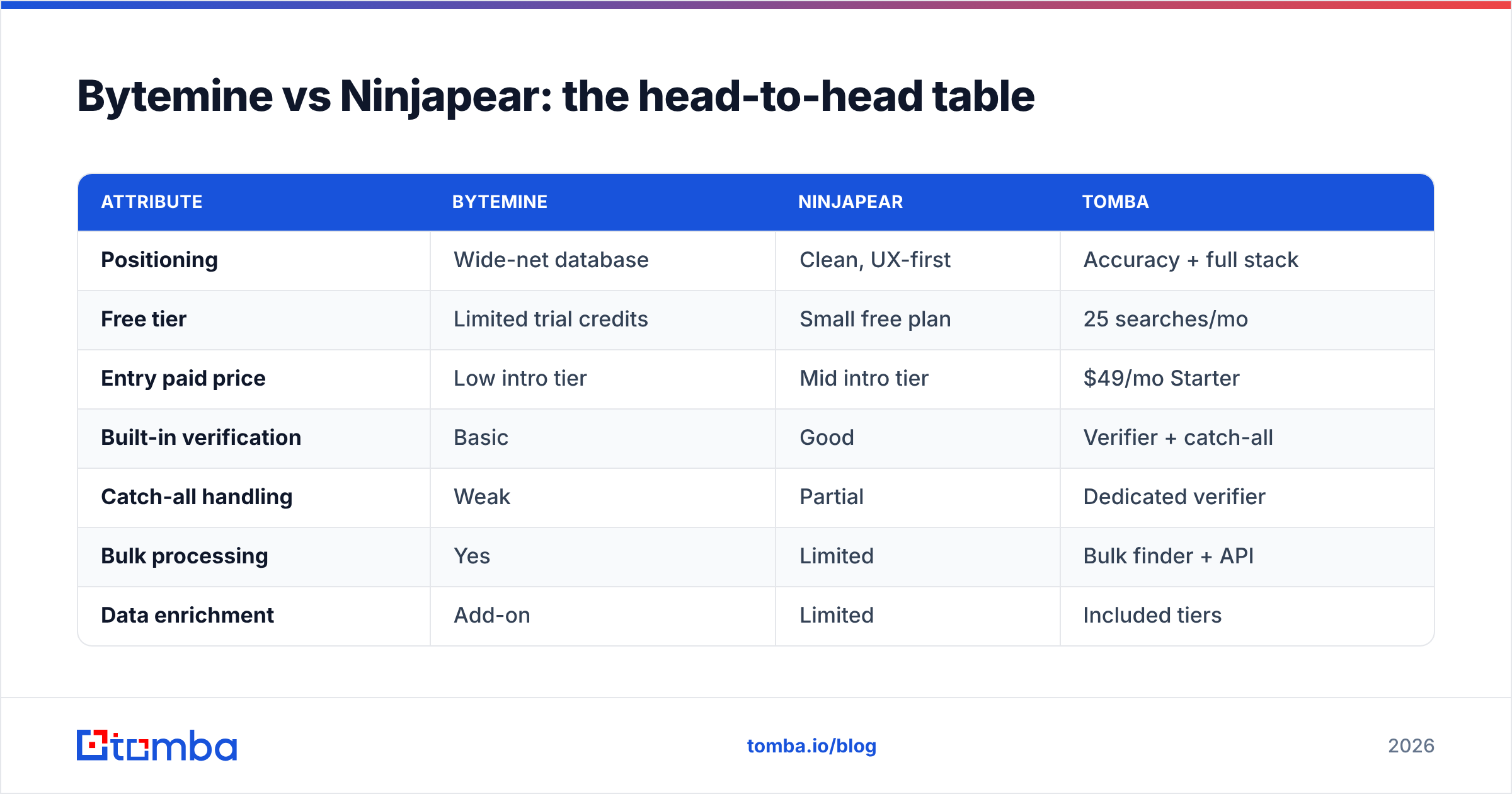
| Attribute | Bytemine | Ninjapear | Tomba |
|---|---|---|---|
| Positioning | Wide-net database | Clean, UX-first | Accuracy + full stack |
| Free tier | Limited trial credits | Small free plan | 25 searches/mo |
| Entry paid price | Low intro tier | Mid intro tier | $49/mo Starter |
| Built-in verification | Basic | Good | Verifier + catch-all |
| Catch-all handling | Weak | Partial | Dedicated verifier |
| Bulk processing | Yes | Limited | Bulk finder + API |
| Data enrichment | Add-on | Limited | Included tiers |
| Phone numbers | No | No | Phone finder |
| API maturity | Mid | Mid | Documented REST API |
A few honest caveats. Exact prices and credit allotments shift constantly in this category, so treat the price row as relative positioning, not a quote — confirm current numbers on each vendor's own pricing page before you sign anything. For Tomba the numbers are public: see the Tomba pricing page for the Free, Starter ($49/mo), Growth ($99/mo), and Pro ($249/mo) breakdown.
Which one is better for high-volume outbound?#
Pick coverage and bulk economics — that usually means Bytemine over Ninjapear, with a verification step bolted on. High-volume cold outbound is a numbers game: you need many addresses, and you accept that you will clean the list afterward. Bytemine's wider net and cheaper credits fit that shape, but only if you treat its output as raw material, not finished leads.
The non-negotiable second step is verification. Sending to unverified, pattern-guessed addresses is the fastest way to tank your domain. Run every export through an email verifier before it touches your sequencer, and warm your sending domain properly first — the email warmup calculator gives you a realistic ramp instead of a guess.
For the actual list building, a bulk email finder plus an email finder API matters more than the prettiest extension, because at thousands of contacts you are scripting this, not clicking it. This is the workflow where Ninjapear's browser-first design becomes a bottleneck rather than a feature.
Which one is better for ABM and recruiting?#
Pick precision and enrichment — Ninjapear edges Bytemine here, but check coverage on your exact accounts first. Account-based marketing and recruiting are low-volume, high-stakes. You are not emailing 5,000 people; you are emailing 50 specific people, and a bounce to the VP you have been chasing for a quarter is expensive. Here, a tool that returns fewer but cleaner addresses wins.
The catch is coverage. Ninjapear's smaller database means it may simply not have your niche or non-US contacts, and a precise tool that finds nothing is useless. Test it against a sample of your real target list before committing — vendor accuracy claims tell you nothing about your specific market.
For these motions, enrichment is the multiplier. Knowing the email is step one; knowing title, company size, and a phone number for a follow-up call turns a single channel into a sequence. If a tool makes you stitch enrichment together from three vendors, the "cheaper" finder isn't actually cheaper.
What about deliverability risk?#
This is the cost both comparisons tend to hide. Every guessed address you send to is a coin flip on your sender reputation, and reputation is far harder to rebuild than a contact list is to rebuild. A tool that hands you 40% more addresses but pushes your bounce rate past 3-4% is a net negative — mailbox providers start routing you to spam, and your verified emails stop landing too.
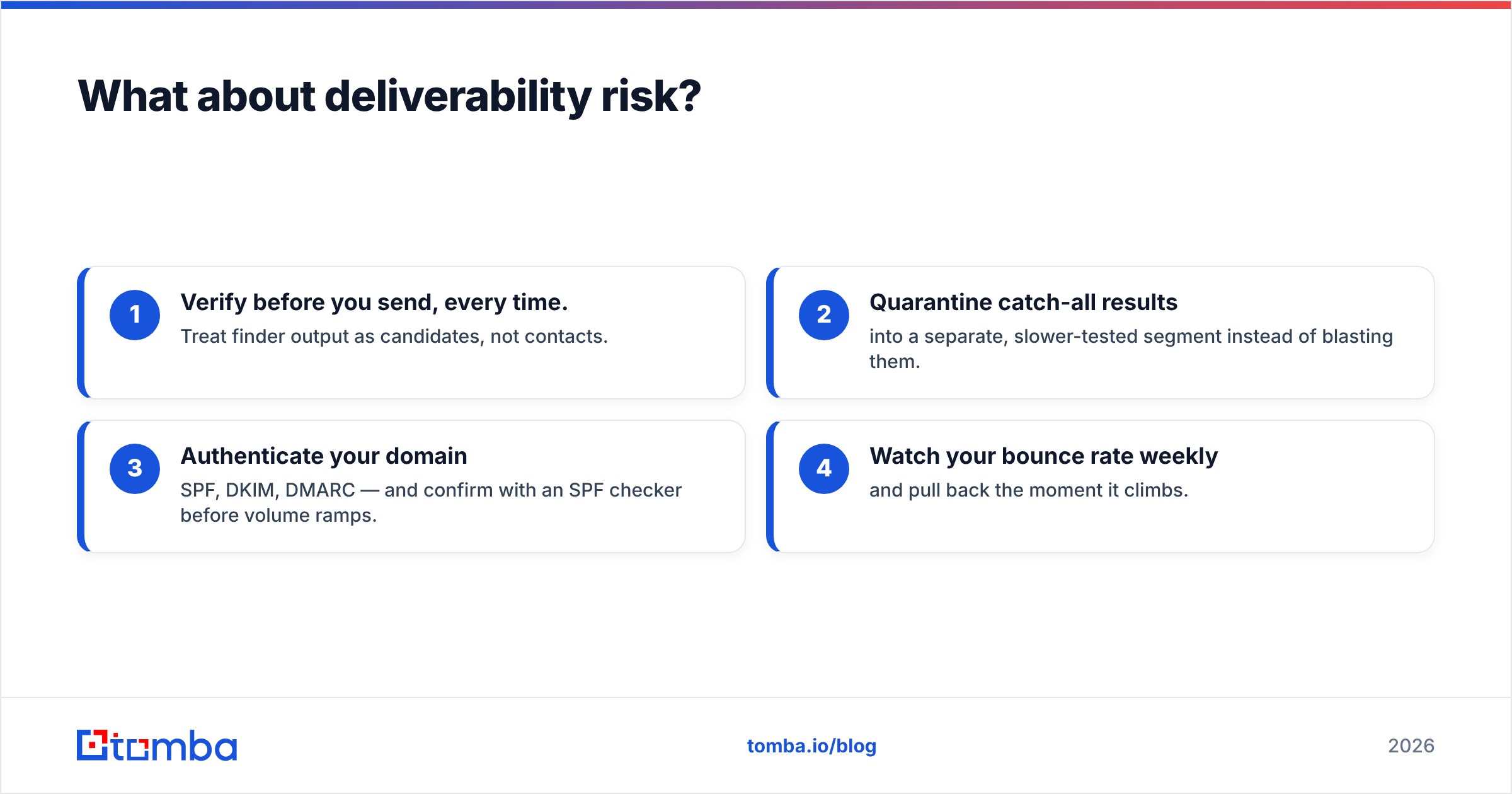
Practical guardrails regardless of which tool you choose:
- Verify before you send, every time. Treat finder output as candidates, not contacts.
- Quarantine catch-all results into a separate, slower-tested segment instead of blasting them.
- Authenticate your domain — SPF, DKIM, DMARC — and confirm with an SPF checker before volume ramps.
- Watch your bounce rate weekly and pull back the moment it climbs.
For the deeper background on why this dominates tool choice, the email deliverability primer is a clean, vendor-neutral read.
How do the prices actually compare?#
Headline price per month is the wrong unit. The unit that matters is cost per deliverable email, which folds in hit rate, deliverability, and wasted credits on bad guesses.
- A cheaper tool that returns 30% junk is not cheaper once you pay to verify and discard that junk.
- A pricier tool with included verification can be cheaper per usable lead.
- Credit rollover, overage rates, and whether verification eats separate credits all swing the real number more than the sticker price.
Build a tiny spreadsheet: run 200 of your real target contacts through each free tier, send (or verify) the results, and compute deliverable emails ÷ dollars. The winner is frequently not the one with the lowest monthly fee. For reference, you can validate any tool's claims against an independent source like G2 reviews rather than trusting on-site testimonials.
When should you consider a third option instead?#
When you want one platform that finds, verifies, enriches, and handles catch-alls without three separate subscriptions. The Bytemine vs Ninjapear framing assumes you must trade coverage against precision. That trade-off softens when verification and enrichment are native rather than bolted on.
That is the gap Tomba targets. The email finder is paired with a verifier, a catch-all finder, domain search, phone lookup, and data enrichment under one roof, with a documented API for the bulk workflows and a free tier (25 searches/mo) to test it on your own accounts. The starter plan is $49/mo — see the Tomba pricing page for the full ladder.
None of this means Bytemine or Ninjapear are bad tools. It means you should price the whole job — find plus verify plus enrich plus protect deliverability — not just the find step, because the find step is the cheapest part of the problem. For a broader market sanity check, the email-finder category on Capterra lists current alternatives and verified user counts.
Bytemine vs Ninjapear: the verdict#
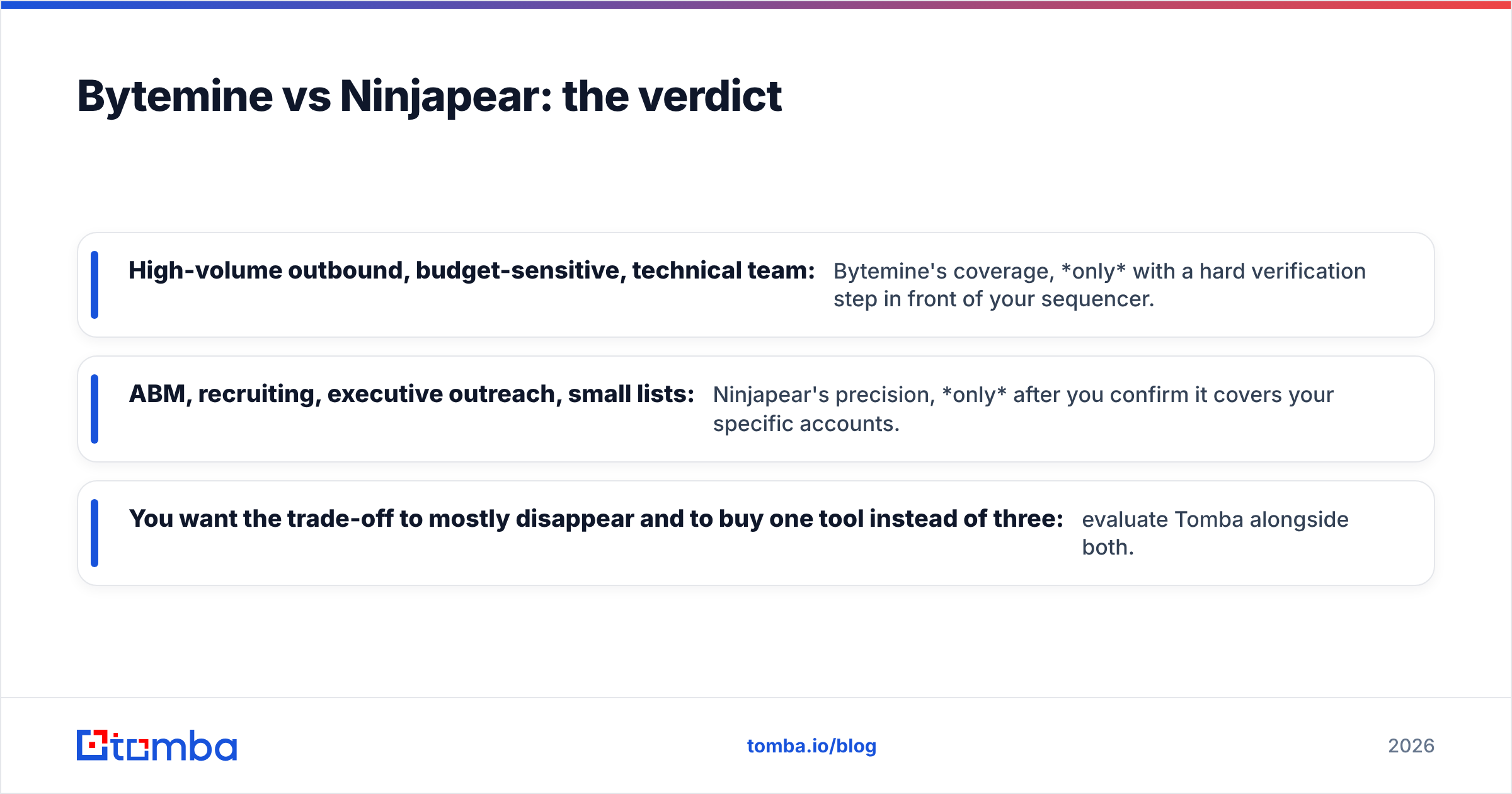
There is no universal winner, only a winner for your motion:
- High-volume outbound, budget-sensitive, technical team: Bytemine's coverage, only with a hard verification step in front of your sequencer.
- ABM, recruiting, executive outreach, small lists: Ninjapear's precision, only after you confirm it covers your specific accounts.
- You want the trade-off to mostly disappear and to buy one tool instead of three: evaluate Tomba alongside both.
Whatever you pick, decide with data from your own target list, not a vendor's accuracy slide. Run the same 200 contacts through each free tier, verify the output, and compute cost per deliverable email. The tool that wins that test is the tool that will win in your pipeline.
Try it on your own list#
Stop arguing tool-vs-tool in the abstract and test against accounts you actually care about. Spin up the Tomba Email Finder on the free tier, run your toughest 25 prospects through find-then-verify, and compare the deliverable-email count head-to-head with whatever Bytemine or Ninjapear returns. The numbers from your market will settle this faster than any comparison post — including this one.
// get started
Find, verify and enrich your first contacts today
Start on the free plan with 25 searches a month, then scale when your team is ready.
Free plan · No credit card required · GDPR & CCPA
// about the author