Bytemine vs Tomba: Email Finder Accuracy & Pricing (2026)
Bytemine vs Tomba compared head-to-head on accuracy, pricing, data coverage, and verification. See which email finder fits your 2026 prospecting stack.
Choosing between Bytemine and Tomba comes down to one question: which tool puts more verified, deliverable emails into your sequencer per dollar spent? This guide answers that with concrete numbers, not marketing claims.
TL;DR#
- Tomba wins on verification depth, transparent pricing (Free, then $49/mo Starter), and a documented API with SDKs — best for teams that need accuracy and scale.
- Bytemine positions itself as a lean lookup tool, but its data coverage and verification controls are thinner and pricing is less transparent.
- Accuracy is the deciding factor: a cheaper finder that returns guesses costs you more in bounces and burned domain reputation.
- If you run real outbound volume, pick the tool with a real-time verifier and bulk workflows. If you only need a handful of lookups a month, either free tier works.
- Our verdict: Tomba for most B2B teams; Bytemine only if you have a narrow, low-volume use case.
What do Bytemine and Tomba actually do?#
Both are email-finder platforms. You feed them a name and a company domain (or just a domain), and they return the most likely professional email address, ideally with a confidence score and a verification status.
Think of an email finder like a GPS for inboxes. A weak one gives you the right neighborhood — the domain pattern — but drops you a few houses down. A strong one routes you to the exact front door and confirms someone's home before you knock. That "someone's home" check is verification, and it's where most cheap tools quietly fall short.
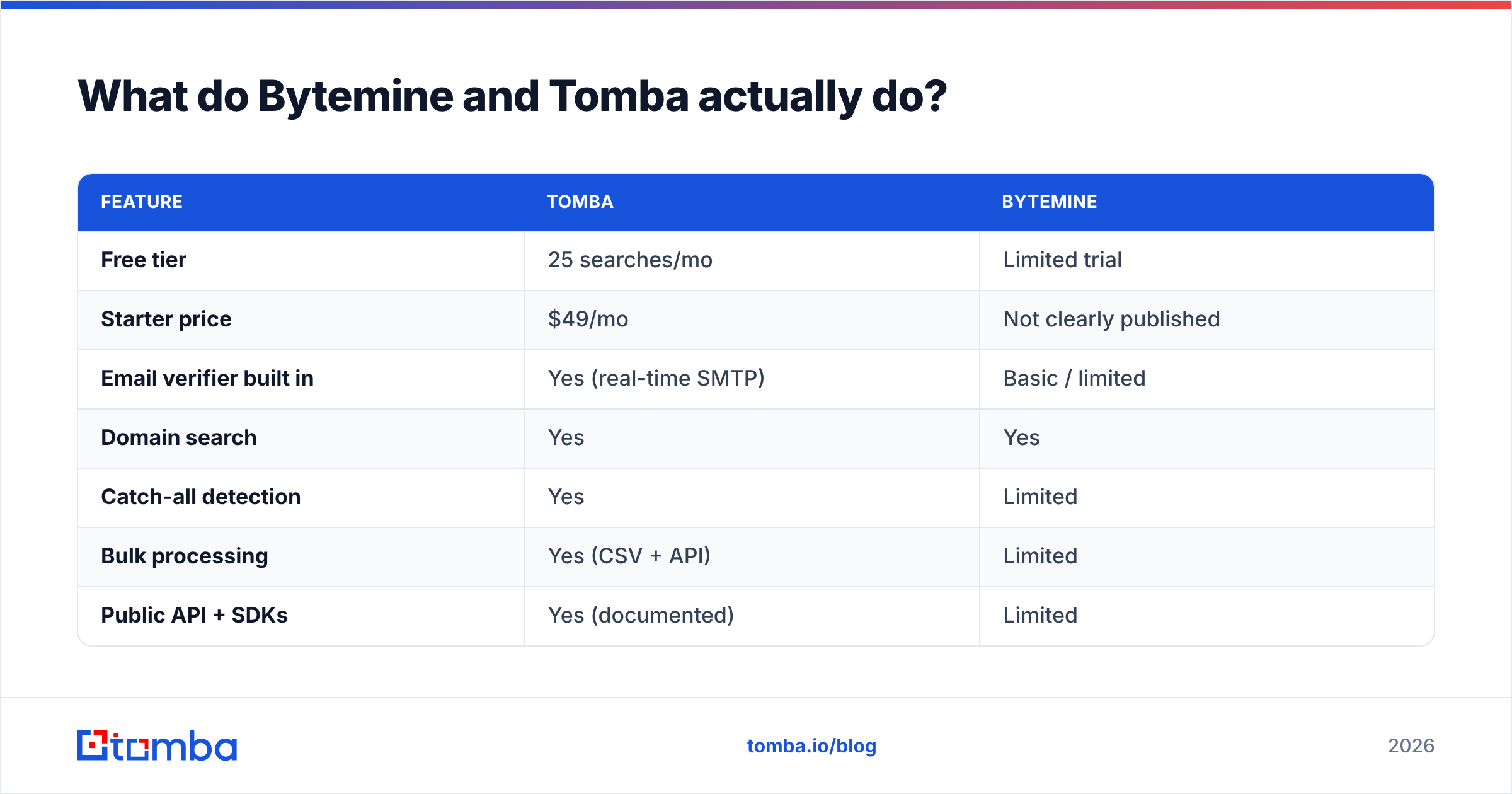
Here's how the two stack up at a glance:
| Feature | Tomba | Bytemine |
|---|---|---|
| Free tier | 25 searches/mo | Limited trial |
| Starter price | $49/mo | Not clearly published |
| Email verifier built in | Yes (real-time SMTP) | Basic / limited |
| Domain search | Yes | Yes |
| Catch-all detection | Yes | Limited |
| Bulk processing | Yes (CSV + API) | Limited |
| Public API + SDKs | Yes (documented) | Limited |
| Phone / enrichment | Yes | No |
The pattern is consistent: Tomba ships a fuller toolkit around the core lookup, while Bytemine stays narrow. Whether that breadth matters depends entirely on your volume and how much you care about bounce rates.

How accurate is each email finder?#
Accuracy is the whole game. A finder that returns an address isn't useful — a finder that returns a deliverable address is. The difference shows up the moment your campaign hits the send button: bounces above 3-4% start dragging down email deliverability and your sender reputation, and once those slip, even your verified contacts stop landing in the inbox.

Tomba pairs its finder with a real-time SMTP-level email verifier, so each result carries a status (valid, invalid, accept-all, or unknown) at the moment you retrieve it. That matters because email data decays — people change jobs, companies migrate domains, and an address that was valid last quarter may bounce today. Bytemine offers verification, but with less granular control over catch-all domains and weaker bulk verification tooling.
Three accuracy factors separate a usable finder from a liability:
- Source diversity — Tomba pulls from multiple signals and publishes a data sources page; opaque single-source tools tend to miss or guess.
- Catch-all handling — domains that accept everything need a dedicated catch-all verifier, or you'll mistake "accepted" for "delivered."
- Confidence scoring — a numeric score lets you set a threshold and discard low-confidence guesses before they ever reach your sequencer.
Tomba exposes all three. Bytemine handles the basics but gives you fewer levers to filter risk, which means more manual cleanup downstream.
Bytemine vs Tomba: pricing compared#
Price-per-deliverable-email beats sticker price every time. A $20 plan that returns 40% guesses is more expensive than a $49 plan that returns 95% verified contacts, because you pay again in bounces, blacklisting, and rep time.
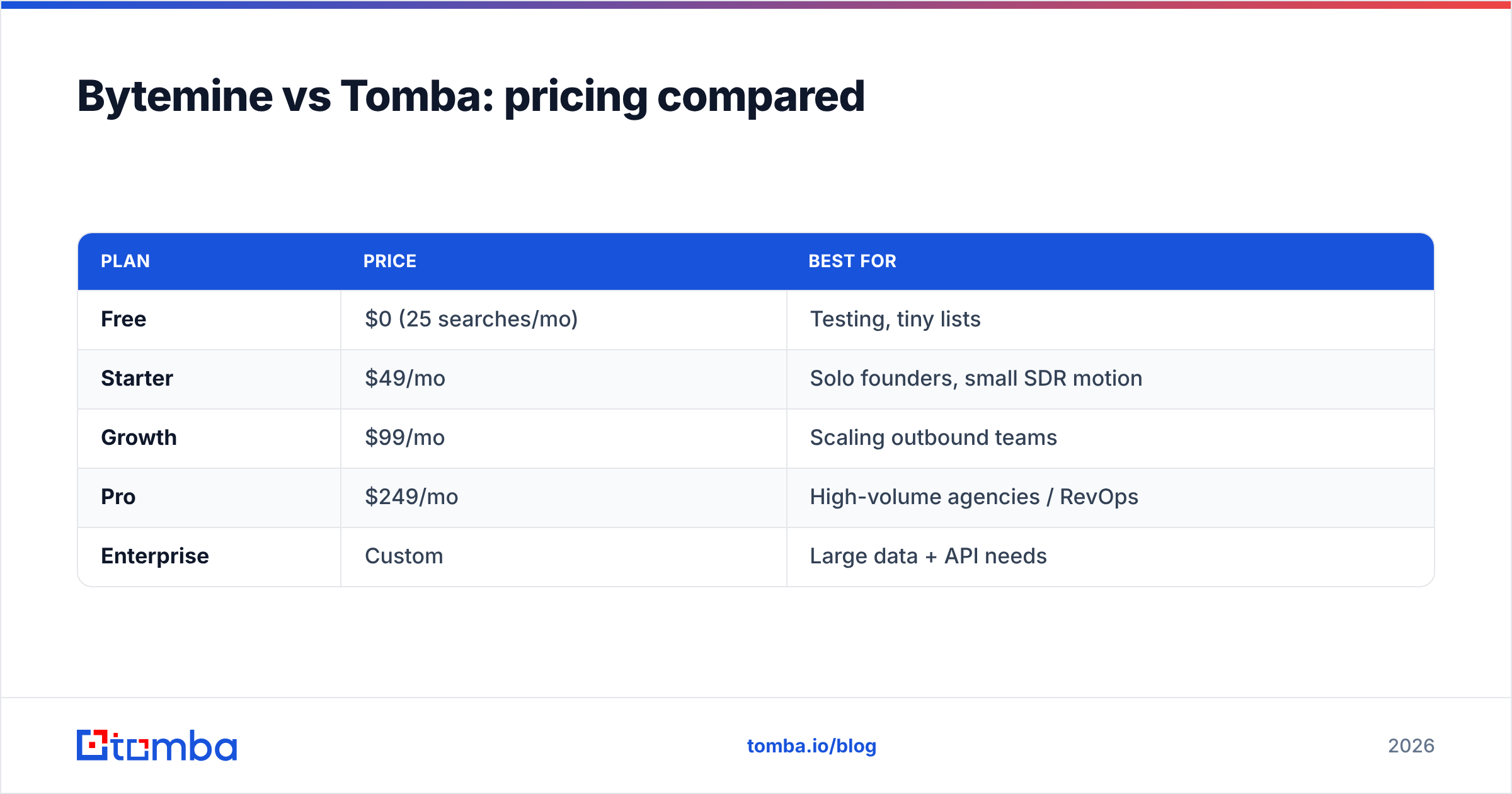
Tomba's pricing is public and predictable:
| Plan | Price | Best for |
|---|---|---|
| Free | $0 (25 searches/mo) | Testing, tiny lists |
| Starter | $49/mo | Solo founders, small SDR motion |
| Growth | $99/mo | Scaling outbound teams |
| Pro | $249/mo | High-volume agencies / RevOps |
| Enterprise | Custom | Large data + API needs |
You can see the full breakdown on the Tomba pricing page. Bytemine's pricing is less transparent publicly, which makes apples-to-apples budgeting harder — and unpredictable cost is its own tax when you're forecasting a quarter of outbound spend.
The practical takeaway: if you need to model cost per 1,000 verified contacts, Tomba lets you do the math up front. With Bytemine you often have to talk to sales or trial your way to a number.
Which has better data coverage and tooling?#
Coverage is about more than the finder. Real prospecting workflows need bulk processing, integrations, and enrichment so you're not stitching tools together by hand.
Tomba's surface area is wider:
- Bulk email finder for CSV uploads and large lists
- Domain search to pull every public address on a company domain
- Data enrichment to append titles, companies, and social profiles
- Phone finder for multi-channel outreach
- Native integrations with HubSpot, Salesforce, Pipedrive, Zapier, and Google Sheets
Bytemine focuses on the core lookup and a slimmer set of integrations. For a single rep doing light prospecting that's fine. For a team running coordinated outbound across CRM and sequencer, the gaps mean more copy-paste and more places for data to rot.
If your stack already runs on HubSpot or Salesforce, native sync is not a nice-to-have — it's the difference between enriched records flowing automatically and an analyst exporting CSVs every Friday.
What about the API and developer experience?#
If you're building lead-gen into a product or automating enrichment, the API is the product. Here Tomba has a clear edge: a documented Tomba API with official SDKs, a CLI, browser extensions, an Excel add-in, and even an MCP server for AI agent workflows.
Bytemine offers programmatic access, but with less mature documentation and fewer first-party libraries. For a developer, that translates to more time reading through trial-and-error requests instead of dropping in a maintained SDK.
A quick gut check before you commit to either API:
- Is there an official SDK in your language, or are you hand-rolling HTTP calls?
- Are rate limits and credit costs documented, so you can predict spend at scale?
- Does verification run in the same call, or do you make two round trips?
- Is there a sandbox / free tier to test integration before you pay?
Tomba answers yes to all four. That's the difference between shipping an enrichment feature this week and debugging undocumented endpoints next month.
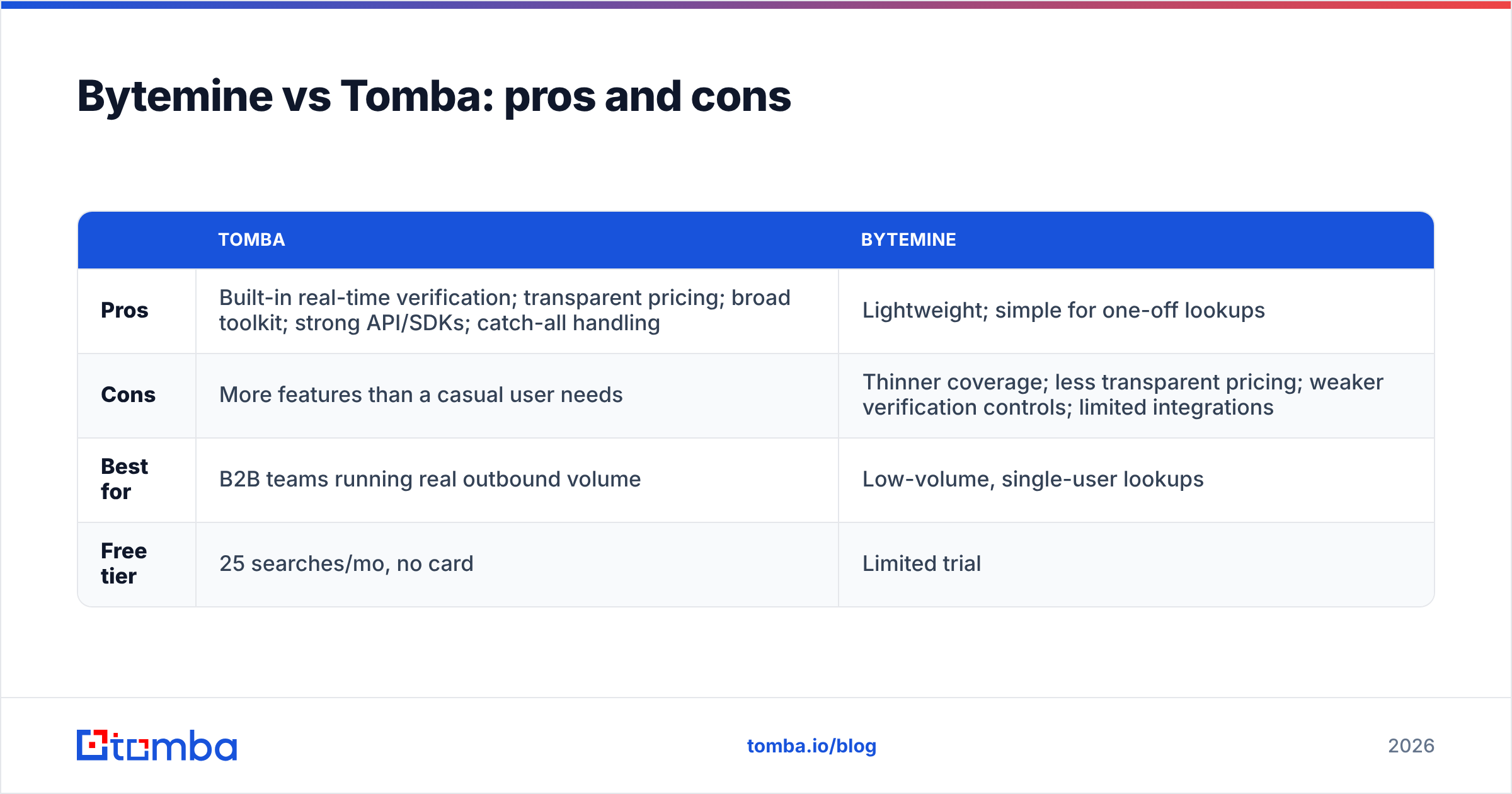
Bytemine vs Tomba: pros and cons#
| Tomba | Bytemine | |
|---|---|---|
| Pros | Built-in real-time verification; transparent pricing; broad toolkit; strong API/SDKs; catch-all handling | Lightweight; simple for one-off lookups |
| Cons | More features than a casual user needs | Thinner coverage; less transparent pricing; weaker verification controls; limited integrations |
| Best for | B2B teams running real outbound volume | Low-volume, single-user lookups |
| Free tier | 25 searches/mo, no card | Limited trial |
The honest summary: Bytemine is a reasonable lightweight option, but it competes in a category where Tomba simply offers more — more verification, more coverage, more ways to plug into your stack — at a published price.
When would you actually pick Bytemine?#
To be fair, no tool is right for everyone. Bytemine makes sense if:
- You do fewer than a dozen lookups a month and never run campaigns at volume.
- You don't need CRM integration and are happy copying results manually.
- You're not building anything programmatic and don't need a mature API.
If two or three of those describe you, the gap between the tools narrows and you can decide on feel. But the moment you start sending real sequences, accuracy and verification stop being optional — and that's where the comparison tilts.
Want a broader market view? Independent directories like G2 and Capterra list user reviews for both categories, and HubSpot's own sales blog covers prospecting workflow benchmarks worth reading before you commit budget.
How to test both before you commit#
Don't take any comparison — including this one — on faith. Run a controlled bake-off:
- Build one test list of 50 known contacts where you already have verified emails (your own customers work well).
- Run the list through both tools using each free tier or trial.
- Measure hit rate (how many emails returned) and accuracy (how many match the known-good address).
- Send a small verified batch and watch the actual bounce rate — that's the only number that pays your bills.
- Time the workflow — how long did bulk processing, export, and CRM sync take in each?
This 30-minute exercise tells you more than any chart. Most teams that run it land on the tool with built-in verification, because the bounce-rate column is where guesses get exposed.
Frequently asked questions#
Is Tomba more accurate than Bytemine? In practice, Tomba's built-in real-time verification and catch-all handling give it an accuracy edge, especially on larger lists. Always validate with your own test list, but the structural advantage favors Tomba.
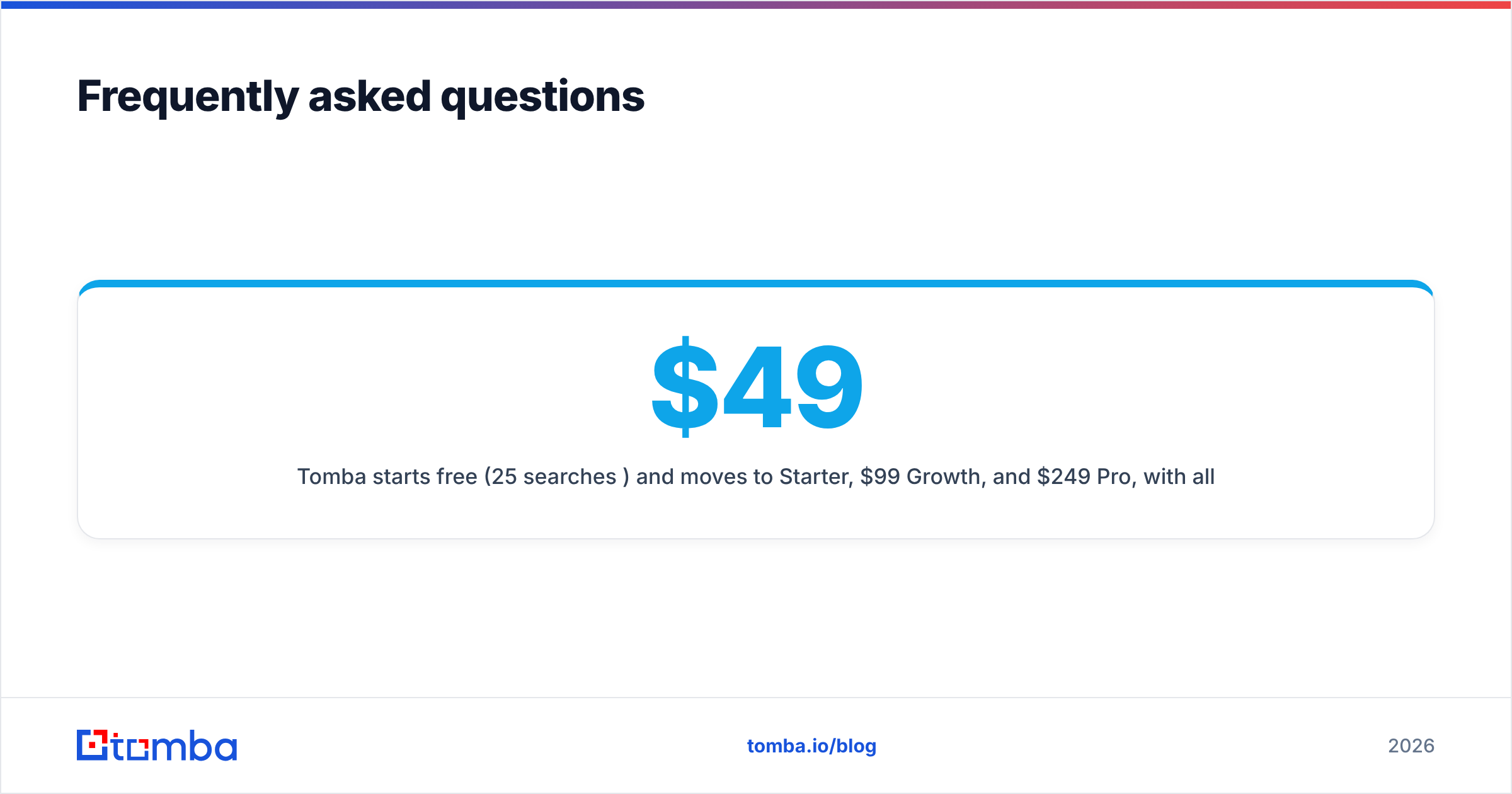
How much does Tomba cost compared to Bytemine? Tomba starts free (25 searches/mo) and moves to $49/mo Starter, $99/mo Growth, and $249/mo Pro, with all tiers published. Bytemine's pricing is less transparent publicly, making direct comparison harder.
Can I use both tools together? Yes — some teams use a secondary finder to fill gaps. But running everything through one verified pipeline (with a dedicated email verifier) keeps your data clean and your bounce rate low.
Do either offer a free plan? Tomba has a free tier with 25 searches per month and no credit card required. Bytemine offers a limited trial.
The verdict#
For most B2B sales, marketing, and RevOps teams, Tomba is the stronger pick — it combines accurate lookups with real-time verification, transparent pricing, broad integrations, and a developer-ready API. Bytemine remains a fine choice for low-volume, single-user lookups where you don't need verification depth or CRM sync.
Ready to see the accuracy difference yourself? Start with the Tomba Email Finder free tier — find and verify your first 25 contacts at no cost, then scale up only when the deliverable-email math makes sense for your pipeline.
// get started
Find, verify and enrich your first contacts today
Start on the free plan with 25 searches a month, then scale when your team is ready.
Free plan · No credit card required · GDPR & CCPA
// about the author