Calendly Pricing & Reviews 2026: Pros, Cons, and Plans
A neutral 2026 breakdown of Calendly pricing, real user reviews, and the pros and cons every sales team should weigh before paying per seat.
Calendly is the default scheduling link for millions of sellers, recruiters, and founders. But "default" and "best value for your team" are not the same thing. Before you roll it out across 20 reps at $16-$20 a seat, it's worth knowing exactly what each tier costs, what real reviewers complain about, and where the per-seat math stops making sense.
This is a neutral teardown of Calendly pricing, its reviews, and the honest pros and cons in 2026 — not a sales pitch.
TL;DR#
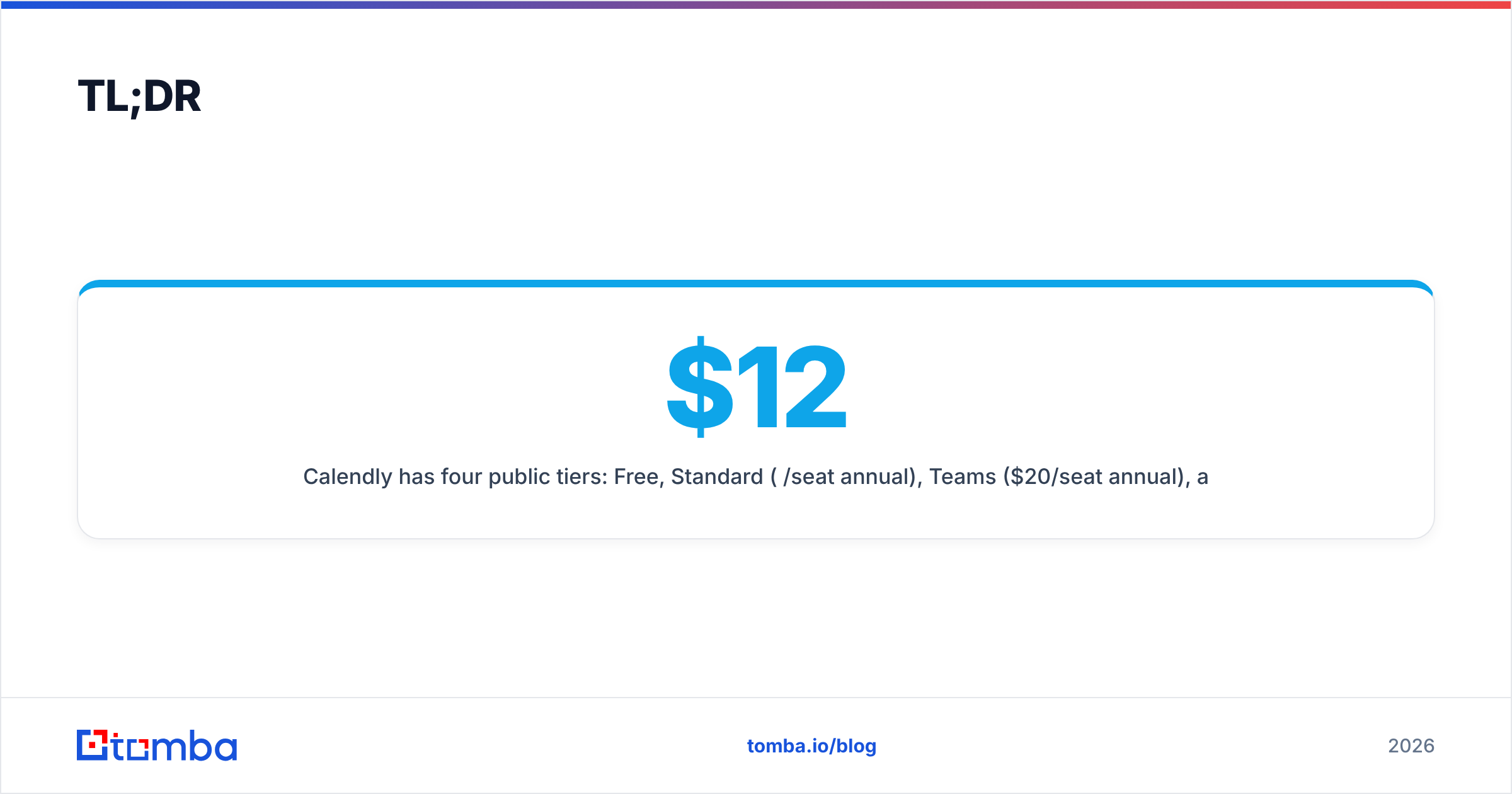
- Calendly has four public tiers: Free, Standard ($12/seat/mo annual), Teams ($20/seat/mo annual), and Enterprise (custom, typically $15k+/year).
- The Free plan is genuinely usable for one event type and one calendar, which is why adoption is so high — but it strips routing, reminders, and integrations.
- Reviewers love the UX and reliability (4.7/5 on G2) and consistently flag per-seat cost creep, weak support, and limited customization as the top cons.
- Calendly is a scheduler, not a pipeline tool — it books the meeting but does nothing to find or verify the contact. You still need a data layer in front of it.
- Verdict: excellent for booking, priced aggressively at scale. Pair it with a low-cost data source and you cover the full top of funnel.
What is Calendly and who actually uses it?#
Calendly is a meeting-scheduling tool. You connect your calendar, create "event types" (a 30-minute demo, a 15-minute intro), share a link, and invitees pick an open slot. It writes the event to both calendars and can send confirmations and reminders.
Think of it like an open-tables app for your workday: instead of five emails negotiating a time, the other person sees your real availability and grabs a slot. Technically, it syncs against Google, Outlook, Office 365, and iCloud calendars in real time to prevent double-booking.
Who uses it:
- Sales teams — booking demos and discovery calls straight from outbound sequences.
- Recruiters — scheduling phone screens without the back-and-forth.
- Customer success — recurring check-ins and onboarding calls.
- Founders and consultants — a single link in an email signature or on a landing page.
The product is reliable and the free tier is sticky, which is how Calendly became a verb. The question is whether the paid tiers earn their keep once you scale.
How much does Calendly cost in 2026?#
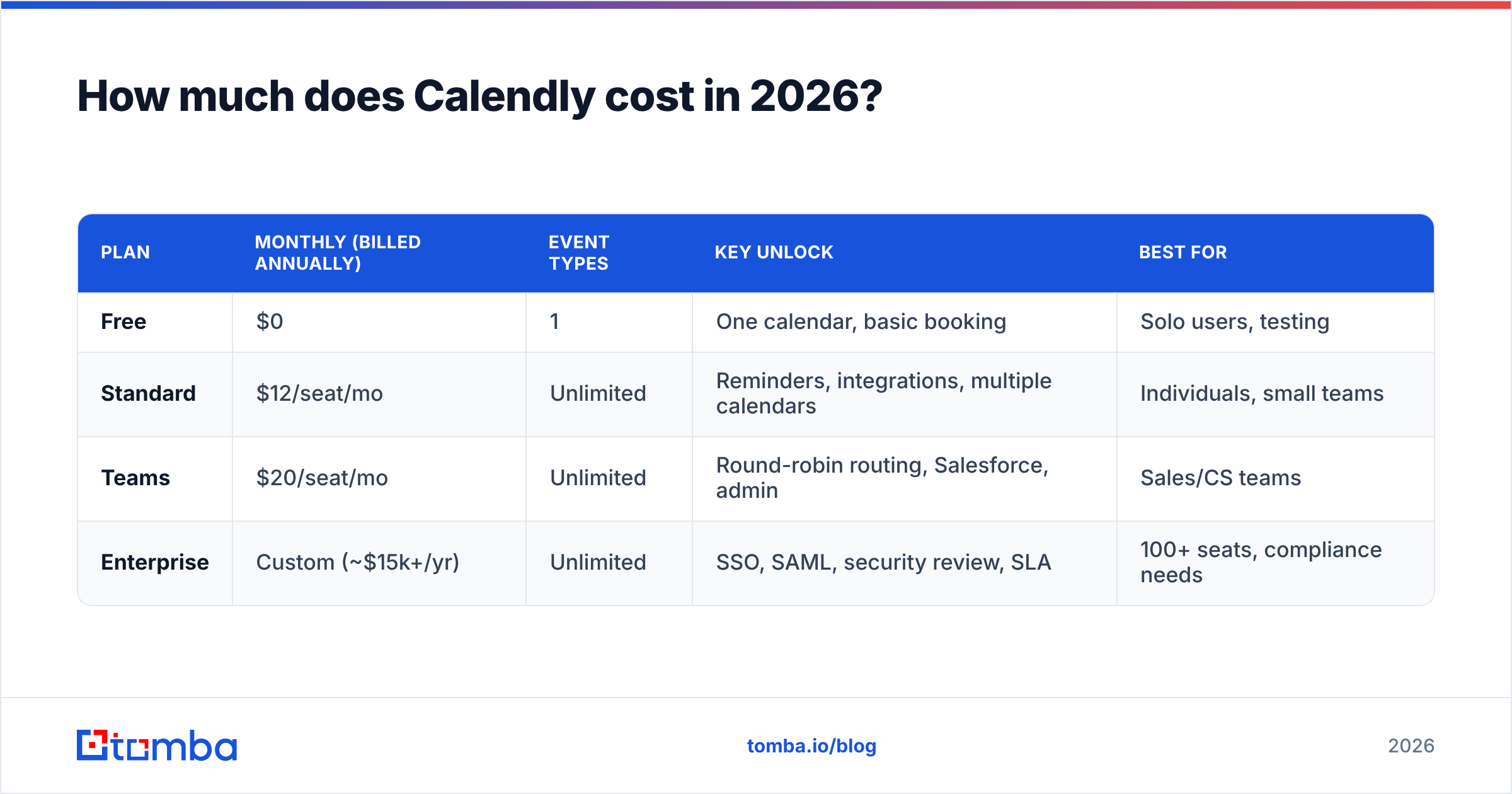
Calendly uses per-seat pricing with a meaningful discount for annual billing. Here is the current public structure. Always confirm live numbers on the official Calendly pricing page before you buy, since vendors adjust tiers often.
| Plan | Monthly (billed annually) | Event types | Key unlock | Best for |
|---|---|---|---|---|
| Free | $0 | 1 | One calendar, basic booking | Solo users, testing |
| Standard | $12/seat/mo | Unlimited | Reminders, integrations, multiple calendars | Individuals, small teams |
| Teams | $20/seat/mo | Unlimited | Round-robin routing, Salesforce, admin | Sales/CS teams |
| Enterprise | Custom (~$15k+/yr) | Unlimited | SSO, SAML, security review, SLA | 100+ seats, compliance needs |
A few things the table doesn't show:
- Monthly billing costs more. Standard is roughly $16/seat and Teams roughly $20+ if you pay month-to-month instead of annually.
- Round-robin and lead routing live on Teams. If you want to distribute inbound meetings across reps, you are paying $20/seat minimum.
- Salesforce routing and the heavier admin controls are Teams-and-up, which pushes most real sales orgs past the Standard tier.
- Enterprise is a real jump. SSO, audit logs, and a security review put you into custom-quote territory that typically starts in the low five figures annually.
)
For a five-person sales team on Teams billed annually, you are looking at roughly $1,200/year. At 25 reps, that's $6,000/year for scheduling alone. That is not outrageous — but it is a line item worth scrutinizing, and it is exactly where reviewers start pushing back.
What do Calendly reviews actually say?#
Calendly's ratings are strong and consistent. On G2 it holds about 4.7/5 across thousands of reviews, and Capterra shows a similar 4.6-4.7 range. The pattern in the written feedback is what matters more than the star average.
What reviewers praise:
- Ease of use. The single most repeated phrase. Setup takes minutes and invitees rarely need instructions.
- Reliability. Calendar sync "just works." Double-bookings are rare.
- Time saved. Teams report cutting scheduling email threads to near zero.
- Embed and link flexibility. Works in email signatures, landing pages, and sequences.
What reviewers criticize:
- Per-seat cost at scale. The most common con. Several reviewers note that the price feels fair for one user and steep across a full team, especially when only some reps need round-robin.
- Support quality. Lower-tier customers report slow, mostly self-serve support.
- Customization limits. Branding control is thin unless you pay up, and the booking page styling options frustrate design-conscious teams.
- Feature gating. Reminders, routing, and integrations being spread across tiers means the plan you think you need is often one step up.
The honest read: nobody complains that Calendly fails at its core job. The complaints are about price-to-value as you add seats and about everything that surrounds the core booking flow.
What are the real pros and cons of Calendly?#
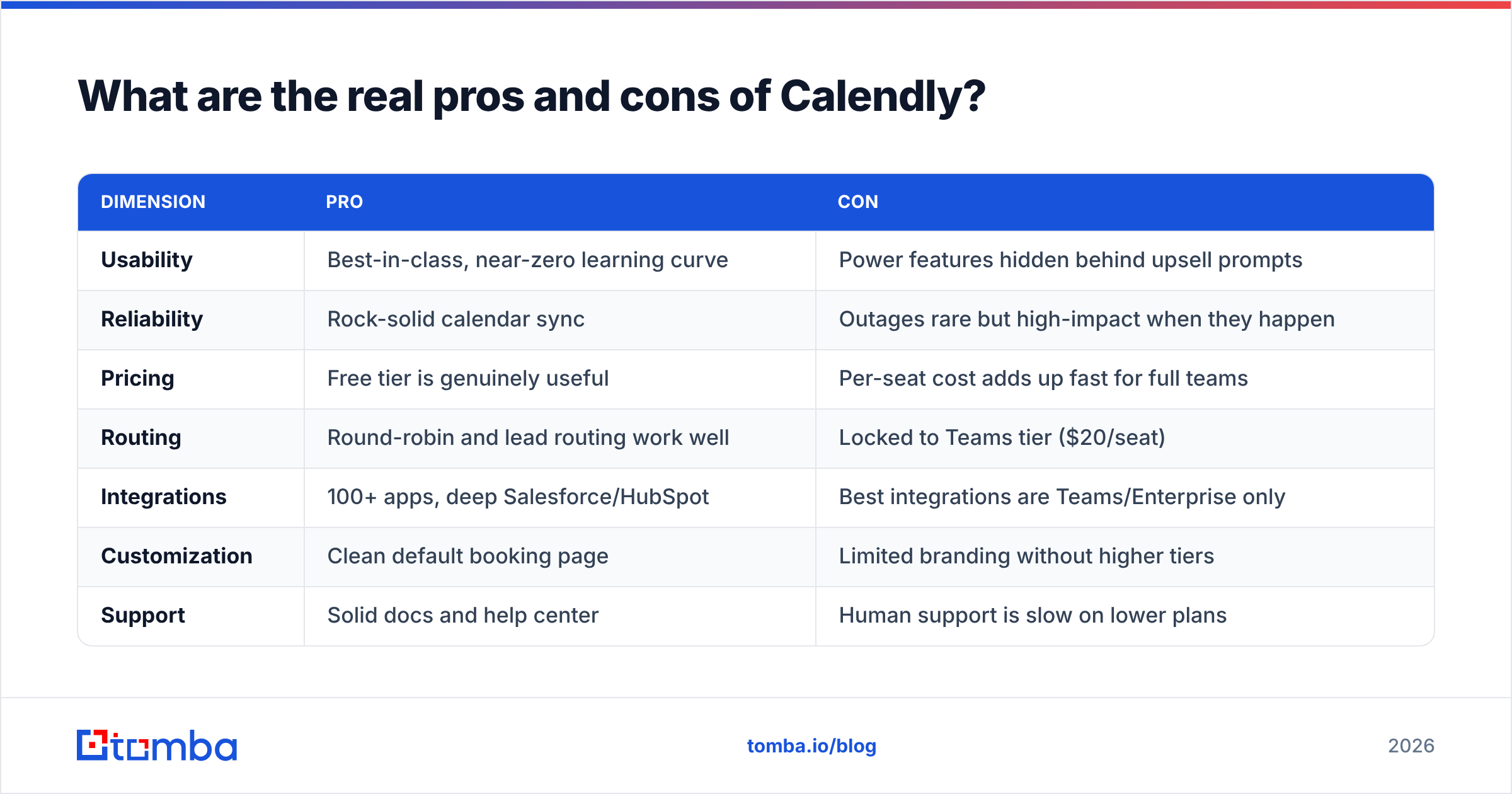
Here's the balanced scorecard, stripped of marketing.
| Dimension | Pro | Con |
|---|---|---|
| Usability | Best-in-class, near-zero learning curve | Power features hidden behind upsell prompts |
| Reliability | Rock-solid calendar sync | Outages rare but high-impact when they happen |
| Pricing | Free tier is genuinely useful | Per-seat cost adds up fast for full teams |
| Routing | Round-robin and lead routing work well | Locked to Teams tier ($20/seat) |
| Integrations | 100+ apps, deep Salesforce/HubSpot | Best integrations are Teams/Enterprise only |
| Customization | Clean default booking page | Limited branding without higher tiers |
| Support | Solid docs and help center | Human support is slow on lower plans |
The core trade-off: Calendly is the safe, polished choice that your prospects already recognize. You pay a premium for that polish and that recognition. If you are scheduling-heavy and value reliability over cost, it's an easy yes. If you are cost-sensitive or only need basic booking, the Free plan — or a cheaper competitor — covers you.
Is Calendly worth it compared to alternatives?#
Calendly is not the only scheduler, and several competitors undercut it or bundle scheduling into a broader suite.
- HubSpot Meetings is free inside the HubSpot CRM, so if you already run HubSpot, you may not need a separate Calendly subscription at all.
- Cal.com is the open-source challenger — self-hostable, cheaper per seat, and aimed at teams that want control and customization.
- Microsoft Bookings ships with many Microsoft 365 business plans, making it effectively free for Outlook-centric orgs.
- Acuity / Squarespace Scheduling leans toward service businesses that take payments at booking.
The decision usually comes down to three questions: Do you already pay for a suite that includes scheduling? Do you need round-robin routing? How many seats are you buying? If you answer "no, no, few," the Free plan or a bundled tool wins. If you answer "no, yes, many," Calendly Teams is a reasonable pick despite the cost.
Where does Calendly stop — and what fills the gap?#
Here's the thing every Calendly review glosses over: scheduling is the last step of outbound, not the first. A booking link is useless if it lands in front of the wrong person, a fake address, or nobody at all.
The realistic top-of-funnel flow looks like this:
- Find the right contact — the decision-maker's professional email and role.
- Verify it's deliverable — so your outreach doesn't bounce and torch your sender reputation.
- Reach out with a personalized message and your booking link.
- Book the meeting — this is where Calendly finally enters.
Calendly owns step four and nothing before it. That's not a knock; it's just scope. But it means your "scheduling stack" is incomplete on its own. If steps one and two are weak, you're paying $20/seat to schedule meetings that never get requested because your emails bounced or reached the wrong inbox.
)
This is exactly where a data layer pays for itself. A tool like the Tomba Email Finder locates verified professional emails by name or domain, and an email verifier confirms deliverability before you send. You can even pull B2B phone numbers for reps who prefer to book calls directly. Compared to a per-seat scheduler, the math is friendly — Tomba pricing starts free at 25 searches a month and scales from $49/mo, so the data that feeds your Calendly link costs less than the scheduling seats themselves.
How should you choose your Calendly plan?#
A quick decision guide based on team size and needs:
- Just you, occasional bookings → Free plan. One event type is enough; don't pay.
- Solo or 2-3 people, want reminders and integrations → Standard at $12/seat annual.
- A real sales or CS team needing round-robin and Salesforce/HubSpot routing → Teams at $20/seat annual. This is the most common paid choice.
- 100+ seats, SSO/SAML, procurement and security review → Enterprise, and negotiate hard on the annual quote.
Two practical tips: always choose annual billing if you're committed (it's a meaningful discount), and audit who actually needs Teams features — you may be able to keep some reps on Standard and only put routing-dependent reps on Teams.
Frequently asked questions#
Is Calendly free version good enough? For a single user with one meeting type, yes. The Free plan handles basic booking, calendar sync, and one event type. You lose reminders, multiple event types, group events, and most integrations — those start at Standard.
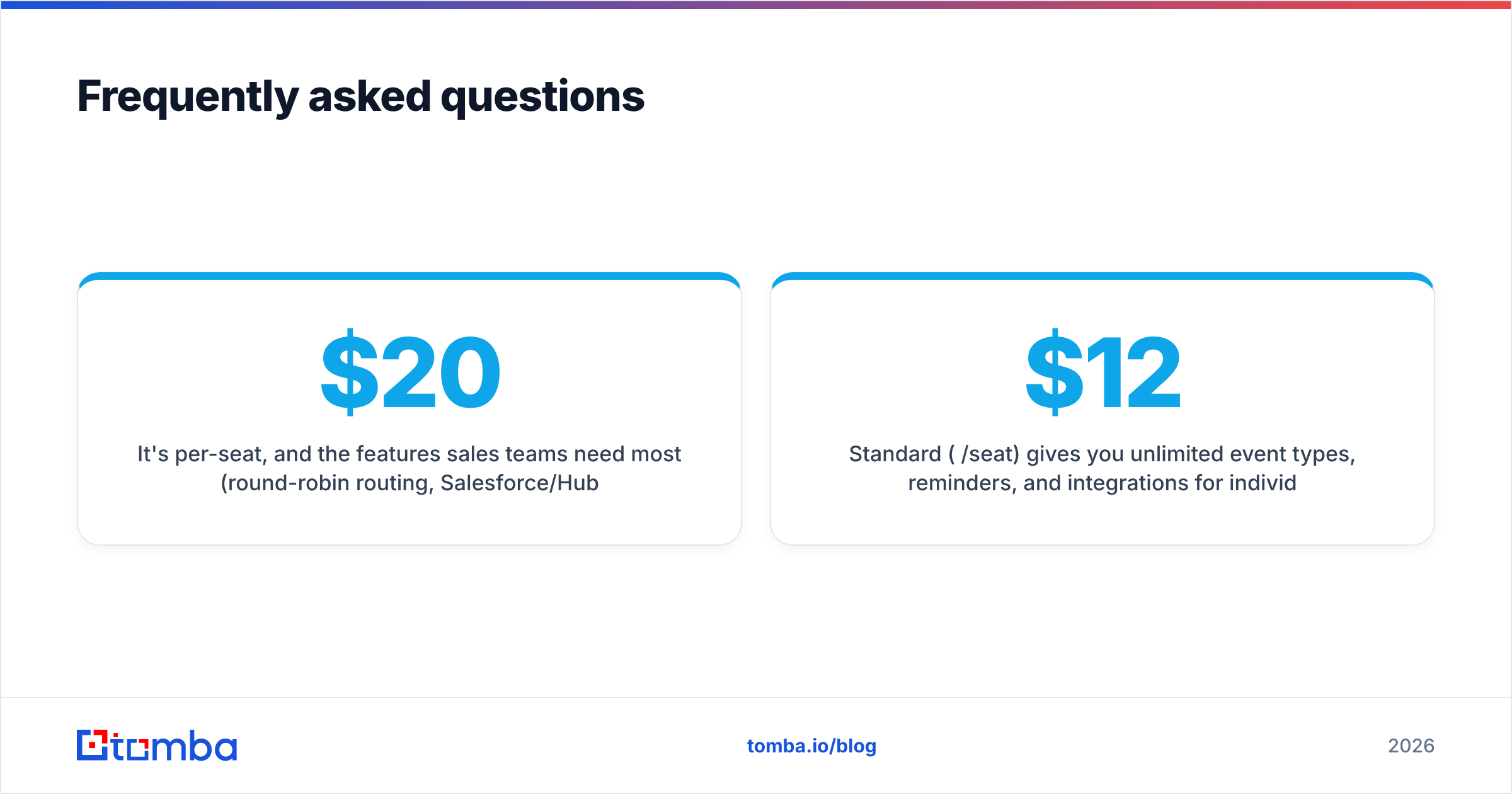
Why is Calendly so expensive for teams? It's per-seat, and the features sales teams need most (round-robin routing, Salesforce/HubSpot, admin controls) sit on the $20/seat Teams tier. Ten reps is $2,400/year on scheduling alone, which is the cost reviewers most often question.
What's the difference between Standard and Teams? Standard ($12/seat) gives you unlimited event types, reminders, and integrations for individuals. Teams ($20/seat) adds collaborative scheduling, round-robin lead routing, Salesforce routing, and admin management — the features a real team needs.
Does Calendly replace a CRM? No. Calendly books meetings and can push them into your CRM, but it doesn't store pipeline, score leads, or manage deals. It's one tool in a stack, not the stack.
The bottom line#
Calendly earns its 4.7 rating — it's reliable, easy, and your prospects already trust the link. The honest cons are all downstream of price: per-seat costs climb fast, the best features are gated to Teams and Enterprise, and support thins out on lower tiers. If scheduling volume is high and reliability matters more than cost, pay for it. If you only need basic booking, the Free plan or a bundled alternative will do.
Either way, remember what Calendly doesn't do: it can't find or verify a single contact. Your booking link is only as good as the prospects who see it. Before you optimize the last step of outbound, fix the first one — start with the Tomba Email Finder to put verified, deliverable contacts in front of your Calendly link, on a free tier you can test today. The cheapest meeting is the one booked with someone who actually exists.
// get started
Find, verify and enrich your first contacts today
Start on the free plan with 25 searches a month, then scale when your team is ready.
Free plan · No credit card required · GDPR & CCPA
Get the Tomba newsletter
Product and data updates
// about the author