Calendly vs Koalendar 2026: Which Booking Tool Wins?
Calendly vs Koalendar compared on pricing, free plans, integrations, and team features for 2026 — plus where each scheduling tool actually fits a B2B sales motion.
TL;DR
- Calendly is the category default: deep integrations, polished team features, and a huge ecosystem — but pricing scales per seat and the free plan is deliberately thin.
- Koalendar is the budget challenger: a genuinely usable free plan, Google-first scheduling, and a flat, low price that solopreneurs and small teams love.
- Pick Calendly if you run round-robin routing, need Salesforce/HubSpot depth, or schedule across a large revenue team.
- Pick Koalendar if you book demos solo or in a small team, live in Google Calendar, and want to avoid per-seat creep.
- Neither tool finds the prospect for you — a booking link is worthless without a verified email to send it to.
What are Calendly and Koalendar?#
Both tools solve the same annoying problem: the back-and-forth of "does Tuesday at 3 work for you?" You share a link, the other person picks a slot, and the meeting lands on both calendars. That's the whole pitch.
Calendly is the 800-pound gorilla. Launched in 2013, it now serves millions of users and anchors the booking step in countless B2B sales motions. Think of it as the iPhone of scheduling — not always the cheapest, but the one everyone already knows how to use.
Koalendar is the scrappy alternative that asks a simple question: why pay per seat for something this straightforward? It leans hard into Google Calendar, ships a clean booking page, and gives away far more on its free tier than Calendly does.
The real difference isn't "can it book a meeting" — both nail that. It's everything around the edges: routing logic, integrations, branding, and how fast the bill grows as your team does.

How do Calendly and Koalendar compare on pricing?#
Pricing is where these two diverge the most, and it's usually the deciding factor for small teams.
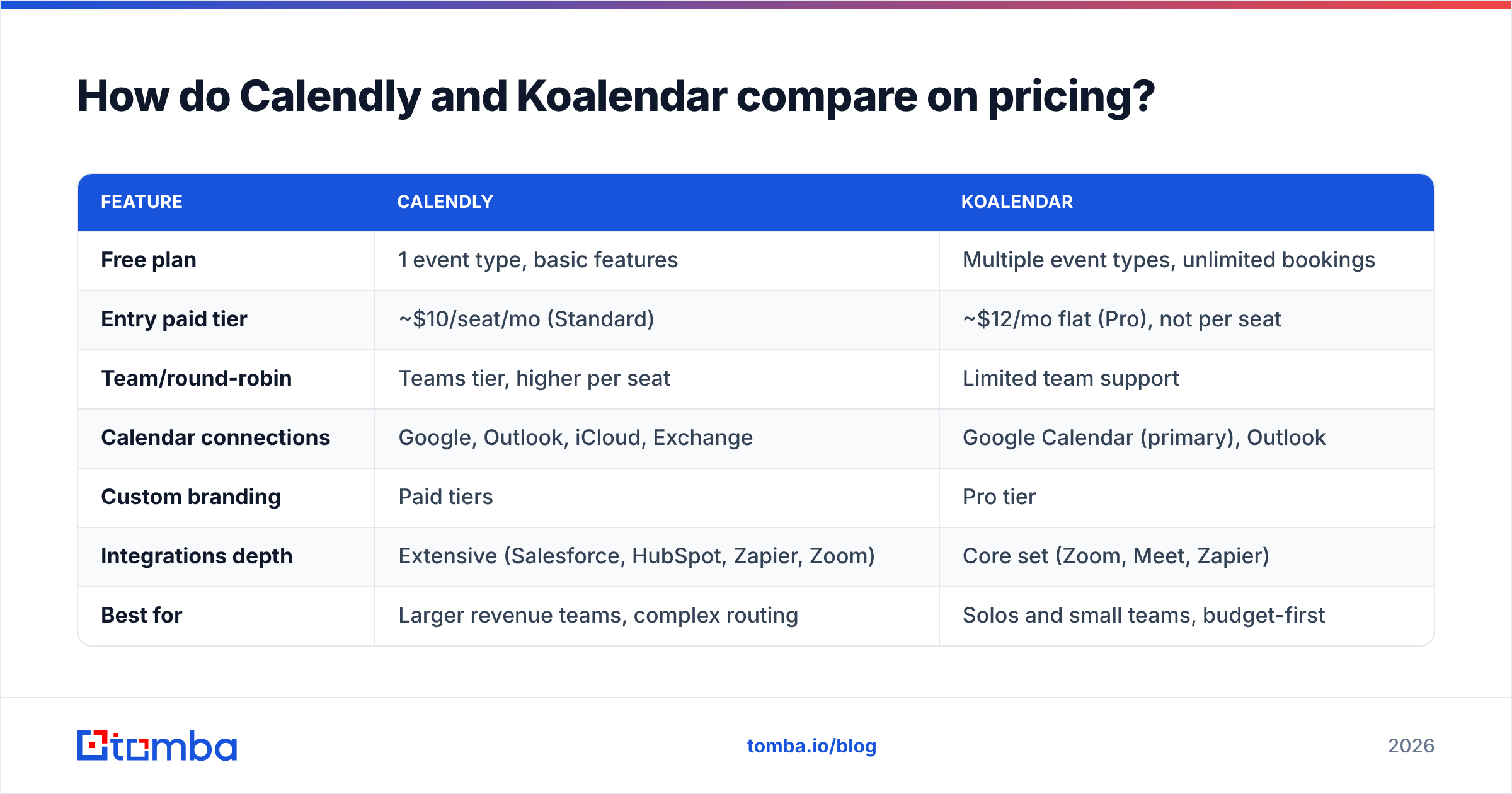
| Feature | Calendly | Koalendar |
|---|---|---|
| Free plan | 1 event type, basic features | Multiple event types, unlimited bookings |
| Entry paid tier | ~$10/seat/mo (Standard) | ~$12/mo flat (Pro), not per seat |
| Team/round-robin | Teams tier, higher per seat | Limited team support |
| Calendar connections | Google, Outlook, iCloud, Exchange | Google Calendar (primary), Outlook |
| Custom branding | Paid tiers | Pro tier |
| Integrations depth | Extensive (Salesforce, HubSpot, Zapier, Zoom) | Core set (Zoom, Meet, Zapier) |
| Best for | Larger revenue teams, complex routing | Solos and small teams, budget-first |
The headline: Calendly charges per seat, Koalendar charges roughly flat. For one person, the gap is small. For a 10-rep team, Calendly's model can mean $100+/month while Koalendar stays close to its base price. But that flat pricing comes with thinner team routing — so the savings only matter if you don't need round-robin and load balancing in the first place.
Calendly's free plan is famously limited to a single event type, which pushes most serious users to pay. Koalendar's free plan, by contrast, supports multiple event types and unlimited bookings, which is why it wins so many "best free Calendly alternative" roundups on G2.
Is Calendly better than Koalendar for sales teams?#
For sales teams, Calendly is usually the stronger pick — and it comes down to routing.
When a lead fills out a form, you often want the meeting assigned to the right rep automatically: round-robin to balance load, territory rules to match by region, or pooled availability so the first free rep grabs it. Calendly handles all of this natively on its Teams and higher plans. Koalendar's team features exist but are far simpler, and you'll outgrow them fast once you're routing inbound demos across a quota-carrying team.
Calendly also goes deeper on the integrations that sales orgs actually run on:
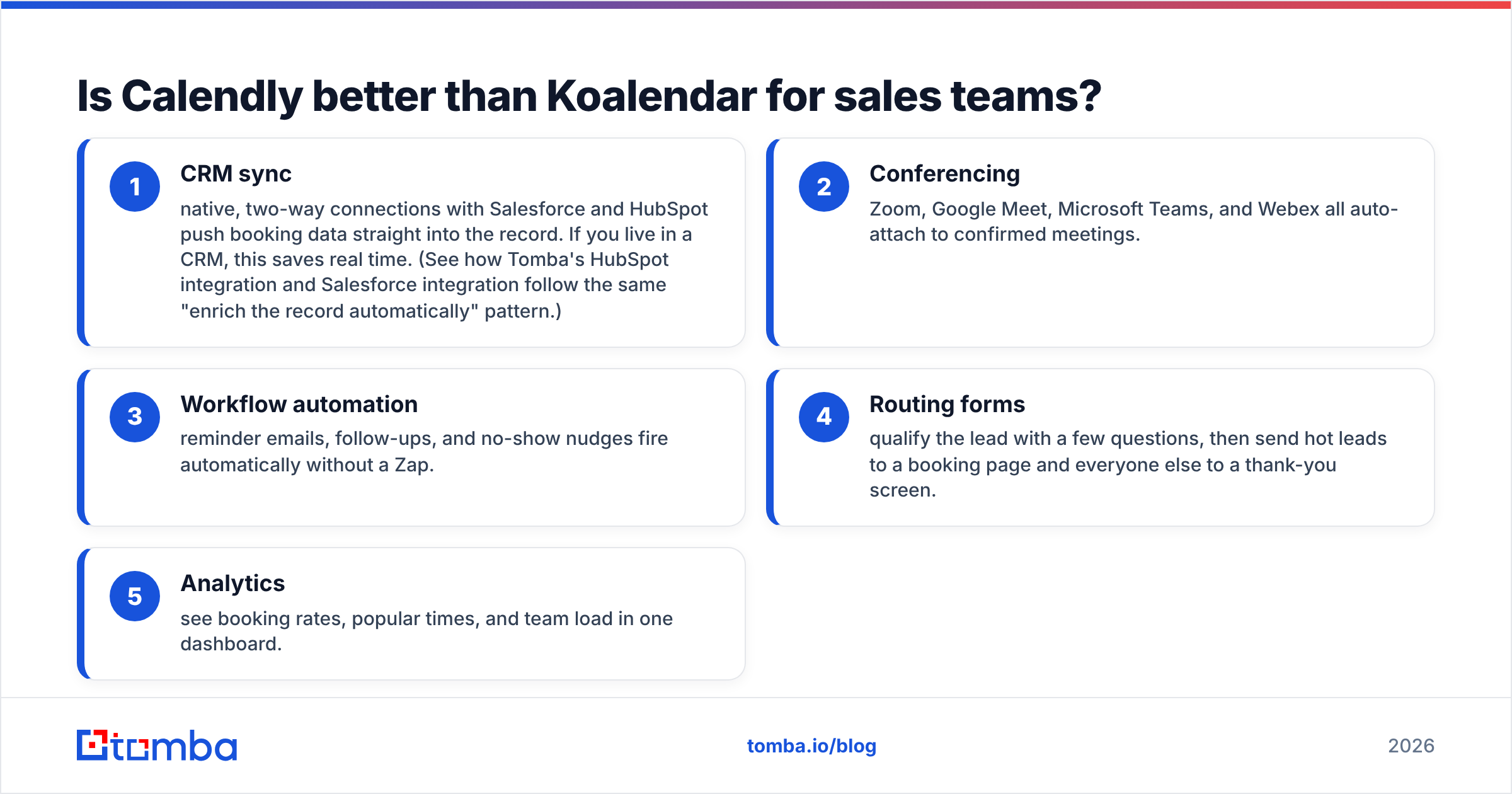
- CRM sync — native, two-way connections with Salesforce and HubSpot push booking data straight into the record. If you live in a CRM, this saves real time. (See how Tomba's HubSpot integration and Salesforce integration follow the same "enrich the record automatically" pattern.)
- Conferencing — Zoom, Google Meet, Microsoft Teams, and Webex all auto-attach to confirmed meetings.
- Workflow automation — reminder emails, follow-ups, and no-show nudges fire automatically without a Zap.
- Routing forms — qualify the lead with a few questions, then send hot leads to a booking page and everyone else to a thank-you screen.
- Analytics — see booking rates, popular times, and team load in one dashboard.
Koalendar covers the essentials — Google Meet and Zoom links, Zapier, email reminders — but it isn't trying to be a revenue-operations hub. That's a feature, not a bug, if you're a founder booking your own calls.
When is Koalendar the better choice?#
Koalendar wins on simplicity and price, full stop.
If you're a solopreneur, consultant, recruiter, or a small team that books meetings off a website or a LinkedIn outreach message, Koalendar gives you most of what Calendly does for a fraction of the cost — and its free tier is good enough that many never upgrade. The booking pages are clean, mobile-friendly, and quick to set up. There's no per-seat anxiety as you add a teammate or two.
It's especially strong if your whole life is in Google Calendar. Koalendar was built Google-first, so connecting your calendar, generating Meet links, and syncing availability is frictionless. You won't get the sprawling integration menu Calendly offers, but you also won't pay for connectors you'll never touch.
The trade-off is ceiling. The moment you need advanced round-robin, Salesforce write-back, multi-step routing logic, or enterprise admin controls (SSO, SCIM, managed users), you'll bump into Koalendar's limits. It's a precision tool for a specific job, not a platform.
What about deliverability and reaching the right person?#
Here's the part both tools quietly assume you've already solved: the meeting link only works if it lands in the right inbox.
A booking page converts nothing if you're emailing info@ addresses, guessed formats that bounce, or a decision-maker who left the company eight months ago. Scheduling is the last step of outbound — getting an accurate, verified contact is the first. If your prospect data is dirty, a slicker Calendly page just means you're failing faster.
This is why high-performing teams pair a scheduler with a real contact-data layer. You find the email by name and company domain, run it through an email verifier so it doesn't bounce and torch your sender reputation, and only then send the booking link. Skip the verification step and a chunk of your invites die silently in spam folders or hard-bounce — which hurts deliverability for every future send, too.
The sequencing matters more than the tool: accurate contact → verified email → personalized message → booking link. Calendly and Koalendar only own that last box. The first three decide whether anyone ever clicks it.
How do Calendly and Koalendar handle branding and customization?#
Branding is a small thing that quietly matters in B2B. A booking page wearing your logo and colors reads as more legitimate than a generic one with someone else's watermark.
- Calendly lets paid plans remove Calendly branding, add your logo, customize colors, and even embed the booking widget directly on your site. Higher tiers unlock more granular control over the booked-meeting experience and confirmation pages.
- Koalendar offers custom branding on its Pro plan — logo, colors, and a cleaner page — at a lower price point than Calendly's comparable tier. For a small business that just wants its name on the page without paying enterprise rates, this is a genuine advantage.
Neither is dramatically better here; the difference is what you pay to unlock it. Koalendar gets you to "branded and professional" for less money. Calendly gets you to "branded, embedded, and deeply integrated into a website funnel" with more polish and more knobs.
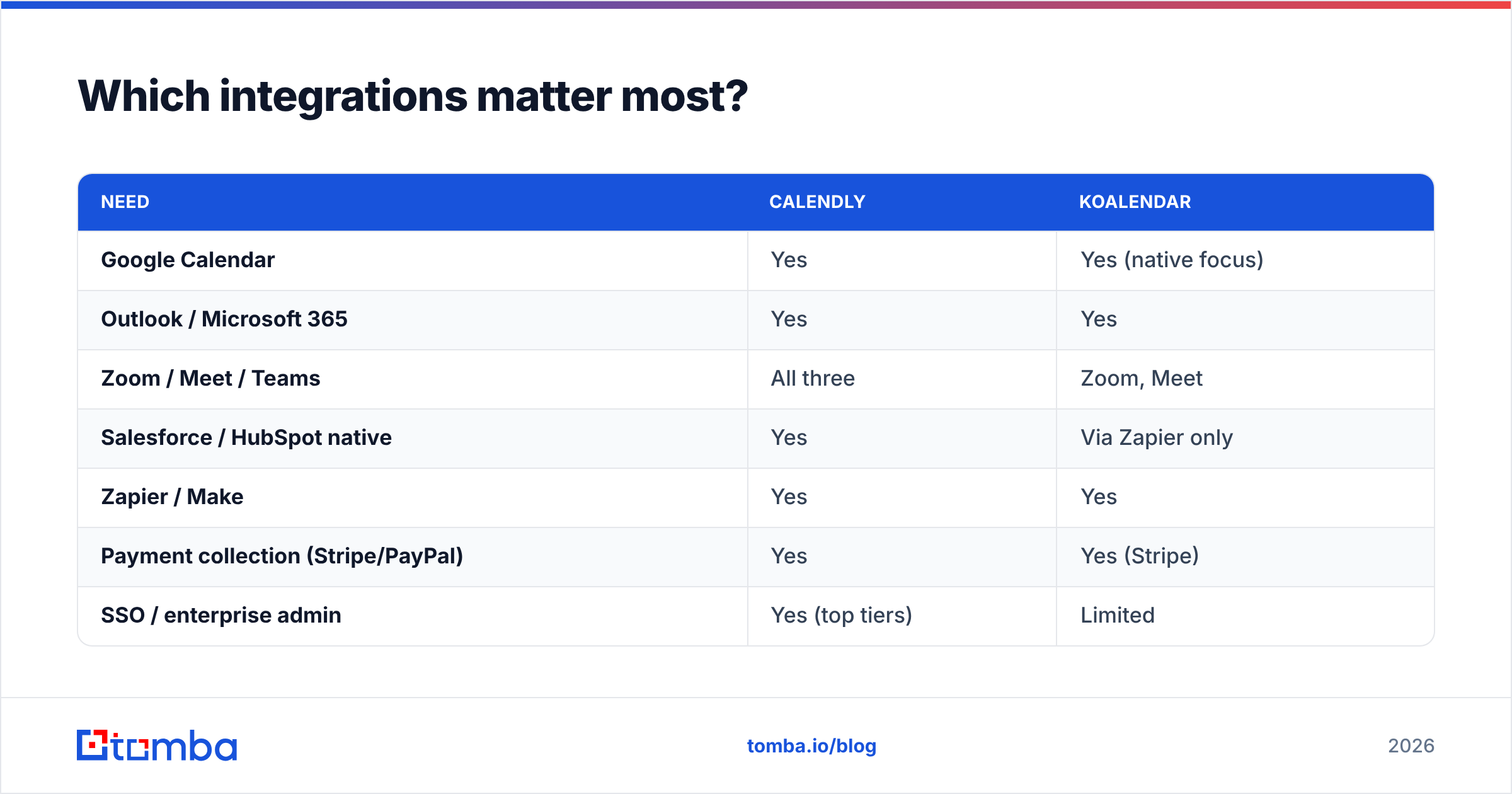
Which integrations matter most?#
Map the integration list to what you actually use, not what looks impressive.
| Need | Calendly | Koalendar |
|---|---|---|
| Google Calendar | Yes | Yes (native focus) |
| Outlook / Microsoft 365 | Yes | Yes |
| Zoom / Meet / Teams | All three | Zoom, Meet |
| Salesforce / HubSpot native | Yes | Via Zapier only |
| Zapier / Make | Yes | Yes |
| Payment collection (Stripe/PayPal) | Yes | Yes (Stripe) |
| SSO / enterprise admin | Yes (top tiers) | Limited |
If your stack is Google Calendar + Zoom + Stripe, both tools cover you and price becomes the tiebreaker — advantage Koalendar. If your stack is Salesforce + Microsoft Teams + SSO across a 30-person team, Calendly is the obvious answer and the per-seat cost is worth it.
A practical tip: whatever you pick, route booking events into your CRM and enrichment flow. Tools like Zapier and Make let you trigger data enrichment the moment a meeting is booked, so the rep walks into the call already knowing the prospect's role, company size, and tech stack.
Calendly vs Koalendar: which should you choose in 2026?#
Here's the honest cut:
- Choose Calendly if you're a sales or revenue team that needs round-robin routing, native CRM write-back, enterprise admin controls, or a website-embedded booking funnel. You'll pay per seat, but you're buying a platform, not just a booking page.
- Choose Koalendar if you're a solo operator or small team that books meetings simply, lives in Google Calendar, and wants the best free plan or a flat, predictable bill. You give up advanced routing and deep CRM integrations you probably weren't going to use anyway.
There's no universally "better" tool — there's the tool that matches your motion. A founder closing 20 demos a month is overpaying for Calendly Teams. A 25-rep inbound team is leaving money on the table fighting Koalendar's routing limits.
What both groups share is the upstream problem: you can't book a meeting with someone you can't reach. Before you obsess over which scheduler has a nicer confirmation page, make sure the contacts you're inviting are real, current, and verified.
Find the right person before you send the booking link#
A scheduling tool is the finish line, not the race. The reps who book the most meetings aren't the ones with the prettiest Calendly page — they're the ones emailing accurate, verified decision-makers instead of bouncing guesses.
That's where Tomba's Email Finder fits in front of whichever scheduler you pick. Drop in a name and company domain, get the professional email, verify it so it doesn't bounce, and send your Calendly or Koalendar link to an inbox that actually exists. Start free with 25 searches a month, and check Tomba pricing when you're ready to scale outbound — Starter is $49/mo, Growth is $99/mo. Fix the top of the funnel, and your booking page finally has someone to convert.
// get started
Find, verify and enrich your first contacts today
Start on the free plan with 25 searches a month, then scale when your team is ready.
Free plan · No credit card required · GDPR & CCPA
// about the author