Calendly vs YouCanBookMe 2026: Which Scheduler Wins?
A neutral, feature-by-feature breakdown of Calendly vs YouCanBookMe in 2026 — pricing, integrations, customization, and which scheduler fits your sales workflow.
Calendly vs YouCanBookMe: The 2026 Scheduling Showdown
Booking a meeting should take one click, not five emails. Both Calendly and YouCanBookMe promise to kill the back-and-forth, but they solve it in different ways and charge for it differently. This guide compares them feature by feature so you can pick the one that matches how your team actually books revenue conversations.
TL;DR#
- Calendly wins on polish and ecosystem. Cleaner UX, deeper native integrations, and the larger app marketplace make it the safe default for most sales and CS teams.
- YouCanBookMe wins on branding and price-per-customization. You get full white-label control and a flexible booking page on lower tiers.
- Pricing is close at the entry level but diverges fast once you add team seats, routing, and automations.
- Neither finds the contact for you. A scheduler books the meeting; it does not source the prospect's email — that is a separate job covered at the end.
- Pick Calendly for scale and integrations; pick YouCanBookMe for tight budgets and brand-heavy booking pages.
What do Calendly and YouCanBookMe actually do?#
Both are appointment-scheduling tools. You connect your calendar, define your availability, and share a link. The invitee picks a slot, the event drops onto both calendars, and reminder emails go out automatically. Think of it like an always-on receptionist who never double-books you.
The difference shows up in the details:
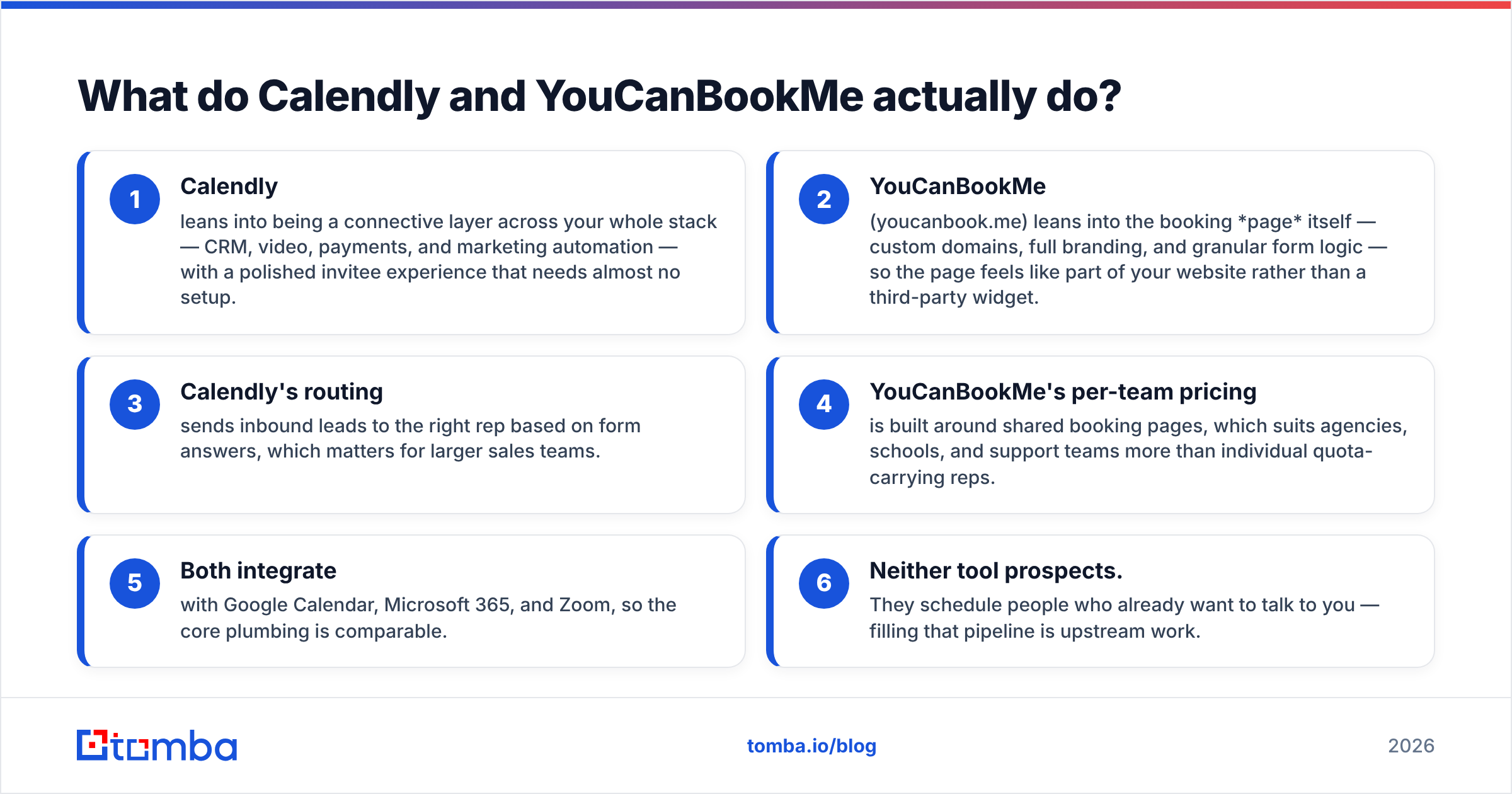
- Calendly leans into being a connective layer across your whole stack — CRM, video, payments, and marketing automation — with a polished invitee experience that needs almost no setup.
- YouCanBookMe (youcanbook.me) leans into the booking page itself — custom domains, full branding, and granular form logic — so the page feels like part of your website rather than a third-party widget.
- Calendly's routing sends inbound leads to the right rep based on form answers, which matters for larger sales teams.
- YouCanBookMe's per-team pricing is built around shared booking pages, which suits agencies, schools, and support teams more than individual quota-carrying reps.
- Both integrate with Google Calendar, Microsoft 365, and Zoom, so the core plumbing is comparable.
- Neither tool prospects. They schedule people who already want to talk to you — filling that pipeline is upstream work.

How do Calendly and YouCanBookMe compare on features and pricing?#
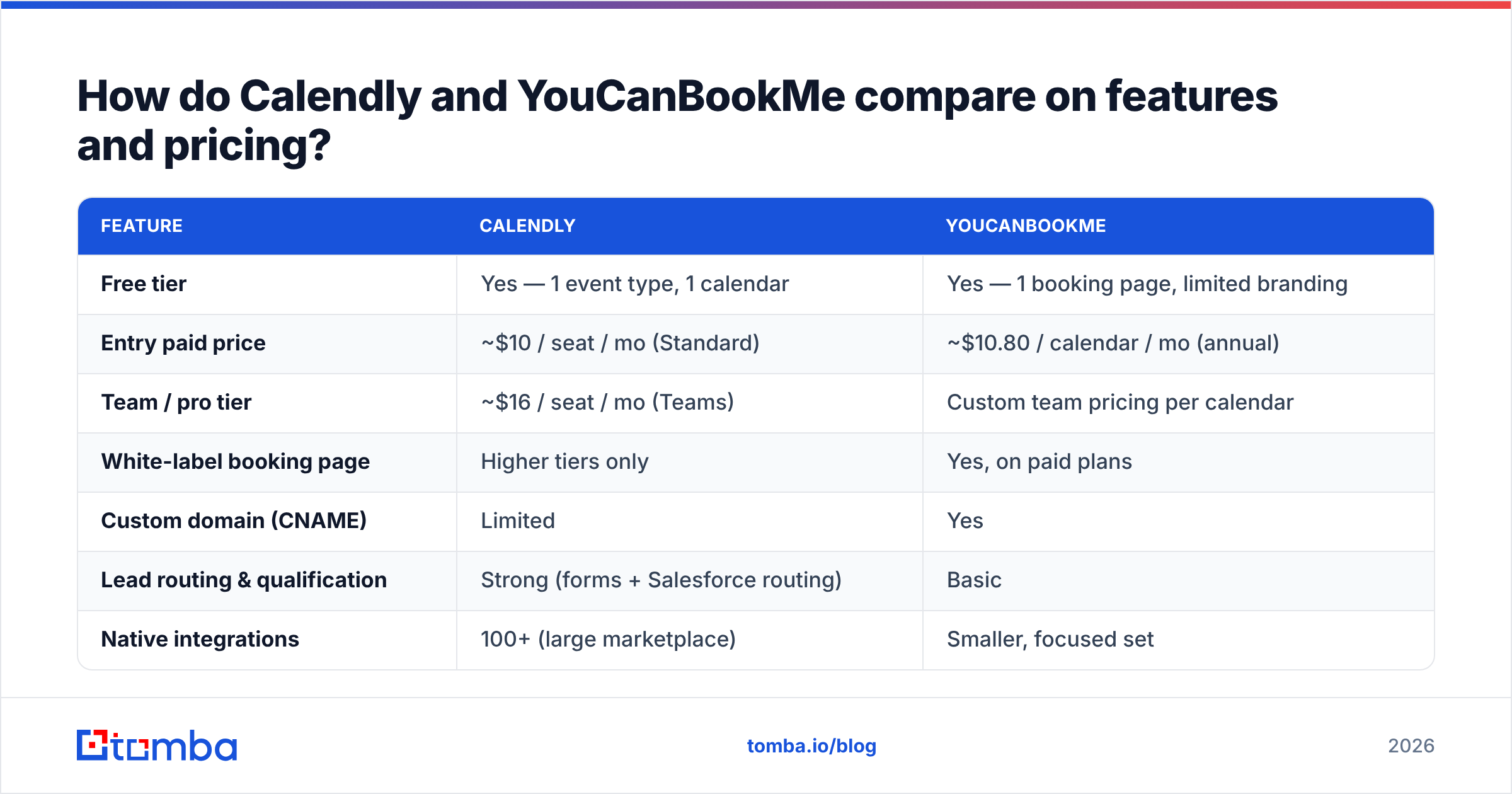
Here is the head-to-head on the attributes that usually decide the purchase. Pricing reflects publicly listed plans as of early 2026; always confirm current rates on each vendor's page.
| Feature | Calendly | YouCanBookMe |
|---|---|---|
| Free tier | Yes — 1 event type, 1 calendar | Yes — 1 booking page, limited branding |
| Entry paid price | ~$10 / seat / mo (Standard) | ~$10.80 / calendar / mo (annual) |
| Team / pro tier | ~$16 / seat / mo (Teams) | Custom team pricing per calendar |
| White-label booking page | Higher tiers only | Yes, on paid plans |
| Custom domain (CNAME) | Limited | Yes |
| Lead routing & qualification | Strong (forms + Salesforce routing) | Basic |
| Native integrations | 100+ (large marketplace) | Smaller, focused set |
| Payments | Stripe + PayPal | Stripe |
| Group / class bookings | Yes | Yes (strong for cohorts) |
| Best fit | Sales & CS teams at scale | Agencies, education, brand-first pages |
A few honest notes on the table. Calendly's per-seat model gets expensive when every rep needs a paid seat, but the included routing and Salesforce sync can be worth it. YouCanBookMe prices per calendar, which can be cheaper for a small shared team but adds up if many individuals each need their own page. Compare the live numbers on Calendly's pricing page and YouCanBookMe before committing.

Is Calendly better than YouCanBookMe for sales teams?#
For most B2B sales orgs, yes — but with caveats. Calendly's advantage is the qualification-and-routing layer. When a lead fills out your booking form, Calendly can route them to the correct AE by territory, deal size, or product line, and write the meeting straight into your CRM. That removes manual triage that otherwise eats an SDR's morning.
YouCanBookMe can handle inbound demos perfectly well, and its custom forms are flexible, but it does not match Calendly's routing depth or its CRM-native automations. If your motion is "marketing drives demo requests, ops routes them to reps," Calendly is the stronger backbone.
Where YouCanBookMe pulls ahead is when the brand experience of the booking page is the point. Agencies booking client calls, universities scheduling advising sessions, and any team that wants the page on its own domain with zero third-party logos will appreciate the white-label control on lower tiers. With Calendly you often need a higher plan to strip the branding.
If you run outbound, remember the scheduler is the last mile. Before a prospect ever sees your booking link, you need their address — that is where an email finder and an email verifier do the heavy lifting. A polished Calendly link is wasted if it lands in a bounced inbox.
Which tool has better integrations and automation?#
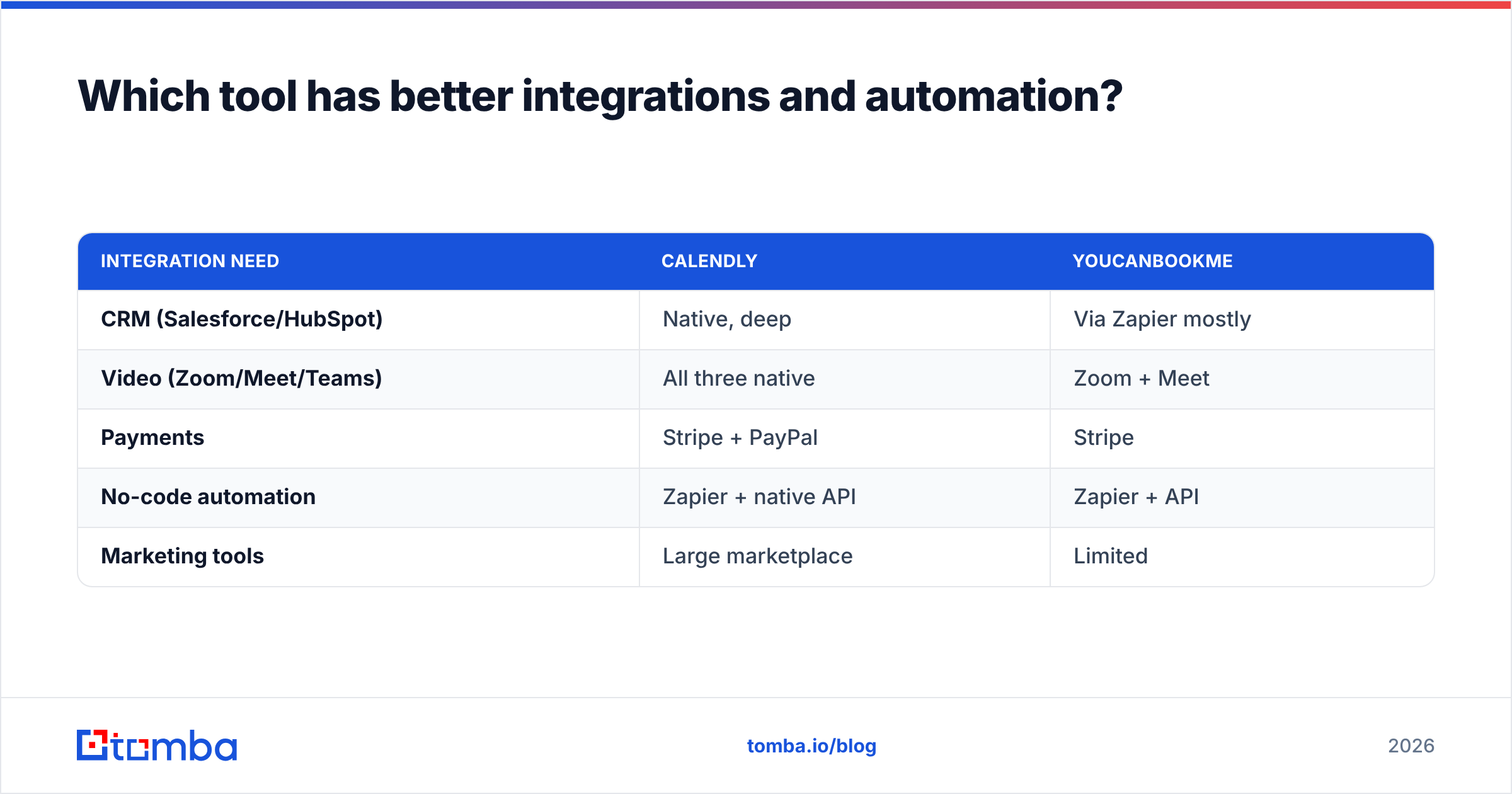
Calendly has the broader ecosystem. It connects natively to Salesforce, HubSpot, Zoom, Google Meet, Microsoft Teams, Stripe, PayPal, and dozens of marketing tools, plus Zapier for everything else. For teams already living inside a CRM, that native depth shortens setup and reduces the number of brittle Zaps you maintain.
YouCanBookMe covers the essentials — Google Calendar, Microsoft 365, Zoom, Stripe, and Zapier — and does them reliably. The integration list is shorter and more focused. If your needs are calendar, video, and payments, you will not feel the gap. If you need the booking event to trigger a multi-step CRM sequence, Calendly's native hooks save you work.
For either tool, the real automation win comes from connecting scheduling to your wider revenue stack. If you pull contact data through the Tomba API or push verified leads into your CRM via a HubSpot integration, the scheduler becomes one node in an automated pipeline rather than an island.
| Integration need | Calendly | YouCanBookMe |
|---|---|---|
| CRM (Salesforce/HubSpot) | Native, deep | Via Zapier mostly |
| Video (Zoom/Meet/Teams) | All three native | Zoom + Meet |
| Payments | Stripe + PayPal | Stripe |
| No-code automation | Zapier + native API | Zapier + API |
| Marketing tools | Large marketplace | Limited |
What about customization and the invitee experience?#
This is YouCanBookMe's home turf. You get fine-grained control over the booking page: custom CSS, your own domain via CNAME, conditional form fields, and per-question logic. The result can look indistinguishable from your own site. For brand-conscious teams, that consistency matters — a booking page that screams "third-party tool" can dent trust on a high-ticket sale.
Calendly's invitee experience is cleaner out of the box and requires almost no configuration to look professional. The tradeoff is less raw control: deep branding and white-labeling sit behind higher tiers, and custom CSS is limited. Most invitees never notice, because Calendly's default design is already minimal and fast.
A simple way to decide:
- Choose YouCanBookMe if the page must feel like your page, on your domain, with your exact fields.
- Choose Calendly if you want a great default experience with minimal setup and are fine with light branding on entry plans.
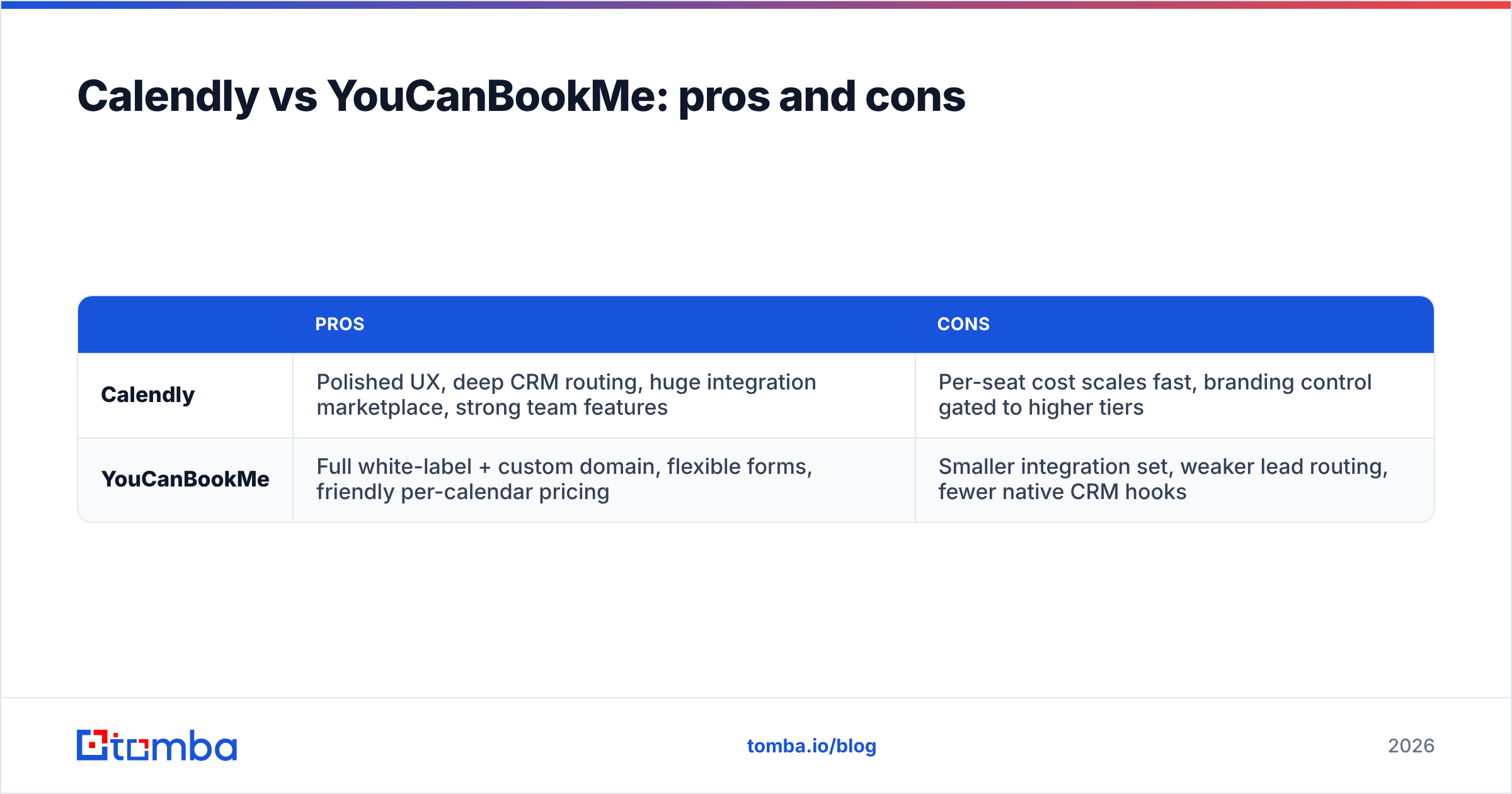
Calendly vs YouCanBookMe: pros and cons#
| Pros | Cons | |
|---|---|---|
| Calendly | Polished UX, deep CRM routing, huge integration marketplace, strong team features | Per-seat cost scales fast, branding control gated to higher tiers |
| YouCanBookMe | Full white-label + custom domain, flexible forms, friendly per-calendar pricing | Smaller integration set, weaker lead routing, fewer native CRM hooks |
Both are mature, reliable products with free tiers, so you can trial each against a real booking flow before paying. Read recent user reviews on G2 to sanity-check current sentiment, since feature sets shift release to release.
Which should you choose in 2026?#
Decide by your primary constraint:
- You are a scaling sales/CS team that lives in Salesforce or HubSpot and needs routing → Calendly. The native automations and qualification layer pay for the per-seat cost.
- You are brand-first — an agency, consultancy, or education team that wants the booking page on your own domain with full styling → YouCanBookMe.
- You are budget-conscious with a small shared team → YouCanBookMe's per-calendar pricing is often cheaper than buying a Calendly seat per person.
- You want the least setup for a professional result → Calendly's defaults get you live in minutes.
- You need payments plus group bookings → both work; pick on the branding and integration criteria above.
There is no universally "better" tool here — only the better fit for your motion. Map your must-haves to the comparison tables, run both free tiers for a week, and let your actual booking volume make the call.
Where does contact data fit into all this?#
A scheduler converts interest into a meeting. It does not create the interest, and it does not find the person. For outbound and demand-gen teams, the bottleneck is almost never the calendar — it is getting accurate, verified contact details so your booking link reaches a real human inbox.
That is the gap Tomba fills. Use the Tomba Email Finder to source professional email addresses by name, company, or domain, then verify them before you send so your outreach — and your Calendly or YouCanBookMe link — actually lands. Tomba's plans start with a free tier of 25 searches per month, Starter at $49/mo, and Growth at $99/mo, with bulk and API options when you scale. Pair a great scheduler with verified contacts, and the whole funnel tightens from first touch to booked meeting. Start finding the right contacts at tomba.io/email-finder.
// get started
Find, verify and enrich your first contacts today
Start on the free plan with 25 searches a month, then scale when your team is ready.
Free plan · No credit card required · GDPR & CCPA
// about the author