Calendly vs Zoom: Which Scheduling Tool Wins in 2026?
Calendly books the meeting, Zoom hosts it — but where do they overlap, and which one does your sales team actually need? A neutral 2026 breakdown.
Most "Calendly vs Zoom" debates start from a false premise: that you have to pick one. You usually don't. Calendly is a scheduling layer that removes the back-and-forth of finding a time. Zoom is the meeting itself — video, audio, recording, webinars. The real question for a 2026 sales or RevOps team is which problem is actually costing you deals, and where the two tools overlap enough that paying for both feels redundant.
This guide breaks down what each tool does, where they compete, where they complement each other, and how to choose based on your workflow rather than the marketing.
TL;DR#
- Calendly is a scheduler; Zoom is a meeting platform. They solve different core problems and integrate cleanly with each other.
- They overlap on one thing: Zoom Scheduler now offers Calendly-style booking pages, and Calendly hosts basic video calls. Neither replaces the other's strength.
- For sales teams, Calendly wins on routing, round-robin, and reducing no-shows; Zoom wins on call quality, recording, and revenue-intelligence integrations.
- Pricing favors Calendly for small teams (a real free tier), while Zoom's value scales with webinars, phone, and large-meeting needs.
- The best setup for outbound is often both — plus a clean data layer so the meetings you book are with real, reachable prospects.

What is Calendly and what does it actually do?#
Calendly is automated scheduling. You connect your calendar, define your availability and meeting types, and share a link. Invitees pick an open slot, and the event is created on both calendars with no email negotiation. That's the whole pitch, and it's a good one — the average sales rep wastes a startling amount of time proposing times that get rejected.
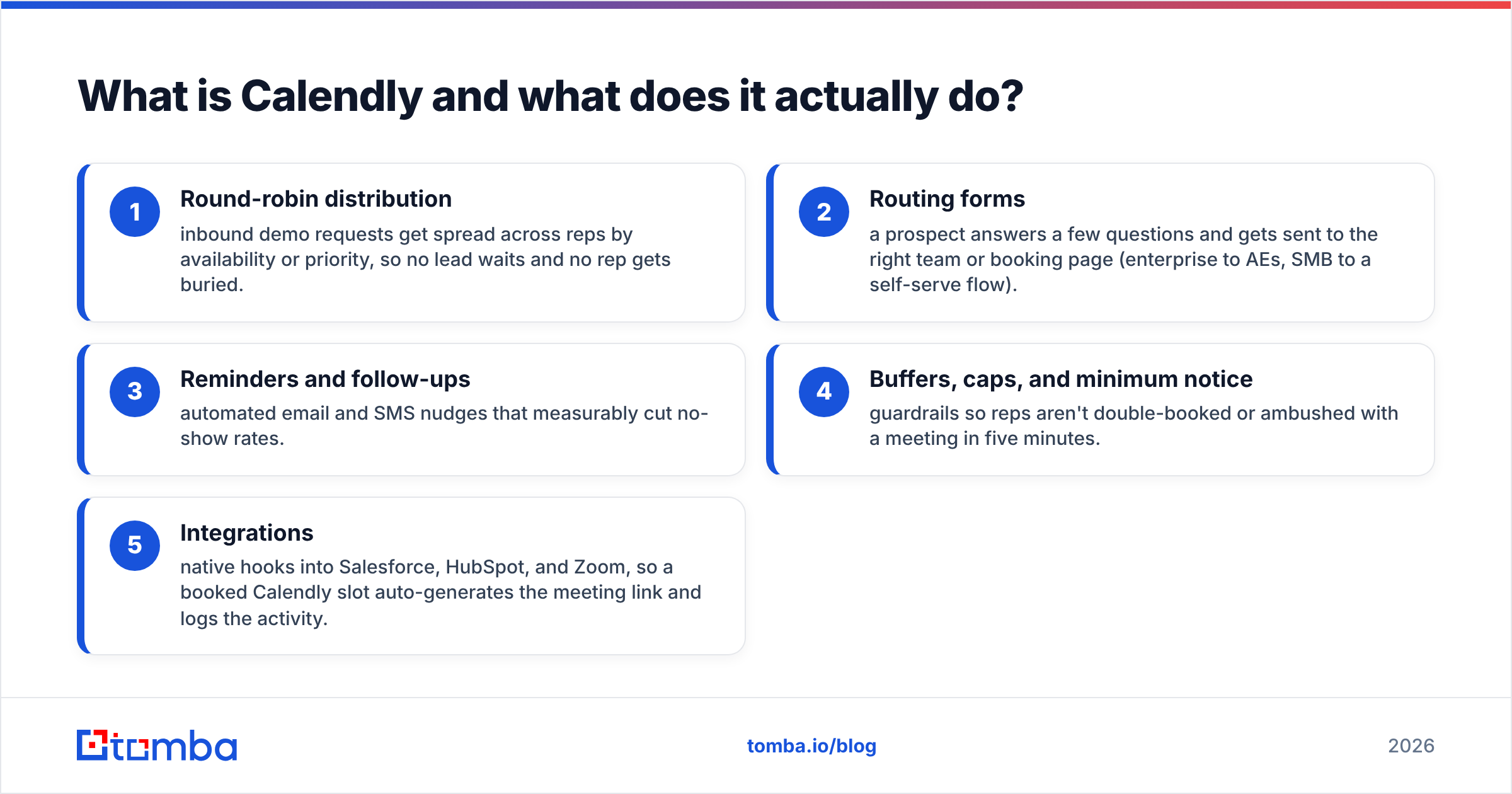
Beyond the basics, Calendly's value for revenue teams sits in routing and qualification:
- Round-robin distribution — inbound demo requests get spread across reps by availability or priority, so no lead waits and no rep gets buried.
- Routing forms — a prospect answers a few questions and gets sent to the right team or booking page (enterprise to AEs, SMB to a self-serve flow).
- Reminders and follow-ups — automated email and SMS nudges that measurably cut no-show rates.
- Buffers, caps, and minimum notice — guardrails so reps aren't double-booked or ambushed with a meeting in five minutes.
- Integrations — native hooks into Salesforce, HubSpot, and Zoom, so a booked Calendly slot auto-generates the meeting link and logs the activity.
Calendly does offer a built-in video option, but it's lightweight. Most teams point Calendly at Zoom, Google Meet, or Microsoft Teams for the actual call.
What is Zoom and where does it fit?#
Zoom is the meeting. It's the video and audio layer where the conversation happens, plus a growing platform around it: cloud recording, webinars, Zoom Phone, AI Companion summaries, and large-scale events. If Calendly's job ends the moment a time is locked in, Zoom's job starts there.
For sales specifically, Zoom matters because of what happens on and after the call:
- Call quality and reliability at scale, including large group demos and webinars.
- Cloud recording and transcripts that feed into revenue-intelligence tools like Gong or Chorus.
- AI Companion meeting summaries and action items, reducing manual note-taking.
- Webinars and events for one-to-many pipeline generation, which Calendly simply doesn't do.
Zoom also added Zoom Scheduler, a booking-page feature that looks a lot like Calendly. That's the overlap that makes people ask "do I need both?" — so let's address it directly.
Calendly vs Zoom: how do they compare head to head?#
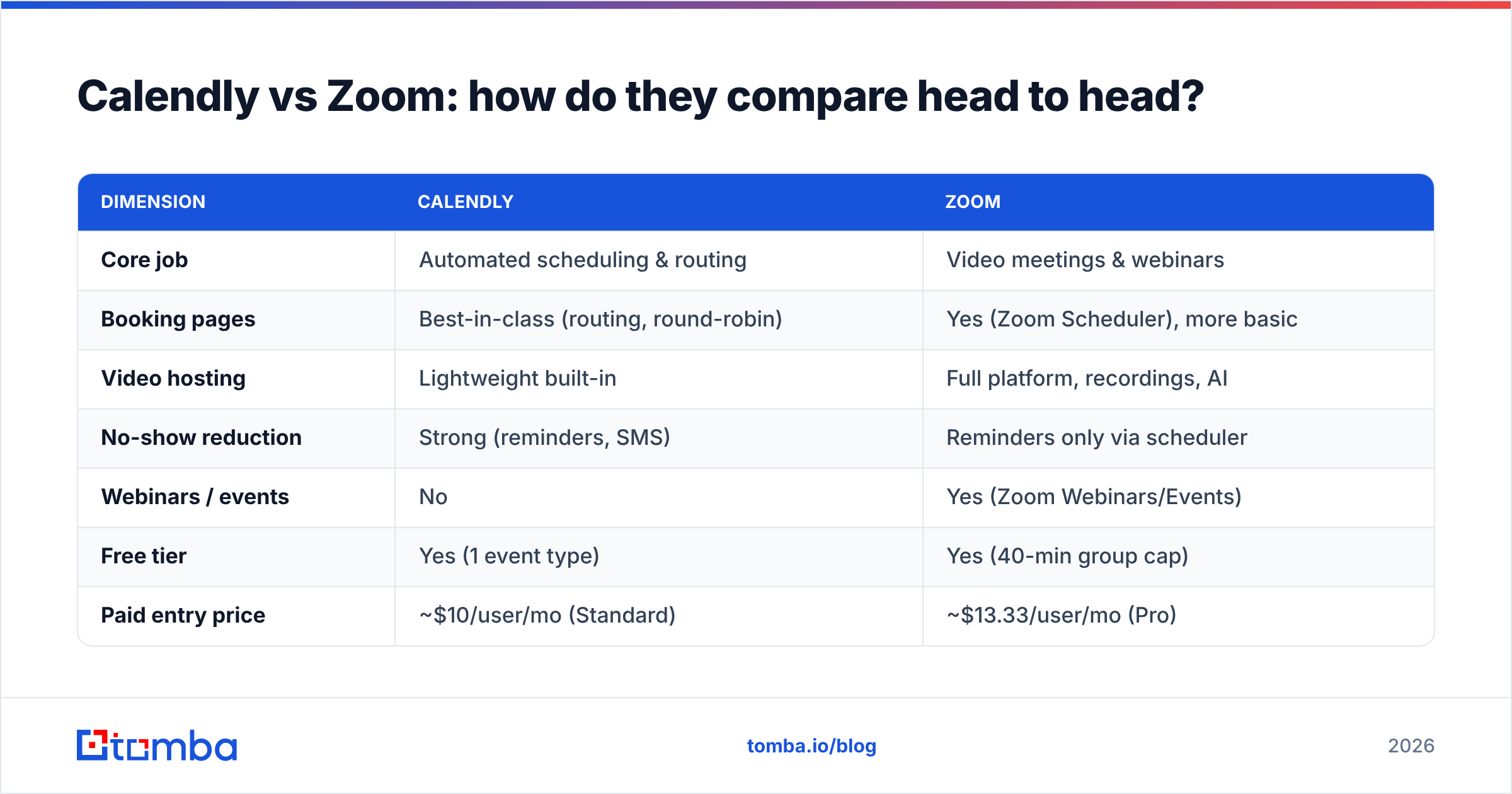
Here's the practical comparison across the dimensions that matter for a B2B team.
| Dimension | Calendly | Zoom |
|---|---|---|
| Core job | Automated scheduling & routing | Video meetings & webinars |
| Booking pages | Best-in-class (routing, round-robin) | Yes (Zoom Scheduler), more basic |
| Video hosting | Lightweight built-in | Full platform, recordings, AI |
| No-show reduction | Strong (reminders, SMS) | Reminders only via scheduler |
| Webinars / events | No | Yes (Zoom Webinars/Events) |
| Free tier | Yes (1 event type) | Yes (40-min group cap) |
| Paid entry price | ~$10/user/mo (Standard) | ~$13.33/user/mo (Pro) |
| Best for | Inbound demo capture, lead routing | The meeting itself, large calls |
| CRM logging | Native Salesforce/HubSpot | Via integrations |
The takeaway: they overlap on booking pages and basic video, but each owns its core. Zoom Scheduler is fine if your scheduling needs are simple and you want one vendor. Calendly's routing and round-robin are still well ahead for teams that treat scheduling as a revenue function, not a calendar convenience.
Is Zoom Scheduler good enough to replace Calendly?#
For a solo founder or a small team, possibly. If you already pay for Zoom and your only need is "let people book a 30-minute call," Zoom Scheduler removes a second subscription and keeps everything in one place. That's a legitimate reason to consolidate.
It stops being good enough the moment scheduling becomes a team problem. Round-robin across five reps, routing enterprise leads away from your self-serve flow, weighting distribution by rep performance, capping daily demos — this is Calendly's home turf, and Zoom Scheduler doesn't match the depth. If your inbound volume is high enough that who gets the meeting affects win rates, Calendly earns its line item.
A useful rule: pick the cheaper single-vendor path until routing complexity forces your hand, then add Calendly. Don't pre-buy complexity you don't have yet.
How much do Calendly and Zoom cost in 2026?#
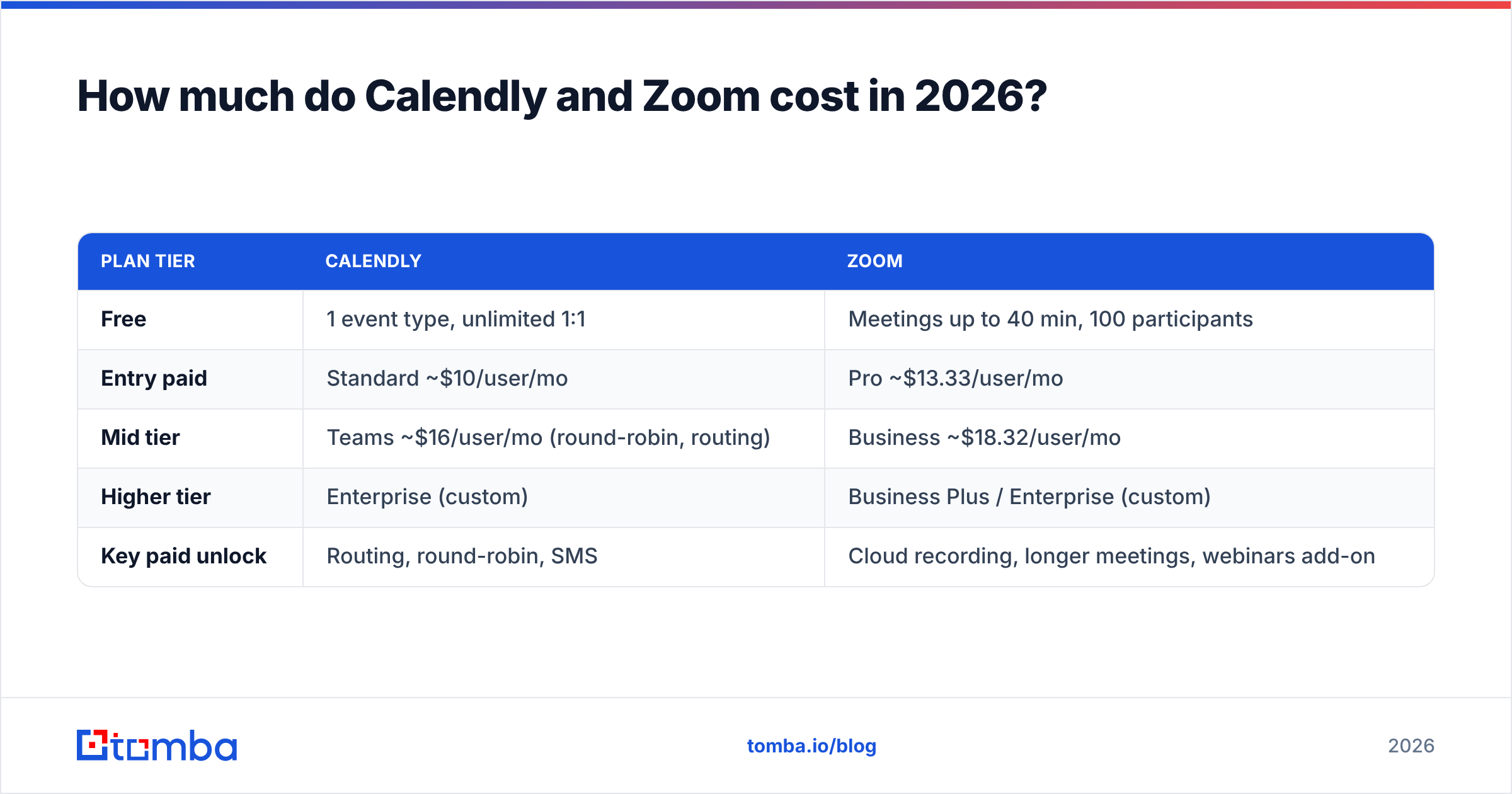
Both run a freemium model, and both gate their genuinely useful features behind paid tiers. Always confirm current numbers on the Calendly and Zoom pricing pages, since they change — but the structure looks like this.
| Plan tier | Calendly | Zoom |
|---|---|---|
| Free | 1 event type, unlimited 1:1 | Meetings up to 40 min, 100 participants |
| Entry paid | Standard ~$10/user/mo | Pro ~$13.33/user/mo |
| Mid tier | Teams ~$16/user/mo (round-robin, routing) | Business ~$18.32/user/mo |
| Higher tier | Enterprise (custom) | Business Plus / Enterprise (custom) |
| Key paid unlock | Routing, round-robin, SMS | Cloud recording, longer meetings, webinars add-on |
For a small team that just needs reliable scheduling, Calendly's free and Standard tiers are hard to beat. For an organization that needs recordings, webinars, and large meetings, Zoom's value is in the platform, not the scheduler. Neither is "expensive" — the cost question is usually whether you're paying for two tools when one would do, and the honest answer depends entirely on your routing complexity and meeting scale.
Which should sales and RevOps teams choose?#
Conclusion first: most outbound and inbound sales teams should run both — Calendly to capture and route the meeting, Zoom to host and analyze it. They integrate natively, so a booked Calendly slot automatically spins up a Zoom link and logs to your CRM. That combination is close to the default modern sales stack.
Choose Calendly alone if:
- Your meetings are 1:1 and you already host video on Google Meet or Teams.
- Your bottleneck is inbound demo capture and lead routing, not call quality.
- You want the strongest no-show reduction with minimal setup.
Choose Zoom alone if:
- Your scheduling needs are simple and Zoom Scheduler covers them.
- You run webinars or large events that Calendly can't host.
- Recording, transcripts, and revenue intelligence drive your process.
What both tools assume — and where most pipelines actually break#
Here's the uncomfortable part neither tool solves: a booking link is worthless if it never reaches a real person. Calendly optimizes the moment of scheduling. Zoom optimizes the meeting. Both assume you already have an accurate, reachable contact on the other end. For inbound, that's handled — the prospect came to you. For outbound, it's the entire game, and it's where most pipelines quietly leak.
If you're sending booking links to scraped or stale lists, your no-show rate isn't a Calendly reminder problem — it's a data problem. Bounced emails, wrong contacts, and catch-all domains mean the meeting was never going to happen. This is the layer that sits before scheduling, and it's where a dedicated email finder and email verifier change the math: you book meetings with verified decision-makers instead of spraying links into the void.
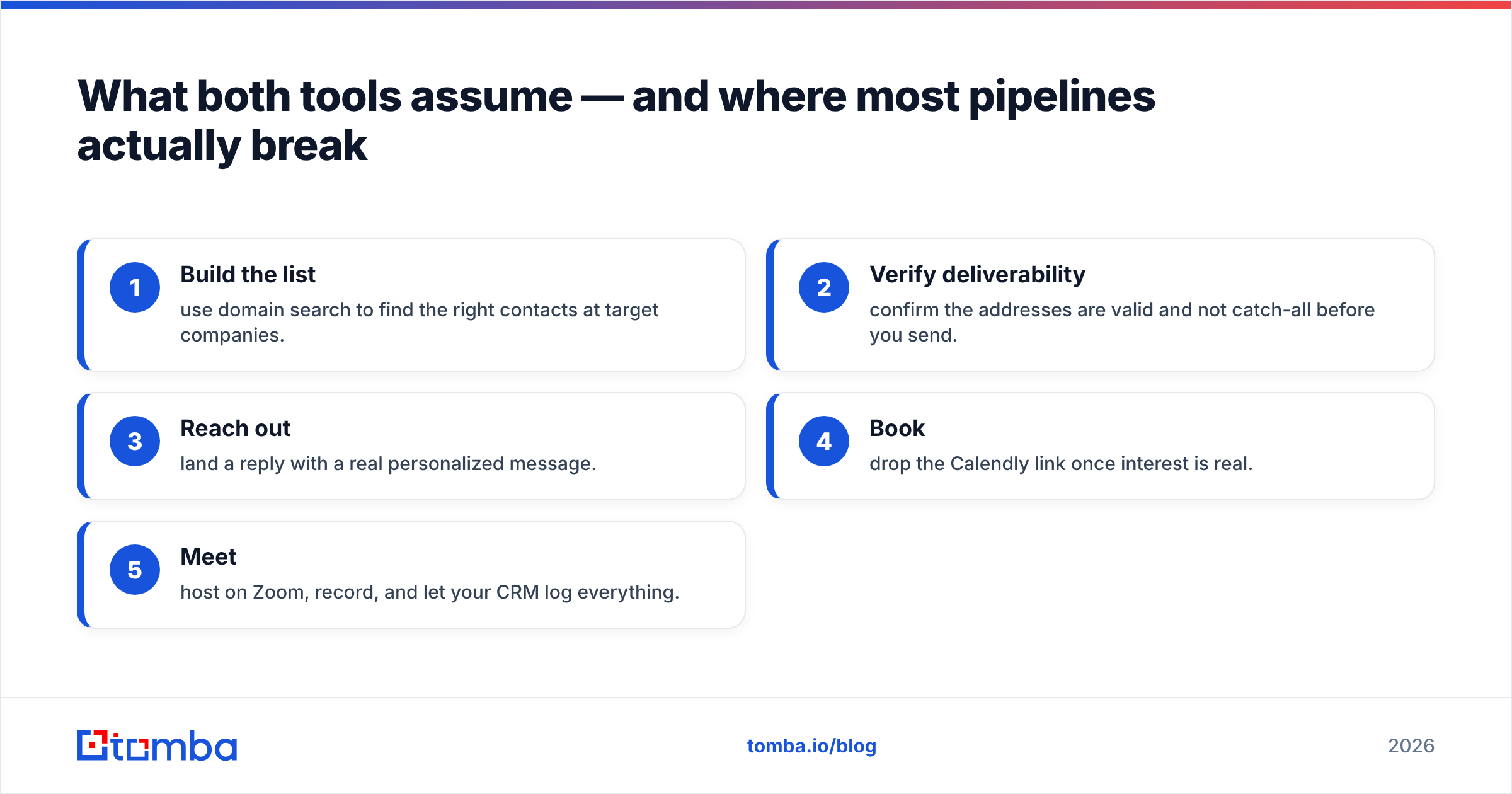
A clean outbound flow looks like this:
- Build the list — use domain search to find the right contacts at target companies.
- Verify deliverability — confirm the addresses are valid and not catch-all before you send.
- Reach out — land a reply with a real personalized message.
- Book — drop the Calendly link once interest is real.
- Meet — host on Zoom, record, and let your CRM log everything.
Skip steps one and two and you're optimizing the wrong end of the funnel. You can read more about how this data layer works in the Tomba pricing breakdown, which is built around exactly this verify-before-you-book workflow.
Frequently asked questions#
Is Calendly the same as Zoom? No. Calendly schedules meetings and routes leads; Zoom hosts the actual video call. They're complementary, and Calendly integrates natively with Zoom to generate meeting links automatically.
Can Calendly replace Zoom? Not for serious video needs. Calendly has a lightweight built-in video option, but it lacks Zoom's recording, transcripts, webinars, and call reliability at scale.
Can Zoom replace Calendly? Zoom Scheduler can replace basic Calendly use, but it doesn't match Calendly's routing, round-robin, and team-distribution features. Small teams may consolidate; high-volume teams usually keep Calendly.
Do I need to pay for both? Many sales teams do, because they solve different problems. If your scheduling is simple and you already use Zoom, Zoom Scheduler may be enough. If routing inbound demos across reps matters, add Calendly.
Which has a better free plan? Calendly's free tier is more useful for pure scheduling. Zoom's free tier is more useful if you mainly need short video calls. Compare both on G2 against your real usage.
The bottom line#
Calendly and Zoom aren't really competitors — they're neighbors. Calendly wins the scheduling and routing job; Zoom wins the meeting and analytics job. Pick one only if your needs sit entirely on one side; run both if you're doing real outbound and inbound at volume.
But remember what sits underneath both: the quality of the contact you're booking. If you want every Calendly link and Zoom invite to land with a verified, reachable decision-maker, start with your data. Tomba's Email Finder helps you find professional email addresses by domain, name, or company — and the built-in verifier confirms they're real before you ever send the booking link. Fix the data, and the scheduling tools finally get to do their job. Start free with 25 searches a month and book meetings that actually happen.
Ready to find emails that actually work?
Join 150,000+ professionals who stopped guessing and started sending. Free credits on signup — no credit card required.
Get the Tomba newsletter
Practical outbound tactics and product updates — once every two weeks.
About the author