Best Calling Softwares for Sales Teams in 2026 (Compared)
Power dialers, AI coaching, and cloud phones all call themselves calling softwares. Here's how to compare them in 2026 and pick the one that actually books meetings.
TL;DR
- "Calling softwares" is a catch-all for three different tools: cloud phone systems, sales power dialers, and AI conversation-intelligence platforms. Buying the wrong category is the most common (and expensive) mistake.
- The dialer is only half the equation. A power dialer that burns through bad phone numbers just helps you fail faster — data quality decides your connect rate.
- For most outbound teams in 2026, a sales-focused dialer (Aircall, JustCall, Kixie, Orum) plus a verified contact source beats a generic VoIP phone.
- Expect to pay $25–$150 per user per month for the software, before usage minutes and number rental.
- Feed your dialer accurate, verified mobile numbers from a tool like Tomba's phone finder, and your connect rate climbs without changing a single script.
What are calling softwares, exactly?#
"Calling softwares" is a search term people type when they want to make sales calls from a computer instead of a desk phone — but it hides three very different product categories. Picking the right category matters more than picking the right brand.
Think of it like kitchen equipment. A microwave, a convection oven, and a sous-vide machine all "cook food," but you'd never buy a microwave to roast a Thanksgiving turkey. Calling tools have the same trap: they all "make calls," yet they're built for different jobs.
Here are the three categories you're actually choosing between:
- Cloud phone systems (VoIP / business phones) — Tools like RingCentral, Dialpad, and Grasshopper replace your office phone lines. Built for inbound + outbound, support teams, and general business telephony. Great extensions, IVR menus, voicemail — not optimized for high-volume outbound dialing.
- Sales dialers (power / parallel dialers) — Tools like Kixie, JustCall, Aircall, and Orum are built for SDRs who need to blast through call lists. Power dialers call one number after another automatically; parallel dialers ring several at once and connect you only when a human picks up.
- Conversation intelligence platforms — Tools like Gong and Chorus record, transcribe, and analyze calls to coach reps and surface deal risk. They often ride on top of one of the above rather than replacing it.
Most teams searching for calling softwares actually want category 2, sometimes bundled with category 3. If you confuse them with category 1, you'll overpay for phone features you never touch and underpay for the dialing speed you desperately need.
How do power dialers and parallel dialers differ?#
A power dialer calls numbers sequentially; a parallel dialer calls several numbers simultaneously. That single difference reshapes your day.
With a power dialer, the software dials the next contact the moment you hang up. No manual dialing, no fumbling with a CRM tab. You still hear every ring, busy tone, and voicemail beep. Realistic output: 60–100 dials an hour.
With a parallel dialer, the system rings three to five numbers at once and only patches you in when a real human answers — it drops the rest. You skip the dead air entirely. Realistic output: 150–300+ dials an hour. The trade-off is the occasional "double connect" awkward pause and a higher risk of being flagged as spam if your data and caller ID hygiene are poor.
Neither is "better." A founder calling 20 hot inbound leads wants a power dialer and full context. An SDR working a 2,000-row list of cold prospects wants a parallel dialer. The decision hinges on list size and intent temperature, not on which vendor has the slickest demo.
One thing both share: they amplify whatever you feed them. Dial speed multiplies your data quality — including when your data is bad. That's why teams obsess over data enrichment before they obsess over dialers.
Which calling softwares are best in 2026?#
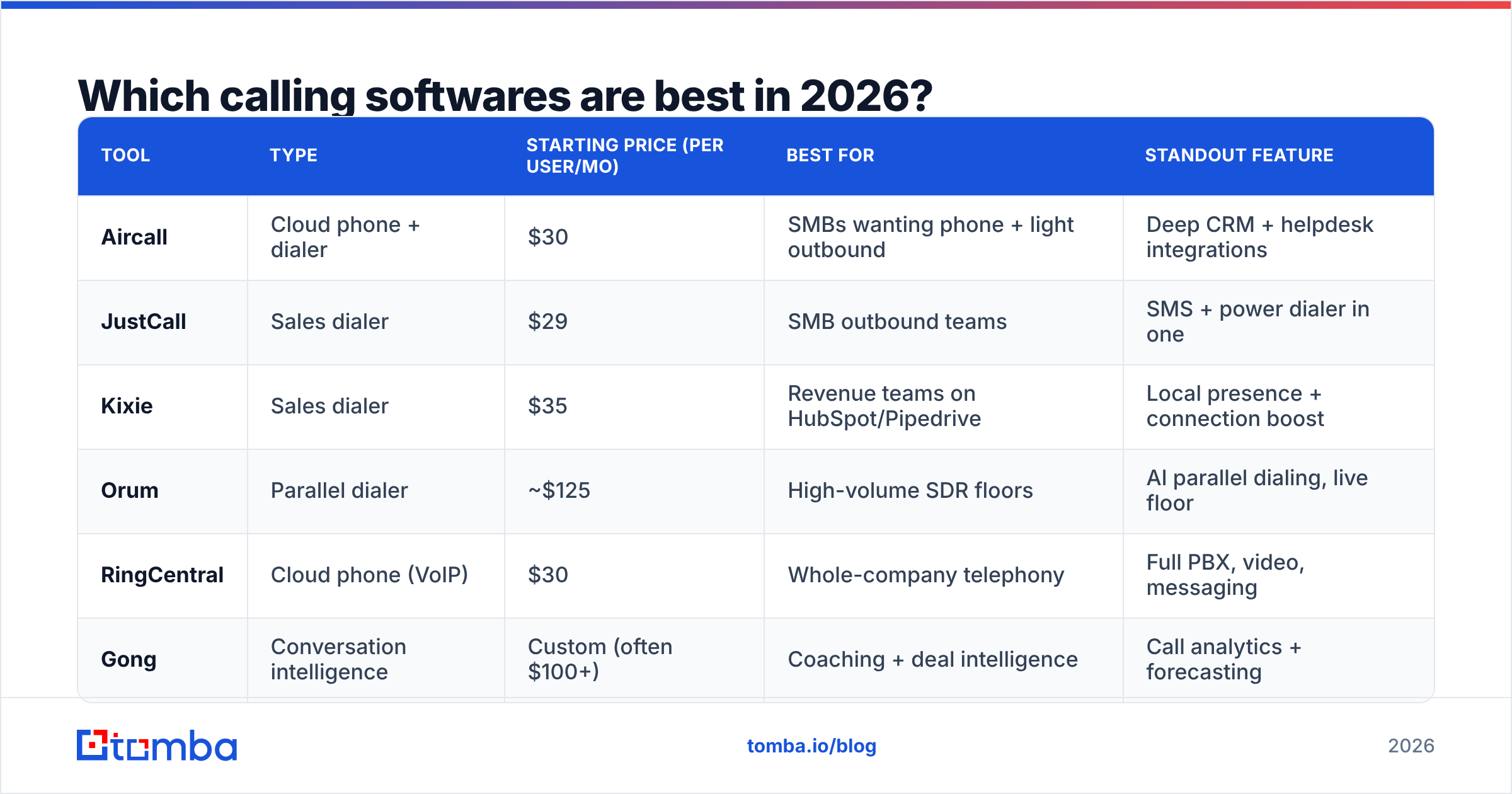
The best calling software is the one that matches your call volume, your CRM, and your budget — there's no universal winner. Below is a side-by-side of the most common sales-focused options so you can shortlist quickly.
| Tool | Type | Starting price (per user/mo) | Best for | Standout feature |
|---|---|---|---|---|
| Aircall | Cloud phone + dialer | $30 | SMBs wanting phone + light outbound | Deep CRM + helpdesk integrations |
| JustCall | Sales dialer | $29 | SMB outbound teams | SMS + power dialer in one |
| Kixie | Sales dialer | $35 | Revenue teams on HubSpot/Pipedrive | Local presence + connection boost |
| Orum | Parallel dialer | ~$125 | High-volume SDR floors | AI parallel dialing, live floor |
| RingCentral | Cloud phone (VoIP) | $30 | Whole-company telephony | Full PBX, video, messaging |
| Gong | Conversation intelligence | Custom (often $100+) | Coaching + deal intelligence | Call analytics + forecasting |
Prices are list rates as of early 2026 and shift with annual billing, seat count, and usage minutes. Always confirm on the vendor's own pricing page and read recent reviews on G2 before committing — the dialer category churns fast.
A few practical notes:
- On a tight budget? JustCall and Aircall give you a real dialer plus SMS without enterprise pricing.
- Living inside HubSpot or Pipedrive? Kixie's native integrations and local-presence dialing usually win.
- Running a dedicated SDR floor? A parallel dialer like Orum pays for itself in raw conversations, if your list quality can support the volume.
- Trying to coach reps to close more? Layer Gong or a similar tool on top; don't expect it to replace your dialer.
What features actually matter in calling software?#
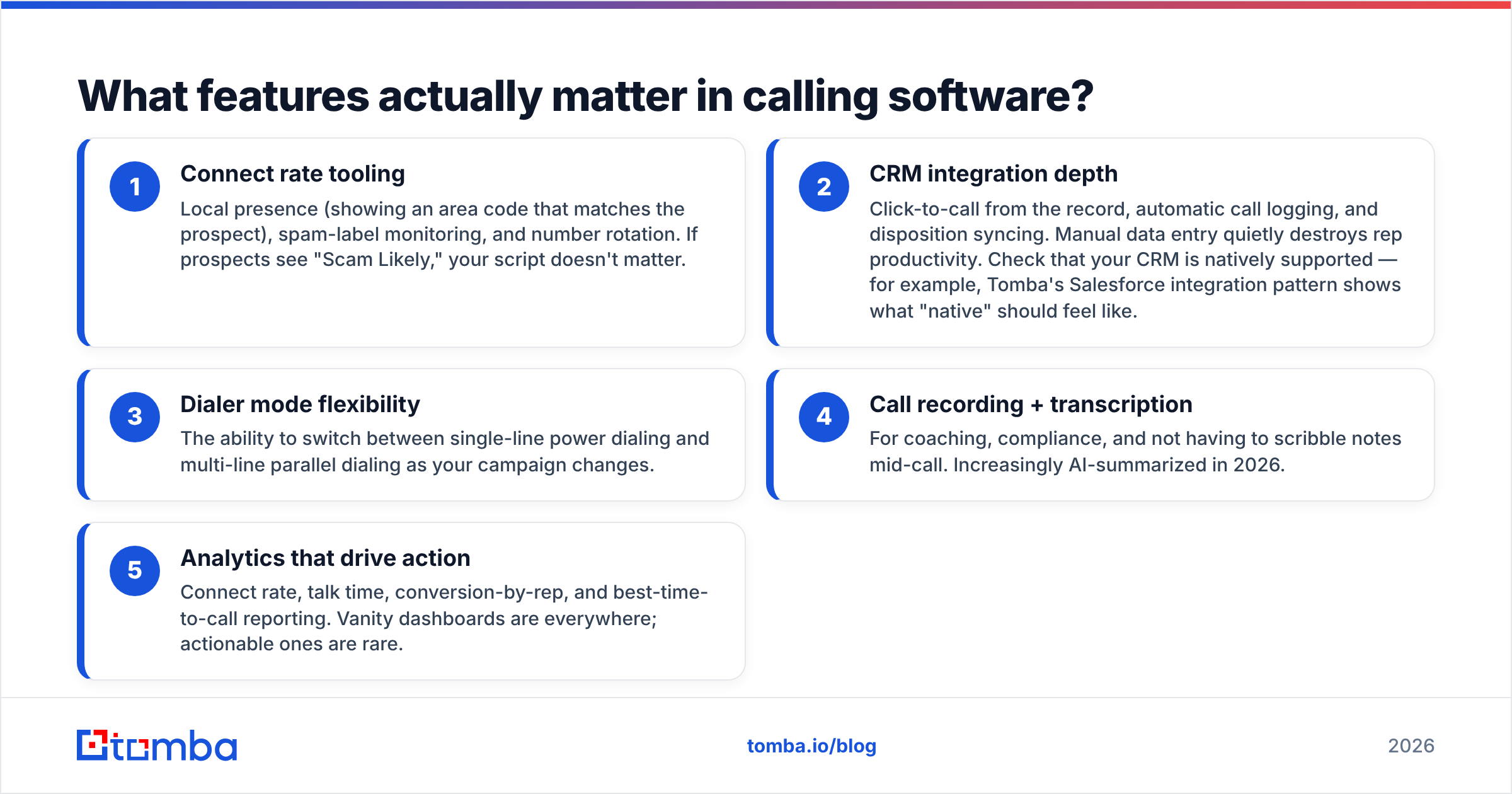
Ignore the feature checklist arms race. Five capabilities move the needle on booked meetings; everything else is a nice-to-have.
- Connect rate tooling — Local presence (showing an area code that matches the prospect), spam-label monitoring, and number rotation. If prospects see "Scam Likely," your script doesn't matter.
- CRM integration depth — Click-to-call from the record, automatic call logging, and disposition syncing. Manual data entry quietly destroys rep productivity. Check that your CRM is natively supported — for example, Tomba's Salesforce integration pattern shows what "native" should feel like.
- Dialer mode flexibility — The ability to switch between single-line power dialing and multi-line parallel dialing as your campaign changes.
- Call recording + transcription — For coaching, compliance, and not having to scribble notes mid-call. Increasingly AI-summarized in 2026.
- Analytics that drive action — Connect rate, talk time, conversion-by-rep, and best-time-to-call reporting. Vanity dashboards are everywhere; actionable ones are rare.
Notice what's not on that list: AI voice agents, sentiment scoring, and gamified leaderboards. They can help, but they're tiebreakers, not deciding factors. If a vendor leads its pitch with the shiny extras and stays vague on connect-rate tooling and CRM sync, treat that as a warning sign.
Why does data quality beat dialer speed?#
Your connect rate is capped by your phone numbers, not your software — period. This is the single most overlooked truth in the calling-software market.
Run the math. Say you buy the fastest parallel dialer on the planet and push 250 dials an hour. If 35% of your phone numbers are wrong, disconnected, or landlines that nobody answers, you've spent that hour and your subscription dialing dead ends at high speed. The dialer did its job flawlessly; the data sabotaged it.
This is why mature teams invest in the contact layer before the calling layer:
- Verify numbers before you dial. A phone validator filters out disconnected and invalid numbers so your dialer spends its time on reachable people.
- Find direct dials and mobiles, not switchboards. Reaching a decision-maker's mobile beats reaching a front desk every time. A dedicated phone finder surfaces those direct numbers.
- Keep an email channel alive in parallel. Calls and emails compound. Pairing your dialer with an email finder lets you follow up the moment a voicemail goes unanswered.
The order of operations is simple: source accurate contacts → verify them → then let the dialer do volume. Skip the first two steps and you're just automating rejection. Cold calling fundamentals like timing and persistence (see HubSpot's cold calling research) only pay off once the number on the screen is real.
How much should calling software cost in 2026?#
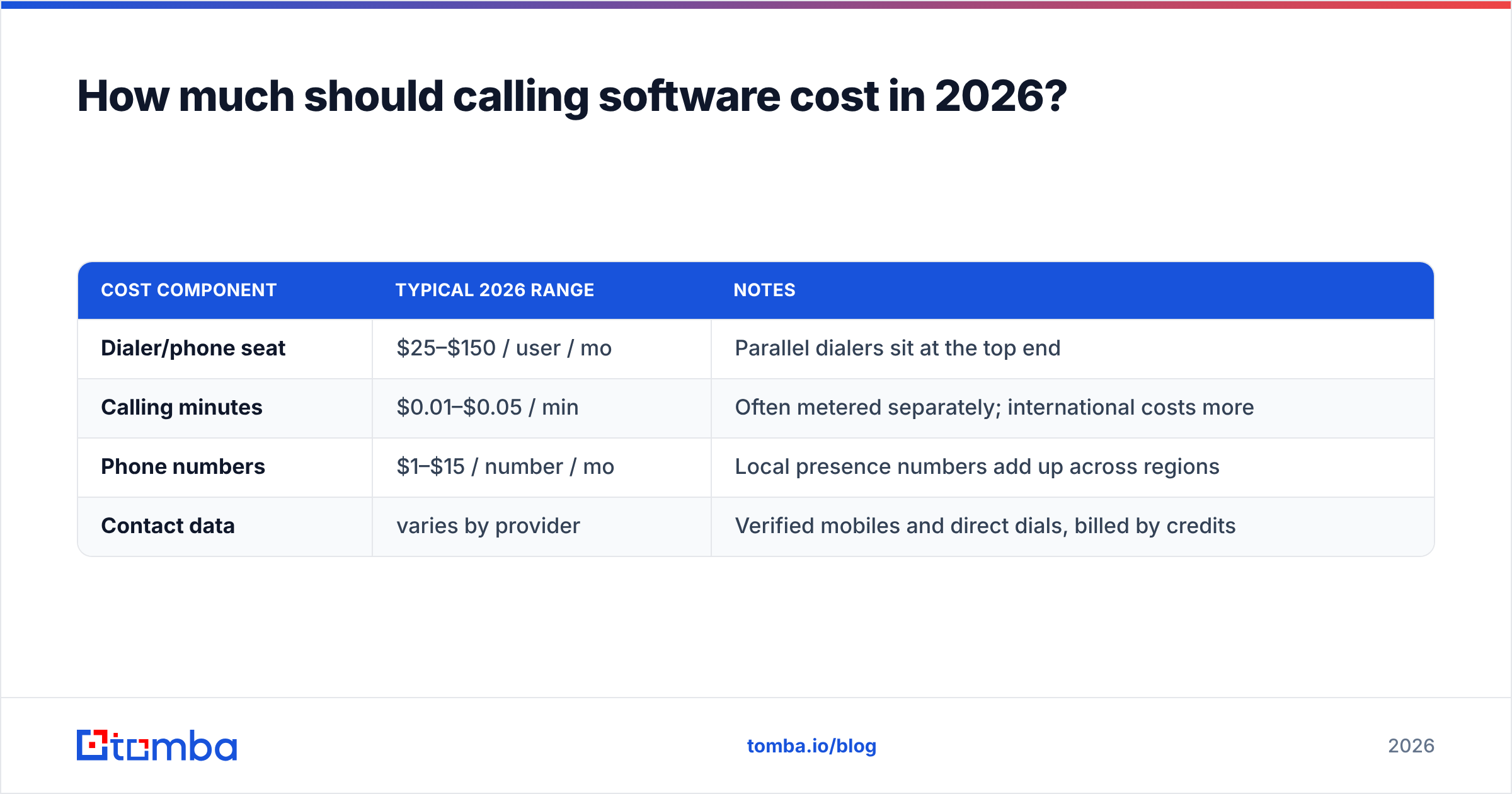
Budget for three line items, not one: the seat license, the usage minutes, and the data feeding it.
| Cost component | Typical 2026 range | Notes |
|---|---|---|
| Dialer/phone seat | $25–$150 / user / mo | Parallel dialers sit at the top end |
| Calling minutes | $0.01–$0.05 / min | Often metered separately; international costs more |
| Phone numbers | $1–$15 / number / mo | Local presence numbers add up across regions |
| Contact data | varies by provider | Verified mobiles and direct dials, billed by credits |
A five-rep SDR team on a mid-tier dialer typically lands around $175–$400/month in software alone, before minutes and data. Parallel-dialing floors run far higher. Compare that against the cost of a rep's time wasted on bad numbers and the data line item starts looking like the cheapest insurance you can buy.
For the data side, Tomba keeps it predictable: a free tier with 25 searches a month, Starter at $49/mo, Growth at $99/mo, and Pro at $249/mo. Full Tomba pricing scales with how many contacts you need to find and verify, so your data budget tracks your actual outbound volume instead of a flat enterprise minimum.
How do you choose the right calling software?#
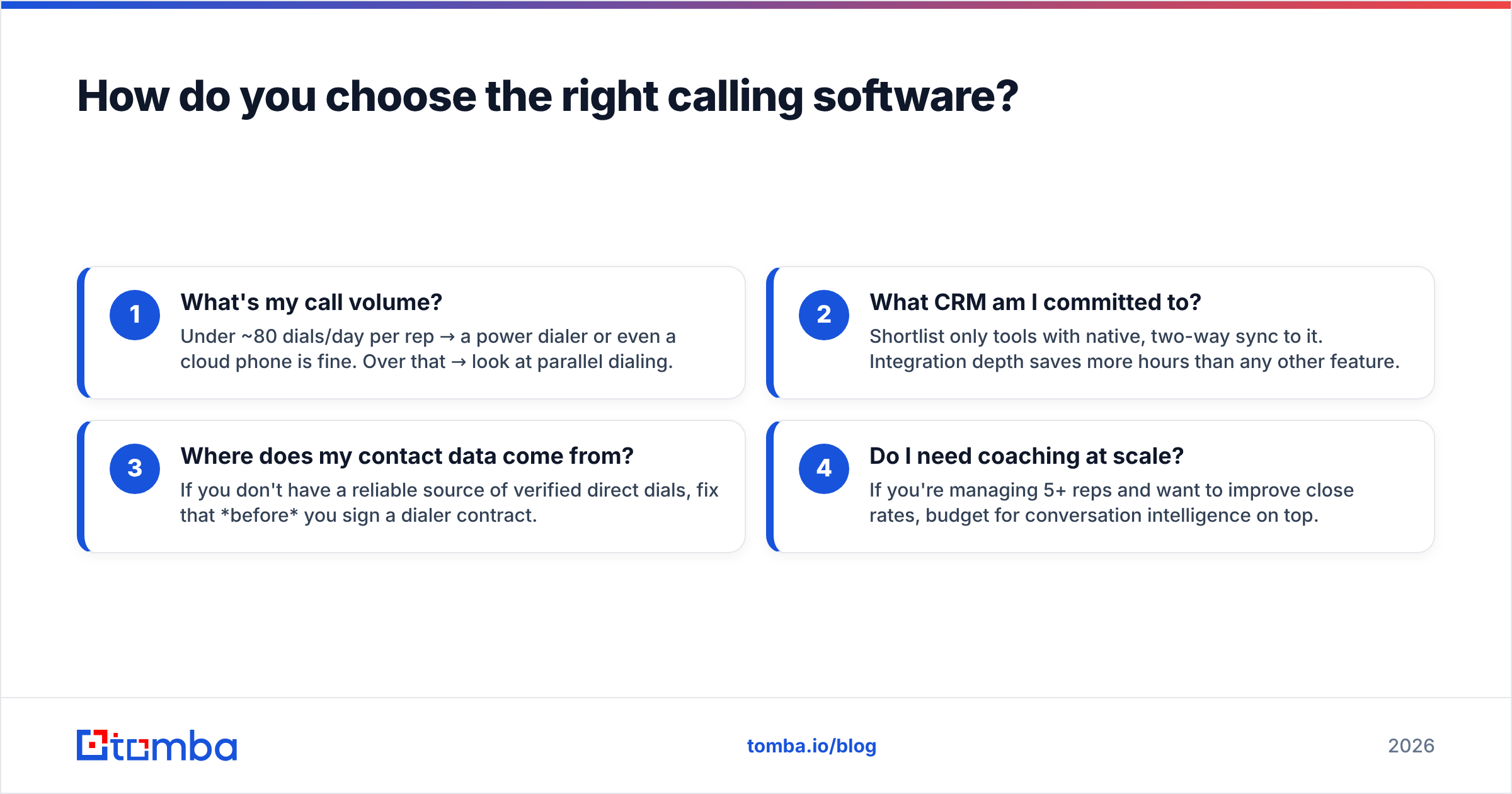
Match the tool to your motion in four questions, in this order:
- What's my call volume? Under ~80 dials/day per rep → a power dialer or even a cloud phone is fine. Over that → look at parallel dialing.
- What CRM am I committed to? Shortlist only tools with native, two-way sync to it. Integration depth saves more hours than any other feature.
- Where does my contact data come from? If you don't have a reliable source of verified direct dials, fix that before you sign a dialer contract.
- Do I need coaching at scale? If you're managing 5+ reps and want to improve close rates, budget for conversation intelligence on top.
Run a two-week trial with a real list, not the vendor's sample data. Track connect rate, conversations per hour, and meetings booked. The tool that wins on meetings, not on dials, is your answer. And if every tool's connect rate looks disappointing in the trial, the culprit is almost always the list — not the software.
The bottom line#
The best calling softwares in 2026 are fast, integrate natively with your CRM, and give you real connect-rate tooling. But the fastest dialer on earth can't fix a list of wrong numbers. Software dials; data decides who picks up.
Before you commit to a dialer, fix the layer underneath it. Use Tomba's Email Finder to build a clean, verified list of decision-makers — complete with the direct contact details your dialer needs to actually reach a human — and pair it with the phone finder and validator so every call you make has a real person on the other end. Start free with 25 searches, then scale as your pipeline grows. Your reps will thank you when "Scam Likely" stops being their most frequent caller ID.
// get started
Find, verify and enrich your first contacts today
Start on the free plan with 25 searches a month, then scale when your team is ready.
Free plan · No credit card required · GDPR & CCPA
// about the author