CallShaper Pricing, Reviews, Pros and Cons (2026 Guide)
A no-fluff breakdown of CallShaper pricing, real user reviews, and the honest pros and cons for outbound and call-center teams shopping for a dialer in 2026.
CallShaper Pricing, Reviews, Pros and Cons (2026 Guide)
CallShaper is a cloud-based predictive dialer and call-center platform aimed at outbound sales, lead generation, and telemarketing teams. If you are weighing it against other dialers, the questions that actually matter are simple: what does it cost, what do real users say, and where does it fall short. This guide answers all three without the marketing gloss.
TL;DR#
- Pricing: CallShaper uses a flat per-seat model commonly cited around $75/user/month, with custom enterprise quotes for larger contact centers. There is no public free tier.
- Reviews: Users on G2 and Capterra praise responsive support, an easy admin interface, and solid reporting; complaints cluster around occasional call-quality dips and a learning curve for advanced campaign setup.
- Best for: Mid-sized outbound teams and BPOs that run high-volume calling and need TCPA-aware compliance tools.
- Weak spots: It is a dialer, not a data provider — you still need accurate phone numbers and clean contact data feeding into it.
- Bottom line: Strong predictive dialing and support; pair it with a reliable data source so your reps dial real, reachable prospects.
What is CallShaper?#
CallShaper is call-center software built around an automatic and predictive dialer. Think of it as the air-traffic control tower for an outbound calling floor: it decides who gets dialed, when, and which agent picks up the connected call, so reps spend time talking instead of listening to dial tones.
The platform bundles the features you expect from a modern contact center: predictive and preview dialing, inbound call routing (IVR), real-time agent monitoring, call recording, scripting, and compliance tooling for U.S. telemarketing rules. It is delivered fully in the browser, so there is no on-premise hardware to maintain.
Where does it sit in the market? CallShaper competes with dialers like Five9, Convoso, PhoneBurner, and Aircall. It positions itself as a mid-market option — more capable than a lightweight power dialer, less sprawling (and less expensive) than enterprise suites. You can confirm the current feature set on the CallShaper homepage.
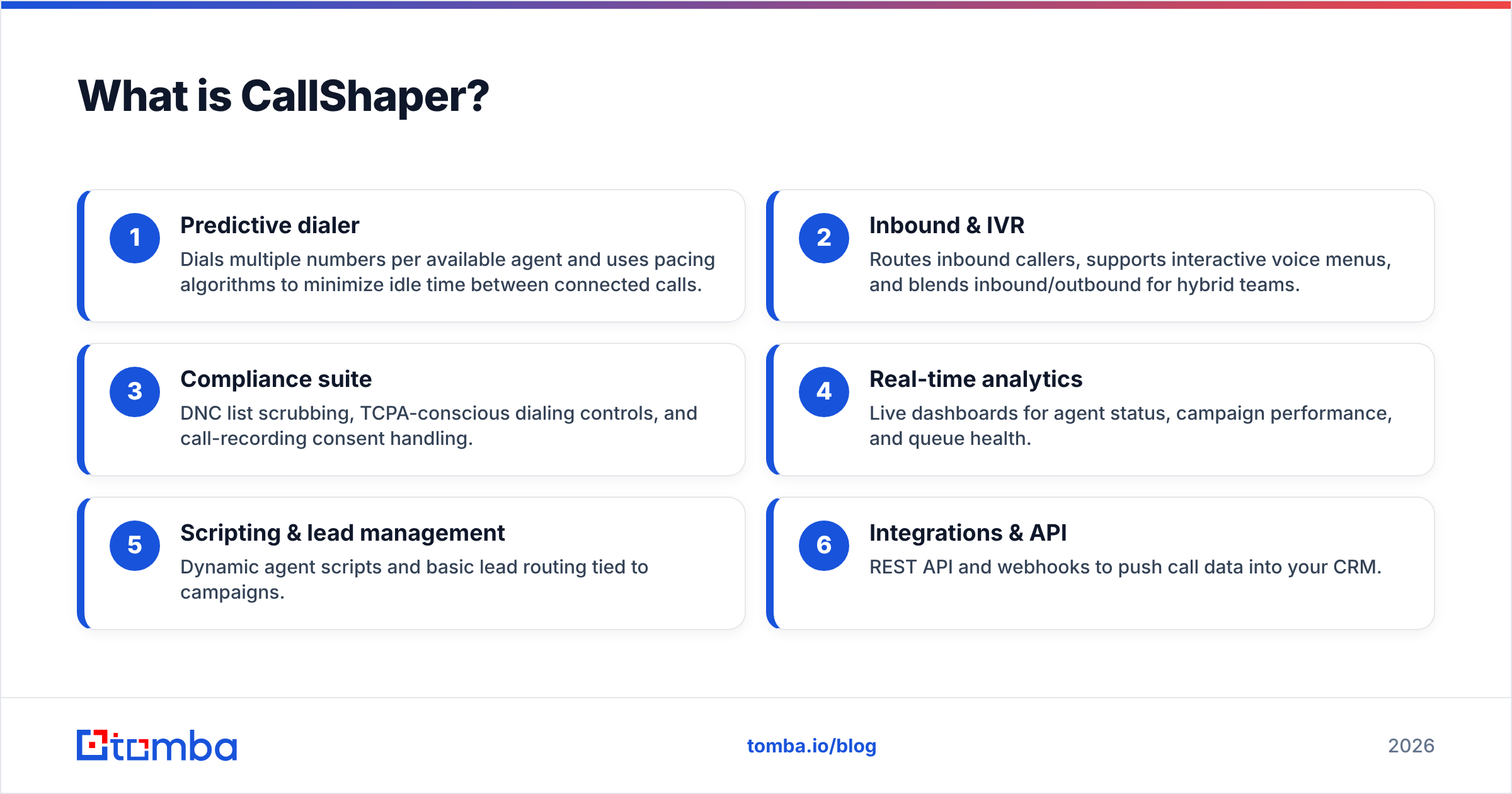
Here is how its core capabilities break down:
- Predictive dialer — Dials multiple numbers per available agent and uses pacing algorithms to minimize idle time between connected calls.
- Inbound & IVR — Routes inbound callers, supports interactive voice menus, and blends inbound/outbound for hybrid teams.
- Compliance suite — DNC list scrubbing, TCPA-conscious dialing controls, and call-recording consent handling.
- Real-time analytics — Live dashboards for agent status, campaign performance, and queue health.
- Scripting & lead management — Dynamic agent scripts and basic lead routing tied to campaigns.
- Integrations & API — REST API and webhooks to push call data into your CRM.

How much does CallShaper cost in 2026?#
CallShaper is priced per seat, billed monthly per user, with a flat rate that is widely reported around $75 per user per month. Unlike many competitors, the headline number includes the dialer plus core compliance and reporting features rather than gating them behind tiers. Larger contact centers negotiate custom enterprise pricing based on seat count and call volume.
A few things to keep in mind about the pricing model:
- There is no public free tier — you request a demo or quote rather than self-serving a trial.
- Telephony/carrier minutes may be billed separately depending on your contract, so the per-seat fee is not always your all-in cost.
- Annual commitments and high seat counts typically unlock discounts that are not published.
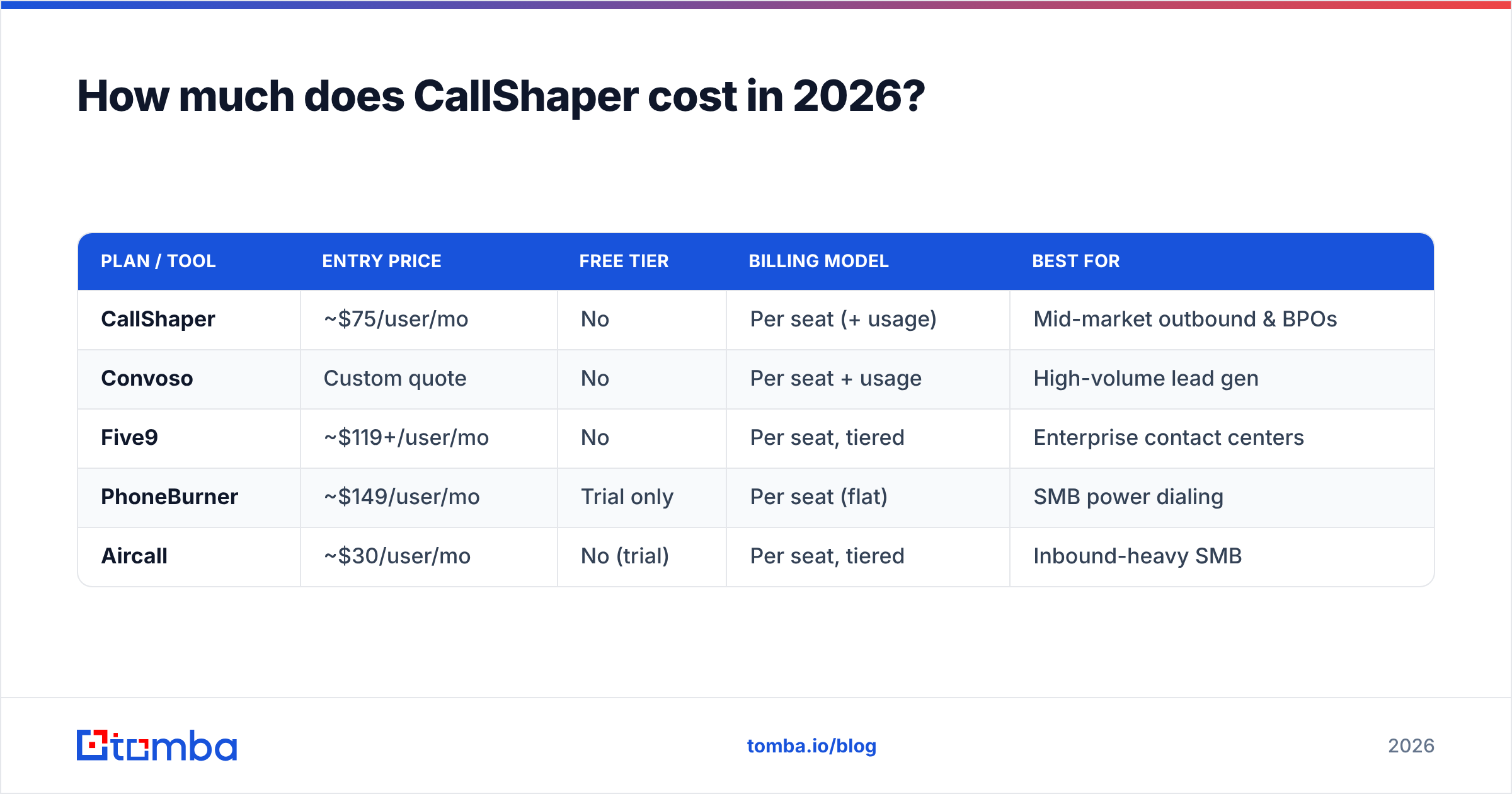
Because dialer pricing is so seat- and volume-dependent, treat any single number as a starting point and get a written quote. Here is how CallShaper's structure compares to common alternatives at a glance:
| Plan / Tool | Entry price | Free tier | Billing model | Best for |
|---|---|---|---|---|
| CallShaper | ~$75/user/mo | No | Per seat (+ usage) | Mid-market outbound & BPOs |
| Convoso | Custom quote | No | Per seat + usage | High-volume lead gen |
| Five9 | ~$119+/user/mo | No | Per seat, tiered | Enterprise contact centers |
| PhoneBurner | ~$149/user/mo | Trial only | Per seat (flat) | SMB power dialing |
| Aircall | ~$30/user/mo | No (trial) | Per seat, tiered | Inbound-heavy SMB |
The takeaway: CallShaper lands in the affordable-mid-market band. It is cheaper per seat than Five9 or PhoneBurner, but unlike Aircall it is purpose-built for outbound predictive dialing rather than inbound support.
What do CallShaper reviews actually say?#
CallShaper holds consistently positive ratings on the major B2B review sites, typically in the 4.5-out-of-5 range. The signal across hundreds of reviews is clear: people like the support and the usability, and they wish call quality and advanced setup were more bulletproof.
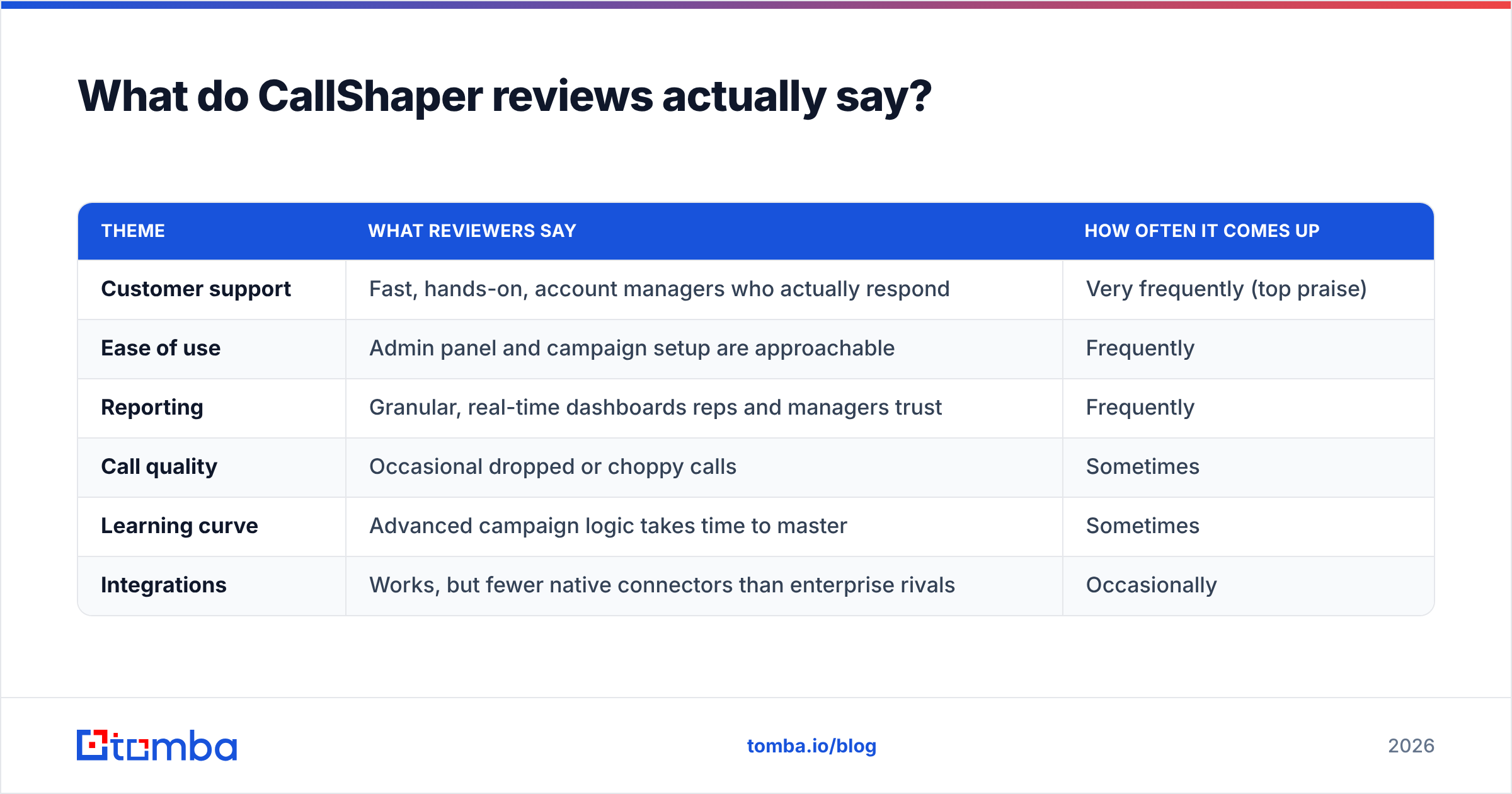
You can read unfiltered feedback on G2 and Capterra before committing. Here is the recurring pattern distilled from public reviews:
| Theme | What reviewers say | How often it comes up |
|---|---|---|
| Customer support | Fast, hands-on, account managers who actually respond | Very frequently (top praise) |
| Ease of use | Admin panel and campaign setup are approachable | Frequently |
| Reporting | Granular, real-time dashboards reps and managers trust | Frequently |
| Call quality | Occasional dropped or choppy calls | Sometimes |
| Learning curve | Advanced campaign logic takes time to master | Sometimes |
| Integrations | Works, but fewer native connectors than enterprise rivals | Occasionally |
The praise: support and simplicity#
The single most repeated compliment is support quality. For a calling floor, downtime is lost revenue, and reviewers consistently note that CallShaper's team resolves issues quickly. The second most common theme is that non-technical managers can build and adjust campaigns without a dedicated admin.
The criticism: call quality and depth#
The most common gripe is intermittent call quality — dropped calls or audio artifacts that, for a dialer, are the cardinal sin. Note that call quality often depends on the carrier and the rep's internet connection as much as the platform. The second theme is depth: power users occasionally hit limits in advanced routing or want more native CRM integrations.
What are the pros and cons of CallShaper?#
Here is the honest balance sheet for CallShaper pricing, reviews, pros and cons in one place.
Pros
- Predictable, mid-market pricing — A flat per-seat rate is easier to budget than usage-heavy enterprise contracts.
- Excellent customer support — The most consistently praised aspect across every review platform.
- Strong predictive dialer — Pacing keeps agent idle time low, which is the entire point of buying a dialer.
- Built-in compliance — DNC scrubbing and TCPA-aware controls reduce regulatory risk for U.S. campaigns.
- Real-time reporting — Live dashboards that managers actually use to coach reps mid-shift.
Cons
- No free tier — You cannot self-serve a trial; everything starts with a sales conversation.
- Occasional call-quality complaints — Worth testing thoroughly during a pilot on your own network.
- Learning curve for advanced features — Simple to start, more involved to master complex campaigns.
- Fewer native integrations than enterprise suites — API exists, but you may build more glue yourself.
- It is not a data source — CallShaper dials the numbers you give it; it does not find or verify them.
That last point is the one most teams underestimate.
Does CallShaper solve your data problem? (It doesn't)#
A dialer is only as good as the list you feed it. CallShaper will happily dial a thousand numbers an hour — but if those numbers are wrong, disconnected, or attached to the wrong person, you are just automating wasted effort faster. Garbage in, garbage dialed.
This is the gap every dialer leaves open. Predictive dialing software assumes you already have accurate, current contact data. In practice, B2B phone and email data decays fast as people change jobs, and stale lists tank connect rates no matter how good your pacing algorithm is.
That is where a dedicated data layer earns its keep. Before a single number hits your CallShaper campaign, you want to:
- Enrich contacts with verified direct-dial numbers using a phone finder so reps reach decision-makers, not switchboards.
- Validate every number with a phone validator to strip disconnected and invalid lines before they waste dialer capacity.
- Pull complete records through data enrichment so the rep sees name, role, company, and email on the screen-pop.
- Add an email channel with a reliable email finder so a missed call becomes a follow-up email instead of a dead end.
Feeding a clean, verified list into CallShaper is the difference between a 5% connect rate and a 25% one. The dialer is the engine; accurate data is the fuel.
How does CallShaper fit into your outbound stack?#
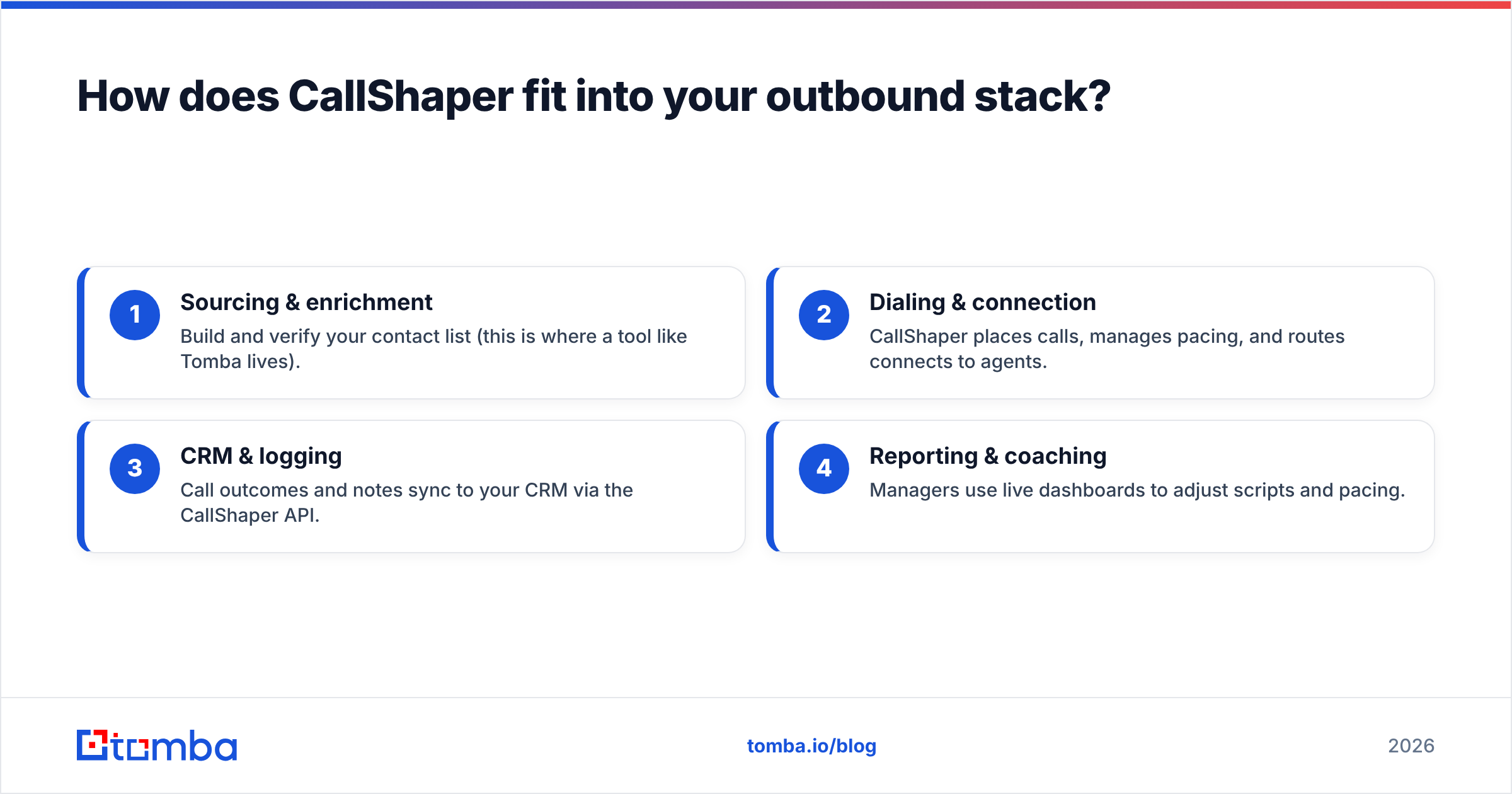
CallShaper sits in the execution layer of an outbound motion. To get value from it, the layers around it have to be solid. A healthy stack looks like this:
- Sourcing & enrichment — Build and verify your contact list (this is where a tool like Tomba lives).
- Dialing & connection — CallShaper places calls, manages pacing, and routes connects to agents.
- CRM & logging — Call outcomes and notes sync to your CRM via the CallShaper API.
- Reporting & coaching — Managers use live dashboards to adjust scripts and pacing.
CallShaper owns step two well. It is genuinely good at the dialing layer. The mistake teams make is assuming the platform also handles step one — it doesn't, and a great dialer running on a bad list still produces bad results.
If you also run cold email alongside calling, your data source should serve both channels. Verifying contacts with an email verifier keeps bounce rates low and protects sender reputation, while accurate direct dials keep your CallShaper agents productive. One clean dataset, two channels.
Is CallShaper worth it in 2026?#
Yes — if you are a mid-market outbound or BPO team that needs a capable predictive dialer with strong support and you accept that you must supply your own clean data. The flat per-seat pricing is fair for what you get, and the review consensus on support and usability is hard to argue with.
It is the wrong choice if you want a free or self-serve trial before committing, if you are primarily an inbound support team (Aircall fits better), or if you expect the dialer to also source and verify contacts. Pricing always comes down to a quote, so pilot it on your own network to test call quality before you sign.
For a quick decision:
- Choose CallShaper if predictive dialing, compliance, and responsive support are your priorities.
- Look at Aircall if you are inbound-heavy and want lighter setup.
- Look at Five9 or Convoso if you are a large enterprise contact center.
- In every case, invest in a data source first — the dialer is downstream of data quality.
Get accurate data into your dialer with Tomba#
CallShaper can dial faster than your reps ever could by hand — but speed only pays off when the numbers are real and the person on the other end is who you think it is. Before your next campaign, enrich and verify your list with Tomba. Use the Tomba Email Finder and phone tools to build a clean, verified contact set, then push it into CallShaper so every dial has a real shot at a connection. Start free with 25 searches a month, and check Tomba pricing — Starter is $49/mo — when you are ready to scale your outbound data. Feed the dialer better data, and watch your connect rate follow.
// get started
Find, verify and enrich your first contacts today
Start on the free plan with 25 searches a month, then scale when your team is ready.
Free plan · No credit card required · GDPR & CCPA
// about the author