CallTools Pricing, Reviews, Pros and Cons (2026 Guide)
An honest, numbers-first breakdown of CallTools pricing, real user reviews, and the pros and cons before you commit a sales team to it in 2026.
CallTools Pricing, Reviews, Pros and Cons (2026 Guide)
TL;DR
- CallTools is a cloud-based contact center and predictive dialer aimed at outbound sales and high-volume calling teams, not a per-seat softphone for casual users.
- Pricing is quote-based — there is no public self-serve price page, and most reviewers report a per-seat model that lands in the mid-to-high range once minutes and numbers are added.
- Reviewers praise the predictive/power dialer, list management, and call analytics; the most common complaints are onboarding complexity, occasional call-quality dips, and unpredictable add-on costs.
- It is strong for teams that already have clean, dialable lists — and weak as a standalone data source, because the dialer is only as good as the phone numbers you feed it.
- If your bottleneck is finding and verifying B2B phone numbers and emails, pair any dialer with a data layer like Tomba rather than expecting the dialer to fix bad data.
What is CallTools?#
CallTools is a cloud contact center platform built around outbound calling. Think of it as the engine room of a call floor: it loads your contact lists, dials numbers automatically, routes live answers to available reps, and records everything for coaching and compliance. Its headline feature is the predictive dialer, which calls multiple numbers at once and only connects a rep when a human picks up — so reps spend more time talking and less time listening to ringtones.
Around that core, CallTools bundles the usual contact-center toolkit: inbound IVR and call routing, a built-in CRM-lite contact manager, list scrubbing, local caller ID, SMS, call recording, and a real-time analytics dashboard. It competes with platforms like Five9, PhoneBurner, and Kixie, and it markets heavily to outbound sales, lead-gen agencies, real estate, insurance, and collections teams.
What CallTools is not: it is not a data provider. It dials the numbers you give it. If those numbers are wrong, disconnected, or belong to the wrong person, no dialer can save the conversation. That distinction matters for the pricing math later — you are paying for throughput, not for accurate contacts.
How much does CallTools cost in 2026?#
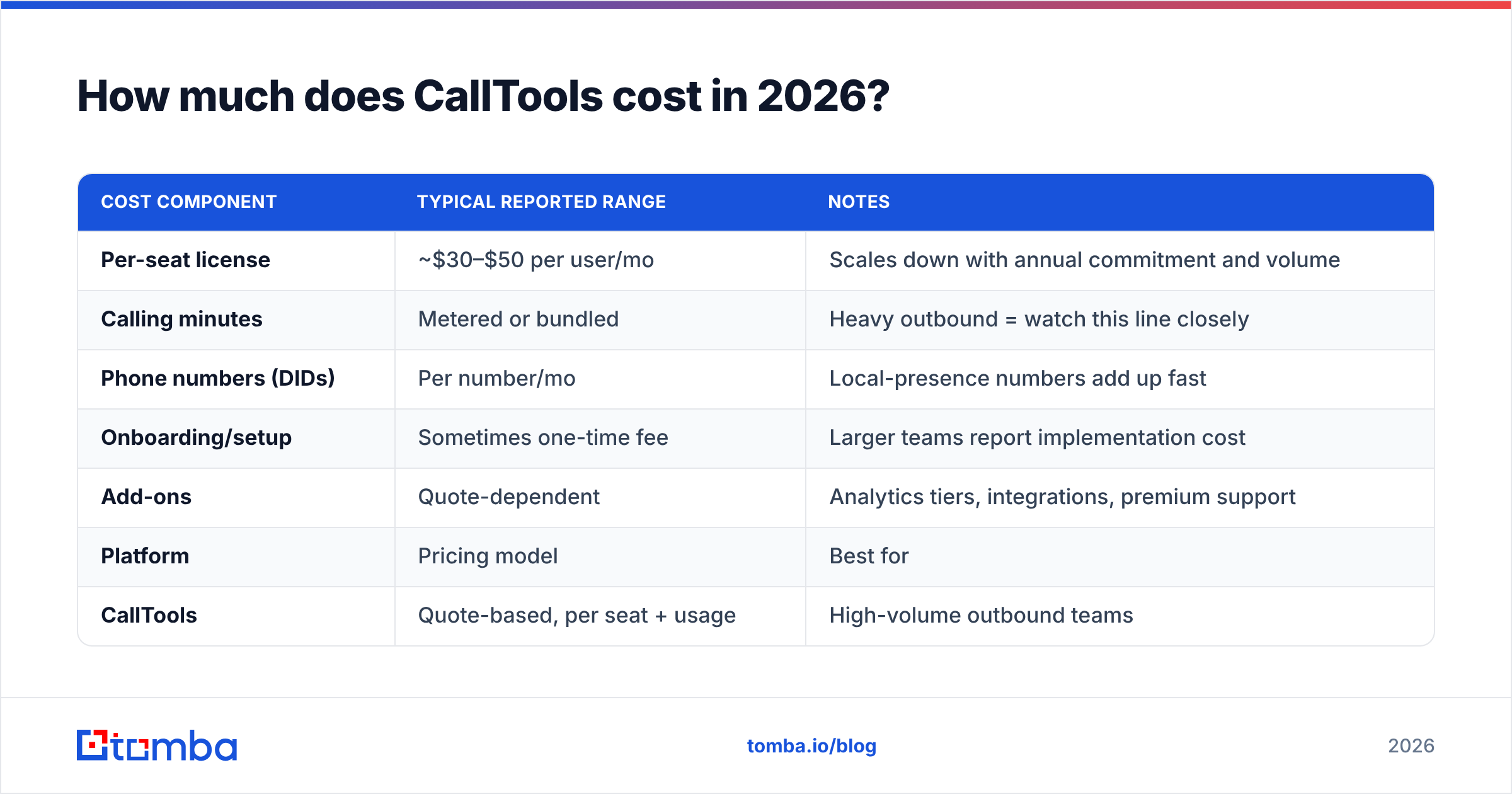
The honest answer: CallTools does not publish a public price. Pricing is quote-based and configured per team, so anyone promising you an exact monthly figure online is guessing. What follows is a synthesis of publicly reported figures from review sites and user threads — treat it as a planning range, then confirm with a live quote.
Most reviewers describe a per-seat monthly license plus usage-based costs for calling minutes and phone numbers. The variables that move your bill are seat count, included vs. metered minutes, the number of local DID numbers you rent, and add-ons like advanced analytics or dedicated support.
| Cost component | Typical reported range | Notes |
|---|---|---|
| Per-seat license | ~$30–$50 per user/mo | Scales down with annual commitment and volume |
| Calling minutes | Metered or bundled | Heavy outbound = watch this line closely |
| Phone numbers (DIDs) | Per number/mo | Local-presence numbers add up fast |
| Onboarding/setup | Sometimes one-time fee | Larger teams report implementation cost |
| Add-ons | Quote-dependent | Analytics tiers, integrations, premium support |
Because the published number is a quote, the most useful comparison is total cost of ownership, not sticker price. A "cheap" seat price means little if metered minutes and number rentals double the invoice. When you request a quote, ask for an all-in monthly estimate at your real call volume, not the base seat rate.
For context, here is how CallTools' model compares to two common alternatives at a structural level:
| Platform | Pricing model | Best for | Public pricing? |
|---|---|---|---|
| CallTools | Quote-based, per seat + usage | High-volume outbound teams | No |
| PhoneBurner | Published per-seat tiers | SMB power dialing | Yes |
| Five9 | Quote-based, per seat + usage | Enterprise contact centers | No |
| Kixie | Published tiers + PowerCall | CRM-connected sales teams | Partial |
The takeaway: CallTools sits with the enterprise-style "call us for a number" crowd. That is fine if you are running a real call floor, but it means you cannot quietly trial it at a known price the way you can with a published-tier competitor.
What do CallTools reviews actually say?#
Across G2 and Capterra, CallTools generally scores well, and the praise clusters around a few consistent themes. So do the complaints. Here is the balanced read.
What reviewers consistently like:
- The dialer throughput. The predictive and power dialer modes are the most-praised feature — teams report meaningful jumps in connect rates and talk time once campaigns are tuned.
- List and campaign management. Uploading, segmenting, and scrubbing lists is straightforward, and reviewers like the control over dialing pace and caller ID.
- Responsive support during setup. Many reviews single out account managers who help configure campaigns, which softens the steeper learning curve.
- Analytics and call recording. Real-time dashboards and recordings make coaching and QA practical for managers running multiple reps.
What reviewers consistently flag:
- Onboarding complexity. The platform is deep, and several reviewers describe a non-trivial ramp before reps are productive.
- Call-quality variability. A minority report intermittent audio issues or dropped calls — usually tied to connectivity or number reputation rather than the platform alone.
- Cost unpredictability. Because pricing is quote-based with usage components, some teams report bills that grew faster than expected.
- Data quality is on you. A recurring undercurrent: the dialer is excellent at calling numbers, and useless against a list full of dead or wrong numbers.
That last point is the one most buyers underestimate. A predictive dialer amplifies whatever list you feed it — including its errors. Burn through 1,000 stale numbers faster, and you have just reached more wrong people, faster.
Is CallTools worth it? Pros and cons#
Here is the structured verdict, weighing what you get against what you pay and tolerate.
| Pros | Cons |
|---|---|
| Powerful predictive/power dialer with high talk-time | No public pricing — must request a quote |
| Strong list management and campaign controls | Usage-based costs can be unpredictable |
| Solid analytics, recording, and coaching tools | Steeper onboarding than lightweight dialers |
| Local caller ID and inbound routing included | Occasional call-quality complaints |
| Good fit for agencies and high-volume floors | Not a data source — needs clean lists to shine |
Who CallTools is right for: outbound-heavy teams — lead-gen agencies, real estate, insurance, collections — that dial in serious volume, have a manager tuning campaigns, and already maintain reasonably clean, compliant contact lists. For that profile, the throughput justifies the quote.
Who should look elsewhere: a small team making a few dozen calls a day, anyone who wants a published price and a same-day self-serve trial, or a team whose real problem is not having good numbers to call in the first place. A dialer does not solve a data problem.

Why does data quality matter more than the dialer?#
Conclusion first: the dialer multiplies your data, it does not improve it. If 30% of your list is wrong numbers, a predictive dialer just helps you reach those wrong numbers 30% faster. The economics of any calling platform — CallTools included — are dominated by connect rate, and connect rate is a data problem long before it is a dialer setting.
Think of it like a sports car. CallTools is a fast engine, but if you pour in contaminated fuel, you do not get a fast car — you get an expensive breakdown. Clean, verified phone numbers are the fuel.
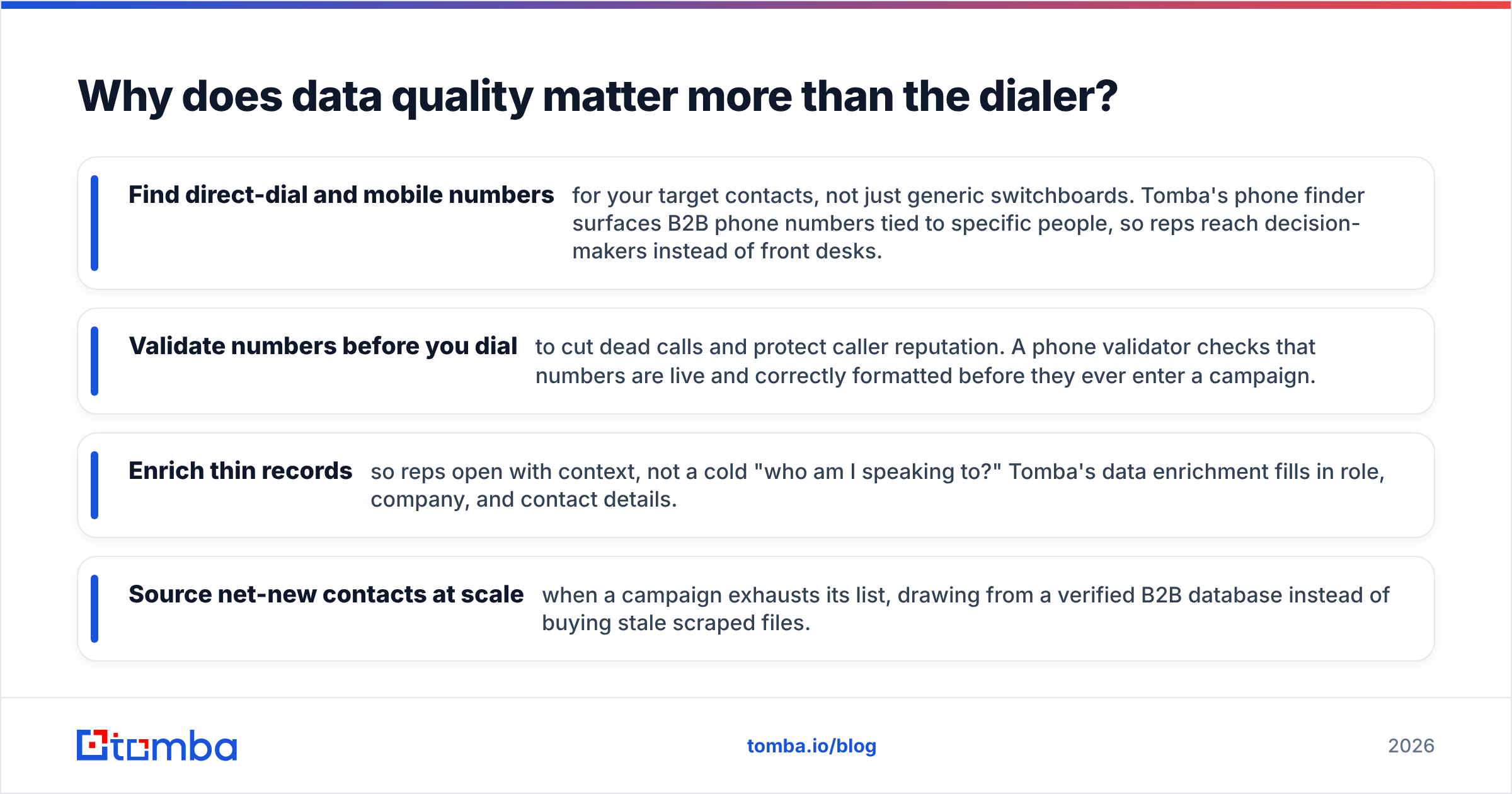
This is where a dedicated data layer earns its place alongside the dialer. Before a list ever hits CallTools, you want to:
- Find direct-dial and mobile numbers for your target contacts, not just generic switchboards. Tomba's phone finder surfaces B2B phone numbers tied to specific people, so reps reach decision-makers instead of front desks.
- Validate numbers before you dial to cut dead calls and protect caller reputation. A phone validator checks that numbers are live and correctly formatted before they ever enter a campaign.
- Enrich thin records so reps open with context, not a cold "who am I speaking to?" Tomba's data enrichment fills in role, company, and contact details.
- Source net-new contacts at scale when a campaign exhausts its list, drawing from a verified B2B database instead of buying stale scraped files.
Feed a tuned predictive dialer a verified, enriched list and the platform's strengths finally show up in your numbers. Feed it a bad list and you will blame the dialer for a problem it never caused.
How should you evaluate CallTools before buying?#
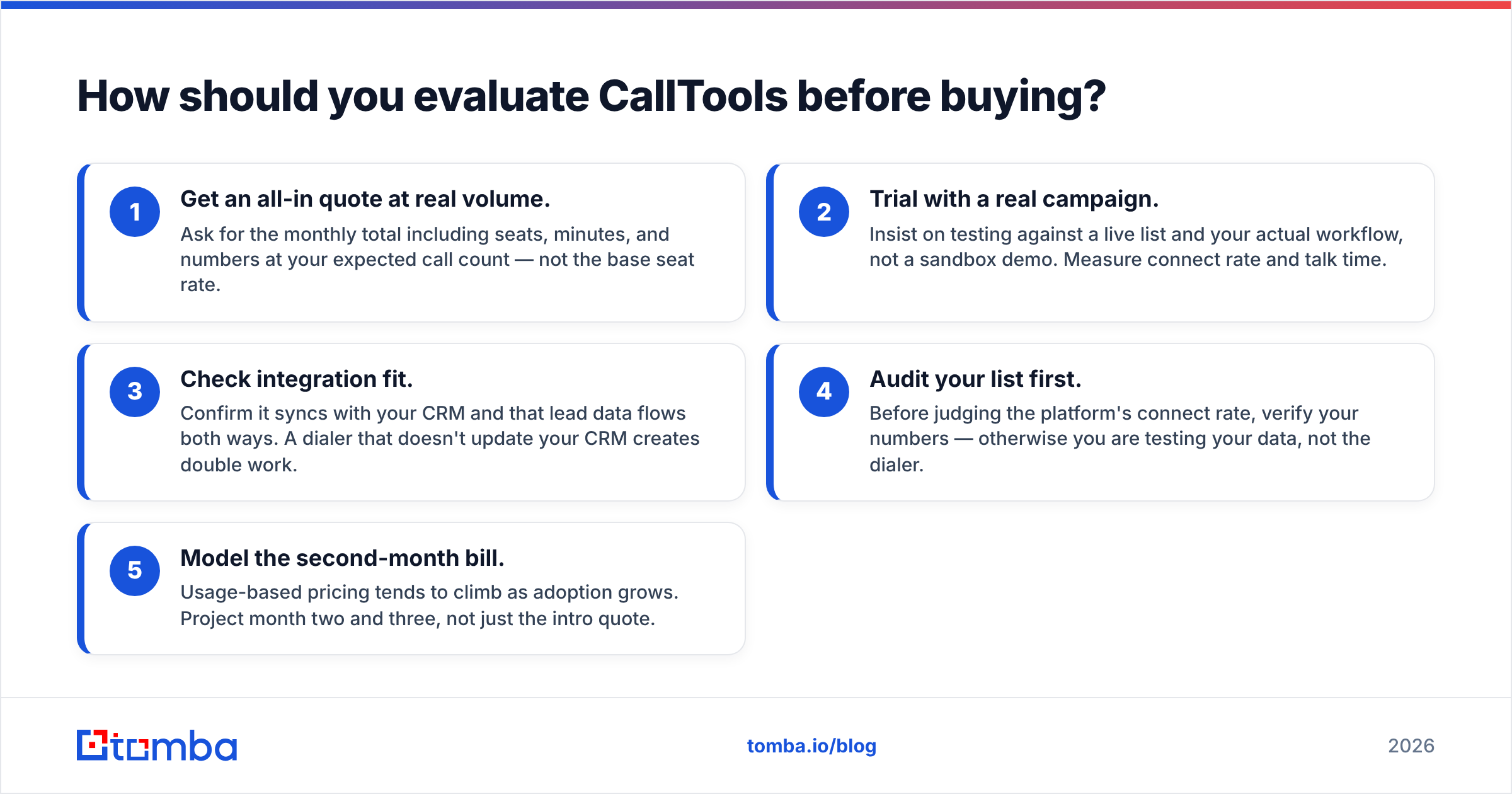
Run this short due-diligence checklist before you sign anything:
- Get an all-in quote at real volume. Ask for the monthly total including seats, minutes, and numbers at your expected call count — not the base seat rate.
- Trial with a real campaign. Insist on testing against a live list and your actual workflow, not a sandbox demo. Measure connect rate and talk time.
- Check integration fit. Confirm it syncs with your CRM and that lead data flows both ways. A dialer that doesn't update your CRM creates double work.
- Audit your list first. Before judging the platform's connect rate, verify your numbers — otherwise you are testing your data, not the dialer.
- Model the second-month bill. Usage-based pricing tends to climb as adoption grows. Project month two and three, not just the intro quote.
Do steps 1 and 4 in particular and you will avoid the two most common regrets in CallTools reviews: surprise costs and disappointing connect rates that were really a data problem.
CallTools vs. the build-your-own stack#
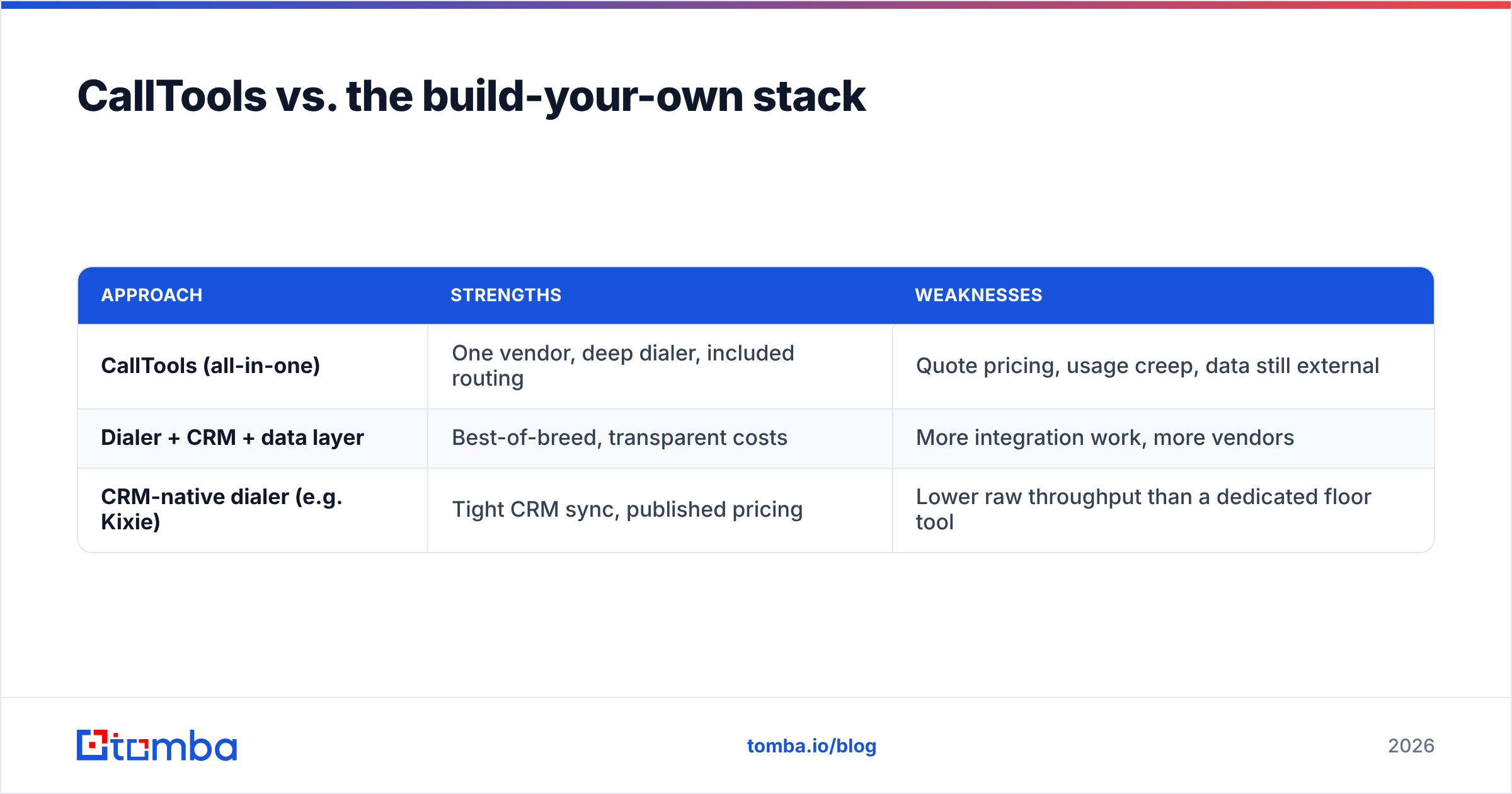
Some teams skip an all-in-one and assemble a stack: a lighter dialer, a CRM, and a data provider. The trade-off is integration overhead versus cost control and best-of-breed pieces.
| Approach | Strengths | Weaknesses |
|---|---|---|
| CallTools (all-in-one) | One vendor, deep dialer, included routing | Quote pricing, usage creep, data still external |
| Dialer + CRM + data layer | Best-of-breed, transparent costs | More integration work, more vendors |
| CRM-native dialer (e.g. Kixie) | Tight CRM sync, published pricing | Lower raw throughput than a dedicated floor tool |
There is no universally correct answer — but notice that every row still needs a data layer. Whether you buy CallTools or build a stack, the contacts have to come from somewhere accurate. That is the constant across all three options.
Frequently asked questions#
Does CallTools have a free trial? CallTools does not publish a standard self-serve free trial the way published-tier competitors do. Evaluation is typically arranged through sales as part of a demo and quote. Ask specifically for a trial against your own list.
Is CallTools good for cold calling? Yes, for high-volume cold calling it is one of its core use cases — the predictive dialer is built for exactly that. Its value depends heavily on the quality and compliance of the lists you dial.
How much does CallTools cost per month? There is no public price. Reported figures suggest a per-seat license in the rough range of $30–$50/user/month plus usage for minutes and numbers, but you must request a quote for an accurate, all-in total.
Can CallTools find phone numbers for me? No. CallTools dials the numbers you provide; it is not a data source. To source and verify B2B numbers, pair it with a tool like a phone finder.
The bottom line#
CallTools is a capable, throughput-focused contact center platform that rewards teams dialing at real volume — provided you go in with eyes open on quote-based pricing, a non-trivial onboarding curve, and the hard truth that the dialer only amplifies the data you feed it. Compare the all-in cost at your actual volume, trial it against a live campaign, and never judge its connect rate on a list you haven't verified.
If your real constraint is reaching the right people, fix the data before you buy the dialer. Start with verified, enriched contacts: use Tomba's Phone Finder to source direct B2B numbers and pair it with the phone validator so every record that reaches your dialer is live and worth a rep's time. A great dialer plus a clean list beats a great dialer alone — every campaign, every month. See Tomba pricing to size the data layer alongside whatever calling platform you choose.
// get started
Find, verify and enrich your first contacts today
Start on the free plan with 25 searches a month, then scale when your team is ready.
Free plan · No credit card required · GDPR & CCPA
// about the author