Calltools vs Readymode 2026: Best Call Center Dialer?
Calltools vs Readymode compared on dialer modes, pricing, compliance, and CRM fit — plus how to feed either platform clean B2B phone data that actually connects.
Choosing between Calltools and Readymode comes down to one question: do you want a flexible cloud dialer you can bolt onto an existing stack, or an all-in-one call center platform with a CRM baked in? Both move outbound dials faster than a manual dialer ever could, but they solve slightly different problems for slightly different teams.
This guide breaks down the real differences — dialer modes, pricing posture, compliance tooling, integrations, and the kind of team each one fits — so you can pick without sitting through two sales demos. It also covers the part most dialer reviews skip: the contact data you feed the machine matters more than the machine itself.
TL;DR — Calltools vs Readymode at a glance#
- Calltools is a flexible cloud-based predictive and power dialer that's strong on call routing, analytics, and integrating with your existing CRM. Best for teams that already have a system of record.
- Readymode (formerly XenCALL) is an all-in-one predictive dialer with a built-in CRM, best for call centers that want one platform instead of stitching tools together.
- Pricing: both lean toward custom/seat-based quotes rather than transparent public tiers — expect to talk to sales. Readymode often lands cheaper per seat for high-volume rooms; Calltools wins on configurability.
- The real lever is data. A 30-line/minute predictive dialer burning through stale numbers just hits more voicemails faster. Clean, verified phone and email data is what actually moves connect rates.
- Verdict: Calltools for integration-first teams, Readymode for all-in-one call centers. Neither sources contact data — that's where a tool like Tomba fits in.

What is Calltools?#
Calltools is a cloud-based contact center platform built around outbound dialing. Its core is a configurable dialer that supports predictive, power, and preview modes, wrapped in call routing, IVR, voicemail drops, local caller ID, and real-time analytics dashboards.
The platform's pitch is flexibility. Calltools is the option you reach for when you already run a CRM — Salesforce, HubSpot, Pipedrive — and you want a dialing layer that plugs into it rather than replacing it. Its API and webhook support let you push call outcomes back into your system of record, and its reporting is granular enough for managers who live in dashboards.
Where Calltools shines:
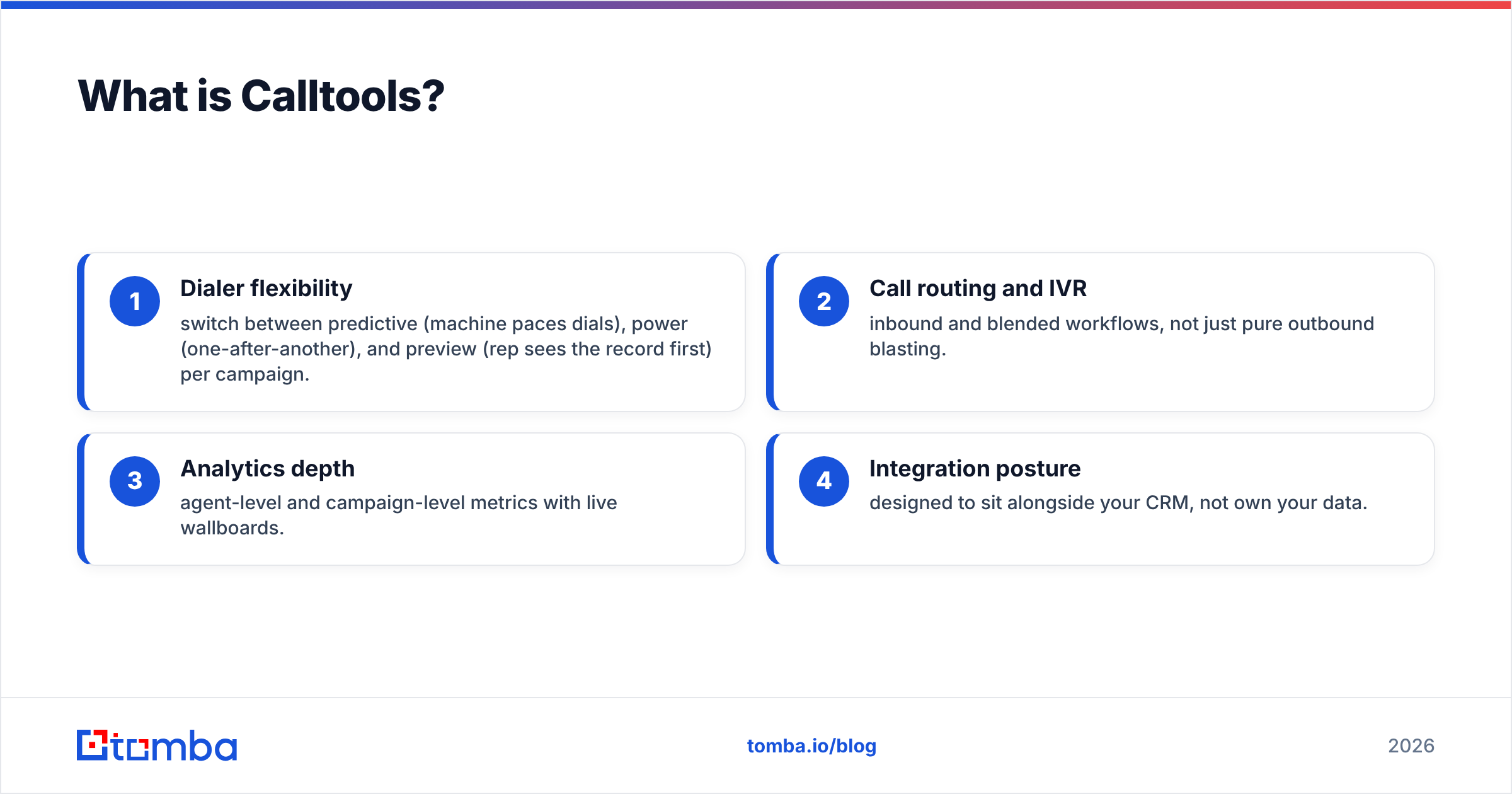
- Dialer flexibility — switch between predictive (machine paces dials), power (one-after-another), and preview (rep sees the record first) per campaign.
- Call routing and IVR — inbound and blended workflows, not just pure outbound blasting.
- Analytics depth — agent-level and campaign-level metrics with live wallboards.
- Integration posture — designed to sit alongside your CRM, not own your data.
The trade-off: because Calltools assumes you bring your own CRM, teams without one will feel the gap. You're configuring a dialer, not adopting a turnkey call center in a box.
What is Readymode?#
Readymode is an all-in-one predictive dialer with a CRM built directly into the platform. It started life as XenCALL and rebranded, but the DNA is the same: give a call center one place to manage leads, dial them predictively, log dispositions, and report on results without leaving the app.
Readymode targets high-volume outbound rooms — insurance, lead gen, debt, home services, and similar industries where agents make hundreds of dials a day. The predictive dialer is the headline feature, designed to keep talk time high by dialing multiple numbers per available agent and connecting live answers instantly.
Because the CRM is native, lead management, call dispositions, callbacks, and pipeline all live in one system. For a call center owner who doesn't want to integrate three tools, that's the whole appeal. You can read more about how CRM systems anchor a sales stack, but the short version is that Readymode tries to be both your dialer and your database.
The trade-off runs opposite to Calltools: you get an all-in-one, but you're adopting Readymode's CRM whether you love it or not. Teams with an entrenched Salesforce org may find the native CRM redundant or limiting.
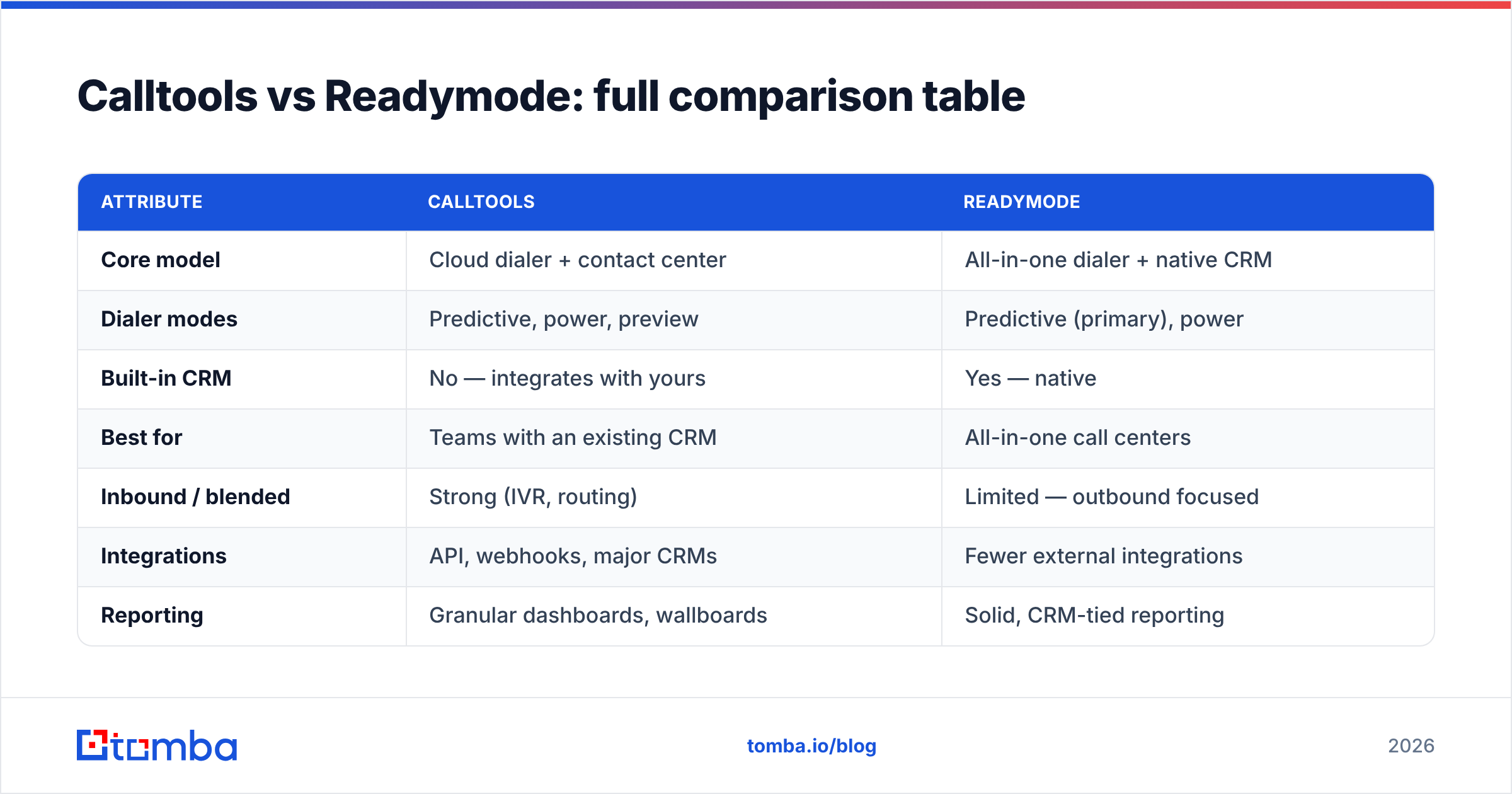
Calltools vs Readymode: full comparison table#
Here's the head-to-head on the attributes that actually drive a buying decision.
| Attribute | Calltools | Readymode |
|---|---|---|
| Core model | Cloud dialer + contact center | All-in-one dialer + native CRM |
| Dialer modes | Predictive, power, preview | Predictive (primary), power |
| Built-in CRM | No — integrates with yours | Yes — native |
| Best for | Teams with an existing CRM | All-in-one call centers |
| Inbound / blended | Strong (IVR, routing) | Limited — outbound focused |
| Integrations | API, webhooks, major CRMs | Fewer external integrations |
| Reporting | Granular dashboards, wallboards | Solid, CRM-tied reporting |
| Pricing model | Seat-based, contact sales | Seat-based, contact sales |
| Typical industries | Mixed B2B/B2C outbound | Insurance, lead gen, home services |
| Learning curve | Moderate (config-heavy) | Moderate (all-in-one) |
The pattern is clear: Calltools is the modular pick and Readymode is the bundled pick. Neither is objectively "better" — they're optimized for different buying philosophies.
Is Calltools better than Readymode?#
It depends on whether you already own a CRM. Calltools is better if you do; Readymode is better if you don't.
If your team runs Salesforce, HubSpot, or Pipedrive and wants a dialer that respects that system of record, Calltools is the cleaner fit. You keep your data model, your automations, and your reporting hub, and you add a powerful dialing and routing layer on top. The Salesforce integration and HubSpot integration patterns most teams already rely on stay intact.
If you're standing up a new call center or you're tired of paying for a separate CRM, Readymode's all-in-one model removes a whole category of integration headaches. One login, one bill, one support team. For a 20-seat insurance room dialing purchased lists, that simplicity is worth real money.
The honest answer most vendors won't give you: the dialer is rarely the bottleneck. A predictive dialer doing 40 lines a minute against a list of dead numbers just reaches voicemail faster and torches your sender reputation equivalent for phone — your caller ID gets flagged as spam. The constraint is almost always data quality.
How much do Calltools and Readymode cost?#
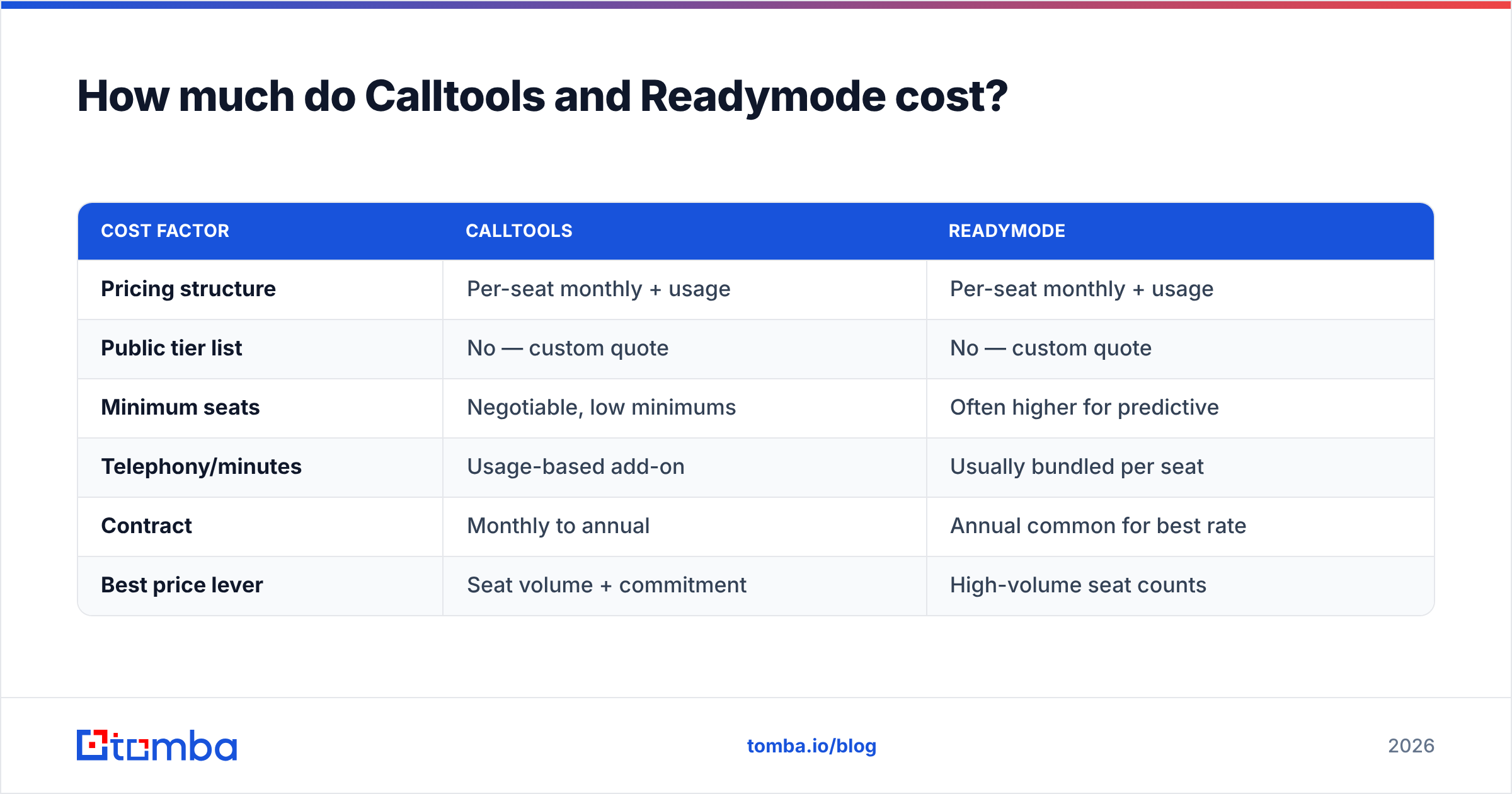
Neither publishes fully transparent pricing — both route you to a sales conversation, which is standard for contact-center software priced per seat and per usage. Here's what to expect when you get the quote.
| Cost factor | Calltools | Readymode |
|---|---|---|
| Pricing structure | Per-seat monthly + usage | Per-seat monthly + usage |
| Public tier list | No — custom quote | No — custom quote |
| Minimum seats | Negotiable, low minimums | Often higher for predictive |
| Telephony/minutes | Usage-based add-on | Usually bundled per seat |
| Contract | Monthly to annual | Annual common for best rate |
| Best price lever | Seat volume + commitment | High-volume seat counts |
A few practical notes. Calltools tends to be more accommodating for smaller teams and blended inbound/outbound use, with usage-based telephony that scales with your actual dial volume. Readymode often quotes more aggressively per seat for large predictive-dialing rooms, since that's its core market.
Always confirm what's included: number provisioning, local caller ID / local presence, recording storage, and compliance tooling can be line items or bundled depending on the deal. Get the all-in monthly number, not just the per-seat rate.
Which dialer is more compliant (TCPA, DNC, consent)?#
Both platforms ship compliance tooling, but you remain the compliant party — software is a tool, not a shield. For U.S. outbound, the TCPA and Do-Not-Call rules govern how and whom you can dial, and penalties are per-call.
What to verify in either platform:
- DNC scrubbing — can it suppress numbers against federal and internal DNC lists automatically?
- Consent tracking — does it log opt-ins and time-of-consent on the record?
- Calling-window enforcement — does it respect local time zones and legal calling hours per lead?
- Abandoned-call controls — predictive dialers must cap abandonment rates; confirm the platform enforces a safe threshold.
- Recording disclosures — automated two-party consent announcements where required.
Readymode's native CRM means consent and disposition data live in one place, which simplifies audit trails. Calltools relies on your connected CRM to be the source of truth for consent — fine if your CRM hygiene is good, risky if it isn't. Either way, compliant dialing starts with a clean, permissioned list, not with the dialer.
What about data quality and connect rates?#
This is the section that decides your ROI, and it has nothing to do with which dialer you pick. Connect rate — the percentage of dials that reach a live human — is the number that determines whether your agents talk to prospects or to dial tones.
Connect rates collapse for three reasons:
- Stale numbers — B2B phone data decays roughly 30% a year as people change jobs.
- Wrong contact — dialing the main line instead of the decision-maker's direct number.
- Spam-flagged caller ID — hammering bad lists gets your numbers labeled "Scam Likely."
No dialer fixes any of these. They're upstream data problems. The fix is verified, enriched contact data — accurate direct-dial numbers paired with the right person — before the list ever hits Calltools or Readymode. That's where a data layer like Tomba's phone finder and data enrichment come in: you find and validate B2B phone numbers, then push a clean list into your dialer of choice.
Pairing accurate phone data with email also lets you run multi-channel sequences — call, then follow up by email — which lifts overall response rate well beyond what dialing alone delivers. A rep who can find the direct number and the verified email address works a lead from two angles instead of one.
How do you feed clean data into Calltools or Readymode?#
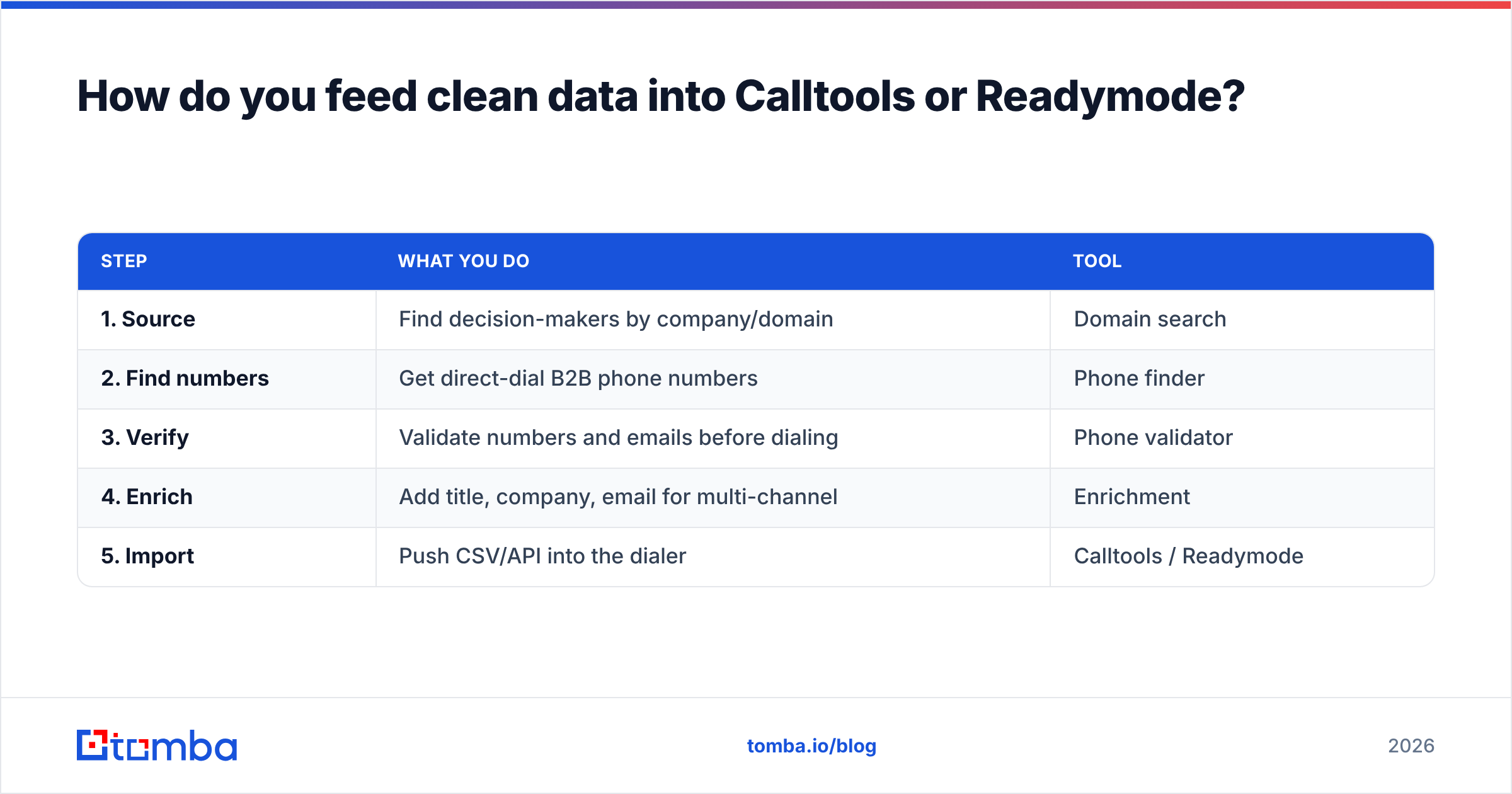
The workflow is the same regardless of which dialer you choose. Build the list, verify it, enrich it, then import.
| Step | What you do | Tool |
|---|---|---|
| 1. Source | Find decision-makers by company/domain | Domain search |
| 2. Find numbers | Get direct-dial B2B phone numbers | Phone finder |
| 3. Verify | Validate numbers and emails before dialing | Phone validator |
| 4. Enrich | Add title, company, email for multi-channel | Enrichment |
| 5. Import | Push CSV/API into the dialer | Calltools / Readymode |
In practice, you start with a domain search to pull the right contacts at a target account, layer in a phone validator pass to drop dead numbers, and enrich each record so your agents see who they're calling and why. Then the dialer does what it's good at — pacing dials — against a list that's actually worth dialing.
The same hygiene applies to the email side of any outbound motion. If you're running call-plus-email cadences, verifying addresses with an email verifier before you send protects your domain the way DNC scrubbing protects your caller ID.
Calltools vs Readymode: which should you choose?#
Pick based on your existing stack and your team's shape:
- Choose Calltools if you already run a CRM you like, you need blended inbound/outbound, and you value configurability and integration over an all-in-one bundle.
- Choose Readymode if you're a high-volume outbound call center, you want one platform for dialing and lead management, and you'd rather not integrate multiple tools.
- Choose neither yet if your contact lists are unverified — fix the data first, because the best dialer in the world can't dial a number that doesn't ring.
Both are credible platforms with real customers and solid uptime. Read current user reviews on G2 and Capterra to sanity-check support quality and recent product changes, since dialer feature sets shift quarter to quarter. But weight your decision toward your data strategy, not the demo dazzle — the dialer is the easy part to swap; the list is what makes or breaks the quarter.
Power your dialer with data that connects#
Whichever dialer wins your evaluation, it's only as good as the numbers you load into it. Tomba's Tomba Email Finder and phone finder help you build verified, enriched contact lists — accurate direct-dial numbers and professional emails for the exact decision-makers you want to reach — so Calltools or Readymode spends its dials on live humans, not dead lines.
Start free with 25 searches a month, then scale up: the Starter plan is $49/mo and the Growth plan is $99/mo. Check full Tomba pricing to match a tier to your call volume. Build the clean list first, plug it into your dialer, and let your agents do what they were hired to do — talk to people who actually pick up.
// get started
Find, verify and enrich your first contacts today
Start on the free plan with 25 searches a month, then scale when your team is ready.
Free plan · No credit card required · GDPR & CCPA
// about the author