Campaign Click Rate Tracking: A Complete 2026 Guide
Opens lie. Clicks don't. Here's how to set up campaign click rate tracking that survives Apple MPP, ties CTR to revenue, and tells you which emails actually work in 2026.
Open rates broke in 2021, and most teams still haven't noticed. Apple Mail Privacy Protection started pre-loading images, inflating opens with phantom engagement. The metric that survived is the click. If someone clicks, they did something deliberate, and that intent is the closest signal to revenue you can get before a reply lands.
This guide is about building campaign click rate tracking that you can actually trust — the kind that tells you which subject lines, segments, and CTAs move pipeline, not the kind that looks good in a Monday slide.
TL;DR#
- Open rate is a vanity metric in 2026. Apple MPP and bot-prefetch inflate it. Click rate (CTR) and click-to-open rate (CTOR) are the signals that correlate with real intent.
- Two clicks matter: raw click rate (clicks ÷ delivered) measures the whole campaign; CTOR (clicks ÷ opens) isolates how persuasive your body copy and CTA are.
- Tracking breaks silently — link redirects, UTM gaps, bot clicks from security scanners, and dirty lists all corrupt the number before you ever see it.
- Clean data is upstream of clean metrics. Bounces and spam-trap hits don't just hurt deliverability; they poison your denominator and make CTR meaningless.
- Tie every click to a UTM + CRM record so click rate becomes a revenue conversation, not a marketing trivia stat.
What is campaign click rate tracking?#
Campaign click rate tracking is the practice of measuring, attributing, and acting on every link click inside an email campaign. At its simplest it answers one question: of the people who received this email, what share clicked a link?
Think of it like a store with a window display. Open rate tells you how many people glanced at the window. Click rate tells you how many actually opened the door and walked in. Only one of those groups can buy something.
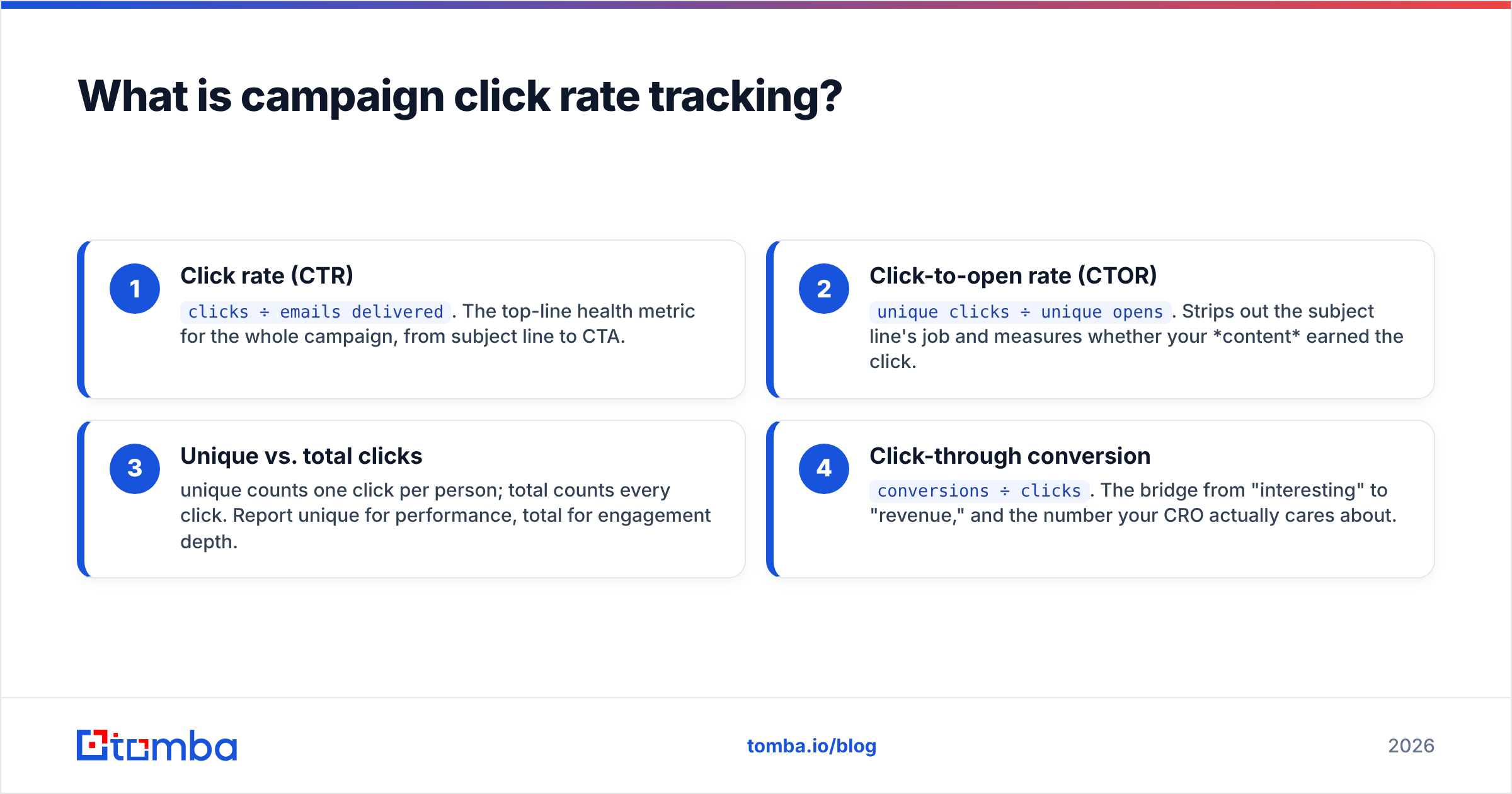
There are two numbers you need to track, and conflating them is the most common mistake teams make:
- Click rate (CTR) —
clicks ÷ emails delivered. The top-line health metric for the whole campaign, from subject line to CTA. - Click-to-open rate (CTOR) —
unique clicks ÷ unique opens. Strips out the subject line's job and measures whether your content earned the click. - Unique vs. total clicks — unique counts one click per person; total counts every click. Report unique for performance, total for engagement depth.
- Click-through conversion —
conversions ÷ clicks. The bridge from "interesting" to "revenue," and the number your CRO actually cares about.
Track all four and you can pinpoint where a campaign leaks. A high open but low CTOR means your subject overpromised. A high CTOR but low conversion means the email was great and the landing page wasn't.
Why did open rate stop being trustworthy?#
Because machines started opening your email. When Apple rolled out Mail Privacy Protection, Apple Mail clients began pre-fetching tracking pixels regardless of whether a human ever saw the message. Since Apple Mail and iPhone account for a huge share of opens, your open rate quietly became a blend of real readers and silent robots.
Security gateways made it worse. Corporate spam filters and link scanners "click" every URL in an inbound email to check it's safe — before the recipient sees the message. That inflates clicks too, which is why naive click tracking can be just as misleading as open tracking if you don't filter bot activity.
The practical upshot: you need to measure clicks, and you need to clean the click data. Both halves matter. A click rate built on a list full of dead addresses and scanner bots is a number that feels precise and means nothing. Good email deliverability and a verified list are the foundation the whole metric sits on.
What is a good campaign click rate in 2026?#
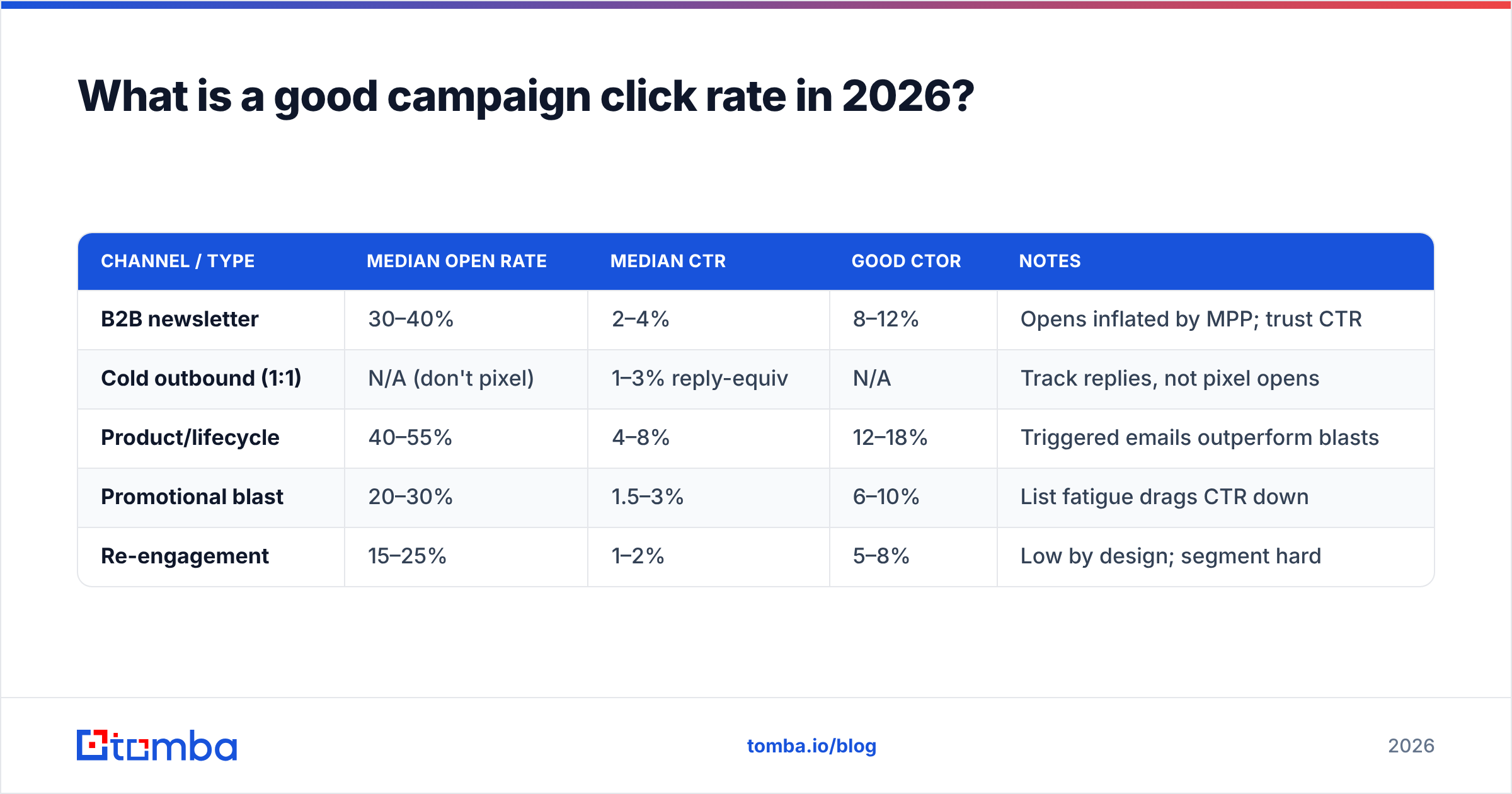
It depends on channel, list quality, and industry — but here are working benchmarks. Cross-reference with public data from Mailchimp's email benchmark report and HubSpot's marketing statistics before you set internal targets.
| Channel / Type | Median open rate | Median CTR | Good CTOR | Notes |
|---|---|---|---|---|
| B2B newsletter | 30–40% | 2–4% | 8–12% | Opens inflated by MPP; trust CTR |
| Cold outbound (1:1) | N/A (don't pixel) | 1–3% reply-equiv | N/A | Track replies, not pixel opens |
| Product/lifecycle | 40–55% | 4–8% | 12–18% | Triggered emails outperform blasts |
| Promotional blast | 20–30% | 1.5–3% | 6–10% | List fatigue drags CTR down |
| Re-engagement | 15–25% | 1–2% | 5–8% | Low by design; segment hard |
Two rules override every number in that table. First, your own trailing 90-day average is the only benchmark that matters — industry medians are starting lines, not goals. Second, a rising CTR on a shrinking, cleaner list beats a flat CTR on a bloated one. Pruning dead contacts raises the metric and the deliverability behind it.
How do you set up click tracking that doesn't lie?#
Most ESPs turn on click tracking by default, but "on" is not the same as "trustworthy." Here's the stack that produces numbers you can defend in a board meeting.
1. Standardize UTMs on every link#
Every tracked link needs consistent UTM parameters: utm_source, utm_medium, utm_campaign, and ideally utm_content to A/B individual CTAs. Inconsistent casing (Newsletter vs newsletter) fragments your reports in Google Analytics and makes campaign-level CTR impossible to roll up. Lock the convention in a shared doc and never deviate.
2. Filter bot and scanner clicks#
Look for clicks that fire within one or two seconds of delivery, multiple link clicks from a single recipient in the same instant, or clicks from data-center IP ranges. Most modern ESPs now flag "machine clicks" — turn that filter on. If yours doesn't, exclude clicks that arrive before a human could plausibly read the email.
3. Verify the list before you send#
This is the step teams skip, and it silently corrupts everything downstream. If 12% of your "delivered" count is actually going to dead mailboxes, catch-alls, and spam traps, your denominator is wrong and your CTR is understated — or your sender reputation tanks and the whole campaign lands in spam, where nobody clicks at all. Run the list through an email verifier before every major send, and use a bulk email finder workflow when you're enriching net-new contacts so you start from accurate addresses instead of guesses.
4. Pipe clicks into your CRM#
A click that lives only in your ESP dashboard is a dead end. Push click events into your CRM via native integration or Zapier so a sales rep sees "clicked pricing link twice this week" on the contact record. That's when click rate stops being a marketing metric and starts being a response rate and pipeline driver.
How do you turn click data into revenue?#
Tracking is worthless if it doesn't change a decision. Here's the loop that connects a click to a closed deal.
Segment by click behavior, not just demographics. A contact who clicked your case-study link is a different human than one who clicked "unsubscribe." Build segments off click intent — "clicked product page, no demo booked" is a ready-made retargeting list.
Score clicks by page value. A click on your pricing page is worth more than a click on a blog post. Weight your lead scoring so high-intent clicks bump a contact toward sales-ready faster.
Run CTR as your A/B north star, not opens. When you test subject lines, the honest success metric is downstream clicks, because a clickbait subject can win opens and lose every click after. Test CTA copy, button vs. text link, and link placement — those move CTOR directly.
Close the loop with conversions. The full chain is delivered → opened → clicked → converted. If you only measure to the click, you'll optimize for clickbait. Tie clicks to CRM deal stages so you know which campaigns produced revenue, not just curiosity.
Click rate tracking tooling compared#
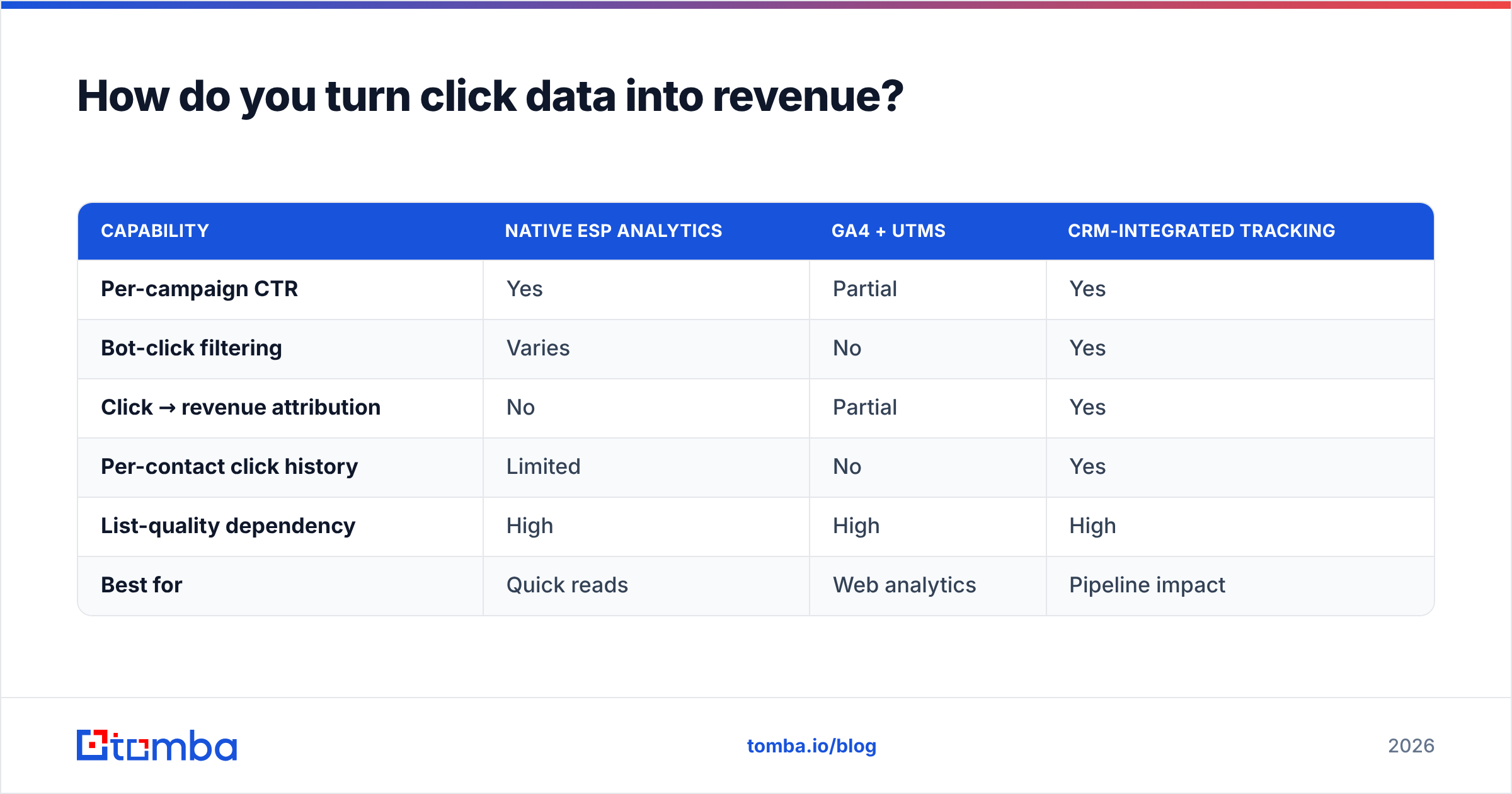
| Capability | Native ESP analytics | GA4 + UTMs | CRM-integrated tracking |
|---|---|---|---|
| Per-campaign CTR | Yes | Partial | Yes |
| Bot-click filtering | Varies | No | Yes |
| Click → revenue attribution | No | Partial | Yes |
| Per-contact click history | Limited | No | Yes |
| List-quality dependency | High | High | High |
| Best for | Quick reads | Web analytics | Pipeline impact |
Notice the last row: every column depends on list quality. The cleanest attribution stack in the world reports garbage if the underlying list is full of invalid addresses. That's why verification isn't a "nice to have" sitting next to your analytics — it's underneath them.
What ruins click rate tracking most often?#
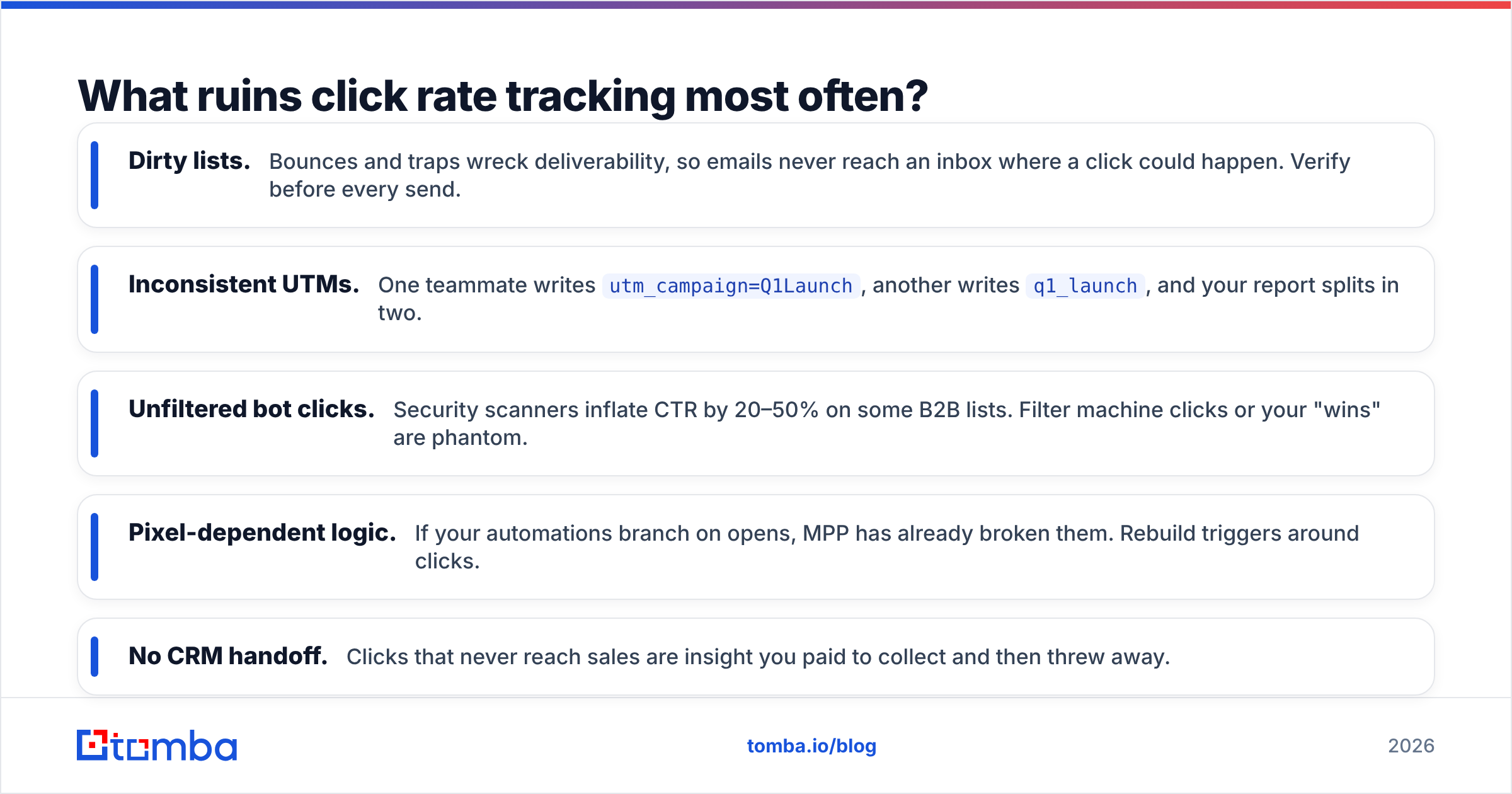
Five failure modes account for the majority of broken dashboards:
- Dirty lists. Bounces and traps wreck deliverability, so emails never reach an inbox where a click could happen. Verify before every send.
- Inconsistent UTMs. One teammate writes
utm_campaign=Q1Launch, another writesq1_launch, and your report splits in two. - Unfiltered bot clicks. Security scanners inflate CTR by 20–50% on some B2B lists. Filter machine clicks or your "wins" are phantom.
- Pixel-dependent logic. If your automations branch on opens, MPP has already broken them. Rebuild triggers around clicks.
- No CRM handoff. Clicks that never reach sales are insight you paid to collect and then threw away.
Fix those five and your click rate becomes the most honest number in your reporting stack. For accuracy at the source, it helps to understand where your contact data comes from — accurate, recently-validated records are the difference between a CTR you can act on and one you have to apologize for.
How is click tracking different for cold outbound?#
Don't pixel cold email. Tracking pixels and link wrappers are among the strongest spam signals there are, and on a 1:1 cold sequence they hurt deliverability more than the data is worth. For cold outbound, the click you care about is the reply, and your "tracking" is response rate by sequence step.
That flips the priority order entirely. In cold outbound, the win is reaching a real, verified human inbox at all — which makes finding the correct address the highest-leverage move you can make. Start from accurate contacts with an email finder, verify them, and measure replies. Save the pixel-and-link analytics for opt-in marketing campaigns where recipients expect tracking and won't punish you for it.
Put it together: the click-rate operating system#
Here's the whole system in one pass. Build your list from verified, accurate sources. Standardize UTMs so every link rolls up cleanly. Send, then filter bot and scanner clicks out of the raw count. Report CTR for campaign health and CTOR for content quality. Pipe clicks into your CRM so sales sees intent in real time. Test subject lines against downstream clicks, not opens. And close the loop by tying clicks to conversions so the metric earns its place in revenue conversations.
Do that for one quarter and you'll have something most teams never build: a click rate you actually trust, on a list clean enough to make it mean something.
The whole system rests on the address being real in the first place. If your campaign is going out to addresses you scraped, guessed, or let rot for six months, no amount of UTM hygiene saves the number. Start clean with Tomba Email Finder to build accurate, verified contact lists by domain, name, or company — and pair it with Tomba's verifier so every send starts from a denominator you can defend. Plans start free with 25 searches a month, and the Starter tier runs $49/mo when you're ready to scale; see full Tomba pricing for the breakdown. Clean data in, honest click rates out.
Ready to find emails that actually work?
Join 150,000+ professionals who stopped guessing and started sending. Free credits on signup — no credit card required.
Get the Tomba newsletter
Practical outbound tactics and product updates — once every two weeks.
About the author