Capsule CRM Pricing & Reviews 2026: Pros and Cons
A neutral breakdown of Capsule CRM pricing, real user reviews, and the honest pros and cons — plus who should pick it and who should skip it in 2026.
Capsule CRM Pricing, Reviews, Pros and Cons in 2026
Capsule CRM keeps showing up on shortlists for small and mid-sized teams that want a clean, no-nonsense contact manager — not a 500-feature suite they will never fully use. But "simple" cuts both ways, and the pricing has shifted enough over the last two years that old reviews are misleading. This is a straight read on what Capsule actually costs, what real users praise and complain about, and where it fits versus the alternatives.
TL;DR#
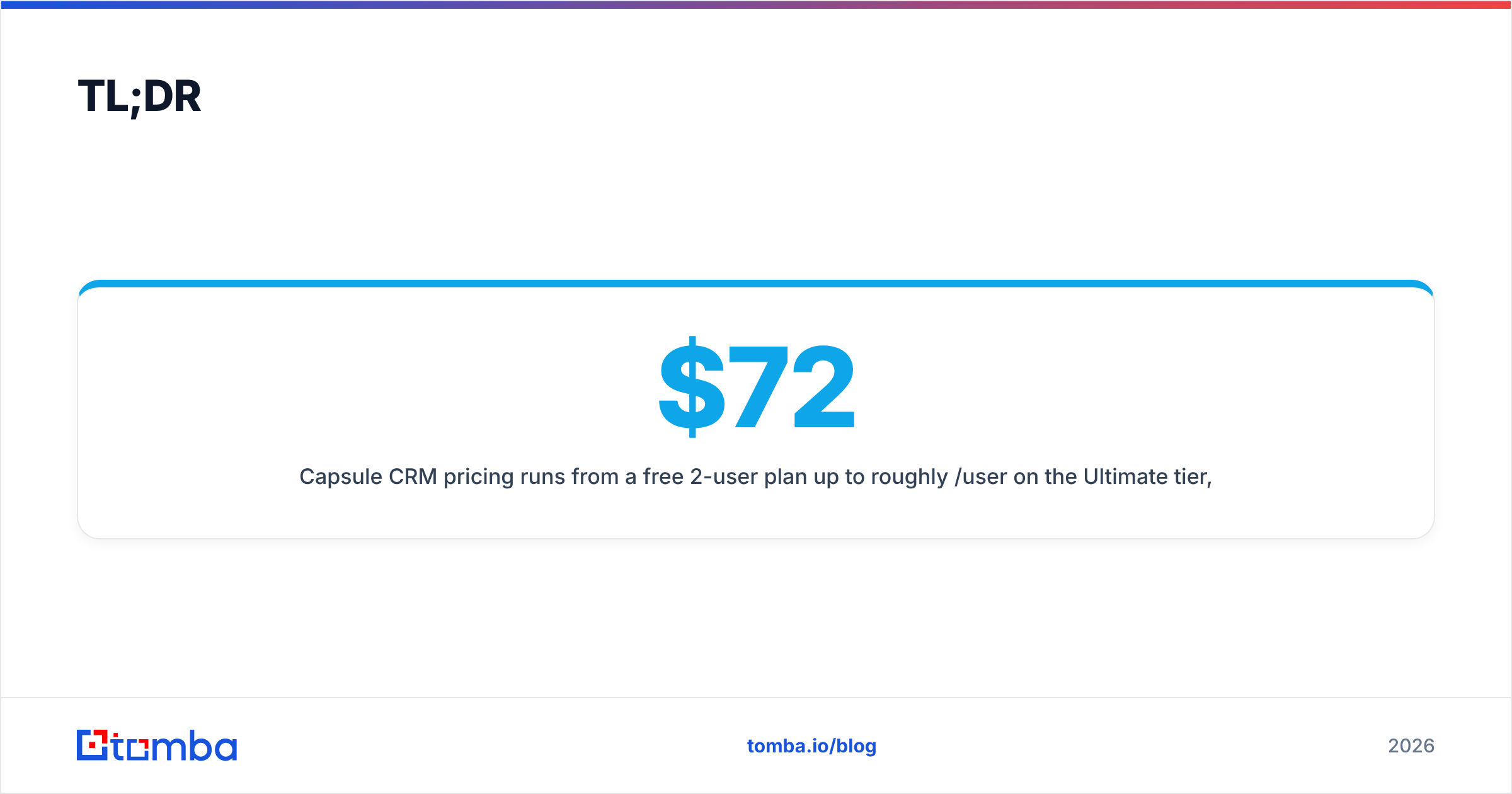
- Capsule CRM pricing runs from a free 2-user plan up to roughly $72/user/month on the Ultimate tier, with the sweet spot for most teams on Starter (
$18) or Growth ($36) per user, billed monthly. - Best for: small B2B teams, agencies, and consultancies that want fast setup, clean contact management, and a readable pipeline — without a steep learning curve.
- Weak spots: lighter native marketing automation, fewer power-user reporting options than Salesforce or HubSpot, and AI features that still trail the bigger platforms.
- Reviews are consistently positive on usability (4.5-ish stars on G2 and Capterra) and mixed on advanced customization and support response times.
- Capsule does not find or verify contact data — you still need a dedicated source like the Tomba Email Finder to fill the CRM with accurate, reachable leads.
What is Capsule CRM?#
Capsule CRM is a lightweight customer relationship management tool aimed at small and mid-sized businesses. Think of it as a well-organized filing cabinet for every person and company you deal with: contacts, the history of your conversations, the deals in flight, and the tasks tied to each. It is web-based, has mobile apps, and connects to common tools through native integrations and Zapier.
If you want the textbook definition of the category, see this plain-English explainer on what a CRM is. Capsule's pitch is that it covers 90% of what a growing team needs without the bloat — and most reviews agree it delivers on that promise.

How much does Capsule CRM cost in 2026?#
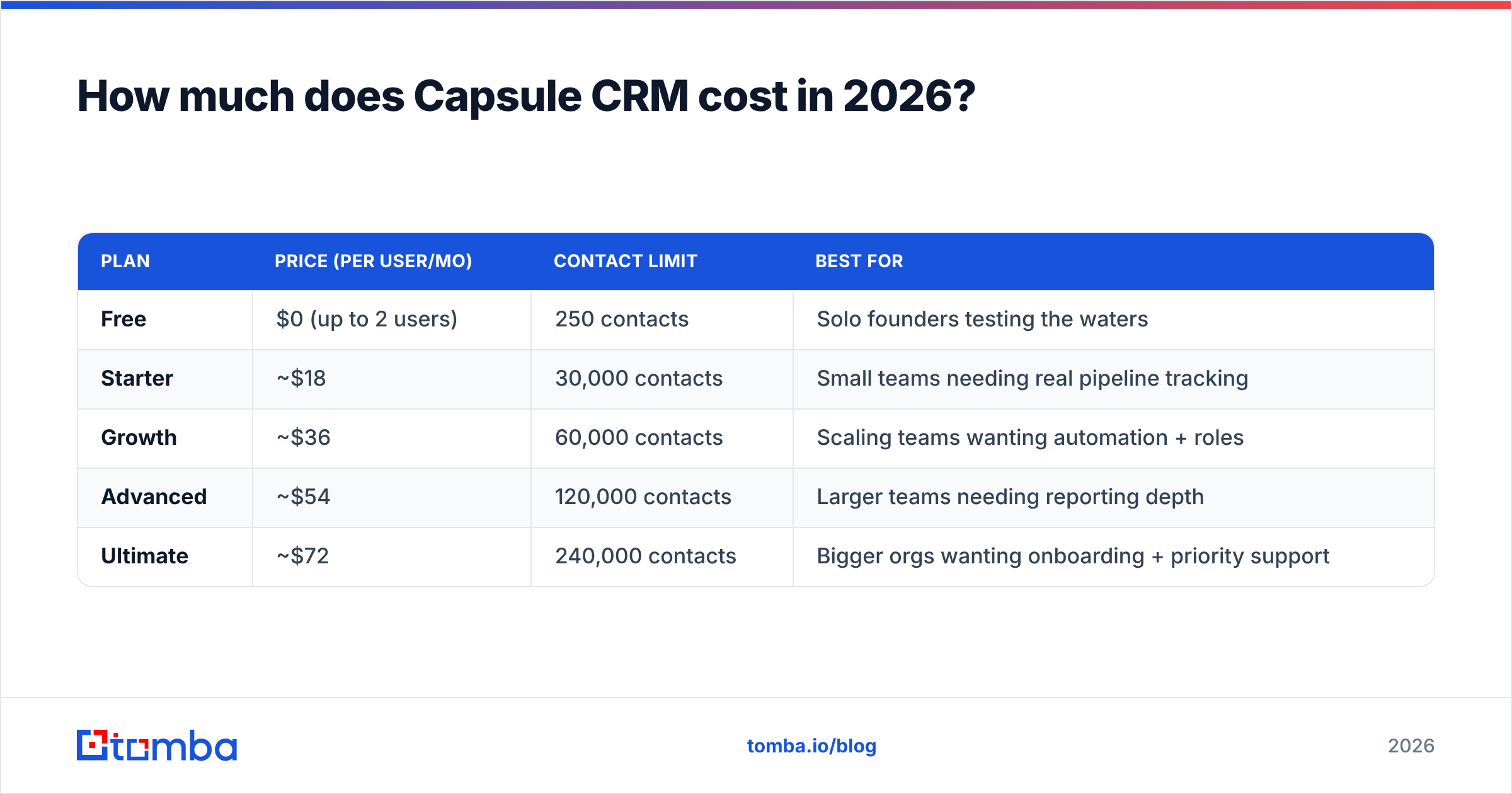
Capsule prices per user, per month, with a meaningful free tier and four paid plans. Prices below reflect Capsule's published 2026 rates (monthly billing; annual billing typically shaves ~15-20%). Always confirm on capsulecrm.com before you commit, because vendors adjust tiers often.
| Plan | Price (per user/mo) | Contact limit | Best for |
|---|---|---|---|
| Free | $0 (up to 2 users) | 250 contacts | Solo founders testing the waters |
| Starter | ~$18 | 30,000 contacts | Small teams needing real pipeline tracking |
| Growth | ~$36 | 60,000 contacts | Scaling teams wanting automation + roles |
| Advanced | ~$54 | 120,000 contacts | Larger teams needing reporting depth |
| Ultimate | ~$72 | 240,000 contacts | Bigger orgs wanting onboarding + priority support |
A few things the table alone won't tell you:
- The free plan is genuinely usable for one or two people, but 250 contacts disappears fast in active B2B sales.
- Per-user pricing scales linearly, so a 10-person team on Growth is ~$360/month — still cheaper than comparable HubSpot Sales tiers, but not "cheap" at headcount.
- Higher tiers unlock limits, not just features — contact caps, custom fields, AI content credits, and email-send volumes all step up with the plan.
- Add-ons matter. Capsule's Transactions and advanced workflow features sit behind the upper tiers, so map your must-haves to a specific plan before you assume Starter is enough.
Is Capsule CRM worth the price?#
For the right team, yes. The value case is speed-to-productivity: most reviewers report being fully operational in a day or two, which is rare in CRM. You are paying for clarity, not horsepower.
Where the price stops making sense is when you need heavy marketing automation, multi-stage lead scoring, or enterprise reporting. At that point you are bolting third-party tools onto Capsule, and the combined cost can rival an all-in-one platform like HubSpot — without the seamless integration.

What do Capsule CRM reviews say?#
Across G2 and Capterra, Capsule lands consistently in the 4.4–4.6 star range, with hundreds of reviews. The themes are stable enough to summarize honestly.
What reviewers consistently praise:
- Ease of use — the most repeated compliment. Onboarding is fast and the interface stays out of the way.
- Clean pipeline view — drag-and-drop deal stages that non-technical staff actually use.
- Fair pricing for small teams — seen as good value below ~15 users.
- Solid Google Workspace and Outlook sync for email capture.
What reviewers consistently criticize:
- Reporting depth — fine for basics, frustrating for teams that want custom dashboards.
- Marketing automation is lighter than HubSpot; many pair Capsule with a separate email tool.
- Support speed — generally helpful, but response times draw occasional complaints on lower tiers.
- AI features lag the bigger platforms, though they are improving.
The pattern is clear: people who buy Capsule for simplicity love it, and people who outgrow simplicity feel the ceiling. Match the tool to your stage and the reviews become very predictable.
How does Capsule CRM compare to alternatives?#
Capsule competes in a crowded mid-market. Here is the honest positioning against the names you will weigh it against.
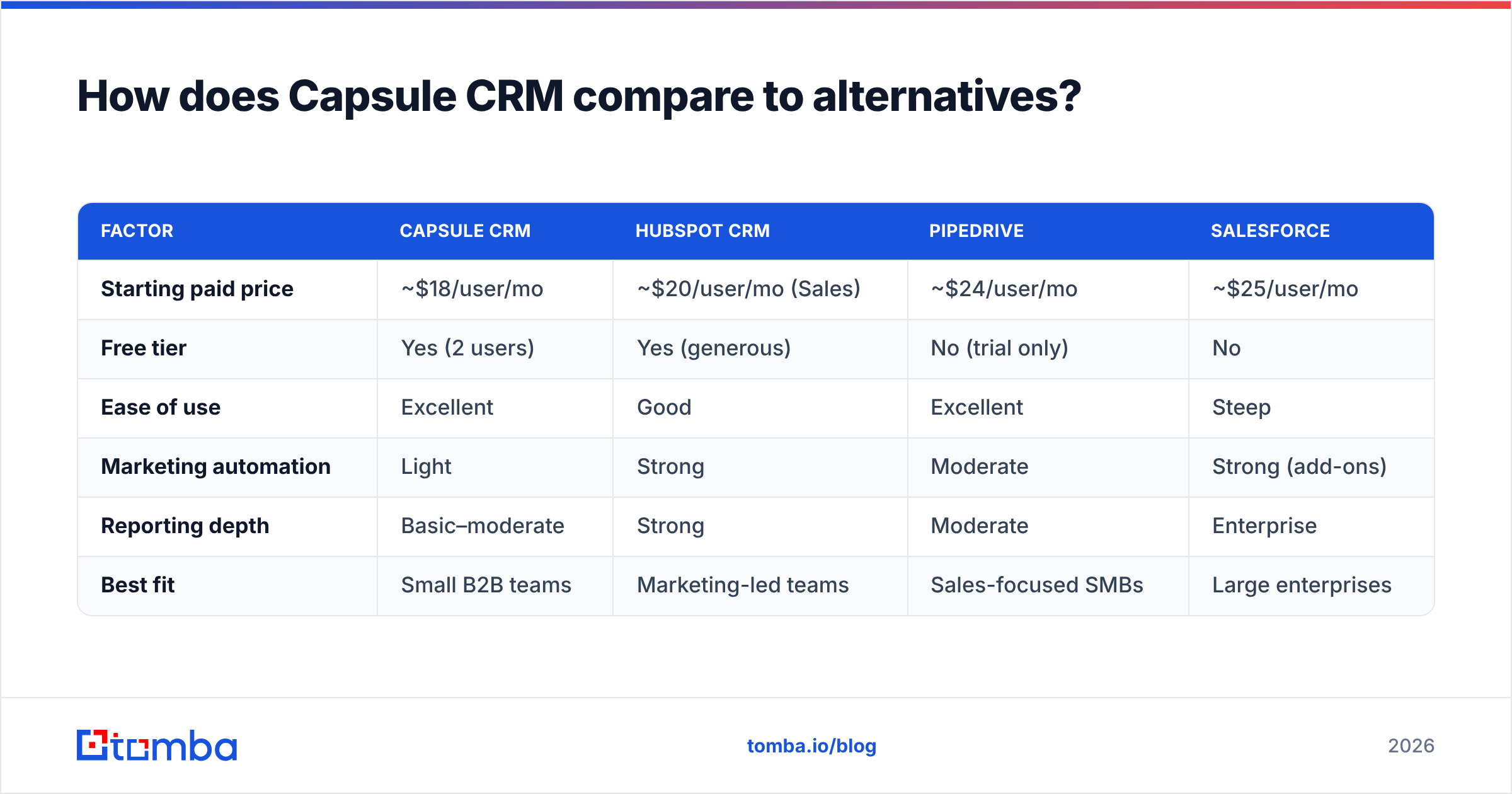
| Factor | Capsule CRM | HubSpot CRM | Pipedrive | Salesforce |
|---|---|---|---|---|
| Starting paid price | ~$18/user/mo | ~$20/user/mo (Sales) | ~$24/user/mo | ~$25/user/mo |
| Free tier | Yes (2 users) | Yes (generous) | No (trial only) | No |
| Ease of use | Excellent | Good | Excellent | Steep |
| Marketing automation | Light | Strong | Moderate | Strong (add-ons) |
| Reporting depth | Basic–moderate | Strong | Moderate | Enterprise |
| Best fit | Small B2B teams | Marketing-led teams | Sales-focused SMBs | Large enterprises |
The takeaway: Capsule wins on simplicity and price-to-value for small teams. HubSpot wins if marketing automation is central. Pipedrive is the closest head-to-head rival on usability. Salesforce wins on scale and customization — at a complexity and cost most small teams don't need.
If you already use HubSpot elsewhere, note that Tomba ships a native HubSpot integration so your data source and CRM stay in sync regardless of which platform you land on.
What are the pros and cons of Capsule CRM?#
Pros
- Fast setup and genuinely low learning curve.
- Honest, transparent per-user pricing with a usable free tier.
- Clean contact and pipeline management that teams actually adopt.
- Good core integrations (Google, Outlook, Zapier, accounting tools).
- Scales smoothly from solo to mid-sized without forcing a migration.
Cons
- Reporting and analytics are shallow for data-hungry teams.
- Native marketing automation is limited compared to all-in-one suites.
- AI capabilities trail competitors, though they are catching up.
- No built-in way to find or verify contact data — it stores leads, it doesn't source them.
That last point is the one teams underestimate. A CRM is only as valuable as the data inside it, and Capsule assumes you arrive with clean contacts already in hand.
How do you keep Capsule CRM filled with accurate data?#
A CRM doesn't generate leads — it organizes them. The single biggest reason CRM rollouts stall is dirty or empty records: missing emails, bounced addresses, no phone numbers, stale job titles. Capsule won't fix that for you.
This is where a dedicated data layer pays off. Before a contact ever reaches your pipeline, you want a verified email and accurate company details attached. A purpose-built email finder pulls professional addresses by name and domain, and data enrichment fills the gaps Capsule leaves blank — role, company size, social profiles, and more. Run new lists through verification first, push the clean records into Capsule, and your reporting (such as it is) finally reflects reality.
A practical workflow looks like this:
- Source professional emails with an email finder, by domain or by name.
- Verify addresses to cut bounces before they hurt your sender reputation.
- Enrich each record with firmographic and contact detail.
- Sync the cleaned data into Capsule so reps work from accurate records.
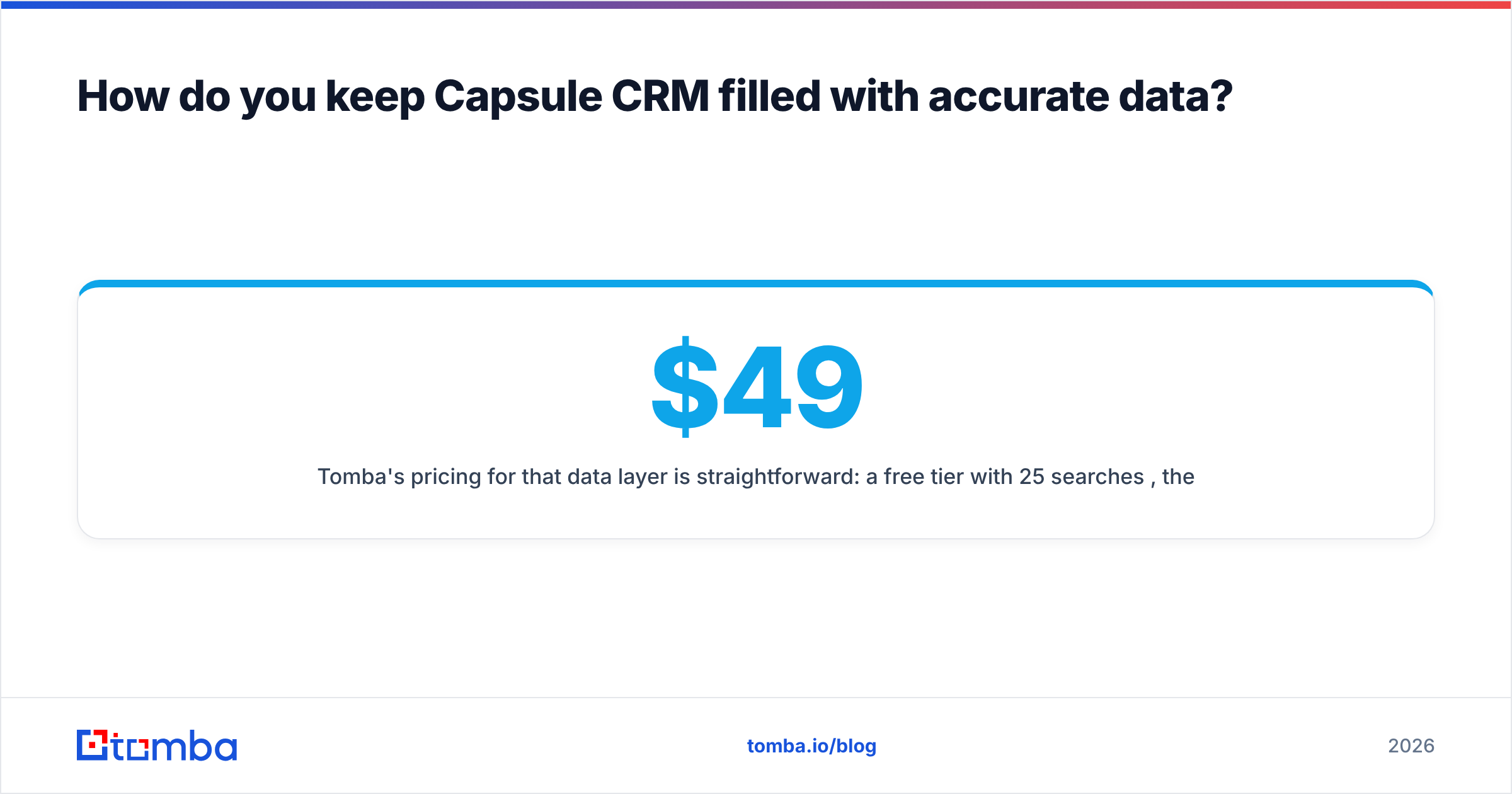
Tomba's pricing for that data layer is straightforward: a free tier with 25 searches/month, then Starter at $49/month, Growth at $99/month, Pro at $249/month, and custom Enterprise plans. You can review full Tomba pricing to size it against your volume.
Who should choose Capsule CRM?#
Choose Capsule if you are a small-to-mid B2B team, agency, or consultancy that values speed and clarity over deep customization. If your team has resisted CRM adoption because past tools felt heavy, Capsule has the best odds of actually getting used — and adoption beats features every time.
Skip Capsule if marketing automation is core to your motion, if you need enterprise-grade reporting, or if you expect to scale past a few hundred users with complex permission structures. In those cases, HubSpot or Salesforce will serve you better despite the higher cost and complexity.
Final verdict and next step#
Capsule CRM is a strong, fairly priced choice for small teams that want a CRM people will actually use — clean, fast, and honest about what it is. Its limits are real (reporting, automation, AI), but for its target buyer they rarely bite. Pick the plan that matches your contact volume and the one or two features you can't live without, and don't overbuy a tier "just in case."
Whatever CRM you land on, fill it with data that's worth managing. Start free with the Tomba Email Finder to find and verify professional emails by name or domain, then push clean, enriched records straight into Capsule. A tidy pipeline is only useful when the contacts inside it are real — get the data right first, and the CRM does the rest.
// get started
Find, verify and enrich your first contacts today
Start on the free plan with 25 searches a month, then scale when your team is ready.
Free plan · No credit card required · GDPR & CCPA
// about the author