Capsule CRM vs Pipedrive (2026): Which CRM Wins for You?
Capsule CRM vs Pipedrive compared on pricing, pipeline tools, automation, and data quality so you can pick the right CRM for your sales team in 2026.
Choosing between Capsule CRM and Pipedrive comes down to one question: do you want a calm, affordable contact hub or a sales-pipeline machine built to push deals forward? Both are popular with small and mid-sized teams, both are cheaper than Salesforce, and both will hold your contacts without complaint. But they optimize for different jobs, and picking the wrong one means either paying for power you never touch or fighting a tool that won't keep up.
This comparison breaks down pricing, pipeline management, automation, reporting, and the one thing neither tool does well on its own — keeping your contact data accurate. Read it as a buyer's guide, not a sales pitch.
TL;DR: Capsule CRM vs Pipedrive at a glance#
- Pipedrive wins on pure sales execution. Its visual pipeline, deal-rotting alerts, and activity-based selling are purpose-built for reps who live in the deal board.
- Capsule wins on simplicity and price. It is lighter, cleaner, and cheaper at the entry tier, which suits agencies, consultancies, and relationship-led businesses.
- Automation is a tie that leans Pipedrive. Pipedrive's workflow automation and AI Sales Assistant are deeper; Capsule's automations are newer and simpler.
- Both live or die on data quality. A CRM is only as good as the emails and phone numbers inside it — feed either tool clean, verified contacts with an email finder and your win rate climbs.
- Verdict: Pick Pipedrive if selling is your core motion. Pick Capsule if you manage long-term relationships and want low overhead.
What is Capsule CRM?#
Capsule CRM is a lightweight, relationship-focused CRM built for small businesses that want to track contacts, tasks, and a basic sales pipeline without a steep learning curve. Founded in the UK, it leans into simplicity: a clean contact record, a tasks list, a single (or multiple, on higher tiers) sales pipeline, and tidy integrations with tools like Google Workspace, Mailchimp, and Xero.
Think of Capsule as a well-organized address book that grew a sales pipeline. It is the tool you reach for when "CRM" mostly means "never lose track of who I talked to and what I promised." Agencies, accountants, consultancies, and service businesses gravitate to it because it stays out of the way.
What is Pipedrive?#
Pipedrive is a sales-first CRM designed around the visual deal pipeline and "activity-based selling" — the idea that you control outcomes by controlling the next action on every deal. Built by salespeople who were frustrated with bloated enterprise CRMs, it puts the Kanban-style pipeline front and center and nudges reps to always schedule the next call, email, or demo.
If Capsule is an address book that grew a pipeline, Pipedrive is a pipeline that grew everything else around it. It now bundles workflow automation, an AI Sales Assistant, email sync, web forms, and reporting dashboards. It is opinionated software: it wants you to move deals through stages, and it makes that motion frictionless.
Capsule CRM vs Pipedrive: side-by-side comparison#
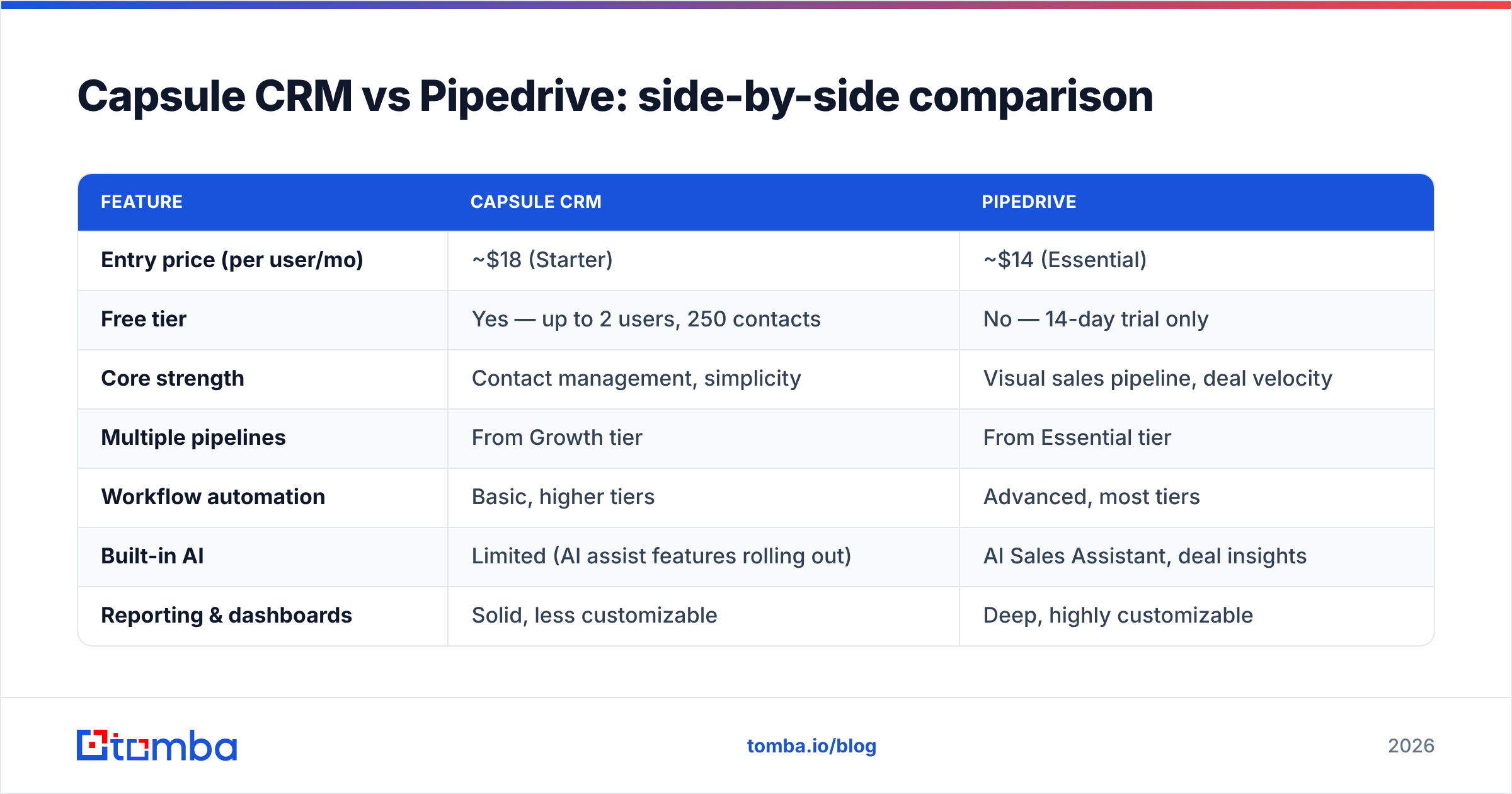
Here is the head-to-head on the attributes that actually change your day-to-day work and your monthly bill. Prices reflect per-user, per-month billing on annual plans as published by each vendor in 2026; always confirm current rates on their pricing pages.
| Feature | Capsule CRM | Pipedrive |
|---|---|---|
| Entry price (per user/mo) | ~$18 (Starter) | ~$14 (Essential) |
| Free tier | Yes — up to 2 users, 250 contacts | No — 14-day trial only |
| Core strength | Contact management, simplicity | Visual sales pipeline, deal velocity |
| Multiple pipelines | From Growth tier | From Essential tier |
| Workflow automation | Basic, higher tiers | Advanced, most tiers |
| Built-in AI | Limited (AI assist features rolling out) | AI Sales Assistant, deal insights |
| Reporting & dashboards | Solid, less customizable | Deep, highly customizable |
| Email finder / enrichment | Not native | Limited add-on (LeadBooster) |
| Best for | Relationship-led small businesses | Outbound and inside-sales teams |
The headline: Pipedrive's entry plan is slightly cheaper but has no free tier, while Capsule's free plan makes it genuinely $0 for a two-person shop. Once you scale past a handful of users, the per-seat math tightens and the decision shifts back to capability, not cost.

Is Pipedrive better than Capsule CRM for sales pipelines?#
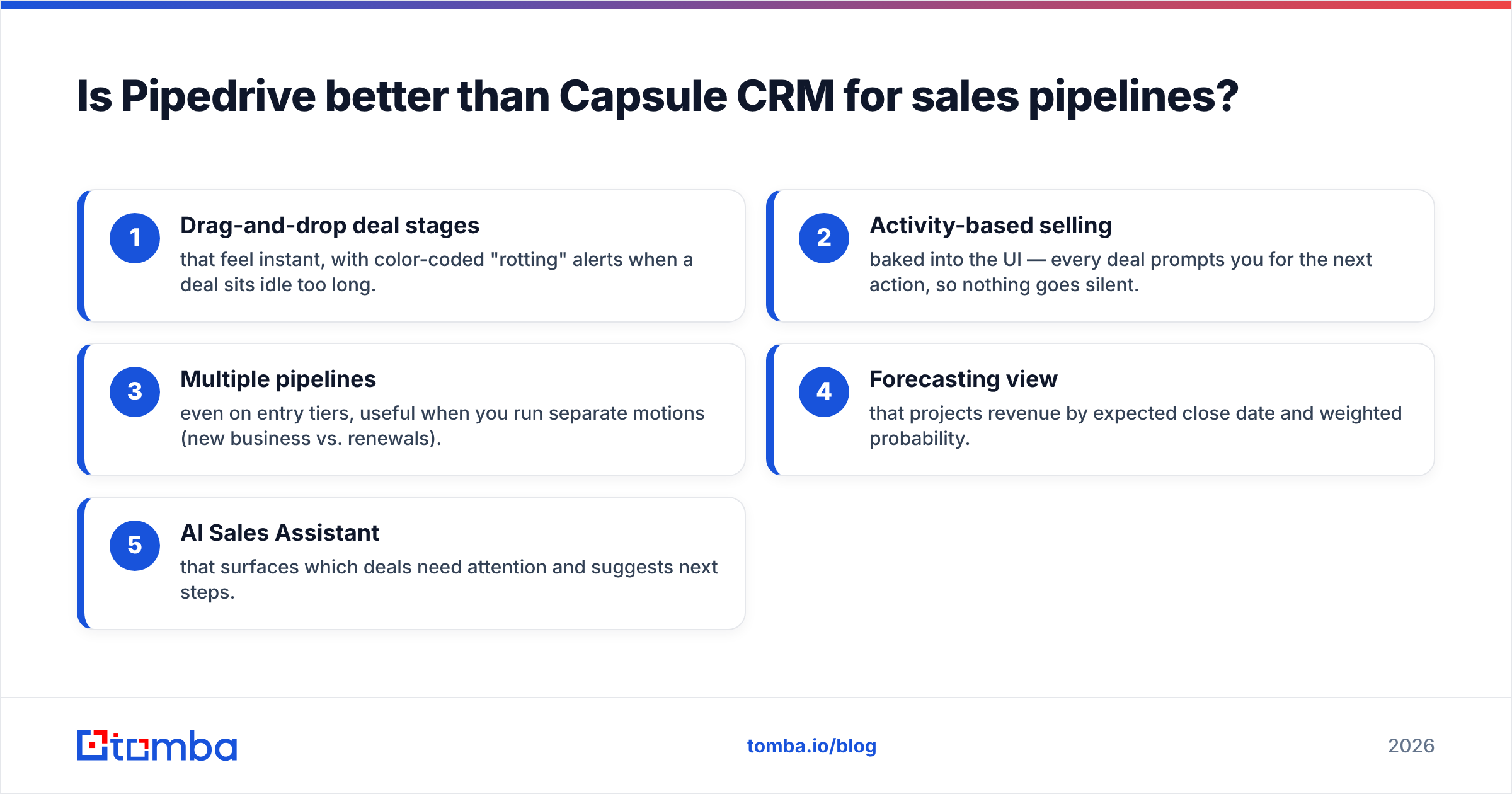
Yes — for teams whose primary job is pushing deals to close, Pipedrive's pipeline is better. This is the category Pipedrive was born to win.
Pipedrive's pipeline gives you:
- Drag-and-drop deal stages that feel instant, with color-coded "rotting" alerts when a deal sits idle too long.
- Activity-based selling baked into the UI — every deal prompts you for the next action, so nothing goes silent.
- Multiple pipelines even on entry tiers, useful when you run separate motions (new business vs. renewals).
- Forecasting view that projects revenue by expected close date and weighted probability.
- AI Sales Assistant that surfaces which deals need attention and suggests next steps.
Capsule has a competent pipeline too — you can track opportunities, set milestones, and view a board — but it treats the pipeline as one feature among several rather than the entire reason the product exists. For a relationship manager closing a handful of larger deals, Capsule is plenty. For an SDR working 50 active deals, Pipedrive's velocity tooling pays for itself.
You can see how real users score these differences on third-party review sites like G2, where Pipedrive consistently rates higher on "pipeline management" while Capsule rates higher on "ease of use."
Which CRM is easier to use?#
Capsule is easier to learn; Pipedrive is easier to sell with. That distinction matters.
A new user can be productive in Capsule in under an hour — the interface is uncluttered, the contact record is intuitive, and there are few rabbit holes to fall into. That low cognitive load is exactly why non-sales teams (operations, client services, founders wearing five hats) love it.
Pipedrive has a steeper but shallow curve. Once a rep understands the pipeline philosophy, the tool becomes second nature, and the daily workflow is faster because everything is engineered around moving deals. The trade-off is more configuration up front: custom fields, automation rules, and integrations all reward setup time.
If your team is non-technical and CRM is a means to an end, Capsule's gentleness wins. If your team sells full-time and will invest a day in setup, Pipedrive's payoff is larger.
How do Capsule CRM and Pipedrive handle automation?#
Pipedrive offers deeper automation; Capsule offers simpler automation. Both reduce busywork, but at different ceilings.
Pipedrive's Workflow Automation lets you trigger actions on almost any event — when a deal moves stages, send a templated email; when a deal is created, assign an owner and schedule a follow-up. Combined with the AI Sales Assistant and a marketplace of 400+ integrations, it can run a fairly sophisticated outbound machine without external tools.
Capsule's automation is younger and lighter. You get workflow templates, automated task sequences, and tidy integrations through Zapier and native connectors. It covers the common cases — onboarding sequences, reminders, handoffs — but you'll hit its ceiling faster than Pipedrive's.
For most small teams, both are "good enough." If automation is central to your growth plan, Pipedrive gives you more headroom before you need a dedicated sales automation layer on top.
What about reporting and forecasting?#
Pipedrive's reporting is more powerful and customizable; Capsule's is cleaner but more limited.
Pipedrive ships customizable dashboards, deal and activity reports, revenue forecasting, and goal tracking per rep. Sales managers can slice performance by stage, source, owner, and time period, which makes it a real management tool, not just a rep tool. This is where Pipedrive earns its keep for teams that care about win rate and pipeline coverage.
Capsule provides solid sales and activity reporting with a focus on clarity over depth. You can see pipeline value, conversion, and activity, but you won't build the kind of granular, custom analytics that a data-driven sales ops function expects. For a five-person agency, that's fine. For a 25-rep inside-sales team, it's a constraint.
The factor both reviews ignore: data quality#
Here's the uncomfortable truth no CRM comparison wants to admit: neither Capsule nor Pipedrive fixes bad data, and bad data is what actually kills pipelines. A pristine pipeline full of bounced emails and wrong phone numbers is just a tidy way to lose deals.
CRMs are systems of record, not systems of discovery. They store the contact you give them; they don't go find a verified work email or flag that a prospect changed jobs six months ago. Industry data routinely shows B2B contact records decay 25–30% per year as people switch roles and companies. That decay silently rots both tools from the inside.
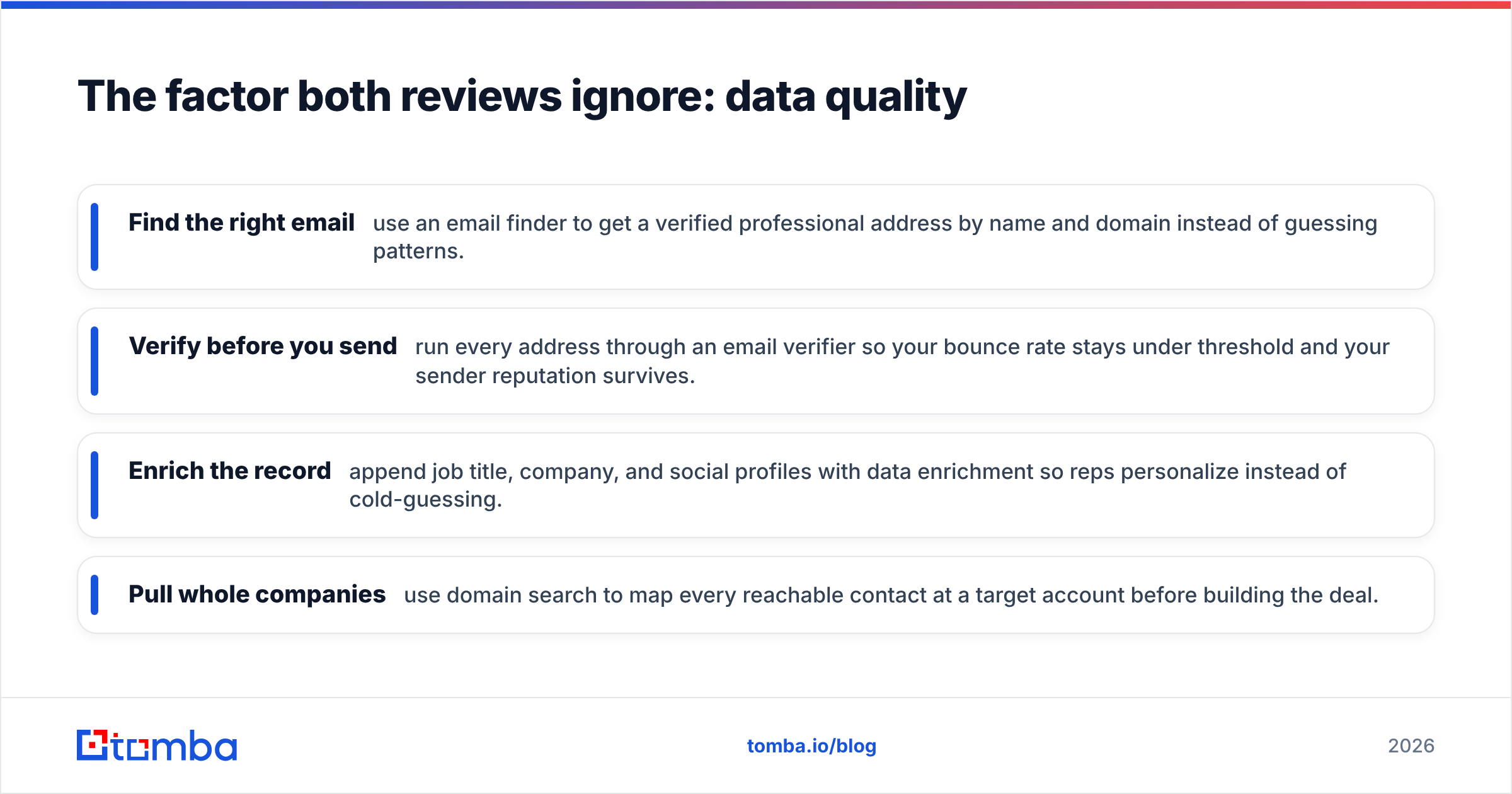
This is where a dedicated data layer matters more than the CRM logo on the screen. Before a contact ever lands in Capsule or Pipedrive, you want to:
- Find the right email — use an email finder to get a verified professional address by name and domain instead of guessing patterns.
- Verify before you send — run every address through an email verifier so your bounce rate stays under threshold and your sender reputation survives.
- Enrich the record — append job title, company, and social profiles with data enrichment so reps personalize instead of cold-guessing.
- Pull whole companies — use domain search to map every reachable contact at a target account before building the deal.

Plug that clean data into either CRM through an integration like HubSpot-style syncs or Pipedrive's own marketplace, and the comparison between Capsule and Pipedrive stops being about features and starts being about which clean machine you prefer to drive.
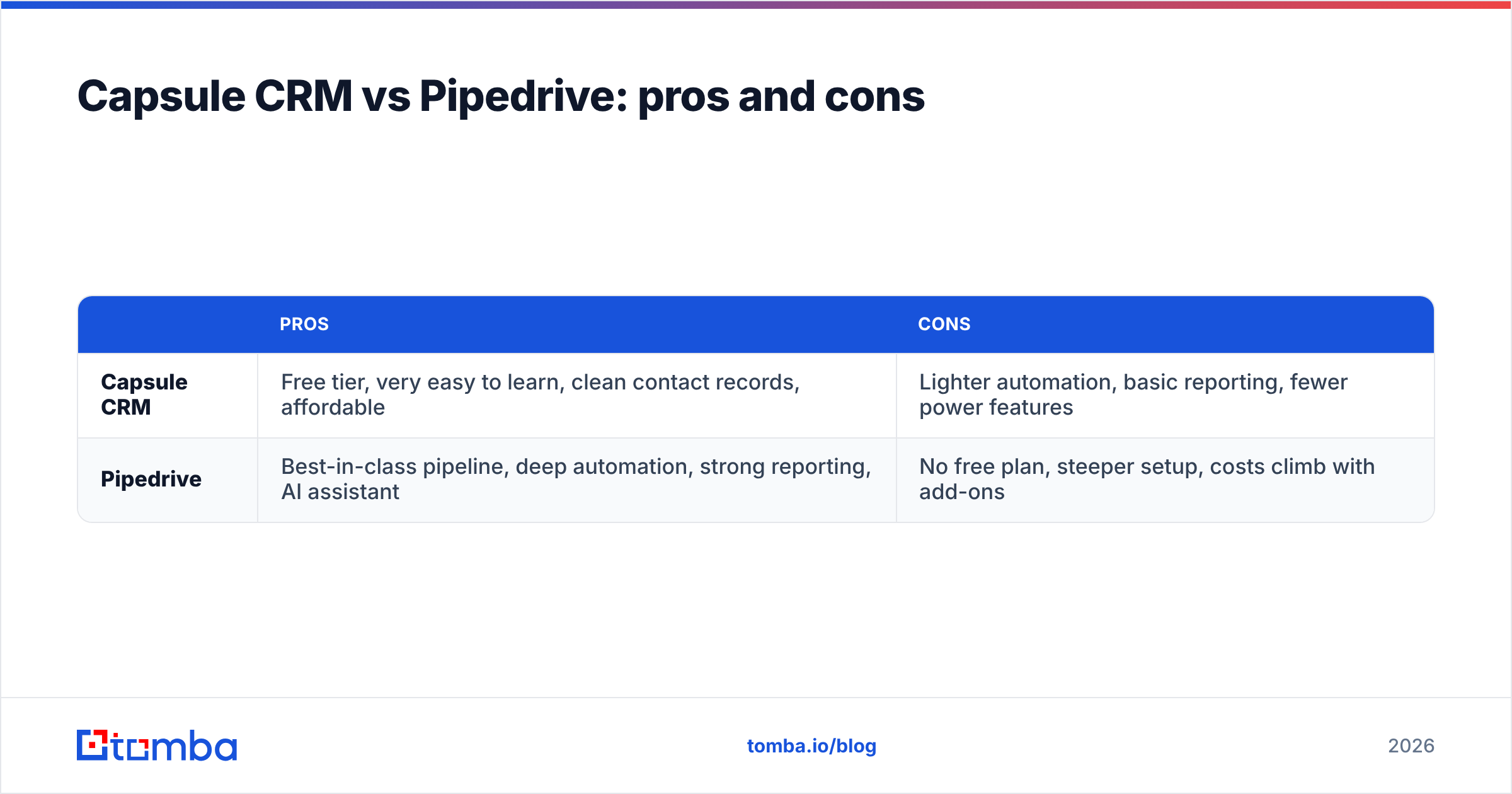
Capsule CRM vs Pipedrive: pros and cons#
A quick honest scorecard for each tool.
| Pros | Cons | |
|---|---|---|
| Capsule CRM | Free tier, very easy to learn, clean contact records, affordable | Lighter automation, basic reporting, fewer power features |
| Pipedrive | Best-in-class pipeline, deep automation, strong reporting, AI assistant | No free plan, steeper setup, costs climb with add-ons |
Neither is objectively "better." They are aimed at different buyers. The mistake is buying Pipedrive's power for a relationship business that will never use it, or buying Capsule's simplicity for a high-velocity sales team that will outgrow it in a quarter.
Which should you choose in 2026?#
Choose Pipedrive if selling is your core business motion — outbound, inside sales, or any team with reps managing dozens of active deals who need pipeline velocity, forecasting, and automation. The lack of a free tier stings, but the 14-day trial is enough to prove value, and the per-seat price is competitive against deeper platforms like Salesforce.
Choose Capsule if you run a service business, agency, or consultancy where the CRM's main job is never dropping a relationship. The free plan, gentle learning curve, and lower cognitive overhead make it the pragmatic pick when nobody on the team wants to "administer a CRM."
Choose neither — yet — if your data is a mess. No CRM rescues a list of stale, unverified contacts. Fix the input first, then pick the tool.
A practical sequence for most teams: verify and enrich your contact list, load it into whichever CRM matches your motion, and connect the two with automation so new leads arrive already clean. You can compare full Tomba pricing against your CRM budget — the data layer typically costs a fraction of the seats and protects every dollar you spend on them.
Final verdict#
Pipedrive is the stronger sales engine; Capsule is the friendlier contact hub. Pick based on your dominant motion, not on a feature checklist — a sales team forced into Capsule will feel boxed in, and a relationship business handed Pipedrive will pay for power it ignores.
But whichever you choose, remember that the CRM is the easy part. The hard part — and the part that actually moves revenue — is filling it with contacts that are real, reachable, and current. Start there.
Ready to feed your CRM data it can trust? Tomba's Email Finder gives you verified professional emails by name or domain, with built-in verification so your Capsule or Pipedrive pipeline stays clean from the first touch. Start free with 25 searches a month, then scale on the Starter plan at $49/mo when your outbound takes off — no contract, no clutter, just contacts that convert.
// get started
Find, verify and enrich your first contacts today
Start on the free plan with 25 searches a month, then scale when your team is ready.
Free plan · No credit card required · GDPR & CCPA
// about the author