Captain Data Pricing, Reviews, Pros and Cons (2026 Guide)
A no-spin breakdown of Captain Data pricing, real user reviews, and the honest pros and cons — plus where a leaner email-finder stack saves you money in 2026.
You are evaluating Captain Data because you want clean, automated B2B data flowing into your CRM — and you want to know what it actually costs before a sales call talks you into an annual contract. This guide gives you the unvarnished version: pricing, real reviews, and where Captain Data wins or frustrates teams in 2026.
TL;DR#
- Captain Data is a no-code data extraction and automation platform, not a standalone email finder. It scrapes and enriches at scale across LinkedIn, Sales Navigator, and other sources, then pushes data into your stack.
- Pricing is credit-based and starts in the mid-three-figures per month (typically around $399+/mo billed annually), which puts it out of reach for small teams and solo operators.
- Strengths: powerful multi-step workflows, deep LinkedIn/Sales Navigator integrations, and API access that scales for RevOps teams.
- Weaknesses: steep price, a learning curve, credit math that gets confusing, and overkill if all you need is verified emails.
- If your real job is finding and verifying email addresses, a focused tool like the Tomba Email Finder does it for a fraction of the cost.

What is Captain Data?#
Captain Data is a cloud-based data extraction and automation platform aimed at sales, marketing, and RevOps teams. Think of it as a conveyor belt for B2B data: you point it at a source (a LinkedIn search, a Sales Navigator list, a company website), define a sequence of steps, and it pulls, enriches, and delivers structured records to your CRM, spreadsheet, or data warehouse — without you writing code.
Where a simple email finder answers one question ("what's this person's email?"), Captain Data chains many actions together. A single workflow might scrape a Sales Navigator search, enrich each profile with company data, find work emails, verify them, and sync the result to HubSpot. That orchestration is the product's real selling point.
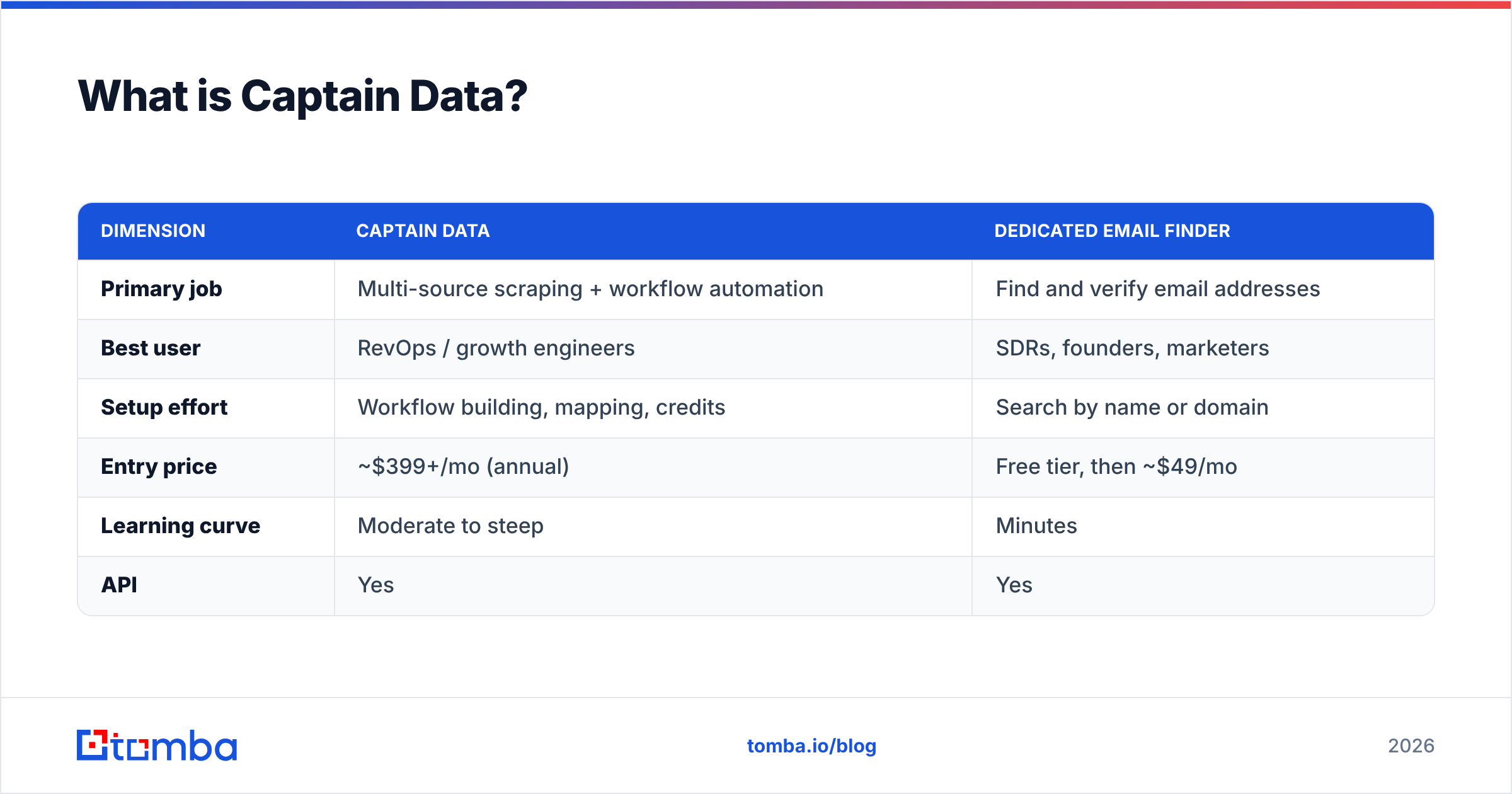
Here's how Captain Data's positioning compares to a focused email-finding tool:
| Dimension | Captain Data | Dedicated email finder |
|---|---|---|
| Primary job | Multi-source scraping + workflow automation | Find and verify email addresses |
| Best user | RevOps / growth engineers | SDRs, founders, marketers |
| Setup effort | Workflow building, mapping, credits | Search by name or domain |
| Entry price | ~$399+/mo (annual) | Free tier, then ~$49/mo |
| Learning curve | Moderate to steep | Minutes |
| API | Yes | Yes |
The takeaway: Captain Data is a platform, not a point solution. That framing matters for the rest of this review, because most of the complaints and the praise both trace back to it being a heavier tool than many buyers expect.
How much does Captain Data cost in 2026?#
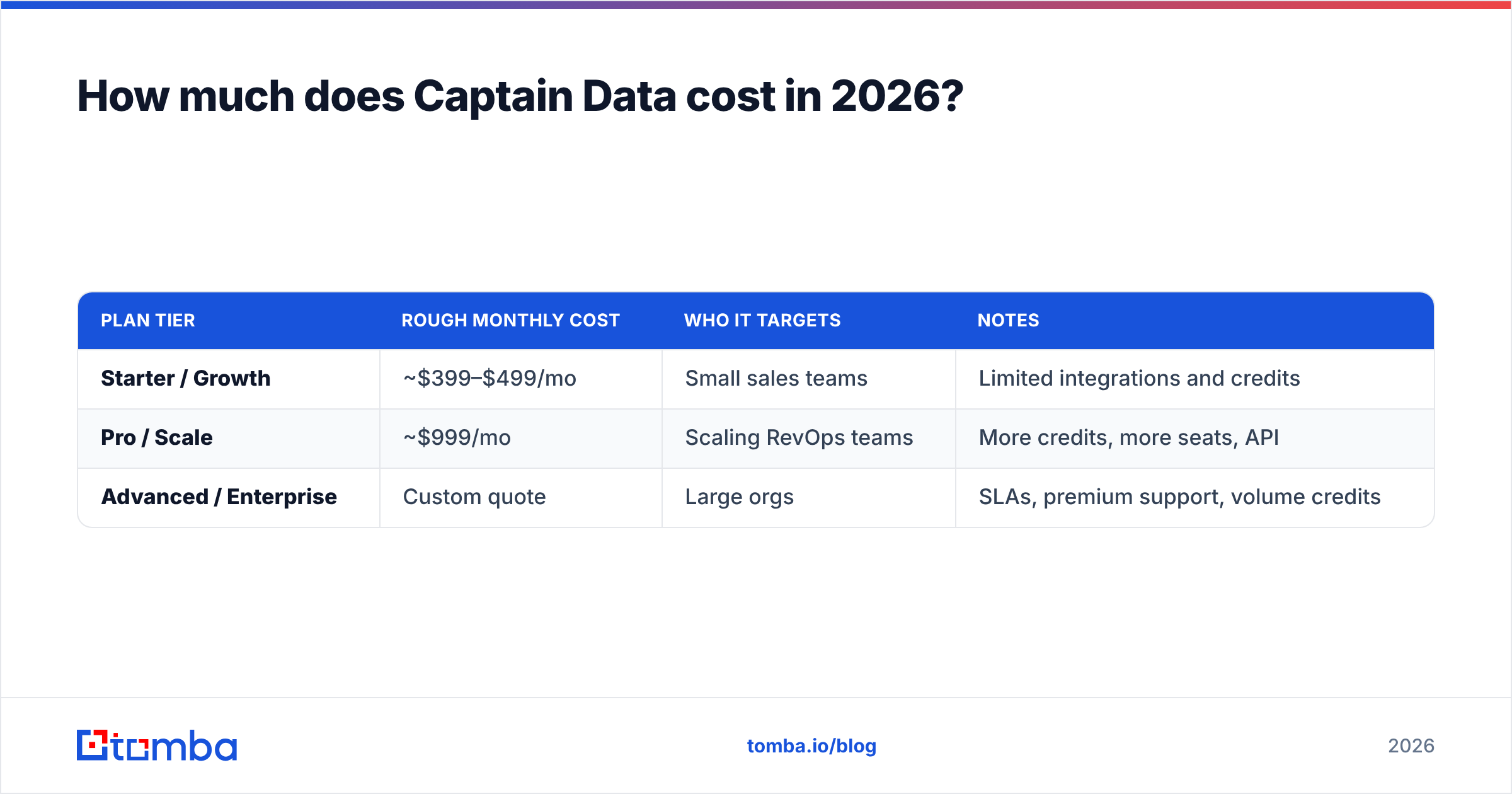
Captain Data uses credit-based pricing with plans that start in the mid-hundreds per month, and the headline number you see is almost always the annual-billing rate. Month-to-month costs more.
Captain Data has shifted its packaging over time, so always confirm current numbers on their official pricing page before buying. As a general shape, here's what teams have reported paying:
| Plan tier | Rough monthly cost | Who it targets | Notes |
|---|---|---|---|
| Starter / Growth | ~$399–$499/mo | Small sales teams | Limited integrations and credits |
| Pro / Scale | ~$999/mo | Scaling RevOps teams | More credits, more seats, API |
| Advanced / Enterprise | Custom quote | Large orgs | SLAs, premium support, volume credits |
A few things to understand before you sign:
- Credits are the real currency. Every action — a scrape, an enrichment, an email lookup — consumes credits. Two teams on the same plan can have wildly different effective costs depending on how heavy their workflows are.
- Annual billing is the advertised price. Monthly plans carry a premium, sometimes 20% or more.
- Integrations can be gated by tier. The connector you need (a specific CRM, a webhook, premium data) may sit on a higher plan than the credit volume alone would require.
- Overages add up. Burn through credits mid-month and you're either throttled or buying more.
Compare that to transparent, low-entry pricing in the email-finding category. Tomba's pricing starts with a free tier of 25 searches per month, then Starter at $49/mo, Growth at $99/mo, and Pro at $249/mo — no annual lock-in required to get a usable plan. If your monthly job is "find 2,000 verified emails," that gap is enormous.
What do Captain Data reviews say?#
Reviews are broadly positive on capability and mixed on price and complexity. On platforms like G2 and Capterra, Captain Data tends to score well for automation power and support responsiveness, while recurring criticism clusters around cost and the learning curve.
Here's the honest pattern across public feedback:
What reviewers praise:
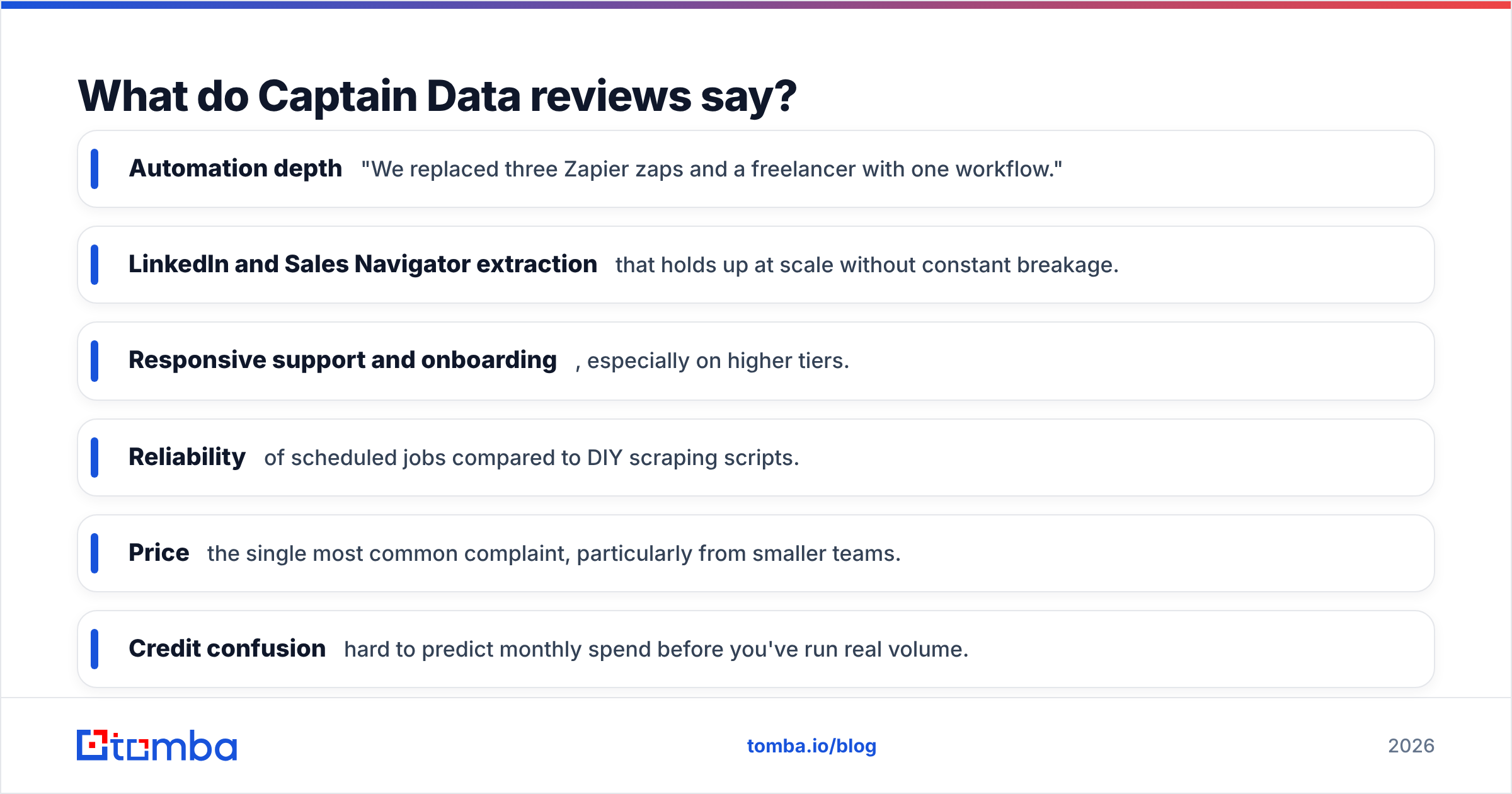
- Automation depth — "We replaced three Zapier zaps and a freelancer with one workflow."
- LinkedIn and Sales Navigator extraction that holds up at scale without constant breakage.
- Responsive support and onboarding, especially on higher tiers.
- Reliability of scheduled jobs compared to DIY scraping scripts.
What reviewers criticize:
- Price — the single most common complaint, particularly from smaller teams.
- Credit confusion — hard to predict monthly spend before you've run real volume.
- Learning curve — non-technical users need time to build and debug workflows.
- Overkill for simple needs — buyers who just wanted emails feel they overpaid.
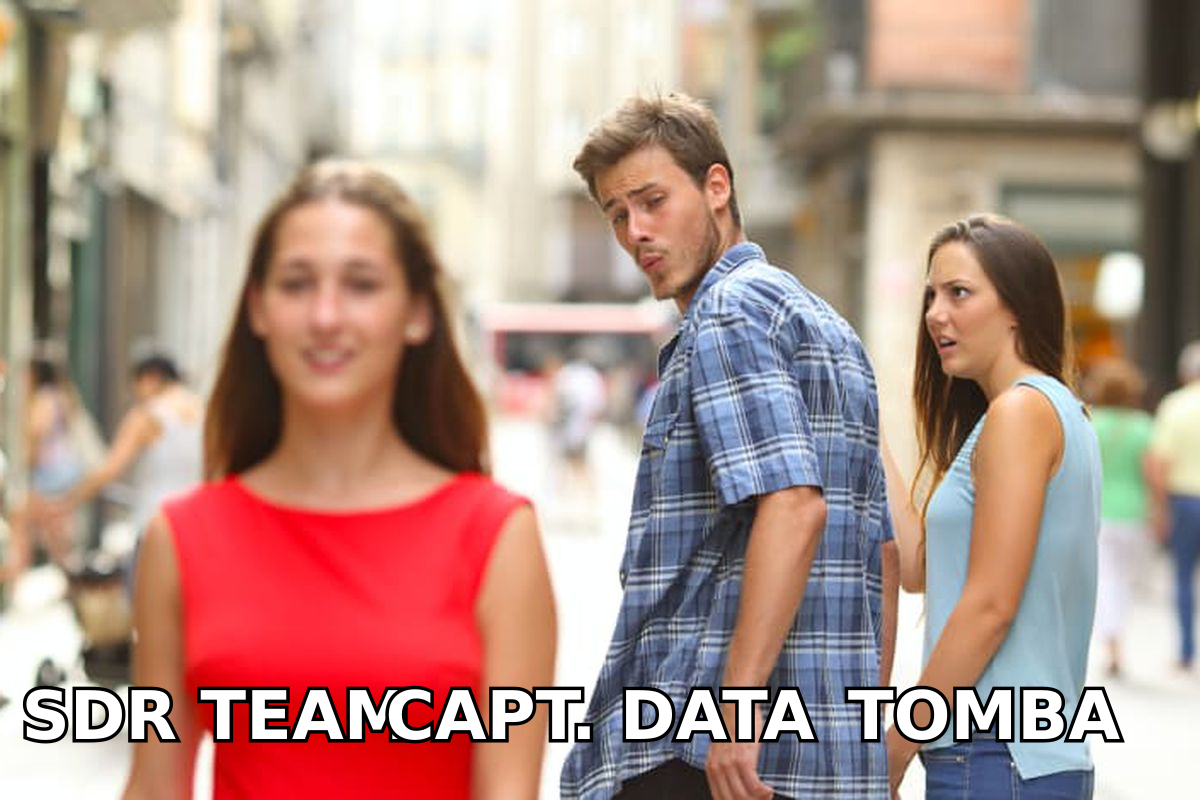
That last point is the crux. A large slice of Captain Data's churn isn't about the product failing — it's about mismatch. People buy a freight train when they needed a bicycle.
What are the pros of Captain Data?#
If you're a RevOps or growth team with real orchestration needs, Captain Data earns its keep. The genuine strengths:
- No-code multi-step workflows. You can build pipelines that would otherwise require a developer and a maintenance budget. This is the core reason power users stay.
- Strong LinkedIn ecosystem coverage. Sales Navigator scraping, profile enrichment, and list-building are mature and stable.
- Scales with your data warehouse. API access and integrations mean Captain Data can sit at the center of a modern revenue operations stack rather than off to the side.
- Reduces tool sprawl. One platform can replace a tangle of scrapers, enrichment add-ons, and glue automations.
- Compliance-conscious architecture. For teams worried about how scraping is handled, Captain Data positions itself as a managed, safer alternative to raw scripts.
In short, Captain Data is excellent when automation itself is the deliverable — when you need data continuously moving and transforming across systems.
What are the cons of Captain Data?#
The drawbacks are equally real, and they decide most buying outcomes:
- High entry price. Starting around $399/mo annually, it prices out solo founders, small agencies, and lean SDR teams.
- Credit-based cost is hard to forecast. You often can't know your true monthly bill until you've run production volume — uncomfortable for tight budgets.
- Learning curve. Building robust, error-handled workflows takes time. Non-technical users lean on support.
- It's more than many buyers need. If your actual task is "get verified work emails for a list of prospects," you're paying for an orchestration engine you'll barely use.
- Annual commitment pressure. The best rates assume a year-long contract, which is risky if you're still validating your motion.
This is where matching tool to job matters. If your bottleneck is contact data — not workflow orchestration — a focused stack is cheaper, faster to deploy, and easier to predict.
Captain Data vs a focused email-finding stack#
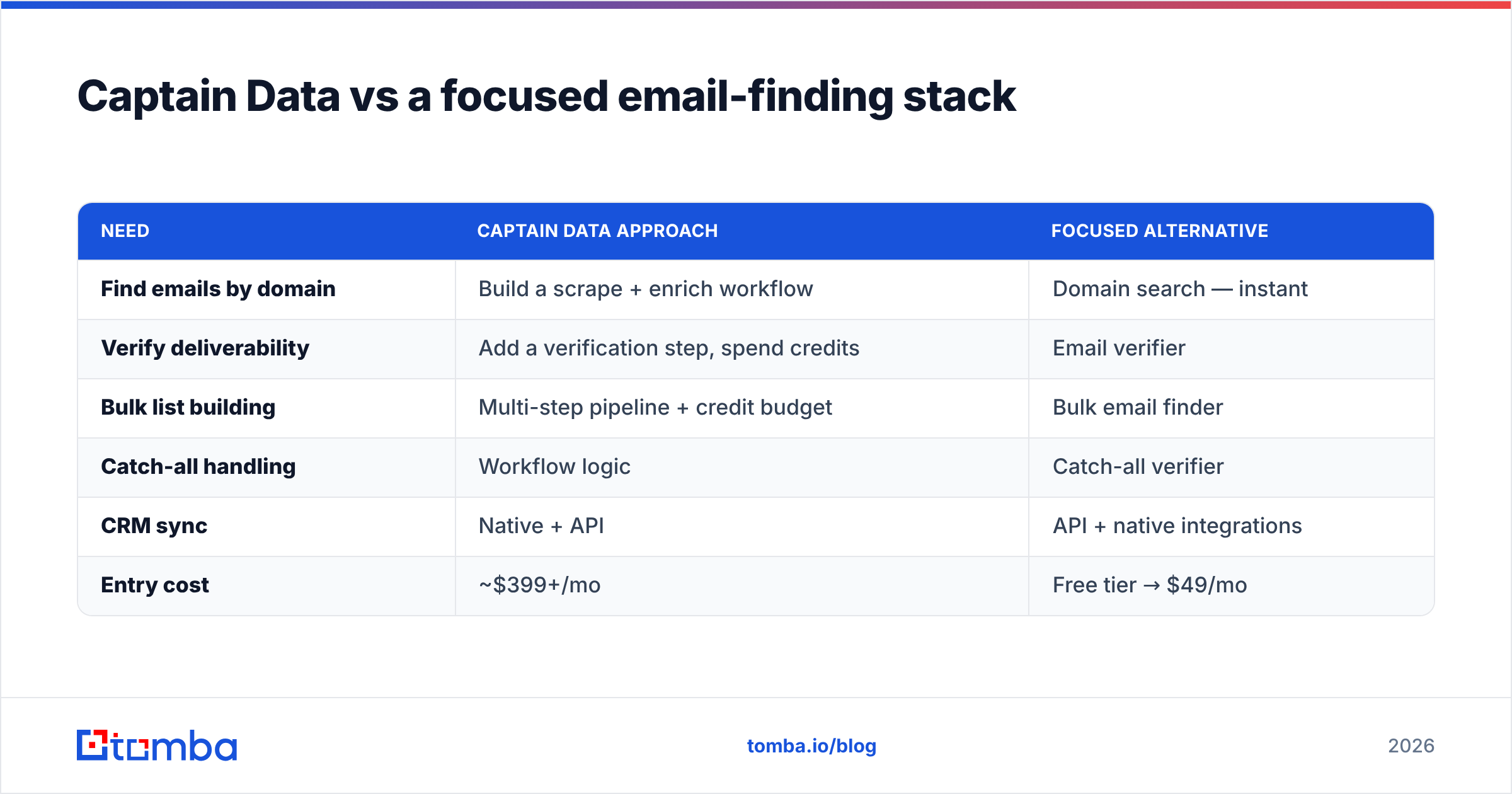
Most teams that "need Captain Data" actually need two narrower things: accurate contact discovery and clean verification. You can assemble that for a fraction of the cost.
| Need | Captain Data approach | Focused alternative |
|---|---|---|
| Find emails by domain | Build a scrape + enrich workflow | Domain search — instant |
| Verify deliverability | Add a verification step, spend credits | Email verifier |
| Bulk list building | Multi-step pipeline + credit budget | Bulk email finder |
| Catch-all handling | Workflow logic | Catch-all verifier |
| CRM sync | Native + API | API + native integrations |
| Entry cost | ~$399+/mo | Free tier → $49/mo |
If you already own Captain Data for orchestration but the quality of the email data underneath is shaky, you don't have to rip anything out. You can feed verified contacts in via the Tomba API and let Captain Data handle the routing. Use each tool for what it's actually good at.
Who should buy Captain Data — and who shouldn't?#
Buy Captain Data if you are a RevOps, growth, or data team that:
- Runs continuous, multi-step data pipelines across several sources.
- Has the budget for a mid-four-figure annual tool.
- Wants no-code orchestration to replace developer time or brittle scripts.
- Treats data automation itself as a core function, not a side task.
Skip Captain Data if you are a founder, SDR, agency, or marketer who:
- Mainly needs verified email addresses and phone numbers.
- Wants predictable, low monthly cost without annual lock-in.
- Doesn't want to build and maintain workflows.
- Is still validating your outbound motion and needs to move fast and cheap.
There's no shame in either answer. The expensive mistake is buying the platform when you needed the point tool — that's the single most common regret in Captain Data reviews.
How do you decide quickly?#
Run this three-question test before any demo:
- Is your bottleneck orchestration or data? If you're losing time wiring systems together, Captain Data is relevant. If you're losing time finding accurate contacts, it isn't — a dedicated email finder is.
- Can you forecast your credit usage? If you can't estimate monthly volume, you can't estimate the bill. Start with a smaller, transparent tool, learn your numbers, then scale up if orchestration becomes the real need.
- Do you need it this quarter? Captain Data rewards teams that invest in building workflows. If you need pipeline now, a tool you can deploy in an afternoon wins.
Honest answers usually sort buyers fast. A surprising number discover their "Captain Data problem" is actually a "we need better emails" problem wearing a more expensive costume.
The bottom line#
Captain Data is a strong, pricey automation platform that's right for RevOps teams and wrong for almost everyone who just needs contact data. The pros — deep workflows, solid LinkedIn extraction, real scalability — are genuine. The cons — high entry price, credit complexity, and a learning curve — are equally genuine and account for most of the negative reviews.
If your real goal is filling the pipeline with accurate, verified emails and phone numbers without a four-figure monthly commitment, you don't need a freight train. Start with the Tomba Email Finder: find professional email addresses by name, domain, or company, verify them before you send, and keep your spend predictable with a free tier and a $49/mo starter plan. Add the heavier orchestration later — only once orchestration, not data, is the thing actually slowing you down.
// get started
Find, verify and enrich your first contacts today
Start on the free plan with 25 searches a month, then scale when your team is ready.
Free plan · No credit card required · GDPR & CCPA
// about the author