Captain Verify Pricing, Reviews, Pros and Cons (2026 Guide)
A neutral 2026 breakdown of Captain Verify pricing, real user reviews, and the honest pros and cons—plus how it stacks up against all-in-one alternatives.
Captain Verify is a France-based email verification service that has built a steady reputation for clean lists and pay-as-you-go pricing. But "steady reputation" is not the same as "right for your stack." Before you load credits, you want the real numbers, the real complaints, and an honest sense of where it wins and where it falls short.
This guide gives you exactly that: the current Captain Verify pricing, what reviewers actually say, the pros and cons that matter, and the alternatives worth comparing before you commit.
TL;DR#
- Captain Verify pricing is credit-based and pay-as-you-go, starting around $7 for 1,000 verifications, with bulk tiers that push the per-email cost down sharply at volume.
- Strengths: low entry cost, no forced monthly subscription, a clean bulk UI, GDPR-friendly EU hosting, and solid syntax/MX checking.
- Weaknesses: catch-all and role-account handling divides reviewers, the API is thinner than larger rivals, and it is verification-only—no finding or enrichment.
- Best for: teams that already have email lists and just need cheap, occasional cleaning without a contract.
- Worth comparing: all-in-one platforms that bundle finding, verifying, and enrichment so you are not stitching three tools together.
What is Captain Verify and who is it for?#
Captain Verify is a single-purpose tool: you feed it a list of email addresses, and it tells you which ones are safe to send to. It checks syntax, domain and MX records, and performs an SMTP-level mailbox probe, then buckets each address as valid, invalid, risky, or unknown.
Think of it like a metal detector at airport security. It does not book your flight or pack your bag—it only screens what you already have and flags the items that will cause problems downstream. If you need the booking and the packing too, you are looking at the wrong category of tool.
That focus is the whole story. Captain Verify is aimed at marketers and small sales teams who already collect emails—through forms, exports, or scraping—and need to scrub bounces before a campaign. It is not built to source new contacts. If your real bottleneck is finding addresses in the first place, a dedicated email finder solves a different problem than a verifier does.

How much does Captain Verify cost in 2026?#
Captain Verify pricing is built around one idea: buy credits, spend them whenever, never lose them to a monthly reset. One credit verifies one email. There is a small free allotment to test the service, and then pay-as-you-go packs whose unit price drops as the pack grows.
The structure rewards volume. A few thousand verifications cost a near-trivial amount; a few million bring the per-email price down to a fraction of a cent. For a team that cleans a big list twice a year, that math is genuinely attractive compared with a tool that bills monthly whether you use it or not.
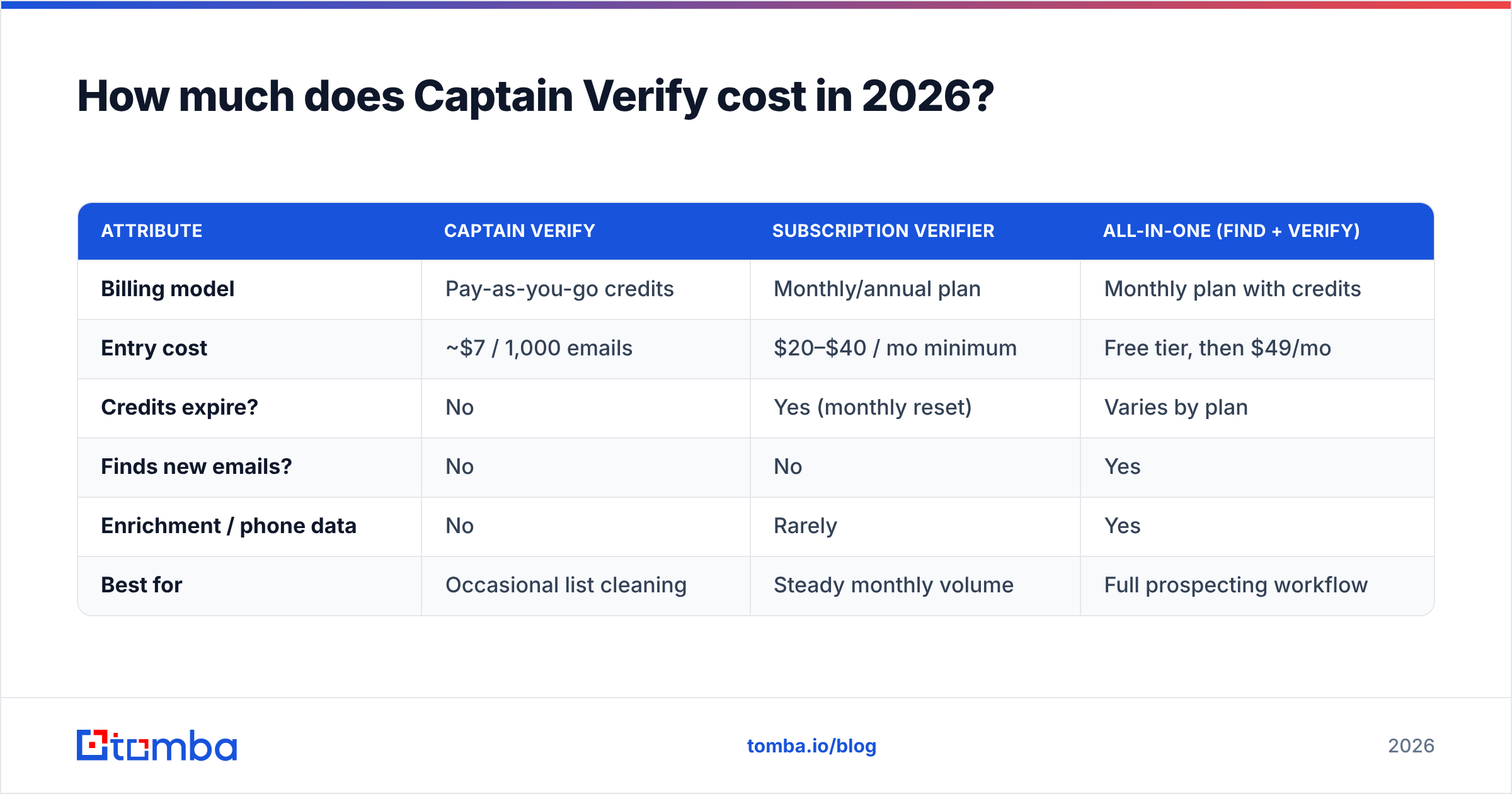
Here is how the credit-based model typically compares against subscription-style and all-in-one tools. Exact numbers move over time—always confirm on the vendor's own pricing page—but the shape of the trade-off is stable:
| Attribute | Captain Verify | Subscription verifier | All-in-one (find + verify) |
|---|---|---|---|
| Billing model | Pay-as-you-go credits | Monthly/annual plan | Monthly plan with credits |
| Entry cost | ~$7 / 1,000 emails | $20–$40 / mo minimum | Free tier, then $49/mo |
| Credits expire? | No | Yes (monthly reset) | Varies by plan |
| Finds new emails? | No | No | Yes |
| Enrichment / phone data | No | Rarely | Yes |
| Best for | Occasional list cleaning | Steady monthly volume | Full prospecting workflow |
The key takeaway: Captain Verify is cheapest when your usage is lumpy and infrequent. The moment your workflow needs finding, enrichment, or steady high volume, the "cheap per credit" advantage gets eaten by the cost of buying and integrating extra tools.
What do Captain Verify reviews actually say?#
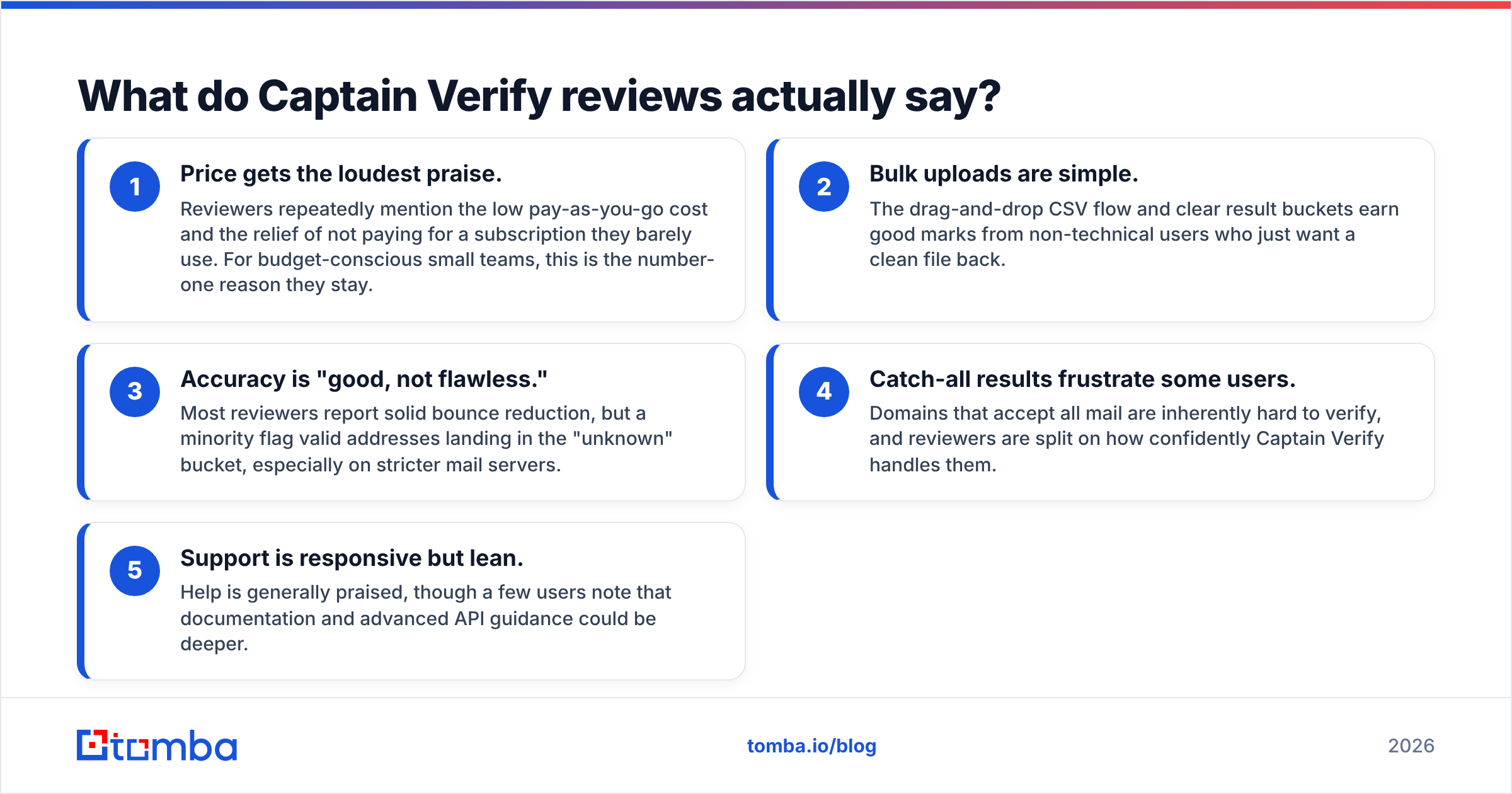
Across G2 and Capterra, Captain Verify reviews cluster around a consistent set of themes. Strip away the marketing and the recurring signal looks like this:
- Price gets the loudest praise. Reviewers repeatedly mention the low pay-as-you-go cost and the relief of not paying for a subscription they barely use. For budget-conscious small teams, this is the number-one reason they stay.
- Bulk uploads are simple. The drag-and-drop CSV flow and clear result buckets earn good marks from non-technical users who just want a clean file back.
- Accuracy is "good, not flawless." Most reviewers report solid bounce reduction, but a minority flag valid addresses landing in the "unknown" bucket, especially on stricter mail servers.
- Catch-all results frustrate some users. Domains that accept all mail are inherently hard to verify, and reviewers are split on how confidently Captain Verify handles them.
- Support is responsive but lean. Help is generally praised, though a few users note that documentation and advanced API guidance could be deeper.
None of these are dealbreakers on their own. Together, they paint a picture of a competent, narrow tool that does its one job well and rarely tries to do more.
What are the pros and cons of Captain Verify?#
Here is the honest balance sheet. No tool wins every row, and pretending otherwise just costs you money later.
Pros
- Low, transparent pricing. Credit packs are cheap to start and cheaper at scale, with no contract.
- No credit expiry. Buy now, use later—ideal for seasonal senders.
- EU hosting and GDPR posture. A real advantage for European teams with strict data-residency needs.
- Clean bulk experience. CSV in, scored list out, minimal friction.
- Decent core checks. Syntax, MX, and SMTP probing cover the fundamentals well.
Cons
- Verification only. No finding, no enrichment, no phone data—you will need other tools.
- Catch-all uncertainty. Risky/unknown buckets can be larger than you would like on tricky domains, where a dedicated catch-all verifier often resolves more addresses confidently.
- Thinner API and integrations. Fine for manual cleaning, less ideal for deeply automated pipelines.
- Single-point tooling. Stitching a finder, a verifier, and an enricher together adds cost and maintenance overhead.

How accurate is Captain Verify's verification?#
Accuracy in email verification is less about a single headline percentage and more about how a tool handles the hard cases. Anyone can confirm that nope@@broken is invalid. The real test is the messy middle.
There are four buckets that decide real-world value:
- Valid: mailbox confirmed, safe to send. Captain Verify does this reliably.
- Invalid: bounces guaranteed. Also handled well—this is where you save your sender reputation.
- Catch-all (accept-all): the server accepts everything, so the mailbox cannot be confirmed by probing alone. This is where verifiers diverge most.
- Unknown: the server timed out or refused to answer. A higher unknown rate means more emails you still have to judge yourself.
Captain Verify performs solidly on the first two buckets. The reviews suggest it is more conservative on catch-all and unknown results—safe, but it can leave usable contacts in limbo. If a large share of your list sits on catch-all domains (common in enterprise and Google Workspace estates), pair your verification with a tool purpose-built for that scenario, and verify in bulk so you can compare confidence rates on the same file.
Either way, treat verification as one layer of email deliverability, not the whole answer. A clean list reduces bounces; it does not fix a cold domain, a missing SPF record, or weak warmup.
Is Captain Verify better than an all-in-one platform?#
It depends on where your actual bottleneck sits—and being honest about that is the difference between a tool that pays for itself and one that becomes shelf-ware.
If you already own large lists and only need to scrub them occasionally, a standalone verifier like Captain Verify is hard to beat on price. You buy credits when you need them and pay nothing in between.
But most sales and growth teams have a different problem. They need to find the right contacts, verify them, and enrich them with role, company, and phone data before outreach. Running that across three separate vendors means three logins, three bills, three integrations to maintain, and data that does not always line up. That is where a platform that bundles an email verifier with finding and enrichment changes the economics.
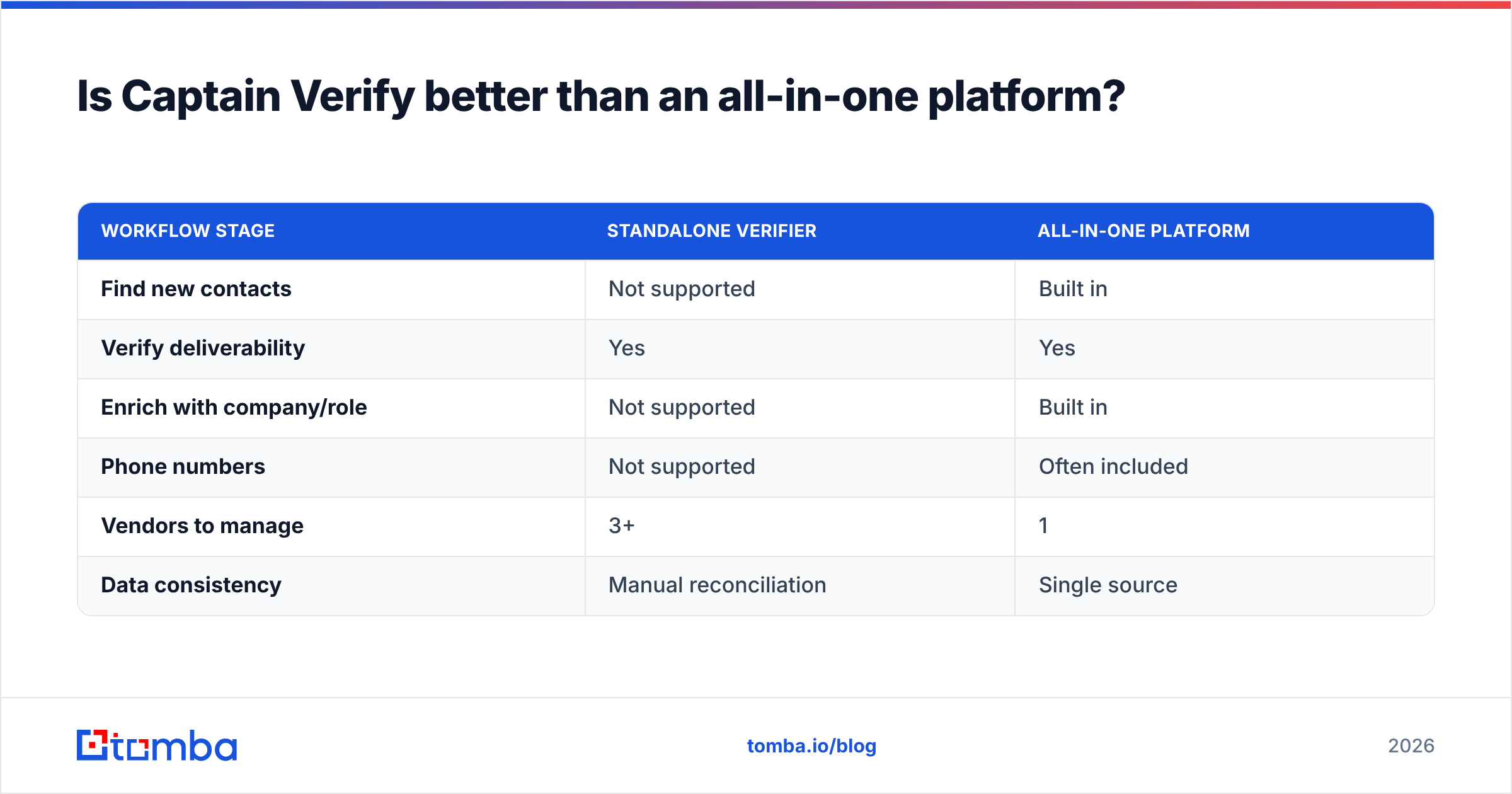
| Workflow stage | Standalone verifier | All-in-one platform |
|---|---|---|
| Find new contacts | Not supported | Built in |
| Verify deliverability | Yes | Yes |
| Enrich with company/role | Not supported | Built in |
| Phone numbers | Not supported | Often included |
| Vendors to manage | 3+ | 1 |
| Data consistency | Manual reconciliation | Single source |
The point is not that Captain Verify is bad. It is that a verifier solves one-third of the job. If that one-third is genuinely all you need, it is an efficient pick. If it is not, the "cheap per credit" headline hides the real total cost of running a fragmented stack.
What are the best Captain Verify alternatives?#
Your alternative depends on what you are missing:
- You only verify, but want richer API access: look at dedicated verification vendors with stronger developer docs and SLAs.
- You need catch-all confidence specifically: prioritize tools that publish how they resolve accept-all domains rather than dumping them into "unknown."
- You need the whole pipeline: choose an all-in-one platform. Tomba bundles finding, verification, domain search, catch-all verification, and enrichment under one roof, with a free tier (25 searches/month) and paid plans from $49/month for Starter up to Pro at $249/month. See the full Tomba pricing for the breakdown.
The honest framing: if you want a screwdriver, buy the best screwdriver. If you keep reaching for the screwdriver, the drill, and the wrench on every job, buy the toolkit.
How do you choose the right fit?#
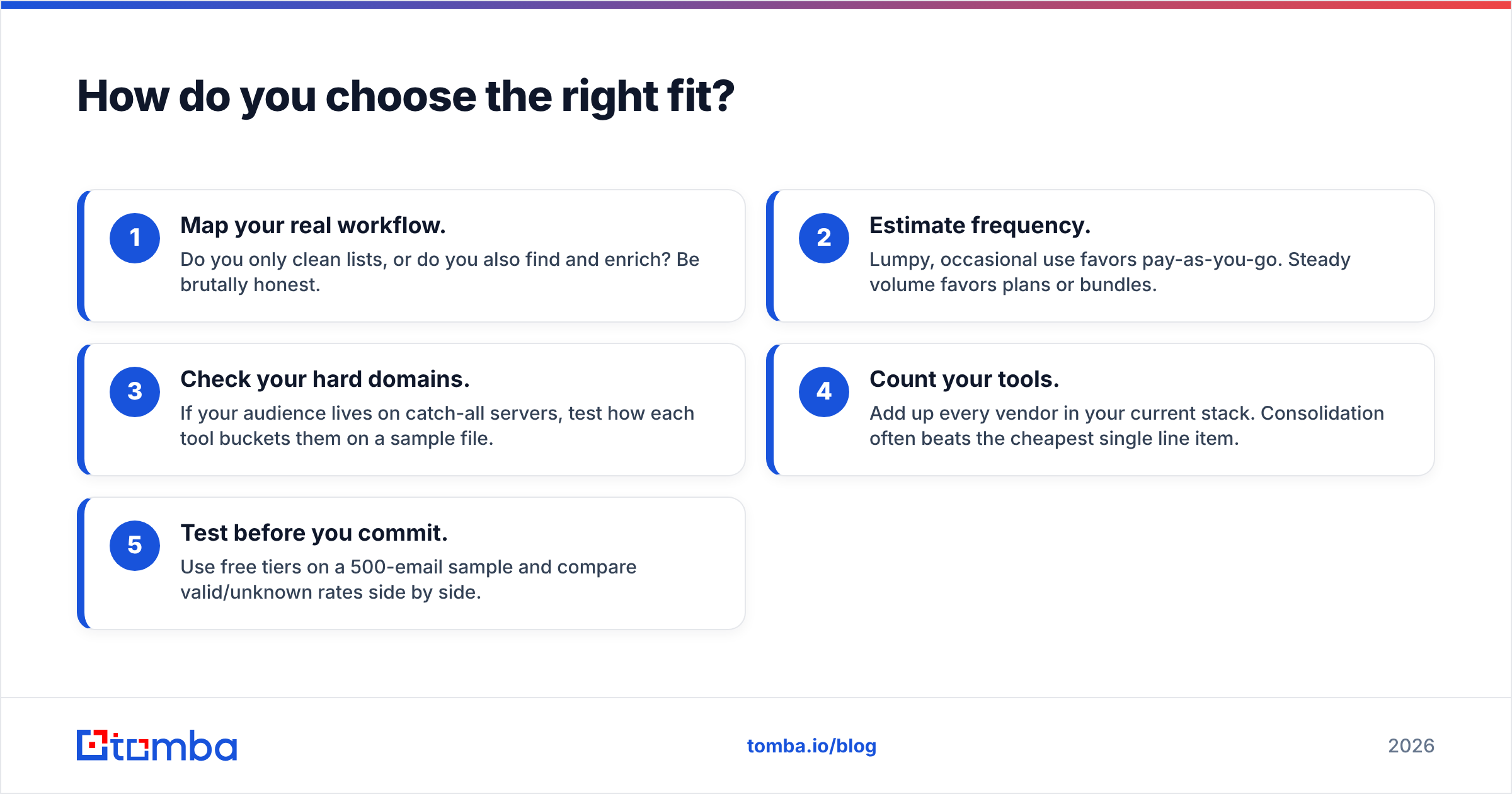
Run a five-minute audit before you spend a cent:
- Map your real workflow. Do you only clean lists, or do you also find and enrich? Be brutally honest.
- Estimate frequency. Lumpy, occasional use favors pay-as-you-go. Steady volume favors plans or bundles.
- Check your hard domains. If your audience lives on catch-all servers, test how each tool buckets them on a sample file.
- Count your tools. Add up every vendor in your current stack. Consolidation often beats the cheapest single line item.
- Test before you commit. Use free tiers on a 500-email sample and compare valid/unknown rates side by side.
That last step matters most. Verification claims are easy to make and hard to trust until you run your own list through and read the buckets yourself.
The bottom line#
Captain Verify is a clean, affordable, EU-hosted verifier that does its single job well. Its pricing is genuinely attractive for teams with occasional, list-cleaning needs and no appetite for a subscription. The cons are not flaws so much as boundaries: it verifies, and that is all it does.
If verification is your only gap, it is a reasonable pick. If your team actually needs to find contacts, verify them, and enrich them in one motion, a fragmented stack quietly costs more than it saves.
That is exactly the gap the Tomba Email Finder closes. Find professional email addresses by domain, name, or company, verify them, and enrich them—without juggling three vendors or three invoices. Start free with 25 searches a month, then scale on a plan that matches your real volume instead of a credit pack that only covers one-third of the work.
// get started
Find, verify and enrich your first contacts today
Start on the free plan with 25 searches a month, then scale when your team is ready.
Free plan · No credit card required · GDPR & CCPA
// about the author