Captain Verify vs ContactOut 2026: Honest Feature Comparison
Captain Verify cleans your list; ContactOut finds new contacts. We break down pricing, accuracy, and use cases so you pick the right tool in 2026 — or skip both.
You searched "Captain Verify vs ContactOut" expecting a head-to-head, but these two tools barely compete. One cleans the list you already have. The other digs up contacts you don't. Picking between them without understanding that gap is how teams end up paying for two subscriptions when one platform would do.
This guide cuts through the overlap, compares them on the dimensions that actually matter, and shows where a consolidated alternative beats running both.
TL;DR#
- Captain Verify is an email verifier. It checks whether addresses you already own are deliverable. It does not find new contacts.
- ContactOut is an email finder and contact database. It surfaces emails and phone numbers, mostly through a LinkedIn extension. Its verification is lighter.
- They solve different problems. "Captain Verify vs ContactOut" is really "do I need to clean a list or build one?"
- Pricing favors Captain Verify for one-off cleaning (pay-as-you-go credits); ContactOut's recurring plans get expensive at scale.
- If you need find and verify in one place, an all-in-one like Tomba Email Finder removes the two-tool tax — verification is built in, not bolted on.
What is Captain Verify?#
Captain Verify is a French-built email verifier. You upload a list, it pings each address through syntax checks, MX record lookups, and SMTP probes, then hands back a status: valid, invalid, risky, or unknown. The goal is simple — stop you from emailing dead addresses that spike your bounce rate and torch your sender reputation.
It also does a few adjacent jobs: duplicate removal, a basic email finder by name and domain, and bulk processing. But verification is the core, and pay-as-you-go credits are the headline. You buy a block, you spend it when you need it, no monthly lock-in.
What Captain Verify does not do well is prospecting. Its finder is thin compared to a dedicated database. If your problem is "I have 40,000 contacts and don't know which are alive," it fits. If your problem is "I have no contacts," it doesn't.
)
What is ContactOut?#
ContactOut is a contact-finding platform built around a Chrome extension that pulls personal and work emails plus phone numbers off LinkedIn profiles. Recruiters love it because it surfaces personal Gmail addresses that survive job changes. Sales teams use it to build prospect lists straight from LinkedIn search.
ContactOut leans on a large claimed database and a "triple-verified email" badge, but verification here is a feature of finding, not a standalone product. You don't upload your existing CRM export to ContactOut to clean it — that's not the workflow. You point it at people you want to reach.
So the honest framing: ContactOut answers "who do I contact and how," while Captain Verify answers "are these addresses safe to send to." Reviews on G2 reflect this split — ContactOut is shelved under sales intelligence, Captain Verify under email verification.
How do Captain Verify and ContactOut compare?#
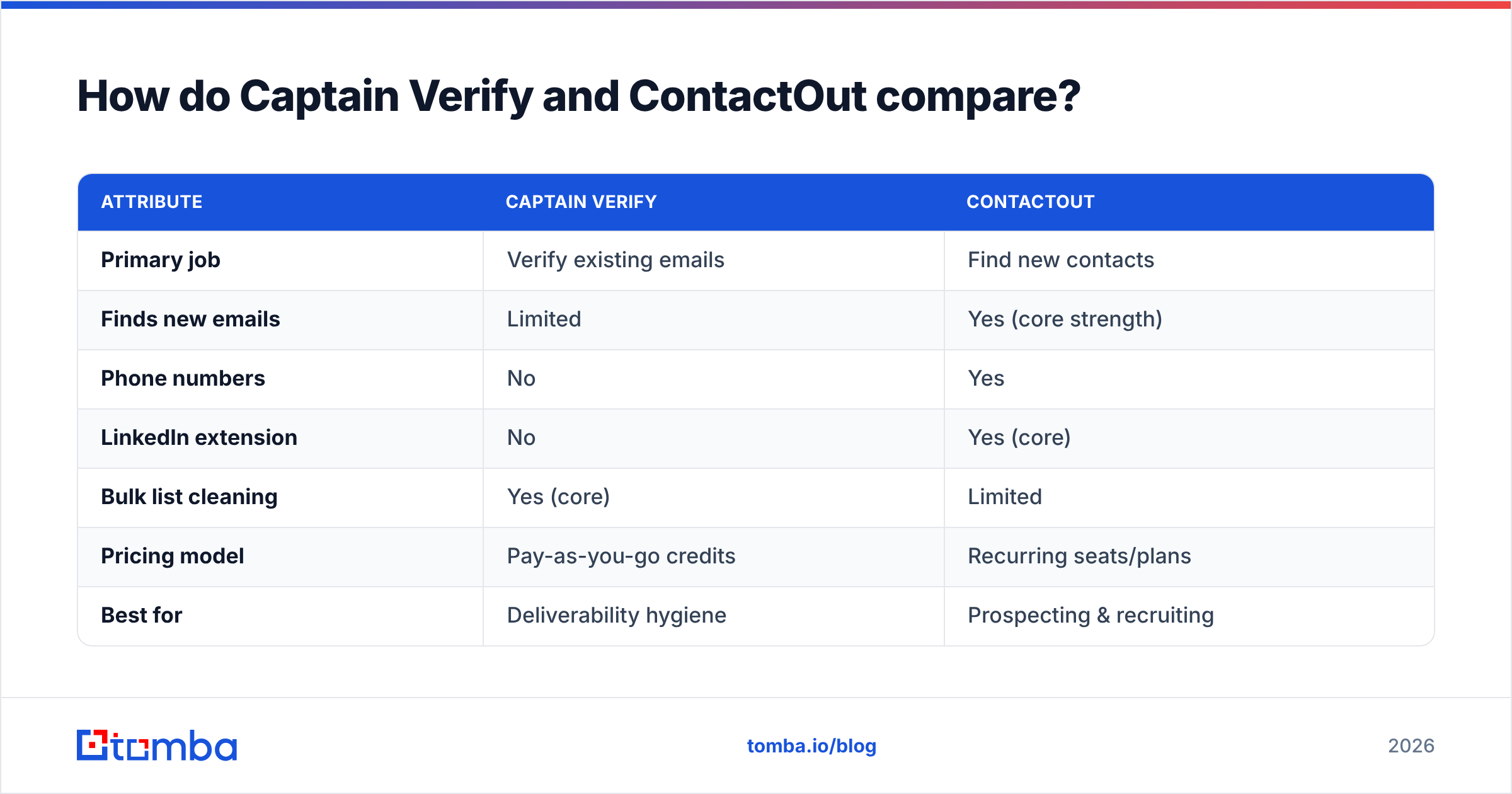
Here's the core-concept breakdown. Read it as a positioning map, not a winner-take-all scorecard — the right pick depends on which job you're hiring for.
| Attribute | Captain Verify | ContactOut |
|---|---|---|
| Primary job | Verify existing emails | Find new contacts |
| Finds new emails | Limited | Yes (core strength) |
| Phone numbers | No | Yes |
| LinkedIn extension | No | Yes (core) |
| Bulk list cleaning | Yes (core) | Limited |
| Pricing model | Pay-as-you-go credits | Recurring seats/plans |
| Best for | Deliverability hygiene | Prospecting & recruiting |
| Catch-all handling | Flags risky/unknown | Varies by record |
The takeaway: these tools are complements far more than competitors. A team running cold outbound often needs both jobs done — which is exactly where paying two vendors starts to hurt.
Which is more accurate?#
Accuracy means two different things here, so compare them on the right axis.
For verification accuracy — does a "valid" verdict actually mean the inbox accepts mail — Captain Verify is the specialist. SMTP-level checking, catch-all flagging, and risky-address scoring are its whole reason to exist. A dedicated verifier will almost always beat a finder's built-in verification badge.
For find accuracy — does the email it returns belong to the right person and still work — ContactOut is the specialist, especially for LinkedIn-sourced personal emails. But "found" is not the same as "deliverable." A finder can hand you a real address that's been abandoned, and a lightweight verification badge won't always catch that.
This is the trap with single-purpose tools: ContactOut's find accuracy doesn't fix bounce risk, and Captain Verify's verification accuracy doesn't help an empty pipeline. The most reliable workflow finds an address and runs it through a real verifier before send.

That accuracy gap is precisely why combined platforms exist. When the same engine that finds the address also verifies it — and flags catch-all domains before they wreck your bounce rate — you stop stitching two accuracy stories together and hoping they line up.
How do they price?#
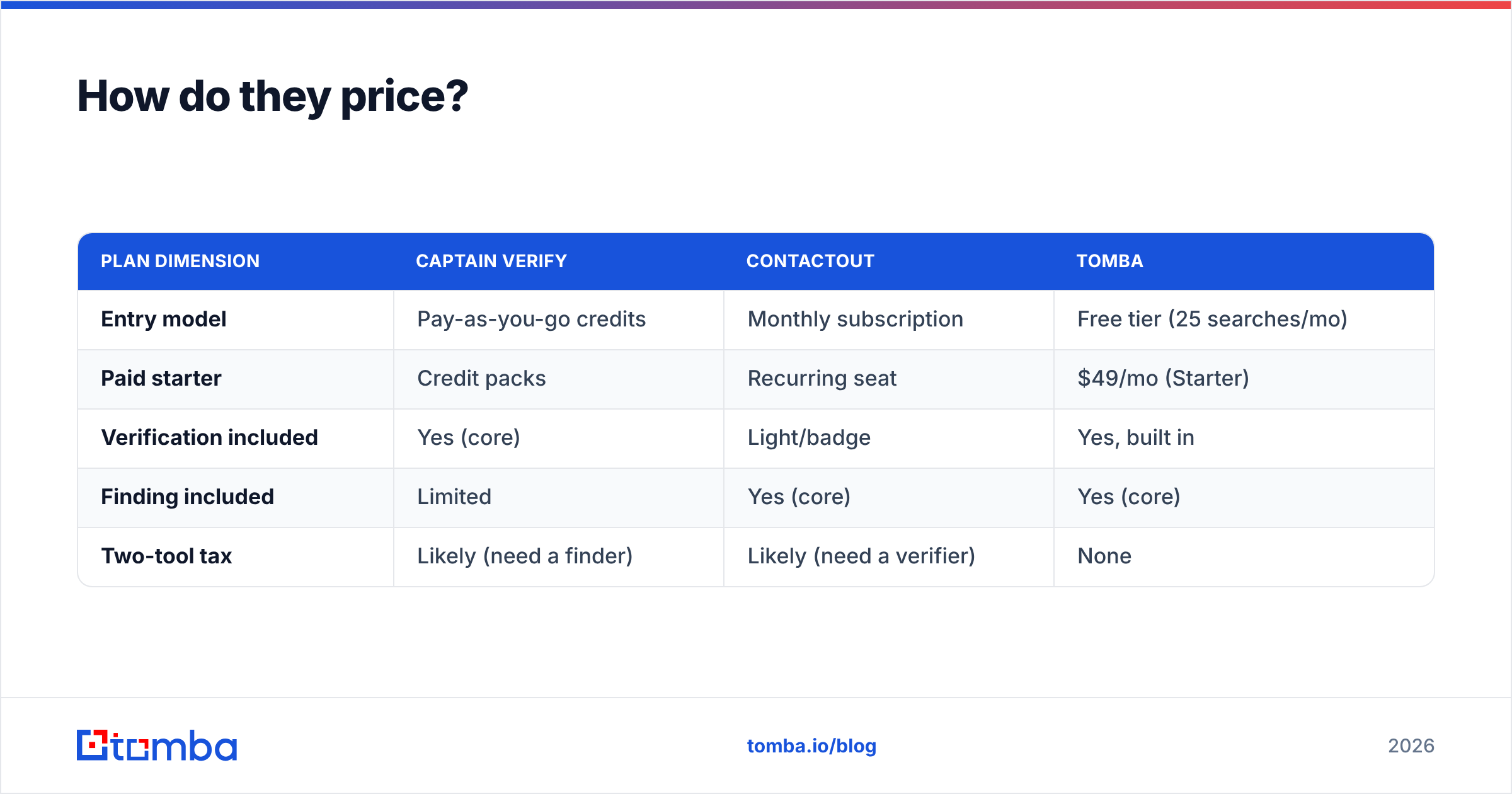
Pricing is where the two tools diverge most, and where buying logic gets clear.
Captain Verify sells credits. You pay once, verify a batch, and the credits sit there until you use them. That's ideal for the team that cleans a list quarterly and doesn't want a subscription humming in the background.
ContactOut sells recurring access — seats and monthly find/export limits. That fits ongoing prospecting where you pull fresh contacts every week, but the cost compounds, and per-seat pricing punishes growing teams. Always check current numbers on the ContactOut site and your own usage before committing, because both vendors revise tiers often.
| Plan dimension | Captain Verify | ContactOut | Tomba |
|---|---|---|---|
| Entry model | Pay-as-you-go credits | Monthly subscription | Free tier (25 searches/mo) |
| Paid starter | Credit packs | Recurring seat | $49/mo (Starter) |
| Verification included | Yes (core) | Light/badge | Yes, built in |
| Finding included | Limited | Yes (core) | Yes (core) |
| Two-tool tax | Likely (need a finder) | Likely (need a verifier) | None |
If you only ever clean lists, Captain Verify's credit model is hard to beat on flexibility. If you only ever prospect, ContactOut earns its subscription. The moment you do both, you're paying twice — and that's the case for consolidating. Compare full Tomba pricing against the combined cost of two point tools before you decide.
)
When should you pick each tool?#
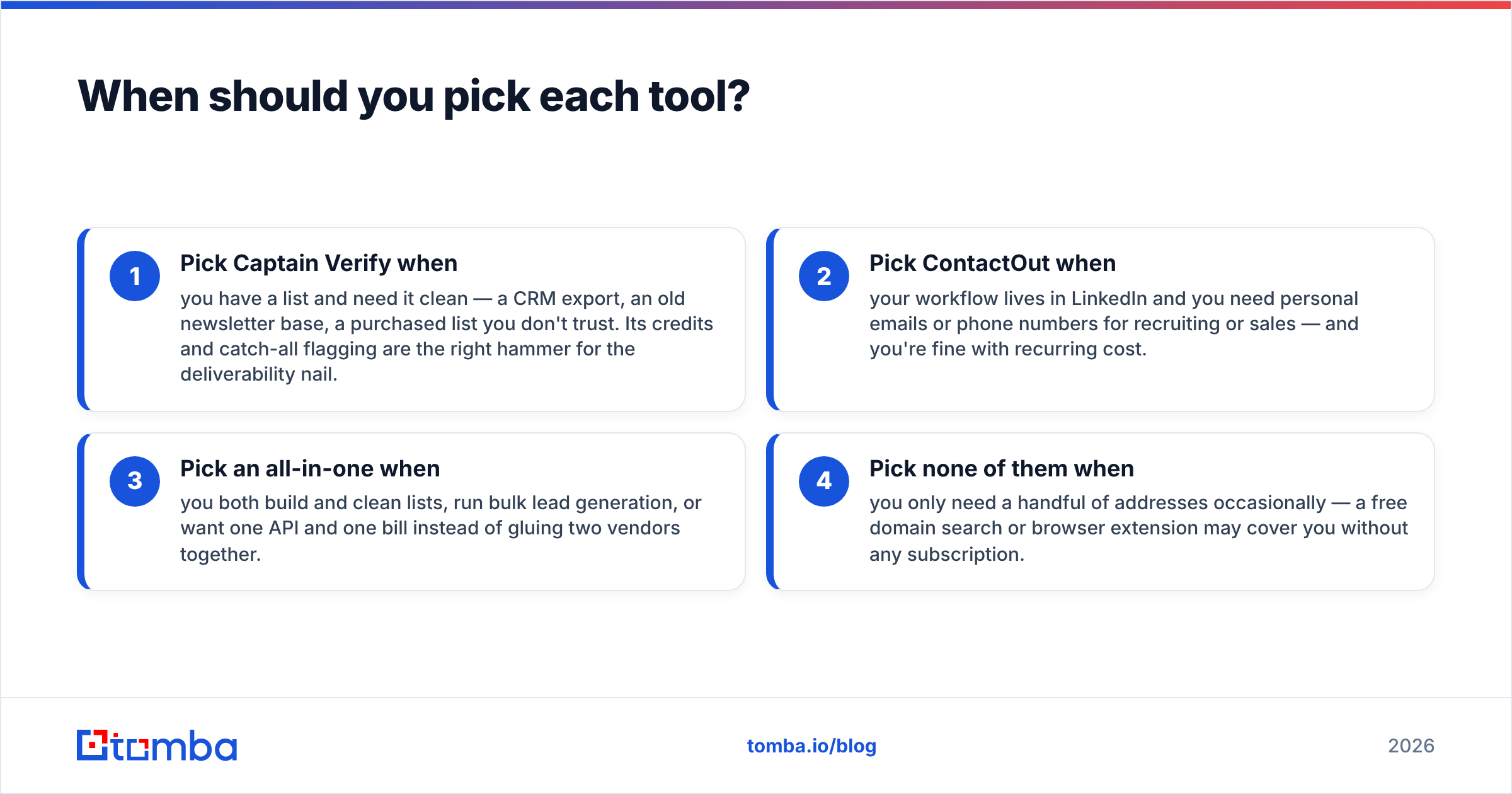
Match the tool to the job, not the brand.
- Pick Captain Verify when you have a list and need it clean — a CRM export, an old newsletter base, a purchased list you don't trust. Its credits and catch-all flagging are the right hammer for the deliverability nail.
- Pick ContactOut when your workflow lives in LinkedIn and you need personal emails or phone numbers for recruiting or sales — and you're fine with recurring cost.
- Pick an all-in-one when you both build and clean lists, run bulk lead generation, or want one API and one bill instead of gluing two vendors together.
- Pick none of them when you only need a handful of addresses occasionally — a free domain search or browser extension may cover you without any subscription.
Be honest about which row you're in. Most outbound teams are in row three and don't realize it until the second invoice arrives.
What about an all-in-one alternative?#
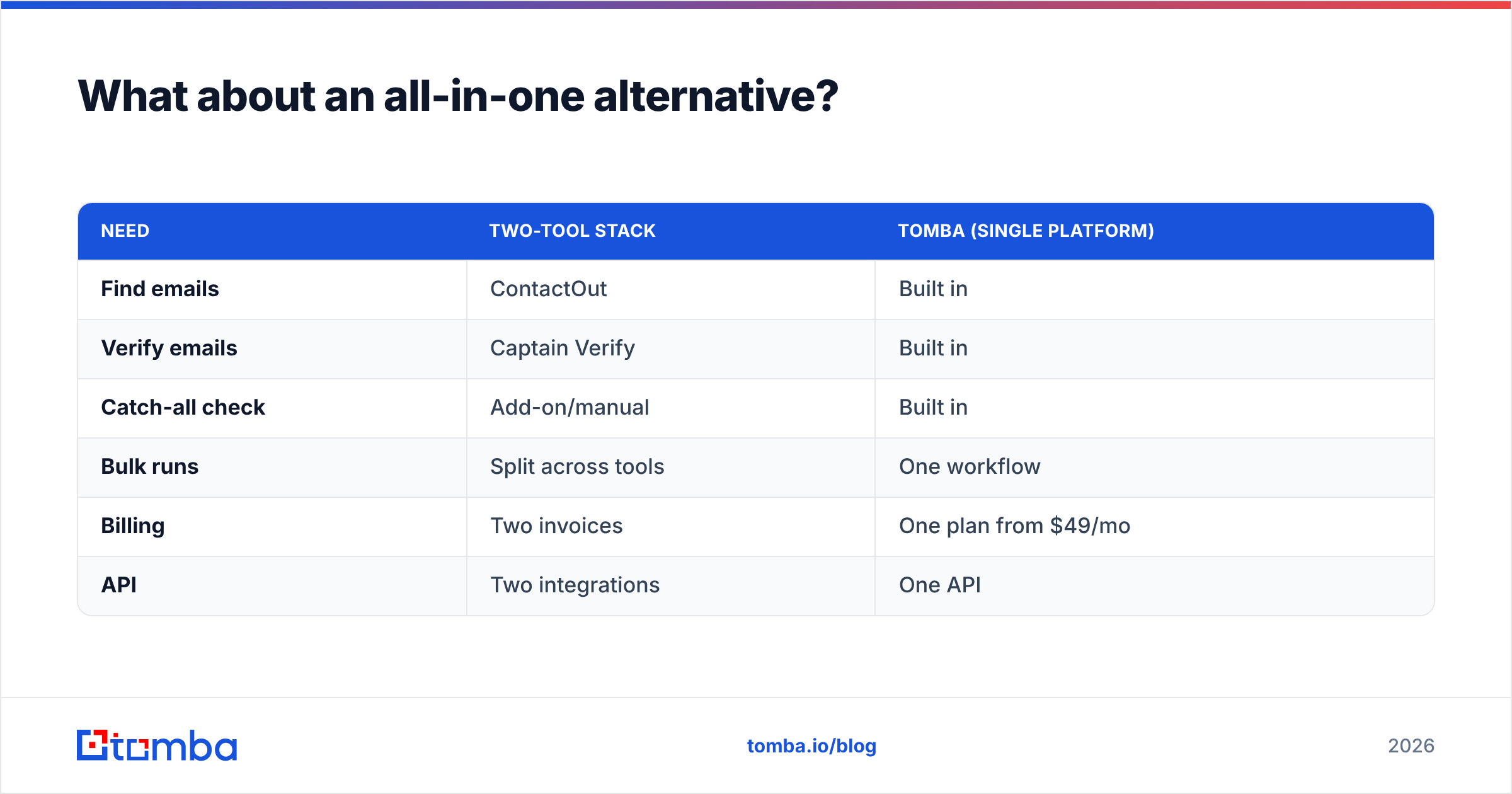
The strongest argument against "Captain Verify vs ContactOut" is that you may not have to choose. The reason these tools feel mismatched is that real prospecting needs both finding and verification, and buying them separately means two logins, two credit systems, and two places for data to drift out of sync.
A consolidated platform like Tomba runs both jobs on one stack: find an email by name or domain, then verify it through the same engine before it ever hits your sequence. You also get catch-all verification, bulk processing, and a single API instead of wiring ContactOut's finder to Captain Verify's checker yourself.
| Need | Two-tool stack | Tomba (single platform) |
|---|---|---|
| Find emails | ContactOut | Built in |
| Verify emails | Captain Verify | Built in |
| Catch-all check | Add-on/manual | Built in |
| Bulk runs | Split across tools | One workflow |
| Billing | Two invoices | One plan from $49/mo |
| API | Two integrations | One API |
This isn't a knock on either specialist — Captain Verify is a genuinely good verifier and ContactOut is a strong LinkedIn sourcer. It's a question of whether your workflow justifies two best-in-class point tools or one platform that covers the whole loop. For teams running steady outbound, consolidation usually wins on cost and on data hygiene.

Common questions#
Is Captain Verify a competitor to ContactOut? Not really. Captain Verify verifies addresses you already have; ContactOut finds new ones. They overlap only at the edges — ContactOut verifies what it finds, and Captain Verify has a thin finder — but their core jobs are different.
Can I use both together? Yes, and some teams do: find with ContactOut, verify with Captain Verify before sending. It works, but it means two subscriptions and a manual handoff. An all-in-one collapses that into one step.
Which is cheaper? For occasional list cleaning, Captain Verify's pay-as-you-go credits are usually cheaper because there's no recurring fee. For continuous prospecting, costs depend entirely on volume — and running both tools is the most expensive path of all.
Do I need verification if my finder says "verified"? Often, yes. A finder's badge tells you the address was plausible when collected. A dedicated verifier checks deliverability now, including catch-all and risky statuses a badge may miss.
The bottom line#
Stop framing this as Captain Verify versus ContactOut. Captain Verify cleans lists; ContactOut builds them. If you only do one of those jobs, buy the specialist that matches it and move on. If you do both — which most outbound and recruiting teams do — paying two vendors to half-solve the problem is the worst of the three options.
That's the gap Tomba is built to close. The Tomba Email Finder finds professional emails by name, domain, or company, then verifies them through the same engine — catch-all flagging and bulk runs included — so you build a clean, sendable list in one place instead of stitching two tools together. Start on the free tier (25 searches a month), and scale to a single $49/mo plan only when you outgrow it. One login, one bill, both jobs done.
// get started
Find, verify and enrich your first contacts today
Start on the free plan with 25 searches a month, then scale when your team is ready.
Free plan · No credit card required · GDPR & CCPA
// about the author