Captain Verify vs FindThatLead: 2026 Accuracy Showdown
Captain Verify verifies emails; FindThatLead finds them. Here's where each wins on accuracy, pricing, and data in 2026 — plus the tool that does both.
TL;DR
- Captain Verify is an email verification tool — it cleans lists you already have. FindThatLead is a prospecting tool — it finds new emails from domains and LinkedIn. They solve different halves of the same problem.
- If you only need to scrub a bounce-prone list, Captain Verify is cheap and competent. If you need to build lists from scratch, FindThatLead does more.
- Neither tool does both jobs well. You end up paying two vendors, juggling two logins, and exporting CSVs between them.
- On raw verification accuracy, dedicated verifiers (including Captain Verify) beat finder-bundled checks — but the gap narrows once you use a platform built for both.
- The all-in-one move: pair a high-accuracy email finder with a built-in email verifier so finding and validating happen in one pass.
What are Captain Verify and FindThatLead?#
Captain Verify and FindThatLead are not really competitors — they're two tools people mistakenly compare because both touch email. Understanding the split is the whole point of this post.
Captain Verify is a French email verification service. You upload a list, it pings mail servers, checks syntax, flags catch-alls and disposables, and hands back a cleaned file with deliverability scores. That's its entire job, and it does it without trying to be a CRM or a sequencer.
FindThatLead is a Spanish lead-generation platform. Its core is finding email addresses — by domain, by name, by company, and through a LinkedIn-style prospecting flow. It bundles a basic verifier and a small cold-email sender on top, but the gravity of the product is discovery, not validation.
So the honest framing of "captain verify vs findthatlead" is: one cleans, one collects. Picking between them based on price alone is how teams end up with a dirty list or an empty one.

How do they actually differ?#
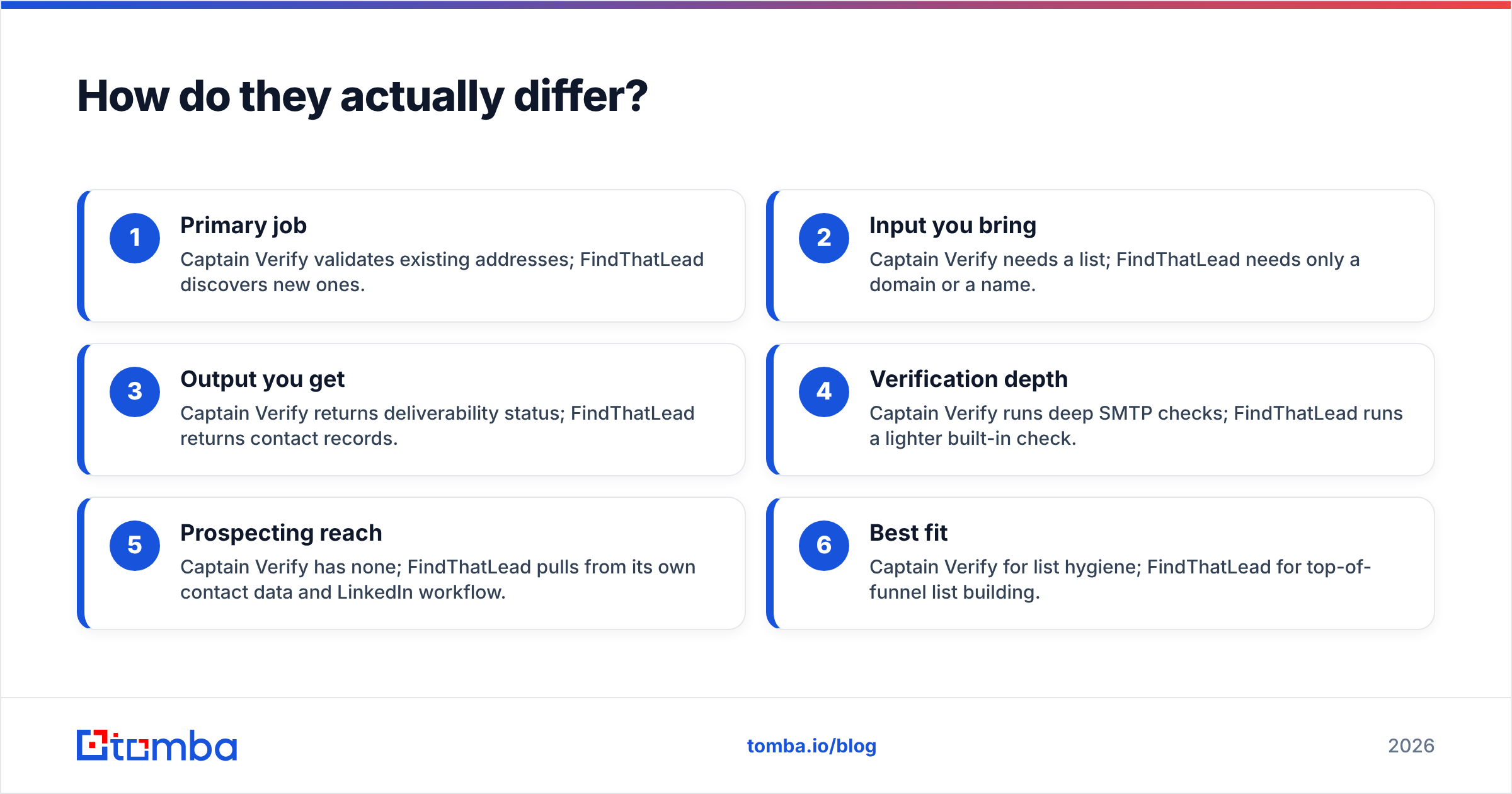
Here's the core split laid out by job-to-be-done:
- Primary job — Captain Verify validates existing addresses; FindThatLead discovers new ones.
- Input you bring — Captain Verify needs a list; FindThatLead needs only a domain or a name.
- Output you get — Captain Verify returns deliverability status; FindThatLead returns contact records.
- Verification depth — Captain Verify runs deep SMTP checks; FindThatLead runs a lighter built-in check.
- Prospecting reach — Captain Verify has none; FindThatLead pulls from its own contact data and LinkedIn workflow.
- Best fit — Captain Verify for list hygiene; FindThatLead for top-of-funnel list building.
If your problem is "my cold emails bounce," you want verification. If your problem is "I have no one to email," you want a finder. Most growing teams discover they need both within a quarter — which is exactly where the two-tool tax starts to hurt.
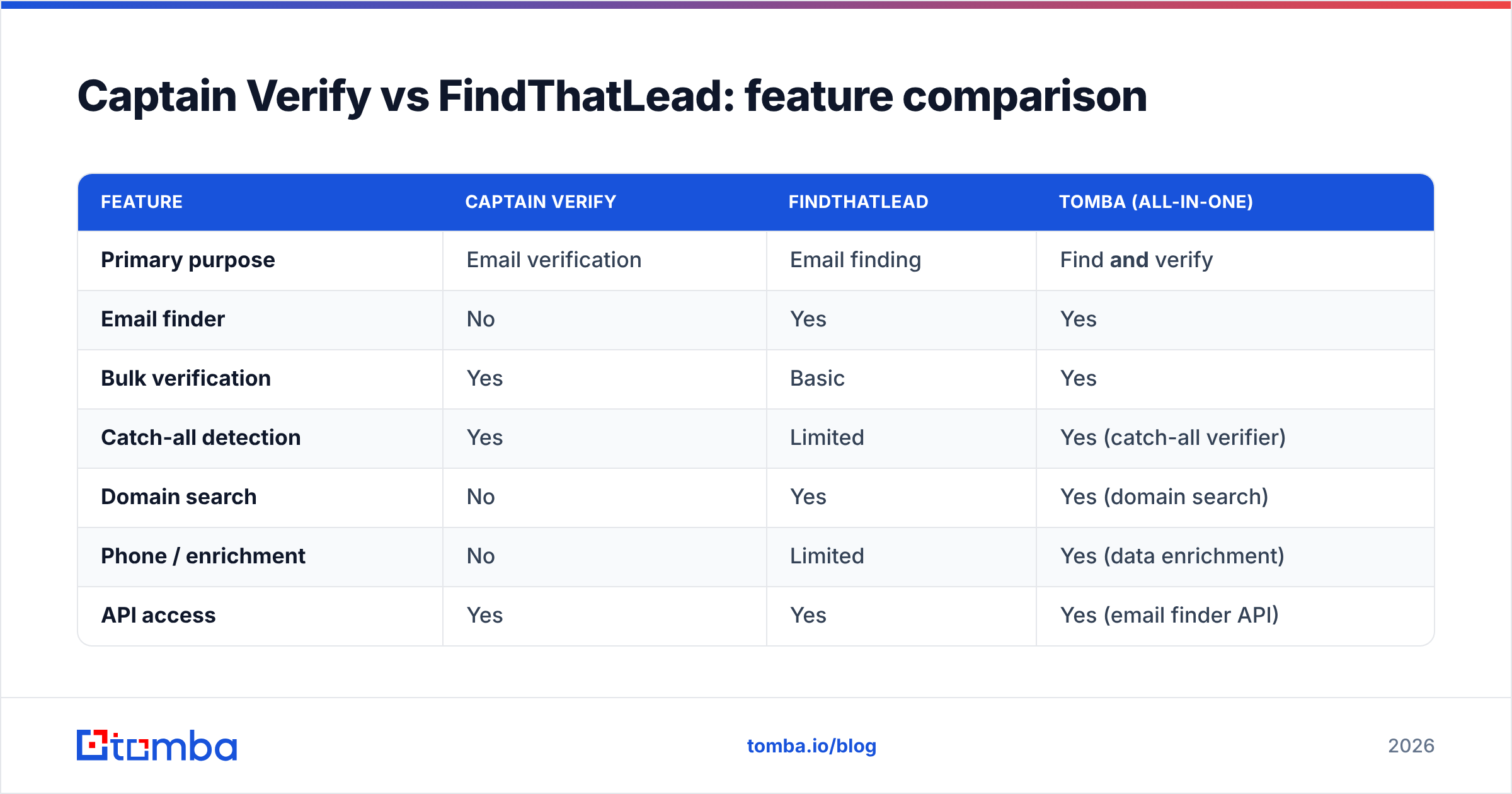
Captain Verify vs FindThatLead: feature comparison#
| Feature | Captain Verify | FindThatLead | Tomba (all-in-one) |
|---|---|---|---|
| Primary purpose | Email verification | Email finding | Find and verify |
| Email finder | No | Yes | Yes |
| Bulk verification | Yes | Basic | Yes |
| Catch-all detection | Yes | Limited | Yes (catch-all verifier) |
| Domain search | No | Yes | Yes (domain search) |
| Phone / enrichment | No | Limited | Yes (data enrichment) |
| API access | Yes | Yes | Yes (email finder API) |
| Free tier | Trial credits | 50 credits/mo | 25 searches/mo |
| Entry paid price | ~€7 one-time packs | ~$49/mo | $49/mo (Tomba pricing) |
| Native integrations | CSV / API | Zapier, CRM | Zapier, HubSpot, Sheets, Salesforce |
The table makes the gap obvious: each specialist tool has a column full of "No" and "Limited." That whitespace is the operational cost — every gap is a job you'll hand to another vendor.

Which one is more accurate?#
For pure verification, Captain Verify is the stronger of the two — but "more accurate than FindThatLead's bundled check" is a low bar. Dedicated verifiers run full SMTP handshakes and maintain disposable/role-account databases that a finder-first tool treats as a side feature.
The catch: verification accuracy only matters if the address was good data to begin with. A verifier confirms an email is deliverable; it can't tell you the address belongs to the VP of Sales you actually wanted. That's where finder accuracy — matching the right person to the right address — carries equal weight.
This is the trap of comparing a verifier to a finder. You optimize one number (deliverability) and ignore the other (relevance). A platform that finds and verifies in the same pipeline scores on both, because every discovered address is validated before it ever reaches your sequencer. According to G2 category data, buyers increasingly rank "combined find + verify" above either capability alone for exactly this reason.
For a deeper look at where contact data actually comes from and why source quality drives both numbers, see Tomba's breakdown of its data sources.
What does each one cost?#
Pricing philosophy differs sharply, and it changes who each tool fits.
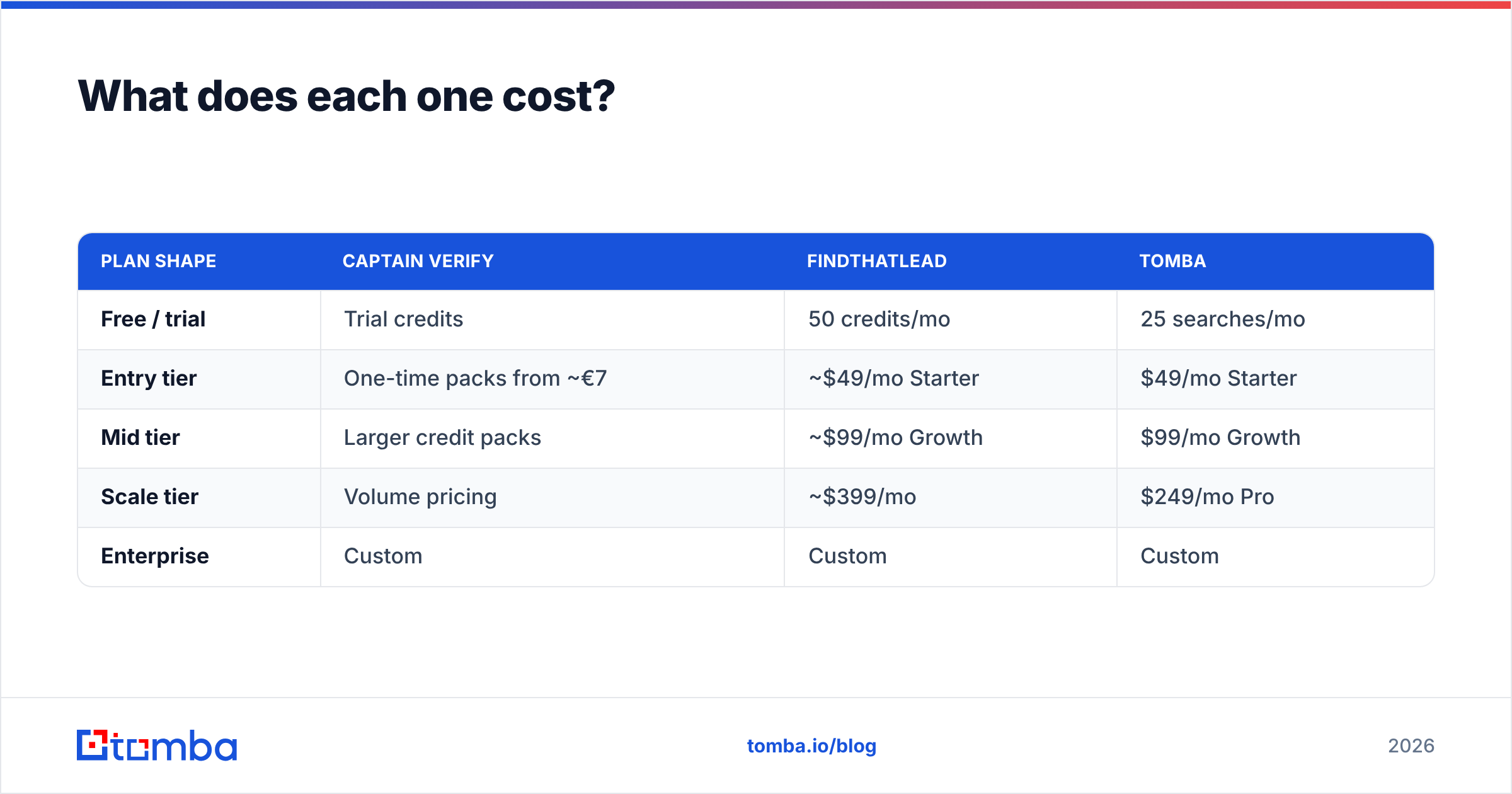
Captain Verify leans toward pay-as-you-go credit packs — attractive if you verify a list occasionally and hate subscriptions. FindThatLead uses monthly tiers that bundle finding credits, light verification, and sender seats — better if prospecting is a recurring motion.
| Plan shape | Captain Verify | FindThatLead | Tomba |
|---|---|---|---|
| Free / trial | Trial credits | 50 credits/mo | 25 searches/mo |
| Entry tier | One-time packs from ~€7 | ~$49/mo Starter | $49/mo Starter |
| Mid tier | Larger credit packs | ~$99/mo Growth | $99/mo Growth |
| Scale tier | Volume pricing | ~$399/mo | $249/mo Pro |
| Enterprise | Custom | Custom | Custom |
Two takeaways. First, if you run both motions, you're stacking a verification spend and a finder subscription — easily $130+/mo combined before either is at scale. Second, an all-in-one at $49–$99/mo collapses that into one line item. Check current Tomba plans against your two-tool total before renewing either.

When should you pick each tool?#
Choose Captain Verify if you already have a large list from events, signups, or a CRM export and your only goal is to cut bounces before a send. It's lean, focused, and the credit model suits one-off cleanups. You can replicate the core motion with a free email checker for spot checks before committing to bulk.
Choose FindThatLead if prospecting is your bottleneck and you want a single tool to source contacts plus fire a basic cold sequence. Just know the built-in verification is a convenience layer, not a deliverability guarantee — plan to re-verify before high-stakes sends.
Choose an all-in-one if you do both regularly. The moment you're exporting from a finder into a verifier every week, the two-tool workflow is costing you more in time than the tools cost in money. Tomba's bulk email finder and domain search run discovery, then validate each result through the same verification engine — no CSV round-trip, one Tomba API call.
What does the all-in-one workflow look like?#
Picture building a list of 200 decision-makers at target accounts:
- Two-tool path: Run domains through FindThatLead → export CSV → upload to Captain Verify → wait → download cleaned file → re-import to your sequencer. Four exports, two dashboards, two invoices.
- All-in-one path: Query domain search, get verified addresses back in the same response, push straight to HubSpot or Google Sheets. One step.
The all-in-one path isn't just fewer clicks — it removes the window where data goes stale between tools and the manual handoffs where rows get dropped or duplicated. For teams running outbound weekly, that compounding friction is the real cost of treating "find" and "verify" as separate purchases.
So who wins, Captain Verify or FindThatLead?#
Neither wins outright, because they're answering different questions — and that's the problem. Captain Verify is the better verifier. FindThatLead is the better finder. If you genuinely only ever do one of those two jobs, buy the specialist and move on.
But most B2B teams need both, sequenced together, on a recurring basis. Buying two specialists means paying twice, integrating twice, and accepting a stale-data gap in the middle. That's the gap a unified platform closes.
If you're evaluating "captain verify vs findthatlead" because you want clean lists and fresh prospects, skip the either/or. Start free with Tomba's Email Finder — 25 searches a month, every result verified through the same engine, with bulk processing, data enrichment, and one-click CRM integrations so finding and verifying happen in a single pass. One login, one bill, one accurate list.
Ready to find emails that actually work?
Join 150,000+ professionals who stopped guessing and started sending. Free credits on signup — no credit card required.
Get the Tomba newsletter
Practical outbound tactics and product updates — once every two weeks.
About the author