Captain Verify vs Generect (2026): Which B2B Tool Wins?
Captain Verify cleans your email list; Generect builds your lead list. Here's an honest 2026 breakdown of which tool fits your B2B workflow — and where a third option beats both.
You searched "Captain Verify vs Generect" expecting a head-to-head. Here's the catch: these two tools barely compete. One scrubs email lists clean; the other scrapes LinkedIn for fresh leads. Choosing between them isn't really a contest — it's a diagnosis of which gap in your pipeline hurts most right now.
This breakdown sorts out what each tool actually does, where they overlap, what they cost in 2026, and why most B2B teams end up needing a third piece neither one provides.
TL;DR#
- Captain Verify is an email verification tool. It takes a list you already have and tells you which addresses are deliverable. It does not find new contacts.
- Generect is a lead-generation and data tool. It pulls B2B contacts and company data (heavily LinkedIn-sourced) so you can build lists. Verification is a side feature, not the core.
- They solve different problems. If your bounce rate is the pain, you want a verifier. If you have no one to email, you want a data source.
- Neither is a full prospecting stack. You still need an email finder to turn a name + company into a real, reachable inbox.
- A consolidated platform — finder, verifier, and enrichment under one roof — usually beats stitching two single-purpose tools together on both cost and accuracy.
What is Captain Verify?#
Captain Verify is a bulk email verification service. You upload a CSV (or hit the API), and it runs each address through syntax checks, MX-record lookups, SMTP pings, and spam-trap/disposable detection. What comes back is a status label — valid, invalid, risky, unknown — so you can strip the junk before it nicks your sender reputation.
Think of it like a bouncer at the door of your campaign. It doesn't bring guests to the party; it just stops the fake IDs from getting in. That's valuable, but only if you already have a guest list.
Captain Verify's strengths are narrow and real: it's cheap, it's fast on large lists, and pay-as-you-go credits mean you're not locked into a subscription. Its weakness is equally clear — it's a one-trick service. It assumes you've already sourced your contacts somewhere else. For teams drowning in a stale list, that one trick is exactly what they need. For teams with an empty CRM, it does nothing.

If verification is the only thing you're after, compare it against a dedicated email verifier and a catch-all verifier before committing — catch-all domains are where most cheap verifiers quietly fail.
What is Generect?#
Generect is a B2B lead-generation and contact-data platform. Its job is the opposite of Captain Verify's: it creates lists. You define an audience — job titles, industries, company size, region — and Generect returns matching people along with emails, company details, and other firmographic data. A good chunk of its data is LinkedIn-derived, which makes it appealing for outbound teams who live in Sales Navigator.
Generect leans toward real-time lookups rather than a static database dump, which can mean fresher data than older list vendors. It also exposes an API, so you can wire lead pulls directly into your sequencing tool or CRM.
Where Generect gets fuzzy is verification depth and transparency. It hands you emails, but the deliverability guarantees are thinner than a tool built specifically to verify. You'll often want to re-check Generect's output through a separate verifier before you send — which, ironically, lands you right back at a tool like Captain Verify.
Captain Verify vs Generect: how do they compare?#
Here's the core distinction laid out. Notice that almost no row is a true apples-to-apples fight — that's the whole point.
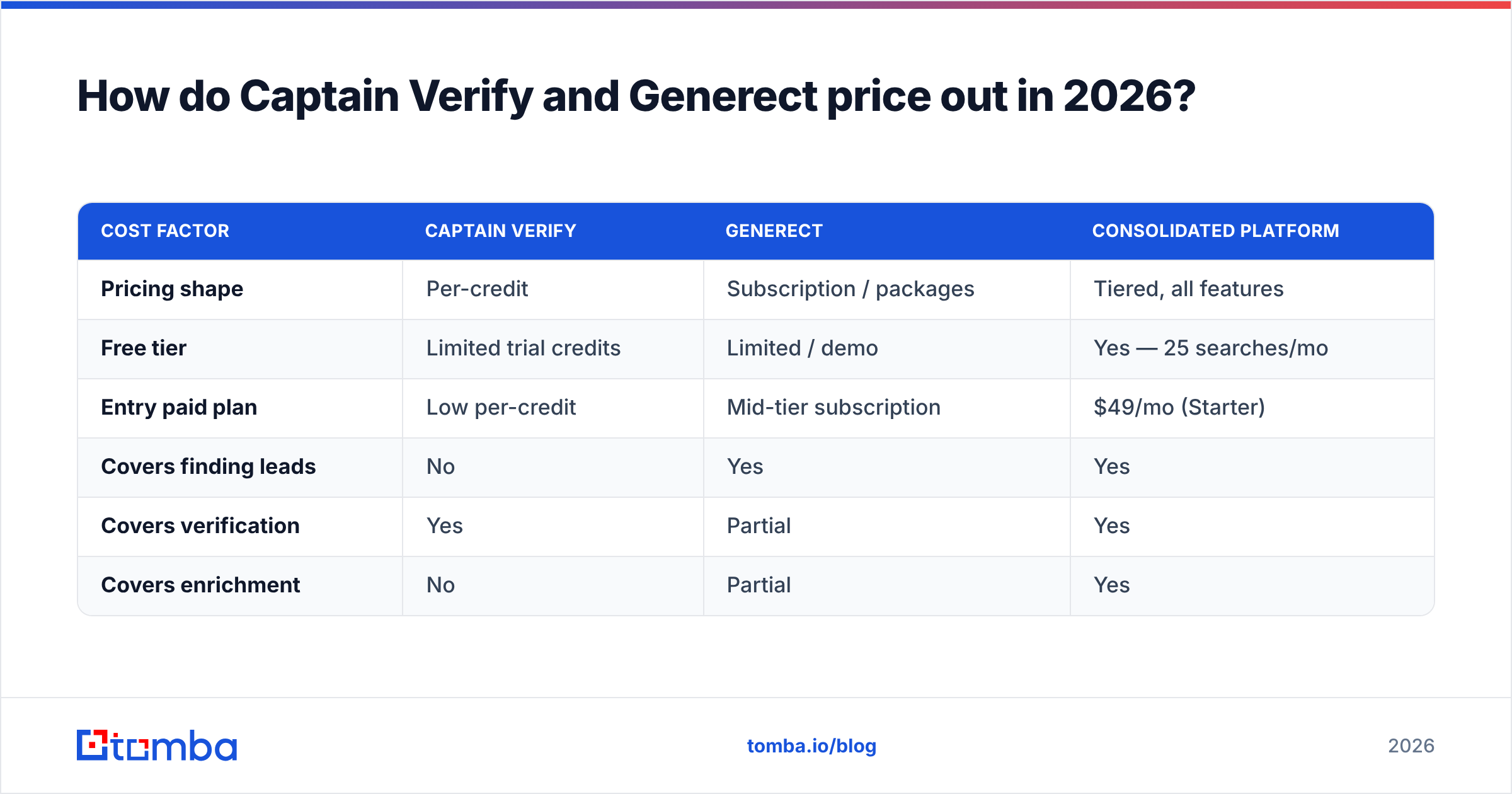
| Attribute | Captain Verify | Generect |
|---|---|---|
| Primary job | Verify existing emails | Find/generate new leads |
| Finds new contacts | No | Yes |
| Email verification | Yes (core feature) | Limited / secondary |
| Main data source | Your uploaded list | LinkedIn + B2B data |
| Pricing model | Pay-as-you-go credits | Subscription / lead packages |
| Best for | Cleaning lists, reducing bounces | Building outbound lists |
| API access | Yes | Yes |
| Catch-all handling | Basic | Varies, less transparent |
| Who needs it | Teams with a dirty list | Teams with an empty list |
The honest read: these belong at different stages of the same workflow. Generect fills the top of the funnel (who do I contact?); Captain Verify guards the bottom (will this email land?). Pitting them against each other is like asking whether a fishing rod beats a fish-cleaning knife. You probably need both — or one tool that does both jobs well.
Which one do you actually need?#
Work backward from your bottleneck. Use this quick diagnostic:
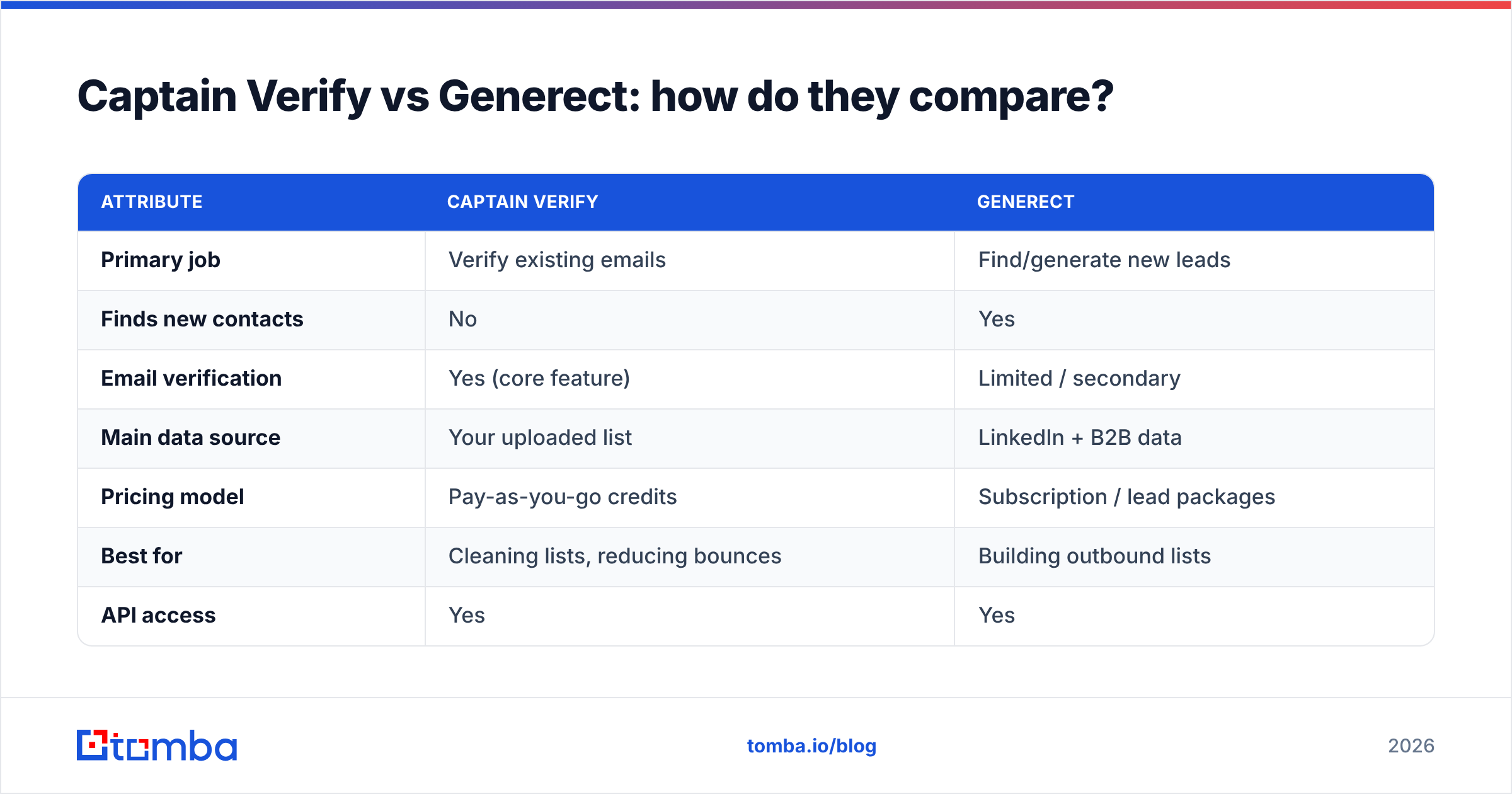
- Your CRM is full but your bounce rate is ugly (>3%). You have contacts; you don't trust them. This is a verification problem — Captain Verify's lane. Run the list, drop the invalids, re-send.
- Your CRM is empty and you need net-new prospects. This is a sourcing problem — Generect's lane. Build the audience, export, then verify before you send.
- You have names and companies but no emails. Neither tool is the clean answer. You need an email finder that turns "Jane Doe @ Acme" into a verified, reachable address.
- You're doing all three every week. Stop buying point tools. A platform that finds, verifies, and enriches in one place will cost less and break less than three subscriptions duct-taped together.
That last point is where most growing teams land. The tool-sprawl tax is real: separate logins, separate credit pools, separate API keys, and data that has to be exported and re-imported between systems. Every hop is a place for accuracy to leak.

How do Captain Verify and Generect price out in 2026?#
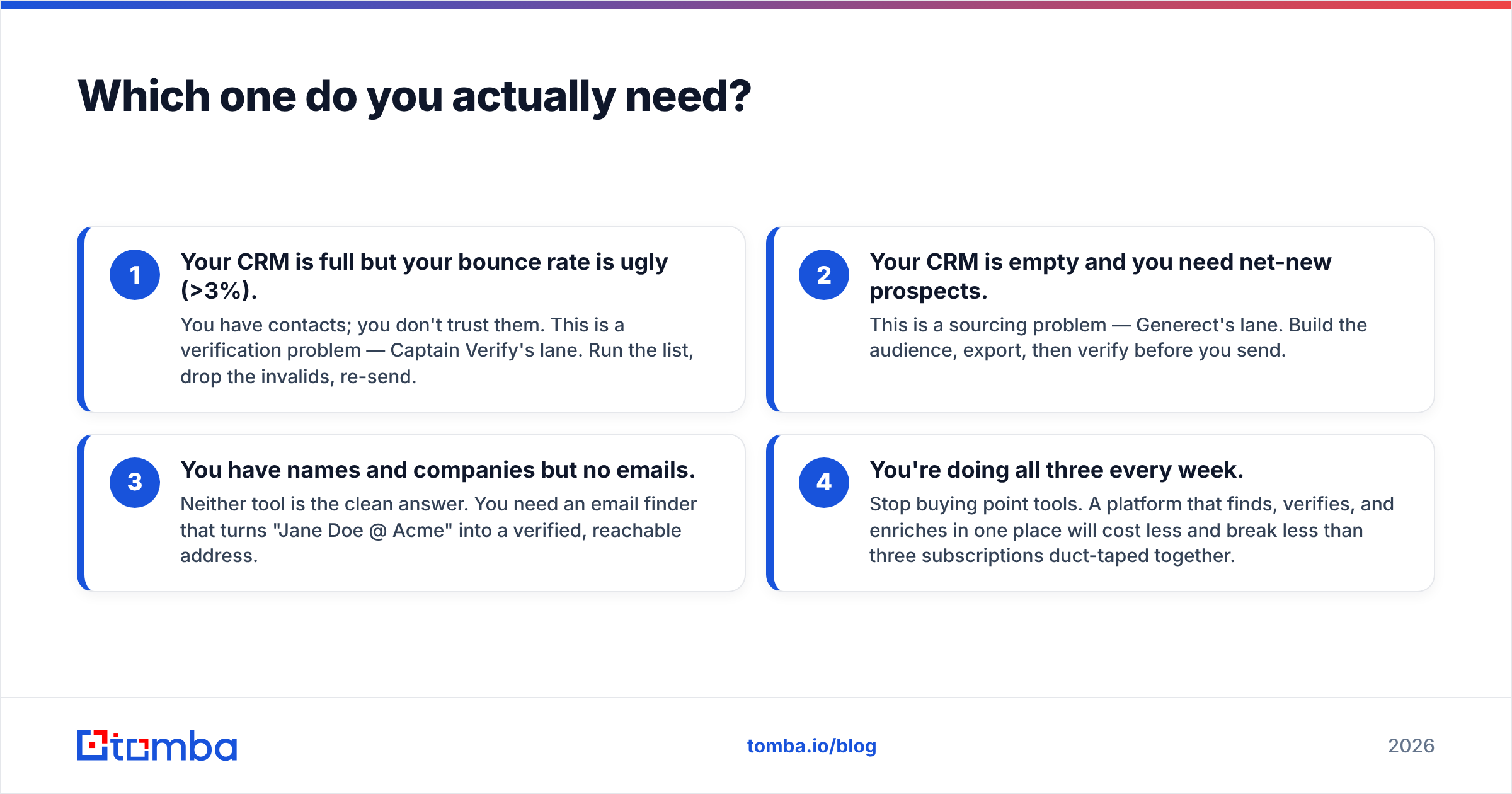
Pricing structures differ enough that a flat "X is cheaper" verdict misleads. Captain Verify sells verification credits — you pay per email checked, and unused credits typically stick around, which suits spiky, occasional cleanups. Generect sells access to lead data, usually as a subscription or lead-volume package, which suits teams pulling lists continuously.
The trap is comparing a per-credit verifier against a per-seat data subscription and concluding one is "expensive." They're priced for different consumption patterns. The better question is total cost across your whole funnel — sourcing plus finding plus verifying — because that's what you actually pay each month once the workflow is real.
| Cost factor | Captain Verify | Generect | Consolidated platform |
|---|---|---|---|
| Pricing shape | Per-credit | Subscription / packages | Tiered, all features |
| Free tier | Limited trial credits | Limited / demo | Yes — 25 searches/mo |
| Entry paid plan | Low per-credit | Mid-tier subscription | $49/mo (Starter) |
| Covers finding leads | No | Yes | Yes |
| Covers verification | Yes | Partial | Yes |
| Covers enrichment | No | Partial | Yes |
When you tally a verifier subscription and a separate data tool, the combined monthly spend frequently exceeds a single all-in-one plan — while delivering a clunkier workflow. For a like-for-like look at consolidated tiers, the Tomba pricing page shows where a finder, verifier, and enrichment all sit under one subscription.
Is there a better all-in-one alternative?#
Yes — and it's the option most "Captain Verify vs Generect" searchers actually want once they realize they're shopping for two halves of one job.
The gap between these two tools is the entire middle of the prospecting workflow. Generect gives you a name and a company. Captain Verify confirms whether an email is alive. But the step between them — reliably constructing and validating the actual email address from a name and domain — is where deals are won or lost. That's the email-finding step, and it's exactly what a dedicated finder handles.
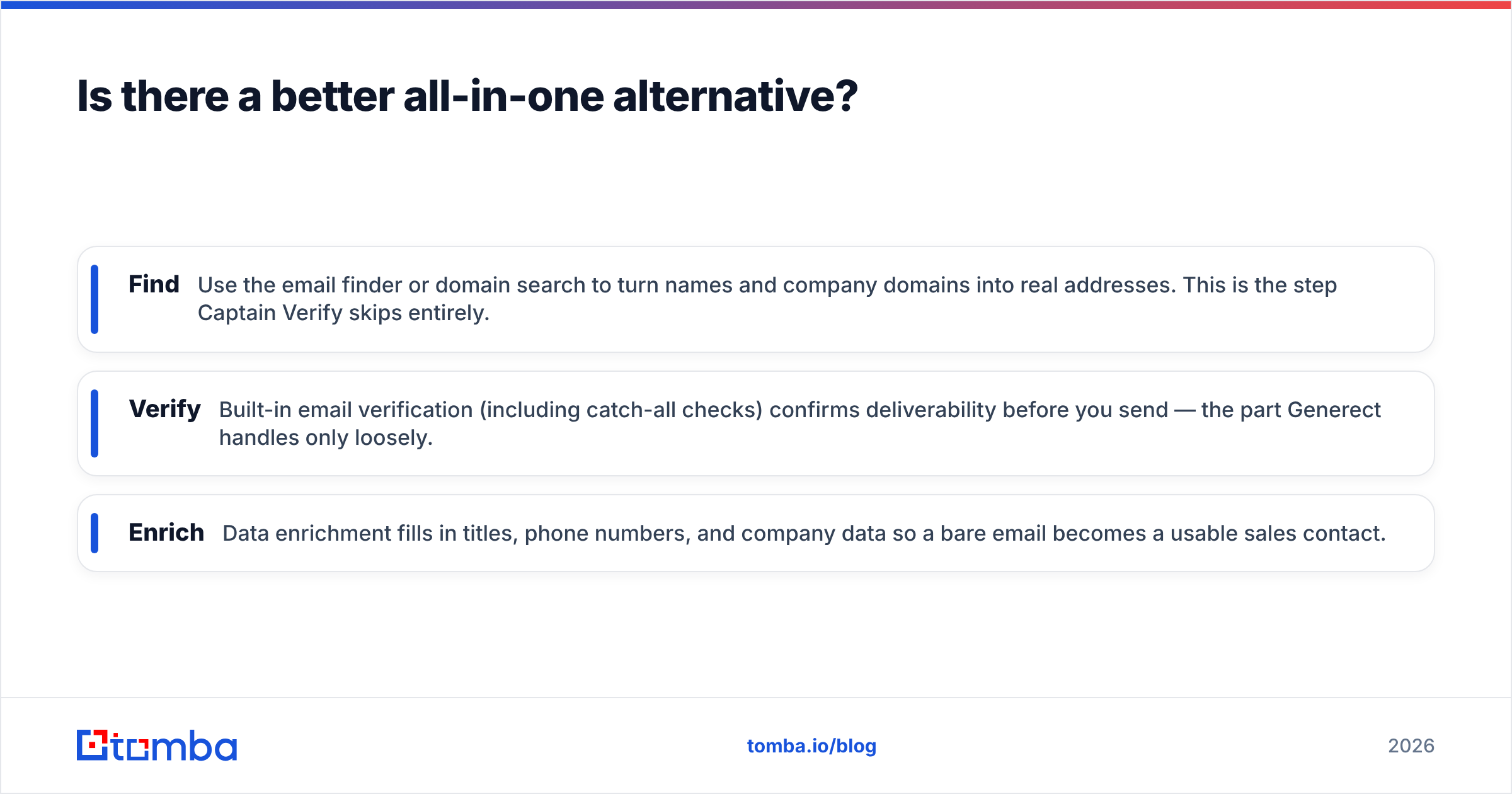
A platform like Tomba folds all three stages into one stack:
- Find — Use the email finder or domain search to turn names and company domains into real addresses. This is the step Captain Verify skips entirely.
- Verify — Built-in email verification (including catch-all checks) confirms deliverability before you send — the part Generect handles only loosely.
- Enrich — Data enrichment fills in titles, phone numbers, and company data so a bare email becomes a usable sales contact.
One credit pool, one API, one export. No CSV ping-pong between a data tool and a verifier. For teams running outbound at any real volume, that consolidation is the difference between a workflow you maintain and a workflow that maintains itself.
According to widely cited deliverability research, list hygiene and accurate targeting are the two biggest levers on cold-email performance — and a single platform that controls both ends up easier to keep clean than a chain of disconnected tools. Independent reviews on G2 and Capterra are a good sanity check before you commit to any vendor in this space; read the verification-accuracy and data-freshness sections specifically, since that's where the marketing claims and the user reality tend to diverge.
What about accuracy and deliverability?#
Accuracy is the metric that actually matters, and it's where single-purpose tools show their seams.
Captain Verify can correctly flag a dead mailbox, but if Generect handed you the wrong email format in the first place, a "valid" result just confirms you'll reliably reach the wrong person — or a catch-all domain that accepts everything and tells you nothing. Verification only protects you against bad addresses, not against wrong ones.
This is why catch-all domains are the silent killer of cold campaigns. A catch-all server accepts every address at the domain, so a basic verifier returns "valid" for an inbox that may not exist. Handling that well takes a dedicated catch-all verifier and pattern intelligence drawn from a large body of confirmed addresses — depth that a budget standalone verifier rarely has, and that a lead tool treats as an afterthought.
The practical takeaway: judge any combination of these tools on end-to-end accuracy — from "name + company" all the way to "message landed in the right inbox" — not on any single tool's in-house score. A clean-looking verification pass on a badly sourced list is false confidence, and false confidence is what torches sender reputation.
When does the two-tool combo still make sense?#
To be fair, there are cases where keeping Captain Verify and Generect separate is reasonable:
- You're already deeply invested in one. If Generect is wired into your stack and performing, bolting on a cheap verifier for cleanup is a sensible patch.
- Your volumes are tiny and irregular. A handful of cleanups a quarter doesn't justify migrating platforms.
- You have very specific data needs that one of these tools serves unusually well for your niche.
But for the majority of B2B teams scaling outbound in 2026 — where you're sourcing, finding, verifying, and enriching every single week — the friction and stacked cost of two narrow tools outweigh the convenience of not switching. The consolidation math wins as soon as the workflow becomes routine.
The verdict#
There's no winner between Captain Verify and Generect because they were never in the same race. Captain Verify is a solid, affordable verifier for lists you already own. Generect is a capable lead source for teams who need fresh LinkedIn-sourced contacts. Buy Captain Verify if your problem is bounces. Buy Generect if your problem is an empty pipeline.
But if you stepped back and realized you need all of it — find, verify, enrich, without the tool-sprawl tax — then the real answer is a single platform built to carry a contact from a name to a reply.
Start where the pipeline actually breaks. Tomba's Email Finder turns names and company domains into verified, reachable addresses — with catch-all verification and enrichment built into the same workflow, not bolted on from a second vendor. The free tier gives you 25 searches a month to test it against your own list before you pay a cent. Find the email, verify it lands, enrich the record, and send — all in one place.
// get started
Find, verify and enrich your first contacts today
Start on the free plan with 25 searches a month, then scale when your team is ready.
Free plan · No credit card required · GDPR & CCPA
// about the author