Captain Verify vs SignalHire 2026: Which Tool Wins?
Captain Verify cleans your list; SignalHire builds it. We break down pricing, accuracy, and use cases so you pick the right tool — or skip both for a cheaper all-in-one.
Captain Verify vs SignalHire: Picking the Right Tool in 2026
Most people who type "Captain Verify vs SignalHire" into Google are comparing two tools that barely overlap. That is the first thing you need to know before you spend a dollar on either.
Captain Verify is an email verification service — you feed it a list, it tells you which addresses are safe to mail. SignalHire is a contact discovery platform — you find emails and phone numbers from LinkedIn profiles and company pages. One cleans the list; the other builds it. Comparing them straight up is like comparing a dishwasher to a grocery store.
This guide cuts through that. You will get a feature-by-feature breakdown, real pricing, and a clear answer on which tool fits your workflow — plus an honest note on when a single all-in-one platform beats running both.
TL;DR#
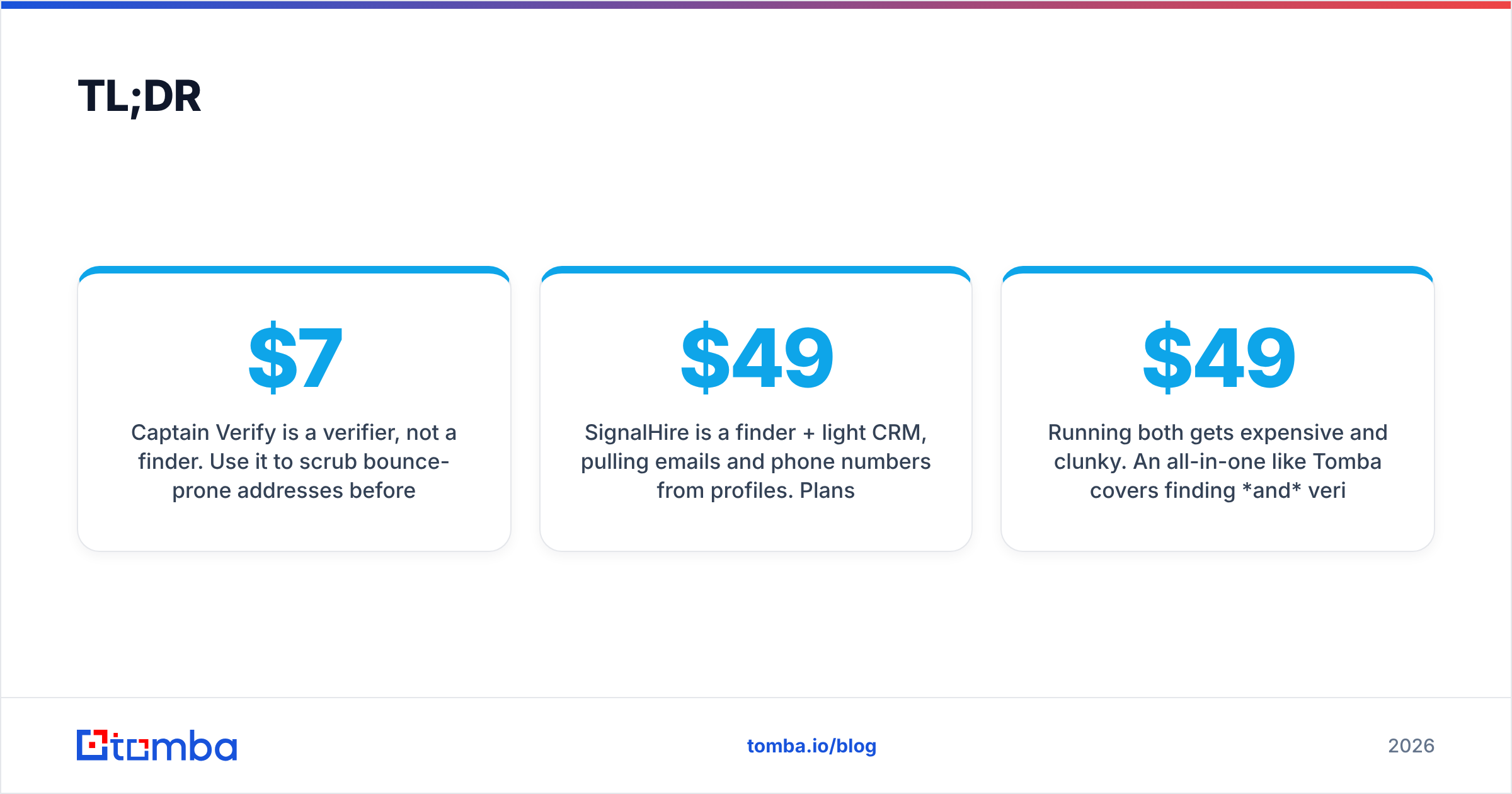
- Captain Verify is a verifier, not a finder. Use it to scrub bounce-prone addresses before a campaign. Pricing is pay-as-you-go, starting around $7 for 1,000 credits.
- SignalHire is a finder + light CRM, pulling emails and phone numbers from profiles. Plans run roughly $49–$99/month per seat depending on credit volume.
- They solve different problems. If you only need clean lists, Captain Verify wins on price. If you need new contacts, SignalHire wins on coverage.
- Running both gets expensive and clunky. An all-in-one like Tomba covers finding and verifying from one dashboard, with a free tier and a $49/mo Starter plan.
- Pick by job-to-be-done, not brand name — the wrong category of tool is the most common mistake here.
What is Captain Verify?#
Captain Verify is a French-built email verification platform focused on one thing: telling you whether an email address will bounce. You upload a CSV, the engine runs SMTP checks, syntax validation, domain and MX record lookups, and catch-all detection, then hands back a cleaned list tagged by status (valid, invalid, risky, unknown).
It also offers smaller utilities — a blacklist monitor and an SMTP test tool — but the core product is bulk verification. There is no contact discovery here. Captain Verify will never find you a new email; it only judges the ones you already have.
That narrow focus is a feature, not a flaw. Verification-only tools tend to be cheap and fast because they are not paying to maintain a contact database. If your pipeline already produces raw addresses — from forms, scrapers, or events — and you just need them clean, this is a tidy fit.

What is SignalHire?#
SignalHire is a contact-finding platform aimed at recruiters and sales teams. Its main draw is a browser extension that reveals candidate and prospect contact details — work emails, personal emails, and phone numbers — directly from LinkedIn, GitHub, and other profile pages.
Beyond the extension, SignalHire bundles a lightweight applicant-tracking and CRM layer, so recruiters can move a sourced contact through stages without leaving the tool. It also includes basic email verification on found addresses, which is where the overlap with Captain Verify shows up — but verification is a side feature, not the headline.
The trade-off: you are paying database-and-enrichment prices. SignalHire credits cost more per action than pure verification credits because the platform maintains and refreshes a large contact dataset.
Captain Verify vs SignalHire: How do they compare?#
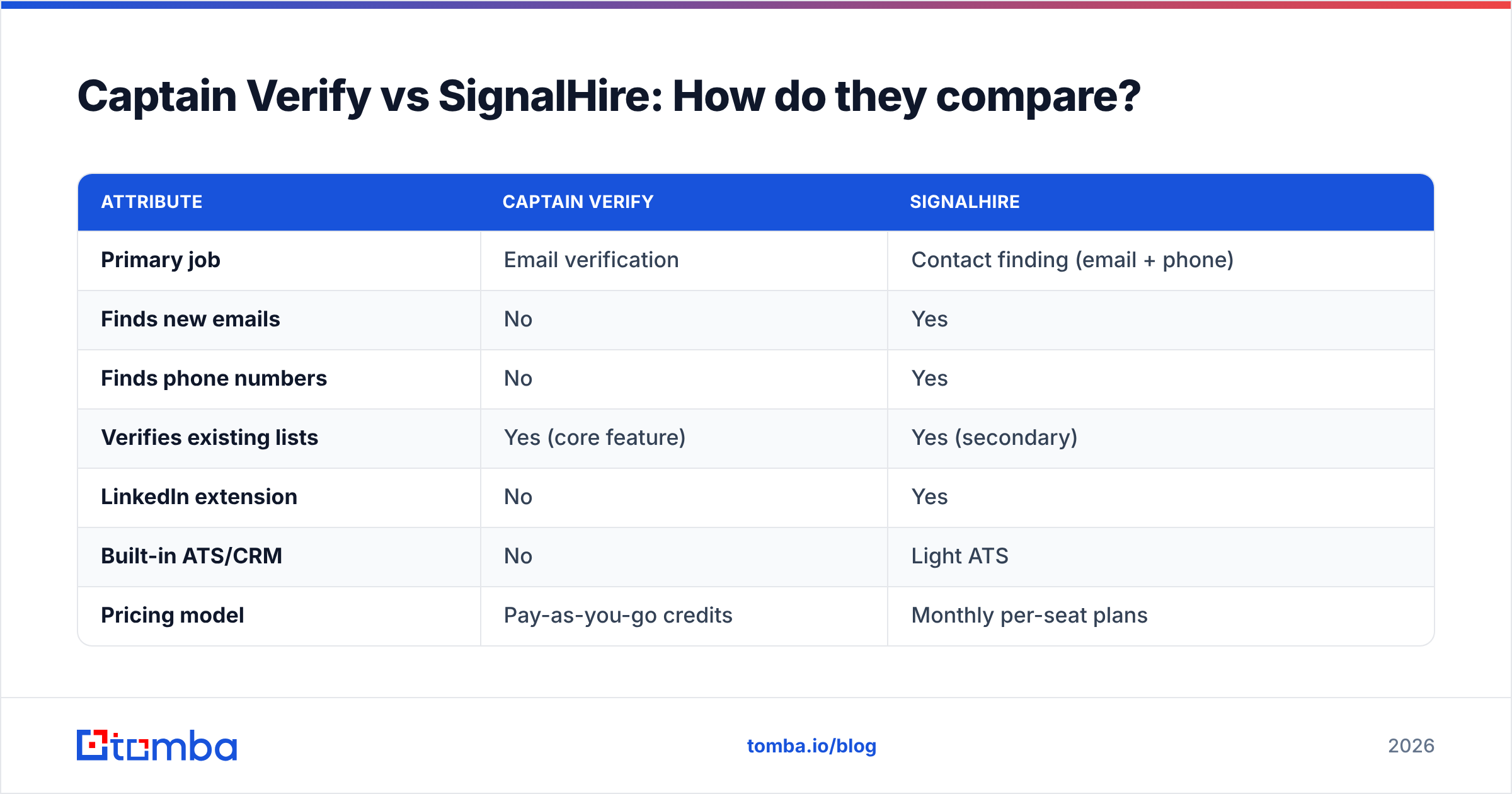
Here is the core matchup. Notice how few rows actually overlap — that is the whole point.
| Attribute | Captain Verify | SignalHire |
|---|---|---|
| Primary job | Email verification | Contact finding (email + phone) |
| Finds new emails | No | Yes |
| Finds phone numbers | No | Yes |
| Verifies existing lists | Yes (core feature) | Yes (secondary) |
| LinkedIn extension | No | Yes |
| Built-in ATS/CRM | No | Light ATS |
| Pricing model | Pay-as-you-go credits | Monthly per-seat plans |
| Entry cost | ~$7 / 1,000 credits | ~$49 / month |
| Best for | Cleaning lists you already own | Sourcing recruits and prospects |
| Free option | Small free trial credits | Limited free credits |
If you read only one thing in this post, read that table. The "winner" depends entirely on whether your bottleneck is dirty data or no data.
Which one is more accurate?#
Accuracy means different things for each tool, so judge them on their own turf.
For Captain Verify, accuracy is bounce prevention — what share of addresses it correctly flags as deliverable or dead. Dedicated verifiers like Captain Verify typically land in the 95–98% range on standard mailboxes, with the usual soft spot being catch-all domains, where no verifier can be fully certain. If catch-alls dominate your list, pair any verifier with a dedicated catch-all verifier to reduce guesswork.
For SignalHire, accuracy is match rate and data freshness — how often it returns a correct, current email or phone number for a given profile. Finder tools live and die on how recently their database was refreshed, and reported match rates swing widely by region and seniority. A senior exec in the US is easier to match than a mid-level engineer in a smaller market.
The honest takeaway: Captain Verify is more accurate at verifying because that is all it does, and SignalHire is more useful at finding because Captain Verify cannot find at all. You are not really comparing accuracy — you are comparing two unrelated skills.
What does each one cost?#
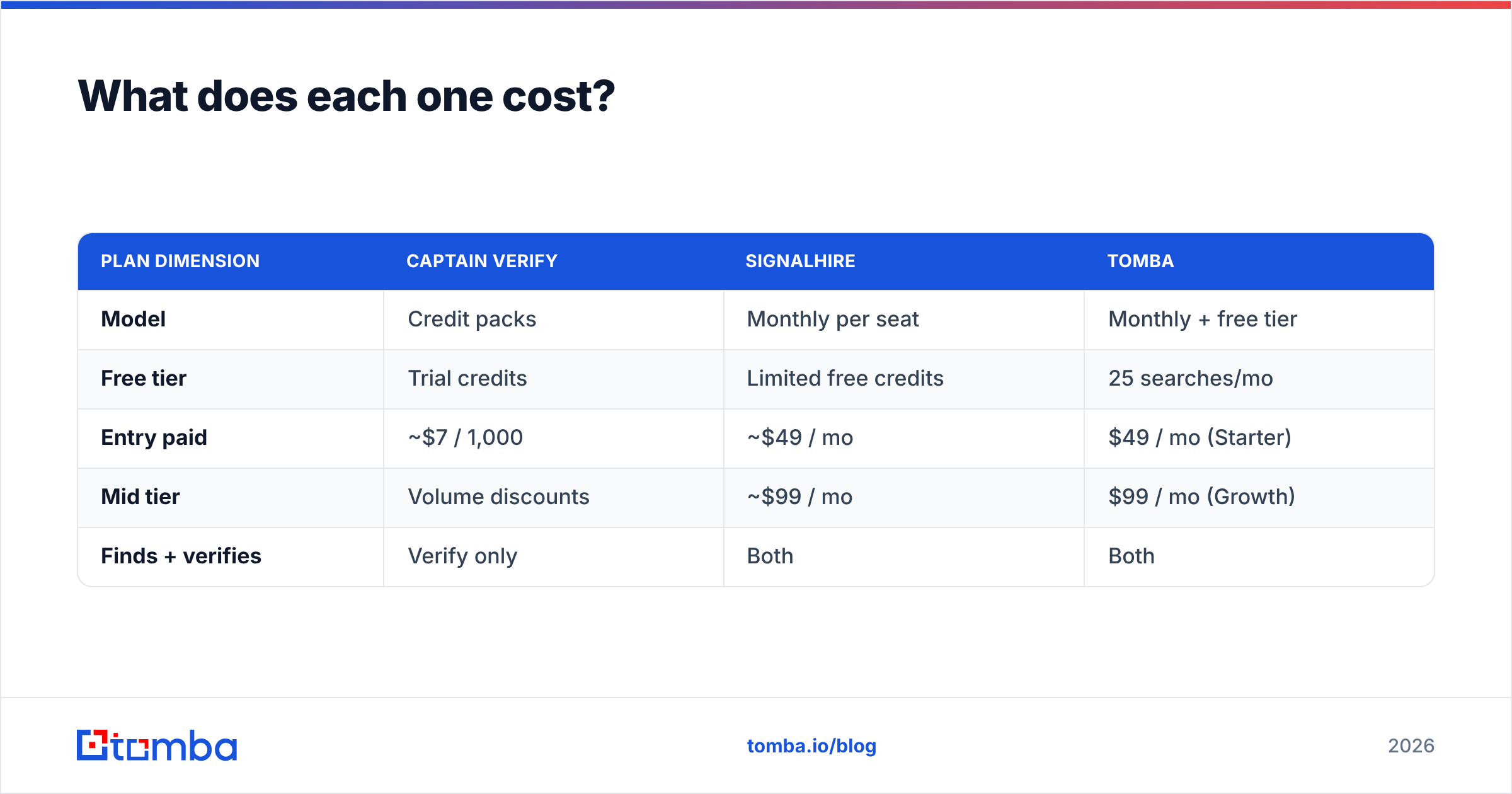
Pricing is where the category difference hits your wallet.
Captain Verify uses pay-as-you-go credit packs. You buy a block of verification credits and burn them as you check addresses; smaller packs start near $7 for 1,000 verifications, with the per-credit cost dropping as volume rises. There is no monthly seat fee, which makes it friendly for occasional, bursty cleaning jobs.
SignalHire charges monthly per seat, tiered by how many contact reveals you need. Plans commonly start around $49/month for a modest credit allotment and climb toward $99/month and up for higher volume. Because finding costs more to deliver than verifying, expect each reveal to cost more than a verification credit.
| Plan dimension | Captain Verify | SignalHire | Tomba |
|---|---|---|---|
| Model | Credit packs | Monthly per seat | Monthly + free tier |
| Free tier | Trial credits | Limited free credits | 25 searches/mo |
| Entry paid | ~$7 / 1,000 | ~$49 / mo | $49 / mo (Starter) |
| Mid tier | Volume discounts | ~$99 / mo | $99 / mo (Growth) |
| Finds + verifies | Verify only | Both | Both |
A quick reality check on the math: if you need both finding and verifying, you are buying SignalHire and arguably still want a stronger standalone verifier — two bills, two logins. That stacking cost is exactly why all-in-one platforms exist. You can sanity-check current numbers against Tomba pricing and each vendor's own page before committing.

When should you choose Captain Verify?#
Pick Captain Verify when your only problem is list hygiene. Specifically:
- You already have the emails. They come from sign-up forms, webinar registrations, scraped sources, or an old CRM export that has gone stale.
- You verify in bursts. Pay-as-you-go beats a monthly subscription when you clean a list once a quarter, not every day.
- You are protecting sender reputation. Cutting invalids before a send is the single cheapest way to protect email deliverability and keep your bounce rate low.
- You do not need phone numbers or new contacts. If discovery is not on your wishlist, you should not pay for it.
Captain Verify is a sharp, single-purpose blade. The risk is buying it and then realizing your real bottleneck was never the dirty list — it was not having enough contacts in the first place.
When should you choose SignalHire?#
Pick SignalHire when your bottleneck is finding people, especially in a recruiting context:
- You source from LinkedIn daily. The extension is the product; if your team lives in LinkedIn Recruiter or Sales Navigator, the workflow fit is strong.
- You need phone numbers, not just emails. Recruiters who cold-call benefit from the dual email-and-phone reveal that a pure verifier can never offer.
- You want a light ATS in the same tool. Moving a sourced candidate through stages without exporting to a separate system saves clicks.
- Per-seat monthly billing fits your team. If reveals are a daily activity, a subscription is more predictable than burning credit packs.
The catch is cost and scope creep: you are paying database prices, and the built-in verification is a convenience layer, not a best-in-class scrubber.
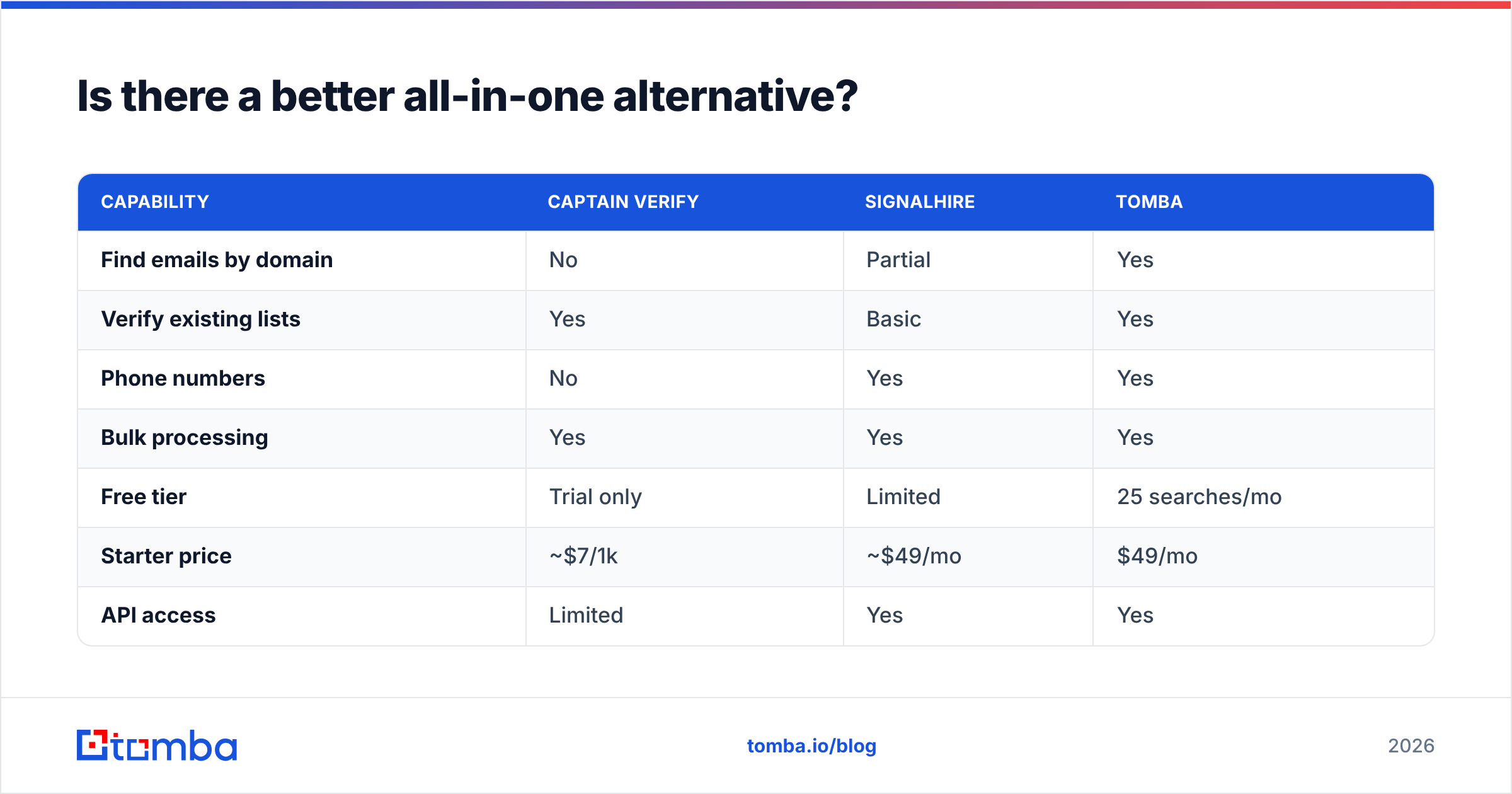
Is there a better all-in-one alternative?#
For most teams that need both finding and verifying, running two narrow tools is the expensive, fiddly path. This is the gap an all-in-one platform fills.
Tomba combines the jobs Captain Verify and SignalHire split between them. You can find email addresses by name, company, or domain, then run those same addresses through the email verifier without exporting anything. Need numbers? The phone finder covers B2B direct dials. Cleaning a big list? The bulk email finder and bulk verify handle volume in one pass.
| Capability | Captain Verify | SignalHire | Tomba |
|---|---|---|---|
| Find emails by domain | No | Partial | Yes |
| Verify existing lists | Yes | Basic | Yes |
| Phone numbers | No | Yes | Yes |
| Bulk processing | Yes | Yes | Yes |
| Free tier | Trial only | Limited | 25 searches/mo |
| Starter price | ~$7/1k | ~$49/mo | $49/mo |
| API access | Limited | Yes | Yes |
This is not a knock on either competitor — both are good at their one job. It is a math argument. If you would otherwise pay for a finder and a verifier, one platform that does both removes a bill, a login, and the CSV shuffling between tools. You can compare specialists directly via independent reviews on G2 and Capterra before deciding.
How do you choose in 60 seconds?#
Answer one question: what is missing from your pipeline right now?
- Missing clean data (you have emails, they bounce): start with Captain Verify, or a verifier with broader coverage. Check the official Captain Verify site for current packs.
- Missing contacts (you cannot find people to email or call): start with SignalHire. The official SignalHire page has up-to-date plan details.
- Missing both (you need to build and clean): skip the two-tool tax and use an all-in-one so finding flows straight into verifying.
Do not buy a verifier to solve a sourcing problem, and do not buy a sourcing tool expecting elite verification. That single mismatch is the most common — and most expensive — mistake people make with this exact comparison.
The bottom line#
Captain Verify and SignalHire are not really rivals. Captain Verify is a clean, cheap, pay-as-you-go verifier for lists you already own. SignalHire is a recruiter-friendly finder with phone numbers and a light ATS. Choose by the hole in your workflow, not by which name you searched first.
If that hole is "I need to find verified contacts and stop juggling subscriptions," start with the Tomba Email Finder. You get finding, verification, domain search, and phone lookup under one login, a free tier of 25 searches a month to test it on real prospects, and a $49/mo Starter plan that undercuts stacking two specialized tools. Run a few of your toughest contacts through it and compare the results yourself before you commit to anything.
// get started
Find, verify and enrich your first contacts today
Start on the free plan with 25 searches a month, then scale when your team is ready.
Free plan · No credit card required · GDPR & CCPA
// about the author