Captain Verify vs Tomba: Which Email Tool Wins in 2026?
Captain Verify only cleans lists. Tomba finds and verifies. Here's a hands-on 2026 breakdown of pricing, accuracy, and which tool fits your outbound stack.
Picking between Captain Verify and Tomba feels like a head-to-head, but the two tools barely overlap. One cleans the list you already have. The other builds the list in the first place — and then cleans it. That single difference decides which one belongs in your stack.
TL;DR#
- Captain Verify is a single-purpose email verifier. It validates lists you already own and prices by credits. It does not find new contacts.
- Tomba is a find-and-verify platform. It locates professional emails by name, domain, or company, then verifies them — plus phone, enrichment, and a B2B database.
- If you only need to scrub an existing list, Captain Verify is a clean, cheap option.
- If you need to source net-new contacts and keep bounce rates low, Tomba covers the whole job in one subscription starting at $49/mo.
- Most outbound teams pick the tool that removes a step, not the one that adds another vendor.
What is Captain Verify?#
Captain Verify is a French email-verification service that checks whether the addresses on a list are deliverable. You upload a CSV, it runs syntax checks, MX-record lookups, SMTP pings, and catch-all detection, then hands back a clean file tagged valid, invalid, risky, or unknown.
It does that job well. The interface is simple, results come back fast, and pricing is pay-as-you-go on credits, which suits teams that verify in occasional bursts rather than every day. Captain Verify also handles a few adjacent checks — disposable-domain flags and basic deduplication.
What it does not do is matter just as much. Captain Verify cannot tell you the email address of a prospect you haven't found yet. It assumes you already have the list. If sourcing contacts is the hard part of your day — and for most B2B teams it is — verification is only the back half of the workflow.

What is Tomba?#
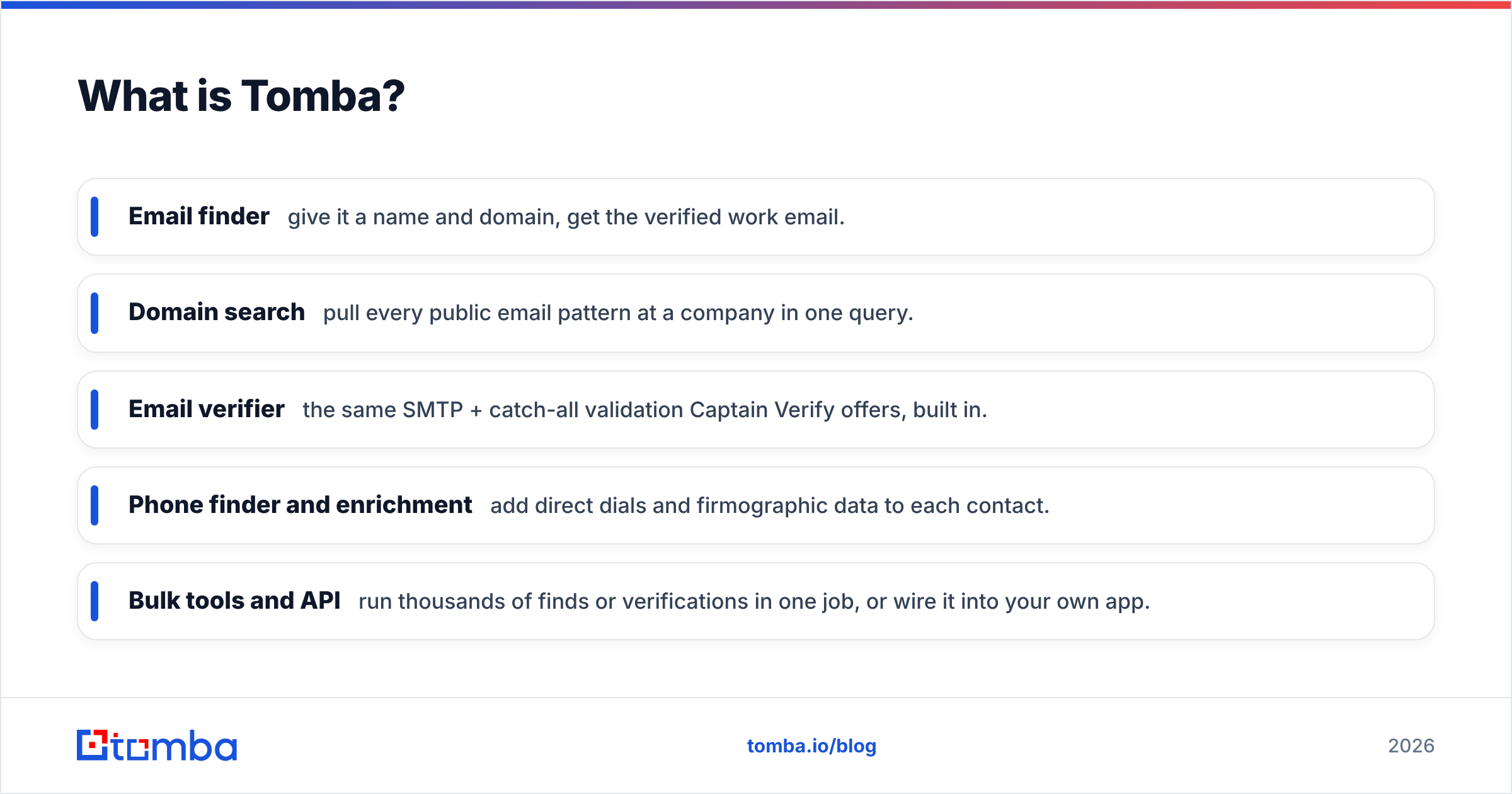
Tomba is a lead-intelligence platform built around an email finder that returns professional addresses from a name and a company domain, with a confidence score and the public sources behind each result. Around that core sit a stack of tools that cover the rest of the prospecting motion.
- Email finder — give it a name and domain, get the verified work email.
- Domain search — pull every public email pattern at a company in one query.
- Email verifier — the same SMTP + catch-all validation Captain Verify offers, built in.
- Phone finder and enrichment — add direct dials and firmographic data to each contact.
- Bulk tools and API — run thousands of finds or verifications in one job, or wire it into your own app.
The point is not that Tomba has more buttons. It's that the find step and the verify step live in the same place, so a contact goes from "name on a list" to "verified, enriched record" without exporting between vendors.
Captain Verify vs Tomba: how do they compare?#
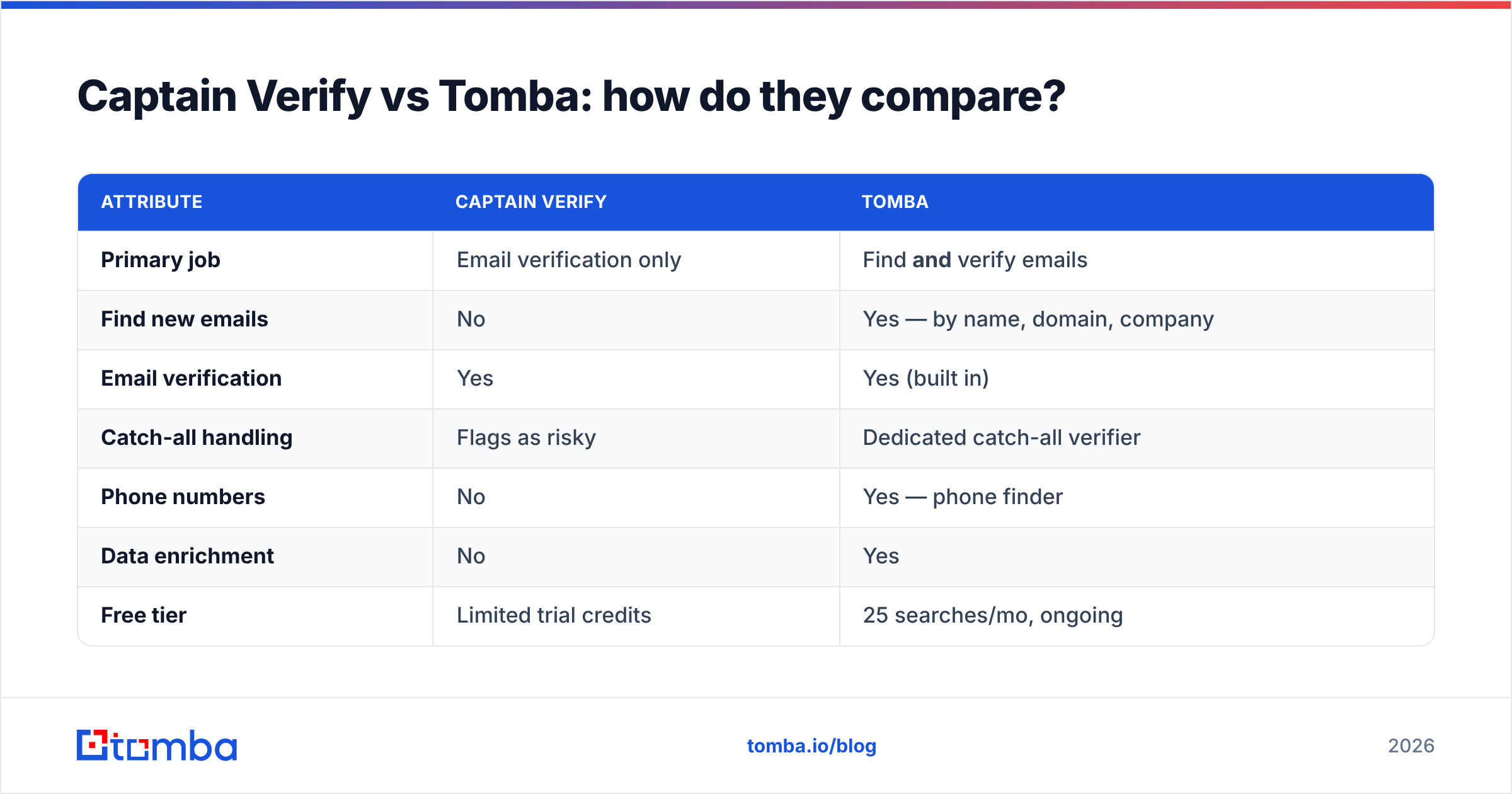
Here's the side-by-side on the attributes that actually change your workflow and your bill.
| Attribute | Captain Verify | Tomba |
|---|---|---|
| Primary job | Email verification only | Find and verify emails |
| Find new emails | No | Yes — by name, domain, company |
| Email verification | Yes | Yes (built in) |
| Catch-all handling | Flags as risky | Dedicated catch-all verifier |
| Phone numbers | No | Yes — phone finder |
| Data enrichment | No | Yes |
| Free tier | Limited trial credits | 25 searches/mo, ongoing |
| Entry paid price | Pay-as-you-go credits | $49/mo Starter |
| API access | Yes | Yes — email finder API |
| Chrome extension | No | Yes — browser extension |
| Best for | Cleaning lists you already have | Building and cleaning lists end to end |
The table makes the real question obvious: it isn't "which verifier is more accurate?" It's "do I already have the contacts, or do I need to find them?"
Is Captain Verify accurate enough?#
For pure verification, Captain Verify is solid. SMTP-based checking, MX validation, and disposable-domain detection are table stakes, and it does them reliably. On a clean B2B list, you'll get a dependable valid/invalid split and a meaningful drop in your bounce rate.
The accuracy gap shows up on catch-all domains. A catch-all server accepts mail for any address, so an SMTP ping returns "OK" whether or not the mailbox exists. Captain Verify flags these as risky and leaves the call to you. Tomba runs a dedicated catch-all verifier that uses pattern analysis and historical signals to push more of those "unknown" results into a confident verdict — which directly affects how many usable contacts survive your cleaning pass.
If you want to understand why this matters before you commit budget, the fundamentals of email deliverability explain how bounce rate feeds sender reputation and, eventually, inbox placement. A verifier that leaves a third of your list as "unknown" hasn't solved the problem — it's deferred it.
Which one is better for cold outreach?#
For most cold-outreach teams, Tomba removes a vendor. Here's the realistic workflow with each.
With Captain Verify, your pipeline looks like: find a list (separately — scraper, another tool, or bought data) → export it → upload to Captain Verify → clean it → export again → load into your sending tool. Captain Verify owns exactly one of those five steps.
With Tomba, you run domain search to pull every contact at a target company, the email finder returns verified addresses with confidence scores, and the records land already enriched. The find and the verify are one motion. You can also enrich leads with titles and phone numbers in the same pass, which matters when your sequences personalize by role.
That doesn't make Captain Verify wrong. If you buy or scrape lists in bulk and just need them scrubbed before sending, a focused verifier is genuinely all you need, and paying per credit keeps it cheap. The mismatch only appears when finding the contacts is your bottleneck — which, for outbound built on targeted accounts rather than purchased lists, it almost always is.
How does pricing compare?#
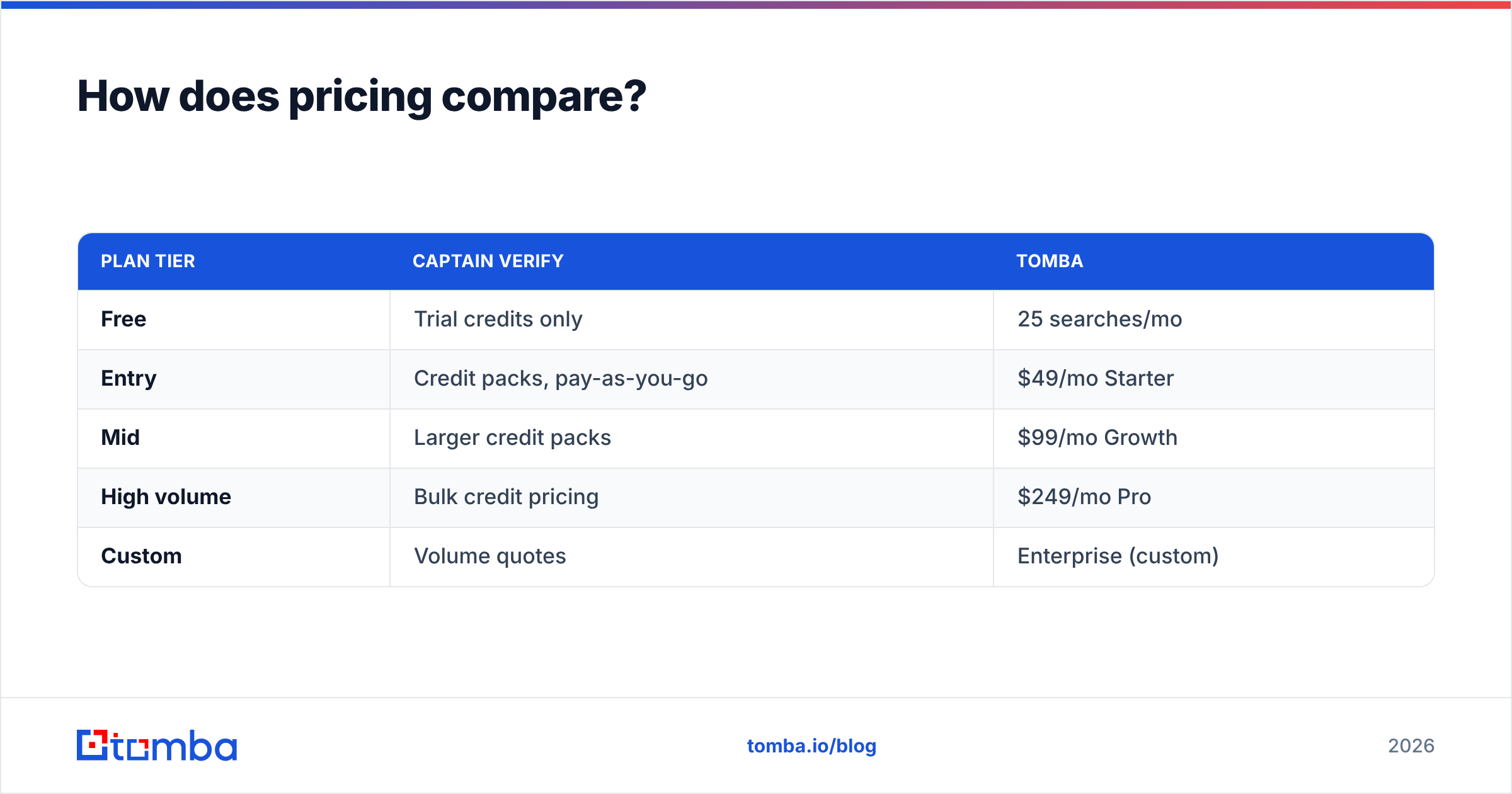
The pricing models are structurally different, so compare them by intent rather than sticker price.
| Plan tier | Captain Verify | Tomba |
|---|---|---|
| Free | Trial credits only | 25 searches/mo |
| Entry | Credit packs, pay-as-you-go | $49/mo Starter |
| Mid | Larger credit packs | $99/mo Growth |
| High volume | Bulk credit pricing | $249/mo Pro |
| Custom | Volume quotes | Enterprise (custom) |
Captain Verify's pay-as-you-go credits are attractive when verification is sporadic — you buy a pack, use it over months, and never pay for idle capacity. That's a real advantage for a team that cleans one big list per quarter.
Tomba's subscription bundles finding, verifying, enrichment, and API access into one monthly fee. If you'd otherwise pay Captain Verify for verification and another vendor for finding contacts, the combined cost usually lands higher than a single Tomba plan. Full Tomba pricing is public, so you can model your own volume. The honest rule of thumb: if verification is the only thing you do, credits can be cheaper; the moment you're also paying to source contacts, one platform tends to win on total cost.
What about API and integrations?#
Both tools expose an API, and both are reasonable to build against. Captain Verify's API does one thing — verify — and does it cleanly, which is fine if your app only needs a deliverability check at signup or form submission.
Tomba's API covers finding, verifying, domain search, and enrichment from one set of credentials, plus there's a Chrome extension, Google Sheets add-on, and native connections to tools like HubSpot and Zapier. If your goal is to enrich a CRM record the moment a lead is created — find the email, verify it, attach a phone number — that's a single integration rather than a chain of three.
For developers, the deciding factor is scope. A signup-form deliverability gate is a one-endpoint job, and Captain Verify is a fine fit. A "complete the contact record automatically" job spans find, verify, and enrich, and that's where a multi-function API earns its place.
Which tool should you choose?#
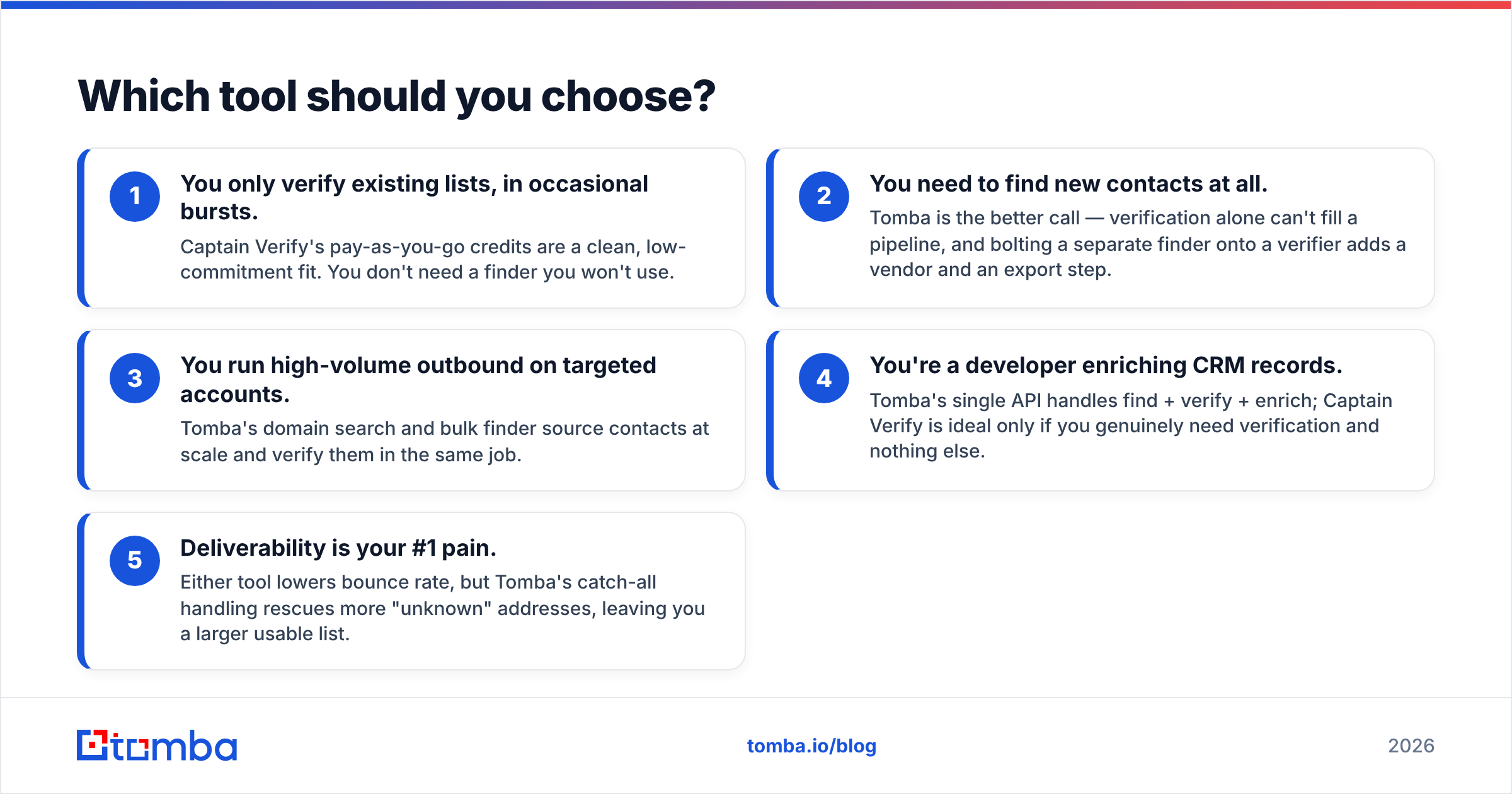
Match the tool to the shape of your work, not to a feature checklist.
- You only verify existing lists, in occasional bursts. Captain Verify's pay-as-you-go credits are a clean, low-commitment fit. You don't need a finder you won't use.
- You need to find new contacts at all. Tomba is the better call — verification alone can't fill a pipeline, and bolting a separate finder onto a verifier adds a vendor and an export step.
- You run high-volume outbound on targeted accounts. Tomba's domain search and bulk finder source contacts at scale and verify them in the same job.
- You're a developer enriching CRM records. Tomba's single API handles find + verify + enrich; Captain Verify is ideal only if you genuinely need verification and nothing else.
- Deliverability is your #1 pain. Either tool lowers bounce rate, but Tomba's catch-all handling rescues more "unknown" addresses, leaving you a larger usable list.
Most teams that think they have a "verification problem" actually have a "finding and verifying" problem — they just feel the verification half because that's where the bounces show up. If that's you, picking a verifier-only tool solves the symptom and leaves the cause.
You can sanity-check vendor accuracy claims against third-party reviews on G2 and Capterra before committing, and read up on verification fundamentals on Wikipedia's email-validation overview — both tools' methods map to the same underlying SMTP and DNS checks.
The verdict#
Captain Verify is a good verifier. Tomba is a good verifier plus the finder, enrichment, and database that surround it. If your list already exists and you just need it clean, Captain Verify's credit model is hard to argue with. If any part of your job involves getting the contacts — and for B2B outbound it nearly always does — paying one vendor to do half the work rarely beats paying one vendor to do all of it.
Start with the Tomba Email Finder on the free tier (25 searches a month, no card) and run your own target accounts through it. Find the emails, watch them verify in the same pass, and compare the end-to-end time against your current find-then-verify chain. If finding contacts is your real bottleneck, you'll feel the difference on the first list — and you'll have replaced two tools with one.
// get started
Find, verify and enrich your first contacts today
Start on the free plan with 25 searches a month, then scale when your team is ready.
Free plan · No credit card required · GDPR & CCPA
// about the author