Captain Verify vs Wiza 2026: Which Tool Wins for B2B?
Captain Verify cleans your lists; Wiza pulls leads from LinkedIn. See how the two compare on accuracy, pricing, and workflow fit in 2026 — and where a single platform beats both.
You are comparing two tools that don't actually do the same job. That is the first thing to get straight before you spend a dollar on either one.
Captain Verify is an email verification service. You feed it a list, it tells you which addresses are deliverable. Wiza is a LinkedIn-first prospecting tool. You browse Sales Navigator, and it extracts contact data — emails and phone numbers — for the people you find. One cleans data you already have. The other generates new data from LinkedIn.
This guide breaks down where each tool wins, where each one leaves a gap, and why a lot of B2B teams end up running a third option that covers both jobs in one place.
TL;DR#
- Captain Verify is a focused, affordable email verifier — great for cleaning lists, weak if you need to find contacts in the first place.
- Wiza is a LinkedIn data extractor — strong for Sales Navigator workflows, but it ties your prospecting to LinkedIn and bundles verification you can't fully control.
- Neither tool does the full find-and-verify loop well on its own. You typically end up paying for two products.
- Pricing: Captain Verify is pay-as-you-go from a few dollars per thousand; Wiza runs credit/subscription tiers that get expensive at volume.
- Better-fit alternative: Tomba combines an email finder, email verifier, and domain search in one platform starting at $49/mo.
What is Captain Verify?#
Captain Verify is an email validation tool. Its core job is to check whether an address is real and deliverable before you send to it. It runs syntax checks, MX record lookups, SMTP handshakes, and flags risky categories like disposable domains, role accounts (info@, sales@), and spam traps.
The appeal is simplicity and price. It is built around bulk list cleaning and pay-as-you-go credits, so you can verify a one-off list of 20,000 addresses without a monthly commitment. There is an API for real-time validation at signup forms, and the dashboard is straightforward.
What Captain Verify does not do is find contacts. If you don't already have an email list, it has nothing to chew on. It is the dishwasher, not the grocery store — useless until you've already brought the data home.

What is Wiza?#
Wiza is a LinkedIn prospecting and lead-export tool. You run a search in LinkedIn Sales Navigator (or browse regular LinkedIn), and Wiza extracts the prospects into a clean list with work emails, personal emails, and phone numbers. It runs its own verification pass on the emails it pulls and only charges credits for valid ones, depending on your plan.
This is a fundamentally different motion from Captain Verify. Wiza creates lead data; it doesn't just clean it. For teams whose entire prospecting process lives inside Sales Navigator, that LinkedIn-native workflow is the main draw.
The trade-offs: your sourcing is tethered to LinkedIn, you generally need a LinkedIn/Sales Navigator account in good standing, and the verification is a black box bundled into the export. You take the deliverability rate Wiza gives you. If you want to apply your own verification standards, you're layering a second tool on top anyway.
Captain Verify vs Wiza: the core difference#
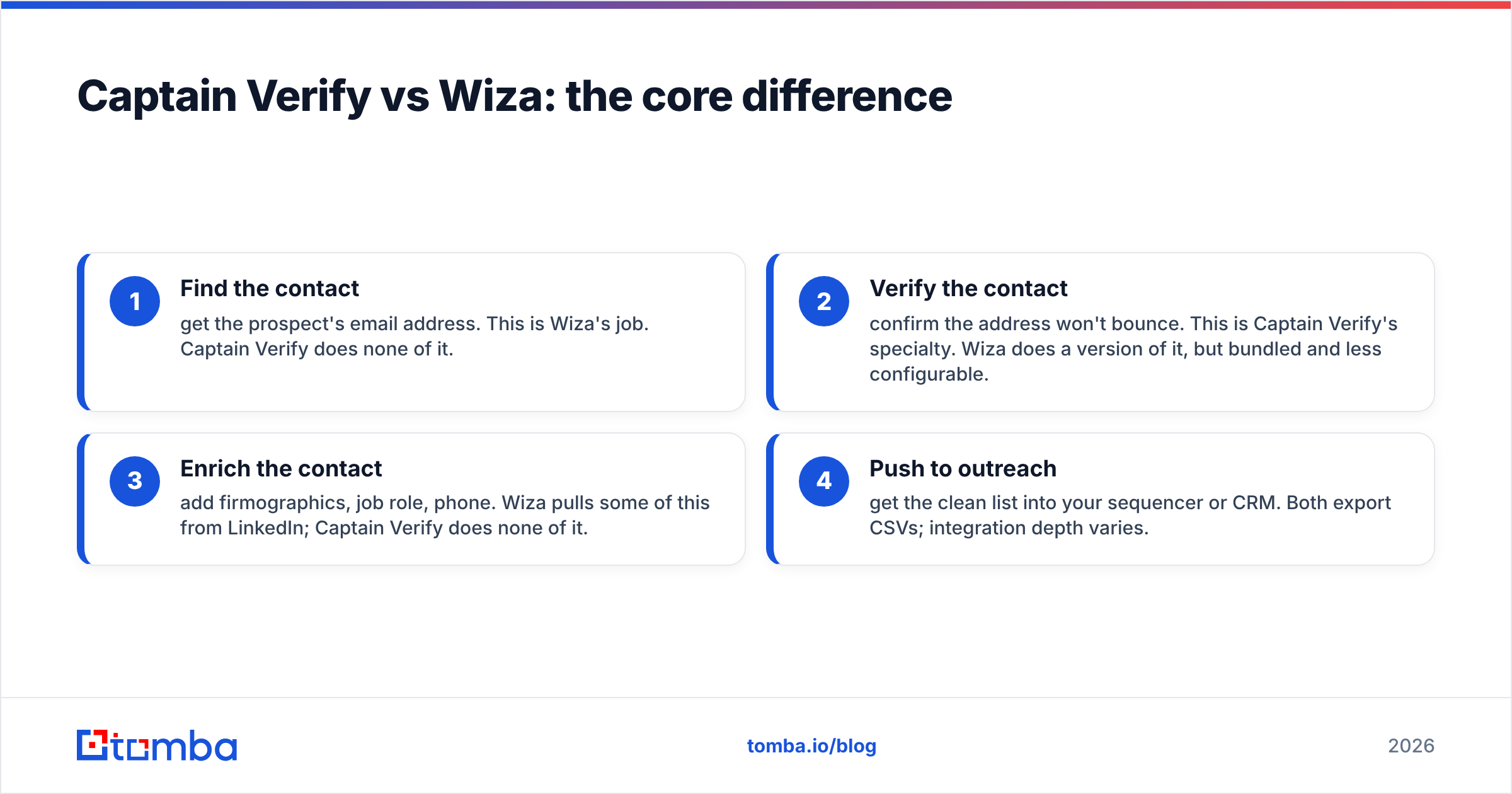
Here's the cleanest way to think about it. These two tools sit at different stages of the same pipeline.
- Find the contact — get the prospect's email address. This is Wiza's job. Captain Verify does none of it.
- Verify the contact — confirm the address won't bounce. This is Captain Verify's specialty. Wiza does a version of it, but bundled and less configurable.
- Enrich the contact — add firmographics, job role, phone. Wiza pulls some of this from LinkedIn; Captain Verify does none of it.
- Push to outreach — get the clean list into your sequencer or CRM. Both export CSVs; integration depth varies.
So the honest answer to "Captain Verify vs Wiza" is that they are complements as often as they are competitors. The real question is whether you want to buy two narrow tools or one that handles the whole loop.
How do Captain Verify and Wiza compare on features?#
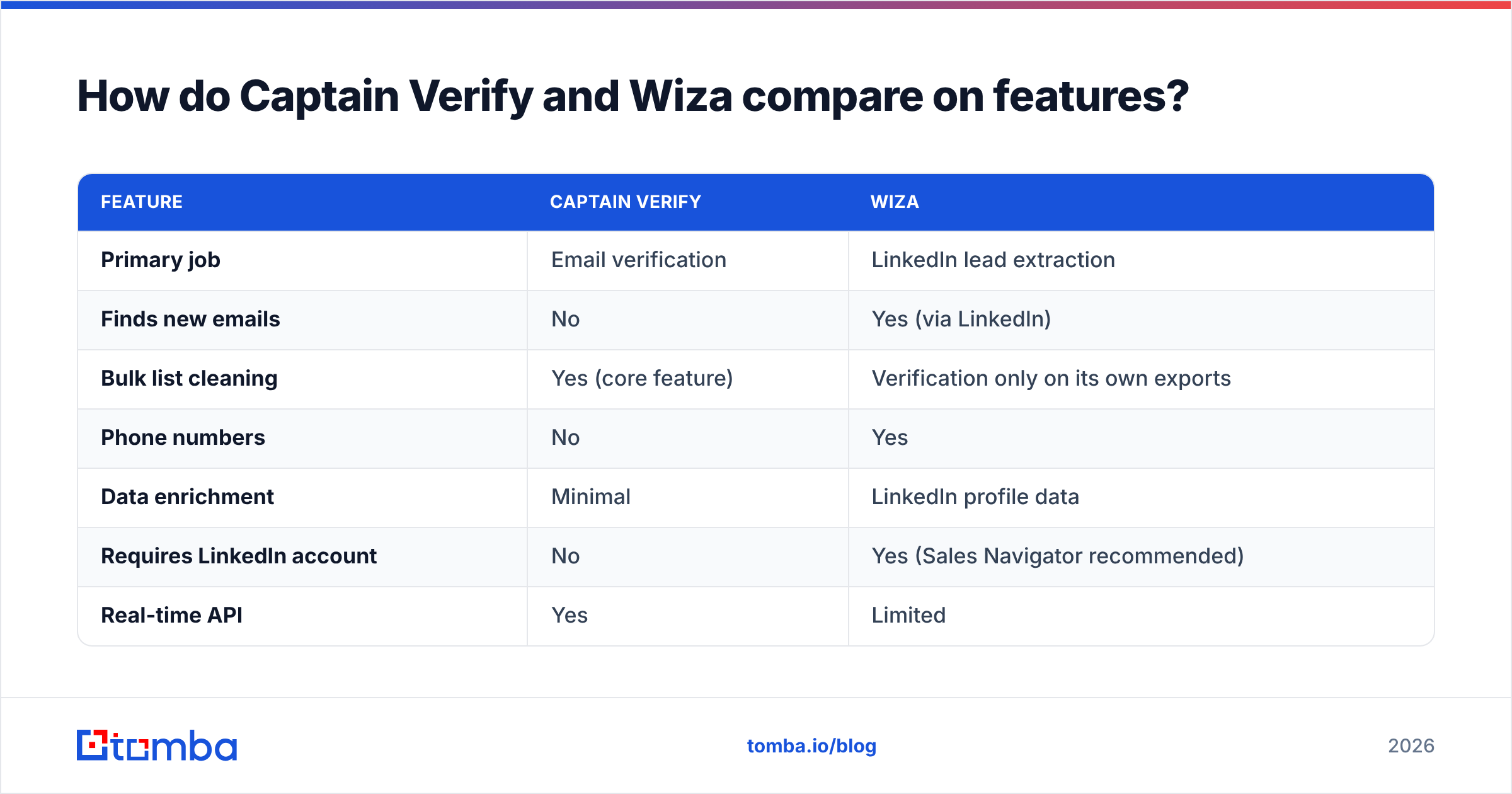
| Feature | Captain Verify | Wiza |
|---|---|---|
| Primary job | Email verification | LinkedIn lead extraction |
| Finds new emails | No | Yes (via LinkedIn) |
| Bulk list cleaning | Yes (core feature) | Verification only on its own exports |
| Phone numbers | No | Yes |
| Data enrichment | Minimal | LinkedIn profile data |
| Requires LinkedIn account | No | Yes (Sales Navigator recommended) |
| Real-time API | Yes | Limited |
| Pricing model | Pay-as-you-go credits | Credit tiers + subscriptions |
| Best for | Cleaning existing lists | Sales Navigator prospecting |
The table makes the gap obvious. If you only need one of these jobs done, pick the matching tool. If you need both — and most outbound teams do — you're shopping for two subscriptions, two dashboards, and a CSV shuffle in between.
Which tool is more accurate?#
Accuracy means two different things here, so compare them on the right axis.
For verification accuracy, Captain Verify is the purpose-built option. A dedicated verifier lives or dies on its SMTP logic and catch-all handling, and that's all Captain Verify does. The one persistent industry-wide challenge is catch-all domains — servers that accept every address regardless of whether the mailbox exists. No verifier can be 100% certain on those without sending, so look closely at how any tool labels "accept-all" or "unknown" results. This is exactly why a dedicated catch-all verifier matters when a large share of your list sits on catch-all domains.
For finding accuracy, Wiza is the one being judged, since Captain Verify finds nothing. Wiza's email match rate depends on how complete the LinkedIn profile is and whether the person's work email follows a discoverable pattern. Match rates on LinkedIn extraction tools vary widely by industry and seniority — expect strong results for well-documented companies and thinner coverage for small or stealth firms.
The takeaway: a verifier and a finder shouldn't be compared on a single accuracy number, because they're answering different questions. Judge Captain Verify on bounce rate after cleaning, and judge Wiza on valid-email match rate from a search.
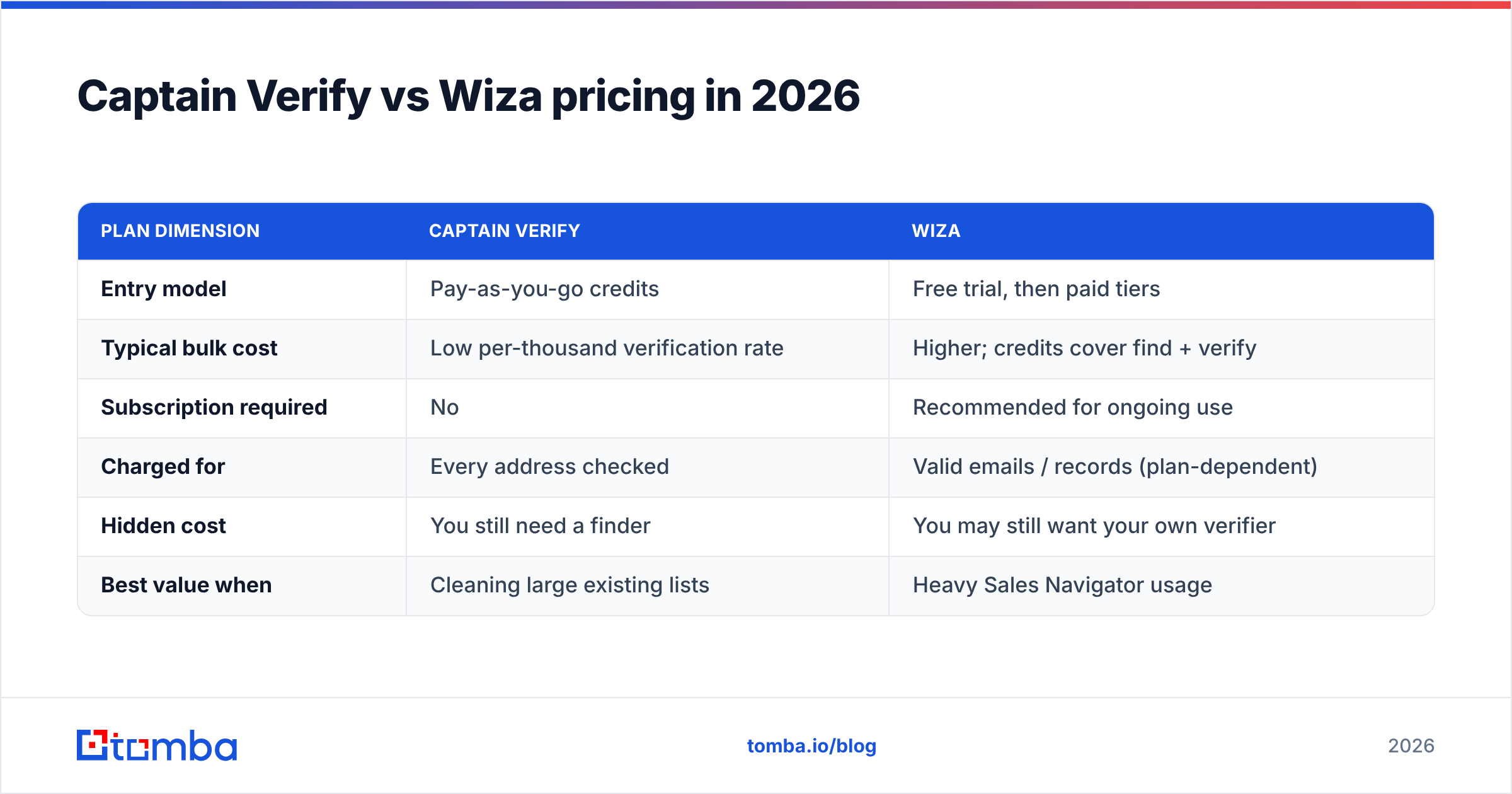
Captain Verify vs Wiza pricing in 2026#
Pricing is where the "two tools" problem really shows up.
| Plan dimension | Captain Verify | Wiza |
|---|---|---|
| Entry model | Pay-as-you-go credits | Free trial, then paid tiers |
| Typical bulk cost | Low per-thousand verification rate | Higher; credits cover find + verify |
| Subscription required | No | Recommended for ongoing use |
| Charged for | Every address checked | Valid emails / records (plan-dependent) |
| Hidden cost | You still need a finder | You may still want your own verifier |
| Best value when | Cleaning large existing lists | Heavy Sales Navigator usage |
Captain Verify is genuinely cheap for what it does — pure verification at a low per-thousand rate with no lock-in. Wiza costs more because you're paying for sourced data, not just validation, and credit consumption climbs fast at scale.
But add it up. If you run both — Wiza to source, Captain Verify to clean — you're paying two vendors to do what an all-in-one finder-plus-verifier handles on a single bill. That stacked cost is the real comparison, and it's where a consolidated platform changes the math. Check the Tomba pricing tiers against your combined Captain Verify + Wiza spend before you commit to either.
When should you choose Captain Verify?#
Pick Captain Verify if:
- You already have lists — from events, signup forms, old CRM exports — and just need them cleaned before sending.
- You want pay-as-you-go with no monthly subscription.
- You run a signup form and need real-time validation via API to block typos and disposable addresses at the point of entry.
- Budget is tight and verification is the only job on your plate.
Skip it if your actual problem is that you don't have enough contacts yet. A verifier can't solve an empty pipeline.
When should you choose Wiza?#
Pick Wiza if:
- Your prospecting lives in Sales Navigator and you want to export those searches into clean, contactable lists fast.
- You need phone numbers alongside emails.
- LinkedIn is your primary channel and you're comfortable tying sourcing to it.
Be cautious if you need sourcing beyond LinkedIn, want full control over verification thresholds, or worry about LinkedIn account limits. A LinkedIn-only pipeline is a single point of failure — and a LinkedIn finder plus domain search gives you a second sourcing path that doesn't depend on one platform's tolerance for scraping.
Is there a better alternative to both?#
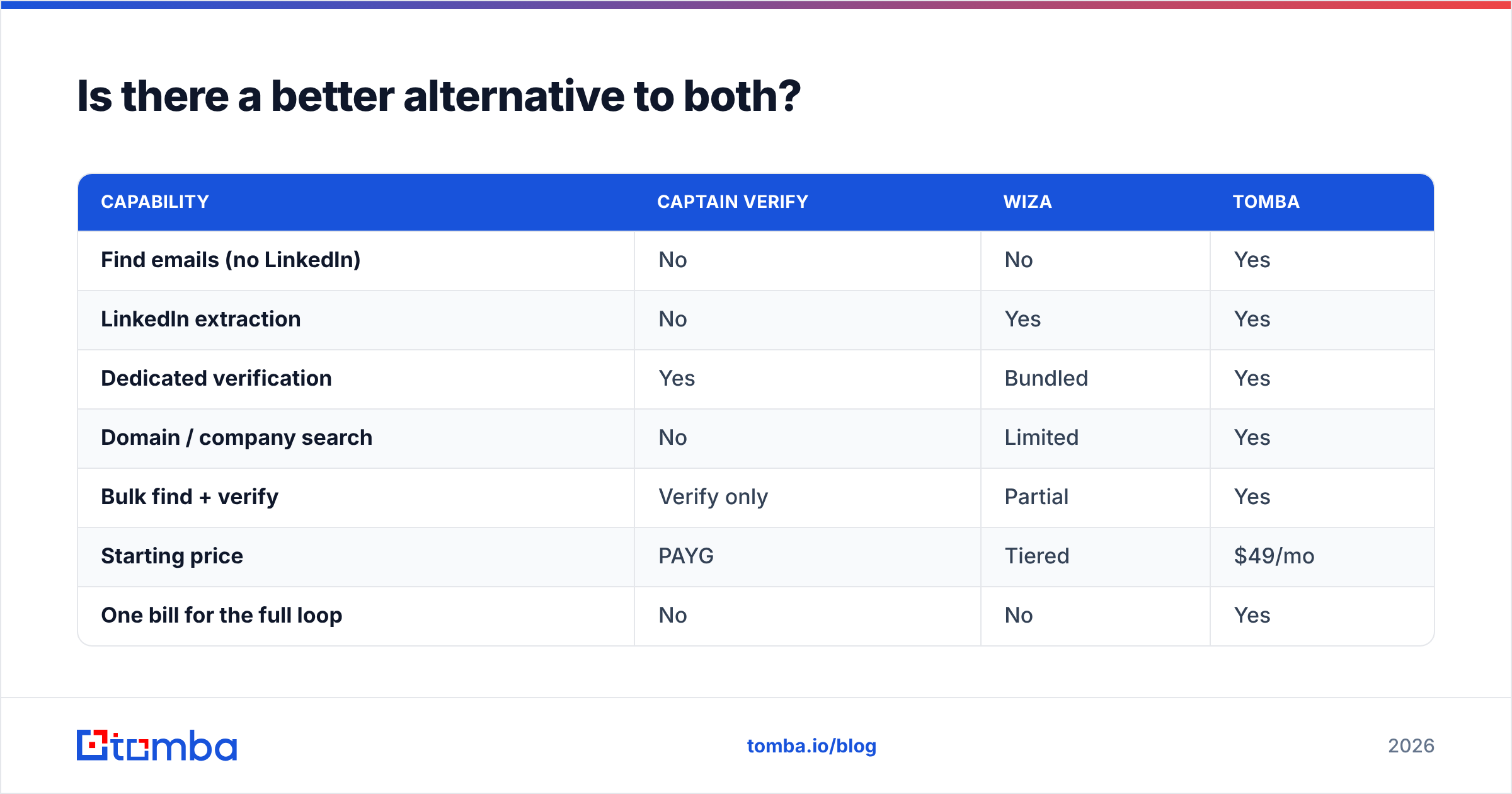
Yes — if your real goal is the full find-and-verify loop, a single platform beats stitching two narrow tools together. This is where Tomba fits.
Tomba does both jobs Captain Verify and Wiza split between them, plus a few they don't cover:
- Find emails by name, company, or domain with the email finder — no LinkedIn account required.
- Verify deliverability with a dedicated email verifier, including catch-all handling, instead of a bundled black box.
- Search a whole company at once with domain search to map every reachable contact at a target account.
- Work at scale with the bulk email finder for find-and-verify on entire lists in one pass.
- Connect your stack through native integrations with HubSpot, Salesforce, Pipedrive, and Sheets — no CSV shuffle.
Here's how the three line up on the jobs that actually matter:
| Capability | Captain Verify | Wiza | Tomba |
|---|---|---|---|
| Find emails (no LinkedIn) | No | No | Yes |
| LinkedIn extraction | No | Yes | Yes |
| Dedicated verification | Yes | Bundled | Yes |
| Domain / company search | No | Limited | Yes |
| Bulk find + verify | Verify only | Partial | Yes |
| Starting price | PAYG | Tiered | $49/mo |
| One bill for the full loop | No | No | Yes |
You can sanity-check the verification side independently against industry sources — G2's email verification category lists how buyers rate each tool — and read up on email deliverability fundamentals to understand why verification matters before any send. For LinkedIn-sourcing context, Wiza's own homepage documents its Sales Navigator workflow.
How do you actually decide?#
Run your decision through three questions:
- Do I have contacts, or do I need to find them? No contacts → you need a finder (Wiza or Tomba), not Captain Verify alone.
- Is LinkedIn my only sourcing channel? If yes, Wiza fits. If you want domain-based and pattern-based sourcing too, a platform with multiple discovery methods serves you better long-term.
- Am I willing to pay and manage two vendors? If consolidating onto one bill and one dashboard saves money and time, an all-in-one is the rational pick.
Most teams I've seen running Captain Verify + Wiza together eventually consolidate, because the per-tool savings evaporate once you count two subscriptions, two integrations to maintain, and the manual export-import step between them.
The bottom line#
Captain Verify and Wiza are good at narrow things. Captain Verify is a clean, cheap verifier. Wiza is a capable LinkedIn extractor. But comparing them head-to-head is slightly the wrong frame, because they solve different halves of the same problem — and using both means buying both.
If you want one tool that finds professional emails and verifies them before you send, start with the Tomba Email Finder. The free tier gives you 25 searches a month to test match rates against your own target accounts, and paid plans start at $49/mo — often less than running a finder and a verifier side by side. Find, verify, and enrich in one place, then push straight into your CRM. That's the loop Captain Verify and Wiza only cover half of each.
// get started
Find, verify and enrich your first contacts today
Start on the free plan with 25 searches a month, then scale when your team is ready.
Free plan · No credit card required · GDPR & CCPA
// about the author