7 Best Centrex Alternatives in 2026: Cloud PBX & VoIP Compared
Centrex is a relic of the copper-line era. Here are the 7 best Centrex alternatives for 2026 — cloud PBX, hosted VoIP, and UCaaS — ranked by price, features, and fit for B2B sales teams.
Centrex was clever in 1985. Your phone company hosted the PBX in its central office, you rented features per line, and nobody on your team had to babysit a closet full of hardware. Forty years later, that same model is the most expensive, least flexible way to run a business phone system — and most carriers are quietly sunsetting it.
If you are reading this, you have probably gotten a letter from your provider about a copper retirement deadline, a price hike, or a forced migration. This guide ranks the real Centrex alternatives for 2026, tells you which type fits which team, and shows you how to fill whatever you pick with people actually worth calling.
TL;DR#
- Centrex is being retired. Carriers are decommissioning copper and TDM lines, so a migration to IP-based calling is no longer optional — it is a deadline.
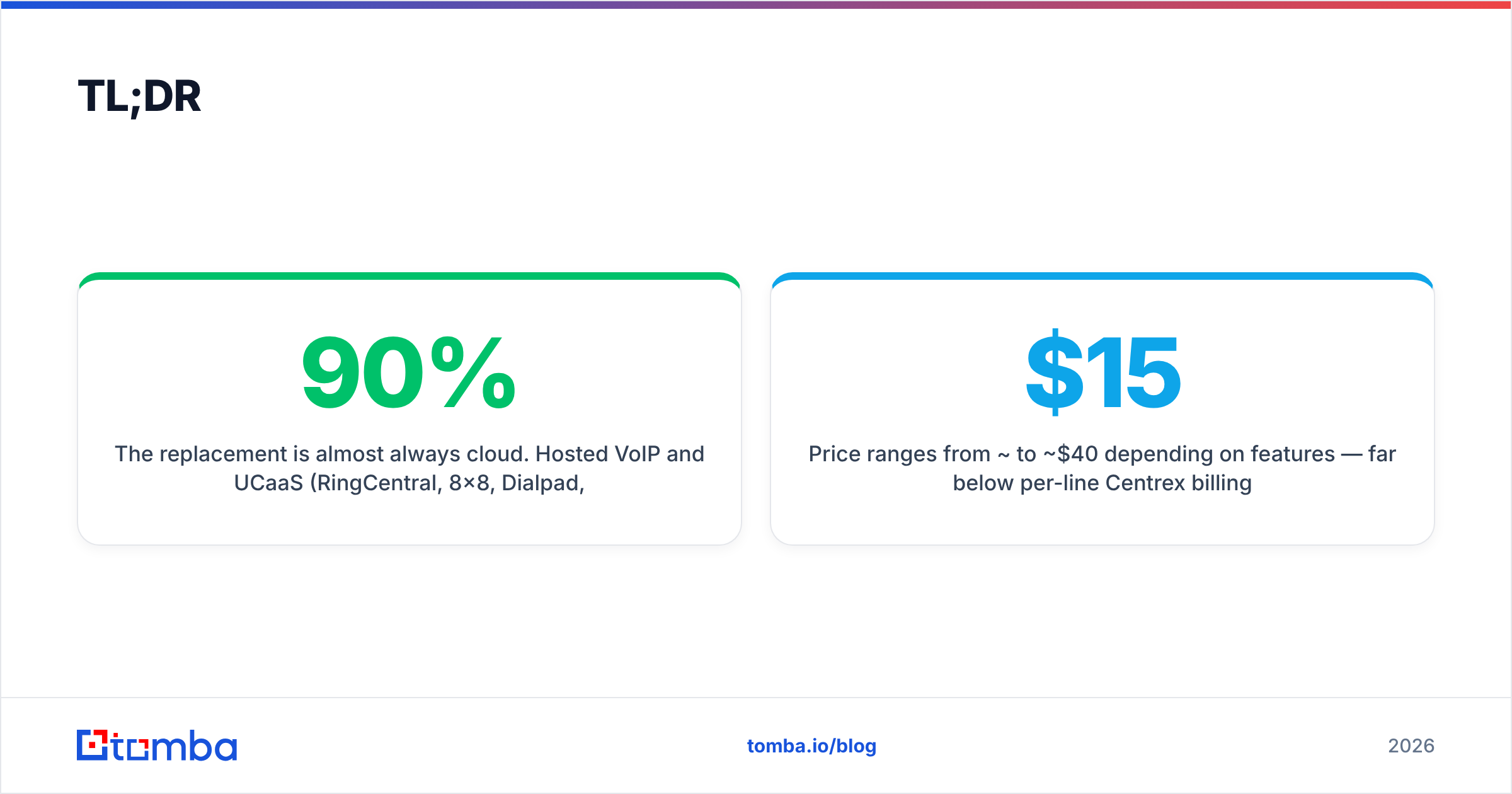
- The replacement is almost always cloud. Hosted VoIP and UCaaS (RingCentral, 8x8, Dialpad, Zoom Phone, Nextiva) cover 90% of teams. On-prem IP-PBX (3CX, FreePBX) and SIP trunking serve the rest.
- Price per seat ranges from ~$15 to ~$40/mo depending on features — far below per-line Centrex billing.
- The phone system is half the job. A dialer with no numbers to call is dead weight; pair your new platform with accurate contact data.
- Match the tool to the team: sales floors want analytics and dialers, IT-heavy shops want on-prem control, lean teams want plug-and-play UCaaS.
What is Centrex and why are teams replacing it?#
Centrex (Central Office Exchange) is a business phone service where the switching equipment lives at the telephone company's facility, not on your premises. You lease PBX-style features — extensions, transfer, hold, hunt groups — on a per-line basis over traditional copper or T1 circuits. Think of it as renting a furnished apartment: the landlord owns everything, you pay monthly, and you cannot knock down a wall without permission.
That model is collapsing for three concrete reasons:
- Copper retirement. Major carriers have FCC approval to decommission legacy TDM and copper infrastructure. When the line goes, Centrex goes with it.
- Per-line economics. Centrex bills per line with add-on fees for features that modern platforms bundle for free. A 20-person team can pay more for Centrex than for a fully-featured cloud suite.
- Zero flexibility. Adding a remote rep, spinning up a new queue, or integrating your phone with a CRM ranges from painful to impossible on Centrex.
If you sell over the phone, the integration gap alone is reason to move. A modern system logs every call to your CRM automatically — see why that matters in our breakdown of CRM workflows.
What are the main types of Centrex alternatives?#
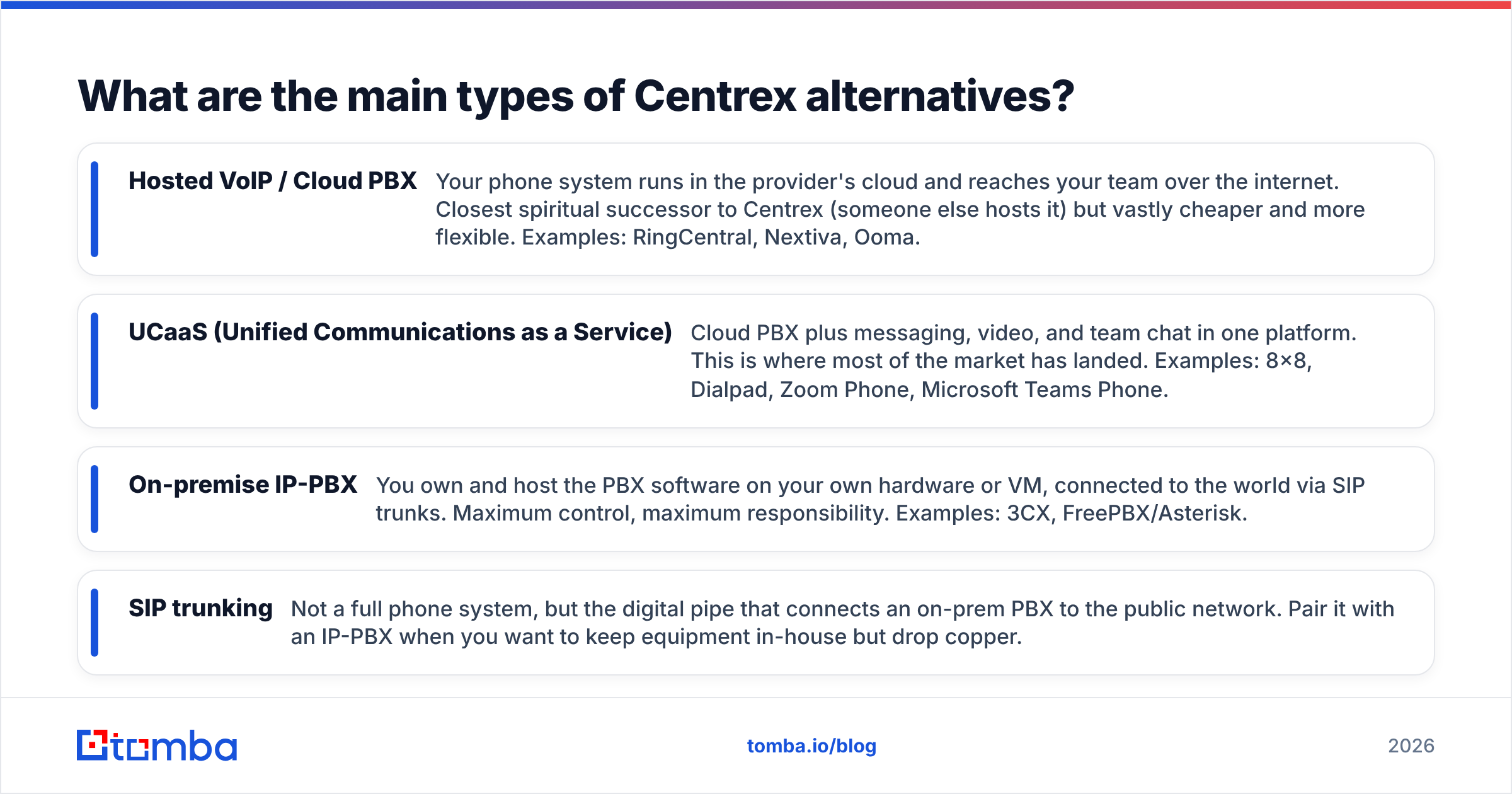
Before you compare brand names, pick a category. There are four, and most teams only seriously consider the first two.
- Hosted VoIP / Cloud PBX — Your phone system runs in the provider's cloud and reaches your team over the internet. Closest spiritual successor to Centrex (someone else hosts it) but vastly cheaper and more flexible. Examples: RingCentral, Nextiva, Ooma.
- UCaaS (Unified Communications as a Service) — Cloud PBX plus messaging, video, and team chat in one platform. This is where most of the market has landed. Examples: 8x8, Dialpad, Zoom Phone, Microsoft Teams Phone.
- On-premise IP-PBX — You own and host the PBX software on your own hardware or VM, connected to the world via SIP trunks. Maximum control, maximum responsibility. Examples: 3CX, FreePBX/Asterisk.
- SIP trunking — Not a full phone system, but the digital pipe that connects an on-prem PBX to the public network. Pair it with an IP-PBX when you want to keep equipment in-house but drop copper.
The deciding question is simple: do you want to own the system or rent it? Renting (cloud) wins for almost everyone who is leaving Centrex, because the whole point of Centrex was not owning hardware. Owning (on-prem) makes sense only when you have IT staff and strict data-control requirements.
Which Centrex alternatives are best in 2026?#
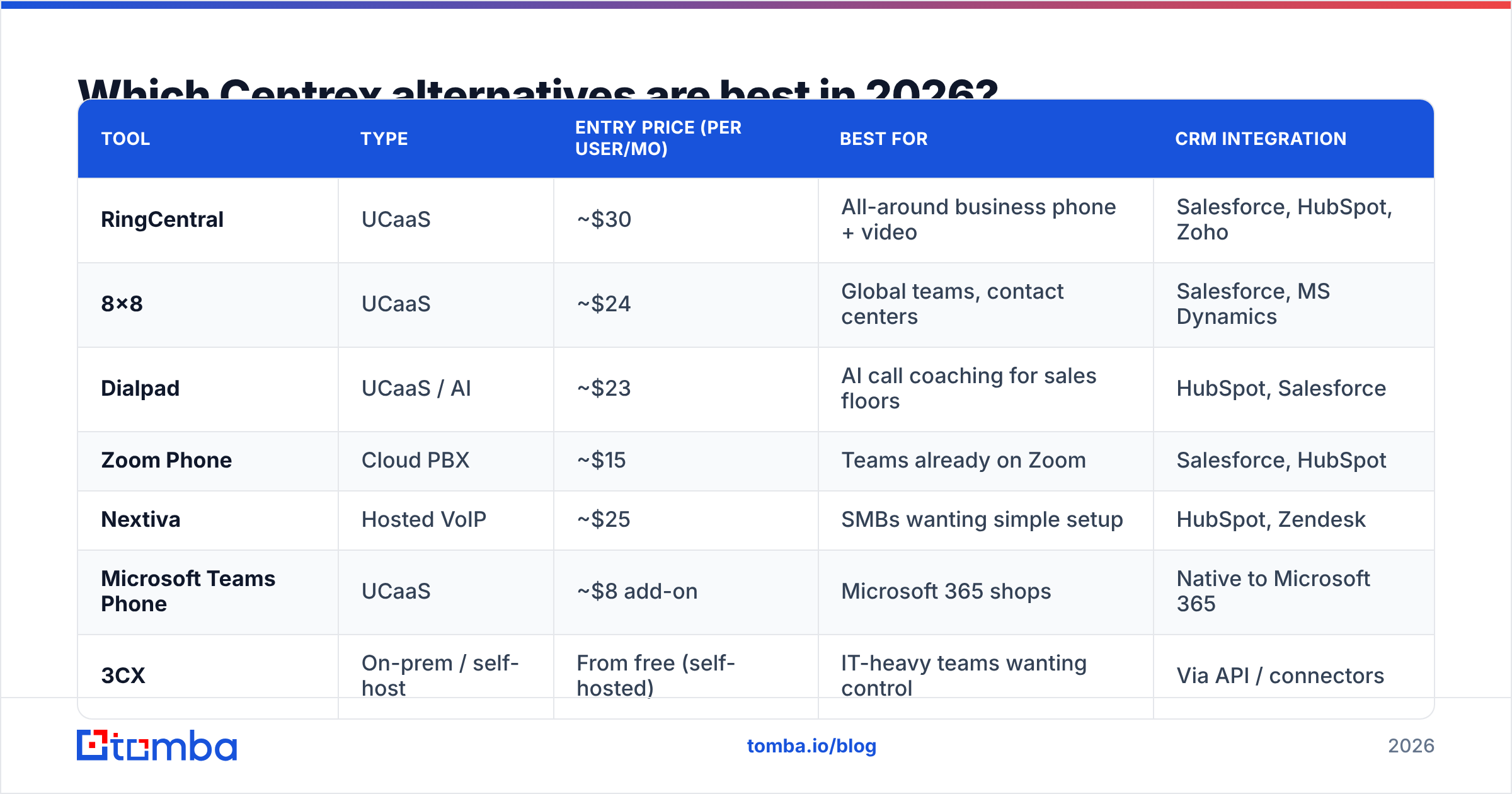
Here is a side-by-side comparison of the leading options across the categories above. Prices are entry-level per-user monthly rates at the time of writing; always confirm current vendor pricing before you commit.
| Tool | Type | Entry price (per user/mo) | Best for | CRM integration |
|---|---|---|---|---|
| RingCentral | UCaaS | ~$30 | All-around business phone + video | Salesforce, HubSpot, Zoho |
| 8x8 | UCaaS | ~$24 | Global teams, contact centers | Salesforce, MS Dynamics |
| Dialpad | UCaaS / AI | ~$23 | AI call coaching for sales floors | HubSpot, Salesforce |
| Zoom Phone | Cloud PBX | ~$15 | Teams already on Zoom | Salesforce, HubSpot |
| Nextiva | Hosted VoIP | ~$25 | SMBs wanting simple setup | HubSpot, Zendesk |
| Microsoft Teams Phone | UCaaS | ~$8 add-on | Microsoft 365 shops | Native to Microsoft 365 |
| 3CX | On-prem / self-host | From free (self-hosted) | IT-heavy teams wanting control | Via API / connectors |
A few honest notes on the table:
- Cheapest is not best. Teams Phone at ~$8 looks unbeatable, but it assumes you already pay for Microsoft 365 and want calling bolted onto chat — not a sales-grade dialer.
- Dialpad and 8x8 earn their premium if you run an outbound floor: live transcription, sentiment, and coaching are built in, not add-ons.
- 3CX can be genuinely free when self-hosted, but "free software" is not "free to operate" — someone has to run it.
How do you choose between cloud and on-premise?#
Pick cloud unless you have a specific reason not to. That is the conclusion; here is the reasoning.
Cloud (hosted VoIP / UCaaS) wins on the dimensions that pushed you off Centrex in the first place: no hardware, predictable per-seat billing, instant scaling, and remote-work support out of the box. The provider handles uptime, security patching, and carrier relationships. For a sales or support team, the deciding factor is usually the deep CRM and dialer integrations cloud platforms ship natively.
On-premise IP-PBX earns its place in three situations:
- Strict data residency — you must keep call data and routing inside your own network for compliance.
- Existing IT capacity — you already have staff who can administer Linux, SIP, and networking.
- High call volume at scale — past a few hundred seats, owning SIP trunks can beat per-seat cloud pricing.
For everyone else, the math and the maintenance both favor the cloud. The detail people forget: migrating off Centrex is also the moment to clean up your data. A new dialer is only as good as the numbers in it.

What does migrating off Centrex actually involve?#
Migration is a project, not a flip of a switch. Map it in five stages and it stays boring — which is exactly what you want from a phone cutover.
- Audit your lines and numbers. Inventory every DID, extension, hunt group, and fax line. You will be surprised how many "active" Centrex lines nobody uses.
- Port your numbers. Submit porting requests early; carrier ports can take days to weeks. Keep Centrex live in parallel until the port completes.
- Choose and provision the new system. Set up extensions, call flows, and voicemail in your new cloud PBX before cutover, not during.
- Integrate the CRM. Connect the phone platform to your CRM so calls log automatically. If you use HubSpot, vendors document this well — start with the HubSpot integrations directory and your provider's connector.
- Test, train, cut over. Run test calls on every queue, train the team on the new softphone, then schedule the cutover for a low-volume window.
Budget for a parallel-run period. The fastest way to a bad migration is killing Centrex before the new system is proven.
How do you keep the new phone system full of good leads?#
A modern dialer with an empty or stale list is worse than Centrex — it costs more and rings nobody worth reaching. Whatever platform you land on, the bottleneck moves from infrastructure to data.
This is where contact data matters more than the phone system itself. Before a rep dials, you need a verified direct number and the decision-maker behind it. Tomba's phone finder pulls B2B phone numbers from a company domain or contact, and the email finder gives you the email channel for multi-touch sequences when a call goes to voicemail. For larger lists, data enrichment fills the gaps in records you already have so your shiny new dialer is firing at real, reachable humans.
The pattern that works: enrich and verify first, then load the dialer. A confirmed number routed through Dialpad or RingCentral connects; a guessed one burns a rep's hour and your sender-of-record reputation.
Centrex vs. cloud PBX: the honest cost comparison#
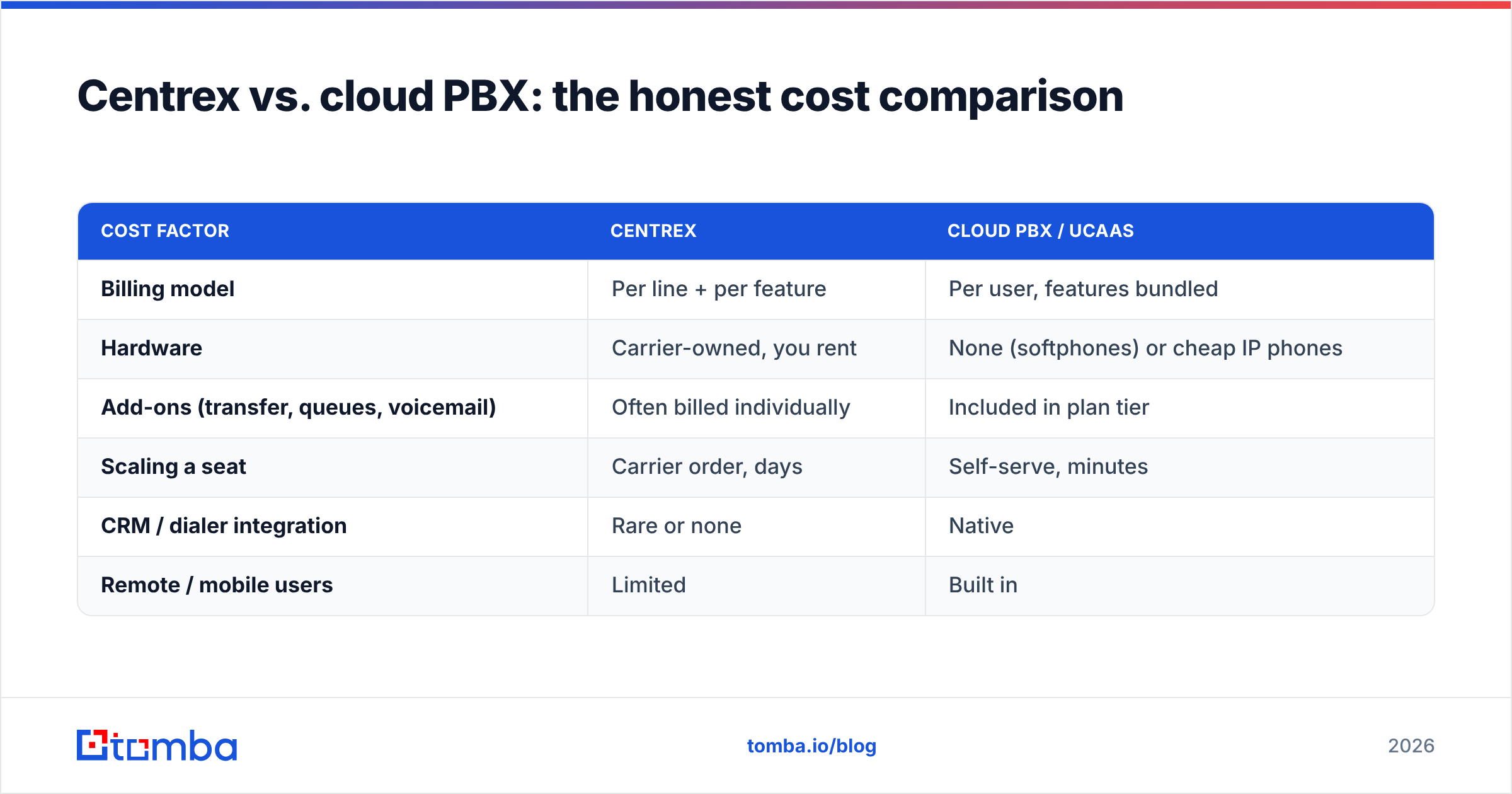
People assume cloud is cheaper across the board. Usually true, but it depends on what you count.
| Cost factor | Centrex | Cloud PBX / UCaaS |
|---|---|---|
| Billing model | Per line + per feature | Per user, features bundled |
| Hardware | Carrier-owned, you rent | None (softphones) or cheap IP phones |
| Add-ons (transfer, queues, voicemail) | Often billed individually | Included in plan tier |
| Scaling a seat | Carrier order, days | Self-serve, minutes |
| CRM / dialer integration | Rare or none | Native |
| Remote / mobile users | Limited | Built in |
The line items that made Centrex feel "safe" — predictable carrier billing, no equipment — are exactly what cloud delivers, minus the per-feature nickel-and-diming. The only real Centrex advantage left is inertia, and copper retirement is removing even that.
Frequently asked questions#
Is Centrex being discontinued? Most carriers are phasing out Centrex alongside legacy copper and TDM infrastructure. Exact dates vary by provider and region, so check your contract and any decommission notices — but treat it as a when, not an if. You can read the background on Centrex for the technical history.
What is the closest direct replacement for Centrex? Hosted VoIP / cloud PBX, because both put the switching in someone else's cloud. RingCentral and Nextiva feel the most like a managed, set-and-forget upgrade.
Can I keep my existing phone numbers? Yes. Number portability lets you move your DIDs to the new provider. Start the port early and run both systems in parallel until it completes.
Do I need new phones? Not necessarily. Most cloud platforms work through softphones (desktop and mobile apps). If you want desk phones, inexpensive SIP-compatible IP phones work with every major provider.
What about call quality? Modern VoIP on a decent internet connection matches or beats copper. Prioritize QoS on your network and pick a provider with regional data centers for the best latency.
The bottom line#
Centrex did its job for forty years, but the copper underneath it is being switched off, and the per-line economics never made sense for a team that calls to sell. For most businesses leaving it behind, a cloud PBX or UCaaS platform is the obvious move: lower cost, native CRM integration, and seats you can add in minutes. On-prem IP-PBX stays relevant only for IT-heavy or compliance-bound shops.
Whichever platform you choose, remember the half of the job that no phone system solves: who you call. A dialer is only as valuable as the verified numbers and decision-makers feeding it. Start your migration list with the Tomba Email Finder and phone finder to load your new system with contacts that actually pick up — then check the full Tomba pricing to see how far the free tier (25 searches a month) gets you before you commit. Replace the copper, then fill the pipeline.
Ready to find emails that actually work?
Join 150,000+ professionals who stopped guessing and started sending. Free credits on signup — no credit card required.
Get the Tomba newsletter
Practical outbound tactics and product updates — once every two weeks.
About the author