Champify Pricing, Reviews, Pros and Cons (2026 Guide)
A neutral 2026 breakdown of Champify pricing, real user reviews, and the honest pros and cons of its job-change and champion-tracking data — plus where it falls short.
You are evaluating Champify because someone on your team said "our best buyers already know us — they just changed jobs." That instinct is correct, and Champify is built entirely around it. The question is whether the pricing, the data quality, and the workflow justify another line item in your go-to-market stack.
This guide gives you the honest version: what Champify costs, what real reviewers say, where it genuinely shines, and where it leaves gaps you will need to fill with other tools.
TL;DR#
- What it is: Champify tracks when your past champions, customers, and contacts change jobs, then surfaces those "warm" accounts inside your CRM and outbound motion.
- Pricing: Champify does not publish flat numbers; it sells annual contracts that typically land in the mid four to five figures per year, scaled by seats and CRM volume. Expect a sales call, not a self-serve checkout.
- Biggest pro: The job-change and champion signal is genuinely high-converting — warm intros beat cold lists, and reviewers consistently mention better reply and meeting rates.
- Biggest con: It is a narrow, premium signal layer. It does not replace an email finder, verifier, or broad prospecting database — and contact data for the new role is not always complete.
- Who should skip it: Early teams without a clean CRM of past contacts, and budget-conscious teams that need raw email-finding volume more than they need a niche signal.
What is Champify and who is it for?#
Champify is a B2B "warm outbound" platform. Its core job is to monitor the people already in your world — closed-won contacts, churned users, former evaluators, and product champions — and alert you the moment they move to a new company. A champion who loved you at Company A becomes a warm buyer at Company B, and Champify tries to catch that transition before your competitors do.
The product leans on three motions:
- Champion tracking — follow individual contacts across job changes so you can re-engage them at their new employer.
- New-buyer alerts — when a former user lands somewhere new, that account becomes a fresh opportunity with a built-in advocate.
- CRM enrichment and routing — push these signals into Salesforce or HubSpot so reps act inside their existing workflow instead of a separate dashboard.
It is aimed at mid-market and enterprise revenue teams with an established customer base. The whole value proposition assumes you already have a meaningful list of past contacts worth tracking. If your CRM is thin, the signal pool is thin too.
How much does Champify cost in 2026?#
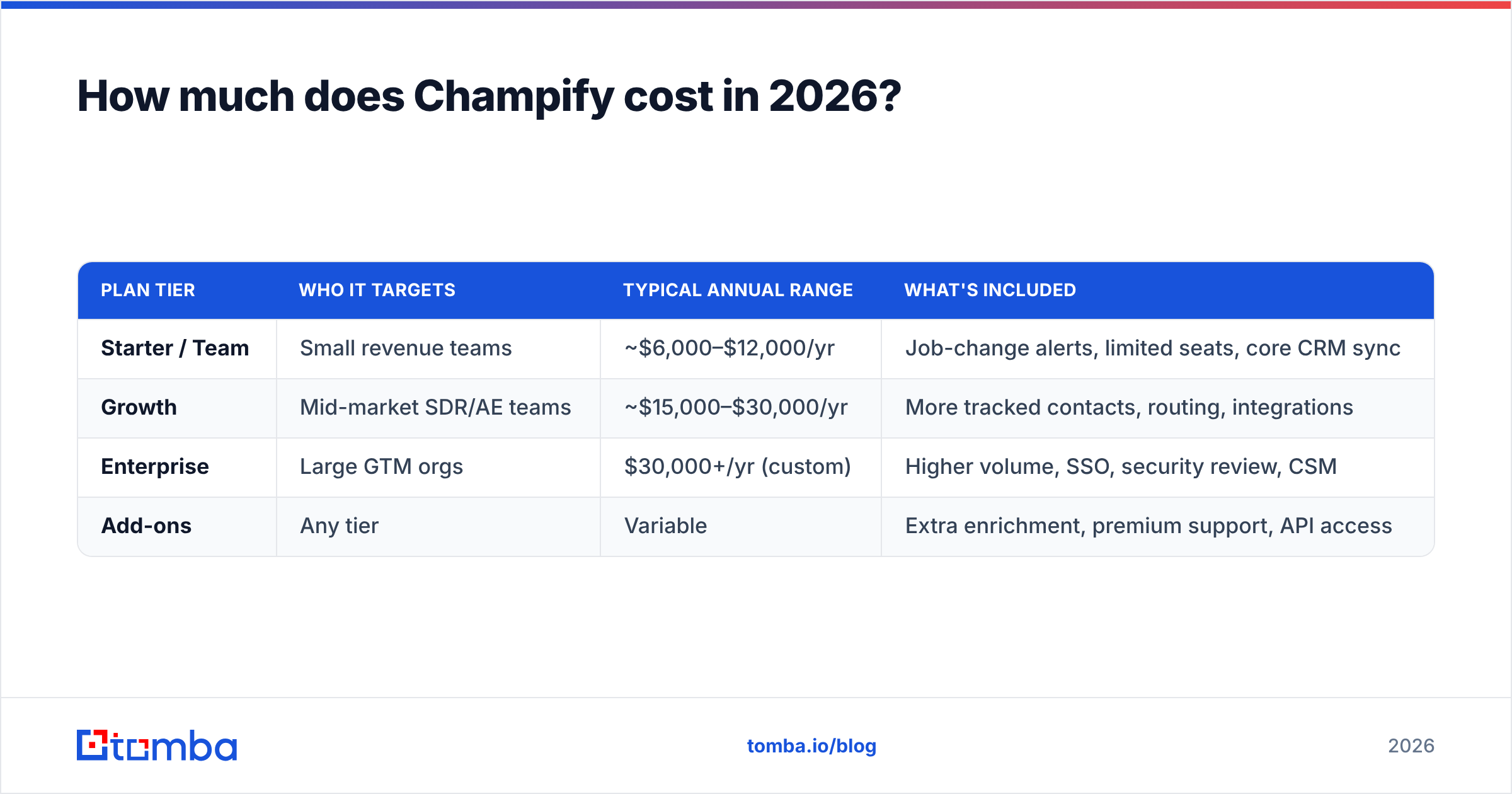
Champify uses annual, sales-led contracts rather than a public price list. That is common for signal-data vendors, but it makes budgeting harder. Based on reviewer reports and typical positioning, here is a realistic picture. Treat these as directional ranges, not quotes — confirm directly during your demo.
| Plan tier | Who it targets | Typical annual range | What's included |
|---|---|---|---|
| Starter / Team | Small revenue teams | ~$6,000–$12,000/yr | Job-change alerts, limited seats, core CRM sync |
| Growth | Mid-market SDR/AE teams | ~$15,000–$30,000/yr | More tracked contacts, routing, integrations |
| Enterprise | Large GTM orgs | $30,000+/yr (custom) | Higher volume, SSO, security review, CSM |
| Add-ons | Any tier | Variable | Extra enrichment, premium support, API access |
A few things to understand about the pricing model:
- It scales with your contact volume. The more past contacts and accounts you track, the more you pay. A large customer base is an asset and a cost multiplier at the same time.
- Seats matter. Per-rep pricing means rolling it out to a 40-person sales org costs far more than a 5-person team pilot.
- Annual commitment is the norm. You are unlikely to find a true month-to-month plan, which raises the stakes on your pilot.
If you want predictable, transparent, usage-based costs for the data layer underneath your outbound, compare this against published options like Tomba pricing, where a free tier and a $49/mo Starter plan let you test before committing a year of budget.
What do Champify reviews say (pros and cons)?#
Across G2 and peer communities, Champify reviews cluster around a clear theme: the signal works, but it is a focused tool with a premium price. Here is the balanced read on the champify pricing reviews pros and cons that buyers actually raise.
The pros reviewers consistently mention#
- Warm beats cold, measurably. Reps report higher reply rates and more booked meetings when outreach references a real relationship instead of a cold pitch. This is the headline benefit and it holds up.
- Strong CRM fit. The Salesforce and HubSpot sync means signals show up where reps already work, which drives actual adoption instead of dashboard rot.
- Time saved on manual tracking. Before tools like this, finding job changes meant manually scrolling LinkedIn. Automating it frees SDR hours.
- Net-new pipeline from existing relationships. Several reviewers describe sourcing pipeline they would never have found, purely from champions who moved.
The cons reviewers consistently mention#
- Price relative to scope. The most common critique: it is expensive for a single signal type, and the ROI math only works if you act on the alerts consistently.
- Contact data gaps at the new role. Knowing someone changed jobs is step one; getting their new, verified work email is step two, and reviewers note the email/phone for the new role is not always present or accurate.
- Coverage depends on your CRM hygiene. Garbage in, garbage out — if past contacts are duplicated or stale, the signal degrades.
- Annual lock-in. Teams that wanted to trial it cheaply found the commitment structure frustrating.
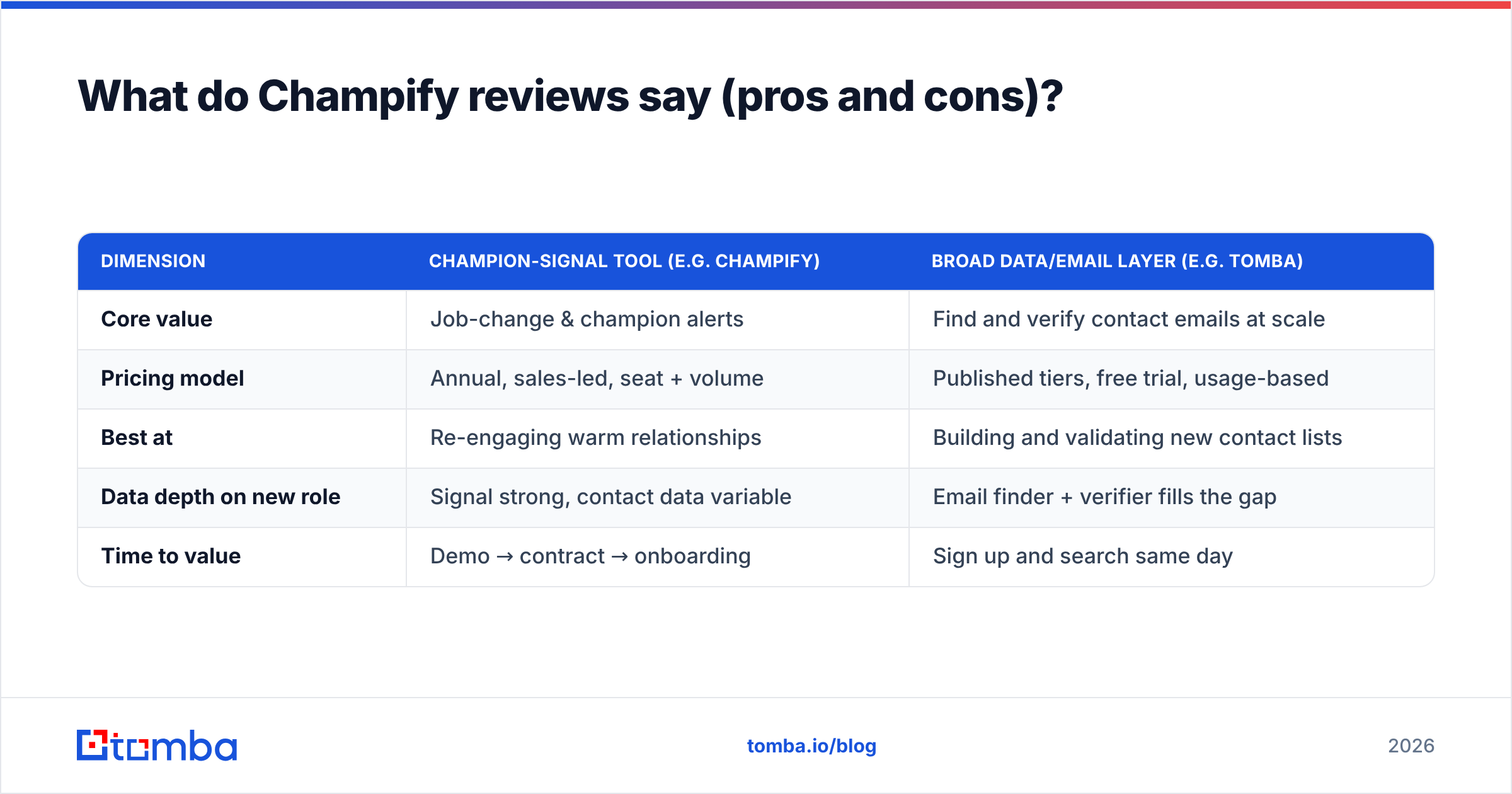
| Dimension | Champion-signal tool (e.g. Champify) | Broad data/email layer (e.g. Tomba) |
|---|---|---|
| Core value | Job-change & champion alerts | Find and verify contact emails at scale |
| Pricing model | Annual, sales-led, seat + volume | Published tiers, free trial, usage-based |
| Best at | Re-engaging warm relationships | Building and validating new contact lists |
| Data depth on new role | Signal strong, contact data variable | Email finder + verifier fills the gap |
| Time to value | Demo → contract → onboarding | Sign up and search same day |
Is the job-change signal worth the price?#
The signal is worth it only if you operationalize it. A job-change alert is a perishable asset — its value decays within weeks as the champion settles in and competitors reach out. Teams that win with Champify wire alerts directly into a same-day outreach play with assigned ownership. Teams that let alerts pile up in a report see weak ROI and blame the tool.
Think of it like a smoke detector for opportunity. The detector is useless if no one is home to act on the alarm. Champify rings the bell; your reps still have to run the play, and they need a complete contact record to do it.
That last point is the practical catch. When a champion moves to a new company, you often still need to find their new work email and verify it before you send. A bounced first email to a warm champion wastes the single best moment you will get with them. This is why most teams pair a signal tool with a dedicated email finder and an email verifier — the signal tells you who and when, the finder and verifier give you a deliverable where.

What are the best Champify alternatives in 2026?#
No single tool covers signal, contact data, and verification equally well, so most modern stacks combine two or three. Here is how the common options compare for the jobs around warm and cold outbound.
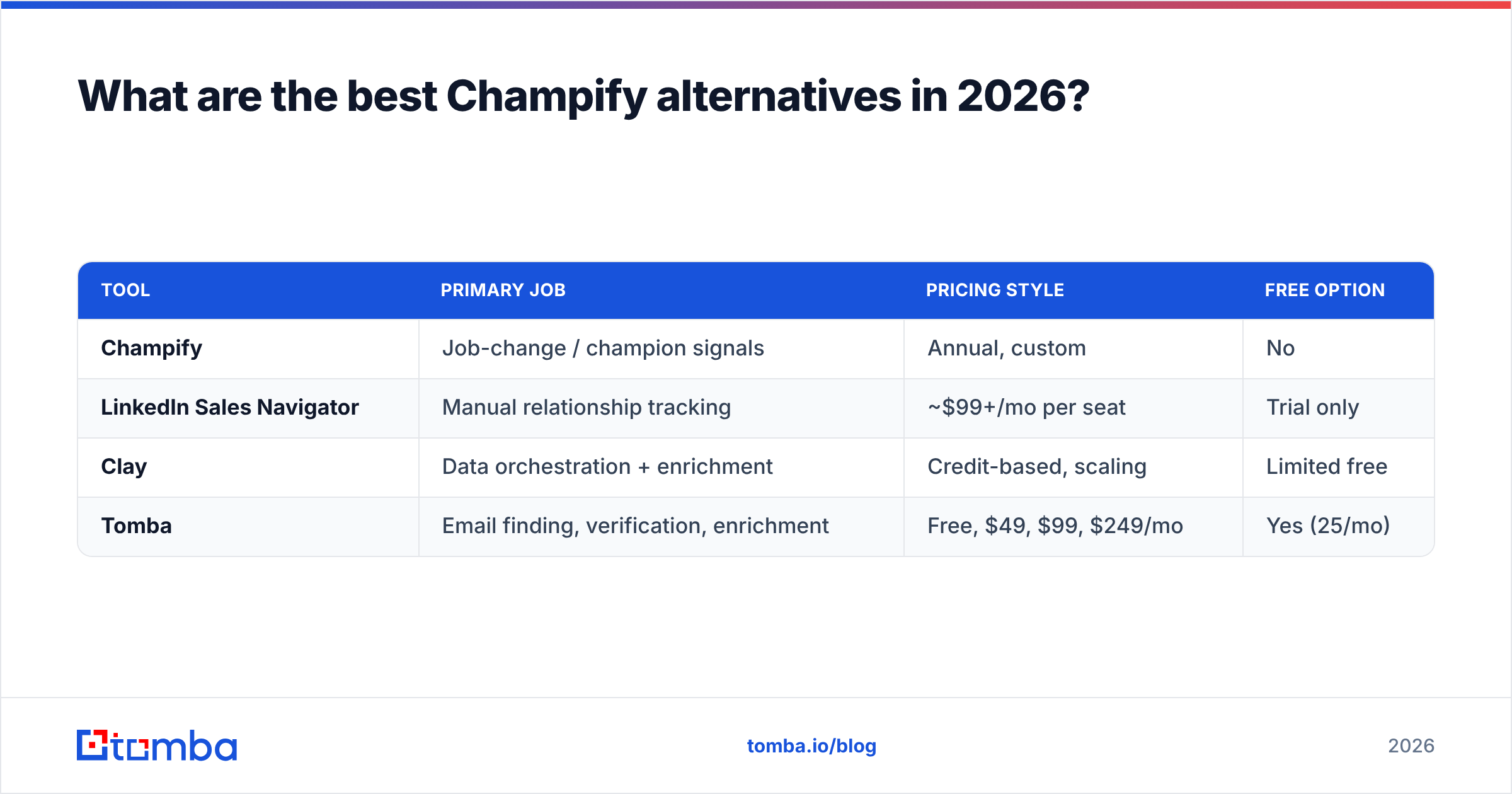
| Tool | Primary job | Pricing style | Free option |
|---|---|---|---|
| Champify | Job-change / champion signals | Annual, custom | No |
| LinkedIn Sales Navigator | Manual relationship tracking | ~$99+/mo per seat | Trial only |
| Clay | Data orchestration + enrichment | Credit-based, scaling | Limited free |
| Tomba | Email finding, verification, enrichment | Free, $49, $99, $249/mo | Yes (25/mo) |
A few notes on fit:
- If your gap is acting on the new role: A signal tells you a champion moved, but you still need their verified email. Pairing Champify (or a manual LinkedIn motion) with Tomba's domain search lets you pull the right contact at their new company in seconds, then validate it before sending.
- If your gap is budget flexibility: Champify's annual model is a real barrier for smaller teams. Tools with a published free tier and a $49/mo entry point let you build the contact-data half of the workflow without a procurement cycle. See Tomba's data sources for how that accuracy is maintained.
- If your gap is broad prospecting volume: Champify is intentionally narrow. For building net-new lists at scale across whole industries, you want a database and bulk tooling, not a champion tracker. Tomba's bulk email finder handles that side.
- If you live in spreadsheets or a CRM: Look for native connectors. Tomba's HubSpot integration and Google Sheets add-on keep the data layer where your team already works.
How should you structure your stack around it?#
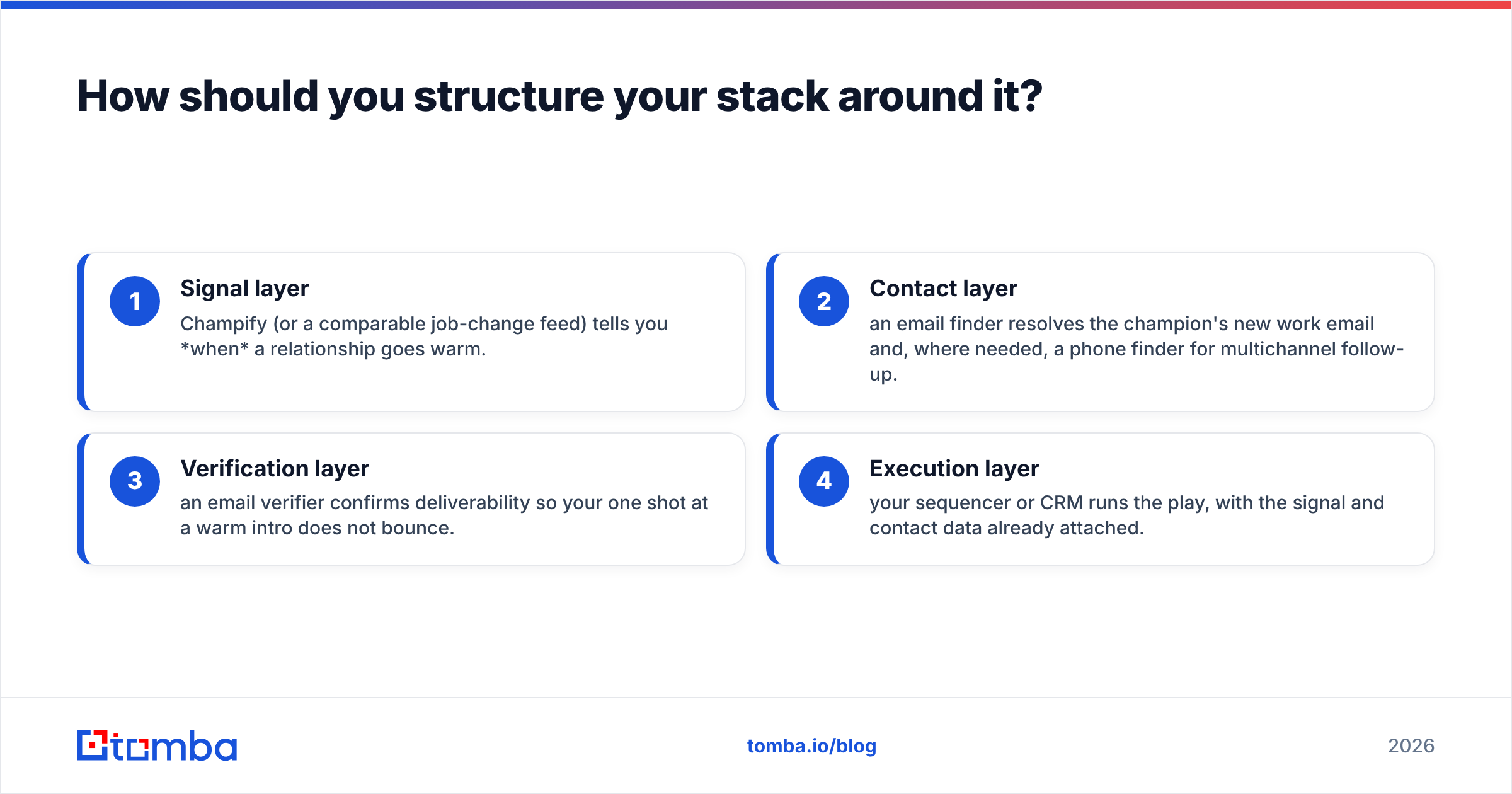
The cleanest framing: Champify is a signal, not a system of record. Build your outbound engine in layers and let each tool do one job well.
- Signal layer — Champify (or a comparable job-change feed) tells you when a relationship goes warm.
- Contact layer — an email finder resolves the champion's new work email and, where needed, a phone finder for multichannel follow-up.
- Verification layer — an email verifier confirms deliverability so your one shot at a warm intro does not bounce.
- Execution layer — your sequencer or CRM runs the play, with the signal and contact data already attached.
When those layers are connected, a single job-change event flows automatically into a verified, ready-to-send touch. When they are not, your reps spend the warm window doing manual research and the signal's value evaporates. The deliverability of that first message matters as much as the signal itself — a strong sender reputation and a verified address are what turn a warm alert into a booked meeting.
Frequently asked questions#
Does Champify publish its pricing? No. Champify uses sales-led annual contracts scaled by seats and tracked-contact volume. You will go through a demo to get a quote, and ranges in this guide are directional estimates from reviewer reports, not official numbers.
Is Champify accurate? The job-change detection is its strongest data point and reviewers rate it well. The weaker spot is complete, verified contact data for the person's new role — which is why teams pair it with a dedicated email finder and verifier.
Can a smaller team afford Champify? It is built for mid-market and enterprise teams with an established customer base. Smaller teams often get more value first from a free or low-cost contact-data tool, then add a signal layer once outbound is producing pipeline.
What is the cheapest way to test the warm-outbound motion? Start the contact-data half on a free plan, run a manual LinkedIn job-change check on your top 50 past champions, and measure reply rates. If the motion converts, then justify a signal tool to automate the detection.
The bottom line#
Champify sells a real, high-converting signal — and prices it like a premium, sales-led product. The pros are concrete: warm relationships convert better, and automating job-change detection saves your team hours of manual LinkedIn work. The cons are equally concrete: it is expensive for a single signal type, it locks you into annual commitments, and it does not give you complete, verified contact data for the new role.
For most teams, the smart move is not Champify or a data tool — it is a signal layer plus a reliable contact layer underneath it. Before you sign an annual contract, make sure the unglamorous half of the workflow is solid. Spin up Tomba's Email Finder on the free tier, verify the new-role emails your warm signals surface, and only then decide how much premium signal automation your pipeline actually needs. Get the contact data right, and every warm alert becomes a message that lands.
// get started
Find, verify and enrich your first contacts today
Start on the free plan with 25 searches a month, then scale when your team is ready.
Free plan · No credit card required · GDPR & CCPA
// about the author