Best Channels Alternatives in 2026: 7 Cold-Calling Tools Ranked
Channels (formerly CrazyCall) is a solid click-to-call tool, but it's not the only option. Here are 7 Channels alternatives compared on price, features, and data quality.
Channels (the tool formerly known as CrazyCall) does one job well: it puts a click-to-call widget on top of your CRM and records what happens. But "does one job well" is exactly why teams outgrow it. If you need a power dialer, deeper analytics, local presence numbers, or you simply want better per-seat pricing, you're shopping for Channels alternatives — and there are a lot of them.
This guide ranks seven of them for 2026, with a side-by-side table, honest trade-offs, and one point most "best dialer" lists skip entirely: your dialer is only as good as the phone numbers you feed it.
TL;DR#
- Channels (CrazyCall) is a lightweight, browser-based click-to-call tool — great for small teams, thin on advanced dialing and reporting.
- Best overall alternative: Aircall for support-heavy teams, JustCall for outbound sales teams that want a power dialer plus SMS.
- Best value: CloudTalk and Kixie undercut most rivals on per-seat cost while adding automation.
- The real bottleneck isn't the dialer — it's bad contact data. A clean dialer dialing wrong numbers still wastes your reps' day.
- Pair any of these tools with verified B2B phone numbers and enriched contacts so connect rates actually move.
What is Channels (and why look for an alternative)?#
Channels is a cloud-based phone system built around a click-to-call browser extension. You install it, it sits on top of LinkedIn, your CRM, or any web page with a phone number, and you call with one click. It records calls, logs them, and offers simple scripts and basic reporting. You can read the current feature set on the official Channels site.
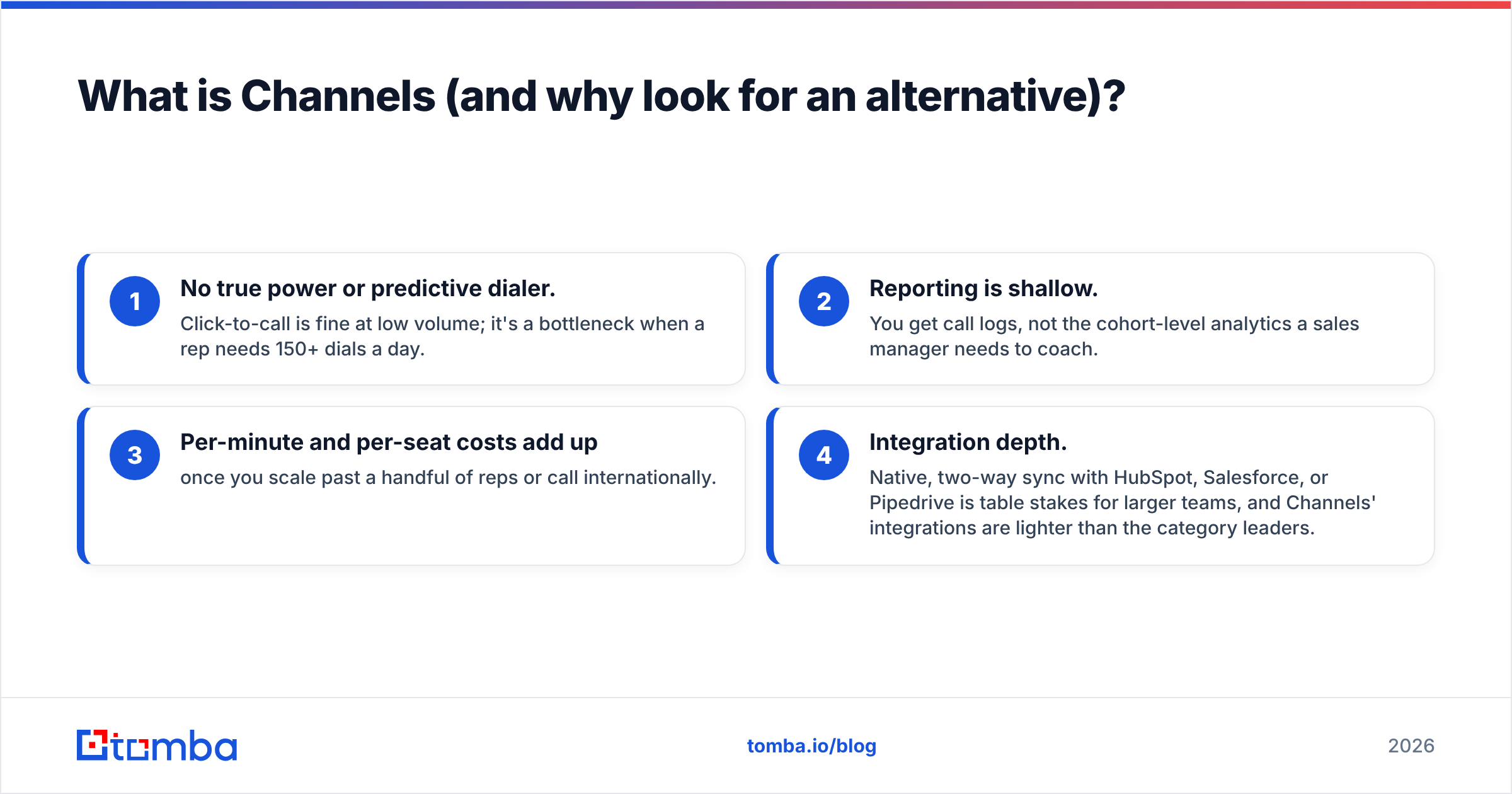
For a two-to-five person team making a moderate volume of calls, that's often enough. People start looking for alternatives when they hit one of these walls:
- No true power or predictive dialer. Click-to-call is fine at low volume; it's a bottleneck when a rep needs 150+ dials a day.
- Reporting is shallow. You get call logs, not the cohort-level analytics a sales manager needs to coach.
- Per-minute and per-seat costs add up once you scale past a handful of reps or call internationally.
- Integration depth. Native, two-way sync with HubSpot, Salesforce, or Pipedrive is table stakes for larger teams, and Channels' integrations are lighter than the category leaders.
None of that makes Channels bad. It makes it a starter tool. The question is what you graduate to.
What should you look for in a Channels alternative?#
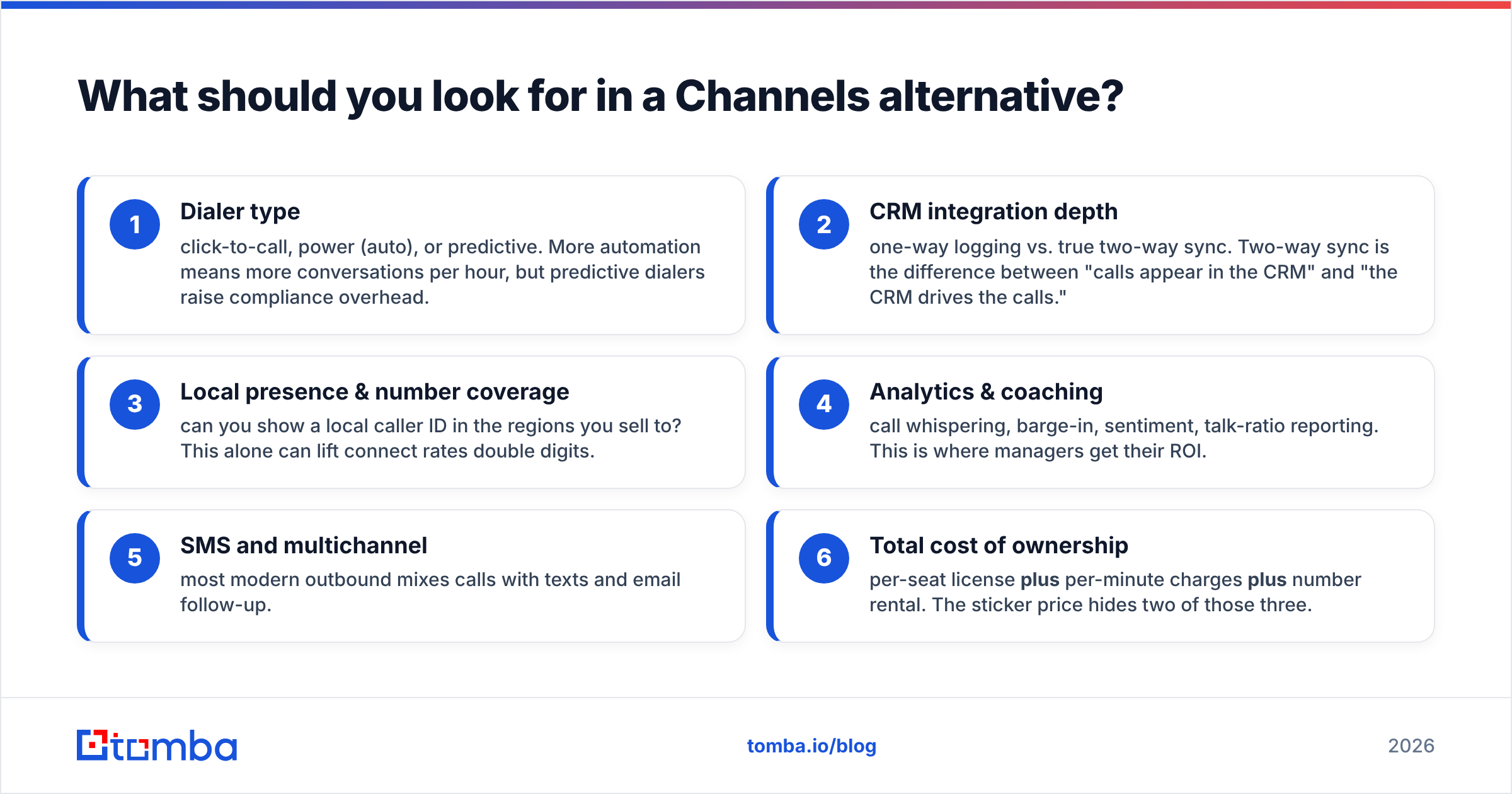
Before the table, here's the rubric. When you evaluate any cold-calling platform, score it on these six dimensions — not just the monthly price:
- Dialer type — click-to-call, power (auto), or predictive. More automation means more conversations per hour, but predictive dialers raise compliance overhead.
- CRM integration depth — one-way logging vs. true two-way sync. Two-way sync is the difference between "calls appear in the CRM" and "the CRM drives the calls."
- Local presence & number coverage — can you show a local caller ID in the regions you sell to? This alone can lift connect rates double digits.
- Analytics & coaching — call whispering, barge-in, sentiment, talk-ratio reporting. This is where managers get their ROI.
- SMS and multichannel — most modern outbound mixes calls with texts and email follow-up.
- Total cost of ownership — per-seat license plus per-minute charges plus number rental. The sticker price hides two of those three.
Keep dimension 3 in mind. Local presence and connect rates depend entirely on dialing the right number — which is a data problem, not a software problem. We'll come back to that.
Which Channels alternatives are best in 2026?#
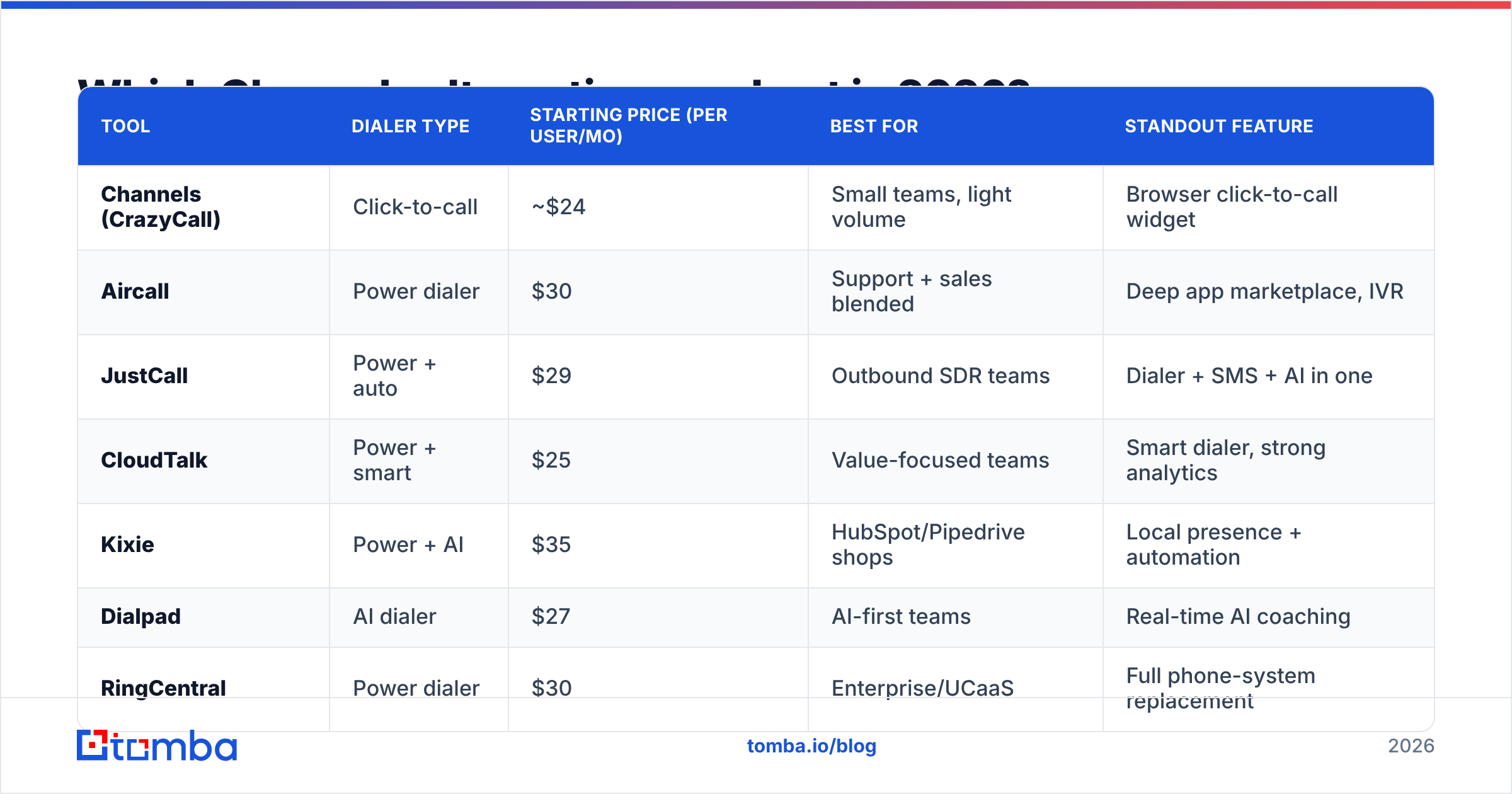
Here's the head-to-head. Prices are entry-level paid tiers as published by each vendor; always confirm current pricing because this category changes often.
| Tool | Dialer type | Starting price (per user/mo) | Best for | Standout feature |
|---|---|---|---|---|
| Channels (CrazyCall) | Click-to-call | ~$24 | Small teams, light volume | Browser click-to-call widget |
| Aircall | Power dialer | $30 | Support + sales blended | Deep app marketplace, IVR |
| JustCall | Power + auto | $29 | Outbound SDR teams | Dialer + SMS + AI in one |
| CloudTalk | Power + smart | $25 | Value-focused teams | Smart dialer, strong analytics |
| Kixie | Power + AI | $35 | HubSpot/Pipedrive shops | Local presence + automation |
| Dialpad | AI dialer | $27 | AI-first teams | Real-time AI coaching |
| RingCentral | Power dialer | $30 | Enterprise/UCaaS | Full phone-system replacement |
A few notes the table can't hold:
- Aircall leads on integrations and is genuinely easy to administer, but it's a UCaaS-style platform — you pay for breadth you may not use if you're pure outbound. See its current capabilities on aircall.io.
- JustCall is the most natural Channels upgrade for outbound sales specifically: power and auto dialers, native SMS, and AI call scoring without bolting on a second vendor.
- CloudTalk is the value pick. You get a smart dialer and respectable analytics at a price that undercuts Aircall and Kixie. Compare features at cloudtalk.io.
- Kixie shines if you live in HubSpot or Pipedrive — its automation and local presence are tightly wired into those CRMs.
- Dialpad bet early on AI and it shows: live transcription and real-time coaching cards are best in class.
- RingCentral is overkill if you only want a sales dialer, but right if you're replacing your entire phone system.
For an unbiased volume of user reviews across all of these, cross-check ratings on G2's contact-center software category before you commit.
Is a power dialer worth it over Channels' click-to-call?#
Yes — if your reps make more than ~60 dials a day. Here's the intuition. Click-to-call is like checking out at a grocery store with one cashier: fine when the line is short, painful at rush hour. A power dialer is the self-checkout bank — it queues the next call the instant the last one ends, so your rep spends time talking, not clicking and waiting.
The math is blunt. If a rep wastes seven seconds per dial on manual clicking and after-call clicking, across 150 dials that's nearly 18 minutes a day of pure dead time — about 1.5 hours a week, per rep. A power dialer claws most of that back. Across a five-person team, that's the equivalent of a part-time SDR you didn't have to hire.
The catch: a faster dialer that calls bad numbers just reaches voicemail and disconnected lines faster. Speed multiplies whatever data quality you already have. Garbage in, garbage out — at 4x the rate.
Why does contact data matter more than the dialer you pick?#
Because the dialer is the cheapest part of the problem to fix. Switching from Channels to JustCall is a credit-card decision you can make this afternoon. Fixing the fact that 20-30% of the phone numbers in your CRM are wrong, outdated, or belong to the gatekeeper instead of the decision-maker — that's the work that actually changes your connect rate.
Think about the funnel. A rep makes 150 dials. If 25% of those numbers are bad, that's roughly 38 dials that could never connect, no matter how good the dialer is. You didn't have a dialer problem. You had a data problem wearing a dialer costume.
This is where the stack matters more than any single tool:
- Find the right number in the first place. A B2B phone finder gives you direct-dial and mobile numbers tied to the actual decision-maker, not a generic switchboard.
- Validate before you dial. Running numbers through a phone validator strips disconnected and invalid lines so your power dialer isn't burning cycles on dead ends.
- Enrich the whole record. Contact enrichment fills in title, company, and email so a missed call has a follow-up path instead of a dead end.
- Catch them by email when the call misses. Most connects take multiple touches; pairing dials with a verified email from an email finder gives every rep a second channel.
No dialer on the list above does any of this. They move audio. The data has to come from somewhere else, and that "somewhere else" decides whether your shiny new dialer pays for itself.
How do you choose the right Channels alternative for your team?#
Match the tool to your actual motion, not the longest feature list:
- You're a small team making moderate calls and Channels mostly works — you may not need to switch at all. Add better data first; the cheapest performance gain is fixing your contact list, not your software.
- You're an outbound SDR team scaling dials — JustCall or CloudTalk. You want a power dialer, SMS, and analytics in one bill.
- You're blended sales + support — Aircall. The IVR, routing, and marketplace earn their keep when calls flow both directions.
- You live in HubSpot or Pipedrive — Kixie. The native automation removes manual logging entirely.
- You're AI-curious and want live coaching — Dialpad. Real-time transcription changes how managers ramp new reps.
- You're replacing a whole phone system — RingCentral. It's more than a dialer, and that's the point.
Whatever you pick, budget separately for data. The platforms above are priced per seat; your data tooling is priced per lookup or per credit, and the two are independent line items. A common, balanced setup is one dialer plus one data provider feeding it — and on the data side, Tomba's pricing starts free (25 searches/month) and scales from $49/mo Starter to $99/mo Growth, well below what most teams assume verified data costs.
How much should the whole stack cost?#
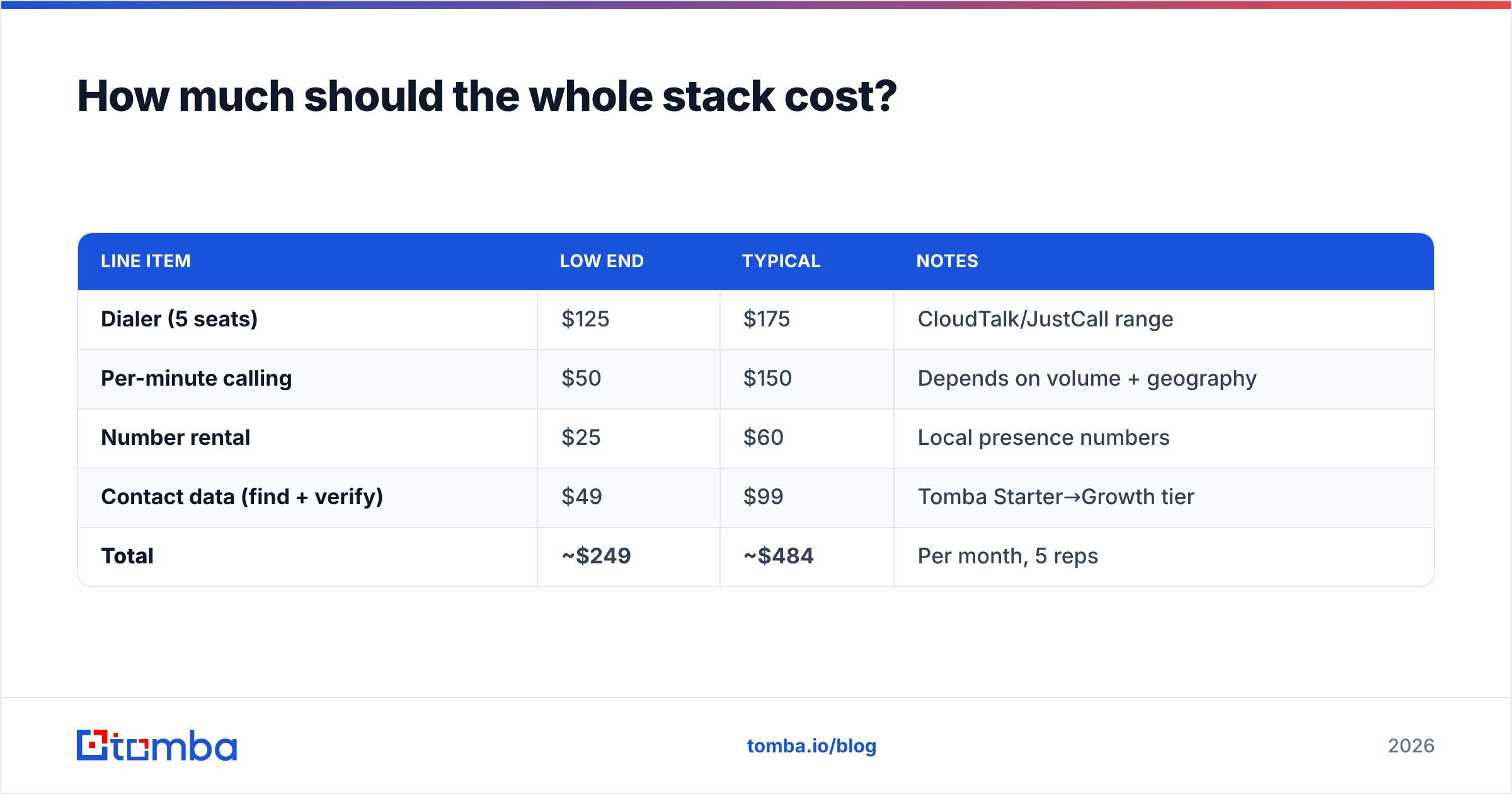
Here's a realistic monthly picture for a five-rep outbound team, so you can sanity-check quotes:
| Line item | Low end | Typical | Notes |
|---|---|---|---|
| Dialer (5 seats) | $125 | $175 | CloudTalk/JustCall range |
| Per-minute calling | $50 | $150 | Depends on volume + geography |
| Number rental | $25 | $60 | Local presence numbers |
| Contact data (find + verify) | $49 | $99 | Tomba Starter→Growth tier |
| Total | ~$249 | ~$484 | Per month, 5 reps |
The data line is the smallest number on the table and the one with the highest leverage. Cut it to save fifty dollars and you can erase the value of the other four hundred by dialing numbers that don't connect.
The bottom line#
Channels is a fine starter dialer. The seven alternatives here each beat it on a specific axis — JustCall and CloudTalk on outbound features and value, Aircall on integrations, Kixie on CRM-native automation, Dialpad on AI, RingCentral on enterprise scope. Pick by your motion, not by the spec sheet.
But don't let the dialer debate distract you from the multiplier. Every tool on this list dials whatever numbers you give it, exactly as fast as you tell it to. The teams that win aren't the ones with the fanciest dialer — they're the ones whose reps reach a live, correct decision-maker on the first try.
That starts upstream of any phone system. Use the Tomba Email Finder — alongside Tomba's phone finder and enrichment — to build a list of verified, decision-maker contacts before you ever click "dial." Start free with 25 searches a month, plug the verified numbers and emails into whichever Channels alternative you chose, and watch your connect rate stop being a software question and start being a solved one.
// get started
Find, verify and enrich your first contacts today
Start on the free plan with 25 searches a month, then scale when your team is ready.
Free plan · No credit card required · GDPR & CCPA
// about the author