Channels Pricing, Reviews, Pros and Cons (2026 Breakdown)
A neutral, hands-on look at Channels (channels.app): real pricing tiers, what reviewers praise and complain about, and the honest pros and cons before you commit your sales team to it in 2026.
TL;DR
- Channels (formerly CrazyCall) is a cloud phone system built for sales and support teams that want click-to-call, call recording, and CRM integrations without a hardware PBX.
- Pricing runs from a free Lite plan up to paid per-user tiers; the value depends heavily on your call volume and how many international numbers you need.
- Reviewers love the fast setup and browser-based dialer, but flag occasional call-quality dips and a number-buying flow that surprises some first-time buyers.
- The biggest hidden cost is bad contact data — a great dialer wastes money calling wrong numbers.
- Pair Channels with verified B2B phone numbers and clean enrichment so every dial reaches a real decision-maker.
What is Channels and who is it for?#
Channels is a cloud-based business phone and call-center platform — think of it as the difference between owning a landline switchboard and renting a phone that lives in your browser. You log in, click a contact, and the call connects through the internet. No copper wires, no on-site PBX box humming in a closet.
It started life as CrazyCall and rebranded to Channels (channels.app) as it leaned into a "data-driven phone system" positioning. The core audience is small-to-midsize sales and support teams that make outbound calls all day: SDR teams cold calling, account managers following up, and support reps handling inbound tickets. If you run 5–50 reps and want call recording, local caller IDs in multiple countries, and a click-to-call widget that fires straight from your CRM, Channels sits squarely in your shortlist.
It is not an enterprise contact-center suite. You won't find the deep workforce-management and omnichannel routing that something like Genesys or Five9 ships. That's by design — Channels trades depth for speed and price.
)
What does Channels actually do?#
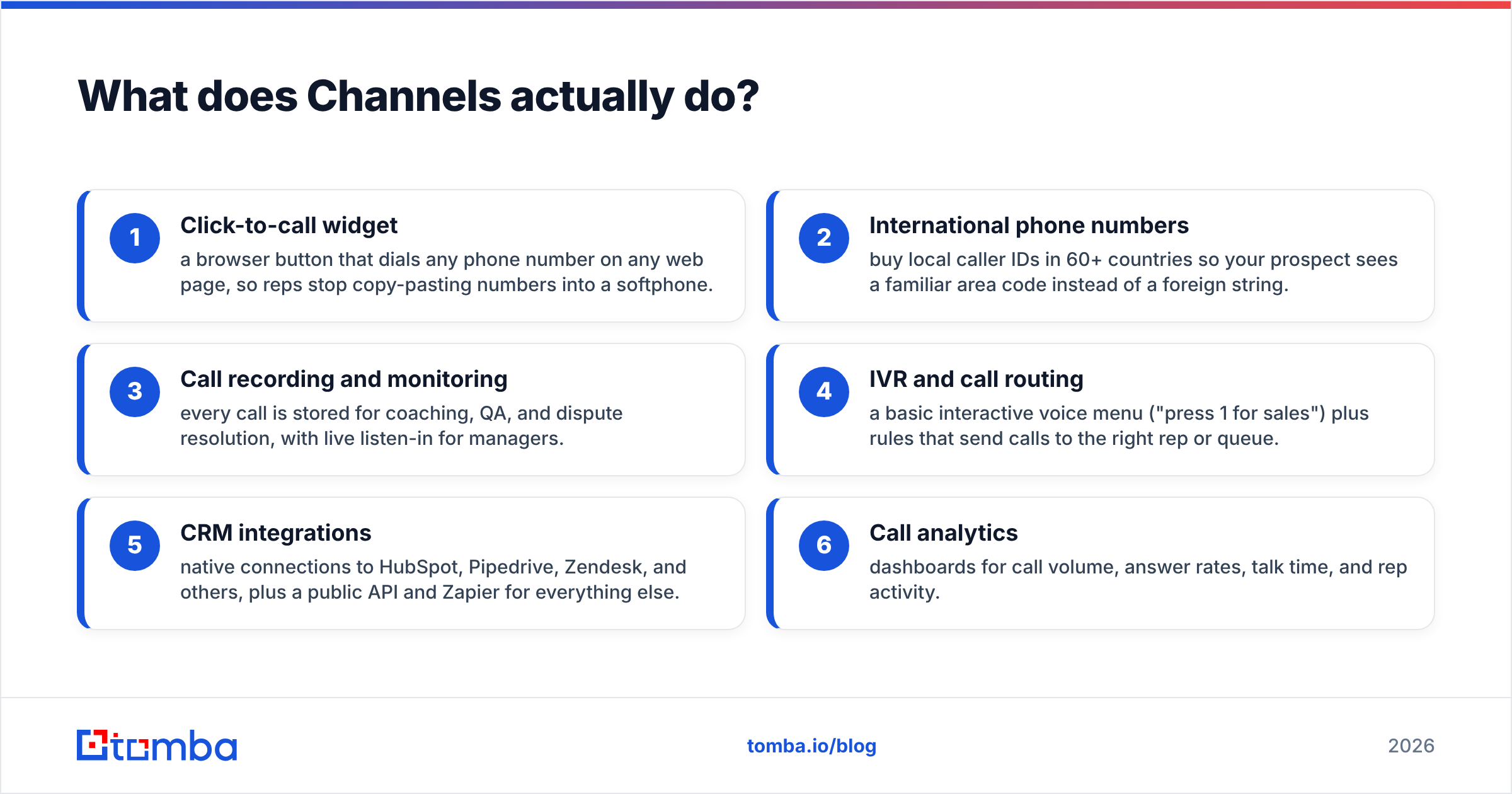
Before pricing makes sense, you need the feature picture. Here are the core capabilities most teams use day to day:
- Click-to-call widget — a browser button that dials any phone number on any web page, so reps stop copy-pasting numbers into a softphone.
- International phone numbers — buy local caller IDs in 60+ countries so your prospect sees a familiar area code instead of a foreign string.
- Call recording and monitoring — every call is stored for coaching, QA, and dispute resolution, with live listen-in for managers.
- IVR and call routing — a basic interactive voice menu ("press 1 for sales") plus rules that send calls to the right rep or queue.
- CRM integrations — native connections to HubSpot, Pipedrive, Zendesk, and others, plus a public API and Zapier for everything else.
- Call analytics — dashboards for call volume, answer rates, talk time, and rep activity.
That feature set is genuinely useful, but notice what it assumes: you already have a list of correct phone numbers to dial. Channels moves the call; it does not find or clean the contact. That gap is where most teams bleed budget, and we'll come back to it.
How much does Channels cost in 2026?#
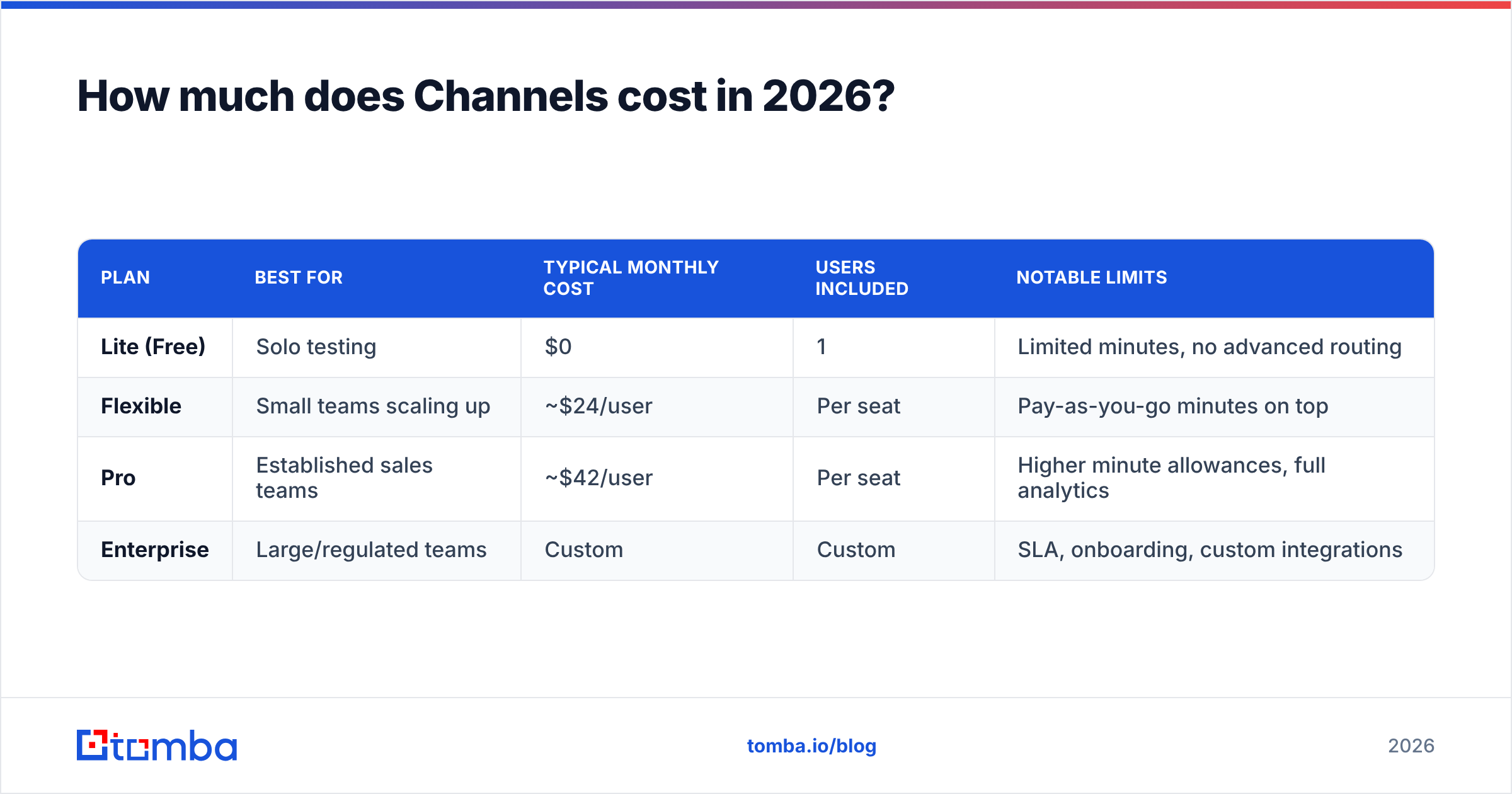
Short answer: there's a free Lite tier to test the waters, and paid plans charge per user per month, with phone numbers and call minutes billed separately as usage. That last part trips up first-time buyers — the subscription is not all-you-can-call.
Pricing pages change often, so treat the table below as a structural guide and confirm live numbers on the Channels pricing page before you buy. The shape of the plans matters more than the exact dollar figure:
| Plan | Best for | Typical monthly cost | Users included | Notable limits |
|---|---|---|---|---|
| Lite (Free) | Solo testing | $0 | 1 | Limited minutes, no advanced routing |
| Flexible | Small teams scaling up | ~$24/user | Per seat | Pay-as-you-go minutes on top |
| Pro | Established sales teams | ~$42/user | Per seat | Higher minute allowances, full analytics |
| Enterprise | Large/regulated teams | Custom | Custom | SLA, onboarding, custom integrations |
Two cost drivers live outside that subscription line:
- Phone numbers — each local or toll-free number you rent adds a recurring monthly fee.
- Call minutes — outbound minutes are metered by destination country, so a team dialing internationally pays meaningfully more than one calling locally.
When you model your real cost, multiply seats by the plan price, then add expected minutes and the numbers you'll keep. A 10-rep team can look cheap on the sticker price and land much higher once heavy outbound volume is included. Build a per-rep, per-month all-in figure before signing.
What do Channels reviews say?#
Across G2 and Capterra, Channels lands in solid-but-not-flawless territory, typically rating in the low-to-mid 4-star range. The themes are consistent enough to trust.
What reviewers consistently praise:
- Setup speed. Most teams are dialing the same day. No telecom contracts, no hardware.
- The click-to-call extension. Reps repeatedly call it the standout feature for cutting dead time between calls.
- Responsive support. The team gets credit for fast, human replies during onboarding.
- Fair entry price. The free tier and low starter cost make it easy to pilot without procurement battles.
What reviewers complain about:
- Call quality variability. A minority report dropped calls or audio lag, usually tied to their own bandwidth, but frustrating regardless.
- The number-purchasing flow. Some buyers expected unlimited calling and were surprised by metered minutes and per-number fees.
- Reporting depth. Power users outgrow the analytics and want more granular, exportable data.
- Occasional integration quirks. Native CRM syncs work well until an edge case forces a Zapier workaround.
None of these are dealbreakers for the target buyer. They're the normal trade-offs of a lightweight, affordable VoIP tool versus a heavyweight enterprise platform.
Channels pros and cons at a glance#
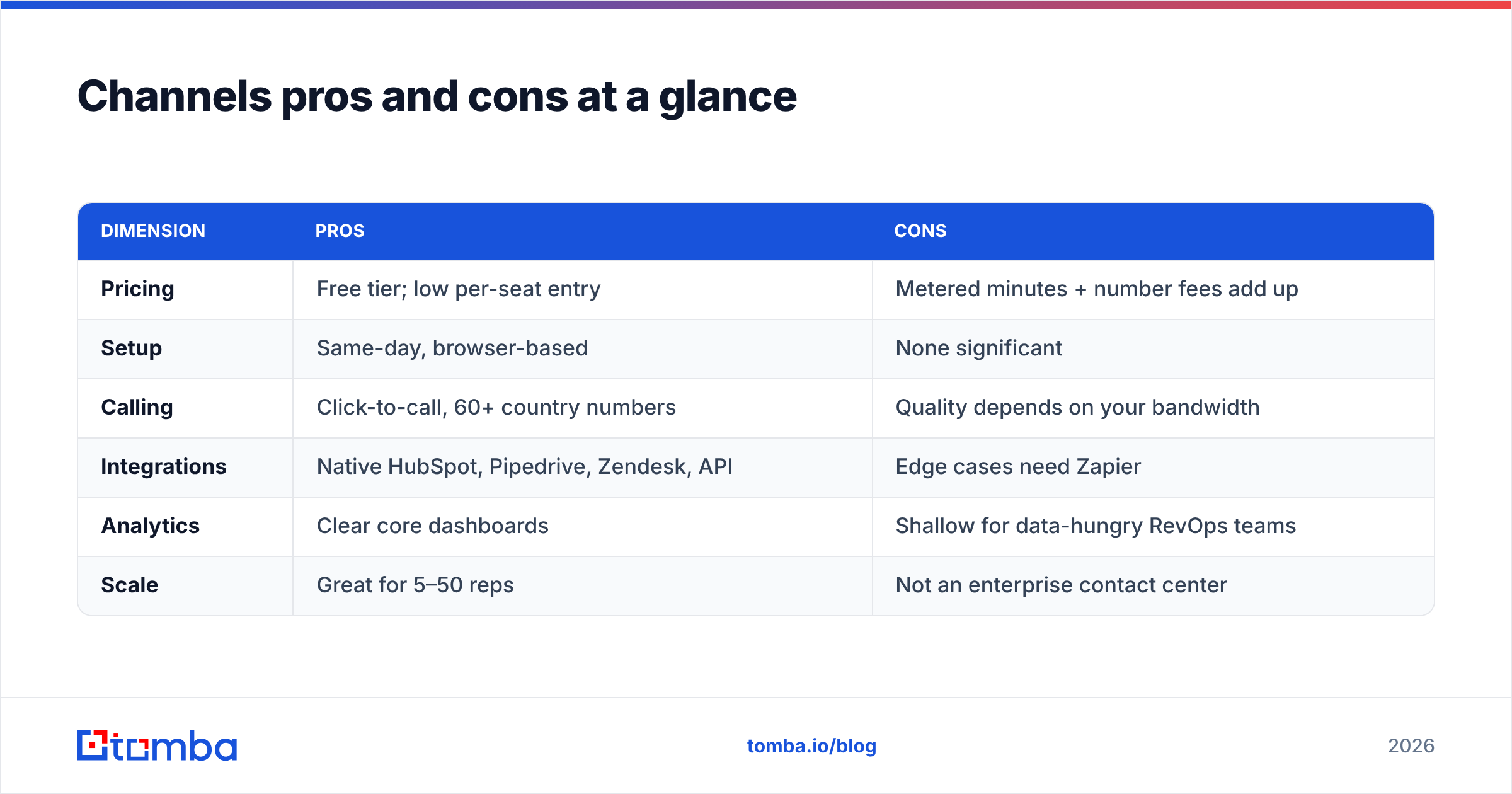
Here's the honest balance sheet to keep next to your evaluation notes:
| Dimension | Pros | Cons |
|---|---|---|
| Pricing | Free tier; low per-seat entry | Metered minutes + number fees add up |
| Setup | Same-day, browser-based | None significant |
| Calling | Click-to-call, 60+ country numbers | Quality depends on your bandwidth |
| Integrations | Native HubSpot, Pipedrive, Zendesk, API | Edge cases need Zapier |
| Analytics | Clear core dashboards | Shallow for data-hungry RevOps teams |
| Scale | Great for 5–50 reps | Not an enterprise contact center |
The pattern is clear: Channels is excellent value for a focused outbound or support team that wants to start fast and keep costs predictable on the subscription line — as long as you watch usage-based charges and don't need enterprise routing.
Is Channels better than the alternatives?#
It depends on what you're optimizing for. Channels competes with Aircall, JustCall, CloudTalk, and Kixie, among others. As a rough map:
- Aircall — more polished and integration-rich, but pricier with seat minimums.
- CloudTalk — comparable feature set, often a near-direct alternative on price.
- JustCall — strong SMS and automation, popular with high-volume SDR teams.
- Kixie — built around sales velocity and power dialing, tightly coupled to CRM workflows.
If your priority is the lowest-friction, lowest-cost way to get a small team dialing with local caller IDs, Channels is a strong pick. If you need deep automation, a power dialer, or enterprise-grade reliability guarantees, evaluate the others harder.
But here's the uncomfortable truth that applies to every tool on that list: the dialer is the cheap part of your call program. The expensive part is the data you feed it.
)
Why your dialer is only as good as your data#
A phone system that connects calls flawlessly to wrong numbers is an efficient way to waste salaries. Picture a kitchen with a top-of-the-line oven and spoiled ingredients — the appliance isn't the problem. Industry call lists decay fast: people change jobs, companies reorganize, and direct dials go stale within months.
This is where the real ROI math lives. If 30% of your list is wrong, your reps spend nearly a third of their dialing day on disconnected lines, gatekeepers, and dead ends — and you pay metered minutes for the privilege. Fixing the data often boosts connect rates more than switching the dialer ever will.
Three data fixes pay for themselves quickly:
- Find direct dials, not switchboards. Reaching a decision-maker's mobile beats navigating a corporate IVR. A dedicated phone finder surfaces real B2B numbers tied to the right person.
- Validate before you dial. Run numbers through a phone validator so you stop burning minutes on disconnected or invalid lines.
- Enrich the whole contact. Layer in title, company, and a verified email so a missed call has a follow-up path. Good data enrichment turns a single phone field into a full prospect record.
Calling is rarely a standalone motion in 2026 — it's one leg of a multi-touch sequence. The reps who win pair a dial with a verified email and a LinkedIn touch. That's why teams using Channels (or any dialer) increasingly bolt on a contact-data layer rather than relying on whatever numbers the CRM happened to import years ago.
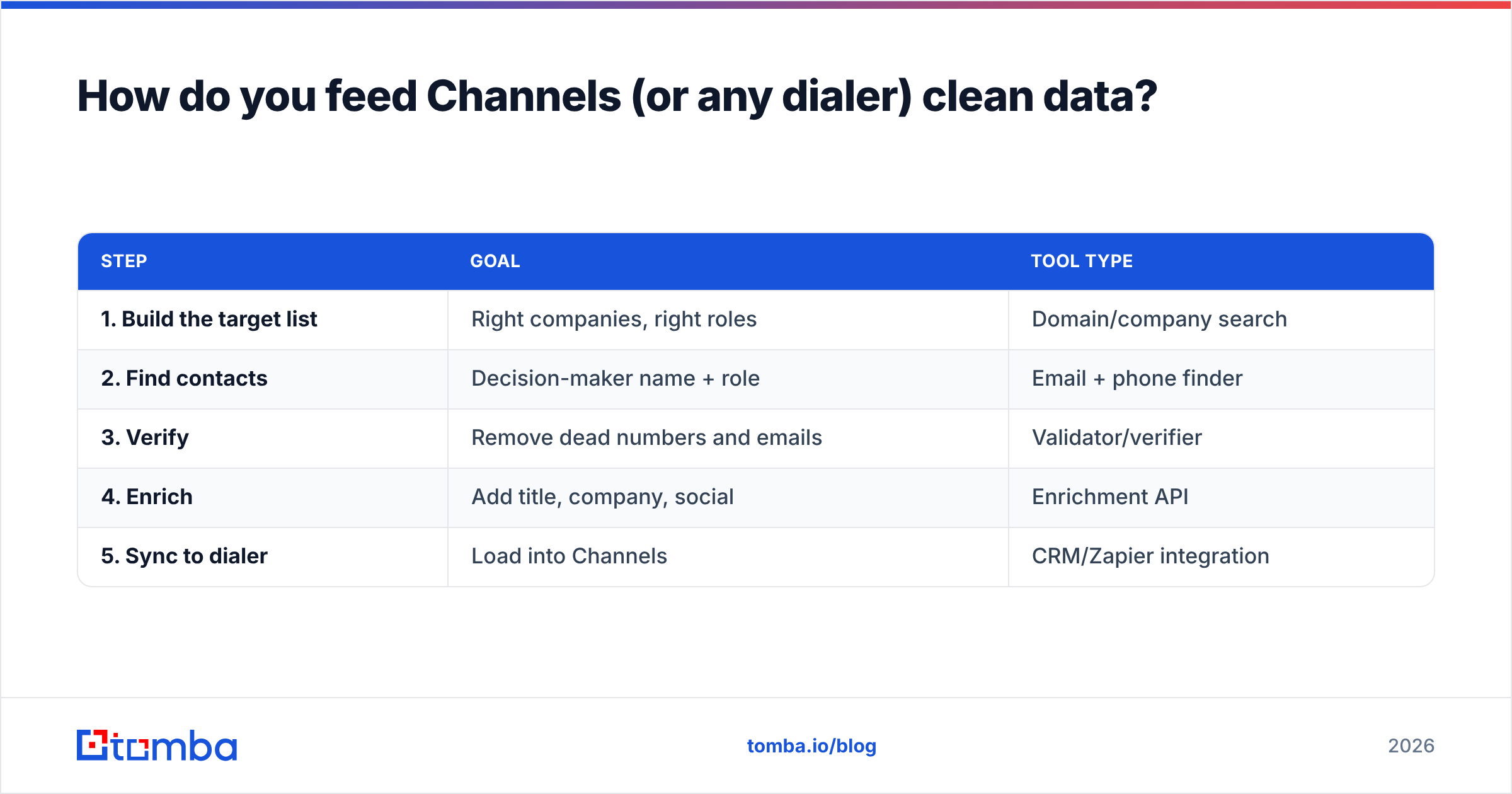
How do you feed Channels (or any dialer) clean data?#
The workflow is simpler than most teams assume. You don't need a data engineering project — you need a repeatable enrichment step before lists hit the dialer.
| Step | Goal | Tool type |
|---|---|---|
| 1. Build the target list | Right companies, right roles | Domain/company search |
| 2. Find contacts | Decision-maker name + role | Email + phone finder |
| 3. Verify | Remove dead numbers and emails | Validator/verifier |
| 4. Enrich | Add title, company, social | Enrichment API |
| 5. Sync to dialer | Load into Channels | CRM/Zapier integration |
The practical version: start from a company domain, pull the right contacts, grab their direct dials and verified emails, validate everything, then push the cleaned records into your CRM where Channels picks them up. If you run outbound at scale, automate steps 2–4 with an email finder API so enrichment happens continuously instead of in painful quarterly cleanups.
Done right, your reps open Channels each morning to a list where the numbers actually ring the people you want to reach. The dialer does what it's good at, and you stop paying for misses.
Who should buy Channels — and who shouldn't?#
Buy Channels if you:
- Run a 5–50 person sales or support team
- Want to be dialing today with no hardware
- Need local caller IDs across several countries
- Have predictable, mostly local call volume
- Value low entry cost over deep enterprise features
Look elsewhere if you:
- Need enterprise SLAs, advanced workforce management, or full omnichannel routing
- Run extremely high international minute volume (model the metered cost first)
- Require power-dialing or deep sales automation as a core requirement
- Want exportable, granular analytics for a dedicated RevOps function
For most lean teams, Channels delivers exactly what it promises at a fair price. Just go in with eyes open about usage-based charges — and with a plan for the data quality that actually determines whether your calls connect.
The bottom line#
Channels is a well-priced, fast-to-deploy cloud phone system that earns its mostly-positive reviews. The pros — quick setup, click-to-call, multi-country numbers, fair entry pricing — outweigh the cons of metered minutes and modest analytics for the small-and-midsize teams it targets. Verify the live pricing tiers against your real call volume, pilot on the free plan, and decide from there.
But remember where the leverage really is: no dialer fixes a bad list. Before you obsess over which phone tool to buy, make sure the numbers and emails you're loading are real, current, and tied to the right decision-makers.
Ready to make every dial count? Start with the Tomba Email Finder to build verified contact records — direct dials, verified emails, and full enrichment — then pour that clean data into Channels or whatever dialer you choose. Check Tomba pricing to see how a free tier and plans from $49/mo can cut the wrong-number waste out of your call program. The phone system connects the call; the data decides whether it was worth making.
// get started
Find, verify and enrich your first contacts today
Start on the free plan with 25 searches a month, then scale when your team is ready.
Free plan · No credit card required · GDPR & CCPA
// about the author