Chatbot for Lead Capture: The 2026 Playbook & Tools
A chatbot for lead capture turns passive website traffic into qualified pipeline 24/7. Here is how it works, what to look for in 2026, and how to enrich every lead it grabs.
You spend money to get people to your website. Most of them leave without telling you who they are. A chatbot for lead capture is the cheapest way to fix that leak — it greets visitors the moment they land, asks the right questions, and hands you a contact record while a static form is still waiting to be ignored.
This guide breaks down how lead-capture chatbots actually work in 2026, which tools earn the budget, the conversion math that justifies them, and the enrichment step most teams skip that quietly doubles the value of every lead.
TL;DR#
- A chatbot for lead capture is an automated conversational widget that qualifies website visitors and collects contact details in real time, 24/7.
- Conversational capture typically converts 2x–4x better than a static form because it removes friction and replies instantly.
- The best 2026 tools combine AI intent detection, CRM sync, and calendar booking — not just scripted decision trees.
- A raw chatbot lead is half-finished. Enrich and verify it (full name, work email, company, role) before it hits your sequence or you burn deliverability.
- Pair your chatbot with an email-verification and data enrichment layer so sales reps inherit clean, complete records instead of a first name and a typo.
What is a chatbot for lead capture?#
A chatbot for lead capture is a small conversational program that lives on your website, ad landing pages, or in-app, and its single job is to turn an anonymous visitor into a known, contactable lead. Think of it as a tireless front-desk receptionist: it never sleeps, it greets every visitor by the same friendly script, and it knows exactly which questions to ask before sending someone to the right person.
Technically, it sits at the boundary between your traffic and your CRM. It triggers on a rule (time on page, exit intent, a pricing-page visit), opens a conversation, qualifies the visitor with a few targeted questions, and writes the result — name, email, company, intent — into your pipeline. Modern versions use a large language model to interpret free-text replies instead of forcing visitors down a rigid button-only tree.
The difference from a generic support bot matters. A support bot deflects tickets. A lead-capture bot is engineered around one conversion event: getting a qualified contact into your system so a human (or an automated sequence) can follow up.
Why does a chatbot beat a static lead form?#
Conclusion first: a chatbot wins because it removes friction and responds instantly, and speed-to-lead is the single biggest predictor of whether a lead converts. A form sits there silently; a chatbot starts a dialogue.
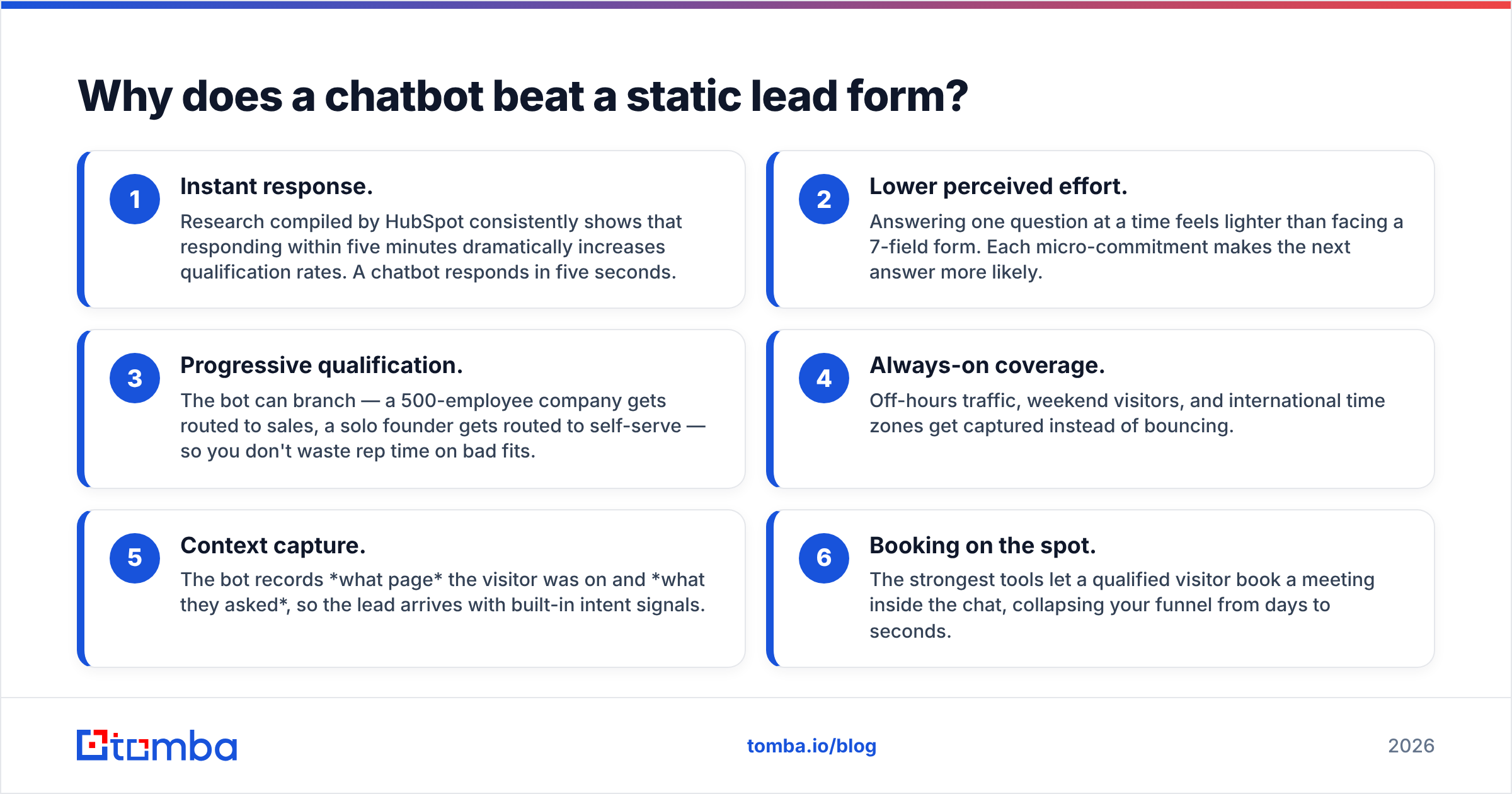
Here is the practical breakdown of where conversational capture pulls ahead:
- Instant response. Research compiled by HubSpot consistently shows that responding within five minutes dramatically increases qualification rates. A chatbot responds in five seconds.
- Lower perceived effort. Answering one question at a time feels lighter than facing a 7-field form. Each micro-commitment makes the next answer more likely.
- Progressive qualification. The bot can branch — a 500-employee company gets routed to sales, a solo founder gets routed to self-serve — so you don't waste rep time on bad fits.
- Always-on coverage. Off-hours traffic, weekend visitors, and international time zones get captured instead of bouncing.
- Context capture. The bot records what page the visitor was on and what they asked, so the lead arrives with built-in intent signals.
- Booking on the spot. The strongest tools let a qualified visitor book a meeting inside the chat, collapsing your funnel from days to seconds.
The cost of getting this wrong is real. If your chatbot captures a name and a personal Gmail and nothing else, your reps still have to research the account manually. That is why capture and enrichment belong together, not in separate quarters of your roadmap.
How does a lead-capture chatbot actually work?#
Every effective lead-capture chatbot moves through the same five stages. Understanding the pipeline helps you spot where a tool is weak before you pay for it.
- Trigger — A rule decides when the widget appears: exit intent, 30 seconds on the pricing page, a returning visitor, or a specific ad-campaign URL parameter.
- Engage — The opener sets the tone. "Looking for X?" outperforms "How can I help?" because it implies the bot already understands the page context.
- Qualify — A short sequence of questions scores fit and intent. Good bots ask 3–4 questions max; every extra step drops completion.
- Capture — The bot collects the work email and, ideally, validates it inline so you don't store
jon@gmial.com. - Route — The qualified lead is written to the CRM, assigned an owner, and either booked into a calendar or dropped into a nurture sequence.
The capture stage is where most teams lose data quality. A visitor types fast, mistypes their email, or drops a personal address. Running each captured email through an email verifier at the moment of capture keeps your list clean and protects your sender reputation before the lead ever enters a sequence.
Which chatbot for lead capture should you choose in 2026?#
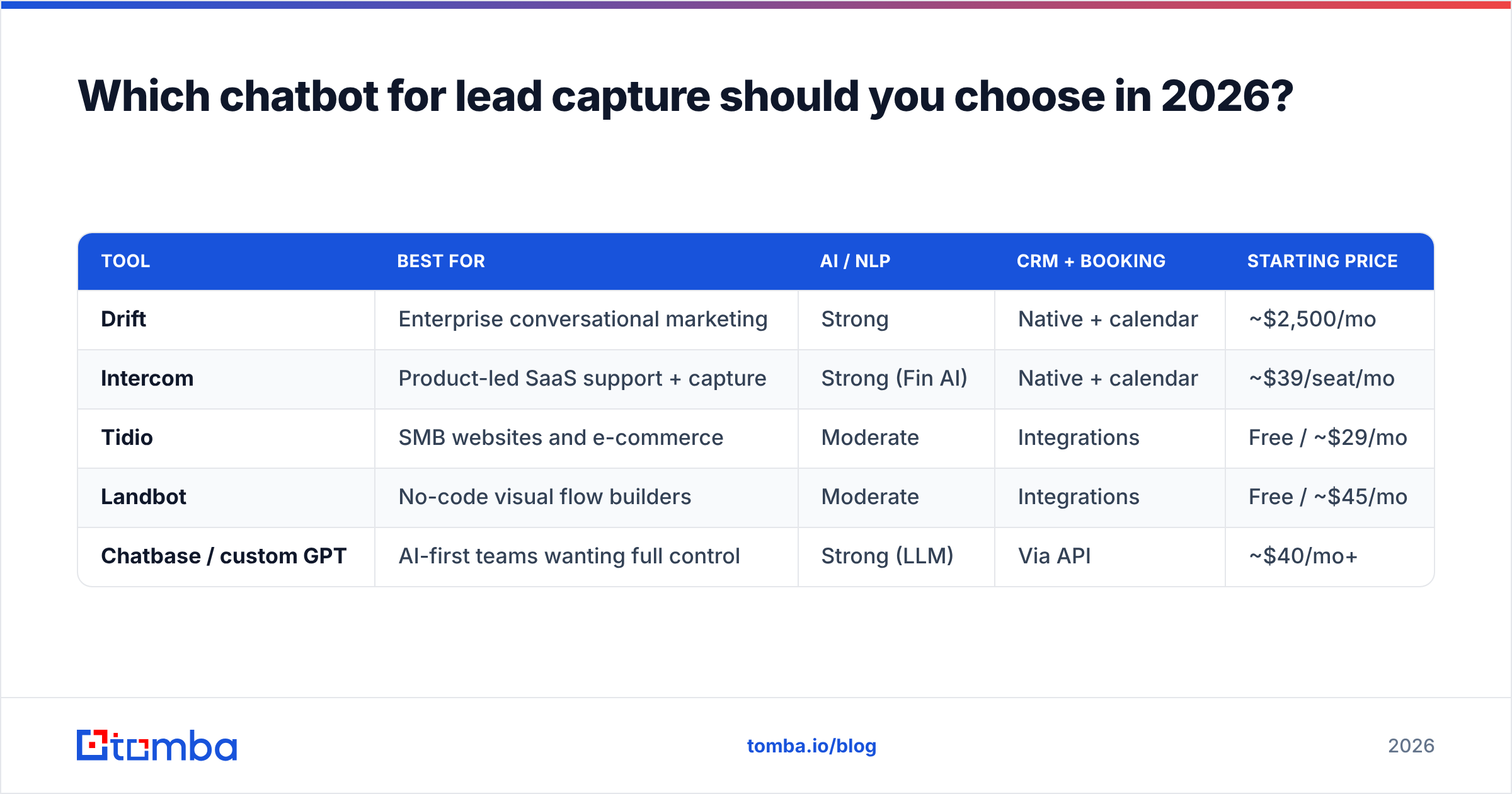
There is no single winner — the right tool depends on whether you optimize for conversational AI, sales routing, or marketing-funnel breadth. Below is an honest comparison of the categories of lead-capture chatbots most B2B teams evaluate in 2026.
| Tool | Best for | AI / NLP | CRM + booking | Starting price |
|---|---|---|---|---|
| Drift | Enterprise conversational marketing | Strong | Native + calendar | ~$2,500/mo |
| Intercom | Product-led SaaS support + capture | Strong (Fin AI) | Native + calendar | ~$39/seat/mo |
| Tidio | SMB websites and e-commerce | Moderate | Integrations | Free / ~$29/mo |
| Landbot | No-code visual flow builders | Moderate | Integrations | Free / ~$45/mo |
| Chatbase / custom GPT | AI-first teams wanting full control | Strong (LLM) | Via API | ~$40/mo+ |
A few honest caveats. Enterprise tools like Drift deliver the deepest routing and ABM features but price out small teams; you can read verified user reviews on G2 before committing. SMB tools like Tidio and Landbot get you live in an afternoon but lean on integrations for serious CRM workflows. And a custom LLM bot gives you total flexibility at the cost of building the qualification logic yourself.
Whatever you pick, the chatbot is only the front door. The data it captures still needs to be completed and verified — which is the part no chatbot vendor solves well.
What separates a good lead-capture chatbot from a great one?#
A great chatbot for lead capture is judged on the quality of the records it produces, not the volume of conversations it starts. Use this checklist when you evaluate or audit a tool:
- Intent detection over scripts. It should understand "we're shopping around for next quarter" as a low-urgency signal and route accordingly, not force the visitor through identical buttons.
- Inline email validation. Typos and disposable addresses should be caught at the moment of entry.
- Smart routing. Enterprise leads go to AEs, SMB to self-serve, support to the help desk — automatically.
- Native calendar booking. Removing the back-and-forth email scheduling step is the highest-leverage feature for sales-led teams.
- Clean CRM hand-off. The record should land mapped to the right fields, deduplicated, with source and intent attached.
- Enrichment hooks. The best setups append company, role, headcount, and a verified work email automatically so reps inherit a full picture.
That last point is where most stacks fall short, so it deserves its own section.
How do you enrich and verify chatbot leads automatically?#
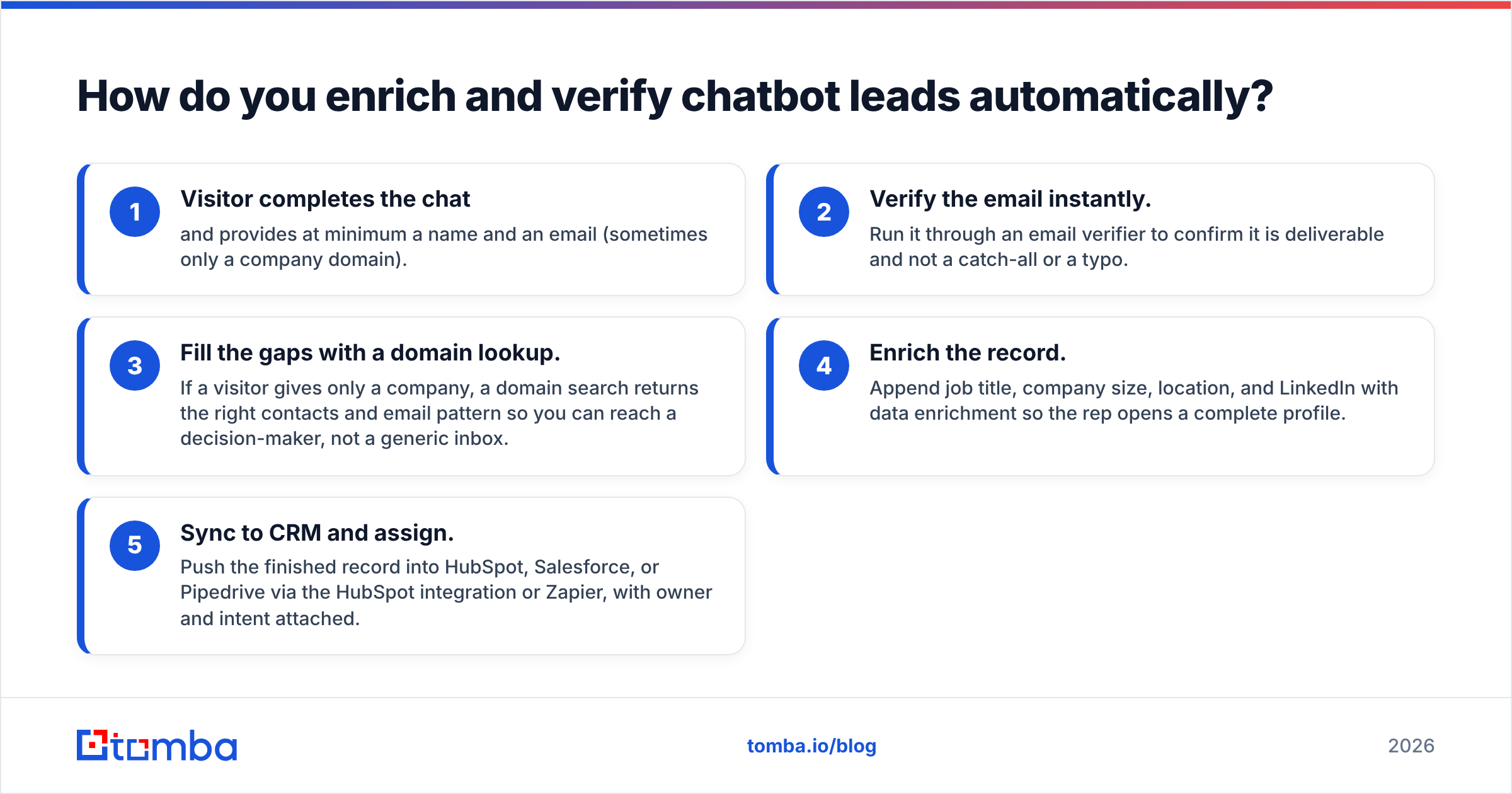
Capture is step one; a usable lead is step two. The fix is a thin automation layer between your chatbot and your CRM that fills the gaps a chat conversation leaves behind. Here is the workflow that turns a thin chatbot lead into a sales-ready record:
- Visitor completes the chat and provides at minimum a name and an email (sometimes only a company domain).
- Verify the email instantly. Run it through an email verifier to confirm it is deliverable and not a catch-all or a typo.
- Fill the gaps with a domain lookup. If a visitor gives only a company, a domain search returns the right contacts and email pattern so you can reach a decision-maker, not a generic inbox.
- Enrich the record. Append job title, company size, location, and LinkedIn with data enrichment so the rep opens a complete profile.
- Sync to CRM and assign. Push the finished record into HubSpot, Salesforce, or Pipedrive via the HubSpot integration or Zapier, with owner and intent attached.
The beauty of this is that it is fully automatable. A chatbot triggers a webhook, the enrichment and verification run in seconds via API, and the rep never touches a half-empty record. Salesforce's own research on data quality repeatedly ties dirty CRM data to lost productivity — this workflow is how you prevent your shiny new chatbot from feeding the problem.
What conversion lift should you expect?#
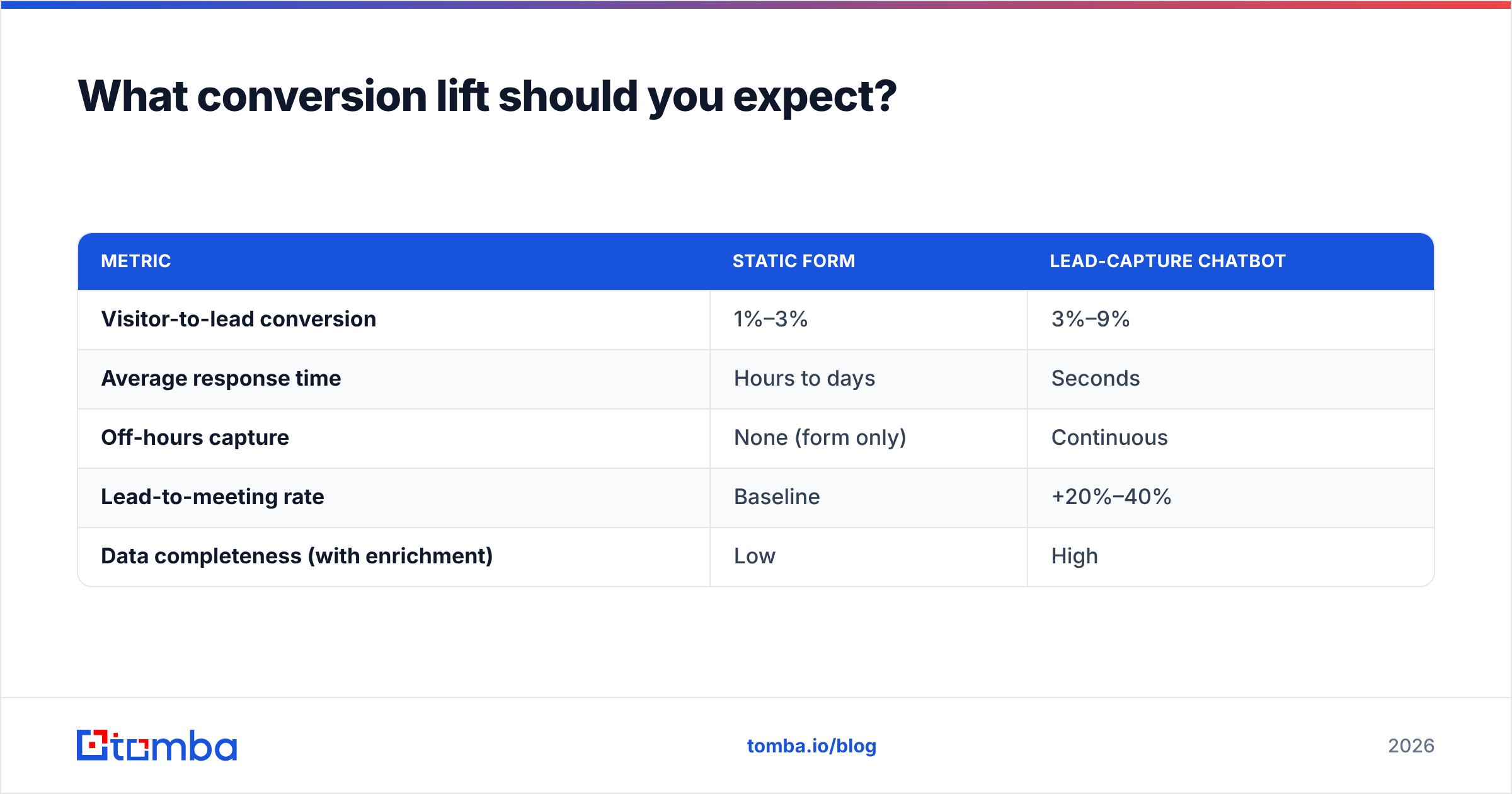
Set expectations with numbers, not hope. Conversational capture is not magic, but the lift is consistent enough that the business case usually clears easily. The table below shows representative ranges B2B teams report when they add a well-tuned chatbot for lead capture and compare it against their old static form.
| Metric | Static form | Lead-capture chatbot |
|---|---|---|
| Visitor-to-lead conversion | 1%–3% | 3%–9% |
| Average response time | Hours to days | Seconds |
| Off-hours capture | None (form only) | Continuous |
| Lead-to-meeting rate | Baseline | +20%–40% |
| Data completeness (with enrichment) | Low | High |
Two honest qualifiers. First, a chatbot that asks too many questions or fires too aggressively will underperform a clean form — friction beats novelty. Second, conversion lift means nothing if the captured data is junk; this is exactly why the verify-and-enrich layer is non-negotiable. A 4x increase in unusable leads just multiplies your reps' wasted effort.
How do you set up a lead-capture chatbot the right way?#
Keep the rollout tight. The most common failure is over-engineering the flow before you have data. Start simple:
- Pick two pages. Deploy on your pricing and high-intent product pages first, not your blog. Intent is highest where buying happens.
- Write a context-aware opener. Reference the page: "Comparing plans? I can find the right fit in two questions."
- Limit qualification to 3 questions. Company size, use case, timeline. That is enough to route.
- Validate the email inline. Reject obvious typos and disposable domains at capture.
- Wire the enrichment webhook. On capture, fire the verify + enrich + CRM-sync chain automatically.
- Measure weekly. Track completion rate, qualified-lead rate, and meeting-booked rate. Cut any question that tanks completion.
Treat the chatbot as a living asset. The opener and qualification logic should change as you learn which phrasing converts — and the back-end enrichment should stay constant so your data quality never regresses.
Frequently asked questions#
Is a chatbot for lead capture better than a contact form? For high-intent pages, almost always — conversational capture converts 2x–4x higher because it responds instantly and reduces friction. Keep a simple form as a fallback for visitors who prefer it.
Do I need an AI chatbot or is a rule-based one enough? A rule-based bot is fine for clear, narrow funnels. An AI/LLM bot is worth it when visitors arrive with varied intent and you want natural-language qualification instead of rigid buttons.
What is the most overlooked part of chatbot lead capture? Verification and enrichment. A captured email is not a usable lead until it is confirmed deliverable and completed with company and role data.
How do I stop my chatbot from hurting email deliverability? Validate every captured address before it enters a sequence. Catch-all domains, typos, and disposable addresses are the fastest way to spike bounces and damage your sender reputation.
Turn chatbot conversations into sales-ready leads#
A chatbot for lead capture solves the front of the funnel — but the record it hands you is only as valuable as the data behind it. That is where Tomba closes the loop. Use the Tomba Email Finder and its verification and enrichment APIs to turn every chatbot conversation into a complete, deliverable, sales-ready contact: confirm the work email, append the company and role, and find the right decision-maker when a visitor gives you only a domain.
Start free with 25 searches a month, then scale on the Starter plan at $49/mo as your traffic grows — see full Tomba pricing for details. Bolt Tomba onto your chatbot once, and every lead it captures arrives clean, verified, and ready for your reps to work.
// get started
Find, verify and enrich your first contacts today
Start on the free plan with 25 searches a month, then scale when your team is ready.
Free plan · No credit card required · GDPR & CCPA
// about the author