ChatGPT for Email Writing: The 2026 Playbook for Sales Teams
ChatGPT can draft a cold email in seconds, but raw output gets ignored. Here's how to use ChatGPT for email writing that actually books replies in 2026.
TL;DR
- ChatGPT is a fast first-draft engine for email writing, but raw output reads generic and tanks reply rates unless you feed it real context.
- The winning workflow is: accurate contact data → a structured prompt → ChatGPT draft → human edit → deliverability check. Skip any step and replies drop.
- Personalization beats polish. An email built on a real trigger ("you just hired 12 SDRs") outperforms a grammatically perfect template every time.
- ChatGPT does not verify email addresses, find contacts, or protect your sender reputation. Pair it with a dedicated email finder and verifier.
- Below: copy-paste prompts, a tool comparison table, and the guardrails that keep AI emails out of spam.
Why use ChatGPT for email writing at all?#
ChatGPT collapses the blank-page problem. Conclusion first: it is the fastest way to go from "I need to email this prospect" to a usable draft, and that speed is worth real money when you send hundreds of emails a week.
Think of ChatGPT like a junior copywriter who never sleeps and never complains. It will draft a cold open, three subject lines, and a follow-up sequence in under a minute. What it will not do is know your prospect, check whether the address is real, or keep your domain off a blocklist. That gap — between a fast draft and a sent email that lands — is the entire subject of this guide.
The mistake most teams make is treating ChatGPT as the whole pipeline. It is one stage. The model generates language; you supply judgment, data, and deliverability. Get that division of labor right and AI-written email becomes a genuine advantage instead of a faster way to get ignored.
)
What is ChatGPT actually good at in an email workflow?#
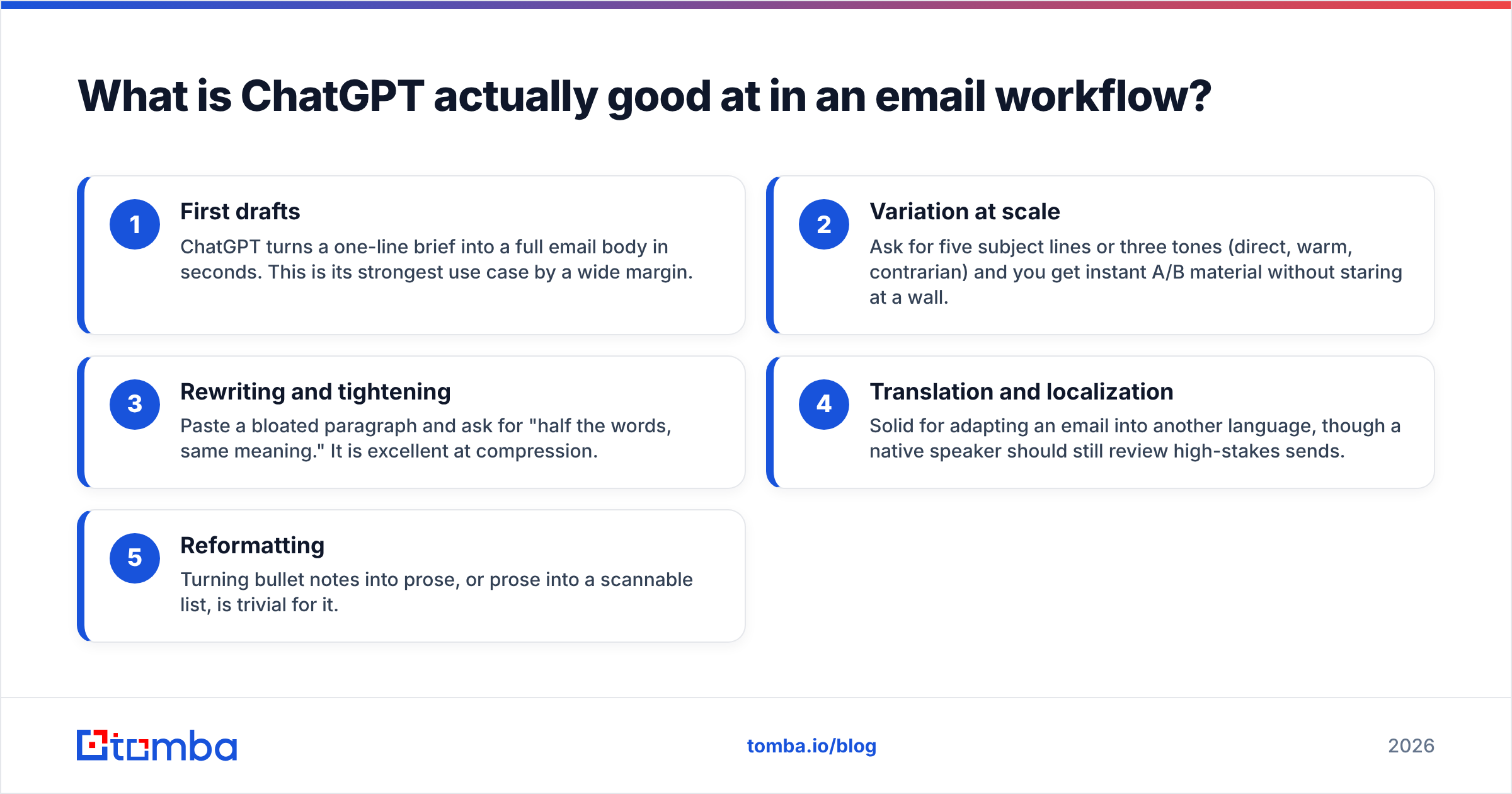
ChatGPT shines at the language-shaped parts of email and struggles with the data-shaped parts. Here is the honest split, structured so you know where to lean on it and where to bring in another tool.
- First drafts — ChatGPT turns a one-line brief into a full email body in seconds. This is its strongest use case by a wide margin.
- Variation at scale — Ask for five subject lines or three tones (direct, warm, contrarian) and you get instant A/B material without staring at a wall.
- Rewriting and tightening — Paste a bloated paragraph and ask for "half the words, same meaning." It is excellent at compression.
- Translation and localization — Solid for adapting an email into another language, though a native speaker should still review high-stakes sends.
- Reformatting — Turning bullet notes into prose, or prose into a scannable list, is trivial for it.
What it is not good at: knowing who to email, whether the address exists, what your prospect did last week, or whether your message trips a spam filter. Those require live data and infrastructure ChatGPT does not have. According to OpenAI's own usage guidance, the model generates plausible text — plausible is not the same as accurate, and in cold email a wrong fact is worse than no email.
How do you write a ChatGPT prompt that produces a usable sales email?#
A good email prompt has five ingredients: role, context, goal, constraints, and tone. Conclusion first — the more real context you paste in, the less generic the output, so front-load the prompt with specifics ChatGPT could never guess.
Here is a reusable template you can copy:
You are an SDR writing a cold email to {first_name}, the {title} at {company}.

Context I know to be true:
- {trigger event — funding, hire, product launch, job post}
- {something specific about their company or role}

Goal: book a 15-minute call about {your value prop}.

Constraints:
- Under 90 words.
- No "I hope this email finds you well."
- One clear call to action.
- 5th-grade reading level.

Tone: direct, peer-to-peer, lightly informal.

Write the email plus 3 subject lines under 5 words each.
The difference between this and "write me a cold email" is night and day. The first produces a sharp, specific message; the second produces the exact template every prospect has already deleted ten times this week. If you want a head start, Tomba's cold email AI and library of cold email templates give you proven structures to feed into ChatGPT instead of starting from zero.
One more rule: never let ChatGPT invent facts. If you do not know the trigger event, do the research first. An AI-confident lie about a prospect's "recent expansion into Europe" that never happened will end the conversation before it starts.
ChatGPT vs. dedicated email tools: where does each fit?#
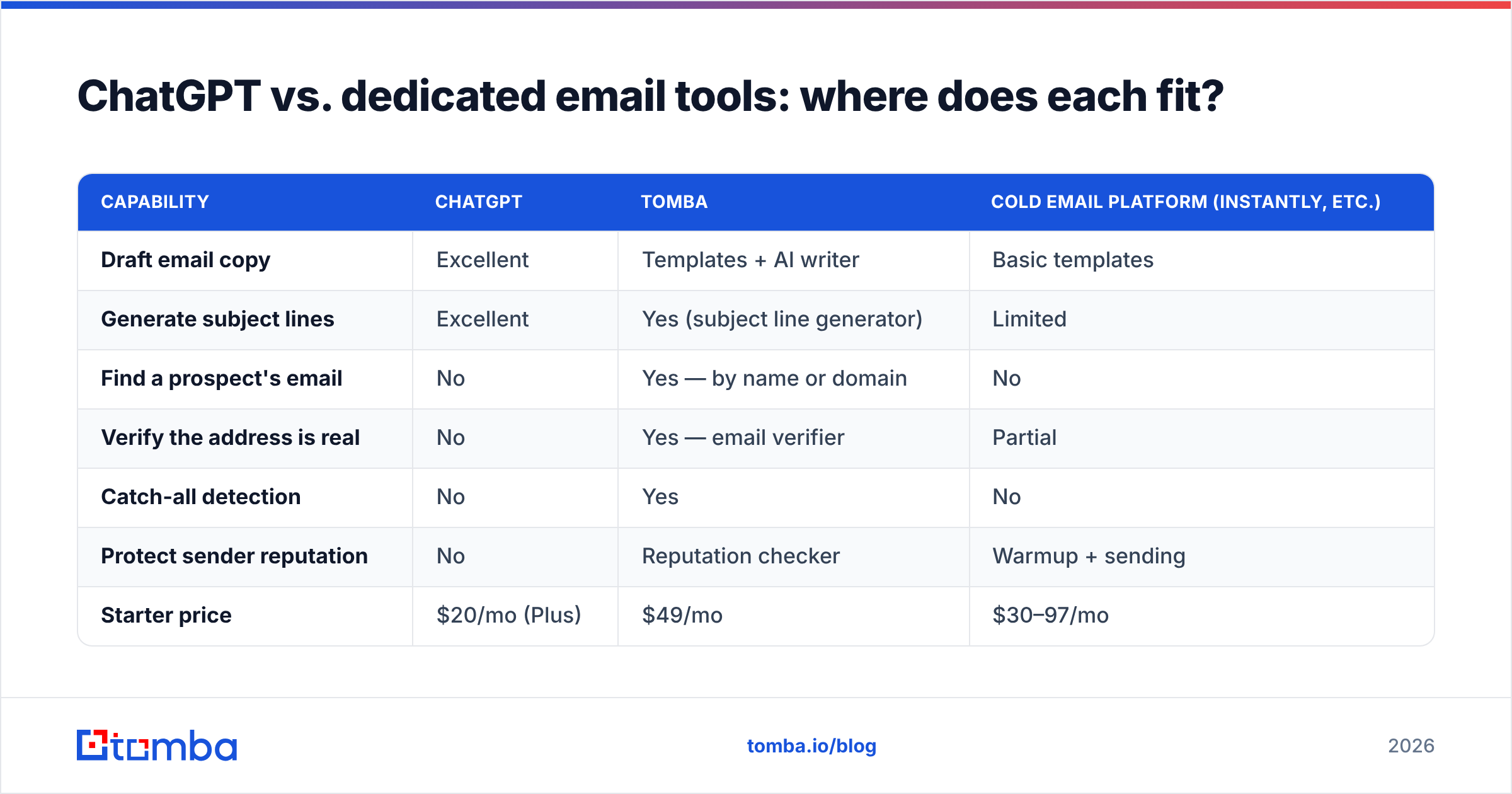
ChatGPT is a writing engine, not an email platform. The table below shows where it fits against the specialized tools you still need around it.
| Capability | ChatGPT | Tomba | Cold email platform (Instantly, etc.) |
|---|---|---|---|
| Draft email copy | Excellent | Templates + AI writer | Basic templates |
| Generate subject lines | Excellent | Yes (subject line generator) | Limited |
| Find a prospect's email | No | Yes — by name or domain | No |
| Verify the address is real | No | Yes — email verifier | Partial |
| Catch-all detection | No | Yes | No |
| Protect sender reputation | No | Reputation checker | Warmup + sending |
| Starter price | $20/mo (Plus) | $49/mo | $30–97/mo |
| Free tier | Limited free model | 25 searches/mo | Trial only |
Read this table the right way: these are not competitors, they are stages of one pipeline. ChatGPT writes, Tomba finds and verifies the contact, and a sending platform handles delivery and warmup. Trying to make any one of them do all three jobs is where teams waste money and tank results. For exact plan breakdowns, see the full Tomba pricing page.
)
Why do ChatGPT emails end up in spam — and how do you stop it?#
ChatGPT-written emails land in spam for reasons that have nothing to do with the words. The model controls copy; deliverability is controlled by your data quality, sender reputation, and sending behavior. Fix those and the same email that was getting filtered starts landing in the inbox.
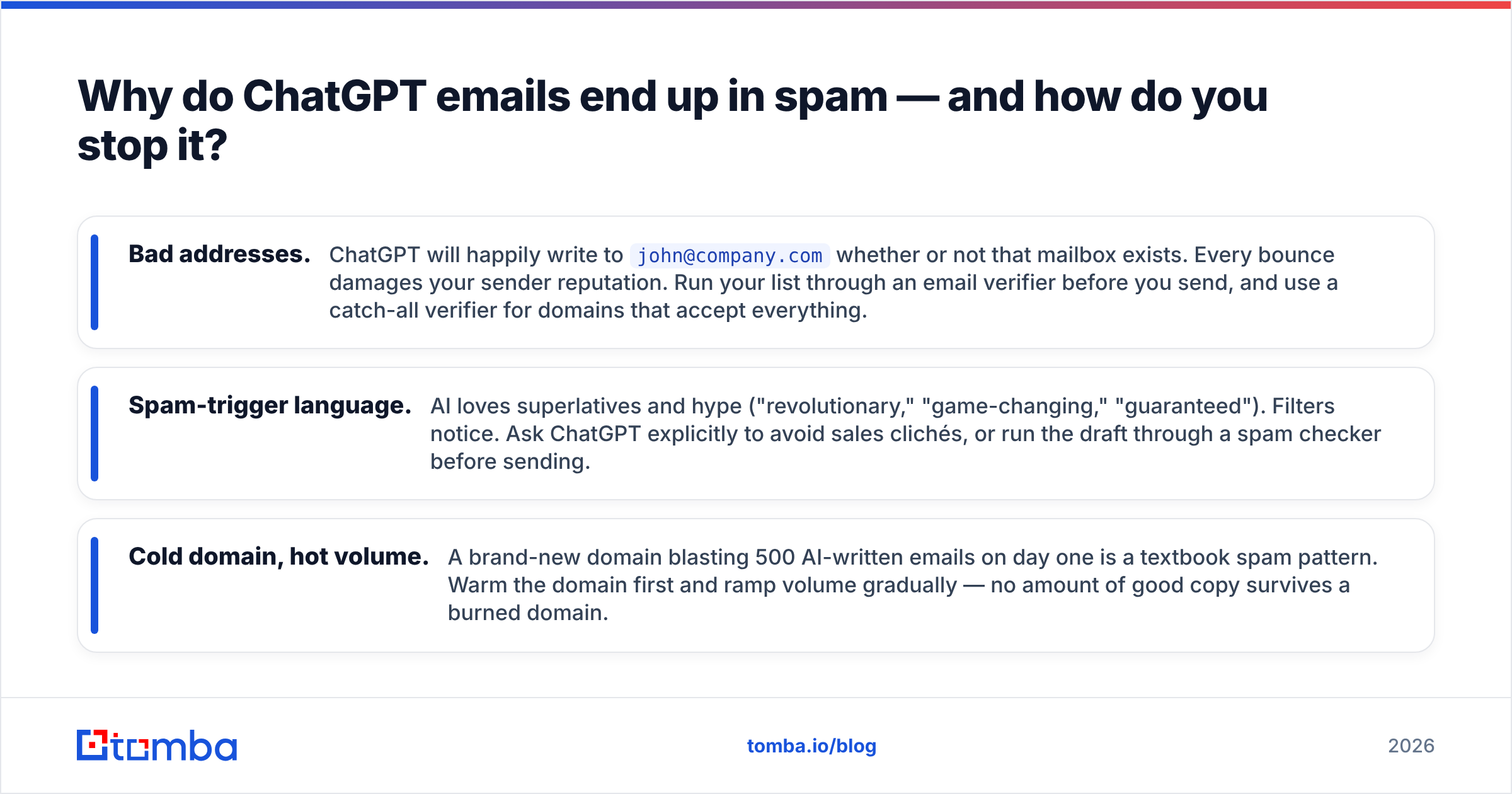
Three failure modes account for most of it:
- Bad addresses. ChatGPT will happily write to
john@company.comwhether or not that mailbox exists. Every bounce damages your sender reputation. Run your list through an email verifier before you send, and use a catch-all verifier for domains that accept everything. - Spam-trigger language. AI loves superlatives and hype ("revolutionary," "game-changing," "guaranteed"). Filters notice. Ask ChatGPT explicitly to avoid sales clichés, or run the draft through a spam checker before sending.
- Cold domain, hot volume. A brand-new domain blasting 500 AI-written emails on day one is a textbook spam pattern. Warm the domain first and ramp volume gradually — no amount of good copy survives a burned domain.
The uncomfortable truth: a mediocre email to a verified address on a warm domain beats a brilliant ChatGPT email to a guessed address every single time. Industry resources like HubSpot's deliverability guides make the same point — list hygiene outweighs copy polish.
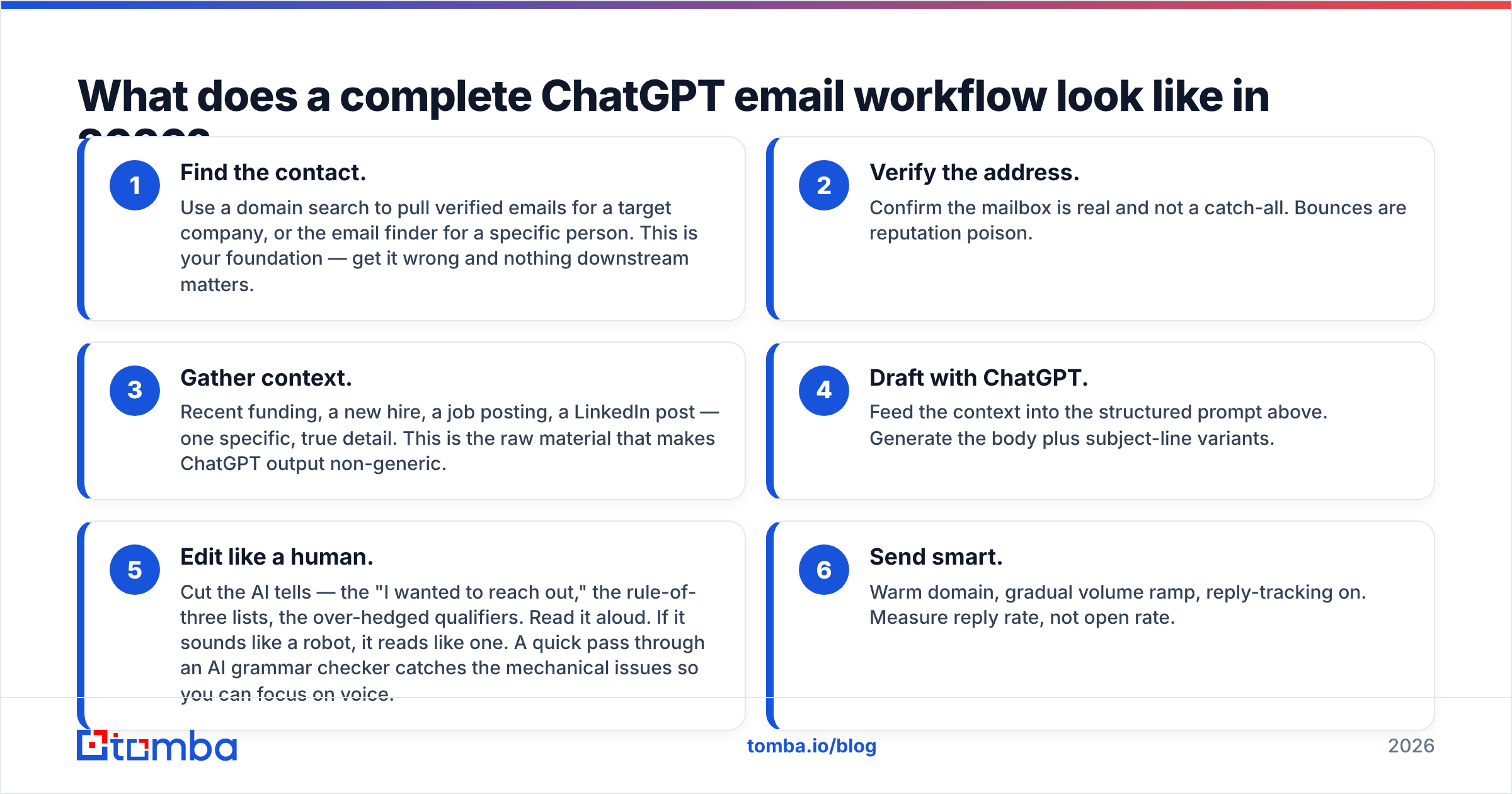
What does a complete ChatGPT email workflow look like in 2026?#
The full workflow has six steps, and ChatGPT only owns one of them. Here is the sequence that actually produces booked meetings:
- Find the contact. Use a domain search to pull verified emails for a target company, or the email finder for a specific person. This is your foundation — get it wrong and nothing downstream matters.
- Verify the address. Confirm the mailbox is real and not a catch-all. Bounces are reputation poison.
- Gather context. Recent funding, a new hire, a job posting, a LinkedIn post — one specific, true detail. This is the raw material that makes ChatGPT output non-generic.
- Draft with ChatGPT. Feed the context into the structured prompt above. Generate the body plus subject-line variants.
- Edit like a human. Cut the AI tells — the "I wanted to reach out," the rule-of-three lists, the over-hedged qualifiers. Read it aloud. If it sounds like a robot, it reads like one. A quick pass through an AI grammar checker catches the mechanical issues so you can focus on voice.
- Send smart. Warm domain, gradual volume ramp, reply-tracking on. Measure reply rate, not open rate.
Notice that ChatGPT is step four of six. The steps around it are where deliverability and personalization live, and they are the steps that determine whether your reply rate is 1% or 8%.
How do you keep AI-written emails from sounding like AI?#
The fix for robotic AI email is specificity and subtraction. Conclusion first: ChatGPT's default voice is generic, hedged, and over-structured — your job as editor is to make it specific and cut the filler.
Watch for these tells and strip them:
- Opening throat-clearing. "I hope this email finds you well" and "I wanted to reach out" add nothing. Delete them and start with the prospect.
- The rule of three. AI compulsively groups ideas in threes ("faster, smarter, and more efficient"). One concrete benefit beats three vague ones.
- Hedge words. "Just," "perhaps," "I think maybe." Confident emails get replies; tentative ones get ignored.
- Symmetrical sentences. "It's not about X, it's about Y" is an AI fingerprint. Vary your rhythm.
- No specifics. If the email could be sent to any prospect in the industry, it is not personalized. Add the one detail only this person would recognize.
A practical trick: after ChatGPT drafts the email, paste it back and ask, "Rewrite this so it sounds like a busy human typed it on their phone — shorter, blunter, no corporate words." The second pass is usually the one worth sending.
When should you not use ChatGPT for email writing?#
Skip ChatGPT when the email is short, relational, or high-stakes. A two-line reply to a warm prospect ("Thursday works — 2pm your time?") does not need AI; typing it yourself is faster and sounds more human. Sensitive emails — a renewal negotiation, an apology, anything where tone carries legal or relationship weight — deserve your own words, because a generic AI miss can cost you the account.
ChatGPT is also the wrong tool for anything requiring current, verifiable facts about a specific person or company. It does not have live data. For that, you need a real B2B database and enrichment, not a language model's best guess. Use AI where language is the bottleneck; use data tools where knowledge is the bottleneck. Most teams get this backward and pay for it in deliverability.
The bottom line#
ChatGPT is a genuine multiplier for email writing — but only as one stage in a pipeline that starts with accurate, verified contact data and ends with disciplined sending. Use it to kill the blank page, generate variants, and tighten copy. Do not use it to find contacts, verify addresses, or protect your reputation; those jobs belong to purpose-built infrastructure.
Before your next AI-written campaign goes out, make sure every address is real. Start with the Tomba Email Finder to source verified, accurate contacts by name or domain — then let ChatGPT write to people you know actually exist. The free tier gives you 25 searches a month to test it, and paid plans start at $49/mo. Pair great data with good prompts, and AI email writing stops being a gamble and starts being a system.
// get started
Find, verify and enrich your first contacts today
Start on the free plan with 25 searches a month, then scale when your team is ready.
Free plan · No credit card required · GDPR & CCPA
// about the author