How to Check Email Address Authenticity: 2026 Guide
Fake and risky emails wreck your sender reputation. Here is how to check email address authenticity in 2026 — syntax, MX, SMTP, and catch-all — without guessing.
TL;DR
- "Authentic" means an email is correctly formatted, hosted on a real mail server, and actually accepts mail at that mailbox — three separate checks, not one.
- Manual checks (syntax, MX lookup, SMTP ping) prove an address can exist; a verification service confirms it does and flags risky catch-all, role, and disposable addresses.
- Catch-all domains are the hard case: the server says "yes" to everything, so you need a tool that scores confidence instead of returning a flat valid/invalid.
- Verifying before you send protects sender reputation, keeps bounce rates under the ~2% threshold inboxes punish, and saves wasted send credits.
- Use a free checker for one-off lookups and a bulk verifier or API for lists; Tomba covers both with a free tier (25 searches/mo).
When you collect an email address — from a form, a list, a business card, or a guess — you are trusting that it is real. Most of the time you have no idea. A typo, an abandoned mailbox, a spam trap, or a fake asdf@gmail.com all look identical until you try to send. By then the damage is done: a bounce, a complaint, a dent in your domain's reputation.
This guide breaks down exactly how to check email address authenticity in 2026 — what each layer of validation actually proves, where manual methods stop working, and which tools pick up the slack.
What does "authentic email address" actually mean?#
An authentic email address passes three independent tests. People collapse them into one word — "valid" — but they fail for different reasons and need different checks.
Think of it like checking whether a house exists before mailing a letter. First the address has to be written correctly (syntax). Then the street has to be real (the domain and its mail servers). Then someone has to actually live there and accept mail (the mailbox). A perfectly formatted address on a real domain can still be a dead mailbox.
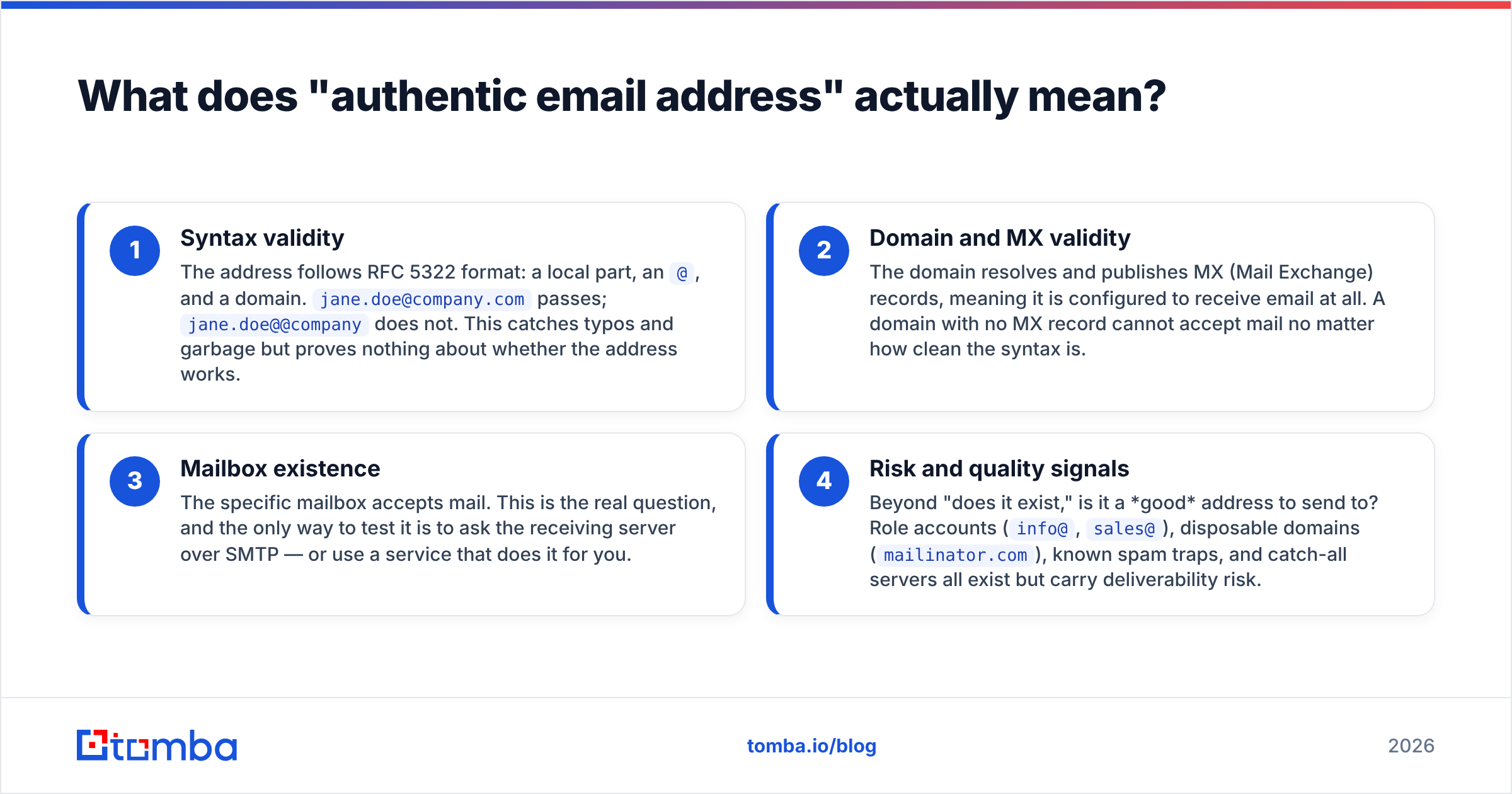
- Syntax validity — The address follows RFC 5322 format: a local part, an
@, and a domain.jane.doe@company.compasses;jane.doe@@companydoes not. This catches typos and garbage but proves nothing about whether the address works. - Domain and MX validity — The domain resolves and publishes MX (Mail Exchange) records, meaning it is configured to receive email at all. A domain with no MX record cannot accept mail no matter how clean the syntax is.
- Mailbox existence — The specific mailbox accepts mail. This is the real question, and the only way to test it is to ask the receiving server over SMTP — or use a service that does it for you.
- Risk and quality signals — Beyond "does it exist," is it a good address to send to? Role accounts (
info@,sales@), disposable domains (mailinator.com), known spam traps, and catch-all servers all exist but carry deliverability risk.
A genuine authenticity check answers all four. Skipping any one is how "verified" lists still bounce.
)
How do you check an email address manually?#
You can validate the first three layers by hand with free, built-in tools. It is slow and it does not scale, but it shows you exactly what a verification service automates.
Step 1 — Check the syntax. Read the address. Is there exactly one @? A valid domain with a dot? No spaces or stray characters? A surprising share of bad addresses are simple transpositions like gmial.com or @yaho.com.
Step 2 — Confirm the domain has MX records. From a terminal, run an MX lookup:
nslookup -type=mx company.comIf you get back one or more mail servers, the domain can receive email. If you get nothing, stop — the address cannot be authentic. You can also use Google's free Dig tool in the browser.
Step 3 — Ping the mailbox over SMTP. This is where it gets technical. You connect to the domain's mail server on port 25 and start a conversation, stopping just before you actually send anything:
HELO yourdomain.com
MAIL FROM: <you@yourdomain.com>
RCPT TO: <jane.doe@company.com>
If the server replies 250 OK to the RCPT TO line, the mailbox is accepted. A 550 means no such user. The problem: most modern mail providers throttle, block, or deliberately mislead these probes to stop exactly this kind of reconnaissance, and doing it repeatedly from your own IP can get you blacklisted.
That is the wall manual checking hits. It works for one address on a cooperative server. It breaks on Gmail, Outlook, catch-all domains, and anything at volume. For a quick one-off, a hosted free email checker runs all three steps for you without touching your IP reputation.
What's the difference between email validation and email verification?#
These terms get used interchangeably, but the distinction matters when you choose a tool.
- Validation is the cheap, offline part: syntax and domain/MX checks. It requires no connection to the recipient's server and returns instantly. It can only ever tell you an address is plausible.
- Verification is the expensive, live part: actually confirming the mailbox accepts mail, plus the risk signals (catch-all, role, disposable, spam trap). It requires talking to the receiving infrastructure and interpreting the response.
A tool that only "validates" will happily pass a clean-looking dead address. Real protection comes from verification. When you evaluate any email verifier, the question to ask is whether it does live mailbox verification or just regex-and-MX validation dressed up as more.
How do the methods to check email address authenticity compare?#
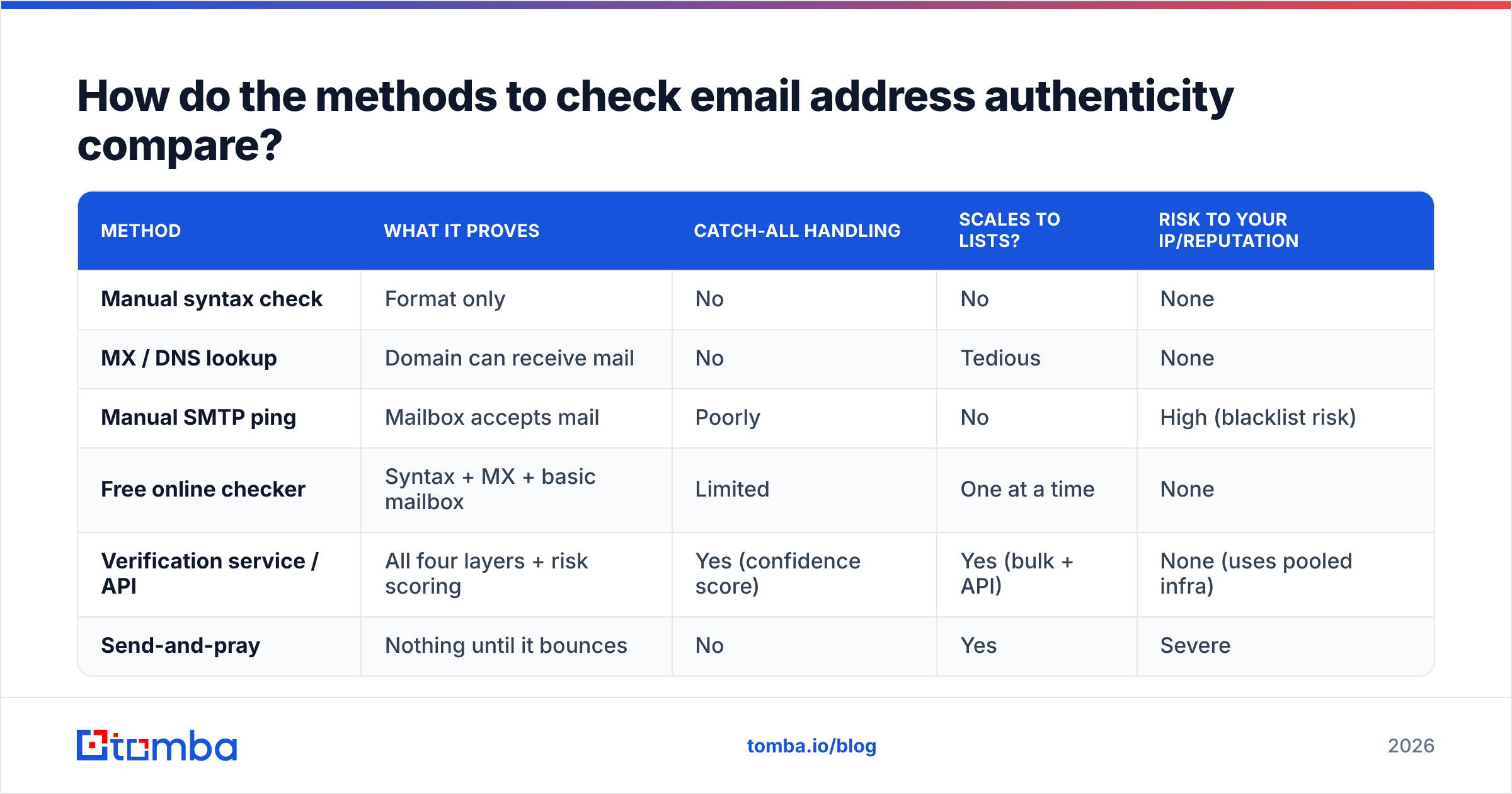
Here is how the common approaches stack up across the things that actually matter — what they prove, whether they scale, and the risk to your own infrastructure.
| Method | What it proves | Catch-all handling | Scales to lists? | Risk to your IP/reputation |
|---|---|---|---|---|
| Manual syntax check | Format only | No | No | None |
| MX / DNS lookup | Domain can receive mail | No | Tedious | None |
| Manual SMTP ping | Mailbox accepts mail | Poorly | No | High (blacklist risk) |
| Free online checker | Syntax + MX + basic mailbox | Limited | One at a time | None |
| Verification service / API | All four layers + risk scoring | Yes (confidence score) | Yes (bulk + API) | None (uses pooled infra) |
| Send-and-pray | Nothing until it bounces | No | Yes | Severe |
The pattern is clear: the more authoritative the check, the more infrastructure it needs behind it. That is the whole reason verification services exist — they centralize the hard SMTP and catch-all work so your domain never takes the hit.
Why do catch-all domains break simple authenticity checks?#
Catch-all domains are the single biggest reason "verified" emails still bounce — and the reason a binary valid/invalid result lies to you.
A catch-all (or "accept-all") server is configured to say 250 OK to every address at the domain, real or not. ceo@company.com, xyzqwerty@company.com, and notarealperson@company.com all get accepted at the SMTP layer. The server sorts out what is real after it accepts the message, internally, where you can't see it.
For your authenticity check, this means an SMTP ping is useless: everything comes back valid. Roughly a fifth of business domains are catch-all, so this is not an edge case — it is a daily problem for B2B prospecting.
The only honest way to handle catch-all addresses is statistical: combine the known email pattern for the domain, the presence of the person on that domain from other sources, and historical data into a confidence score, rather than pretending you have a clean yes/no. A dedicated catch-all verifier does exactly this — it tells you "likely valid, 85% confidence" instead of a misleading "valid." If a tool returns a flat "valid" on every catch-all address, it is hiding the uncertainty from you, not resolving it.
What risk signals should an authenticity check flag?#
Existence is necessary but not sufficient. A real, deliverable mailbox can still be a bad idea to email. A complete check surfaces these:
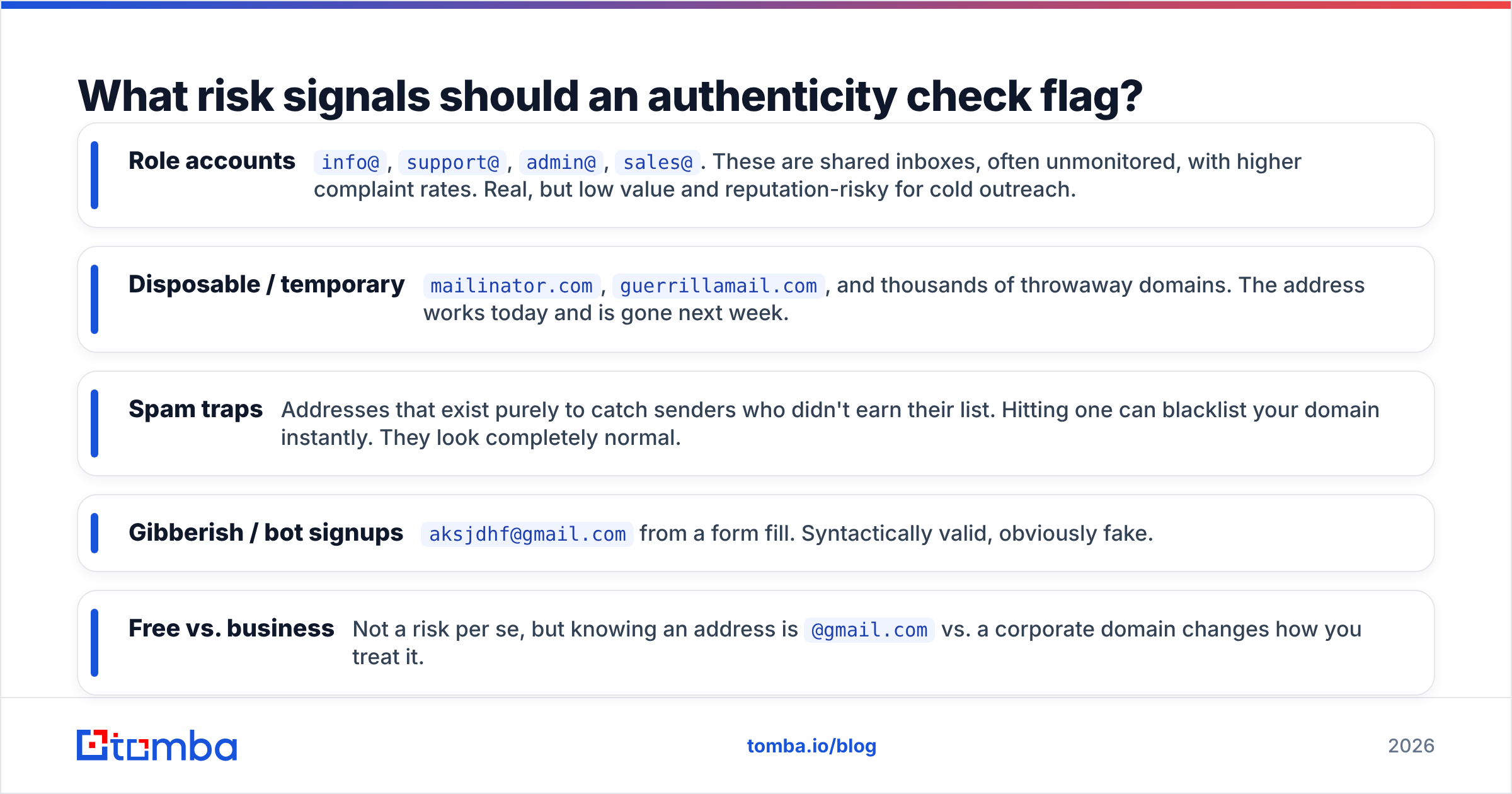
- Role accounts —
info@,support@,admin@,sales@. These are shared inboxes, often unmonitored, with higher complaint rates. Real, but low value and reputation-risky for cold outreach. - Disposable / temporary —
mailinator.com,guerrillamail.com, and thousands of throwaway domains. The address works today and is gone next week. - Spam traps — Addresses that exist purely to catch senders who didn't earn their list. Hitting one can blacklist your domain instantly. They look completely normal.
- Gibberish / bot signups —
aksjdhf@gmail.comfrom a form fill. Syntactically valid, obviously fake. - Free vs. business — Not a risk per se, but knowing an address is
@gmail.comvs. a corporate domain changes how you treat it.
Flagging these is the difference between a verifier and a glorified spell-checker. Each one is a real mailbox that would pass a naive SMTP test and still hurt you.
)
How does verifying emails protect your sender reputation?#
Every bounce and every spam complaint is a vote against your domain — and mailbox providers count the votes.
Gmail, Outlook, and Yahoo decide whether your mail lands in the inbox or spam folder based largely on sender reputation: your bounce rate, complaint rate, and engagement history. The widely cited threshold is to keep hard bounces under about 2%. Cross it and providers start throttling or junking your mail — not just for the bad addresses, but for the good ones too. Google's own Postmaster Tools guidelines make low spam rates and clean sending a precondition for inbox placement.
Verifying a list before you send is the cheapest insurance there is. It directly lowers your bounce rate, which protects the reputation that determines whether your next campaign even reaches the inbox. This is why deliverability-focused teams treat verification as a non-negotiable step, not an optional polish. If you want the full picture on how this connects to inbox placement, the fundamentals of email deliverability are worth the read.
There is a hard-cash angle too: most outreach platforms charge per send. Emailing 1,000 addresses where 150 are dead is paying to damage your own reputation. Verification turns that into 850 clean, deliverable contacts.
Which tool should you use to check email address authenticity?#
Match the tool to the job. The decision comes down to volume and whether you need it inside your own software.
- One-off lookups — A free browser checker is enough. Paste the address, get syntax + MX + mailbox status in seconds. Good for vetting a single inbound lead or a suspicious signup.
- Whole lists (CSV exports, CRM dumps) — Use a bulk verify feature. Upload the file, let it run the SMTP and catch-all logic across every row, and download a scored result with the risky addresses flagged.
- Inside your app or signup flow — Use an email verification API. Verify at the point of capture so fake and mistyped addresses never enter your database in the first place.
- Cold outreach prospecting — Pair verification with discovery: find the address with an email finder, then verify it in the same pass so you are only ever exporting confirmed, deliverable contacts.
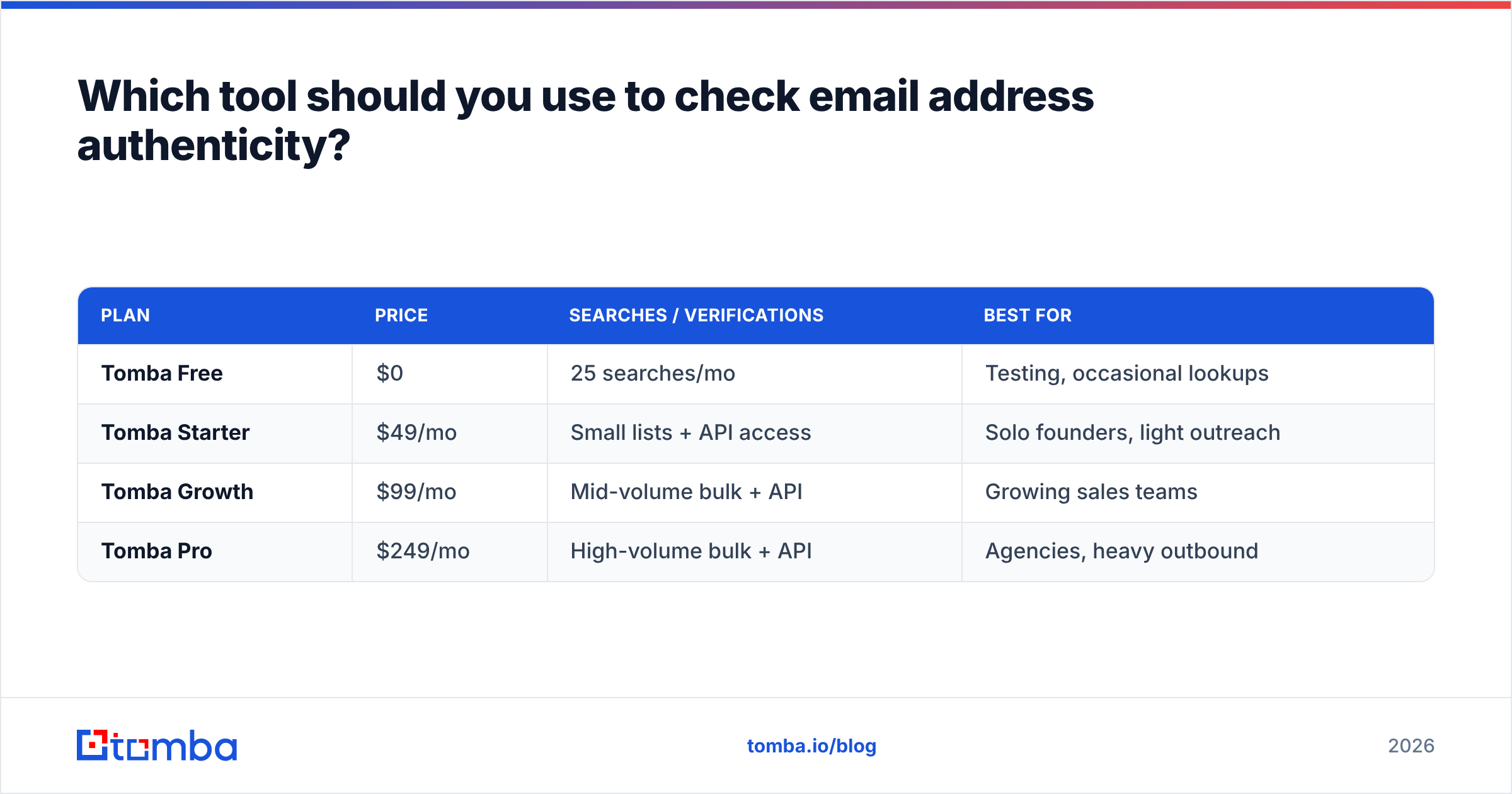
Here is how the main options compare for someone who needs more than a one-off check:
| Plan | Price | Searches / verifications | Best for |
|---|---|---|---|
| Tomba Free | $0 | 25 searches/mo | Testing, occasional lookups |
| Tomba Starter | $49/mo | Small lists + API access | Solo founders, light outreach |
| Tomba Growth | $99/mo | Mid-volume bulk + API | Growing sales teams |
| Tomba Pro | $249/mo | High-volume bulk + API | Agencies, heavy outbound |
You can compare full Tomba pricing against alternatives, but the structural point is this: a free tier lets you verify the method works on your own data before you pay, and the same account covers single checks, bulk lists, and the API so you are not stitching three vendors together. Independent reviews on G2 are a useful sanity check on any verifier you shortlist.
How should you build authenticity checking into your workflow?#
Stop treating verification as a cleanup step and make it a gate. Three practical rules:
- Verify at capture, not at send. Add an API check to forms and signup flows so bad addresses bounce off the front door instead of polluting your CRM for months.
- Re-verify before every campaign. Email decays — people change jobs, mailboxes get deactivated. A list clean six months ago is not clean today. Run it again before each send.
- Treat confidence scores as ranges, not booleans. For catch-all and "risky" results, decide your own tolerance. A high-value enterprise prospect at a catch-all domain might be worth a careful send; a bulk newsletter blast is not.
Verify before you send — start free#
You cannot eyeball email authenticity, and you cannot afford to learn the truth from your bounce report. The reliable path is layered: confirm the syntax, confirm the domain accepts mail, confirm the mailbox exists, and score the risk — then send only to what survives.
Tomba's Email Finder builds that verification in, so the addresses you discover come back already checked for syntax, MX, mailbox, and catch-all confidence. Start on the free tier with 25 searches a month, run your toughest list through it, and see how many "verified" contacts were actually safe to email. Verify first. Protect your reputation. Then hit send.
// get started
Find, verify and enrich your first contacts today
Start on the free plan with 25 searches a month, then scale when your team is ready.
Free plan · No credit card required · GDPR & CCPA
// about the author