Check Email Address Blacklist: The 2026 Sender Guide
Blacklisted IPs and domains quietly kill your cold email. Here's how to check an email address blacklist, read the results, and get delisted fast in 2026.
You sent 500 cold emails and got zero replies. Before you blame your copy, blame your reputation. A single blacklisted IP or domain can route your entire campaign straight to spam — silently, with no bounce message to warn you.
This guide shows you how to check email address blacklist status the right way, how to read the alphabet soup of DNSBLs, and how to get yourself delisted without making things worse.
TL;DR#
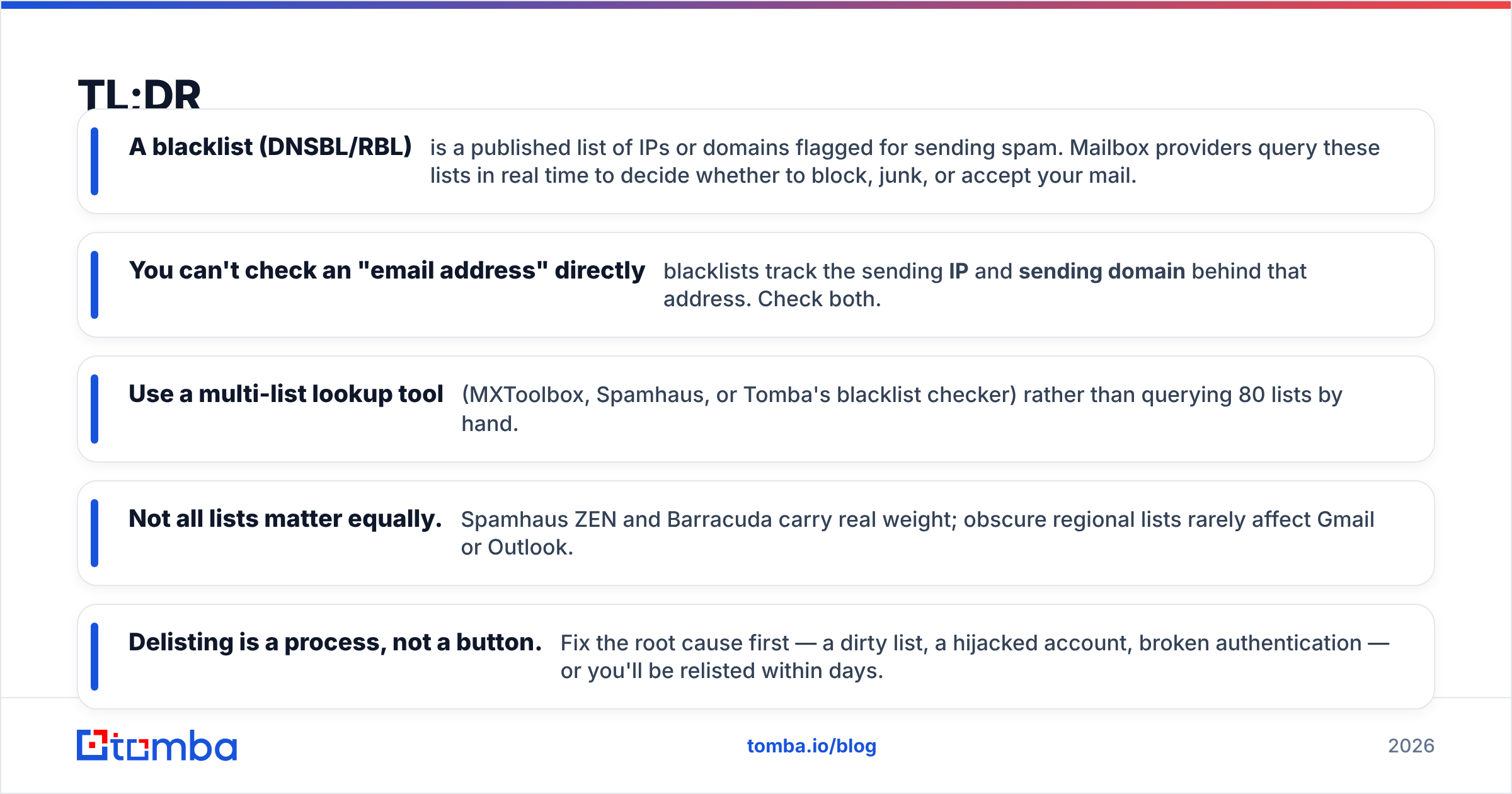
- A blacklist (DNSBL/RBL) is a published list of IPs or domains flagged for sending spam. Mailbox providers query these lists in real time to decide whether to block, junk, or accept your mail.
- You can't check an "email address" directly — blacklists track the sending IP and sending domain behind that address. Check both.
- Use a multi-list lookup tool (MXToolbox, Spamhaus, or Tomba's blacklist checker) rather than querying 80 lists by hand.
- Not all lists matter equally. Spamhaus ZEN and Barracuda carry real weight; obscure regional lists rarely affect Gmail or Outlook.
- Delisting is a process, not a button. Fix the root cause first — a dirty list, a hijacked account, broken authentication — or you'll be relisted within days.
What does it mean to check an email address blacklist?#
The short version: you're checking the reputation of the infrastructure behind your email, not the email string itself.
Think of a blacklist like a bouncer's "do not admit" clipboard at a club. The bouncer (the receiving mail server) doesn't recognize your name (you@yourdomain.com) — they recognize the car you arrived in (your sending IP) and the neighborhood it's registered to (your domain). If either is on the clipboard, you don't get in.
So when someone says "check if my email is blacklisted," what you actually inspect is:
- The sending IP address — the server that physically transmits your mail (your ESP's shared pool, or your dedicated IP).
- The sending domain — the domain in your
From:address andReturn-Path. - The domain's reputation signals — SPF, DKIM, DMARC alignment and historical complaint rates.
These get cross-referenced against DNS-based blocklists, or DNSBLs (also called RBLs — Realtime Blackhole Lists). You can read the full mechanics on Wikipedia's DNSBL entry, but the practical point is this: a DNSBL answers one question in milliseconds — "is this sender known to be bad?"

Why "blacklisted" often produces no error#
Here's the cruel part. When Spamhaus blocks you outright, you may get a bounce. But most damage is quieter: Gmail and Outlook use blacklist hits as one negative signal among many, then silently file you under spam. No bounce, no error code, no warning. Your open rate just craters and you assume nobody cared.
That's why proactively checking — instead of waiting for a hard bounce — is the only reliable defense.
Which blacklists actually matter in 2026?#
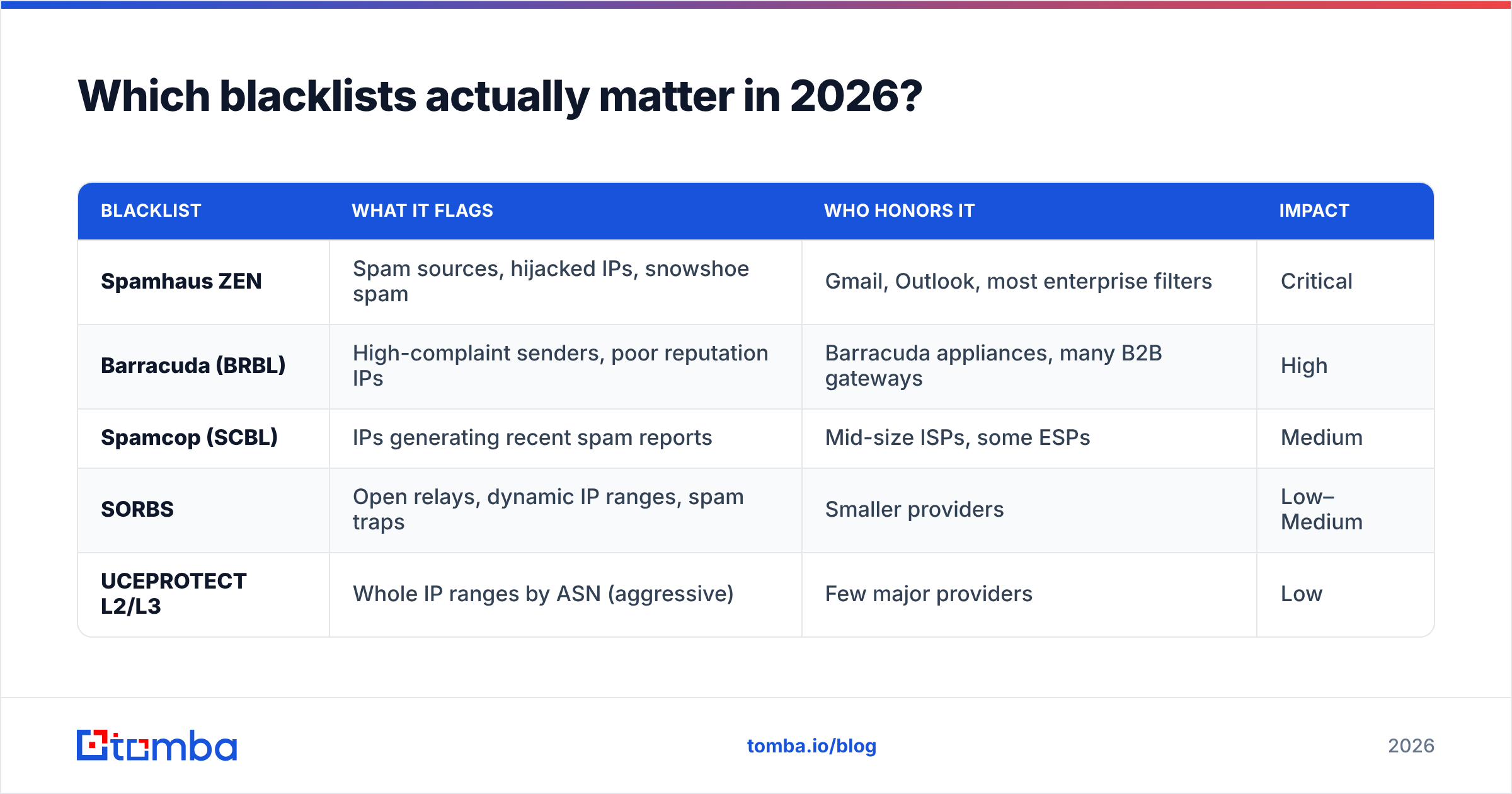
Not all of the ~80 public DNSBLs carry the same weight. Chasing a delisting from a list that no major provider consults is wasted effort. Focus on the lists that move the needle.
| Blacklist | What it flags | Who honors it | Impact |
|---|---|---|---|
| Spamhaus ZEN | Spam sources, hijacked IPs, snowshoe spam | Gmail, Outlook, most enterprise filters | Critical |
| Barracuda (BRBL) | High-complaint senders, poor reputation IPs | Barracuda appliances, many B2B gateways | High |
| Spamcop (SCBL) | IPs generating recent spam reports | Mid-size ISPs, some ESPs | Medium |
| SORBS | Open relays, dynamic IP ranges, spam traps | Smaller providers | Low–Medium |
| UCEPROTECT L2/L3 | Whole IP ranges by ASN (aggressive) | Few major providers | Low |
A few rules of thumb:
- Spamhaus first. If you're on a Spamhaus list, fix that before anything else — it's the most widely consulted blocklist in the world.
- Range-based lists (UCEPROTECT L3) are often noise. They blacklist entire networks because of one bad neighbor. Delisting yourself is usually impossible and rarely necessary.
- Domain blocklists are rising. As IP reputation gets harder to game, providers lean more on domain reputation (DBL). A clean IP with a trashed domain still loses.
- Your ESP's internal reputation isn't public. Gmail Postmaster Tools and Microsoft SNDS expose signals no DNSBL will — check those too.
If your domain reputation is the concern rather than a specific list, run it through a sender reputation checker before you start firing delisting requests.
How do you actually check an email address blacklist?#
You have three practical routes, from fastest to most thorough.
1. Run a multi-list lookup tool. This is what 95% of people should do. A single tool queries dozens of DNSBLs at once and returns a pass/fail grid.
- MXToolbox blacklist check — the industry default; paste an IP or domain, get all major lists at once.
- Spamhaus IP and domain lookup — straight from the source for the most important list.
- Tomba's blacklist checker — checks your domain and IP against the major DNSBLs alongside your other deliverability tooling.
2. Query a DNSBL directly via DNS. For the technical: reverse your IP and prepend it to the list's zone. To check 192.0.2.5 against Spamhaus ZEN, look up 5.2.0.192.zen.spamhaus.org. A returned 127.0.0.x answer means you're listed; NXDOMAIN means you're clean. Useful for scripting, overkill for a one-off.
3. Read your provider's postmaster dashboards. Google Postmaster Tools and Microsoft SNDS show reputation, spam rate, and authentication pass rates that no public blacklist exposes. If you send any real volume, these are non-negotiable.
Check the IP and the domain — both#
The most common mistake: checking only the IP. If you send through a shared ESP pool, the IP might be spotless while your domain is the thing that's flagged. Always check:
- Your sending IP (find it in your email headers under
Received:). - Your root domain (
yourdomain.com). - Any tracking or link domain you use for click tracking — these get blacklisted constantly and drag the parent down with them.

How do you get delisted (and stay off)?#
Getting removed is the easy part. Staying removed is where most senders fail, because they request delisting without fixing what got them listed.
Follow this order:
- Find the root cause before you request anything. Was your list bought or scraped? Did a campaign hit spam traps? Was a mailbox compromised and used to blast spam? Is your authentication broken? Delisting a symptom while the cause persists gets you relisted in 24–72 hours — and repeat listings are stickier.
- Clean your list. Spam traps and high bounce rates are the #1 cause of listings. Remove invalid, role-based, and long-dead addresses. Verifying your list with an email verifier before you send is the single highest-leverage fix.
- Fix authentication. Confirm SPF, DKIM, and DMARC all pass and align. A missing SPF record or unaligned DKIM signature is a fast track to the junk folder and many blocklists.
- Submit the delisting request. Most lists have a self-service removal form (Spamhaus, Barracuda, Spamcop all do). Be honest about the cause and what you fixed. Don't spam the form repeatedly — it resets the queue.
- Warm back up slowly. After delisting, don't resume full volume. Ramp gradually so providers rebuild trust in your sender reputation.
Self-service vs. manual delisting#
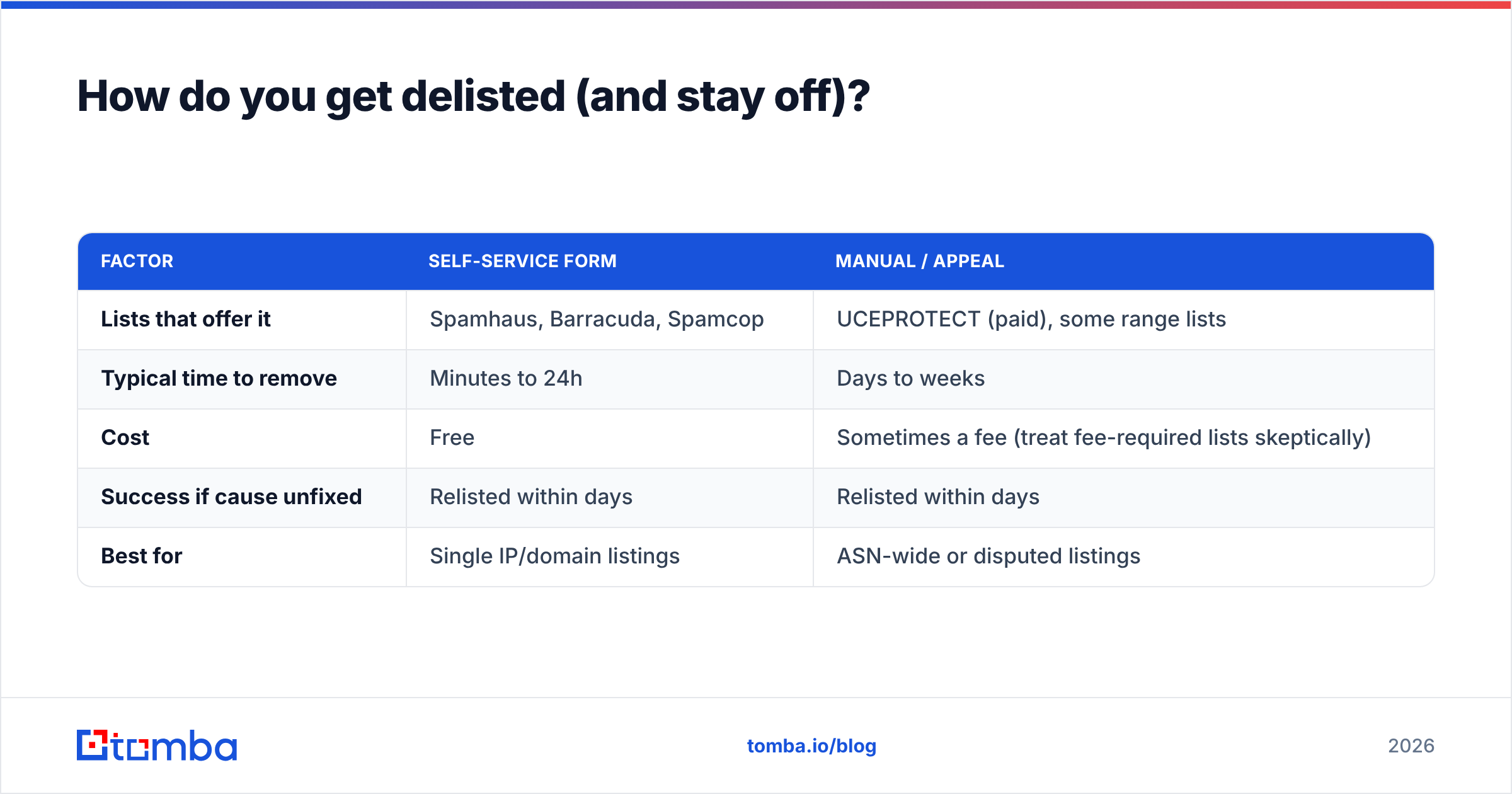
| Factor | Self-service form | Manual / appeal |
|---|---|---|
| Lists that offer it | Spamhaus, Barracuda, Spamcop | UCEPROTECT (paid), some range lists |
| Typical time to remove | Minutes to 24h | Days to weeks |
| Cost | Free | Sometimes a fee (treat fee-required lists skeptically) |
| Success if cause unfixed | Relisted within days | Relisted within days |
| Best for | Single IP/domain listings | ASN-wide or disputed listings |
The table makes the lesson obvious: the removal mechanism barely matters. The cause fix is what determines whether you stay off.
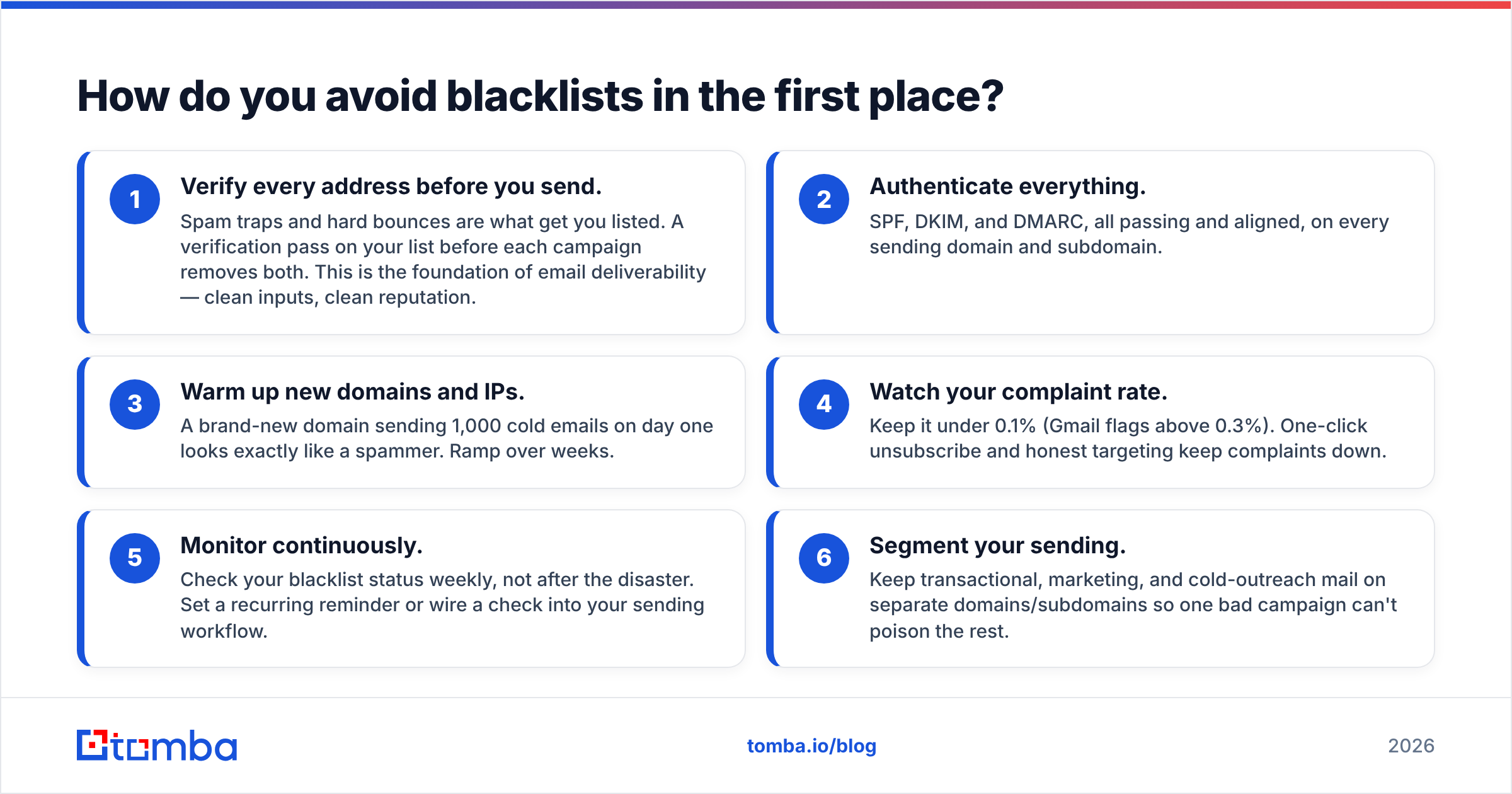
How do you avoid blacklists in the first place?#
Prevention is cheaper than remediation, and it's mostly hygiene. The senders who never get listed share a short list of habits.
- Verify every address before you send. Spam traps and hard bounces are what get you listed. A verification pass on your list before each campaign removes both. This is the foundation of email deliverability — clean inputs, clean reputation.
- Authenticate everything. SPF, DKIM, and DMARC, all passing and aligned, on every sending domain and subdomain.
- Warm up new domains and IPs. A brand-new domain sending 1,000 cold emails on day one looks exactly like a spammer. Ramp over weeks.
- Watch your complaint rate. Keep it under 0.1% (Gmail flags above 0.3%). One-click unsubscribe and honest targeting keep complaints down.
- Monitor continuously. Check your blacklist status weekly, not after the disaster. Set a recurring reminder or wire a check into your sending workflow.
- Segment your sending. Keep transactional, marketing, and cold-outreach mail on separate domains/subdomains so one bad campaign can't poison the rest.
Most of this collapses into one principle: send to real people who want to hear from you, on properly authenticated infrastructure. Blacklists exist to catch senders who don't, and they're remarkably good at it.
Can you check an email address blacklist for free?#
Yes — the core lookups are free. MXToolbox, Spamhaus, and Tomba's free email checker and blacklist checker all let you verify IP and domain status without paying. The paid value comes from doing it at scale and continuously: verifying entire lists, monitoring reputation over time, and catching problems before they land you on a list.
If you're running outbound at any serious volume, the math favors prevention. Verifying a 10,000-contact list costs a fraction of what a single blacklisting costs you in lost deliverability and recovery time. You can see the tiers on the Tomba pricing page — the free plan covers occasional checks, and paid plans handle bulk verification and ongoing monitoring.
Put a clean-list habit in front of every send#
Blacklists are a lagging indicator. By the time you're listed, the damage — a poisoned reputation, a dead campaign — is already done. The fix that prevents almost all of it is boring and upstream: don't email addresses that don't exist.
Run your prospect list through the Tomba Email Finder to source verified, deliverable addresses from the start, and pair it with the email verifier before every campaign. Clean inputs keep you off spam traps, spam traps keep you off blacklists, and staying off blacklists keeps your replies coming. Start free with 25 searches a month and build the habit before you need it.
// get started
Find, verify and enrich your first contacts today
Start on the free plan with 25 searches a month, then scale when your team is ready.
Free plan · No credit card required · GDPR & CCPA
// about the author