How to Check If an Email Account Exists (2026 Guide)
Want to know if an email address is real before you hit send? Here are the methods that actually work in 2026 — SMTP checks, syntax rules, catch-all traps, and the tools that automate it.
How to Check If an Email Account Exists (2026 Guide)
You can check if an email account exists without ever sending a message to it — by querying the receiving mail server directly, validating the address structure, and reading the signals that separate a live inbox from a dead one. The catch: do it carelessly and you'll trip spam traps, hurt your sender reputation, or get fooled by catch-all domains that say "yes" to everything.
This guide walks through every reliable method, where each one breaks, and how to verify thousands of addresses at once without burning your domain.
TL;DR#
- The fastest reliable check is an SMTP handshake: connect to the recipient's mail server and ask whether the mailbox accepts mail — no email is actually sent.
- Syntax and DNS checks come first. If the format is broken or the domain has no MX record, the account can't exist, so you skip the expensive steps.
- Catch-all domains are the big trap. They accept every address, so a "valid" response means nothing. You need a catch-all verifier to handle them.
- Manual SMTP testing doesn't scale and risks your IP. For more than a handful of addresses, use a dedicated email verifier that rotates infrastructure and reads each server's quirks.
- Verify before every campaign. Lists decay ~22–30% per year as people change jobs, so a clean list in January is a dirty one by summer.
Why Should You Check If an Email Account Exists?#
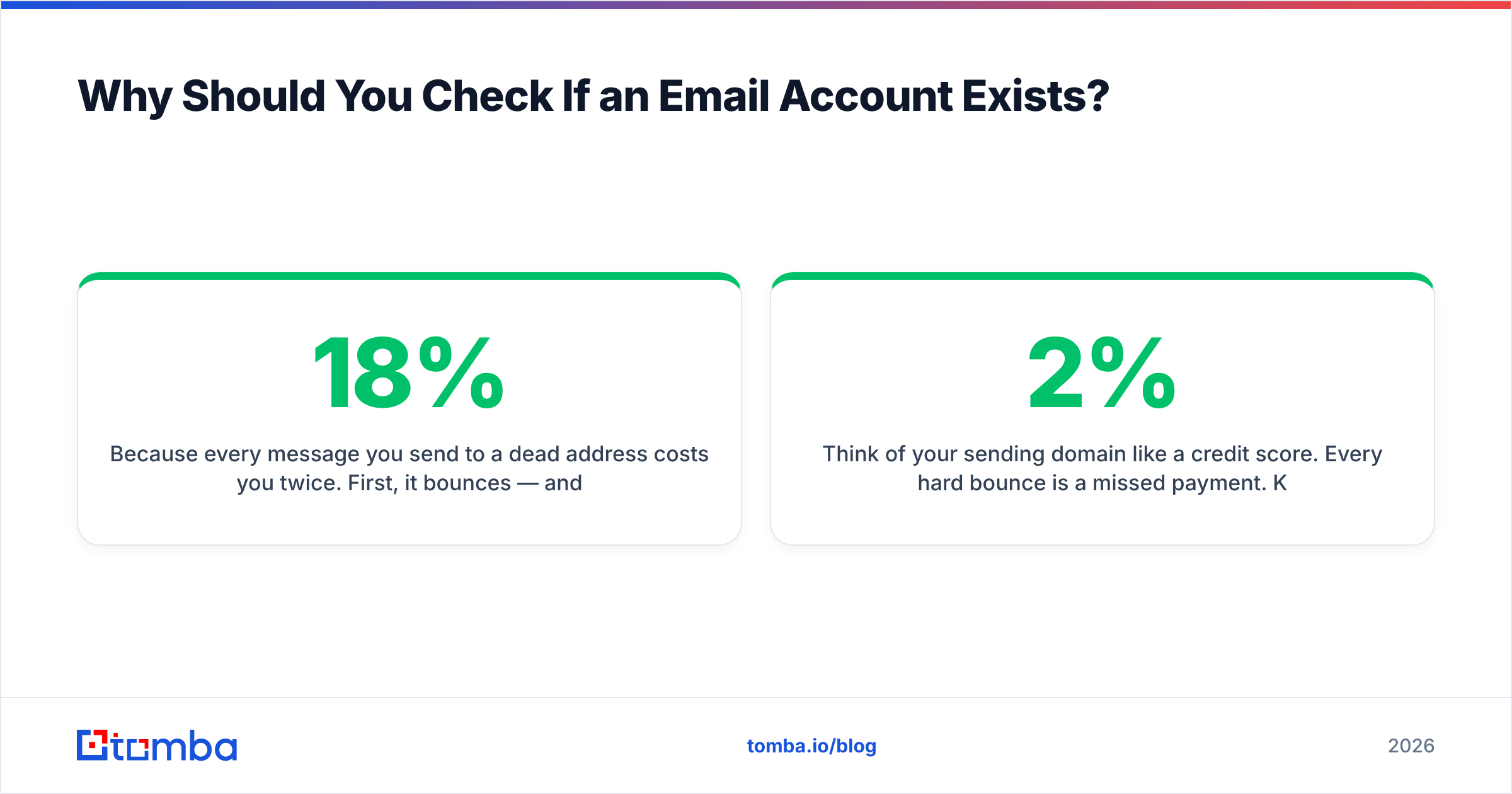
Because every message you send to a dead address costs you twice. First, it bounces — and bounce rate is one of the loudest signals mailbox providers use to decide whether you land in the inbox or the spam folder. Second, it wastes the slot. A 3,000-name list with 18% dead addresses is really a 2,460-name list, and you paid for the difference.
Think of your sending domain like a credit score. Every hard bounce is a missed payment. Keep your bounce rate under 2% and providers treat you as trustworthy; let it drift past 5% and Gmail, Outlook, and Yahoo quietly start throttling you. Verifying addresses up front is the single cheapest way to protect that score.
)
There's a sales angle too. If you run cold outreach, deliverability is your pipeline. A clean list means your reply-rate math is honest — you're measuring how good your message is, not how much of it never arrived. For more on the downstream effects, see Tomba's primer on email deliverability.
How Do You Actually Check If an Email Account Exists?#
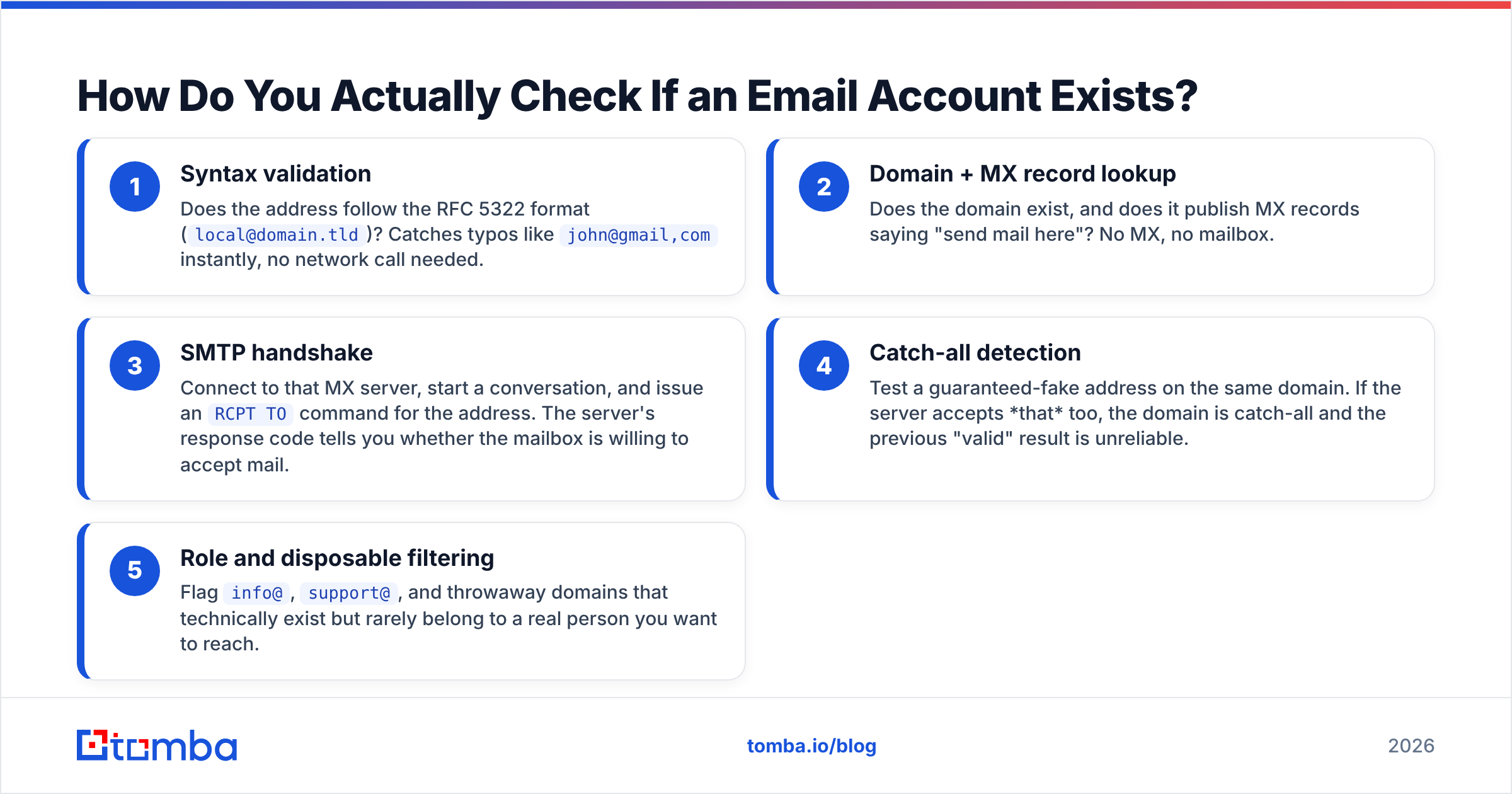
There's no single button. A real verification runs a short pipeline, cheapest checks first, bailing out the moment an address fails. Here's the order that matters:
- Syntax validation — Does the address follow the RFC 5322 format (
local@domain.tld)? Catches typos likejohn@gmail,cominstantly, no network call needed. - Domain + MX record lookup — Does the domain exist, and does it publish MX records saying "send mail here"? No MX, no mailbox.
- SMTP handshake — Connect to that MX server, start a conversation, and issue an
RCPT TOcommand for the address. The server's response code tells you whether the mailbox is willing to accept mail. - Catch-all detection — Test a guaranteed-fake address on the same domain. If the server accepts that too, the domain is catch-all and the previous "valid" result is unreliable.
- Role and disposable filtering — Flag
info@,support@, and throwaway domains that technically exist but rarely belong to a real person you want to reach.
Each layer removes a category of bad address. By the time you reach the SMTP step — the slow, rate-limited one — you've already discarded the garbage for free.
What Is the SMTP Method, and Why Does It Work Without Sending Email?#
An SMTP check is like calling a hotel front desk to ask if a specific guest is registered, then hanging up before you're put through. You learn whether the room is occupied without ever knocking on the door.
Technically, your verifier opens a connection to the recipient's mail server on port 25 and walks through the start of the SMTP conversation:
HELO verifier.example.com
MAIL FROM: <check@verifier.example.com>
RCPT TO: <person@targetdomain.com>
At the RCPT TO line, the server responds with a status code. A 250 means "I'll accept mail for that mailbox" — strong evidence the account exists. A 550 means "no such user." Crucially, the verifier issues QUIT before the DATA command, so no actual message is ever transmitted.
You can run this by hand with a tool like Tomba's SMTP tester for a single address. But there are three reasons manual SMTP testing falls apart at scale:
- Greylisting. Many servers deliberately return a temporary
4xxerror on first contact and only accept on retry, so a naive check reports a false "invalid." - Reputation risk. Hammering port 25 from your own IP looks like a spam reconnaissance attack. Providers will blacklist you.
- Catch-all noise. Plenty of servers answer
250to every address to avoid leaking which mailboxes exist (more on this next).
That's why production verification uses pooled, rotating infrastructure and per-provider logic rather than a raw socket.
What Are Catch-All Domains, and Why Do They Break Verification?#
A catch-all domain accepts mail for every possible address — realperson@, xyzqweasd123@, all of it — and sorts (or trashes) it later. So an SMTP 250 from a catch-all server tells you nothing about whether that specific mailbox is real.
Catch-alls are common at companies that don't want to advertise their valid usernames, or that route everything through a central filter. Roughly 10–15% of business domains run them, which means a meaningful slice of your "verified" list could secretly be guesses.
The fix is two-step: detect that the domain is catch-all (by testing an obviously fake address), then apply deeper signals — historical send data, pattern confidence, engagement history — to grade the address as risky rather than blindly "valid." Tomba's catch-all finder does exactly this so you can keep high-confidence catch-all addresses and drop the coin-flips.
)
Which Method Should You Use? A Side-by-Side Comparison#
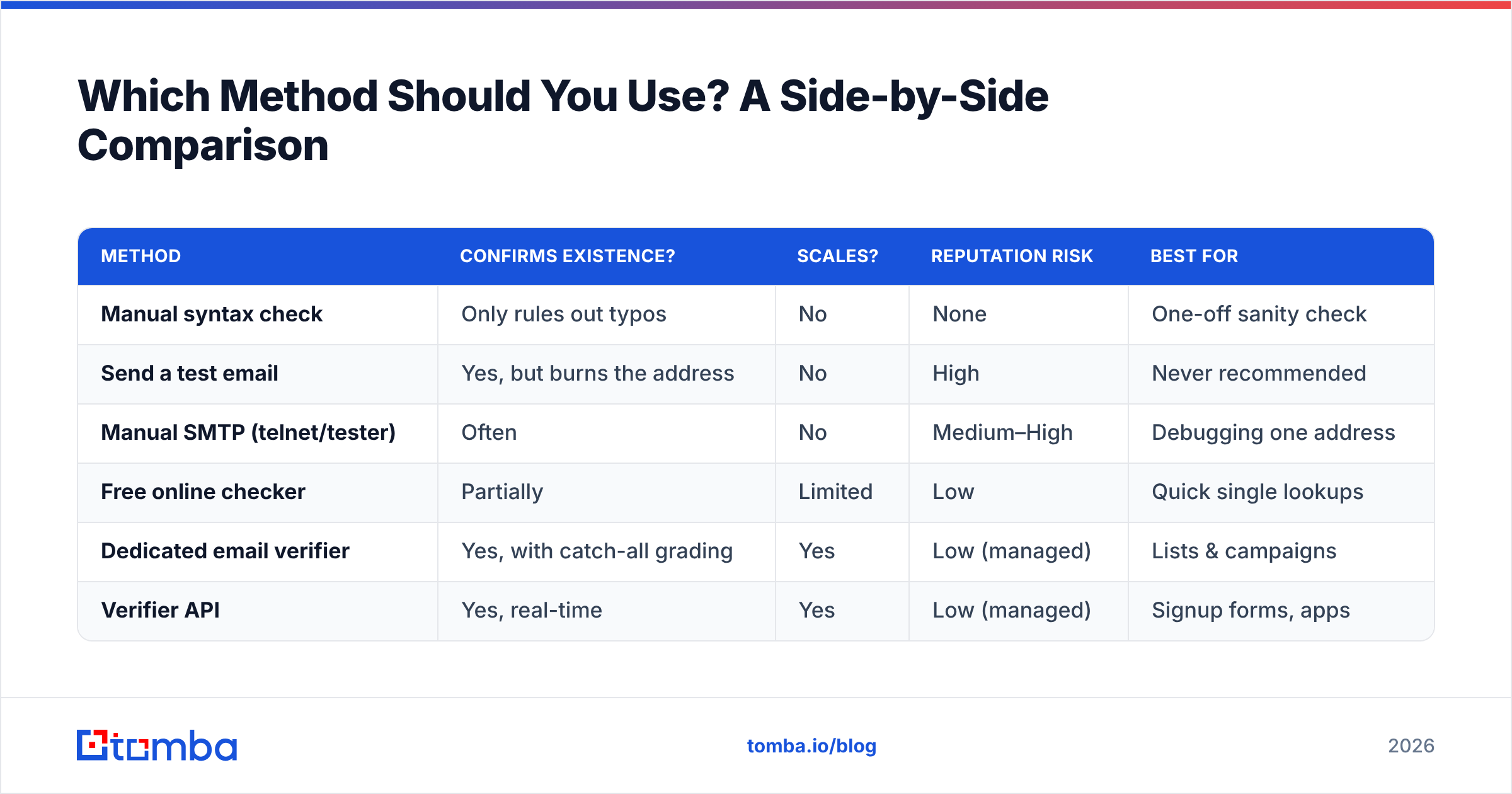
Different situations call for different tools. Here's how the common approaches stack up.
| Method | Confirms existence? | Scales? | Reputation risk | Best for |
|---|---|---|---|---|
| Manual syntax check | Only rules out typos | No | None | One-off sanity check |
| Send a test email | Yes, but burns the address | No | High | Never recommended |
| Manual SMTP (telnet/tester) | Often | No | Medium–High | Debugging one address |
| Free online checker | Partially | Limited | Low | Quick single lookups |
| Dedicated email verifier | Yes, with catch-all grading | Yes | Low (managed) | Lists & campaigns |
| Verifier API | Yes, real-time | Yes | Low (managed) | Signup forms, apps |
For a single address on the spot, a free email checker gets you an answer in seconds. For a list you're about to mail, or a signup field you want to protect at the point of entry, a managed verifier or its email verification API is the only approach that stays safe and accurate at volume.
How Do You Verify a Whole List Without Wrecking Your Domain?#
Upload it to a tool built for the job, let it run the full pipeline in parallel across rotating infrastructure, then download a list scored by status. The point is to never expose your own sending IP to thousands of SMTP probes.
A good bulk run returns each address in one of a few buckets:
- Valid — mailbox confirmed, safe to send.
- Invalid — hard bounce guaranteed, remove it.
- Catch-all / accept-all — graded by confidence; send to the high-confidence ones, hold the rest.
- Unknown — the server wouldn't give a clear answer (greylisting, timeouts); retry later.
- Role / disposable — exists but probably not a person; segment separately.
Tomba's bulk verify handles this end to end, and if you live in spreadsheets you can run the same checks through the Google Sheets add-on or the Excel email finder so the data never leaves your workflow. The general rule: anything over ~50 addresses belongs in a batch tool, not a manual process.
When Should You Re-Check Addresses You've Already Verified?#
Before every major send, and at minimum once a quarter. Email lists rot. People switch jobs, companies fold, mailboxes get deactivated. Industry data from sources like HubSpot puts list decay somewhere between 22% and 30% a year — so a list you verified clean six months ago is already meaningfully stale.
A practical cadence:
- Cold outreach lists — verify within 24 hours of sending. These are highest-risk because you have no prior engagement to lean on.
- Newsletter / marketing lists — re-verify quarterly, plus a sunset rule that removes anyone who hasn't engaged in 6–12 months.
- Signup forms — verify in real time at the point of entry with an API call, so junk never enters the database to begin with.
- CRM enrichment — re-validate when a record hasn't been touched in 90+ days, often alongside data enrichment to refresh the whole contact.
What About Privacy and Legitimate Use?#
Checking whether an address exists is standard, accepted email hygiene — the same mechanism every mail server uses internally to decide whether to accept a message. It becomes a problem only when it's abused: scraping at scale to build spam lists, or probing in ways that violate a platform's terms or local law.
Stay on the right side of it: verify addresses you have a legitimate reason to contact, honor unsubscribes and suppression lists, and comply with GDPR, CAN-SPAM, and CASL where they apply. Reputable verification tools are read-only on the recipient side — they confirm deliverability, they don't read or store mailbox contents. If you're sourcing new contacts rather than cleaning existing ones, pair verification with a compliant B2B database and a clear lawful basis for outreach.
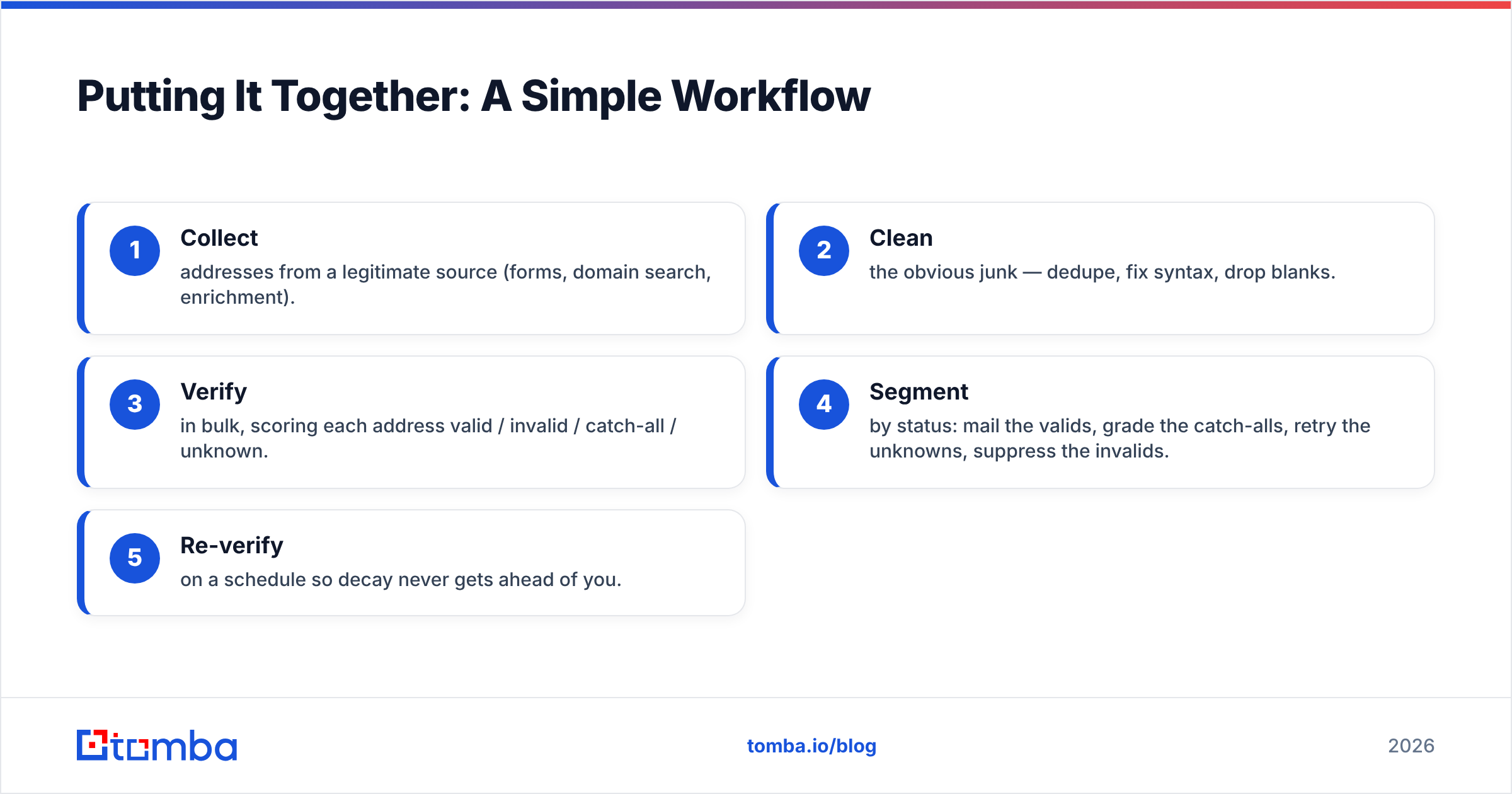
Putting It Together: A Simple Workflow#
Here's the whole thing as a repeatable routine:
- Collect addresses from a legitimate source (forms, domain search, enrichment).
- Clean the obvious junk — dedupe, fix syntax, drop blanks.
- Verify in bulk, scoring each address valid / invalid / catch-all / unknown.
- Segment by status: mail the valids, grade the catch-alls, retry the unknowns, suppress the invalids.
- Re-verify on a schedule so decay never gets ahead of you.
Do this consistently and your bounce rate stays low, your sender reputation stays high, and the metrics you read after each campaign actually mean something.
Verify Smarter With Tomba#
If you want to check if an email account exists — one address or a million — without babysitting SMTP sockets or guessing on catch-all domains, Tomba's Email Finder and its built-in verifier do the full pipeline for you: syntax, MX, SMTP, catch-all grading, and role/disposable filtering, all behind managed, rotating infrastructure that protects your domain. Start free with 25 searches a month, then scale on the Tomba pricing plan that fits your volume — Starter is $49/mo and the Growth plan at $99/mo covers most teams running regular campaigns. Stop sending to ghosts and let your real prospects hear from you.
// get started
Find, verify and enrich your first contacts today
Start on the free plan with 25 searches a month, then scale when your team is ready.
Free plan · No credit card required · GDPR & CCPA
// about the author