How To Check If An Email Exists Without Sending One (2026)
Want to check if an email exists before you hit send? Here are the real methods that work in 2026 — SMTP, MX, catch-all handling — and the traps that get you blocked.
TL;DR
- You can check if an email exists without sending a message by querying the receiving mail server (MX lookup + SMTP handshake) — but doing it by hand is slow and risky for your sending reputation.
- The most reliable signal comes from layering checks: syntax, domain/MX records, SMTP response, and catch-all detection. No single check is enough on its own.
- "Catch-all" domains accept every address, so a green checkmark there means "maybe," not "yes." You need a verifier that flags this honestly.
- Doing high-volume manual SMTP probes will get your IP blocked. An API or bulk tool spreads requests across reputable infrastructure.
- For one-off lookups a free checker is fine; for lists, use a bulk verify flow or an email verification API so you keep bounce rates under 2%.
Why does it matter whether an email exists?#
Bounce rate is the short answer. Every message you send to a dead inbox is a hard bounce, and mailbox providers like Gmail and Outlook read your bounce rate as a trust signal. Cross roughly 2% and your sender reputation starts to slide; cross 5% and you can land on a blocklist that drags down deliverability for your whole domain.
Think of it like a bouncer who remembers faces. Show up once with a fake guest list and you get a warning. Do it repeatedly and you stop getting in at all — even with legitimate guests. Verifying addresses before you send is how you keep your guest list clean.
The business cost is real too. If you pay per-send on an ESP, dead addresses burn budget. If your reps work a list, every invalid contact is wasted research time. And in cold outreach, a spike in bounces can silently route your good emails to spam, so the prospects who do exist never see you.
What does "check if an email exists" actually mean?#
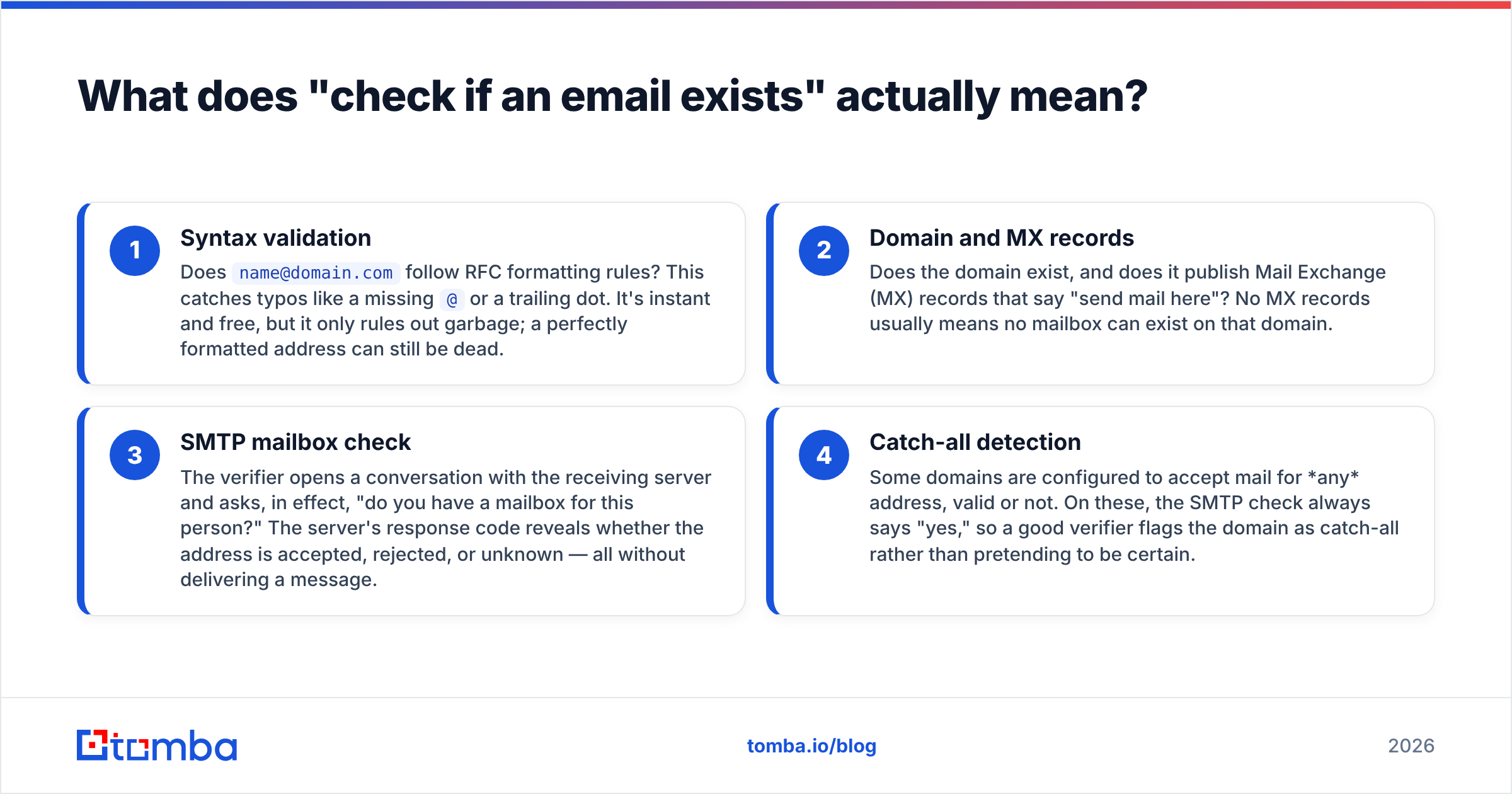
Confirming an email exists means confirming the mailbox is real and able to receive mail — not just that the string looks like an address. There are four distinct layers, and serious verification checks all of them.
- Syntax validation — Does
name@domain.comfollow RFC formatting rules? This catches typos like a missing@or a trailing dot. It's instant and free, but it only rules out garbage; a perfectly formatted address can still be dead. - Domain and MX records — Does the domain exist, and does it publish Mail Exchange (MX) records that say "send mail here"? No MX records usually means no mailbox can exist on that domain.
- SMTP mailbox check — The verifier opens a conversation with the receiving server and asks, in effect, "do you have a mailbox for this person?" The server's response code reveals whether the address is accepted, rejected, or unknown — all without delivering a message.
- Catch-all detection — Some domains are configured to accept mail for any address, valid or not. On these, the SMTP check always says "yes," so a good verifier flags the domain as catch-all rather than pretending to be certain.
A tool that only does step 1 and calls it "verification" is misleading you. Accuracy lives in steps 3 and 4 — and that's exactly where free regex scripts fall apart.
How can you check if an email exists without sending an email?#
The trick is the SMTP handshake: you start the delivery conversation but stop before the message is sent. Here's the sequence a verifier runs:
- Extract the domain and run a DNS query for its MX records.
- Open a socket to the highest-priority mail server on port 25.
- Send
HELO/EHLOto introduce yourself, thenMAIL FROMwith a sender address. - Send
RCPT TO:<address-you're-checking>— this is the real test. - Read the response code. A
250typically means the mailbox exists; a550means it doesn't. Then issueQUITand disconnect. NoDATAcommand, so no email is ever delivered.
If you want to try it manually, you can telnet into a mail server and type these commands yourself. It works — once or twice. The problem is that modern mail servers are defensive. Many providers (Gmail in particular) deliberately return ambiguous responses to anonymous probes, rate-limit by IP, or greylist you. Run a few dozen checks from one address and you'll get throttled or blocked, which poisons your ability to do any lookups from that IP.
This is why programmatic verification routes requests through pools of reputable IPs and respects each provider's quirks. You're not just running commands — you're managing reputation while you do it. For the underlying concepts, Wikipedia's SMTP overview is a solid primer on the protocol these checks ride on.
What are the ways to check if an email exists?#
There's a spectrum from "free and rough" to "paid and precise." Match the method to the stakes.
- Free online checker — Paste a single address into a web tool. Great for a quick sanity check on one contact; not built for lists. Try a free email checker when you just need a yes/no on one address.
- Manual SMTP / telnet — Maximum control, zero cost, but slow, easy to get wrong, and a fast track to getting your IP throttled. Fine for learning, not for production.
- Email verification API — You send addresses programmatically and get structured results (valid, invalid, catch-all, disposable, role-based). This is what you wire into a signup form or CRM. The Tomba API returns a verification status plus a confidence score per address.
- Bulk verification tool — Upload a CSV, get a cleaned file back with each row scored. The right tool for cleaning an existing list before a campaign.
- Real-time form validation — Catch typos and dead addresses at the point of capture, so bad data never enters your database in the first place.
The methods aren't mutually exclusive. A common setup is real-time validation on signup forms plus periodic bulk cleaning of the database, with the API doing both jobs.
Which email verification method should you choose?#
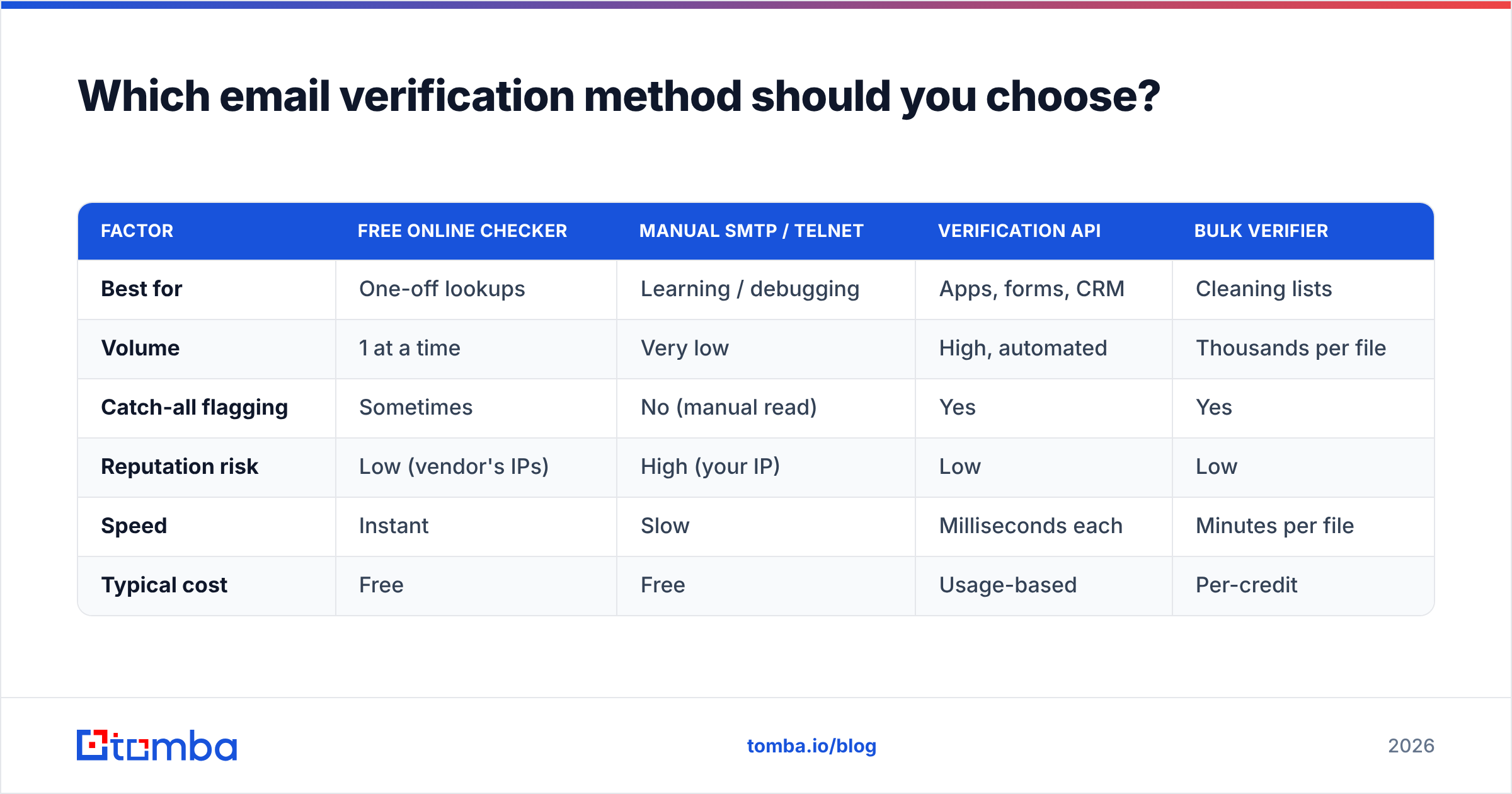
Here's how the main approaches compare on the factors that actually decide which one fits.
| Factor | Free online checker | Manual SMTP / telnet | Verification API | Bulk verifier |
|---|---|---|---|---|
| Best for | One-off lookups | Learning / debugging | Apps, forms, CRM | Cleaning lists |
| Volume | 1 at a time | Very low | High, automated | Thousands per file |
| Catch-all flagging | Sometimes | No (manual read) | Yes | Yes |
| Reputation risk | Low (vendor's IPs) | High (your IP) | Low | Low |
| Speed | Instant | Slow | Milliseconds each | Minutes per file |
| Typical cost | Free | Free | Usage-based | Per-credit |
If you only ever check a handful of addresses, the free tool wins on simplicity. The moment verification becomes part of a workflow — onboarding, lead enrichment, list hygiene — an API or bulk flow pays for itself by protecting your domain reputation and saving manual effort.
How accurate is email verification, really?#
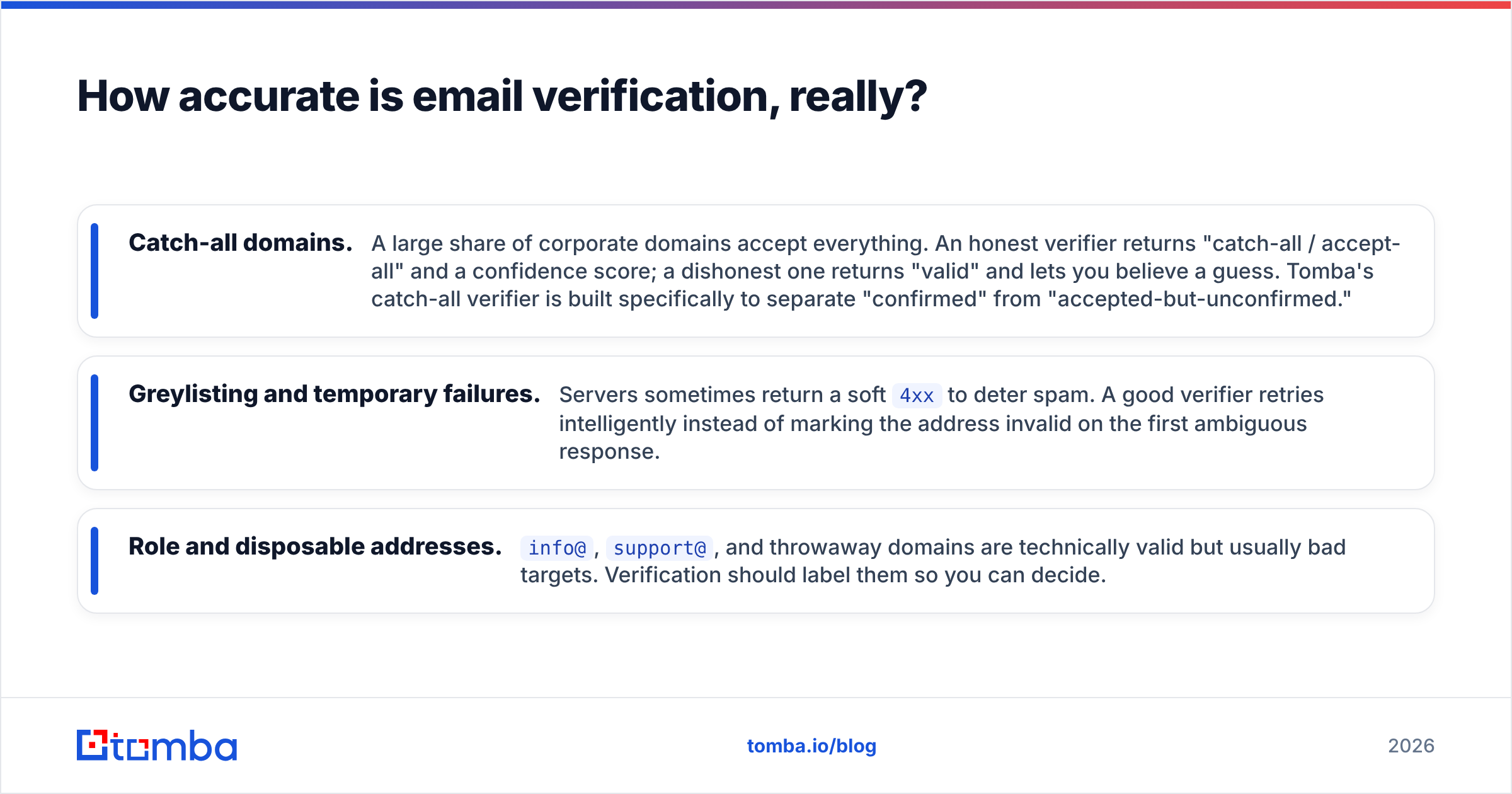
Accuracy depends almost entirely on how a tool handles the gray areas, not the easy cases. Any verifier can spot notanemail or a clearly dead mailbox. The differentiators are:
- Catch-all domains. A large share of corporate domains accept everything. An honest verifier returns "catch-all / accept-all" and a confidence score; a dishonest one returns "valid" and lets you believe a guess. Tomba's catch-all verifier is built specifically to separate "confirmed" from "accepted-but-unconfirmed."
- Greylisting and temporary failures. Servers sometimes return a soft
4xxto deter spam. A good verifier retries intelligently instead of marking the address invalid on the first ambiguous response. - Role and disposable addresses.
info@,support@, and throwaway domains are technically valid but usually bad targets. Verification should label them so you can decide.
Expect a quality verifier to confirm the status of the large majority of standard mailboxes outright, with a clearly labeled "unknown/catch-all" bucket for the rest. Be skeptical of any vendor claiming near-perfect certainty on every address — the protocol simply doesn't allow it on catch-all domains. For neutral third-party views on tool accuracy, vendor profiles on G2 are worth scanning before you commit.

How do you check if an email exists at scale without getting blocked?#
Spread the load and let infrastructure that already has reputation do the talking. When you go from checking one address to checking ten thousand, three things break if you DIY:
- Rate limits. Providers cap how many
RCPT TOprobes they'll answer from one source. Hit the cap and you're throttled or blocked. - Reputation bleed. Aggressive probing from your sending IP can itself hurt your sending reputation — the opposite of what you wanted.
- Ambiguity handling. At scale you need consistent logic for catch-all, greylist, and timeout cases, not gut calls.
A managed bulk flow solves all three. You upload the list, the service distributes checks across vetted IPs with proper backoff, applies retry logic to soft failures, and returns a normalized result for every row. With Tomba you can run this through the bulk verify interface or automate it end-to-end with the email verification API, then push clean contacts straight into tools like HubSpot or Salesforce.
One practical rule: verify close to send time. An address that existed six months ago may have been deactivated since. For active campaigns, re-verify the segment shortly before you launch rather than trusting a stale check.
What about finding the email in the first place?#
Verification answers "does this address exist?" — but often you don't have an address yet, just a name and a company. That's a finding problem, not a verification problem, and the two work as a pair.
The clean workflow is: find, then verify. Use an email finder to get the most likely address for a person from their name and domain, or run a domain search to pull every public address at a company. Each returned address comes with a verification status, so finding and confirming happen in one pass instead of two disconnected steps. If you're working from a spreadsheet, the Google Sheets add-on does both inline.
This pairing is what keeps a prospecting list both complete (you found the contacts) and clean (you confirmed they're reachable) before a single email goes out.
How much does it cost to check if an email exists?#
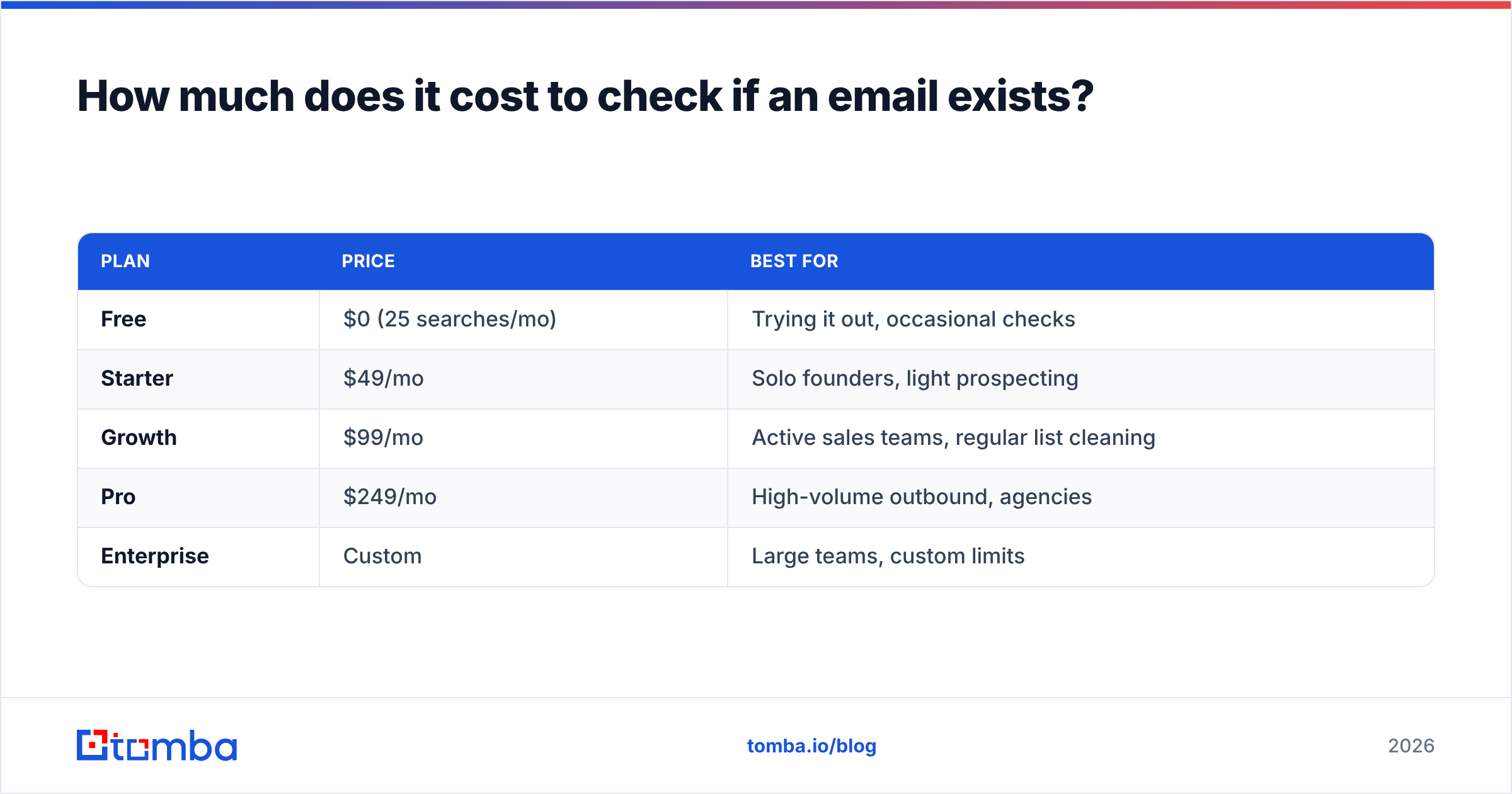
Single checks are free; ongoing verification is priced by volume, and it's cheap relative to the cost of bounces. A quick map of the options:
| Plan | Price | Best for |
|---|---|---|
| Free | $0 (25 searches/mo) | Trying it out, occasional checks |
| Starter | $49/mo | Solo founders, light prospecting |
| Growth | $99/mo | Active sales teams, regular list cleaning |
| Pro | $249/mo | High-volume outbound, agencies |
| Enterprise | Custom | Large teams, custom limits |
You can see the full breakdown on the Tomba pricing page. The math is straightforward: if cleaning a list prevents even a single deliverability incident — the kind that buries your domain in spam for weeks — the subscription has already paid for itself many times over.
Frequently asked questions#
Can you check if an email exists without sending a message?
Yes. An MX lookup plus an SMTP handshake that stops before the DATA command lets the receiving server confirm or deny the mailbox without any email being delivered. Most verification tools and the email verifier work exactly this way.
Why does a verifier say "catch-all" instead of valid or invalid? Because the domain is configured to accept mail for every address, so the server can't tell you whether that specific mailbox exists. A "catch-all" result is the honest answer — the address might be real or might not. Treat it as lower confidence.
Will checking emails hurt my own sender reputation? It can, if you run high-volume SMTP probes from your own sending IP. Using a verification service avoids this because checks are distributed across the vendor's reputation-managed infrastructure, not yours.
How often should I re-verify a list? Verify close to send time, and re-clean any list older than a few months. Mailboxes get deactivated, people change jobs, and yesterday's valid address can be today's bounce.
Is free email verification good enough? For a one-off lookup, yes — a free email checker handles single addresses well. For lists, recurring sends, or anything wired into an app, you want the consistency and catch-all handling of a paid API or bulk tool.
Ready to stop guessing?#
Knowing how to check if an email exists is half the battle — doing it reliably, at scale, without torching your sender reputation is the other half. Start by running your contacts through the Tomba Email Finder, which returns each address already scored for validity, then push clean records into your CRM. You get find-and-verify in one workflow, a clear "valid / catch-all / invalid" verdict on every row, and a free tier to test it on your own list before you commit. Clean data in, fewer bounces out — that's the whole game.
// get started
Find, verify and enrich your first contacts today
Start on the free plan with 25 searches a month, then scale when your team is ready.
Free plan · No credit card required · GDPR & CCPA
// about the author