How to Check If an Email Address Exists Without Sending Email (2026)
Want to know if an inbox is real before you hit send? Here are the SMTP, MX, and API methods that check if an email address exists without sending email — and which ones actually work in 2026.
How to Check If an Email Address Exists Without Sending Email (2026)
You can confirm whether an email address is real without ever sending a message to it. The trick is to ask the receiving mail server directly — through MX lookups, an SMTP handshake, or a verification API — instead of firing off a test email and waiting for a bounce.
This matters because every test send leaves a footprint. Bounce a few addresses and your sender reputation drops; bounce a lot and your domain lands on a blocklist. Checking quietly, before any campaign goes out, keeps your list clean and your inbox placement high.
TL;DR#
- Yes, it's possible. MX record checks, SMTP handshakes, and verification APIs all confirm an inbox exists without delivering a message.
- SMTP verification is the core technique — your script opens a conversation with the recipient's mail server and stops right before
DATA, so nothing is actually sent. - Catch-all domains and greylisting break naive checks. A reliable workflow needs catch-all detection, retries, and risk scoring — not a single SMTP ping.
- APIs beat DIY scripts for scale, because mailbox providers throttle and block raw SMTP probes from unknown IPs.
- A real verifier returns deliverable / risky / invalid, not a flat yes/no, so you can route risky addresses instead of blindly mailing them.
Why would you check if an email exists without sending one?#
The short answer: bounces are expensive. Mailbox providers like Gmail and Outlook treat your bounce rate as a trust signal. A spike tells them you're mailing a stale or purchased list, and they respond by routing your mail to spam — or rejecting it outright.
Think of it like knocking on a door versus mailing a package. If you mail a package to a fake address, the postal service logs a failed delivery against you. If you just knock and listen for someone home, no record is created. Email verification is the knock.
You'd want a no-send check in several situations:
- Before a cold campaign — clean the list so your email deliverability stays intact and your first send doesn't tank your domain.
- At signup — block typo'd and fake addresses in real time so you never collect dead contacts.
- List re-engagement — re-verify an old database before you reactivate it, since 2–3% of B2B addresses go stale every month.
- CRM hygiene — strip invalid rows so your reps stop chasing ghosts and your sender reputation holds.
)
How does email verification work without sending a message?#
A real email check walks through a short ladder of tests. Each step is cheap, and a failure at any rung usually means the address is bad — so you stop early and save work.
- Syntax check — Does the address follow RFC 5322 rules?
john@@acmefails before any network call. - Domain + MX record lookup — Does the domain resolve, and does it publish Mail Exchange (MX) records? No MX means the domain can't receive mail at all.
- SMTP handshake — Your client connects to the recipient's mail server on port 25, says
HELO, issuesMAIL FROM, thenRCPT TO:<target@domain>. The server replies250(accepted) or550(no such user). You disconnect before sendingDATA, so no email is delivered. - Catch-all detection — Some domains accept every address to avoid leaking which mailboxes exist. The check probes a random fake address; if that's also accepted, the domain is catch-all and the result is "risky," not "valid."
- Risk scoring — Disposable domains, role accounts (
info@,sales@), greylisting, and full mailboxes get flagged so you can decide how to treat them.
That SMTP handshake in step 3 is the heart of it. You're having a conversation with the mail server and hanging up one sentence before the actual message — like asking "Is Jane at this address?" and leaving once they say yes, without handing over the letter.
If you want to see the format guessing layer in action, tools like the email permutator generate likely address patterns, and a company email pattern checker infers a domain's structure — both pair naturally with the verification ladder above.
What methods can you use to check if an email address exists?#
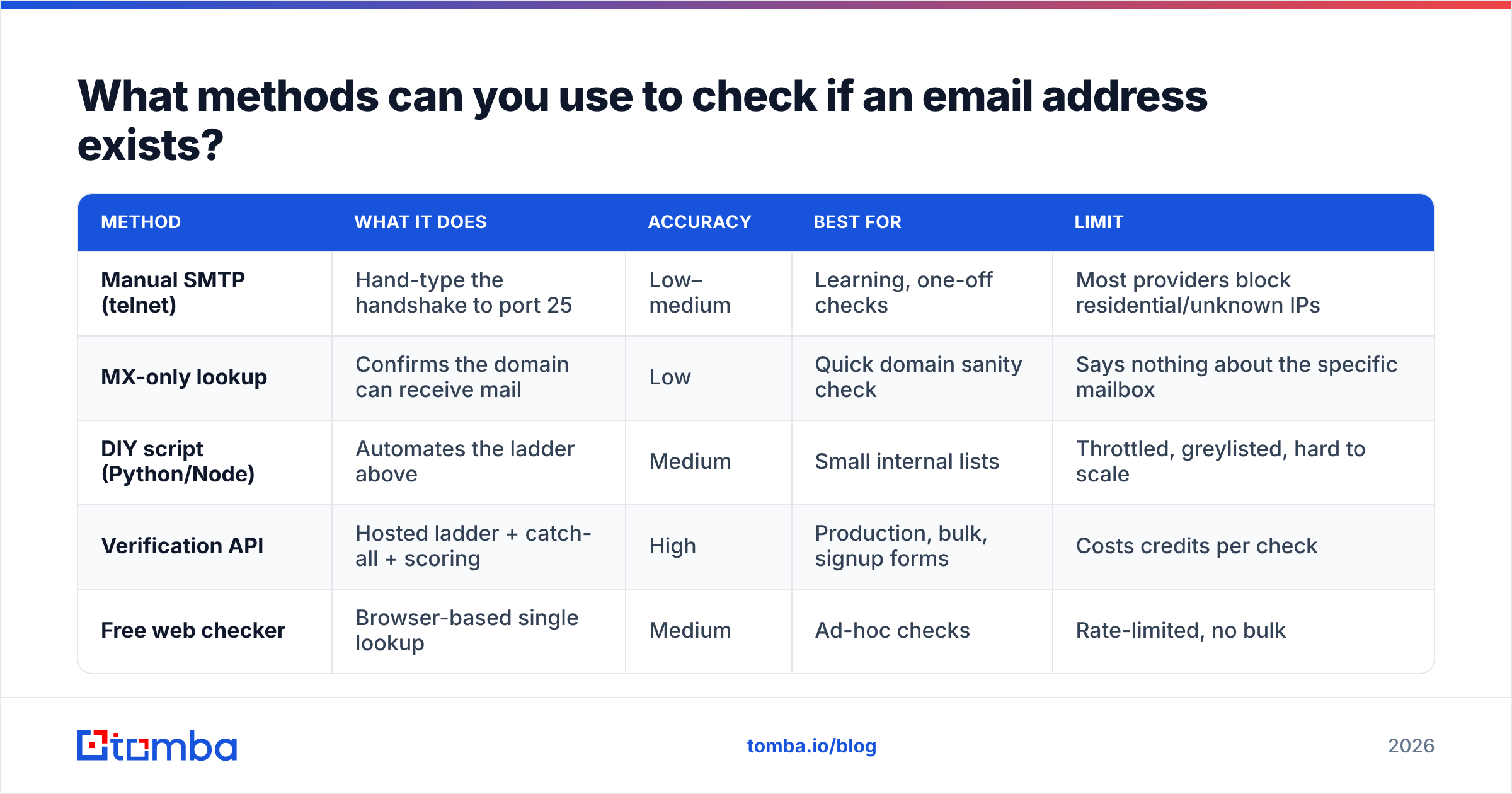
There are four practical routes, from a quick manual probe to a production-grade API. Each trades effort for reliability.
| Method | What it does | Accuracy | Best for | Limit |
|---|---|---|---|---|
| Manual SMTP (telnet) | Hand-type the handshake to port 25 | Low–medium | Learning, one-off checks | Most providers block residential/unknown IPs |
| MX-only lookup | Confirms the domain can receive mail | Low | Quick domain sanity check | Says nothing about the specific mailbox |
| DIY script (Python/Node) | Automates the ladder above | Medium | Small internal lists | Throttled, greylisted, hard to scale |
| Verification API | Hosted ladder + catch-all + scoring | High | Production, bulk, signup forms | Costs credits per check |
| Free web checker | Browser-based single lookup | Medium | Ad-hoc checks | Rate-limited, no bulk |
A few notes on the trade-offs:
- Telnet/manual works for understanding the protocol, but Gmail, Outlook, and most providers now refuse SMTP probes from IPs without sending history. You'll get timeouts or generic
250replies that tell you nothing. - MX-only is fine to reject obviously dead domains, but a valid MX record doesn't mean
john@acme.comexists — only thatacme.comcan receive mail. - DIY scripts are educational and cheap at tiny volume. At scale they hit greylisting (temporary
4xxdeferrals), IP reputation walls, and catch-all ambiguity you have to handle yourself. - APIs absorb all of that — rotating IPs, retry logic, catch-all probing, and disposable-domain databases — and hand back a clean verdict. This is what a tool like the Tomba email verifier does under the hood.
Can you really do it with telnet? (a quick walkthrough)#
Yes — and seeing it once makes the whole concept click. Here's the classic manual handshake:
$ telnet mail.example.com 25
HELO yourdomain.com
MAIL FROM:<you@yourdomain.com>
RCPT TO:<target@example.com>
If the server answers 250 2.1.5 Recipient OK, the mailbox likely exists. If it answers 550 5.1.1 User unknown, it doesn't. You then type QUIT and disconnect — no DATA, no message, nothing delivered.
The catch: this works reliably only against smaller, self-hosted mail servers. Major providers return deliberately vague responses, defer you with greylisting, or block your IP entirely. That's exactly why standalone scripts struggle and hosted verifiers exist. According to RFC 5321, servers are even permitted to accept all RCPT TO commands and bounce later — which is the protocol-level reason catch-all domains are so common.
)
What about catch-all domains and other gotchas?#
Catch-all domains are the single biggest reason naive checks return false positives. A catch-all is configured to accept mail for any local part — ceo@, xyzqwerty123@, all of it — so the SMTP RCPT TO always returns 250. Your script thinks every address is valid when it can't actually tell.
Here's what separates a real verification workflow from a toy one:
- Catch-all probing — Send a
RCPT TOfor a guaranteed-fake address. If it's accepted, flag the domain catch-all and downgrade results to "risky." A dedicated catch-all verifier does this automatically and, where possible, uses additional signals to recover a confident verdict. - Greylisting handling — A
4xxreply means "try again later," not "invalid." You must queue a retry after a delay; treating it as a failure throws away good addresses. - Role-account flags —
support@,admin@, andbilling@are real but rarely good outreach targets. Score them separately. - Disposable domains — Addresses from temporary-mail services pass SMTP but are worthless. A maintained blocklist catches them.
- Full or frozen mailboxes — Some servers return soft errors when a box is over quota; that's "risky," not "invalid."
Handling all five correctly by hand is a real project. It's the gap between "I wrote a telnet loop" and "I trust this number before a 50,000-contact send."
How accurate is no-send verification, and what's the catch?#
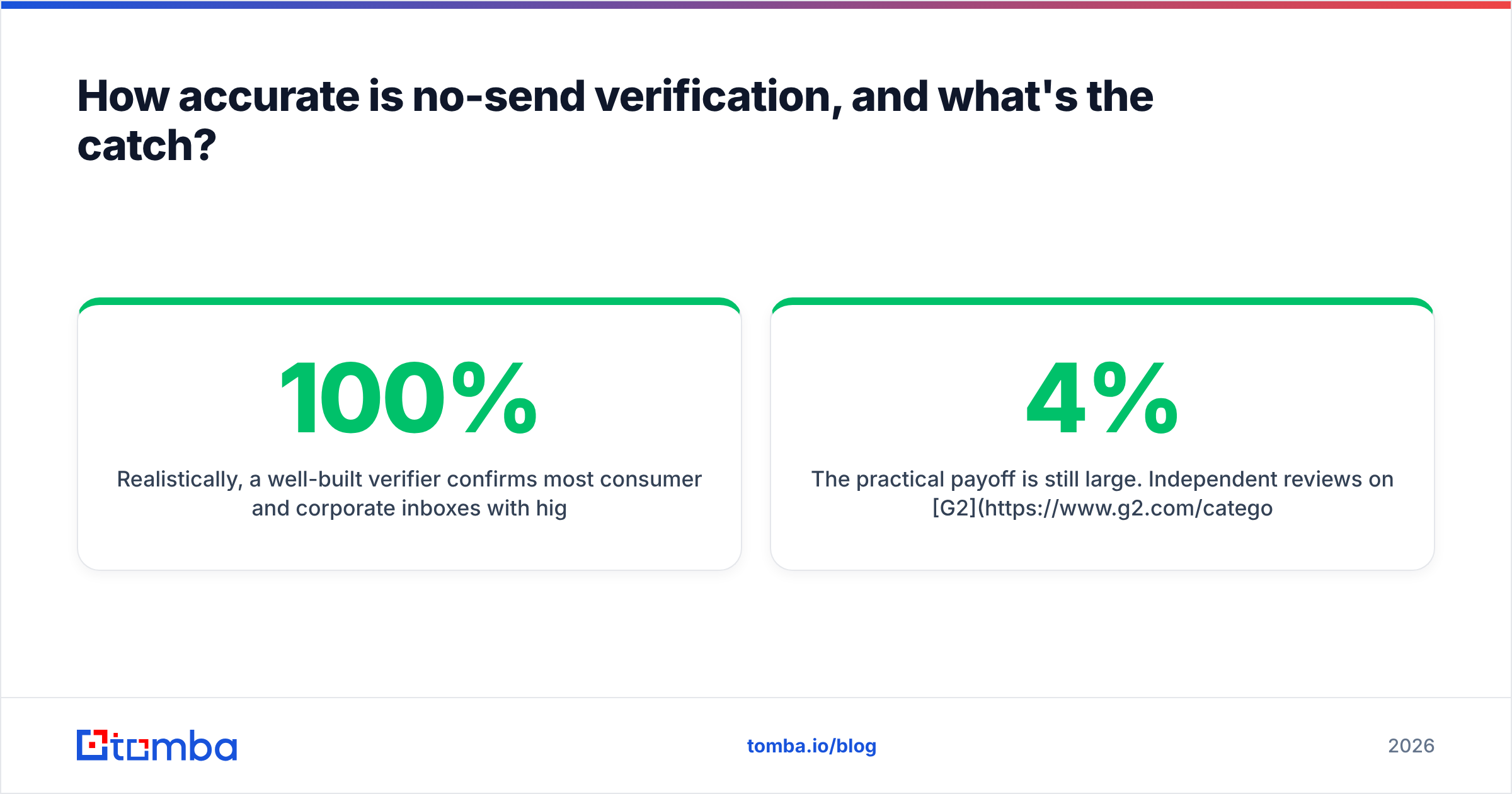
Realistically, a well-built verifier confirms most consumer and corporate inboxes with high confidence — but no method hits 100%, and anyone promising that is overselling. Three honest limits:
- Catch-all domains cap certainty. When a server accepts everything, the best truthful answer is "risky," not "valid." Treat any tool claiming perfect accuracy on catch-alls with suspicion.
- Provider variance. Gmail and Outlook behave differently from a small business's self-hosted Postfix box. Good verifiers tune per-provider; bad ones use one rule for all.
- Point-in-time truth. An address valid today can be deactivated next month. Re-verify before major sends rather than trusting a six-month-old result.
The practical payoff is still large. Independent reviews on G2 consistently show that teams running list verification before sends cut bounce rates dramatically and recover inbox placement — the difference between a 4% bounce rate that triggers throttling and a sub-1% rate that keeps you trusted.
How do you check email addresses in bulk?#
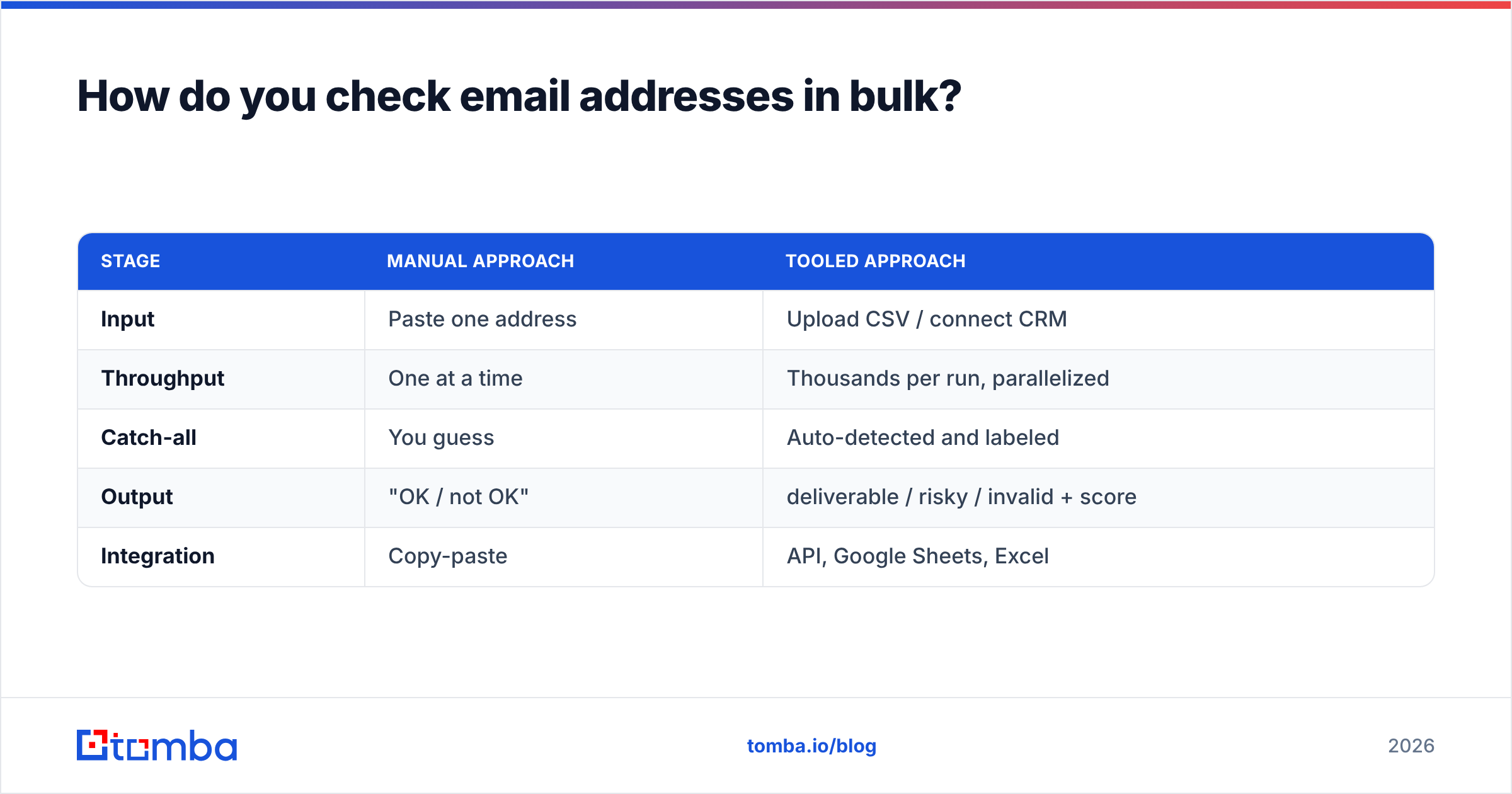
Single checks are fine for a signup form. For a list, you want batch processing with concurrency, retry queues, and a downloadable report. The pattern looks like this:
| Stage | Manual approach | Tooled approach |
|---|---|---|
| Input | Paste one address | Upload CSV / connect CRM |
| Throughput | One at a time | Thousands per run, parallelized |
| Catch-all | You guess | Auto-detected and labeled |
| Output | "OK / not OK" | deliverable / risky / invalid + score |
| Integration | Copy-paste | API, Google Sheets, Excel |
For most teams the right move is a bulk email finder and verifier combo: find the addresses, verify them in the same pass, and export only the deliverable rows. If you're enriching records rather than starting from a list, data enrichment can attach and validate emails to existing CRM contacts in one step.
If you only need an occasional one-off, a free email checker handles a single lookup in the browser without any setup.
Which approach should you pick?#
Match the method to your volume and stakes:
- Just curious / learning the protocol → telnet by hand once, then move on. It won't scale, but it teaches you what's happening.
- A handful of addresses, occasionally → a free web-based email checker. No code, no commitment.
- A signup form or app → a verification API call on submit, so you reject bad addresses before they enter your database.
- A campaign list or CRM cleanup → bulk verification with catch-all detection and risk scoring. This is where DIY scripts fall apart and a hosted verifier earns its cost.
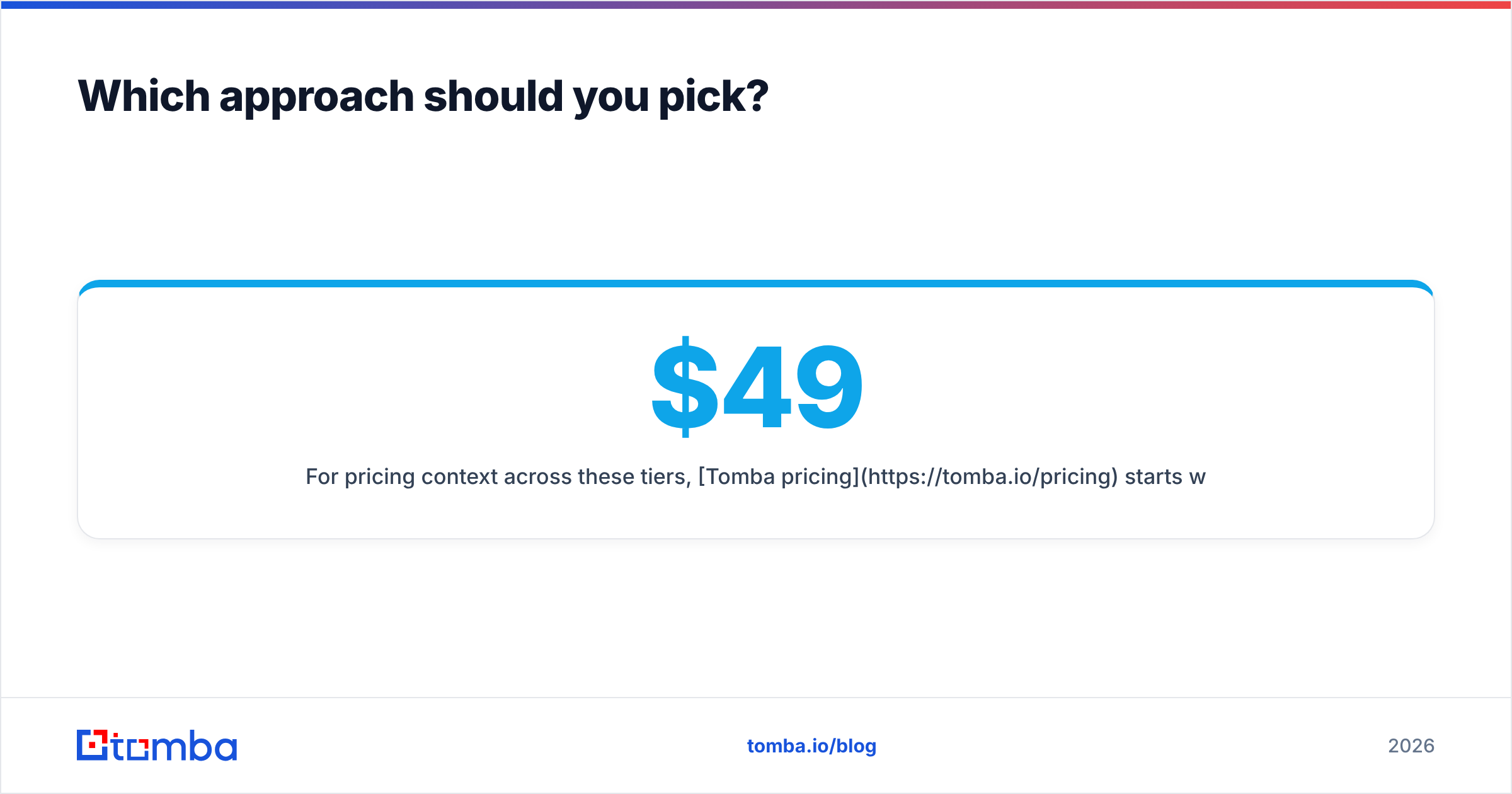
For pricing context across these tiers, Tomba pricing starts with a free plan (25 searches/month), then Starter at $49/mo, Growth at $99/mo, and Pro at $249/mo — so you can start with single checks and scale into bulk and API usage without switching tools.
Frequently asked questions#
Does verifying an email send anything to the recipient?
No. A proper SMTP verification stops before the DATA command, so the recipient never receives a message and nothing appears in their inbox.
Why does my telnet check return "OK" for fake addresses? The domain is almost certainly a catch-all that accepts every address. You need catch-all detection to get a trustworthy verdict.
Is it legal to check if an email exists? Verification itself queries publicly reachable mail servers and is widely used. Sending the mail afterward is what's governed by laws like CAN-SPAM and GDPR — so verify freely, but follow consent rules when you actually mail.
Can I check Gmail and Outlook addresses this way? Yes, but they block raw probes from unknown IPs, so DIY scripts often fail. A verifier with established sending infrastructure and per-provider logic handles them reliably.
How often should I re-verify a list? Before any major send, and at least quarterly for active databases. B2B addresses decay roughly 2–3% per month as people change jobs.
Start checking inboxes the safe way#
If you want to confirm an address is real before you ever hit send, skip the brittle telnet loops and let a hosted ladder do the work. The Tomba Email Finder and its built-in verifier run the full sequence — syntax, MX, SMTP handshake, catch-all probing, and risk scoring — and hand back a clean deliverable / risky / invalid verdict you can act on. Start on the free tier, verify your next list before you mail it, and watch your bounce rate stay where it belongs: near zero. Your sender reputation will thank you.
// get started
Find, verify and enrich your first contacts today
Start on the free plan with 25 searches a month, then scale when your team is ready.
Free plan · No credit card required · GDPR & CCPA
// about the author