Check If Email Domain Is Valid: 2026 Methods & Tools
A valid-looking address can still bounce. Here is how to check if an email domain is valid in 2026 — MX records, SMTP, DNS, and the tools that automate it.

Sending to a dead domain is the fastest way to torch your sender reputation. The address might look perfect — firstname@company.com — but if the domain has no mail servers, the message bounces, and a few hundred bounces in a row is how mailbox providers decide you are a spammer.
This guide shows you exactly how to check if an email domain is valid before you hit send: what "valid" actually means, the manual DNS and SMTP checks, and the tools that do it at scale.
TL;DR#
- A valid email domain resolves in DNS and publishes MX (or fallback A) records that accept mail. No MX, no delivery.
- Three layers to check: domain exists (DNS/A record), domain accepts mail (MX record), and the specific mailbox exists (SMTP/verification).
- Manual checks (
dig,nslookup,whois) are fine for one address; they do not scale and they cannot see catch-all or greylisting behavior. - An email verifier automates all three layers plus syntax, disposable detection, and catch-all flags in one call.
- Verify before every send. Domains expire, MX records change, and a list that was clean in January bounces in June.
What does it mean for an email domain to be valid?#
A domain is valid for email when it both exists in DNS and is configured to receive mail. Those are two separate facts, and skipping either one is where most bounce problems start.
Think of it like mailing a physical letter. First the street has to exist (the domain resolves). Then there has to be a mailbox at the address that someone actually empties (an MX record pointing to a live mail server). A street with no house, or a house with no mailbox, gets your letter returned to sender.
There are three distinct checks, from cheapest to most thorough:
- Domain resolution — Does the domain have a DNS record at all? An unregistered or expired domain fails here instantly.
- Mail acceptance (MX records) — Does the domain publish mail exchange records telling the world which servers handle its email? A parked domain often resolves but has no MX.
- Mailbox existence — Does the specific inbox (
jane@) exist on that server? This needs an SMTP-level check or a verification service.
Most people conflate "the domain loads in a browser" with "the domain accepts email." They are not the same. A company can run its website on one provider and route mail through Google Workspace, Microsoft 365, or nothing at all.
How do you check if an email domain is valid manually?#
Use DNS lookup tools to read the domain's MX records — if MX records exist and point to reachable servers, the domain can receive mail. Here are the commands, in order of usefulness.
Check MX records with dig or nslookup#
On macOS or Linux, dig is the cleanest:
dig MX example.com +shortA valid mail domain returns one or more lines like 10 aspmx.l.google.com. — a priority number and a server hostname. An empty response means no MX records, which usually means the domain is not set up to receive standard email.
On Windows, use nslookup:
nslookup -type=MX example.comConfirm the domain resolves at all#
If MX comes back empty, check whether the domain even exists:
dig A example.com +shortNo A record and no MX record together is a strong signal the domain is dead or unregistered. Per the email RFCs, a domain with an A record but no MX can still receive mail at that address as a fallback — but in 2026 that is rare for legitimate business mail.
Check registration with whois#
whois example.comLook at the expiration date. A domain that expired last week will stop accepting mail even though it resolved fine a month ago. This is why a "clean" list goes stale.
Test the mail server with SMTP (advanced)#
You can open a raw SMTP conversation to see if the server accepts the recipient:
telnet aspmx.l.google.com 25Then issue HELO, MAIL FROM, and RCPT TO commands. A 250 response suggests the mailbox is accepted; a 550 suggests it does not exist. In practice this is unreliable — most providers greylist, rate-limit, or return ambiguous codes to block exactly this kind of probing. Treat manual SMTP as a hint, not a verdict.
Why manual checks aren't enough at scale#
Manual lookups answer "does this domain accept mail" for one domain at a time. They fall apart the moment you have a list, and they miss several failure modes entirely.
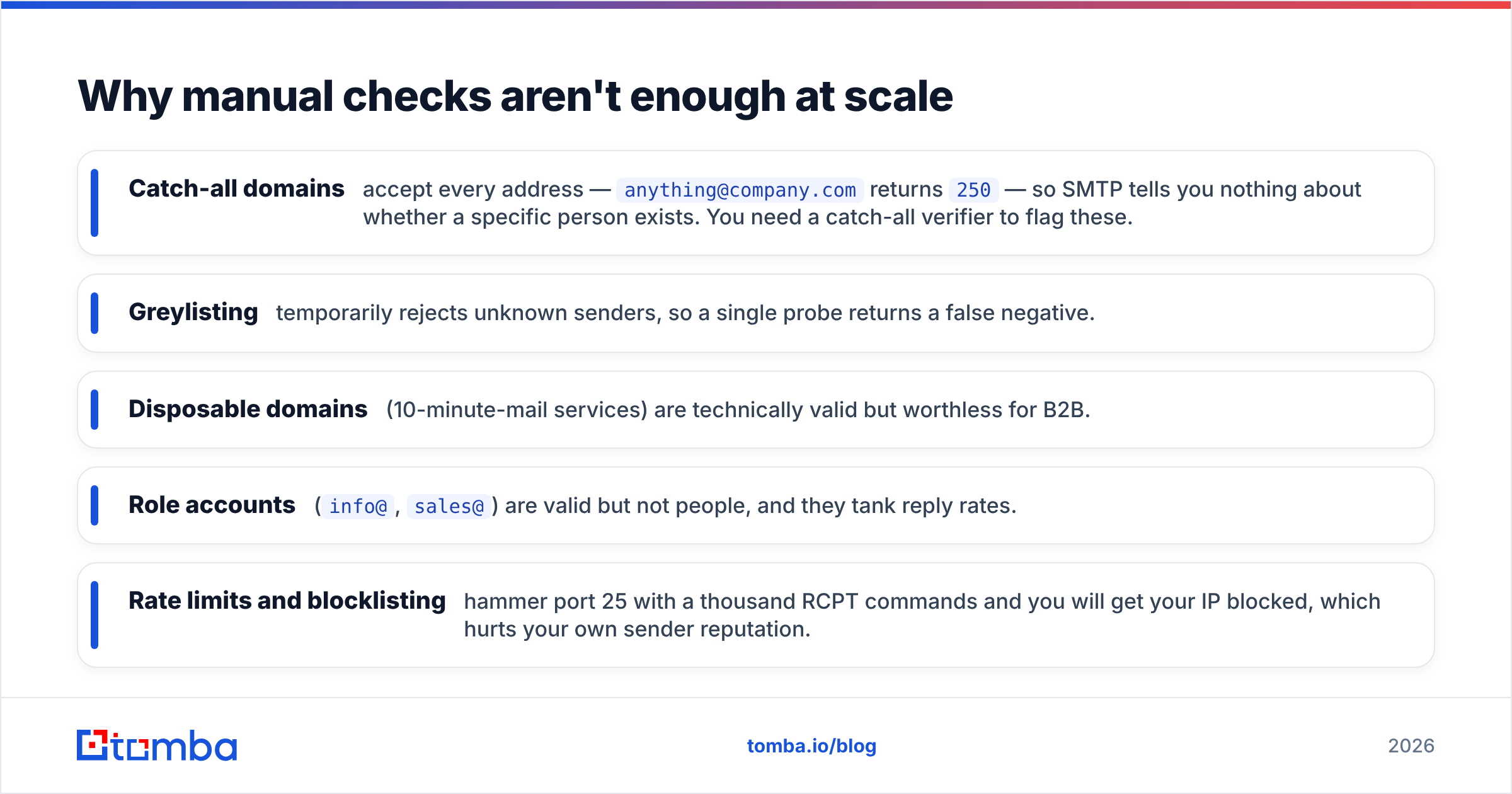
- Catch-all domains accept every address —
anything@company.comreturns250— so SMTP tells you nothing about whether a specific person exists. You need a catch-all verifier to flag these. - Greylisting temporarily rejects unknown senders, so a single probe returns a false negative.
- Disposable domains (10-minute-mail services) are technically valid but worthless for B2B.
- Role accounts (
info@,sales@) are valid but not people, and they tank reply rates. - Rate limits and blocklisting — hammer port 25 with a thousand RCPT commands and you will get your IP blocked, which hurts your own sender reputation.
This is the gap automated verification fills. It batches the DNS and MX checks, handles greylisting with retries, classifies catch-all and disposable domains, and never exposes your sending IP to blocklists.
Manual checks vs. an email verifier#
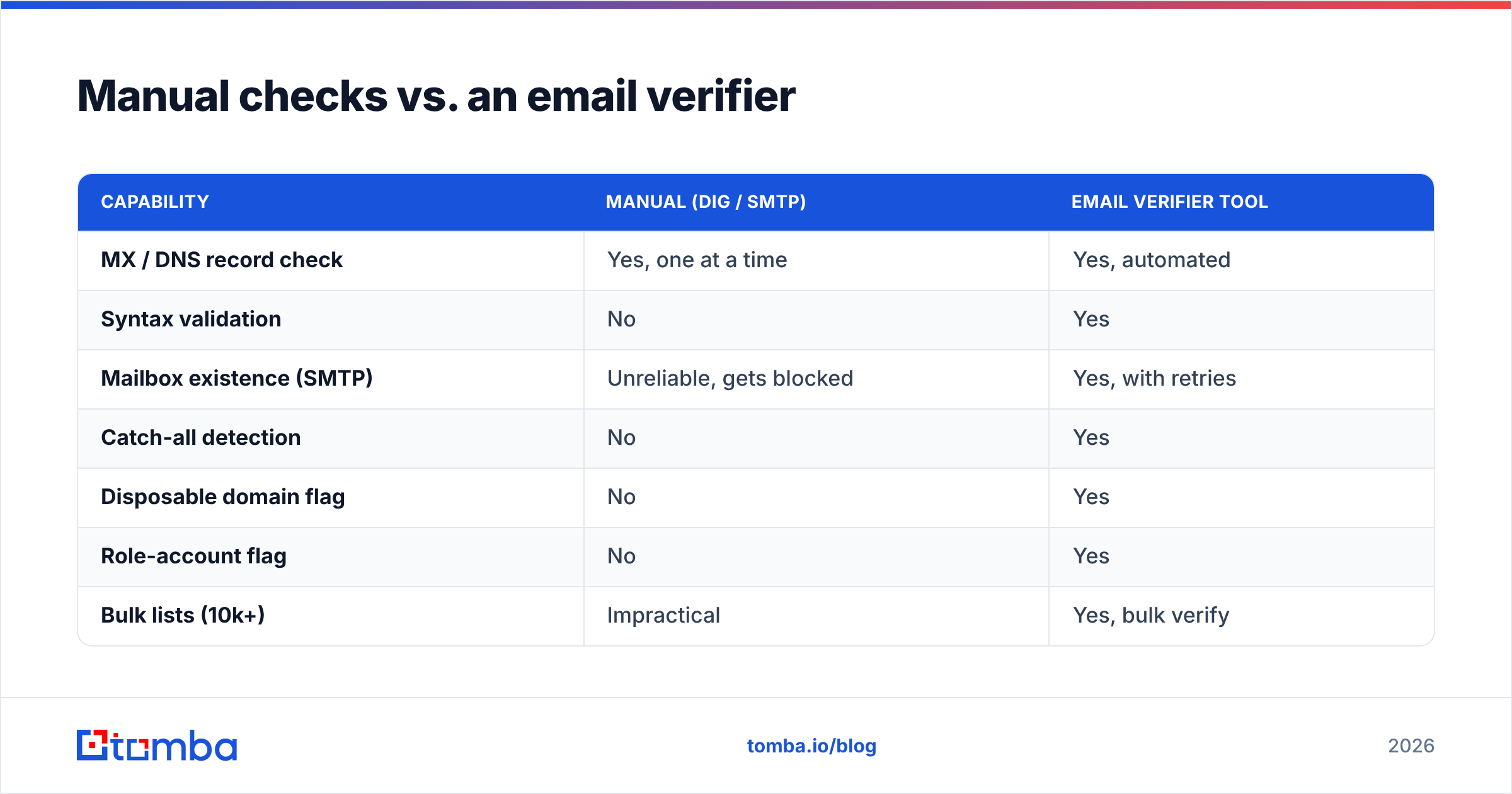
| Capability | Manual (dig / SMTP) | Email Verifier Tool |
|---|---|---|
| MX / DNS record check | Yes, one at a time | Yes, automated |
| Syntax validation | No | Yes |
| Mailbox existence (SMTP) | Unreliable, gets blocked | Yes, with retries |
| Catch-all detection | No | Yes |
| Disposable domain flag | No | Yes |
| Role-account flag | No | Yes |
| Bulk lists (10k+) | Impractical | Yes, bulk verify |
| Risk to your sender IP | High (blocklisting) | None |
| Speed per 1,000 addresses | Hours | Seconds |
The manual route is genuinely useful for a quick sanity check on a single domain. Past a handful of addresses, the math stops working.
How do email verification tools check domain validity?#
They run the same DNS, MX, and SMTP logic you would run by hand — but in parallel, with retry handling, and cross-referenced against databases of catch-all, disposable, and role-based domains. A typical verification pass returns a status in milliseconds.
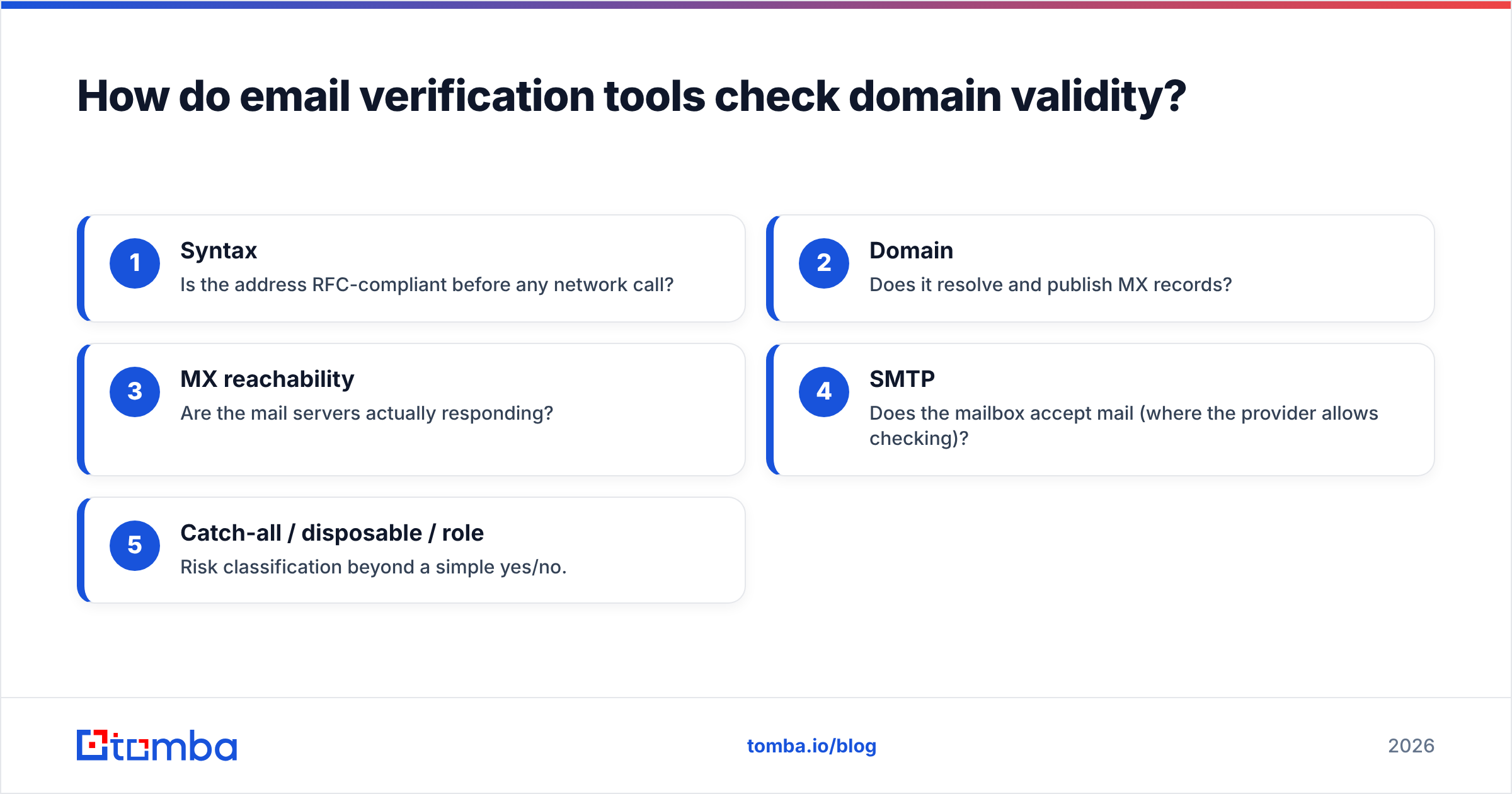
A good verifier reports a layered result:
- Syntax — Is the address RFC-compliant before any network call?
- Domain — Does it resolve and publish MX records?
- MX reachability — Are the mail servers actually responding?
- SMTP — Does the mailbox accept mail (where the provider allows checking)?
- Catch-all / disposable / role — Risk classification beyond a simple yes/no.
The output is usually deliverable, risky, or undeliverable, with sub-reasons. That nuance matters: a risky catch-all is not the same as a hard undeliverable, and you may choose to send to the former with caution.
If you also need to find the right address rather than just check it, pair verification with domain search to pull every known address on a company's domain, then verify the results in the same workflow.
Which tool should you use to check email domain validity?#
The right pick depends on volume and whether you also need finding, enrichment, or just verification. Here is how a few common approaches compare.
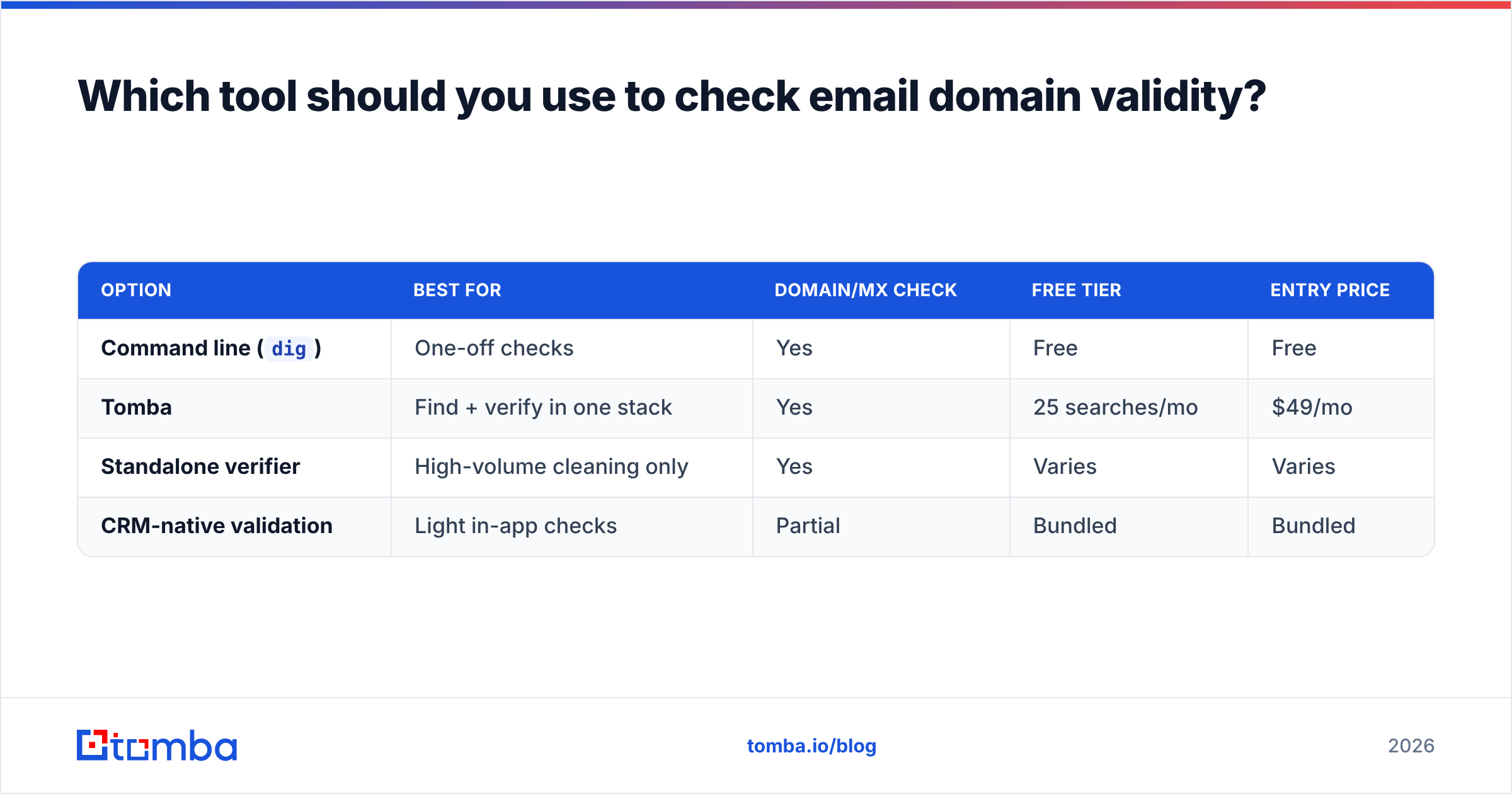
| Option | Best for | Domain/MX check | Free tier | Entry price |
|---|---|---|---|---|
Command line (dig) |
One-off checks | Yes | Free | Free |
| Tomba | Find + verify in one stack | Yes | 25 searches/mo | $49/mo |
| Standalone verifier | High-volume cleaning only | Yes | Varies | Varies |
| CRM-native validation | Light in-app checks | Partial | Bundled | Bundled |
Tomba's verification covers syntax, domain, MX, SMTP, catch-all, and disposable flags, and it shares one credit pool with the finder and enrichment tools. Pricing runs Free (25 searches/mo), Starter $49/mo, Growth $99/mo, and Pro $249/mo — full Tomba pricing is on the site. For developers, the same checks are available through the Tomba API, so you can validate a domain at the moment a form is submitted rather than after the bounce.
If you want a zero-commitment gut check first, the free email checker validates a single address — syntax and domain — without an account.
How often should you re-check email domains?#
Re-verify any list older than 90 days, and verify in real time at the point of capture. Domain validity is not permanent. Companies get acquired and retire domains, registrations lapse, and providers change MX records during migrations. An address that was deliverable in Q1 can be dead by Q3.
Practical cadence:
- At capture — Validate web-form and signup emails synchronously via API so bad data never enters your database.
- Before each campaign — Run the target segment through bulk verification the day you send, not the week before.
- Quarterly hygiene — Re-verify your whole active list every 90 days to protect email deliverability.
Skipping this is the single most common cause of a slowly rotting bounce rate. Mailbox providers like Google and Microsoft weigh your bounce history heavily; a clean list is not a one-time project, it is maintenance.
What about catch-all and parked domains?#
Catch-all domains accept everything, so a domain-level check passes but tells you nothing about the individual mailbox — and parked domains resolve but reject all mail. These two edge cases break naive validation.
For catch-all domains, the MX check is green and SMTP returns 250 for any address, so you cannot confirm whether jane@ specifically exists. A dedicated catch-all finder uses pattern matching and historical data to raise or lower confidence instead of guessing.
For parked or "for sale" domains, you will often see an A record (the parking page) but missing or non-responsive MX records. Always weight the MX result over the A record when deciding whether mail will actually land.
If you are doing your own deliverability tuning, also confirm the sending side is healthy — a quick SPF record check on your own domain prevents the reverse problem, where valid recipients reject your mail.
Common mistakes when validating email domains#
- Trusting the website. A loading homepage proves the domain resolves, not that it accepts mail. Check MX, not the browser.
- Stopping at syntax.
jane@company.comis syntactically perfect and may still be undeliverable. Syntax is layer one of five. - Probing SMTP from your sending IP. You risk getting blocklisted. Let a verifier use its own infrastructure.
- Treating catch-all as deliverable. It is
risky, notsafe. Segment and send carefully. - Verifying once and never again. Lists decay roughly 2–3% per month from job changes and domain churn alone.
Reputable industry reviews on directories like G2 consistently rank verification accuracy and catch-all handling as the features that separate usable tools from the rest — worth checking before you commit to any vendor.
Validate domains before they cost you a campaign#
Checking whether an email domain is valid comes down to three questions: does it resolve, does it publish MX records, and does the mailbox exist. You can answer the first two by hand with dig in a few seconds — but the moment you have a list, catch-all domains, or a form to protect in real time, manual checks stop scaling and start risking your sender reputation.
That is exactly what Tomba's email verifier is built for: syntax, domain, MX, SMTP, catch-all, and disposable checks in one call, with a generous free tier to start and an API for real-time validation at capture. Stop guessing which domains accept mail — verify the list before you send, and keep your bounce rate where it belongs.
// get started
Find, verify and enrich your first contacts today
Start on the free plan with 25 searches a month, then scale when your team is ready.
Free plan · No credit card required · GDPR & CCPA
// about the author