How to Check If an Email ID Exists in 2026 (5 Methods)
Sending to dead inboxes wrecks your sender reputation. Here are five reliable ways to check if an email ID exists before you hit send in 2026.
You typed an address into your CRM, hit send, and got a bounce three seconds later. Multiply that by a few hundred contacts and you have a deliverability problem, not a data problem. Before any outreach goes out, you need a reliable way to check if an email ID exists.
This guide walks through five methods — from a free manual SMTP handshake to API-grade bulk verification — with the trade-offs of each, so you stop guessing and start sending to real inboxes.
TL;DR#
- Checking if an email ID exists means confirming the mailbox can actually receive mail — not just that the format looks valid.
- Five practical methods: syntax check, MX record lookup, SMTP handshake, catch-all detection, and bulk verification tools.
- Manual SMTP pings are free but slow, rate-limited, and unreliable on Gmail/Outlook, which hide their responses.
- Catch-all domains accept everything, so a "valid" result there is not proof the person exists.
- For anything past a handful of addresses, an email verifier is faster, safer for your IP, and far more accurate.
What does it mean for an email ID to "exist"?#
An email ID exists when a real, active mailbox sits behind it and is willing to accept new messages. That is different from the address merely being well-formed.
Think of it like a street address. jane@company.com having the right shape (name, @, domain) is like a house number that follows your city's numbering scheme — it looks plausible. But "exists" means there is an actual house at that number with a mailbox someone empties. A syntactically perfect address can still point to a deleted account, a typo'd domain, or a server that quietly drops everything.
So a proper existence check answers three questions in order:
- Is the syntax valid? Does it follow RFC 5322 rules?
- Can the domain receive mail? Does it publish MX records?
- Will the specific mailbox accept a message? Does the receiving server acknowledge that user?
Most "is this email real" tools collapse these into a single score. Understanding the layers helps you read that score correctly.
)
How do you check if an email ID exists manually?#
You can run a basic existence check yourself with nothing but a terminal. It is the slow path, but it shows you exactly what verification tools automate.
1. Validate the syntax. Reject obvious junk first — missing @, spaces, double dots, illegal characters. This costs nothing and filters a surprising amount of garbage before you touch the network.
2. Look up the MX records. Query DNS for the domain's mail exchange servers:
nslookup -type=mx company.comNo MX records (and no fallback A record) means no mail server, so the address cannot exist. If you want a hosted check, an SMTP tester does the same handshake from the browser.
3. Open an SMTP conversation. Connect to the mail server on port 25 and pretend you are about to send a message:
telnet mail.company.com 25
HELO yourdomain.com
MAIL FROM: <you@yourdomain.com>
RCPT TO: <jane@company.com>
The server's reply to RCPT TO is the tell. A 250 OK suggests the mailbox is accepted; a 550 usually means no such user. You never send DATA, so no email is actually delivered.
4. Read the response carefully. This is where manual checks fall apart. Gmail, Outlook, and most large providers return 250 for almost everything to defeat exactly this kind of probing, then bounce later. Many servers also greylist or block unknown IPs that issue raw RCPT TO commands.
The honest summary: manual SMTP works for small business domains running their own mail, and fails on the providers most of your prospects actually use.
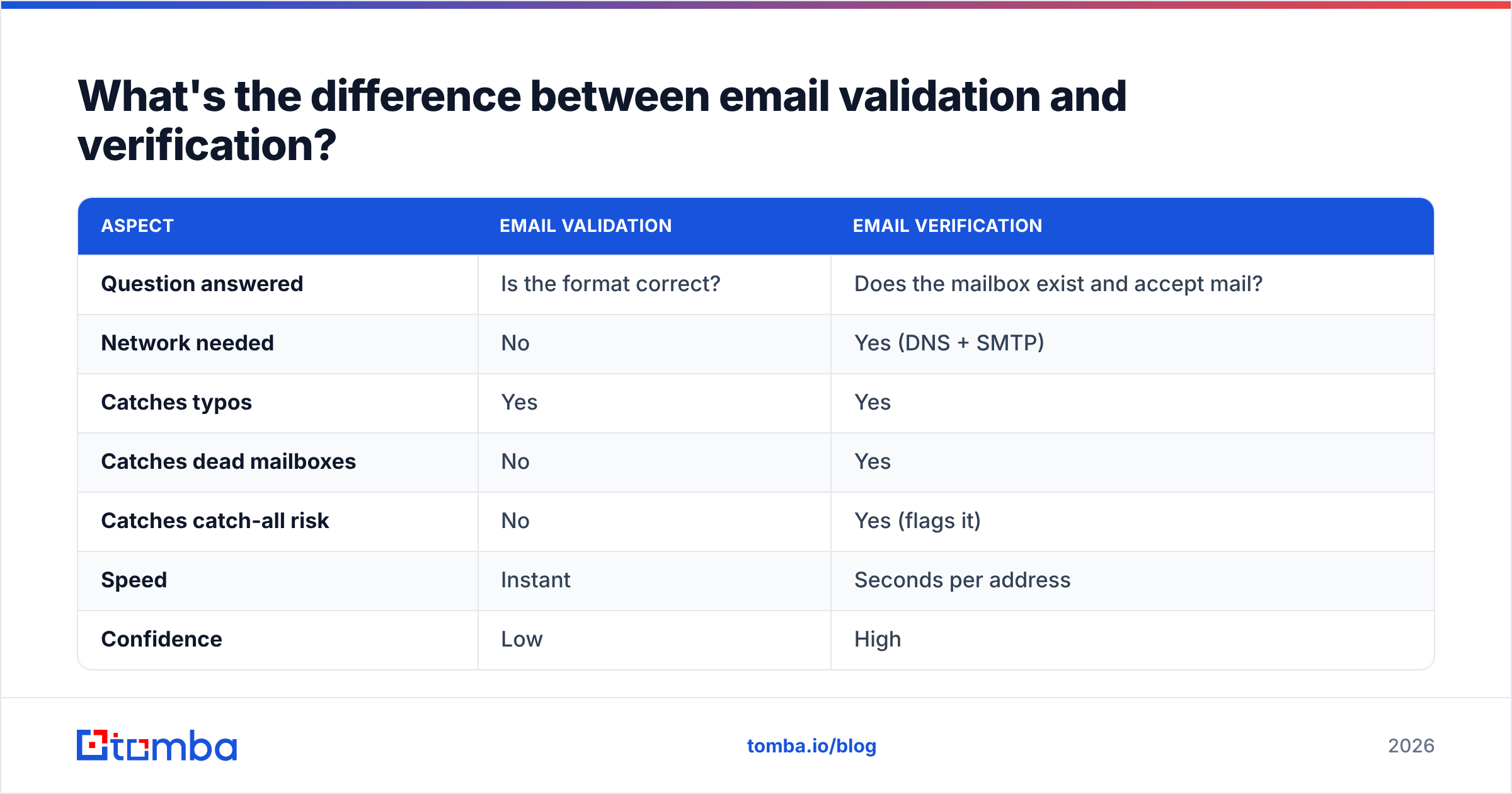
What's the difference between email validation and verification?#
People use these words interchangeably, but they answer different questions — and conflating them is why so many "clean" lists still bounce.
| Aspect | Email validation | Email verification |
|---|---|---|
| Question answered | Is the format correct? | Does the mailbox exist and accept mail? |
| Network needed | No | Yes (DNS + SMTP) |
| Catches typos | Yes | Yes |
| Catches dead mailboxes | No | Yes |
| Catches catch-all risk | No | Yes (flags it) |
| Speed | Instant | Seconds per address |
| Confidence | Low | High |
Validation is the cheap first filter. Verification is the part that actually protects your email deliverability by removing addresses that would bounce. You want both, in that order.
How do catch-all domains break existence checks?#
A catch-all (or "accept-all") domain is configured to accept mail for any address at that domain, real or not. So definitely-not-a-person@company.com returns the same 250 OK as the CEO.
This is the single biggest reason naive checks lie to you. Roughly a third of business domains run catch-all configurations, and on those domains an SMTP probe tells you nothing about whether a specific person exists.
The fix is a two-step approach: detect that the domain is catch-all, then apply additional signals — pattern matching against known company formats, cross-referencing other data sources, and confidence scoring. A dedicated catch-all verifier does this instead of blindly trusting the 250. If you skip it, you will keep a pile of unverifiable addresses labeled "valid" and wonder why your bounce rate climbed.
What tools can check if an email ID exists at scale?#
Manual checks do not survive contact with a real list. Once you are past a dozen addresses — and once those addresses live on Gmail, Outlook, or catch-all domains — you need a tool that handles MX lookups, SMTP handshakes, catch-all detection, and rate limiting for you.
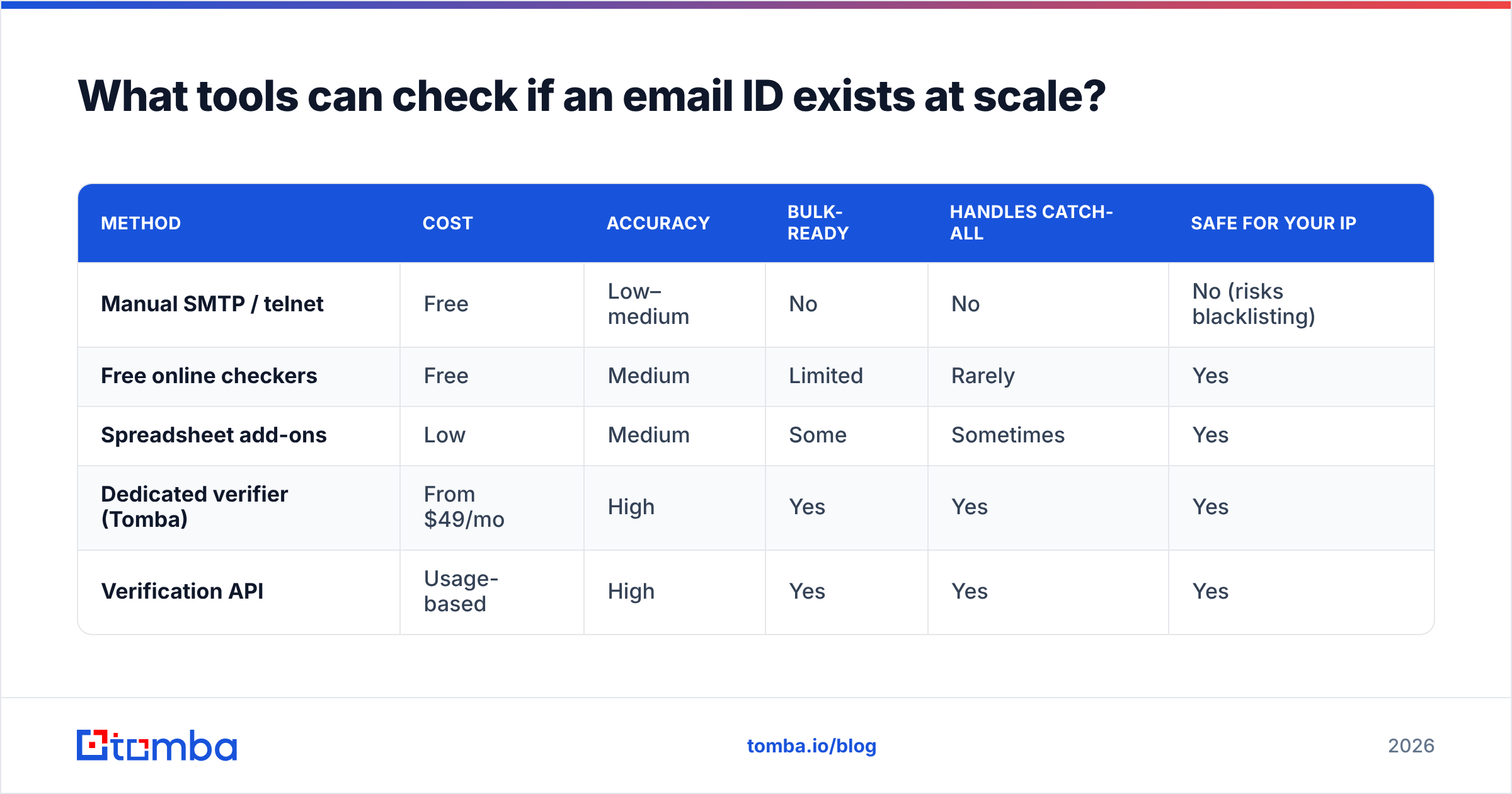
Here is how the common options compare for the specific job of confirming an address exists:
| Method | Cost | Accuracy | Bulk-ready | Handles catch-all | Safe for your IP |
|---|---|---|---|---|---|
| Manual SMTP / telnet | Free | Low–medium | No | No | No (risks blacklisting) |
| Free online checkers | Free | Medium | Limited | Rarely | Yes |
| Spreadsheet add-ons | Low | Medium | Some | Sometimes | Yes |
| Dedicated verifier (Tomba) | From $49/mo | High | Yes | Yes | Yes |
| Verification API | Usage-based | High | Yes | Yes | Yes |
A few notes on reading that table:
- Free checkers are fine for one-off lookups but throttle hard and rarely expose catch-all status.
- Spreadsheet add-ons like an Excel email finder or Google Sheets add-on keep you in a familiar tool, good for marketers cleaning a list.
- Dedicated verifiers add confidence scores, deduplication, and role-account flags on top of the raw SMTP result.
- APIs are the right call when verification needs to happen inside your product or signup flow — see the email verification API for that path.
For transparency on where this kind of result comes from, vendors that publish their data sources are easier to trust than black boxes. You can also sanity-check any provider against independent reviews on G2 before committing.
)
How accurate are email existence checks, really?#
No method is 100% accurate, and anyone claiming otherwise is selling something. The realistic ceiling for SMTP-based verification is high but bounded by factors outside your control.
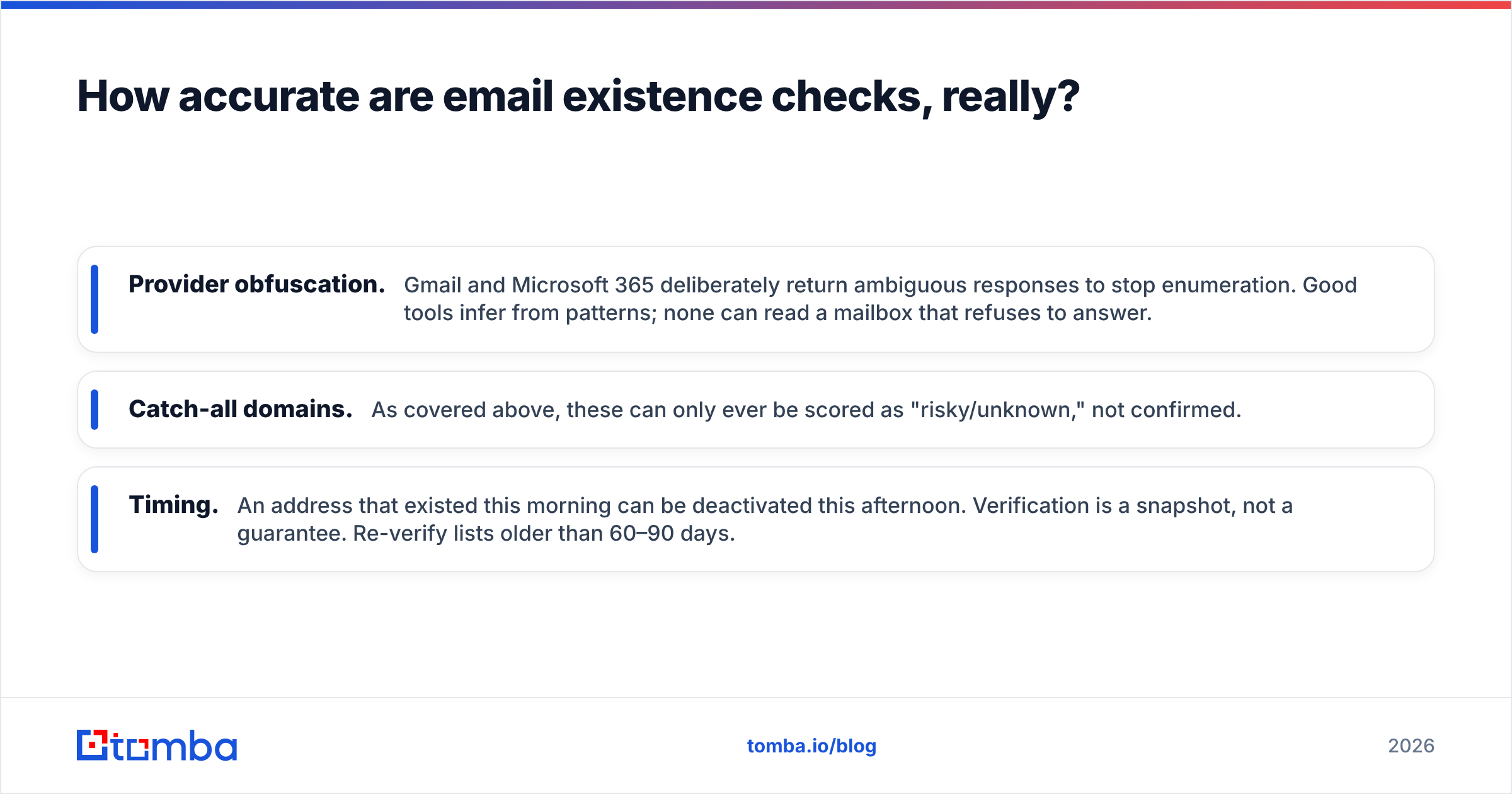
Three things cap accuracy:
- Provider obfuscation. Gmail and Microsoft 365 deliberately return ambiguous responses to stop enumeration. Good tools infer from patterns; none can read a mailbox that refuses to answer.
- Catch-all domains. As covered above, these can only ever be scored as "risky/unknown," not confirmed.
- Timing. An address that existed this morning can be deactivated this afternoon. Verification is a snapshot, not a guarantee. Re-verify lists older than 60–90 days.
The practical target is a bounce rate under 2%, which most mailbox providers and platforms like HubSpot treat as the threshold for healthy sending. A solid verifier gets you there; a manual telnet session usually does not.
What's the best workflow to check if an email ID exists?#
Match the method to the volume. Here is the decision path I would actually follow:
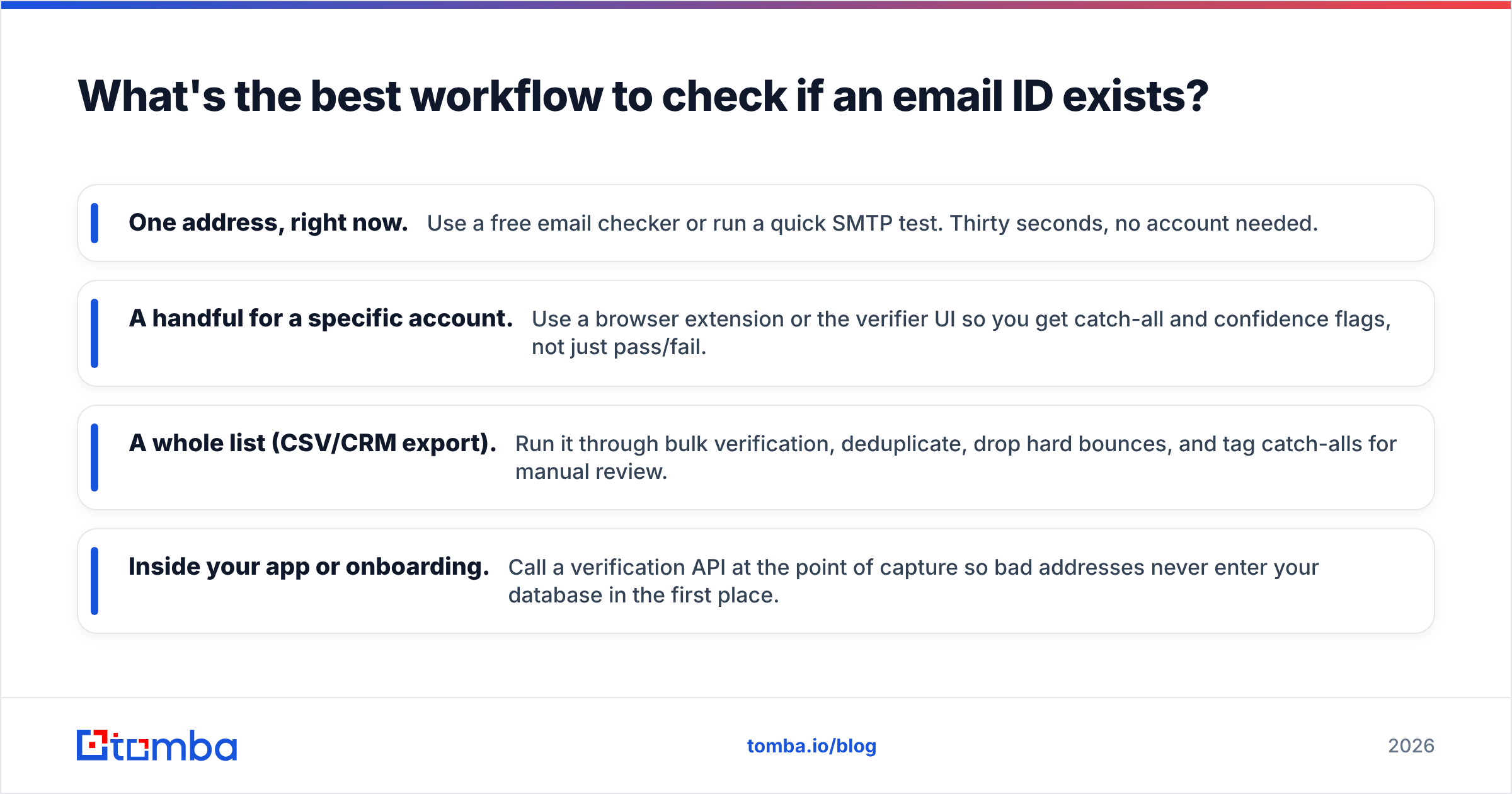
- One address, right now. Use a free email checker or run a quick SMTP test. Thirty seconds, no account needed.
- A handful for a specific account. Use a browser extension or the verifier UI so you get catch-all and confidence flags, not just pass/fail.
- A whole list (CSV/CRM export). Run it through bulk verification, deduplicate, drop hard bounces, and tag catch-alls for manual review.
- Inside your app or onboarding. Call a verification API at the point of capture so bad addresses never enter your database in the first place.
Whichever path you take, verify before the send, not after the bounce. Cleaning reactively means the damage to your sender reputation is already done.
Frequently asked questions#
Can you check if an email exists without sending a message?
Yes. The SMTP handshake stops before the DATA command, so the server evaluates the recipient without any email being delivered. This is how every legitimate verifier works.
Is checking whether an email exists legal? Verifying that an address you already hold is deliverable is standard list hygiene and widely accepted. How you collect and use addresses is governed by laws like GDPR and CAN-SPAM, so keep consent and opt-out handling separate from verification.
Why do verified emails still bounce sometimes? Mailboxes get deactivated, quotas fill up, and catch-all domains hide reality. Even a perfect check is a point-in-time result, which is why re-verification matters for older lists.
Does checking email existence hurt my domain reputation?
Done at scale by hand, yes — raw RCPT TO probing from your own IP can get it blacklisted. A verification service uses its own infrastructure and rotation, so your sending domain stays clean.
Verify before you send#
Guessing whether an address is real is the most expensive shortcut in outbound. Every bounce chips away at your sender reputation, and once that drops, even your good emails land in spam.
The fastest way to stop the bleeding is to clean your list before the next campaign. Run your contacts through Tomba's email verifier to confirm which addresses exist, flag catch-alls, and drop the dead weight — or, if you are building the list from scratch, start with the Tomba Email Finder so the addresses are verified the moment you find them. Check Tomba pricing to match a plan to your volume; the free tier covers 25 searches a month so you can test it before you commit.
// get started
Find, verify and enrich your first contacts today
Start on the free plan with 25 searches a month, then scale when your team is ready.
Free plan · No credit card required · GDPR & CCPA
// about the author