How to Check If an Email Id Is Valid: 2026 Verification Guide
Bouncing emails wreck your sender reputation. Here's how to check if an email id is valid in 2026 — syntax, MX, SMTP, catch-all, and the tools that automate it.
You collected a list of email addresses. Some are real, some are typos, some belonged to people who left the company two years ago. Send to all of them and your bounce rate spikes, your domain reputation tanks, and the inbox providers start routing your good emails to spam. The fix is to check if an email id is valid before you send — not after.
This guide walks through every method that actually works in 2026, from the 10-second free checks to the SMTP-level validation that catches dead mailboxes. You'll learn what each check can and can't prove, where the limits are (catch-all domains, greylisting, role accounts), and how to automate the whole thing.
TL;DR#
- "Valid" means three things: correct syntax, a domain that can receive mail (MX records), and a real, active mailbox. Most free checkers only test the first one.
- Syntax + MX checks are free and instant but only rule out the obvious garbage. They cannot confirm a mailbox exists.
- SMTP verification is the real test — it pings the mail server to ask whether the mailbox accepts mail, without sending an email.
- Catch-all domains and greylisting break naive SMTP checks. You need a verifier that handles them, or you'll get false "valid" results.
- For more than a handful of addresses, use a dedicated email verifier or API. Manual checks don't scale and a 2% bounce ceiling is unforgiving.
What does it mean for an email id to be valid?#
A valid email address has to clear three independent gates. Skip any one and "valid" is a guess.
- Correct syntax — the address follows the format rules: a local part, an
@, and a domain with a top-level extension.john.doe@company.compasses;john.doe@@companydoes not. This is governed by the RFC 5322 standard, which is more permissive than most people expect. - A receiving domain — the domain has valid MX (Mail Exchange) records in DNS, meaning a mail server is configured to accept messages for it. A pretty domain with no MX record can't receive email at all.
- An active mailbox — the specific inbox exists and accepts mail.
ceo@company.commay be syntactically perfect on a live domain and still bounce because no such mailbox was ever created.
Think of it like mailing a physical letter. Correct syntax is writing the address in the right format. A valid MX record is confirming the building exists and has a mailroom. An active mailbox is confirming there's actually an apartment with that number and someone living in it. Most free tools stop at "the building exists."
)
How do you check if an email id is valid manually?#
You can run every layer of validation by hand. It's worth doing once so you understand what the automated tools are actually doing under the hood.
1. Eyeball the syntax. Look for the obvious breakers: missing @, double dots, spaces, a missing TLD, or trailing punctuation. A free email checker does this instantly and also flags disposable domains.
2. Check the MX records. Open a terminal and query DNS directly:
nslookup -type=mx company.comIf you get back one or more mail servers (often aspmx.l.google.com for Google Workspace, or *.protection.outlook.com for Microsoft 365), the domain can receive mail. If you get nothing, every address at that domain is invalid — stop here.
3. Run an SMTP handshake. This is the part that proves the mailbox exists. You connect to the mail server on port 25 and start the conversation an email client would, but stop before actually sending anything:
telnet aspmx.l.google.com 25
HELO yourdomain.com
MAIL FROM: <you@yourdomain.com>
RCPT TO: <target@company.com>
A 250 response to the RCPT TO line usually means the mailbox accepts mail. A 550 means it doesn't exist. The catch: many providers throttle, greylist, or simply lie to scrapers doing this, which is exactly why manual SMTP testing is unreliable past a few lookups. An SMTP tester automates the handshake without you typing raw commands.
4. Sanity-check the result. Cross-reference with the company's known email pattern. If every other address at the domain is first.last@ and yours is flast@, treat it as suspect even if SMTP says 250.
What are the levels of email validation?#
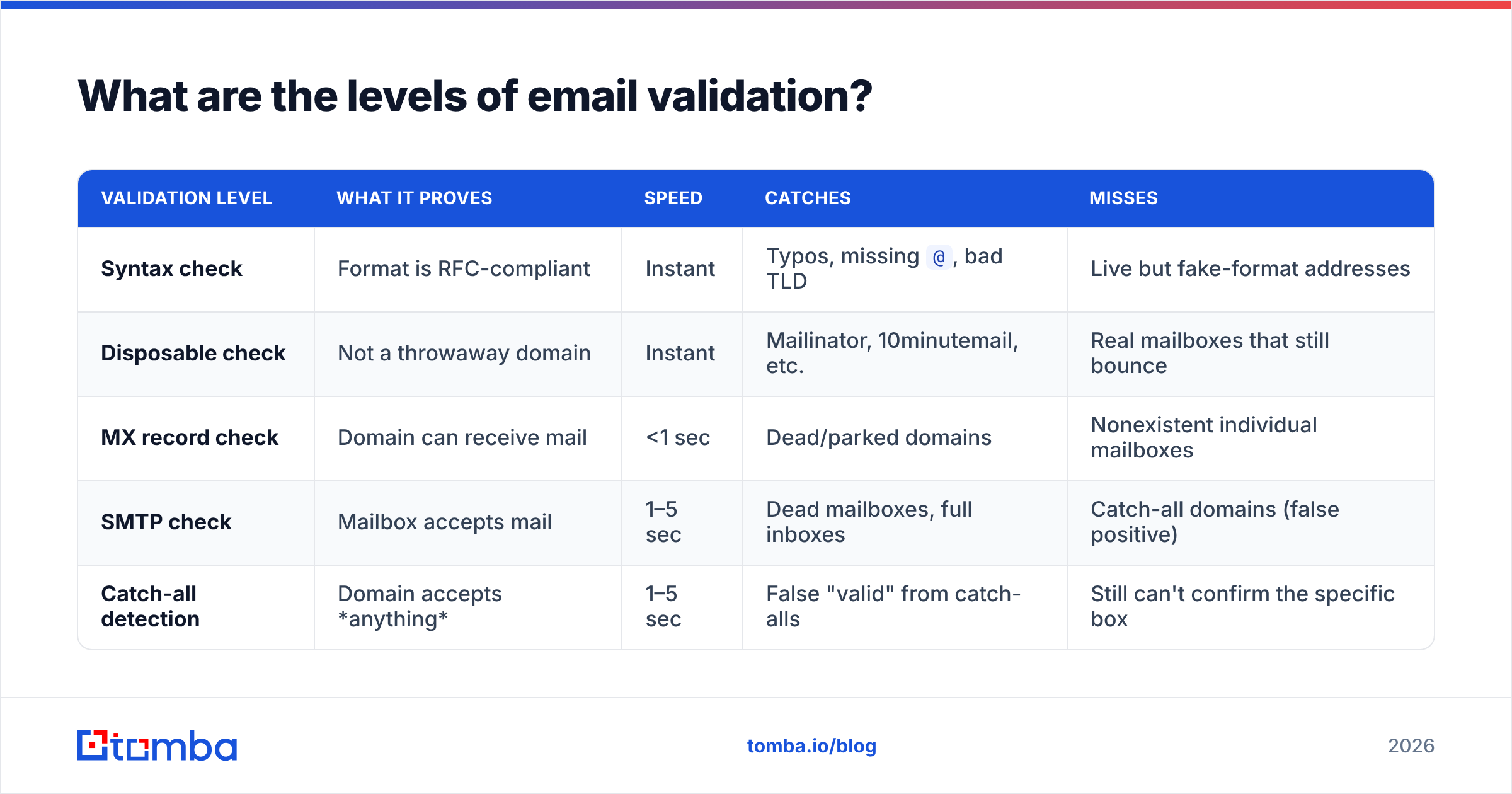
Not all "valid" checks are equal. Here's how the layers stack, from cheapest and weakest to strongest.
| Validation level | What it proves | Speed | Catches | Misses |
|---|---|---|---|---|
| Syntax check | Format is RFC-compliant | Instant | Typos, missing @, bad TLD |
Live but fake-format addresses |
| Disposable check | Not a throwaway domain | Instant | Mailinator, 10minutemail, etc. | Real mailboxes that still bounce |
| MX record check | Domain can receive mail | <1 sec | Dead/parked domains | Nonexistent individual mailboxes |
| SMTP check | Mailbox accepts mail | 1–5 sec | Dead mailboxes, full inboxes | Catch-all domains (false positive) |
| Catch-all detection | Domain accepts anything | 1–5 sec | False "valid" from catch-alls | Still can't confirm the specific box |
The honest takeaway: no single layer is enough. A robust check runs all of them in sequence and returns a confidence-graded result — valid, invalid, risky, or unknown — rather than a binary yes/no.
Why do bounces matter so much?#
Because mailbox providers treat bounce rate as a trust signal, and trust is the entire currency of email deliverability.
When you send to invalid addresses, the receiving servers issue hard bounces. Gmail, Outlook, and Yahoo watch your bounce ratio closely. Cross roughly 2% and your inbox placement starts degrading; push past 5% and you risk getting blocked outright. The damage isn't limited to the bad addresses — it drags down delivery to your good contacts too, because the penalty applies at the domain and IP level.
There's a second cost: wasted spend. If you pay per send, per seat, or per enriched record, every invalid address is money burned on a message no human will ever read. According to HubSpot's research on email marketing, list hygiene is one of the highest-leverage, lowest-effort wins available to any sender — and verification is the first step of hygiene.
)
Manual checks vs an email verifier: which should you use?#
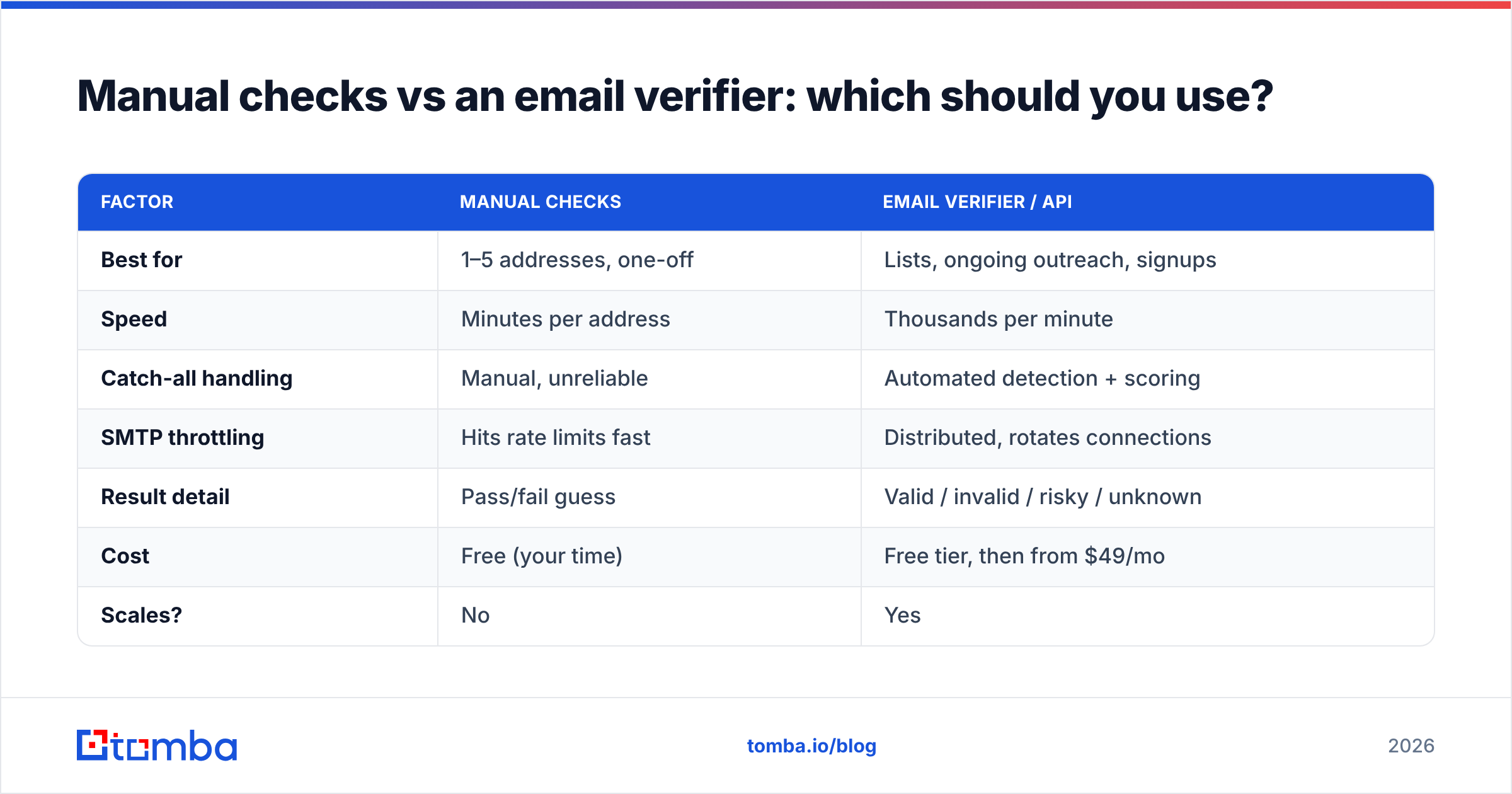
The answer depends almost entirely on volume and how much a bounce costs you.
| Factor | Manual checks | Email verifier / API |
|---|---|---|
| Best for | 1–5 addresses, one-off | Lists, ongoing outreach, signups |
| Speed | Minutes per address | Thousands per minute |
| Catch-all handling | Manual, unreliable | Automated detection + scoring |
| SMTP throttling | Hits rate limits fast | Distributed, rotates connections |
| Result detail | Pass/fail guess | Valid / invalid / risky / unknown |
| Cost | Free (your time) | Free tier, then from $49/mo |
| Scales? | No | Yes |
For a single address you're about to email a prospect, the free manual route is fine. For a signup form, a CRM import, a cold-email list, or anything recurring, a verifier pays for itself the first time it stops a 2,000-address blast from torching your domain. See Tomba pricing for where the free tier ends and paid plans begin.
How does SMTP verification actually work?#
SMTP verification is a polite, incomplete conversation with the recipient's mail server.
The verifier opens a connection to the domain's MX server and walks through the opening lines of the SMTP protocol — HELO, MAIL FROM, and the critical RCPT TO: <address>. At the RCPT TO step the server decides whether it will accept mail for that mailbox. The verifier reads the numeric reply code, then issues QUIT and disconnects before any message is sent. No email lands in anyone's inbox; the recipient never knows.
The complications that separate a toy script from a production verifier:
- Catch-all (accept-all) domains reply
250to every address, real or not. A naive check reports all of them as valid. A real catch-all verifier detects this configuration and downgrades the result to "risky" instead of falsely passing it. - Greylisting makes the server return a temporary
4xxdeferral on first contact, expecting a legitimate sender to retry later. A one-shot check reads this as failure. Good verifiers retry with proper timing. - Rate limiting and blocklists kick in fast if you hammer a server from one IP. Production tools rotate connections and respect backoff so they don't get the verifying IP blocked.
This is the gap between telnet in a terminal and a service: the protocol is simple, but handling the edge cases at scale without poisoning your own IP reputation is not.
What about catch-all and role-based addresses?#
These two categories cause the most confusion, so handle them deliberately.
- Catch-all domains accept mail for any local part, so
anything@domain.comreturns valid. You cannot confirm an individual mailbox on a catch-all through SMTP alone. Treat these as "risky," verify with additional signals (known patterns, enrichment data, engagement history), and send cautiously. A dedicated catch-all finder flags which of your domains behave this way. - Role-based addresses like
info@,support@,sales@, andadmin@are technically valid but often route to shared inboxes or distribution lists. They convert poorly in cold outreach and some ESPs flag lists heavy with them. A good verifier labels role accounts so you can decide whether to keep or drop them per campaign.
The rule of thumb: a verifier should never silently call a catch-all or role address "valid." It should tell you what kind of address it is and let you make the call.
How do you verify a whole list at once?#
For lists, you need batch processing and an API — not a browser tab you paste into 4,000 times.
- Bulk upload. Drop a CSV into a bulk email finder and verifier, let it process, and download a column-scored file. Each row comes back tagged valid, invalid, risky, or unknown with a confidence score.
- API integration. Wire verification into your signup flow or pipeline with the email verification API so addresses get checked the moment they enter your system — before a bad one ever reaches your CRM.
- Spreadsheet add-ons. If your list lives in Google Sheets, a Sheets email finder and verifier add-on validates in place without exporting.
Here's a minimal API call shape (verify before you send, not after):
curl "https://api.tomba.io/v1/email-verifier/target@company.com" \
  -H "X-Tomba-Key: $TOMBA_KEY" \
  -H "X-Tomba-Secret: $TOMBA_SECRET"
The response grades the address and breaks down each layer — syntax, MX, SMTP, catch-all, disposable, role — so you're never trusting a single bit.
What should a complete validation workflow look like?#
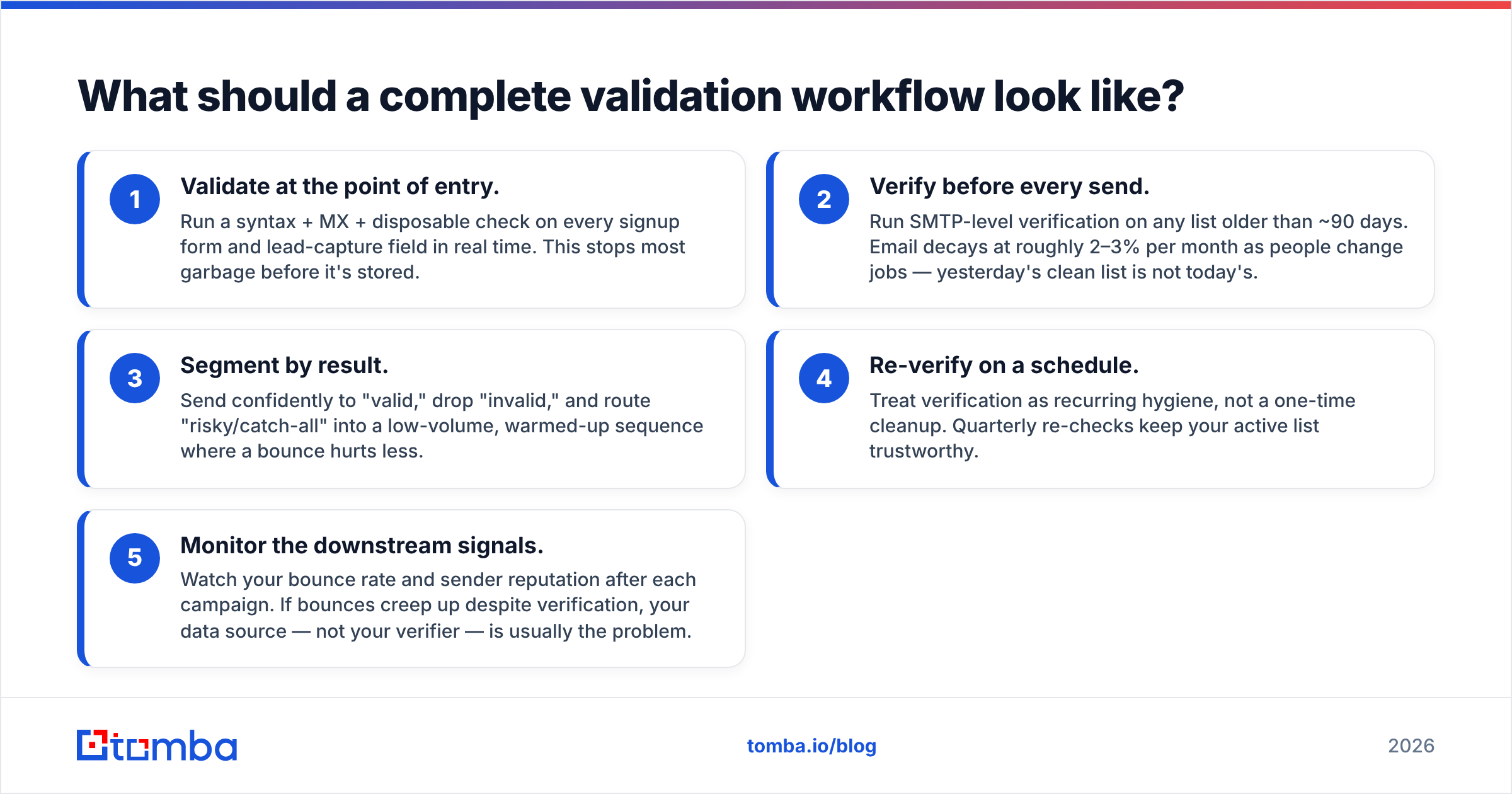
Put the pieces in order and the whole thing becomes routine:
- Validate at the point of entry. Run a syntax + MX + disposable check on every signup form and lead-capture field in real time. This stops most garbage before it's stored.
- Verify before every send. Run SMTP-level verification on any list older than ~90 days. Email decays at roughly 2–3% per month as people change jobs — yesterday's clean list is not today's.
- Segment by result. Send confidently to "valid," drop "invalid," and route "risky/catch-all" into a low-volume, warmed-up sequence where a bounce hurts less.
- Re-verify on a schedule. Treat verification as recurring hygiene, not a one-time cleanup. Quarterly re-checks keep your active list trustworthy.
- Monitor the downstream signals. Watch your bounce rate and sender reputation after each campaign. If bounces creep up despite verification, your data source — not your verifier — is usually the problem.
Follow this loop and "check if an email id is valid" stops being a manual chore and becomes an automatic gate that bad data never gets past.
Common mistakes when checking email validity#
- Trusting syntax checks alone. A perfectly formatted address can still be a dead mailbox. Syntax is the floor, not the ceiling.
- Reading catch-all "250" as confirmation. This is the single most common false positive. If you're not detecting catch-alls, your "valid" rate is inflated.
- Verifying once and never again. Lists rot. A 95%-clean list six months ago can be 80% clean today.
- Hammering SMTP from your own server. You'll get rate-limited or blocklisted, which hurts your real sending reputation. Use a service built to distribute and back off.
- Ignoring role and disposable flags. Keeping
info@addresses and Mailinator domains on a cold list is a quiet deliverability tax.
Frequently asked questions#
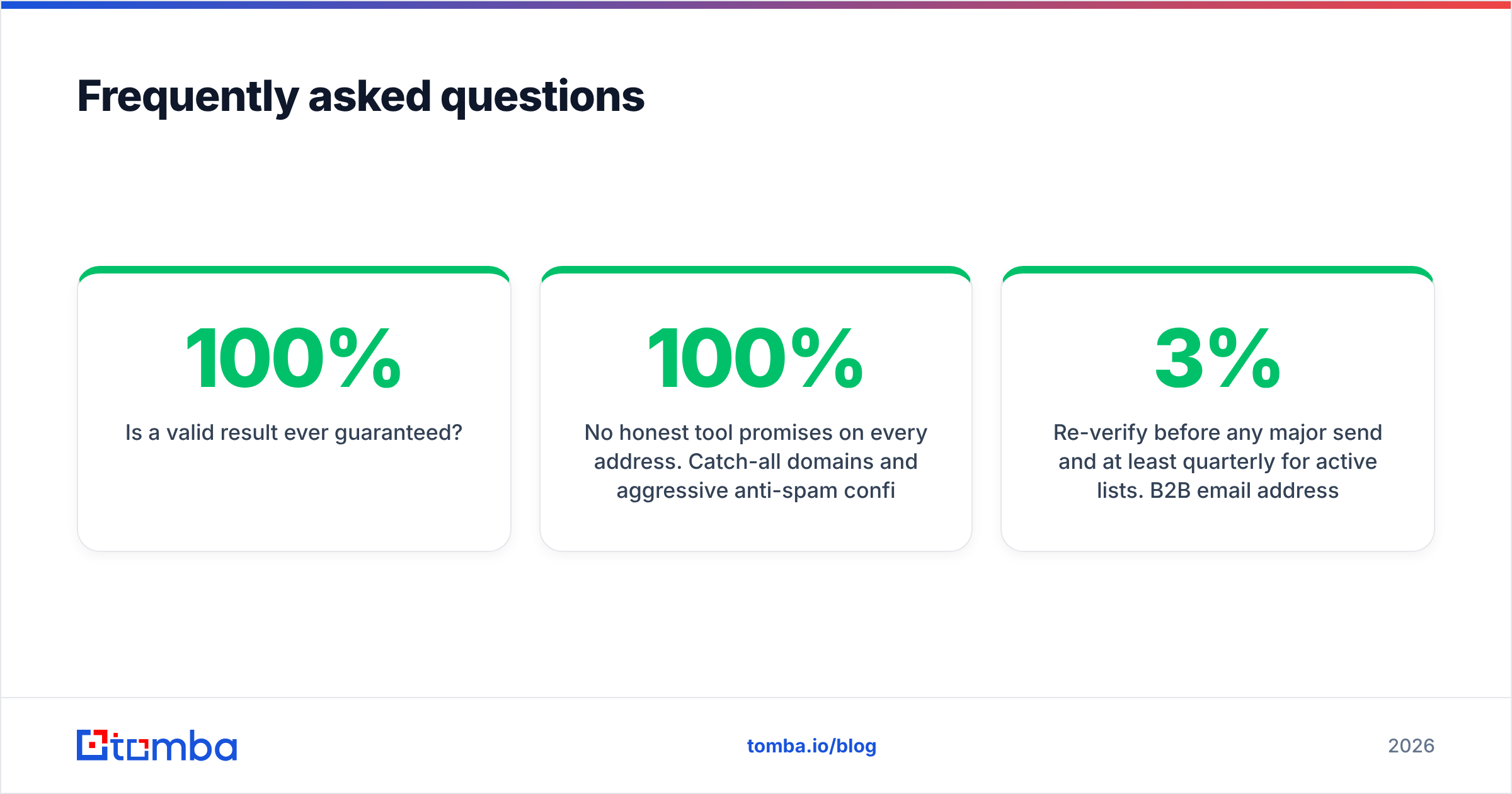
Can you check if an email is valid without sending an email? Yes. SMTP verification opens a connection to the mail server and asks whether the mailbox accepts mail, then disconnects before sending anything. The recipient never receives a message and never knows you checked.
Is a 100% valid result ever guaranteed? No honest tool promises 100% on every address. Catch-all domains and aggressive anti-spam configurations make some mailboxes genuinely unknowable from the outside. A good verifier is transparent about this and returns "risky" or "unknown" instead of a false "valid."
How accurate is free email validation? Free syntax and MX checks are highly accurate at what they do — but they only cover the first two layers. To confirm an actual mailbox, you need SMTP-level verification, which is where dedicated tools and their free tiers come in.
How often should I clean my list? Re-verify before any major send and at least quarterly for active lists. B2B email addresses decay roughly 2–3% per month as people switch roles and companies.
Start verifying before you send#
The cheapest bounce is the one you never trigger. Run your addresses through the Tomba Email Verifier to clear syntax, MX, SMTP, catch-all, and role checks in one pass — and pair it with the Tomba Email Finder when you need to discover and confirm new contacts at the same time. The free tier covers 25 searches a month so you can test it against your own list before committing; paid plans start at $49/mo when you're ready to verify at scale. Stop guessing whether an email id is valid, and start knowing — before it ever costs you a single delivery.
// get started
Find, verify and enrich your first contacts today
Start on the free plan with 25 searches a month, then scale when your team is ready.
Free plan · No credit card required · GDPR & CCPA
// about the author