How to Check If an Email Address Is Correct in 2026
Learn how to check if an email is correct before you hit send — syntax, MX records, SMTP pings, catch-all traps, and the fastest way to verify at scale in 2026.
Sending to an address you never checked is like mailing a letter to a street number you guessed — it might arrive, but most of the time it bounces back and the post office starts treating your whole stack of mail as suspicious. That "post office" is the inbox provider, and a few bad guesses can quietly wreck your deliverability for everyone you email next.
This guide shows you exactly how to check if an email is correct — from a five-second eyeball test to programmatic SMTP validation — and how to do it at scale without burning your sender reputation.
TL;DR#
- Correct ≠ deliverable. An address can be perfectly formatted and still bounce. You need to check syntax, domain, mailbox, and risk signals.
- Four layers to validate: syntax → domain/MX records → SMTP mailbox check → risk flags (catch-all, disposable, role-based).
- Never test by sending. A real send to a bad address damages your sender reputation. Use a verifier instead.
- For one address, use a free checker. For a list, use a bulk email verifier with API access.
- Catch-all domains are the hardest case — they accept everything, so you need confidence scoring, not a yes/no.
What does it mean for an email to be "correct"?#
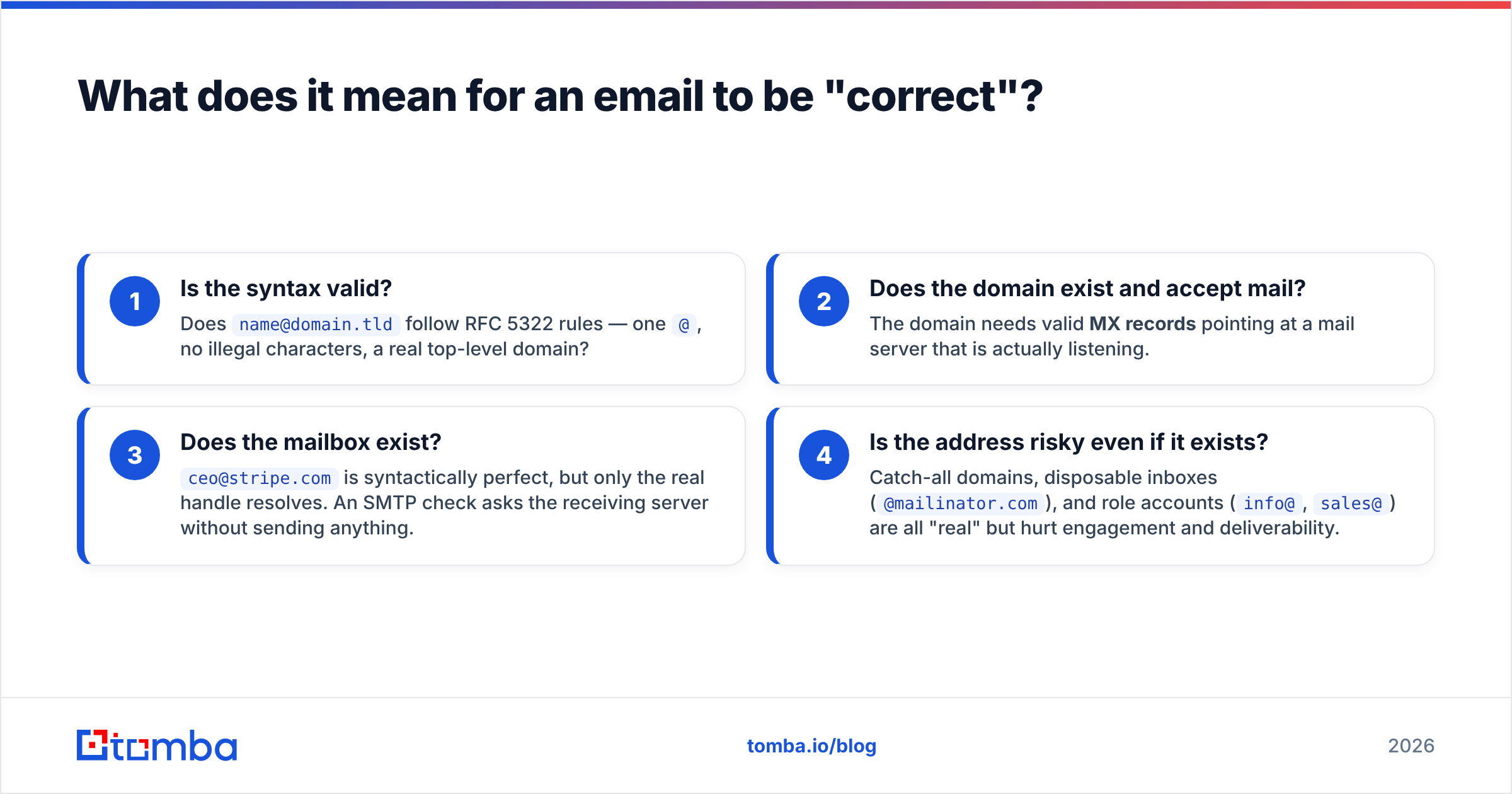
"Correct" hides four separate questions, and a real validation pipeline answers all of them in order. Skipping a layer is how a list that "looks clean" still bounces 15%.
- Is the syntax valid? Does
name@domain.tldfollow RFC 5322 rules — one@, no illegal characters, a real top-level domain? - Does the domain exist and accept mail? The domain needs valid MX records pointing at a mail server that is actually listening.
- Does the mailbox exist?
ceo@stripe.comis syntactically perfect, but only the real handle resolves. An SMTP check asks the receiving server without sending anything. - Is the address risky even if it exists? Catch-all domains, disposable inboxes (
@mailinator.com), and role accounts (info@,sales@) are all "real" but hurt engagement and deliverability.
An address is only worth emailing when it clears all four. Treat "correct" as a stack, not a single checkbox.
)
How do you quickly check if a single email is correct?#
For one address, you can run the full stack in under a minute without writing code. Here is the fastest manual path, ordered cheapest-check-first so you fail fast:
- Eyeball the syntax. Look for the obvious killers: a missing
@, a trailing dot, a space, a typo'd domain (gmial.com,outlok.com), or a TLD that doesn't exist. - Confirm the domain resolves. Paste the domain into a browser or run a DNS lookup. No website and no MX record usually means no mailbox.
- Run a free checker. A tool like Tomba's free email checker performs syntax, MX, and SMTP checks in one pass and returns a status — valid, invalid, accept-all, or unknown.
- Cross-reference the person. If the stakes are high (a single big prospect), confirm the format against the company's known pattern using a company email pattern tool before you trust it.
The key rule: do not "test" by sending a real email. A hard bounce from a single guess is logged by mailbox providers and chips away at your sender reputation. Verification tools query the mail server silently — no message is delivered, so nothing counts against you.
What are the four layers of email validation?#
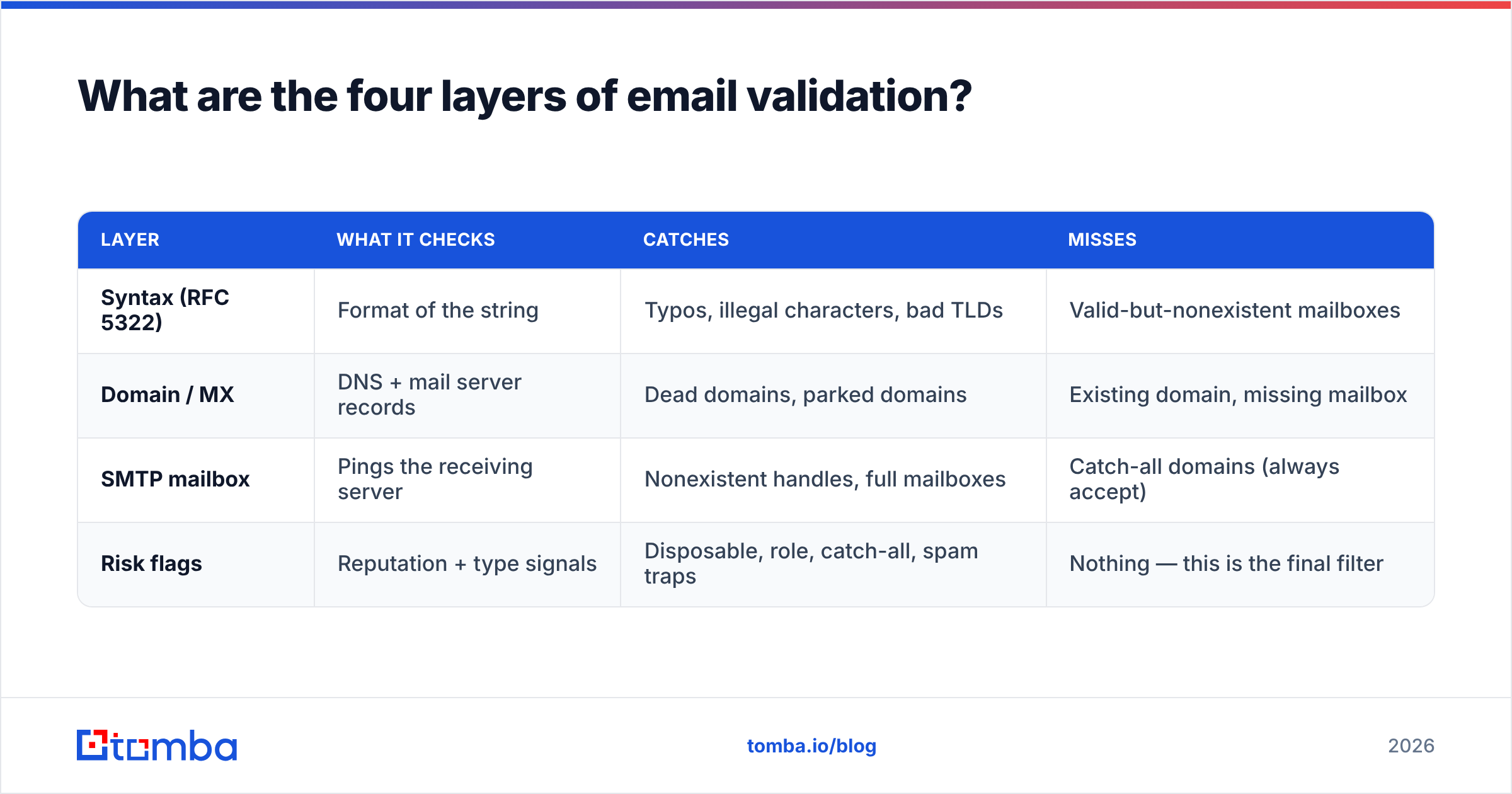
Here is the same stack as a reference table, with what each layer catches and what it misses. Most cheap "validators" only do the first two rows — which is why their output feels clean but still bounces.
| Layer | What it checks | Catches | Misses |
|---|---|---|---|
| Syntax (RFC 5322) | Format of the string | Typos, illegal characters, bad TLDs | Valid-but-nonexistent mailboxes |
| Domain / MX | DNS + mail server records | Dead domains, parked domains | Existing domain, missing mailbox |
| SMTP mailbox | Pings the receiving server | Nonexistent handles, full mailboxes | Catch-all domains (always accept) |
| Risk flags | Reputation + type signals | Disposable, role, catch-all, spam traps | Nothing — this is the final filter |
The lesson is that no single layer is enough. Syntax-only tools pass john@stripe.com even when no John exists. SMTP-only tools choke on catch-all domains. You want a verifier that runs all four and returns a confidence score, not a naive boolean.
How do SMTP and MX checks actually work?#
Think of an MX check as looking up whether a building has a mailroom, and an SMTP check as walking up to the mailroom and asking "does a person named Sarah work here?" without leaving a package.
The MX (Mail Exchange) record is a DNS entry that tells the world which server handles a domain's email. If example.com has no MX record, it can't receive mail — full stop. This is a cheap, instant lookup.
The SMTP handshake goes one step further. The verifier opens a connection to the mail server and begins the conversation a sending server would (HELO, MAIL FROM, RCPT TO) — then stops before any data is sent. The server's response to RCPT TO reveals whether the mailbox exists:
250 OK→ the mailbox is accepted.550 No such user→ the mailbox does not exist.- A
250from a catch-all server → accepted, but possibly meaningless.
Because the verifier never issues the DATA command, no email is delivered. That's the whole trick: you get a definitive answer without sending anything. If you want to test your own server's responses, an SMTP tester lets you watch the handshake play out line by line.
What is a catch-all domain and why does it break verification?#
A catch-all (or "accept-all") domain is configured to accept mail for every address at that domain, real or not — so anything@company.com returns 250 OK. About 10–20% of business domains do this, and it's the single biggest reason "verified" lists still bounce.
When the SMTP check can't distinguish a real mailbox from a fake one, a naive verifier either guesses or returns "unknown." Neither is good enough. The fix is a dedicated catch-all verifier that layers additional signals on top of the SMTP result:
- Pattern matching against the company's known email format.
- Historical data — has this exact address been seen, used, or sourced before?
- Confidence scoring instead of a binary verdict, so you can set your own risk threshold.
For cold outreach, a sensible policy is to send to catch-all addresses that score high-confidence and suppress the rest, rather than blasting every accept-all hit. This is where free single-purpose tools fall short and a proper data platform earns its keep.
)
How do you check a whole list of emails at once?#
Checking one address by hand is fine. Checking 10,000 is not. For lists, you need batch processing, and you have two realistic paths.
1. Upload a file to a bulk verifier. Drop a CSV into a bulk verify interface and get back each row tagged valid / invalid / accept-all / unknown, plus a confidence score. This is the no-code route most teams use before a campaign.
2. Call an API. If verification needs to happen inside your app, form, or CRM, wire up an email verification API so addresses are checked the moment they're captured. Validate at the point of entry and bad data never enters your database in the first place.
A quick mental model for when to verify:
- At capture — validate signup and lead-form emails in real time via API. Stops typos and fake addresses at the door.
- Before a campaign — bulk-verify any list older than ~90 days. Addresses decay roughly 2–3% per month as people change jobs.
- On a schedule — re-verify your active database quarterly to clear out churned contacts.
Which email verification tool should you use in 2026?#
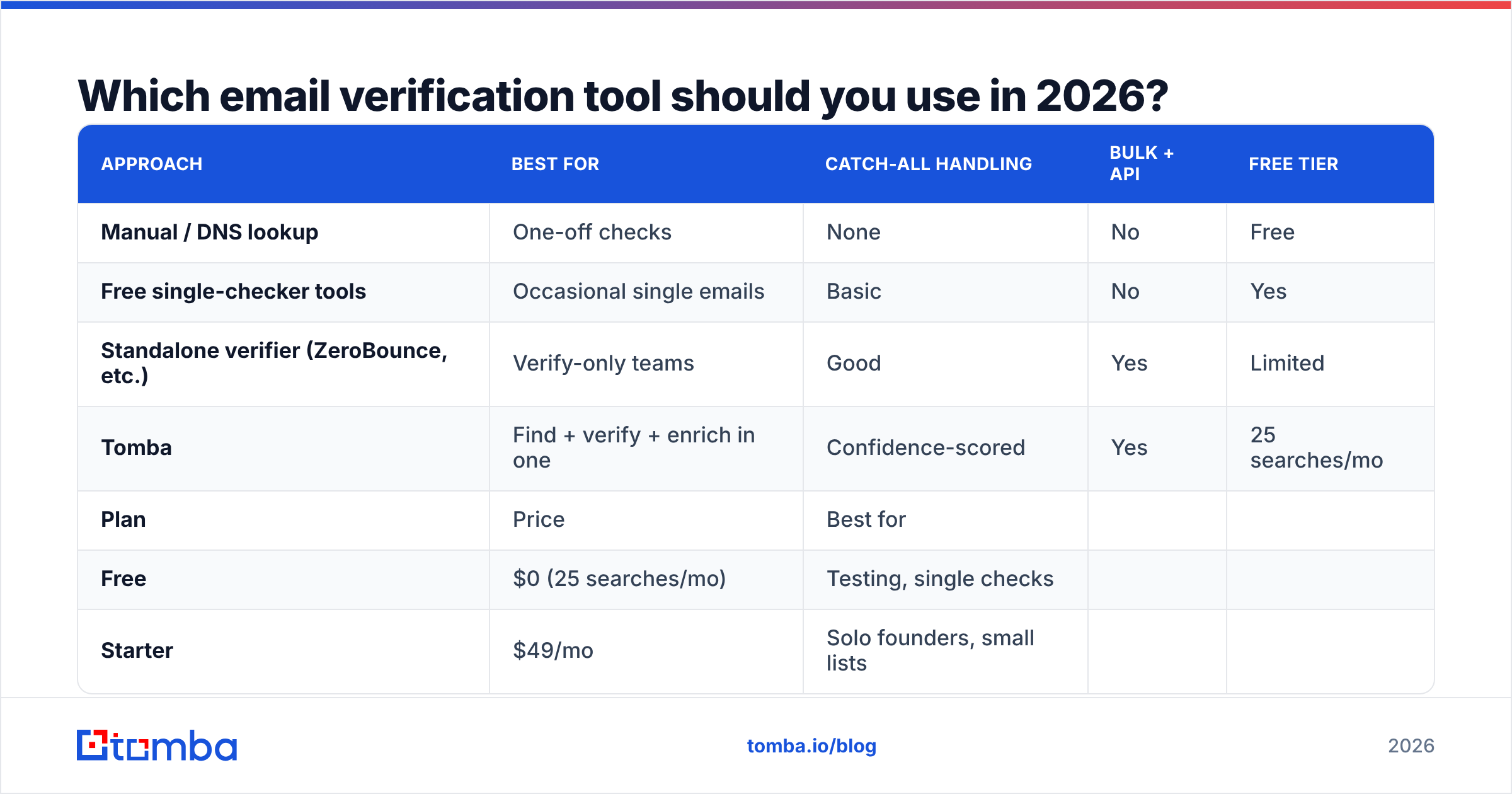
The right tool depends on volume and whether you also need to find emails, not just check them. Here's how the common approaches stack up.
| Approach | Best for | Catch-all handling | Bulk + API | Free tier |
|---|---|---|---|---|
| Manual / DNS lookup | One-off checks | None | No | Free |
| Free single-checker tools | Occasional single emails | Basic | No | Yes |
| Standalone verifier (ZeroBounce, etc.) | Verify-only teams | Good | Yes | Limited |
| Tomba | Find + verify + enrich in one | Confidence-scored | Yes | 25 searches/mo |
If you only ever verify, a dedicated tool works. But most teams that ask "how do I check if an email is correct" are also trying to find the address first — and running two vendors doubles cost and integration work. Tomba combines an email finder, verifier, domain search, and data enrichment under one API, so the find-then-verify loop is a single call.
Pricing is straightforward — see full Tomba pricing — but the headline tiers are:
| Plan | Price | Best for |
|---|---|---|
| Free | $0 (25 searches/mo) | Testing, single checks |
| Starter | $49/mo | Solo founders, small lists |
| Growth | $99/mo | Active outbound teams |
| Pro | $249/mo | High-volume agencies |
| Enterprise | Custom | Large data operations |
For an independent view of how verifiers compare on accuracy and support, G2's email verification category is a useful neutral reference, and the RFC 5322 spec is the source of truth for what "valid syntax" actually means.
How does verifying emails protect your sender reputation?#
Every hard bounce is a small black mark. Mailbox providers like Google and Microsoft track your bounce rate, spam complaints, and engagement, and they use those signals to decide whether your next email lands in the inbox or the spam folder. This is the core of email deliverability.
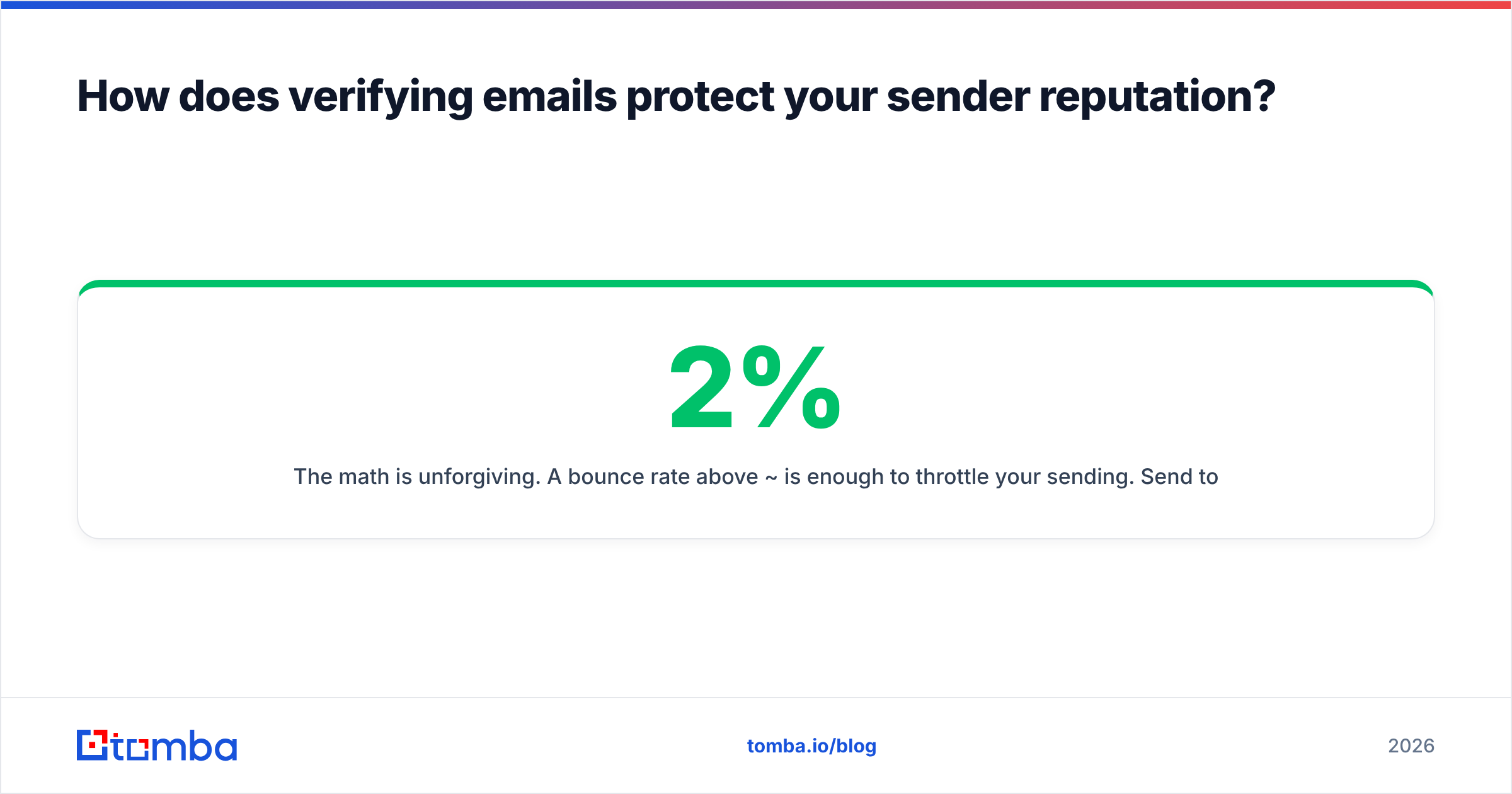
The math is unforgiving. A bounce rate above ~2% is enough to throttle your sending. Send to an unverified list with 15% dead addresses and you don't just lose those 15% — you degrade inbox placement for the other 85%. According to Google's Postmaster guidelines, consistently high bounce and complaint rates are exactly what triggers filtering.
Verification flips the equation:
- Bounce rate drops below the danger threshold because dead addresses are removed pre-send.
- Engagement rises because you're only emailing real, active people.
- Reputation compounds — good sending history makes future inbox placement easier.
In other words, checking if an email is correct isn't a hygiene chore. It's the cheapest deliverability investment you can make, and it pays back on every campaign after.
What mistakes should you avoid when checking emails?#
A few traps catch even experienced teams:
- Trusting syntax alone. A green "valid format" badge says nothing about whether the mailbox exists. Always run the SMTP layer.
- Sending to "unknown" results blindly. Unknown usually means catch-all or a temporarily unreachable server. Score it, don't assume it.
- Verifying once and forgetting. Lists decay. A list verified last year is partly dead today.
- Ignoring role and disposable addresses.
info@and@temp-mail.orgare real but worthless for outreach and inflate complaint rates. - Testing with real sends. The one habit that actively harms you. Verify silently; never probe with a live email.
Get these right and your "correct" check becomes a genuine deliverability filter rather than a false sense of security.
Start checking your emails the right way#
Stop guessing whether an address is real. Whether you're validating a single big-ticket prospect or scrubbing a 50,000-row list before a campaign, the Tomba Email Finder — paired with the built-in verifier — finds the right address and confirms it's deliverable in one workflow, with confidence scoring on catch-all domains and an API you can drop straight into your signup forms or CRM. Spin up the free tier (25 searches a month, no card), run your toughest list through it, and watch your bounce rate fall before your next send. Verify first, send second, and let your sender reputation do the compounding.
// get started
Find, verify and enrich your first contacts today
Start on the free plan with 25 searches a month, then scale when your team is ready.
Free plan · No credit card required · GDPR & CCPA
// about the author