How to Check If an Email Is Real: 2026 Verification Guide
Learn how to check if an email is real in 2026 — from free manual tricks to SMTP and API verification — and stop bounces before they wreck your sender reputation.
You collected a list of email addresses. Before you hit send on a campaign, you need one answer: are these addresses actually real, or are half of them going to bounce and torch your sender reputation? This guide shows you exactly how to check if an email is real — manually, technically, and at scale.
TL;DR#
- "Real" means three things: the syntax is valid, the domain accepts mail, and a live mailbox exists behind the address. All three must be true.
- Free manual checks (syntax, MX records, an SMTP ping) catch obvious junk but miss catch-all domains and rate-limit you fast.
- Bounce rate is the real cost — anything above 2% starts hurting deliverability, and providers like Gmail punish senders with high invalid rates.
- Verification tools and APIs automate syntax, MX, SMTP, and catch-all detection in one call, which is the only sane option past a few hundred addresses.
- Verify before every send, not once — addresses decay roughly 22–30% per year as people change jobs.
What does it mean for an email to be "real"?#
An email address is "real" when a message sent to it will actually land in a human's inbox instead of bouncing back. That sounds simple, but it breaks down into three separate layers, and a checker has to clear all three.
- Syntax is valid. The string follows the format rules defined in the email standard — a local part, an
@, and a domain.john..doe@@gmailfails here before anything else happens. (See the email address spec for the gory details.) - The domain can receive mail. The domain has MX (Mail Exchange) records published in DNS. No MX records usually means no mailbox can exist there.
- The mailbox exists. A specific inbox lives behind the address.
ceo@realcompany.commay be syntactically perfect and sit on a mail-ready domain, yet still not exist.
A lot of "free email checkers" only test layer one and call it a day. That tells you the address could be real, not that it is. The difference is the entire game.
Why should you check if an email is real before sending?#
Because invalid addresses are expensive in ways that compound. A hard bounce is not a neutral event — it is a signal to mailbox providers that you do not maintain your list, and they adjust how they treat the rest of your mail accordingly.
Here is what a dirty list actually costs you:
- Sender reputation damage. Mailbox providers track your bounce and complaint rates. Cross a threshold and your good mail starts landing in spam — even for valid recipients.
- Wasted sending credits and budget. Every email platform charges by volume. Sending to dead addresses is money set on fire.
- Skewed analytics. Open and reply rates calculated against a list padded with invalid addresses lie to you about what is working.
- Blocklisting risk. Repeated sends to spam traps (recycled dead addresses) can get your domain or IP listed on a blacklist, which is slow and painful to escape.
Google is explicit about this. Its Postmaster Tools and sender guidelines tie inbox placement directly to how clean and engaged your sending behavior is. Keeping invalid addresses out is table stakes.
How can you check if an email is real for free (manual methods)?#
You can verify a single address by hand without paying for anything. These methods are slow and they tip off nothing, but they work for one-off checks.
1. Check the syntax#
Read the address. Does it have exactly one @, a plausible domain, and no illegal characters or doubled dots? If it fails a visual sniff test, it is dead. You can paste it into a free email checker to confirm format and basic deliverability in one step.
2. Look up the domain's MX records#
Open a terminal and run a DNS query:
nslookup -type=mx gmail.comIf the domain returns MX records, it is configured to receive mail. If it returns nothing, no mailbox there can be real. This kills typo domains and abandoned ones instantly.
3. Ping the mailbox over SMTP#
This is the closest a manual check gets to proving a mailbox exists. You connect to the mail server and start a conversation without actually sending anything:
telnet mail.example.com 25
HELO yourdomain.com
MAIL FROM: <you@yourdomain.com>
RCPT TO: <target@example.com>
A 250 OK after RCPT TO suggests the mailbox exists. A 550 means it does not. An SMTP tester automates this handshake so you do not have to fight raw telnet.
The catch: most major providers now block or throttle these probes to stop exactly this kind of enumeration, and "catch-all" domains answer 250 OK for every address, real or not. Which is why manual methods fall apart fast.
Manual checks vs. verification tools: which should you use?#
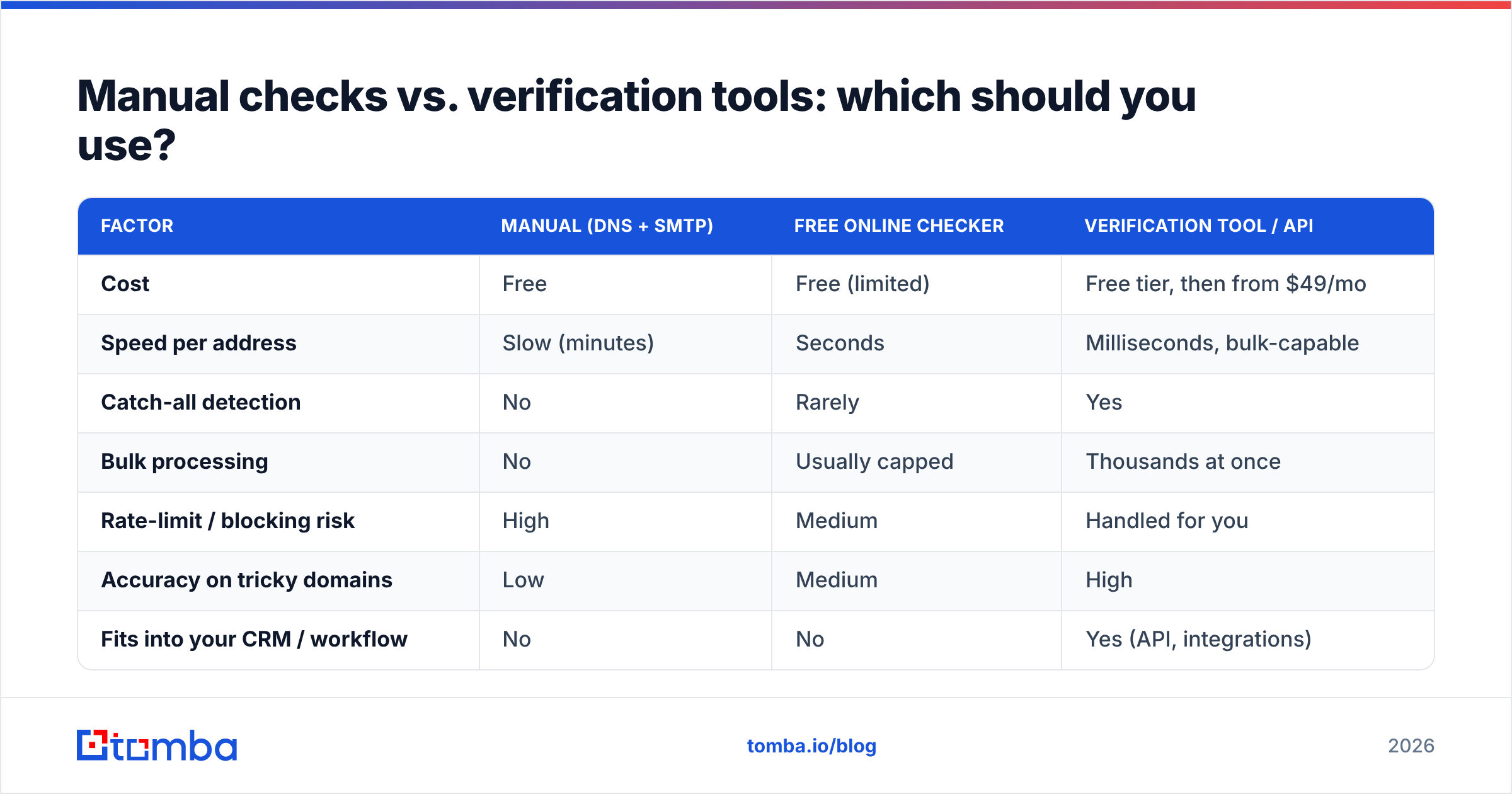
The honest answer depends on volume. One address before an important email? Do it by hand. A list of 5,000 leads before a campaign? You need automation. Here is the trade-off laid out.
| Factor | Manual (DNS + SMTP) | Free online checker | Verification tool / API |
|---|---|---|---|
| Cost | Free | Free (limited) | Free tier, then from $49/mo |
| Speed per address | Slow (minutes) | Seconds | Milliseconds, bulk-capable |
| Catch-all detection | No | Rarely | Yes |
| Bulk processing | No | Usually capped | Thousands at once |
| Rate-limit / blocking risk | High | Medium | Handled for you |
| Accuracy on tricky domains | Low | Medium | High |
| Fits into your CRM / workflow | No | No | Yes (API, integrations) |
The pattern is clear: manual is fine for a handful, and a dedicated email verifier is the only thing that scales without getting you blocked or lied to by catch-all domains.
What is a catch-all domain and why does it break verification?#
A catch-all domain is configured to accept mail for any address at that domain, even ones that do not exist. So an SMTP check returns 250 OK for realperson@company.com and asdfghjkl@company.com alike. Manual verification cannot tell them apart.
This is one of the biggest reasons "I pinged it and it said OK" is not the same as "the mailbox is real." Roughly 10–20% of business domains run catch-all, and they are common at larger companies. Handling them requires probabilistic scoring — looking at the domain's known email patterns, prior data, and confidence signals rather than a single yes/no SMTP reply. A purpose-built catch-all verifier does this; a telnet session cannot.

How do you check if a list of emails is real at scale?#
For anything past a few dozen addresses, you run them through a verification service that performs every check in one pass and returns a status per address. The good ones report:
- Deliverable — valid syntax, live MX, mailbox confirmed.
- Invalid — fails syntax, no MX, or mailbox rejected. Drop these.
- Catch-all / accept-all — domain accepts everything; treat with caution and a confidence score.
- Unknown — the server would not give a definitive answer; retry or send carefully.
- Disposable — temporary throwaway address (Mailinator and friends). Usually drop.
- Role-based —
info@,sales@,support@. Not a person; segment separately.
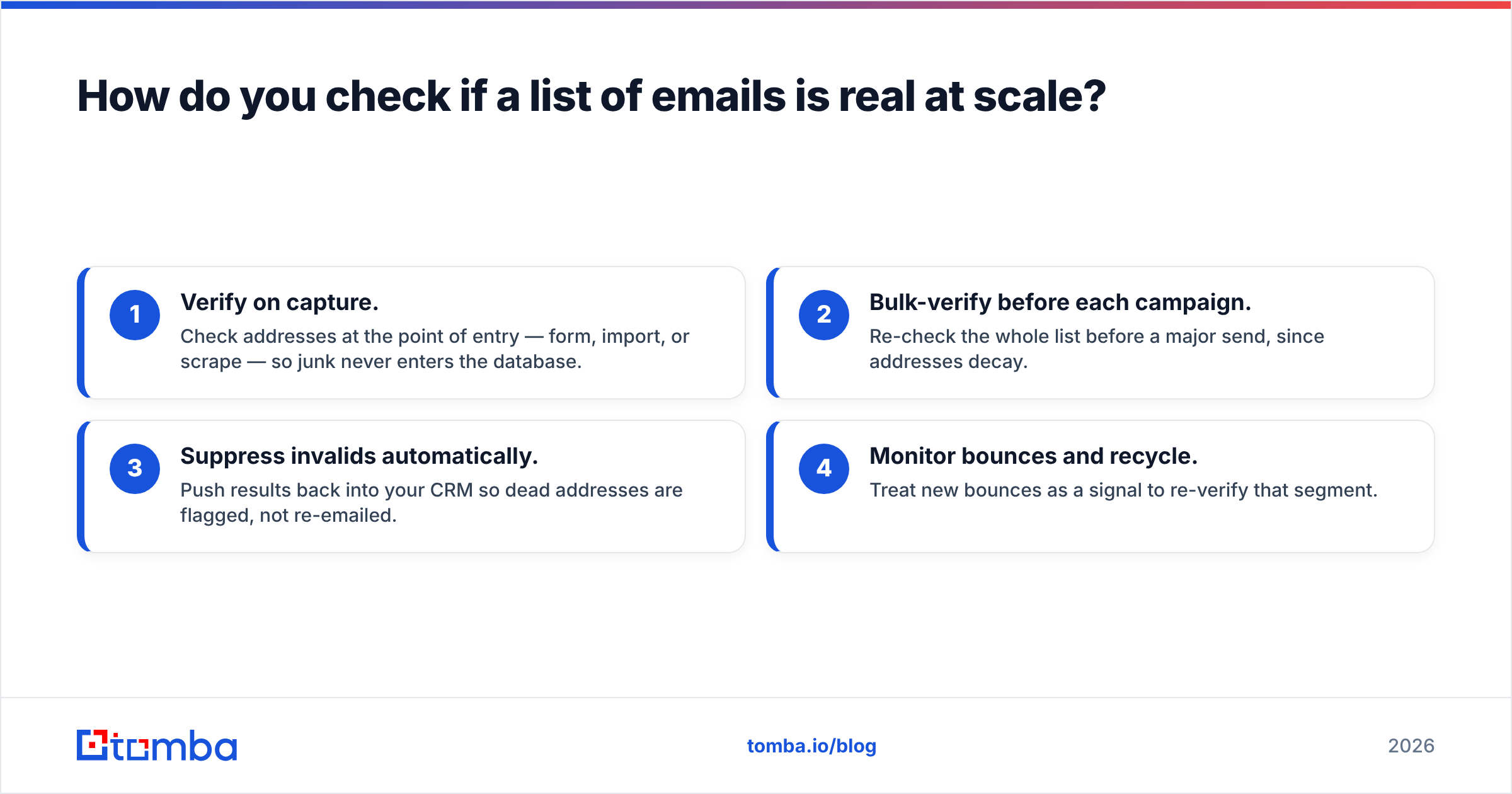
The workflow that keeps a list clean over time looks like this:
- Verify on capture. Check addresses at the point of entry — form, import, or scrape — so junk never enters the database.
- Bulk-verify before each campaign. Re-check the whole list before a major send, since addresses decay.
- Suppress invalids automatically. Push results back into your CRM so dead addresses are flagged, not re-emailed.
- Monitor bounces and recycle. Treat new bounces as a signal to re-verify that segment.
If you are also building the list, find-and-verify in one step is cleaner than two tools. Tomba's email finder returns addresses already scored for validity, and its verifier handles the re-check before send.
What does good email verification accuracy actually look like?#
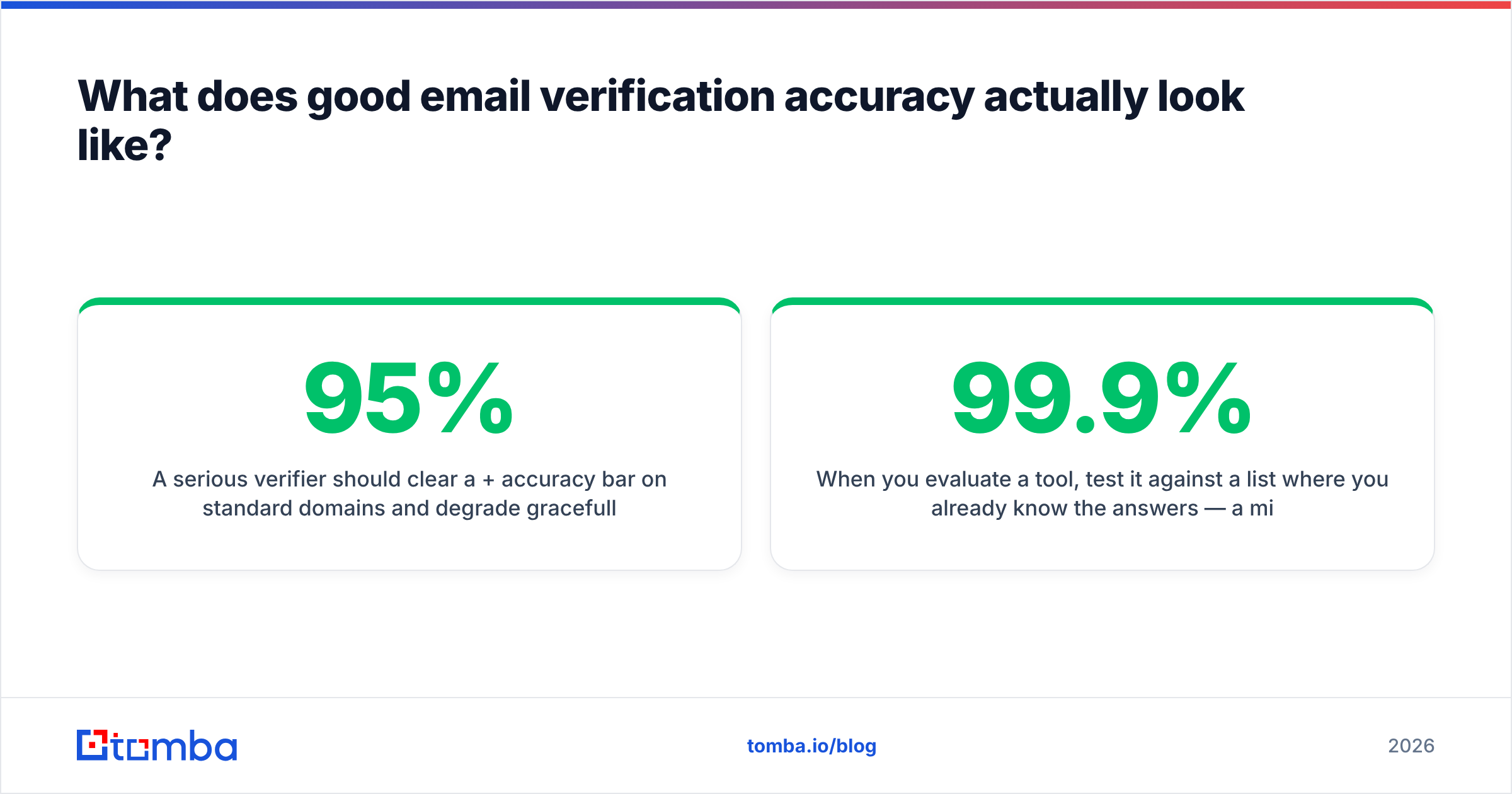
A serious verifier should clear a 95%+ accuracy bar on standard domains and degrade gracefully — meaning it tells you "catch-all, 80% confidence" instead of falsely claiming "valid." Accuracy is not just about catching dead addresses; it is about not discarding good ones (false positives cost you real prospects).
When you evaluate a tool, test it against a list where you already know the answers — a mix of your own confirmed-live addresses, some you know bounced, a catch-all domain, and a disposable. A trustworthy verifier sorts all four correctly. Be skeptical of any service quoting "99.9% accuracy" with no methodology behind it; published benchmarks from sites like G2 and real test results matter more than marketing numbers.
How often should you re-verify your email list?#
Re-verify before every significant send, and do a full-list sweep at least quarterly. Email addresses are not static — people change jobs, companies fold, and inboxes get deactivated. Industry data puts B2B data decay at roughly 22–30% per year, which means a list verified twelve months ago is now a quarter wrong.
A practical cadence:
- Per address: verify at capture.
- Per campaign: bulk-verify the target segment 24–48 hours before send.
- Per quarter: sweep the entire database and suppress anything newly invalid.
This is also where verification pairs naturally with data enrichment — when you re-verify, you can refresh job titles and company data in the same pass, so your list stays both clean and current.
Tomba pricing and how it fits#
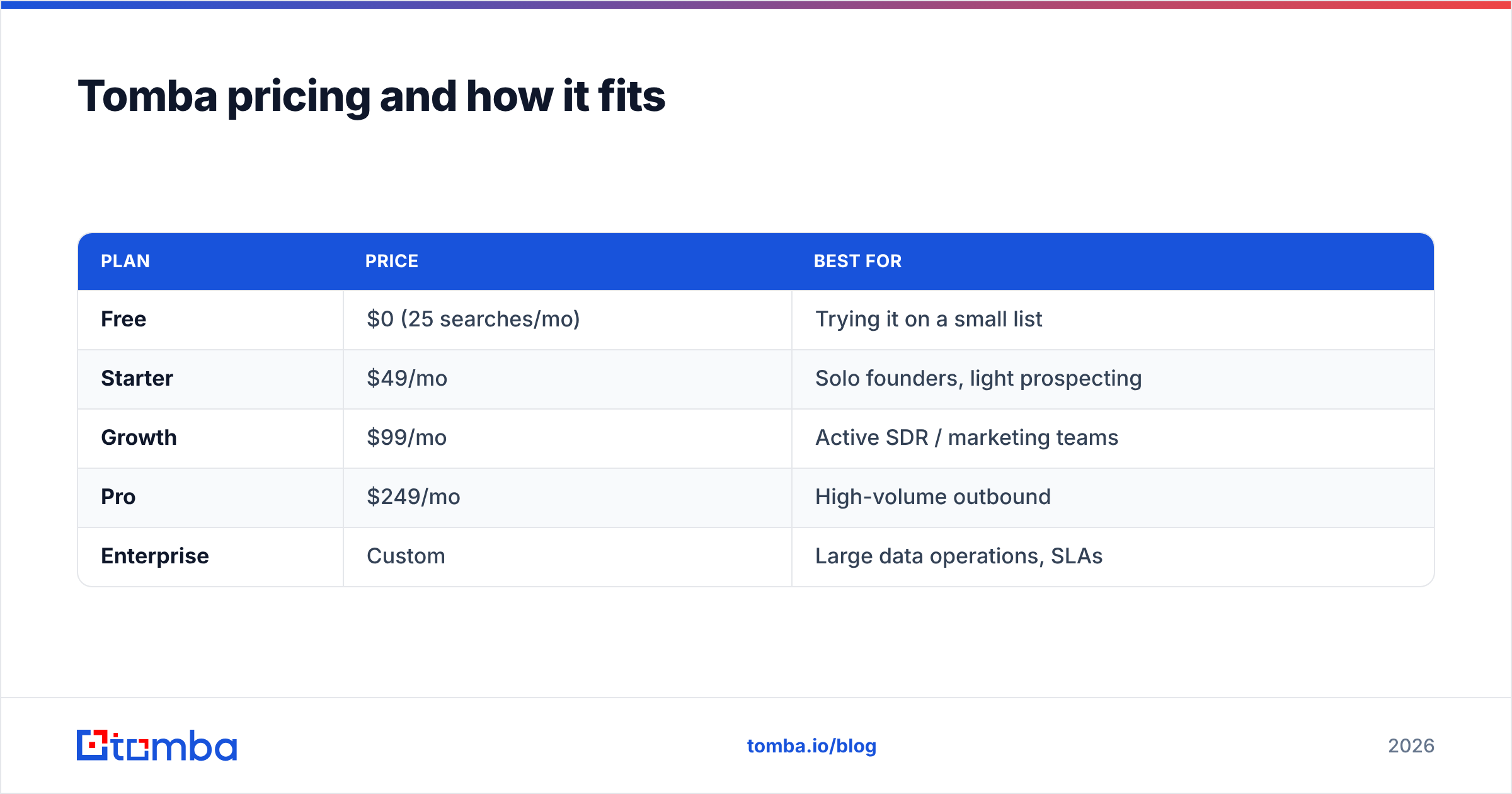
If you want one platform to both find and verify, here is where Tomba lands. Pricing is straightforward and the free tier is enough to test it against your own known-answer list before committing.
| Plan | Price | Best for |
|---|---|---|
| Free | $0 (25 searches/mo) | Trying it on a small list |
| Starter | $49/mo | Solo founders, light prospecting |
| Growth | $99/mo | Active SDR / marketing teams |
| Pro | $249/mo | High-volume outbound |
| Enterprise | Custom | Large data operations, SLAs |
Full Tomba pricing breaks down monthly credits and API limits per tier.
Final checklist: how to check if an email is real#
- Validate syntax — format must be legal.
- Confirm MX records — the domain must accept mail.
- Probe the mailbox — SMTP check for existence.
- Flag catch-all and disposable — score them, do not trust a blind
250 OK. - Segment role-based addresses —
info@is not a person. - Re-verify on a schedule — decay is constant.
Do all six manually for one address. Automate all six for a list.
Stop guessing — verify before you send#
Bounces are not bad luck; they are unverified sends. The fastest way to protect your sender reputation, your budget, and your reply rates is to check every address before it goes into a campaign. Start with Tomba's email verifier to clean an existing list, and pair it with the Tomba Email Finder when you need fresh, already-validated contacts by name or domain. The free tier gives you 25 searches to test it on a list you already know the answers to — run it, compare, and decide for yourself.
// get started
Find, verify and enrich your first contacts today
Start on the free plan with 25 searches a month, then scale when your team is ready.
Free plan · No credit card required · GDPR & CCPA
// about the author