How to Check If an Email Works: 2026 Verification Guide
Sending to a dead inbox tanks your sender reputation. Here are seven tested ways to check if an email works in 2026 — from free syntax checks to SMTP verification at scale.
TL;DR
- "Check if an email works" really means four layered checks: valid syntax, a live mail domain (MX records), an accepting mailbox (SMTP), and whether the domain is catch-all.
- Free browser checkers catch typos and dead domains in seconds, but they can't confirm a real inbox — for that you need SMTP-level verification.
- Catch-all domains accept everything at the server, so a "valid" result there is a maybe, not a yes. Treat them separately.
- Never send cold mail to an unverified list. One bad batch of hard bounces can wreck your sender reputation for weeks.
- For volume, a bulk verify run or the email verification API is faster and safer than manual SMTP probing.
What does it actually mean to "check if an email works"?#
An email "works" when a message you send reaches a real, monitored inbox without bouncing. That single outcome depends on four independent things being true at once, and most people only test the first one.
Think of it like mailing a physical letter. The address has to be written correctly (syntax), the street has to exist (the domain), the house has to be standing (the mail server), and someone has to actually live there to receive it (the mailbox). A typo-free address on a demolished street still gets your letter returned.
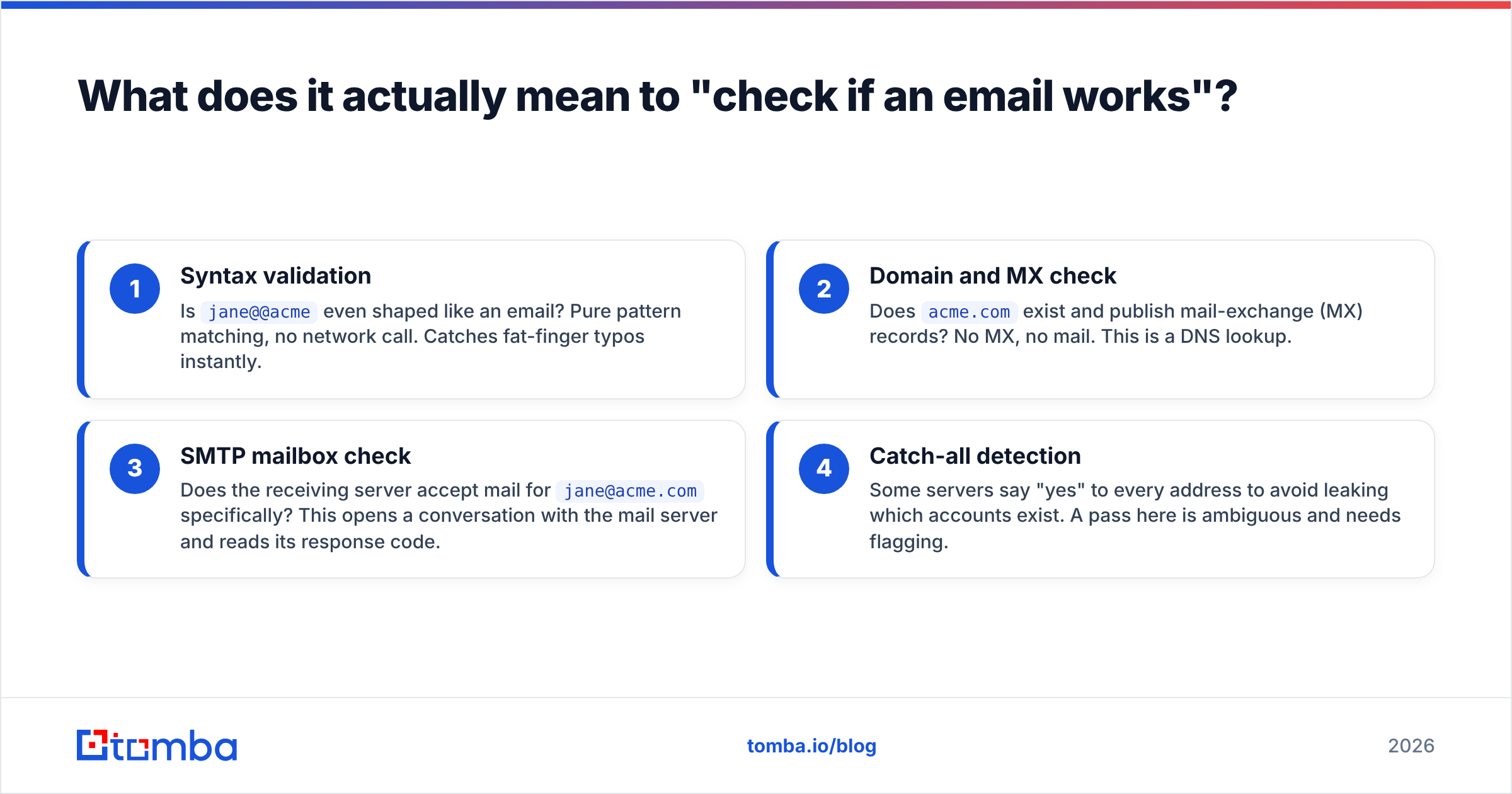
Here are the four layers, from cheapest to most reliable:
- Syntax validation — Is
jane@@acmeeven shaped like an email? Pure pattern matching, no network call. Catches fat-finger typos instantly. - Domain and MX check — Does
acme.comexist and publish mail-exchange (MX) records? No MX, no mail. This is a DNS lookup. - SMTP mailbox check — Does the receiving server accept mail for
jane@acme.comspecifically? This opens a conversation with the mail server and reads its response code. - Catch-all detection — Some servers say "yes" to every address to avoid leaking which accounts exist. A pass here is ambiguous and needs flagging.
Skipping straight to "it looks fine" is how dead addresses end up in your sequence. You want all four signals before you trust an address.

How do you check if an email works for free?#
The fastest free path is a browser-based checker that runs syntax plus MX in one shot. You paste an address, and within a second or two you learn whether the format is legal and the domain can receive mail at all. Tomba's free email checker does exactly this without an account, and it's the right tool when you have one or two addresses to sanity-check before hitting send.
Free methods cluster into three buckets:
- Syntax and format tools — Catch malformed addresses (
name@domain..com, missing TLD, stray spaces). Zero false positives, but they only prove the address is shaped right. - MX / DNS lookups — Confirm the domain publishes mail records. A domain with no MX cannot receive email, full stop. You can do this manually with
nslookup -type=mx acme.comif you like the terminal. - Manual SMTP "ping" — Telnet into the mail server on port 25 and walk through
HELO,MAIL FROM, andRCPT TO. The server's reply code tells you whether the mailbox is accepted. It works, but most ISPs now block port 25 from residential IPs, and one wrong move flags your IP as a prober.
The honest limit of free checking: it tells you an address could work, not that it does. Confirming the actual mailbox at scale, without burning your own IP reputation, is where dedicated verification earns its keep.
What's the difference between valid syntax and a working inbox?#
A valid syntax means the string follows the rules; a working inbox means a server will accept and store mail for it. Those are not the same claim, and conflating them is the single most common verification mistake.
ceo@microsoft.com is perfectly valid syntax and points to a real domain with healthy MX records. Whether that exact mailbox exists and accepts your mail is a different question entirely — one only an SMTP handshake (or a catch-all flag) can answer. Plenty of syntactically perfect addresses bounce because the employee left, the alias was retired, or the mailbox is full.
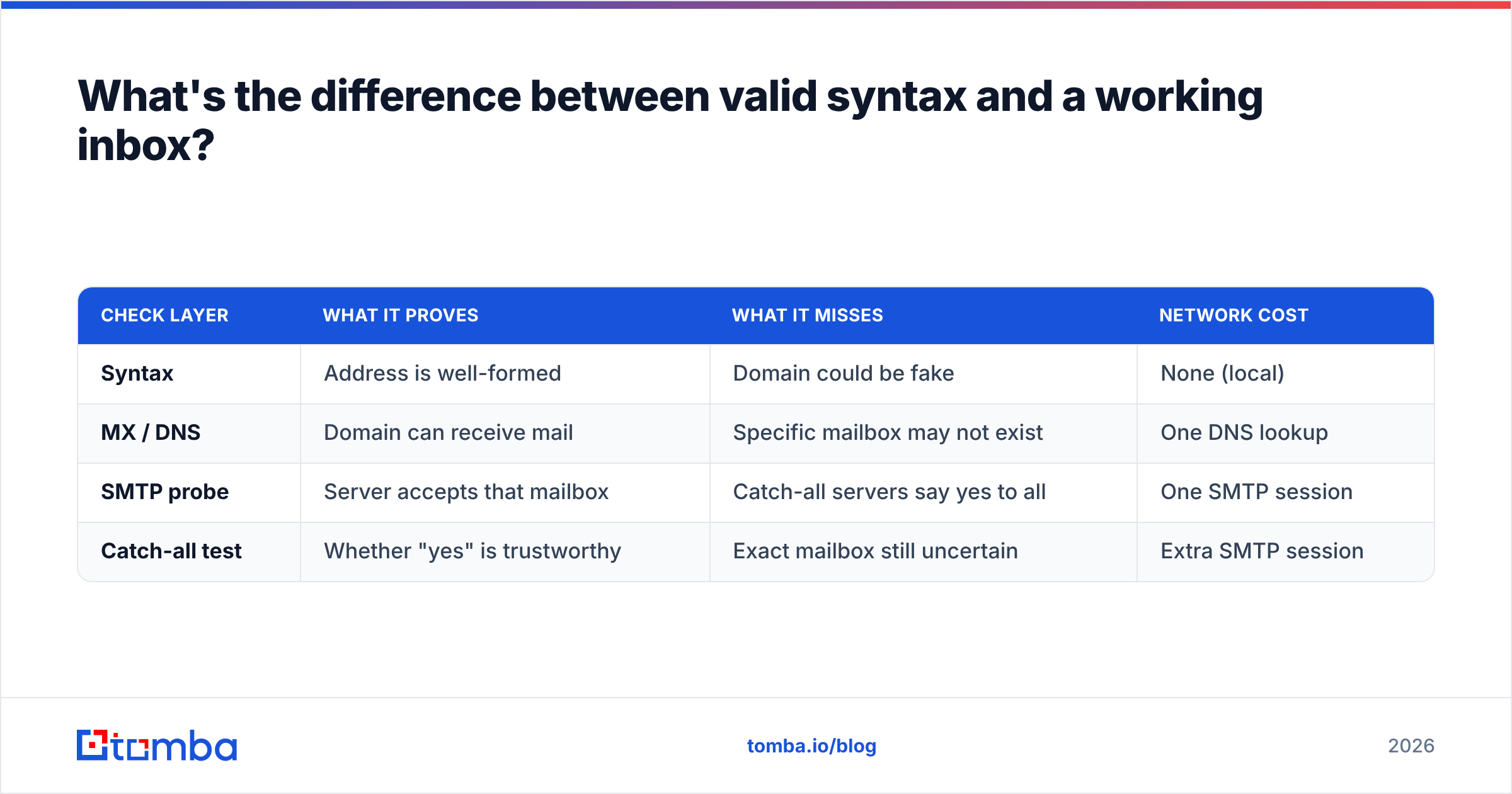
This is why a layered approach matters. Each layer rules out a class of failure the previous one can't see:
| Check layer | What it proves | What it misses | Network cost |
|---|---|---|---|
| Syntax | Address is well-formed | Domain could be fake | None (local) |
| MX / DNS | Domain can receive mail | Specific mailbox may not exist | One DNS lookup |
| SMTP probe | Server accepts that mailbox | Catch-all servers say yes to all | One SMTP session |
| Catch-all test | Whether "yes" is trustworthy | Exact mailbox still uncertain | Extra SMTP session |
If you only run syntax, you'll happily mail a long-dead address. If you run all four, you can sort every address into deliverable, undeliverable, or risky — and treat each bucket differently.
How does SMTP verification confirm a real mailbox?#
SMTP verification opens a real conversation with the recipient's mail server and stops just short of sending anything. The server's response code is the answer you're after.
A clean check runs like this: your verifier connects to the MX host, identifies itself (HELO), declares a sender (MAIL FROM), then asks the server to accept mail for the target address (RCPT TO: jane@acme.com). A 250 means the mailbox is accepted. A 550 means no such user. The verifier records the code and disconnects before issuing DATA, so no email is ever delivered — the recipient never sees a thing.
Doing this by hand is fragile. Reputable mail providers throttle or blacklist IPs that probe too often, port 25 is frequently blocked, and Google and Microsoft increasingly return deliberately vague codes to thwart enumeration. A purpose-built email verifier handles the retries, IP rotation, and provider quirks for you, and it interprets ambiguous codes instead of taking them at face value. That interpretation layer is the real value — raw SMTP codes lie more often than you'd expect.

Why do catch-all domains break simple email checks?#
Catch-all domains accept mail for every address at the domain, so an SMTP "yes" tells you nothing about whether that specific mailbox is real. This is the trap that fools naive checkers into reporting false positives.
Picture an office building where the front desk signs for any package no matter whose name is on it, then sorts it out later — or quietly bins it. From the courier's side, every delivery "succeeds." That's a catch-all server: it returns 250 OK for jane@acme.com, nonsense@acme.com, and definitely-fake-99@acme.com alike. A basic checker marks all three valid. Only one of them might reach a human.
Catch-all is common at enterprises, agencies, and security-conscious orgs precisely because it hides which accounts exist. To handle it you need to (a) detect that the domain is catch-all in the first place, then (b) apply additional signals — known email patterns, prior engagement data, role-account heuristics — to estimate whether the mailbox is genuine. Tomba's catch-all verifier flags these domains and scores the address rather than handing you a misleading green light. The right move is to label catch-all hits as "risky," send to them more cautiously, and keep them out of your most reputation-sensitive sequences.
Which method should you use, and when?#
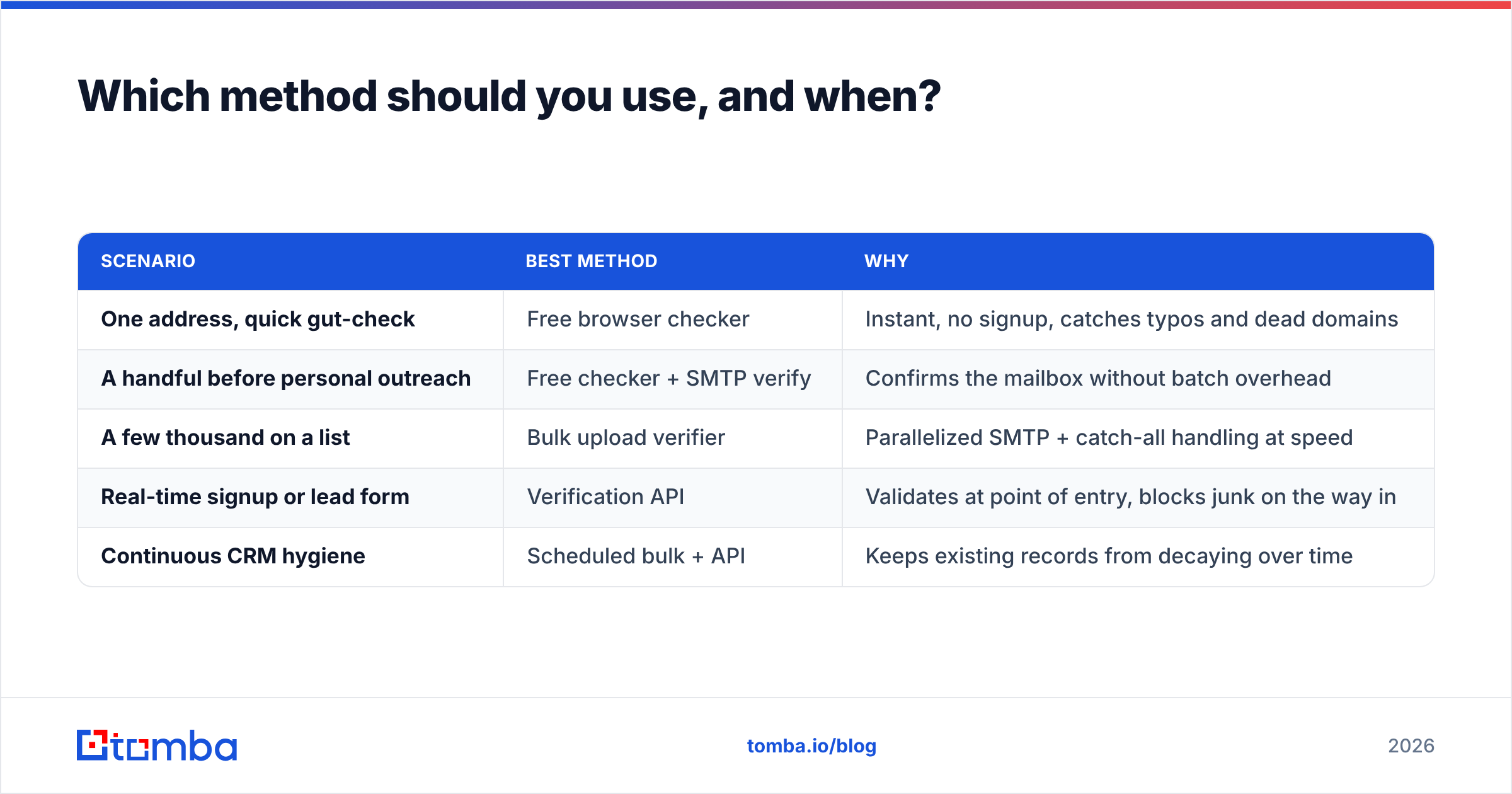
Match the tool to the volume and the stakes. Checking one address before a hand-written intro is a different job from validating a 50,000-row export before a campaign.
| Scenario | Best method | Why |
|---|---|---|
| One address, quick gut-check | Free browser checker | Instant, no signup, catches typos and dead domains |
| A handful before personal outreach | Free checker + SMTP verify | Confirms the mailbox without batch overhead |
| A few thousand on a list | Bulk upload verifier | Parallelized SMTP + catch-all handling at speed |
| Real-time signup or lead form | Verification API | Validates at point of entry, blocks junk on the way in |
| Continuous CRM hygiene | Scheduled bulk + API | Keeps existing records from decaying over time |
For lists, manual probing simply doesn't scale and risks your sending IP. A bulk verify run processes the whole file, separates deliverable from undeliverable, and tags the catch-all gray zone in one pass. For product signups and lead forms, wiring the email verification API into the form stops fake and mistyped addresses before they ever enter your database — far cheaper than cleaning them out later.
If you're standardizing on a stack, check the Tomba pricing tiers against your monthly volume: the Free plan covers 25 searches a month for casual use, Starter runs $49/mo, Growth $99/mo, and Pro $249/mo for heavier verification and finding workloads.
How does email verification protect your sender reputation?#
Verification protects you because mailbox providers judge you on your bounce rate, and dead addresses are the fastest way to spike it. Keeping that rate low is the whole game.
When you send to addresses that don't exist, the receiving servers return hard bounces. Gmail, Outlook, and Yahoo watch your bounce ratio closely as a spam signal — a sender who repeatedly mails non-existent inboxes looks like someone working a scraped or purchased list, which is exactly the behavior their filters are built to punish. Cross a threshold and your messages start landing in spam, or get blocked outright, even for your valid recipients. According to Google's own Postmaster guidelines, keeping invalid sends and spam complaints low is foundational to inbox placement. You can read more on the mechanics in our breakdown of email deliverability and sender reputation.
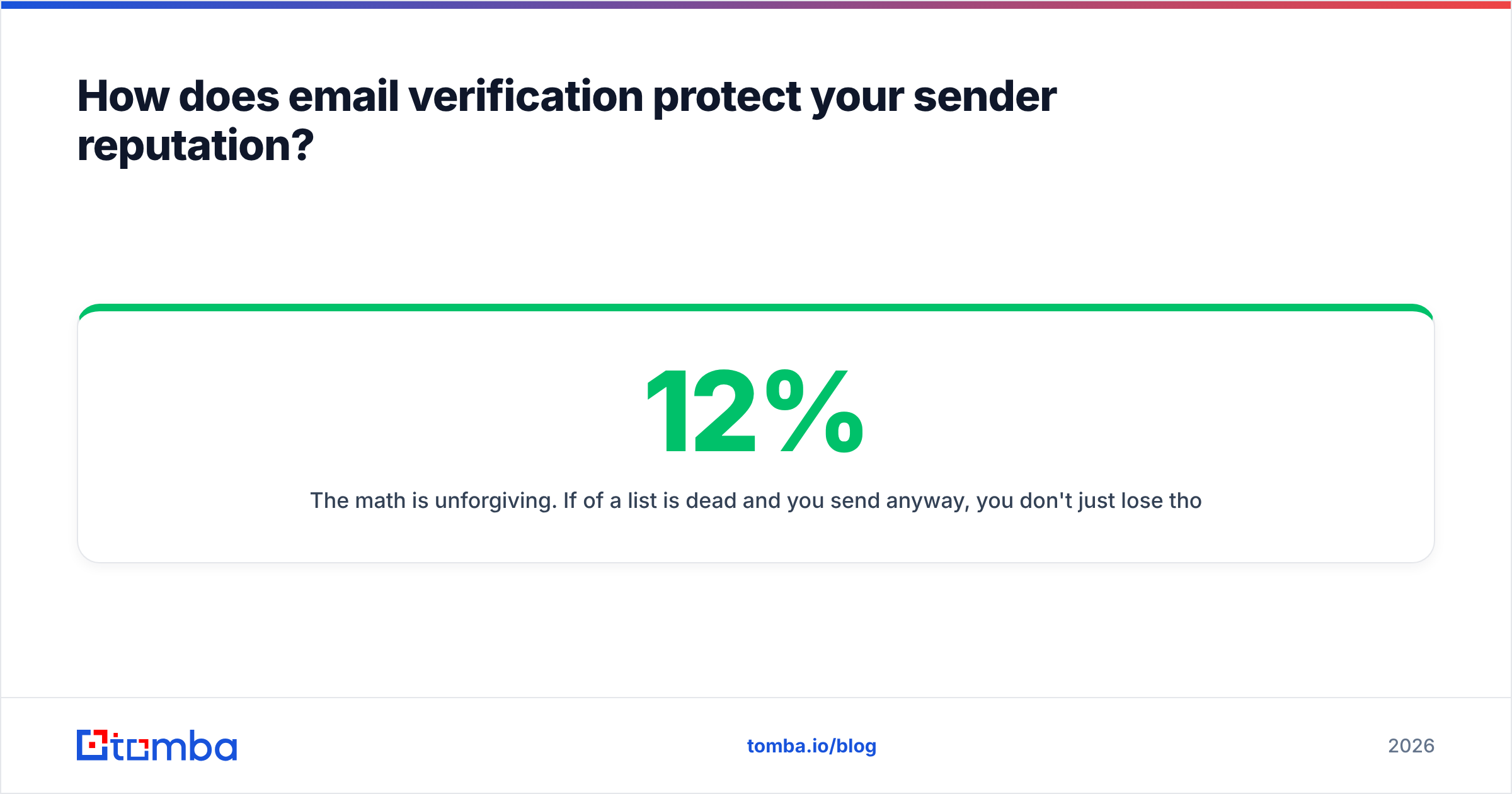
The math is unforgiving. If 12% of a list is dead and you send anyway, you don't just lose those 12% — you damage delivery for the other 88% too. Verifying first turns a reputation-damaging blast into a clean send. Industry reviews on platforms like G2 consistently rank low bounce rate as the top reason teams adopt verification at all. Verify, then send. Always in that order.
What's the fastest workflow to verify before you send?#
The cleanest workflow is a three-step funnel: find, verify, segment. Do these in order and you rarely touch a bad address.
- Find or collect — Pull addresses from your domain search, an opt-in form, or an existing CRM export. Capture the source so you can judge data freshness later.
- Verify in bulk — Run the full list through a verifier in one pass. You'll get back deliverable, undeliverable, and catch-all/risky buckets.
- Segment and send — Mail the deliverable bucket confidently, drop the undeliverable, and route catch-all addresses into a lower-volume, higher-care track.
Two habits keep this durable. First, re-verify lists older than 90 days — B2B email decays roughly 2–3% per month as people change jobs. Second, verify at the point of capture with the API so junk never enters your database to begin with. Prevention beats cleanup every time.
Final take: verify first, send second#
Checking if an email works isn't one test — it's four, layered from a cheap syntax glance to a careful SMTP-plus-catch-all judgment. Free tools are perfect for spot checks. The moment you're dealing with a list, a signup flow, or anything touching your sending reputation, you want real verification doing the heavy lifting so a handful of dead addresses don't poison delivery for everyone else.
Start by running a quick domain search to find the right contacts, then push every address through Tomba's verification before it reaches your outbox. Spin up a free Tomba account — 25 searches a month, no card — and confirm an inbox is real before you ever hit send. Your bounce rate, and your future deliverability, will thank you.
// get started
Find, verify and enrich your first contacts today
Start on the free plan with 25 searches a month, then scale when your team is ready.
Free plan · No credit card required · GDPR & CCPA
// about the author