Check In Email After No Response: 12 Templates for 2026
No reply doesn't mean no. Here are 12 check-in email templates, timing rules, and subject lines that revive cold threads and book more meetings in 2026.
Check In Email After No Response: 12 Templates for 2026
You sent a great email. They opened it. Then silence. Before you write the deal off, know this: most replies don't come from the first send — they come from the check-in. The trick is sending a follow-up that adds a reason to respond instead of just nagging.
TL;DR#
- Silence is rarely a "no." Roughly 80% of conversions need five or more touches, yet most reps stop after one or two.
- Timing beats volume. Wait 2–3 business days for the first check-in, then space follow-ups 4–7 days apart across a 4–6 touch sequence.
- Every check-in must add value — a new angle, proof point, or resource — never a guilt-trip like "just bumping this up."
- Subject lines decide open rates. Reply in-thread or use a short, curiosity-driven line; skip "Re: Re: Re:" spam.
- Bad data kills sequences. If your check-in bounces, the problem isn't your copy — verify addresses with a tool like Tomba's email verifier before you blame the template.
What is a check-in email after no response?#
A check-in email is the message you send when your previous email got no reply. Think of it like knocking a second time on a door — you're not assuming they ignored you on purpose; you're assuming they got busy, lost the thread, or genuinely missed it. The job of the check-in is to re-surface your offer with a fresh hook so responding feels easy and worthwhile.
The mistake most people make is treating a check-in as a reminder. "Just following up on my last email" tells the reader nothing new and quietly puts the burden on them to remember why they should care. A strong check-in does the opposite: it carries its own weight. It gives the prospect a reason to reply today — a relevant case study, a sharper question, a deadline, or a simple yes/no ask that takes five seconds to answer.
Why do prospects ignore your first email?#
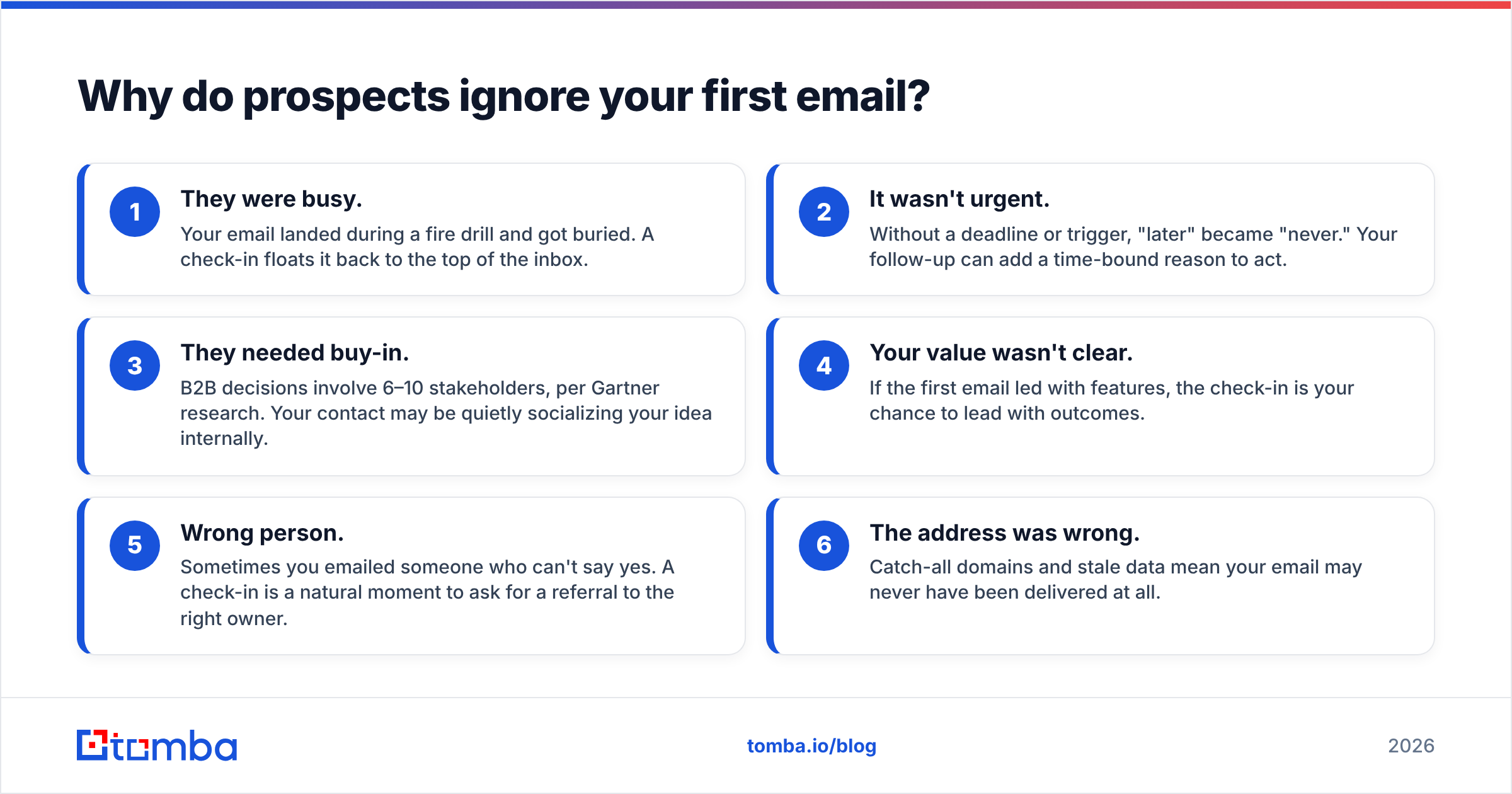
Silence feels personal, but it almost never is. Here are the real reasons your first email died — and how a check-in fixes each one:
- They were busy. Your email landed during a fire drill and got buried. A check-in floats it back to the top of the inbox.
- It wasn't urgent. Without a deadline or trigger, "later" became "never." Your follow-up can add a time-bound reason to act.
- They needed buy-in. B2B decisions involve 6–10 stakeholders, per Gartner research. Your contact may be quietly socializing your idea internally.
- Your value wasn't clear. If the first email led with features, the check-in is your chance to lead with outcomes.
- Wrong person. Sometimes you emailed someone who can't say yes. A check-in is a natural moment to ask for a referral to the right owner.
- The address was wrong. Catch-all domains and stale data mean your email may never have been delivered at all.
That last point is the silent killer. You can write the perfect sequence and still get nothing if the message bounces or lands in a black-hole catch-all. Lifting your response rate starts with confirming the message actually arrives.
How long should you wait before checking in?#
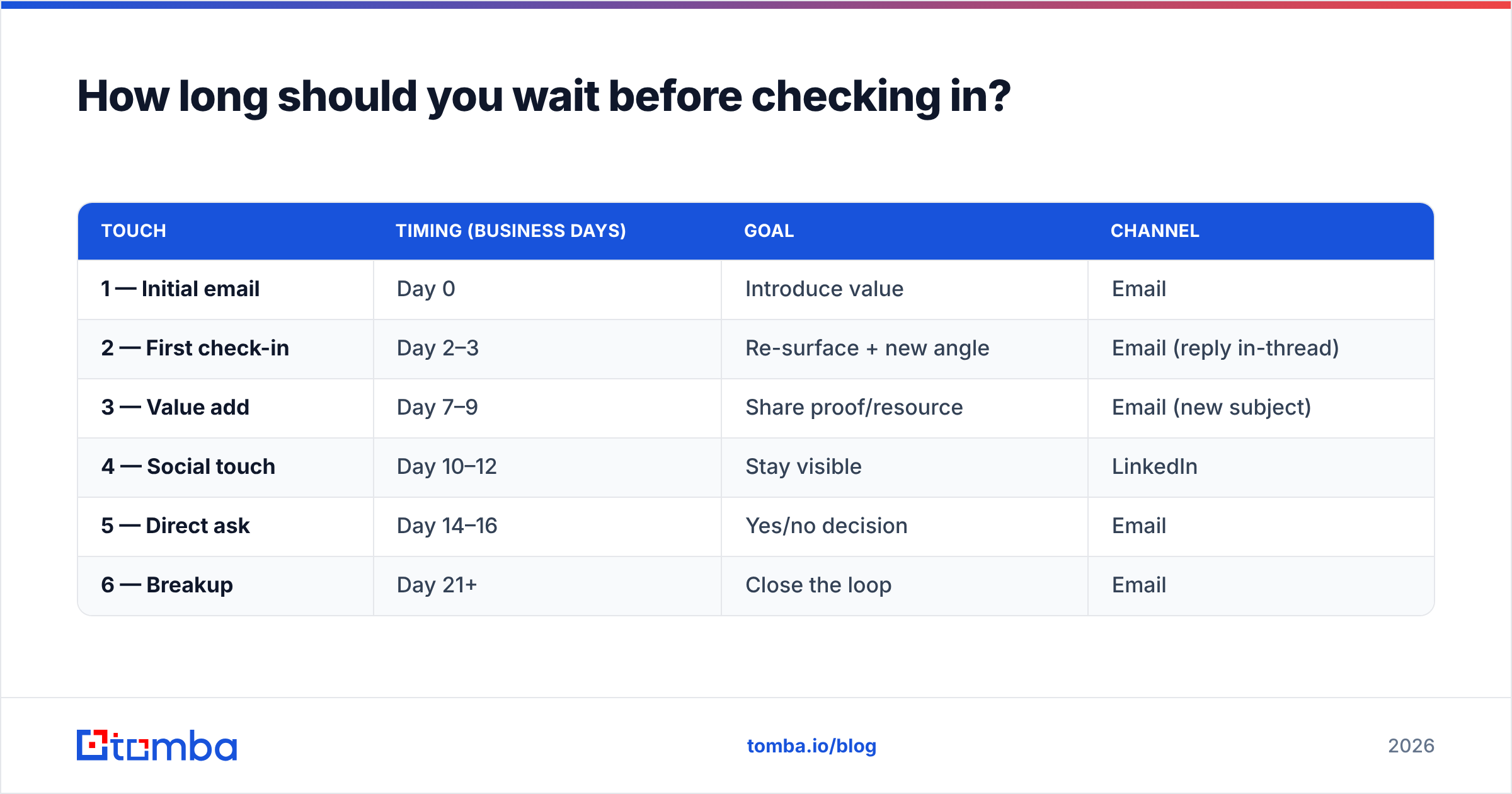
Wait 2–3 business days after the first email, then space each follow-up 4–7 days apart. Too soon reads as desperate; too late and you're forgotten. The sweet spot respects the prospect's calendar while keeping you top of mind.
Here's a cadence that works across most B2B sales motions:
| Touch | Timing (business days) | Goal | Channel |
|---|---|---|---|
| 1 — Initial email | Day 0 | Introduce value | |
| 2 — First check-in | Day 2–3 | Re-surface + new angle | Email (reply in-thread) |
| 3 — Value add | Day 7–9 | Share proof/resource | Email (new subject) |
| 4 — Social touch | Day 10–12 | Stay visible | |
| 5 — Direct ask | Day 14–16 | Yes/no decision | |
| 6 — Breakup | Day 21+ | Close the loop |
Adjust for deal size: enterprise cycles tolerate longer gaps, while transactional SMB deals can compress to a 10-day window. The principle holds — consistent, spaced touches beat one frantic burst.
What are the best check-in email templates after no response?#
Below are 12 templates grouped by intent. Swap the brackets, keep them short, and never send more than 120 words.
The gentle nudge (first check-in)#
Subject: Re: [original subject]
Hi [Name], floating this back to the top in case it slipped through. Worth a quick 15 minutes next week to see if [specific outcome] fits your roadmap? Happy to work around your calendar.
The new-angle check-in#
Subject: A different way to look at [problem]
Hi [Name], since my last note I noticed [trigger / company news]. That usually means [relevant pain]. We helped [similar company] cut that by [metric] — open to a short call to compare notes?
The value drop#
Subject: Thought this might help, [Name]
Hi [Name], no agenda here — I put together a [guide / benchmark] on [topic] that [target role]s have found useful. Want me to send it over? Reply "yes" and it's in your inbox today.
The social-proof check-in#
Subject: How [Competitor] solved [problem]
Hi [Name], wanted to share how [similar company] tackled [problem] and saw [result] in [timeframe]. Happy to walk you through what we'd do differently for [their company]. Worth a chat?
The single-question check-in#
Subject: Quick question
Hi [Name], one quick question: is [problem] still a priority this quarter, or should I check back later in the year? Either answer helps me get out of your way.
The breakup email#
Subject: Should I close your file?
Hi [Name], I haven't heard back, so I'll assume the timing isn't right. I'll close this out for now — just reply if anything changes and I'll jump back in. Wishing you a strong quarter.
The breakup email is the dark horse here: the implied loss of attention often pulls a reply when nothing else does. Pair these with sharper openers from Tomba's cold email templates when you need more variety.
How do you write a subject line that gets opened?#
Reply in-thread for the first check-in, then switch to a short, curiosity-driven new subject for later touches. Staying in-thread keeps context; a fresh line resets a dead thread.
What works in 2026:
- Keep it under 6 words. Mobile inboxes truncate the rest.
- Lead with curiosity or a question. "Quick question" and "Still a priority?" outperform "Following up."
- Personalize the trigger. "Saw your [funding / launch / hire]" beats anything generic.
- Avoid "Re: Re: Re:" chains. Two replies deep, start fresh.
- Never fake a reply. Spoofing "Re:" on a brand-new thread erodes trust fast.
Test variants instead of guessing. A subject line generator gives you ten angles in seconds so you can A/B the openers that actually move your numbers.
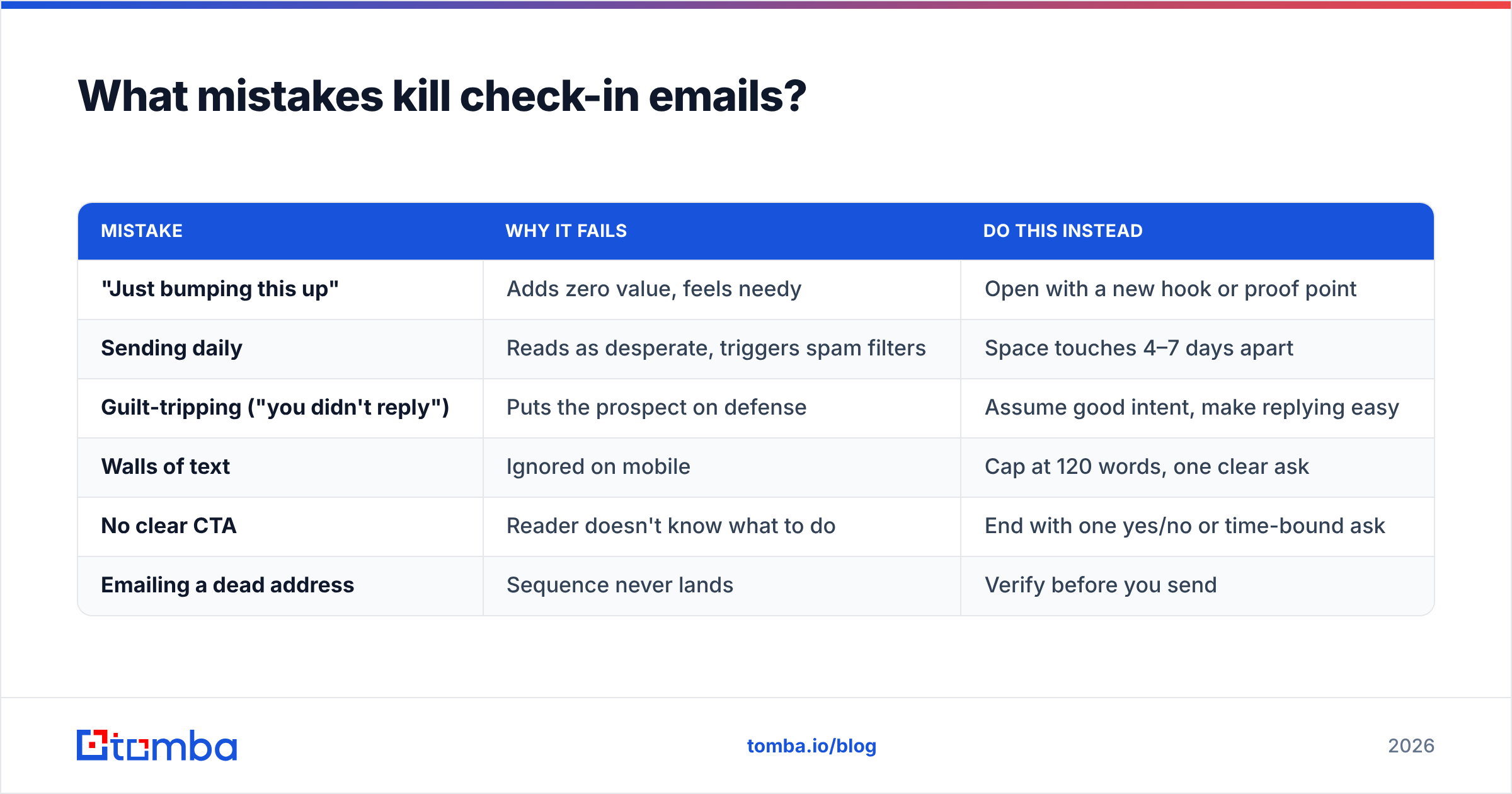
What mistakes kill check-in emails?#
Even good reps sabotage their own follow-ups. Avoid these:
| Mistake | Why it fails | Do this instead |
|---|---|---|
| "Just bumping this up" | Adds zero value, feels needy | Open with a new hook or proof point |
| Sending daily | Reads as desperate, triggers spam filters | Space touches 4–7 days apart |
| Guilt-tripping ("you didn't reply") | Puts the prospect on defense | Assume good intent, make replying easy |
| Walls of text | Ignored on mobile | Cap at 120 words, one clear ask |
| No clear CTA | Reader doesn't know what to do | End with one yes/no or time-bound ask |
| Emailing a dead address | Sequence never lands | Verify before you send |
The first five are copy problems. The last is a data problem — and it's the one most teams never check. According to HubSpot sales research, deliverability and list hygiene quietly cap the ROI of every sequence you run.
How does data quality change your check-in results?#
Your follow-up cadence only works if the emails reach a real human. A flawless six-touch sequence sent to a bouncing or catch-all address produces exactly zero replies — and worse, repeated bounces hurt your sender reputation, dragging down deliverability for the prospects whose addresses are valid.
Two checks protect your sequence:
- Find the right contact. If you're chasing the wrong stakeholder, no template saves you. Use an email finder to pull the verified address of the actual decision-maker before you build the sequence.
- Verify before you send. Strip dead and risky addresses so your check-ins land in inboxes, not spam traps.
This is where many teams cut corners and pay for it later. Free email-finder tiers and scraped lists are riddled with stale data; reputable platforms run live SMTP checks and source from first-party signals. Compare vendors on G2 before committing budget — accuracy and refund policies vary wildly.
How many times should you follow up before giving up?#
Four to six touches over three to four weeks is the proven range — then send a breakup email and move on. Data consistently shows the majority of positive replies arrive on the third through fifth touch, long after most reps have quit at touch one or two.
But "give up" doesn't mean delete. Keep these contacts in a nurture track:
- Re-engage on a trigger. New funding, a new hire in their team, or a product launch resets the conversation.
- Switch channels. A LinkedIn comment or connection request often warms up an email-fatigued prospect, a core tactic in modern social selling.
- Check back next quarter. "Not now" frequently becomes "yes" when budgets reset.
The goal isn't to win every thread. It's to run a disciplined, value-led process so the deals that are winnable don't slip through silence. Even companies like Salesforce build multi-touch nurture into their playbooks precisely because timing — not persistence alone — closes deals.
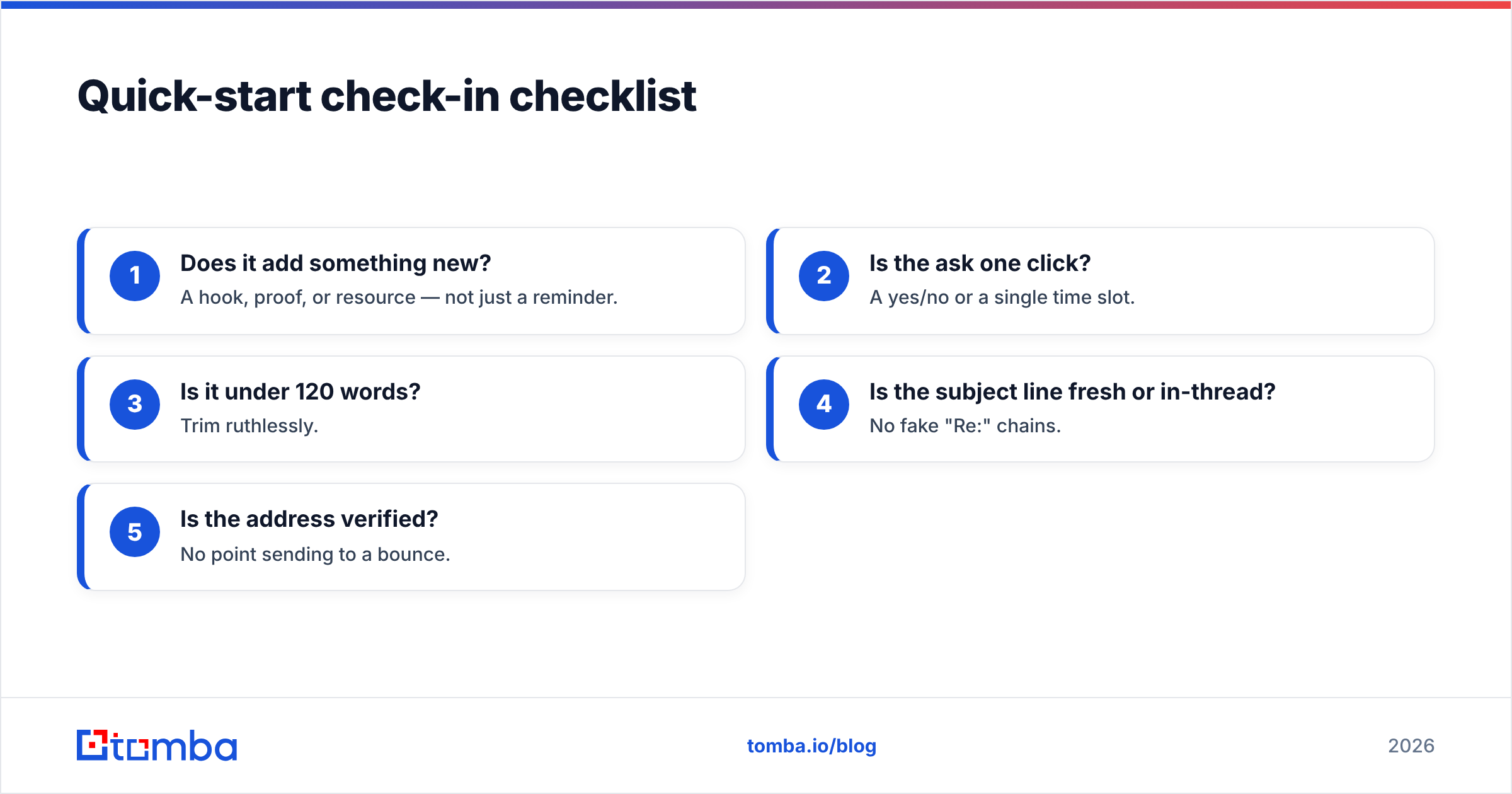
Quick-start check-in checklist#
Before you hit send on any check-in, run this five-second gate:
- Does it add something new? A hook, proof, or resource — not just a reminder.
- Is the ask one click? A yes/no or a single time slot.
- Is it under 120 words? Trim ruthlessly.
- Is the subject line fresh or in-thread? No fake "Re:" chains.
- Is the address verified? No point sending to a bounce.
Nail all five and your reply rate climbs without sending a single extra email.
Turn silence into replies with verified contacts#
The best check-in copy in the world can't fix a wrong or dead email address — and that's the variable most teams ignore. Start every sequence on solid ground: use the Tomba Email Finder to pull verified, decision-maker emails by name, company, or domain, then load your six-touch cadence knowing each message actually lands. Begin on the free tier (25 searches/month), and when you're scaling outreach, the Starter plan at $49/mo and Growth at $99/mo unlock bulk finding and verification. See full Tomba pricing to match a plan to your pipeline. Stop guessing — find the right inbox, send the right check-in, and let your follow-ups do the closing.
// get started
Find, verify and enrich your first contacts today
Start on the free plan with 25 searches a month, then scale when your team is ready.
Free plan · No credit card required · GDPR & CCPA
// about the author