Check Website Spam Score in 2026: A Clean-Domain Guide
Learn how to check your website spam score, what the number really means for SEO and email deliverability, and the exact steps to lower it before it costs you replies.
TL;DR
- Your website spam score is a 0–100 risk signal (popularized by Moz) that estimates how closely your domain resembles sites that get penalized or flagged — it is a correlation score, not a Google penalty.
- A high score quietly damages two things at once: organic SEO trust and the email deliverability of any outreach sent from that domain.
- Check it with at least two tools — one SEO-focused (Moz), one inbox-focused (a spam/blacklist checker) — because they measure different risks.
- The fastest wins: clean toxic backlinks, fix authentication (SPF/DKIM/DMARC), and stop sending to unverified or catch-all addresses.
- Spam score is a lagging indicator. The real fix is upstream: send to real, verified people. A clean list is the cheapest deliverability insurance you will ever buy.
What is a website spam score?#
A website spam score is a single number, usually 0–100, that predicts how likely a domain is to be flagged, penalized, or filtered based on how many "spammy" traits it shares with sites that already were. Moz introduced the most-cited version, and the metric has since become shorthand for "how risky does this domain look to a machine?"
Think of it like a credit score for your domain. No single late payment defines you, but a pattern of red flags — thin content, a flood of low-quality backlinks, a hijacked subdomain — stacks up until algorithms treat you as a risk. The score itself does not directly demote you in search; it reflects the same underlying signals that search engines and spam filters already watch.
Here is the part most guides miss: "spam score" means two different things depending on who is asking.
- SEO spam score — how much your domain resembles sites Google has historically penalized. Driven by backlink quality, content depth, and on-page signals.
- Email spam score — how likely a message from your domain is to land in spam. Driven by authentication, sender reputation, list hygiene, and content triggers.
They overlap, but you can ace one and fail the other. A pristine SEO profile won't save your cold outreach if your DNS records are broken — and a perfectly authenticated domain can still carry toxic backlinks.

Why should you check your website spam score at all?#
Because a bad score is expensive in ways you won't see on a dashboard until it's too late.
On the SEO side, a domain that looks risky earns less trust, ranks lower for competitive terms, and gets crawled less aggressively. On the outreach side — the part that hits revenue fastest — a poor sender reputation means your cold emails skip the inbox and rot in spam. You can write the best sequence in the world; if 40% of it never gets seen, your reply rate is a fiction.
The two failures compound. Outreach from a flagged domain trains inbox providers to distrust you further, which depresses deliverability, which tanks replies, which tempts teams to blast even larger unverified lists — and the spiral tightens.
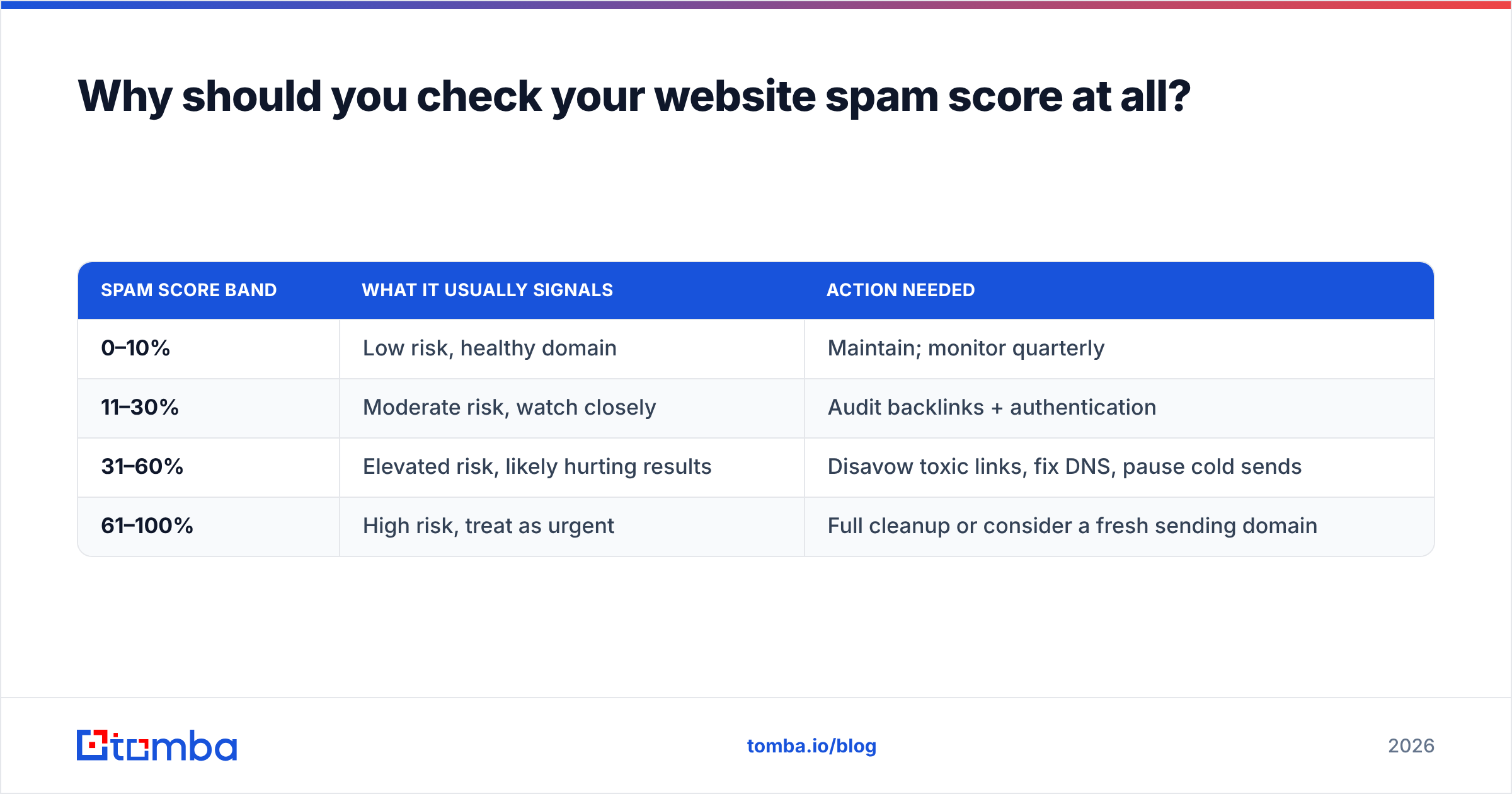
| Spam score band | What it usually signals | Action needed |
|---|---|---|
| 0–10% | Low risk, healthy domain | Maintain; monitor quarterly |
| 11–30% | Moderate risk, watch closely | Audit backlinks + authentication |
| 31–60% | Elevated risk, likely hurting results | Disavow toxic links, fix DNS, pause cold sends |
| 61–100% | High risk, treat as urgent | Full cleanup or consider a fresh sending domain |
Bands are guidance, not gospel — context matters. A new domain with few links can score oddly, and a huge brand can carry a moderate score without consequence. But if you're a B2B team running outbound, anything above ~30% deserves a same-week investigation.
How do you actually check website spam score?#
Use more than one lens. No single tool sees the whole picture, and treating one vendor's number as absolute truth is how teams get blindsided.
Here is the practical stack:
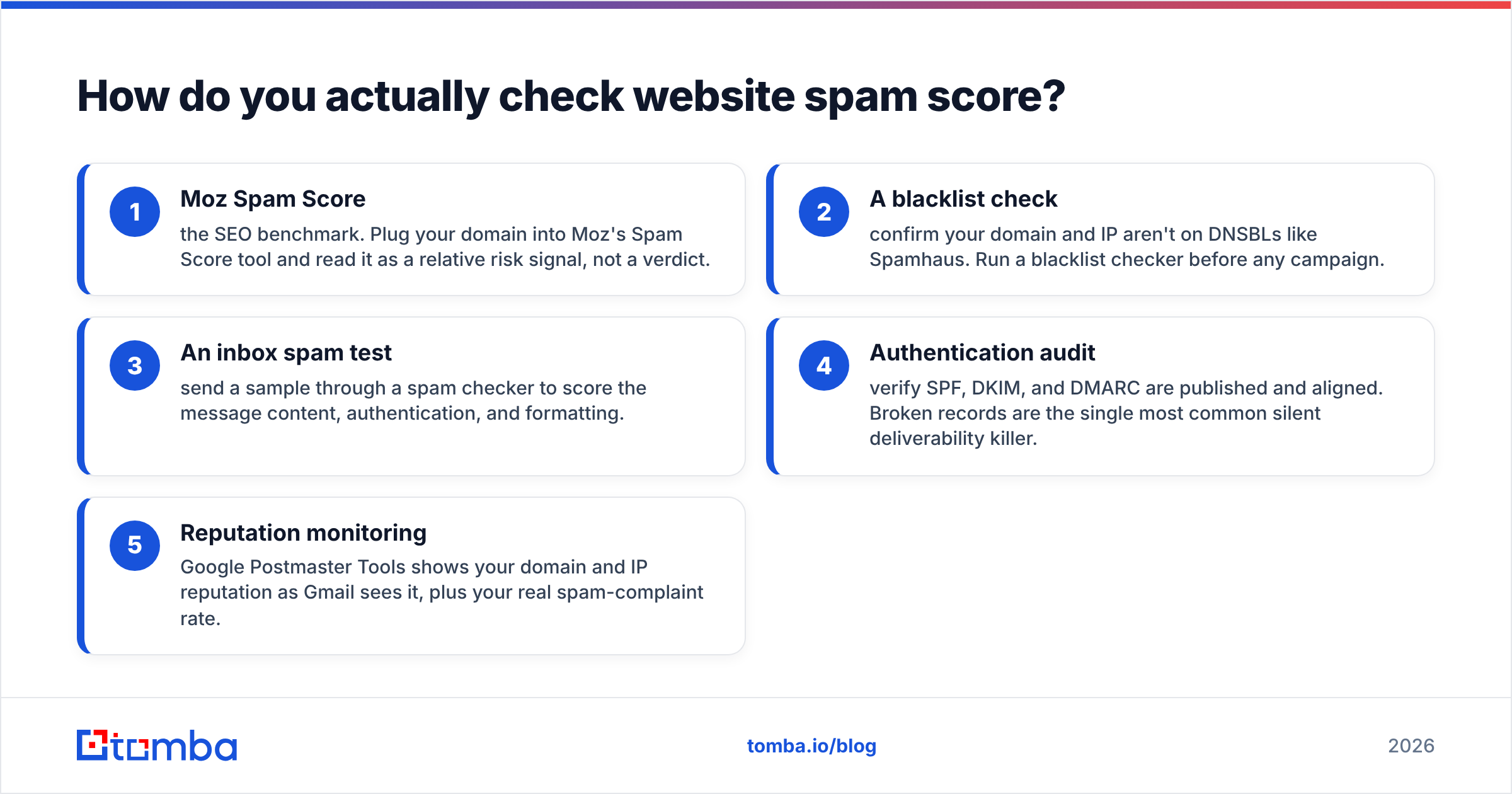
- Moz Spam Score — the SEO benchmark. Plug your domain into Moz's Spam Score tool and read it as a relative risk signal, not a verdict.
- A blacklist check — confirm your domain and IP aren't on DNSBLs like Spamhaus. Run a blacklist checker before any campaign.
- An inbox spam test — send a sample through a spam checker to score the message content, authentication, and formatting.
- Authentication audit — verify SPF, DKIM, and DMARC are published and aligned. Broken records are the single most common silent deliverability killer.
- Reputation monitoring — Google Postmaster Tools shows your domain and IP reputation as Gmail sees it, plus your real spam-complaint rate.
Run these together and the story usually converges. If Moz is green but your inbox placement is bad, the problem is almost always email-side: authentication, list quality, or content. If Moz is red, you have a backlink and content problem that will drag everything else down with it.
A quick word on interpretation: spam score tools are probabilistic. They are pattern-matchers, not oracles. Two tools can disagree by 20 points on the same domain because they weight signals differently. Don't chase a perfect zero — chase the elimination of obvious, fixable red flags.
What raises a website spam score?#
Most high scores trace back to a short list of repeat offenders. Knowing them lets you reverse-engineer your own number.
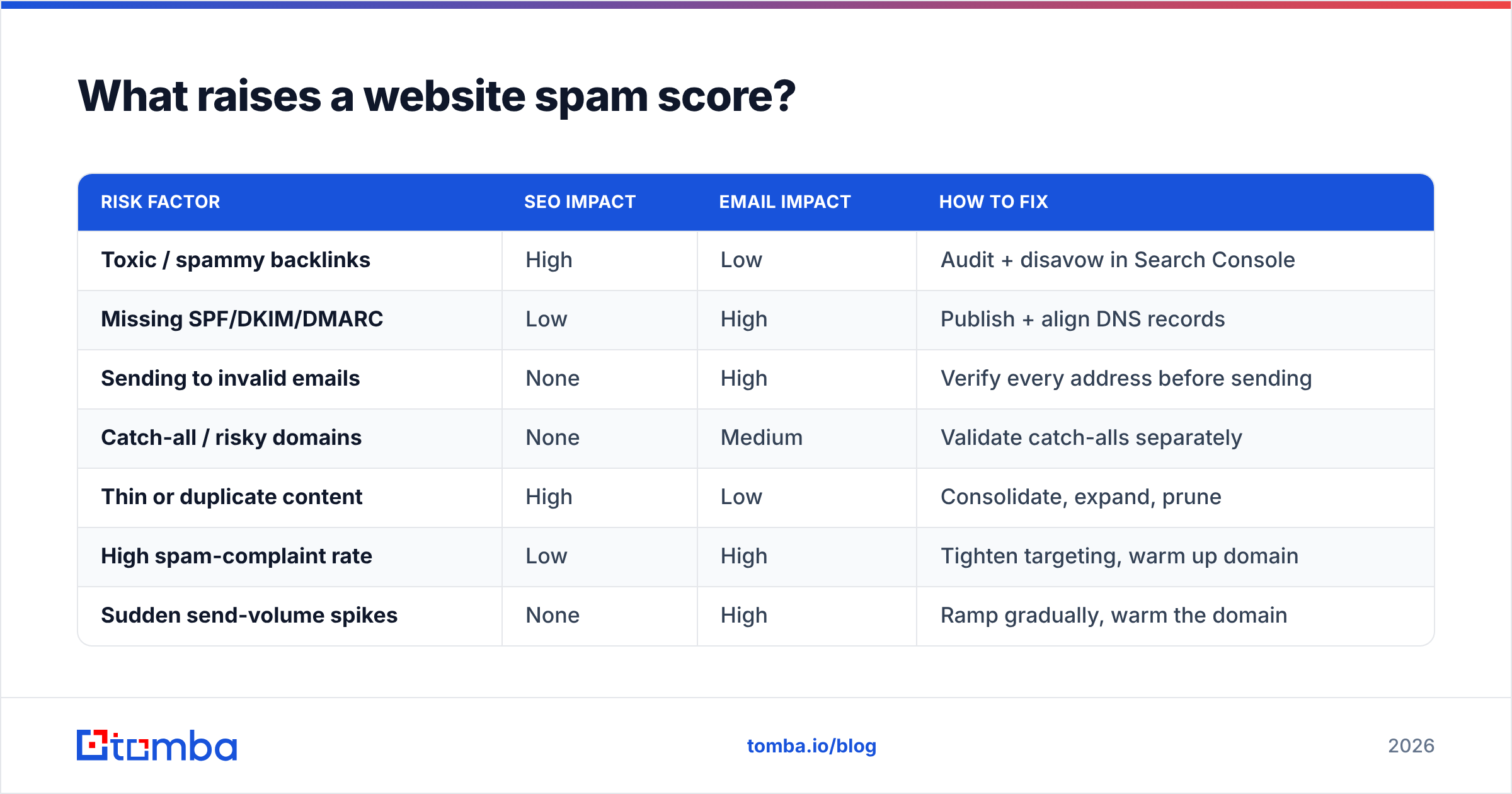
| Risk factor | SEO impact | Email impact | How to fix |
|---|---|---|---|
| Toxic / spammy backlinks | High | Low | Audit + disavow in Search Console |
| Missing SPF/DKIM/DMARC | Low | High | Publish + align DNS records |
| Sending to invalid emails | None | High | Verify every address before sending |
| Catch-all / risky domains | None | Medium | Validate catch-alls separately |
| Thin or duplicate content | High | Low | Consolidate, expand, prune |
| High spam-complaint rate | Low | High | Tighten targeting, warm up domain |
| Sudden send-volume spikes | None | High | Ramp gradually, warm the domain |
| Spam-trigger words / bad HTML | None | Medium | Rewrite copy, simplify markup |
Notice the pattern: the email-side risks are the ones you control most directly and fix fastest. You can't always remove a competitor's spammy link to your site, but you can stop sending to dead addresses today.
That last point is where most outbound teams bleed score. Every hard bounce tells inbox providers you don't know who you're emailing — which is the textbook signature of a spammer. Cleaning your list isn't a nice-to-have; it's the highest-leverage move on this entire table.

How do you lower a high spam score?#
Fix the inputs, and the score follows. Work in this order, because the early steps unblock the later ones.
1. Clean your backlink profile. Pull your inbound links, flag the obviously toxic ones (link farms, irrelevant foreign-language directories, hacked-site links), and submit a disavow file in Google Search Console. This is the single biggest lever on the SEO-side number.
2. Lock down email authentication. Publish a valid SPF record, enable DKIM signing, and set a DMARC policy. Misaligned or missing records are the reason a "clean" domain still lands in spam. Confirm with an SPF checker and a DMARC lookup.
3. Stop emailing addresses you haven't verified. Run every contact through an email verifier before it enters a sequence. Removing invalids and risky catch-alls before you press send is what protects the email deliverability you've worked to build.
4. Warm the domain and ramp volume. New or recovering domains shouldn't blast 2,000 emails on day one. Increase volume gradually so providers learn you're a consistent, legitimate sender.
5. Fix content and on-page signals. Consolidate thin pages, remove duplicate content, and make sure pages deliver on their promise. For email, cut spam-trigger phrasing, balance your text-to-image ratio, and keep HTML clean.
6. Re-check, then monitor. After changes propagate (give DNS and crawls time), re-run the same tools and log the new numbers. Set a recurring monthly check so a regression never surprises you.
The honest truth: there is no button that resets a spam score. It moves when the underlying behavior moves. The teams that keep their scores low aren't running cleanup sprints every quarter — they've made list verification and authentication part of their default workflow.
Which spam-score tools should you use in 2026?#
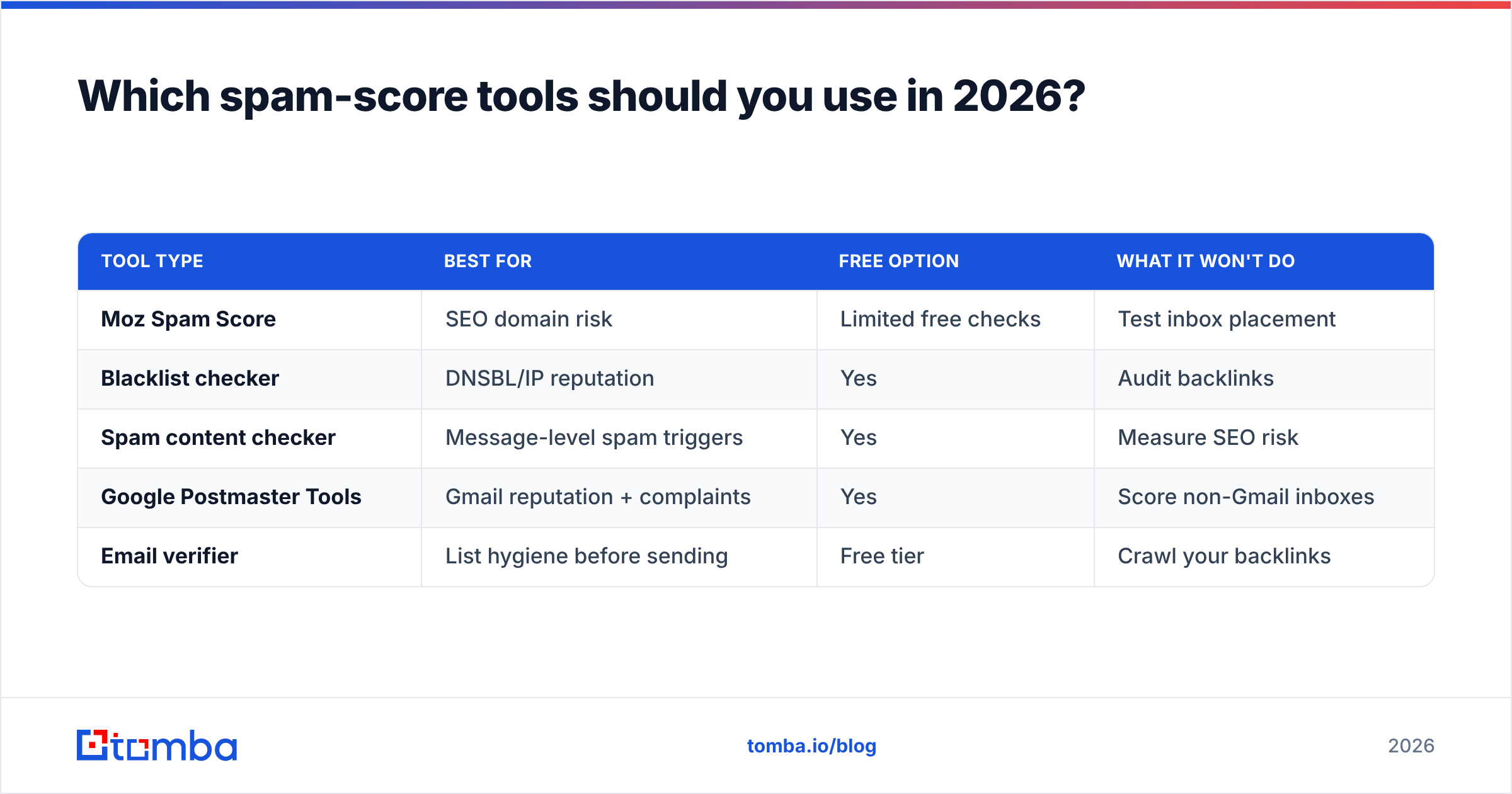
It depends on which spam score you're trying to protect. Here's how the common options map to the job.
| Tool type | Best for | Free option | What it won't do |
|---|---|---|---|
| Moz Spam Score | SEO domain risk | Limited free checks | Test inbox placement |
| Blacklist checker | DNSBL/IP reputation | Yes | Audit backlinks |
| Spam content checker | Message-level spam triggers | Yes | Measure SEO risk |
| Google Postmaster Tools | Gmail reputation + complaints | Yes | Score non-Gmail inboxes |
| Email verifier | List hygiene before sending | Free tier | Crawl your backlinks |
For a B2B outbound team, the practical answer is a two-part habit. Use Moz to watch the SEO-side score, and pair an email reputation checker and verifier to protect the deliverability score — because that's the one tied directly to whether your pipeline gets replies.
Where does Tomba fit? Tomba's role is upstream of the spam score, not on top of it. Most deliverability damage starts with bad contact data — wrong addresses, dead mailboxes, unvalidated catch-alls. By finding and verifying contacts before they ever enter your sequences, you remove the bounces and complaints that drive the email-side spam score up in the first place. The cheapest spam score to fix is the one you never let climb.
How often should you check your spam score?#
Match the cadence to your risk. A static brochure site can check quarterly. An active outbound team — sending hundreds or thousands of emails a week — should check monthly at minimum, and before any major campaign.
Set three triggers that force an immediate check, no matter the calendar:
- Before a new campaign. Verify the list and confirm the domain isn't blacklisted before the first send.
- After a bounce spike. A sudden jump in hard bounces means list rot — pause and clean immediately.
- After any domain change. New sending domain, DNS edit, or platform migration? Re-verify authentication right away.
If you only remember one rule: never scale send volume on a list you haven't verified. Volume amplifies whatever is already true. On a clean list it amplifies replies; on a dirty list it amplifies the exact signals that wreck your spam score.
The bottom line#
A website spam score is a symptom, not a disease. Checking it tells you whether your domain looks trustworthy to the machines that decide your search rankings and your inbox placement — but staring at the number won't move it. What moves it is upstream behavior: clean backlinks, correct authentication, and lists made of real, verified people.
Two of those three live entirely in your control before you ever press send. Get the contact data right, and the email-side of your spam score mostly takes care of itself.
That's where to start. Use the Tomba Email Finder to find accurate, verified professional emails by name, company, or domain — so every contact entering your sequences is a real person at a real mailbox, not a future bounce. Pair it with verification before each campaign, keep your authentication tight, and your spam score stops being a fire to fight and becomes a number you barely think about. Check Tomba pricing — the free tier gives you 25 searches a month to start cleaning your pipeline today.
// get started
Find, verify and enrich your first contacts today
Start on the free plan with 25 searches a month, then scale when your team is ready.
Free plan · No credit card required · GDPR & CCPA
// about the author