Checkemail in 2026: How to Verify Any Email for Free
A checkemail step you skip is a bounce you pay for. Here is how to check if any address is valid, slash bounce rates, and pick the right verifier in 2026.
TL;DR#
- Checkemail means validating an address — syntax, domain, mailbox, and risk — before you send, so dead contacts never touch your sending reputation.
- A single bounce above the ~2% threshold can throttle an entire campaign; verification is the cheapest insurance you can buy.
- Free browser checkers are fine for one-off lookups; bulk API verification is what you need for lists over a few hundred rows.
- Catch-all domains are the hard case — most tools guess; the good ones give you a confidence score instead of a coin flip.
- Tomba's email verifier runs the full multi-step check (syntax → MX → SMTP → catch-all → role/disposable flags) and scales from a single address to bulk lists.
When you hear someone say "let me checkemail that address first," they mean one thing: confirm the inbox is real and safe to contact before a campaign goes out. Skip it, and you are gambling with the one asset cold outreach cannot rebuild quickly — your sender reputation. This guide breaks down exactly what a checkemail process does, when free tools are enough, when you need an API, and how to pick a verifier that does not lie to you about catch-all domains.
)
What is a checkemail process, really?#
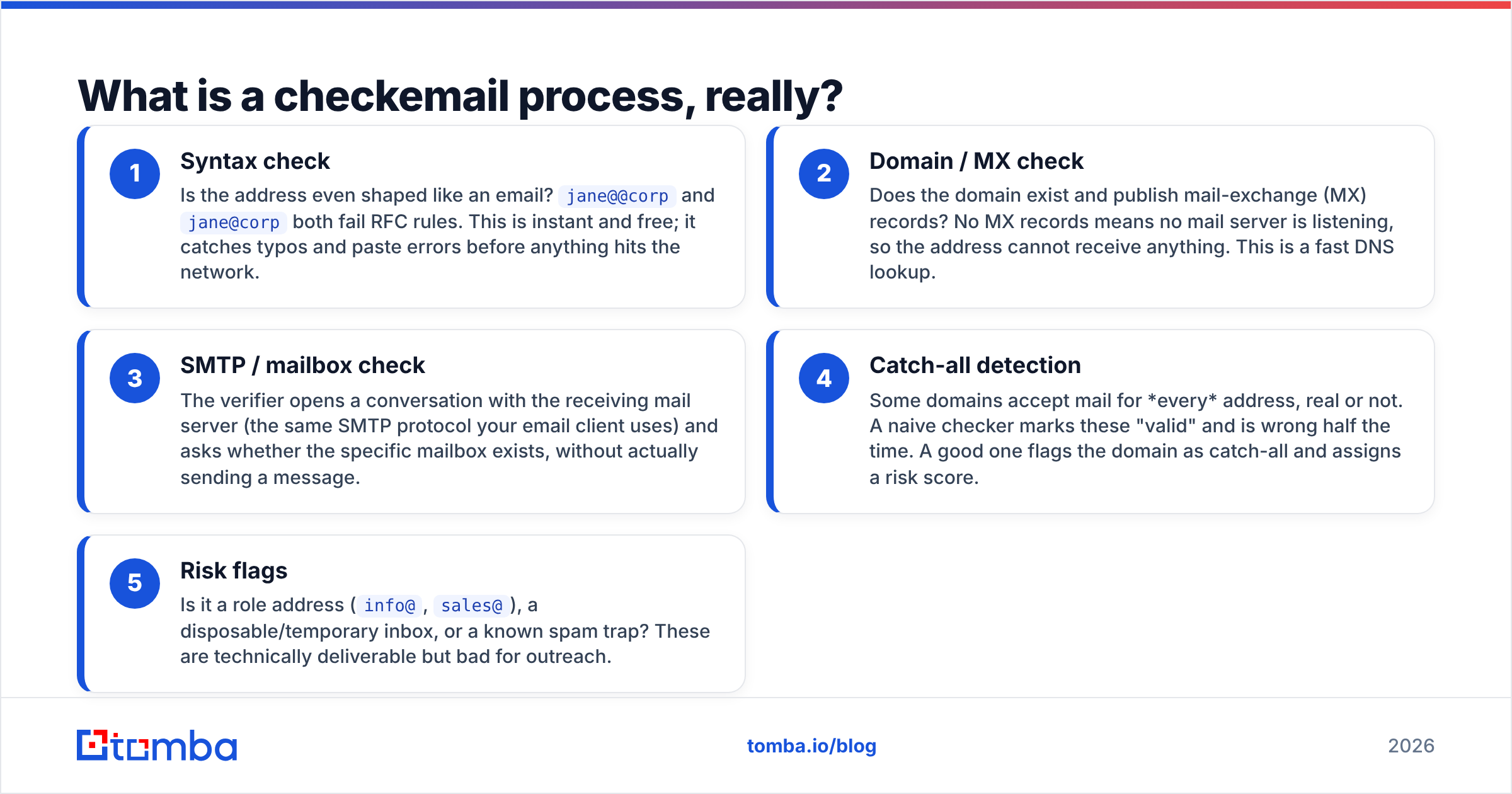
A checkemail process is a sequence of validation steps that answers one question: if I send to this address, will it land? It is not a single yes/no lookup — it is a pipeline, and each stage filters out a different kind of bad address.
Think of it like airport security for your contact list. Each address walks through a series of checkpoints, and any one of them can flag it. Here is the standard sequence, in order of how cheap each check is to run:
- Syntax check — Is the address even shaped like an email?
jane@@corpandjane@corpboth fail RFC rules. This is instant and free; it catches typos and paste errors before anything hits the network. - Domain / MX check — Does the domain exist and publish mail-exchange (MX) records? No MX records means no mail server is listening, so the address cannot receive anything. This is a fast DNS lookup.
- SMTP / mailbox check — The verifier opens a conversation with the receiving mail server (the same SMTP protocol your email client uses) and asks whether the specific mailbox exists, without actually sending a message.
- Catch-all detection — Some domains accept mail for every address, real or not. A naive checker marks these "valid" and is wrong half the time. A good one flags the domain as catch-all and assigns a risk score.
- Risk flags — Is it a role address (
info@,sales@), a disposable/temporary inbox, or a known spam trap? These are technically deliverable but bad for outreach.
Only an address that clears all five deserves to be called "valid." Most free checkboxes stop at step three.
Why does checking an email before sending matter?#
Because bounces are reputation damage you cannot undo cheaply. Every mailbox provider — Gmail, Outlook, Yahoo — watches your bounce rate as a proxy for "does this sender know who they are emailing?" Cross the threshold and your messages start going to spam, even for the contacts that are real.
The numbers most deliverability teams work to: keep your hard-bounce rate under roughly 2%. HubSpot's own email deliverability guidance and most ESP documentation echo the same range. A list with 10% dead addresses will blow past that on the first send.
There is a direct cost angle too. If you pay per email sent, or per credit in a sequencer, every message to a dead address is money set on fire — plus the opportunity cost of a campaign that gets throttled mid-flight. Running a checkemail pass first is almost always cheaper than the bounce.
This is also why verification pairs naturally with finding. When you find email addresses at scale, a slice of them will be stale the day you pull them. Verification is the quality gate between "found" and "sent."
How do you checkemail for free vs. at scale?#
The right tool depends entirely on volume. One address is a different problem from fifty thousand.
For a quick, one-off lookup — you got a business card, you want to confirm a single contact — a browser-based free email checker is perfect. Paste the address, get a verdict in seconds, no signup math. Tomba's free email checker does exactly this for ad-hoc cases.
For anything list-shaped — a CSV export, a scraped lead set, a CRM sync — you want bulk verification or an API. Manually pasting 5,000 rows into a single-lookup box is not a strategy. A bulk verify job uploads the whole file, runs every address through the full pipeline in parallel, and hands back a categorized result (valid / invalid / risky / catch-all) you can filter on.
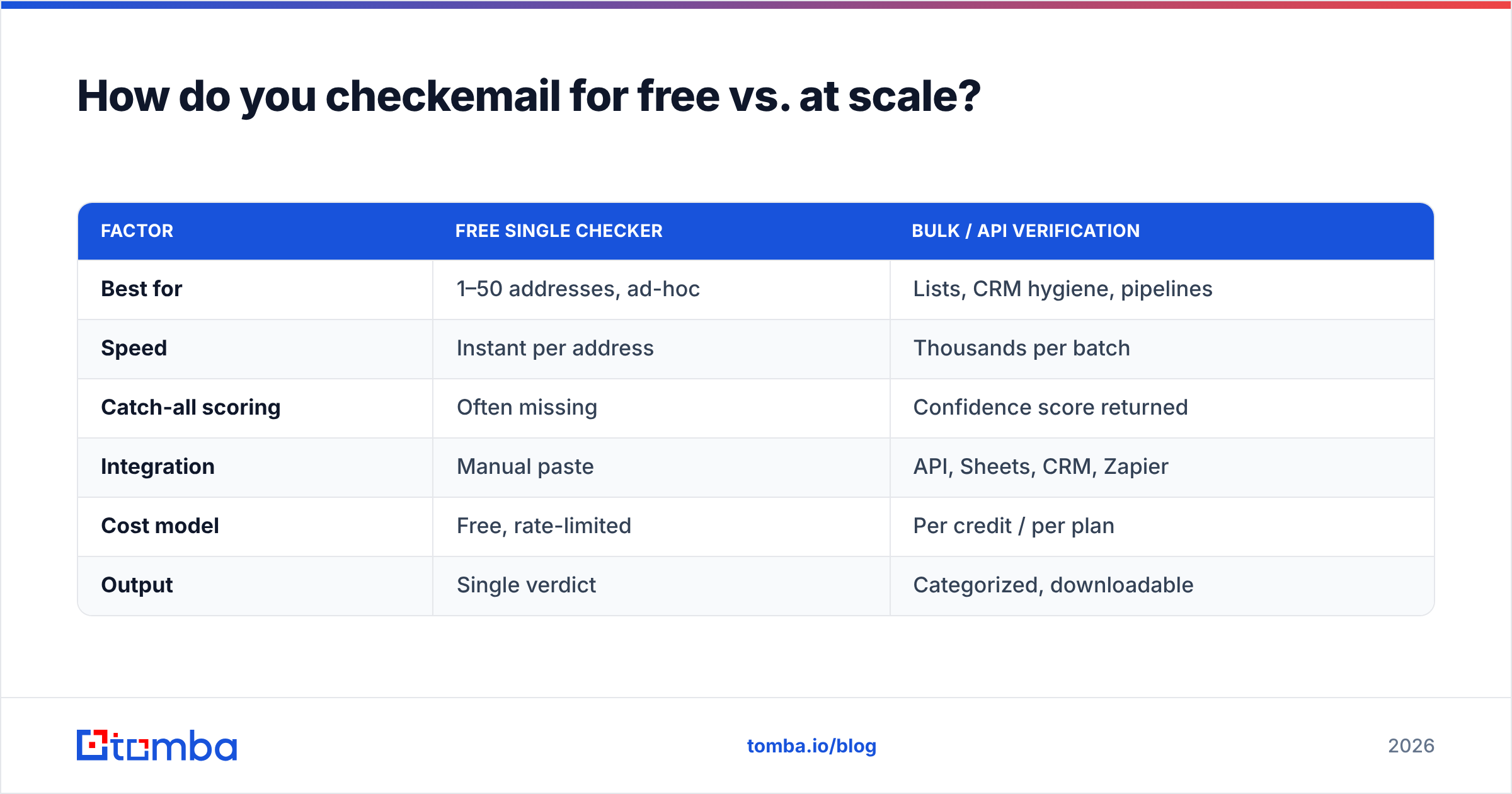
Here is how the two approaches compare in practice:
| Factor | Free single checker | Bulk / API verification |
|---|---|---|
| Best for | 1–50 addresses, ad-hoc | Lists, CRM hygiene, pipelines |
| Speed | Instant per address | Thousands per batch |
| Catch-all scoring | Often missing | Confidence score returned |
| Integration | Manual paste | API, Sheets, CRM, Zapier |
| Cost model | Free, rate-limited | Per credit / per plan |
| Output | Single verdict | Categorized, downloadable |
The honest rule of thumb: if you would not want to do it by hand, you need the bulk path.
What makes one checkemail tool more accurate than another?#
Catch-all handling and data freshness — that is where tools separate. Anyone can run a syntax regex. The hard parts are the cases where the receiving server refuses to give a straight answer.
A catch-all domain accepts mail for any local part, so an SMTP check returns "OK" whether the mailbox is real or invented. Cheap verifiers report these as valid and quietly inflate your bounce risk. Better tools detect the catch-all pattern and either flag it explicitly or return a confidence percentage. If your list is heavy on catch-all domains — common in enterprise — this single difference decides whether your "verified" list is trustworthy. Tomba exposes a dedicated catch-all verifier precisely because this case needs its own logic.
The second differentiator is where the data comes from. A verifier that only does a live SMTP probe is at the mercy of greylisting, rate limits, and servers that lie. A provider that cross-references real-world sending signals and a maintained dataset (see where Tomba gets data) can resolve the ambiguous cases the SMTP handshake alone cannot.
Watch for these accuracy red flags when you evaluate any checker:
- No catch-all distinction — everything comes back "valid" or "invalid," with no risk middle ground.
- No role/disposable flags —
info@and temp-mail addresses pass clean. - No bulk dedupe — you pay to verify the same address three times.
- No confidence score — a binary answer on an inherently probabilistic problem is a tell.
Independent reviews on G2 and similar directories are a useful sanity check here — look specifically at how reviewers describe catch-all and bounce-rate outcomes, not the star average.
)
How does Tomba's checkemail stack up against typical free tools?#
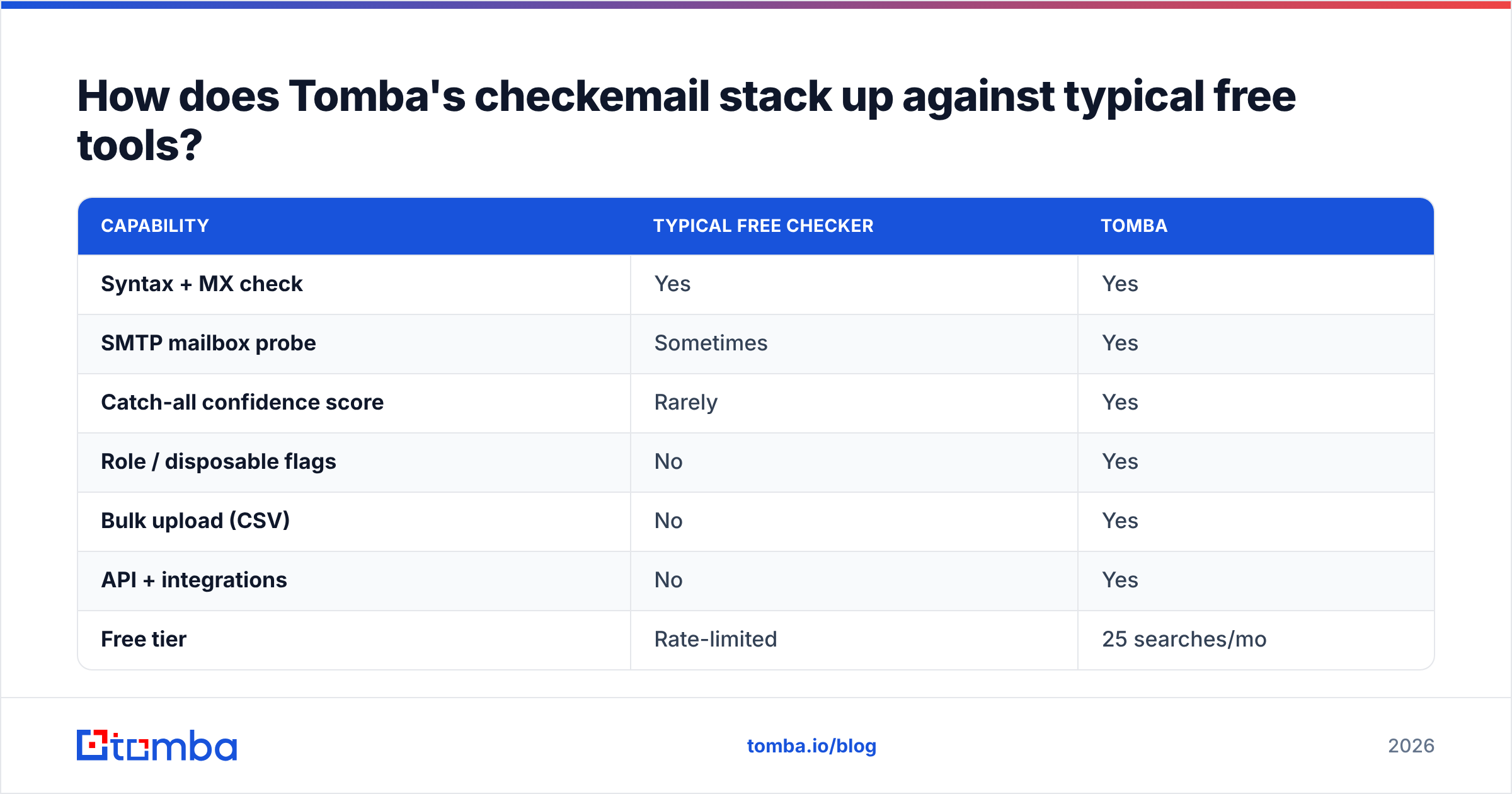
Tomba runs the full five-stage pipeline rather than stopping at the SMTP handshake, and it scales from a single browser lookup to API-driven bulk jobs on the same dataset. Here is a concrete comparison against the kind of stripped-down free checker you will find on a quick search:
| Capability | Typical free checker | Tomba |
|---|---|---|
| Syntax + MX check | Yes | Yes |
| SMTP mailbox probe | Sometimes | Yes |
| Catch-all confidence score | Rarely | Yes |
| Role / disposable flags | No | Yes |
| Bulk upload (CSV) | No | Yes |
| API + integrations | No | Yes |
| Free tier | Rate-limited | 25 searches/mo |
| Starter price | n/a | $49/mo |
A few notes so this stays honest. Free checkers are genuinely fine for the one-address case — there is no reason to spin up an API to confirm a single contact. The gap opens the moment you have a list, recurring CRM hygiene, or a pipeline that needs verification to happen automatically. That is where the integration layer (Sheets, HubSpot, Zapier) and bulk throughput earn their keep.
On price: Tomba's pricing starts with a Free tier at 25 searches per month, then Starter at $49/mo, Growth at $99/mo, and Pro at $249/mo, with Enterprise custom. For most teams running outreach, the Starter or Growth tier covers verification plus finding on the same account.
When should you re-checkemail addresses you already have?#
On a schedule, because email data decays continuously. A contact you verified clean six months ago may have changed jobs, and the address now bounces. B2B email data is widely estimated to go stale at roughly 22–30% per year as people change roles, which means a list left untouched for a year is meaningfully worse than the day you built it.
Practical re-verification triggers:
- Before any major send — re-run the segment you are about to contact, not the whole database.
- On CRM import — verify at the point data enters the system, so bad records never settle in.
- After a quiet period — a list that has not been mailed in 90+ days should be re-checked before you wake it up.
- When bounce rate creeps — if a recent campaign bounced above your baseline, the list is telling you it is stale.
The cheapest way to keep this sane is to make verification part of the workflow instead of a separate chore — verify on find, verify on import, and re-verify the active segment before each send. Done that way, you almost never face a giant cleanup project, because the list never gets dirty enough to need one.
Frequently asked questions#
Does checking an email send a message to it? No. A proper checkemail probe opens an SMTP conversation and asks the server whether the mailbox exists, then disconnects before any message is delivered. The recipient sees nothing.
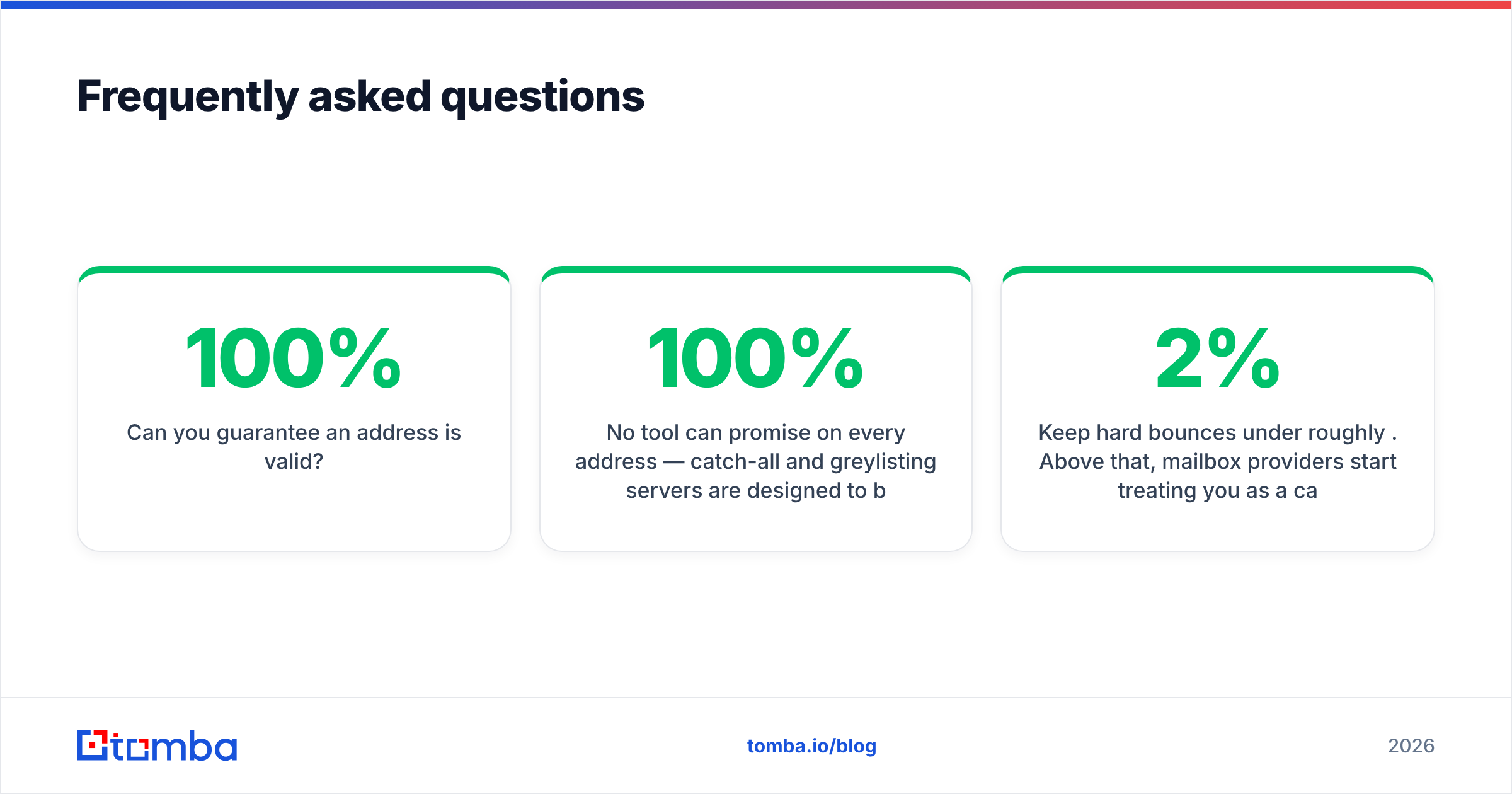
Can you 100% guarantee an address is valid? No tool can promise 100% on every address — catch-all and greylisting servers are designed to be ambiguous. What a good verifier gives you is a confidence score so you can decide your own risk tolerance, plus a clean separation of the addresses that are certain.
Is a free email checker accurate enough? For a single address, usually yes. For a list, free single-lookup tools miss catch-all scoring, role flags, and dedupe — which is exactly where list accuracy lives. Use the free tool for one-offs and a bulk verifier for everything else.
What bounce rate should I aim for? Keep hard bounces under roughly 2%. Above that, mailbox providers start treating you as a careless sender and deliverability drops across the board.
Start checking emails the right way#
If you are sending cold outreach in 2026, verification is not optional — it is the gate that protects every other dollar you spend on the channel. Run a checkemail pass before you send, re-verify your active segments on a schedule, and treat catch-all domains as the risk they are instead of pretending they are clean.
Tomba gives you the whole stack on one account: a free email checker for quick lookups, a full email verifier with catch-all confidence scoring for your lists, and the email finder to build those lists in the first place — all on the same data and the same API. Start on the free tier, verify your next list before it ships, and watch your bounce rate fall where it belongs.
Ready to find emails that actually work?
Join 150,000+ professionals who stopped guessing and started sending. Free credits on signup — no credit card required.
Get the Tomba newsletter
Practical outbound tactics and product updates — once every two weeks.
About the author