Checking In With Clients Email Template: 12 Examples for 2026
A weak check-in email gets ignored. Steal 12 proven checking in with clients email templates that re-open replies, plus the timing and structure that make them work.
You sent a proposal three weeks ago. Silence. Now you need to "check in" without sounding needy, robotic, or like every other rep who pads a dead thread with "just circling back." This guide gives you a checking in with clients email template for every situation, plus the timing and structure that turn a polite nudge into an actual reply.
TL;DR#
- A good check-in email gives the client a reason to reply — new value, a clear question, or a deadline — not just "any update?"
- Send check-ins on a schedule (3–4 business days for active deals, weekly for nurture), never on impulse.
- Subject lines decide whether you get opened: keep them short, specific, and curiosity-driven.
- Below are 12 copy-paste templates covering proposals, post-meeting follow-ups, renewals, dormant accounts, and breakup emails.
- Reliable contact data is the unglamorous half of follow-up: a check-in to a stale or wrong address is wasted effort. Verify before you send.
Why do most "checking in" emails get ignored?#
Because "just checking in" is a status request disguised as outreach — it asks the client to do work (summarize where things stand) and offers them nothing in return. The reader's brain reads it as "reply when you feel like it," so they don't.
Think of a check-in like watering a plant you already planted. The sale is the seedling; the check-in is maintenance. If you show up with an empty watering can — no new information, no question, no value — nothing grows. Every effective check-in carries at least one of three things:
- New value — a resource, a case study, a relevant update, a price change they should know about.
- A specific question — one that can be answered in a single sentence ("Are you still targeting a Q3 start?").
- A reason to act now — a deadline, a slot opening, an expiring offer.
According to HubSpot's sales research, persistence paired with relevance drives the majority of conversions that happen after the first contact. The keyword is relevance — not frequency for its own sake.
What makes a strong check-in email? (The 4-part structure)#
Every template below follows the same skeleton. Memorize it and you can write a check-in for any scenario in 90 seconds.
- Context line — one sentence that reminds them who you are and what you last discussed. No "I hope this email finds you well."
- Value or reason — the new thing you're bringing, or the specific question you need answered.
- Single call to action — one ask, phrased as a yes/no or a calendar choice. Two asks halve your reply rate.
- Easy out — a low-pressure line that respects their time ("If now isn't right, just tell me when to follow up").
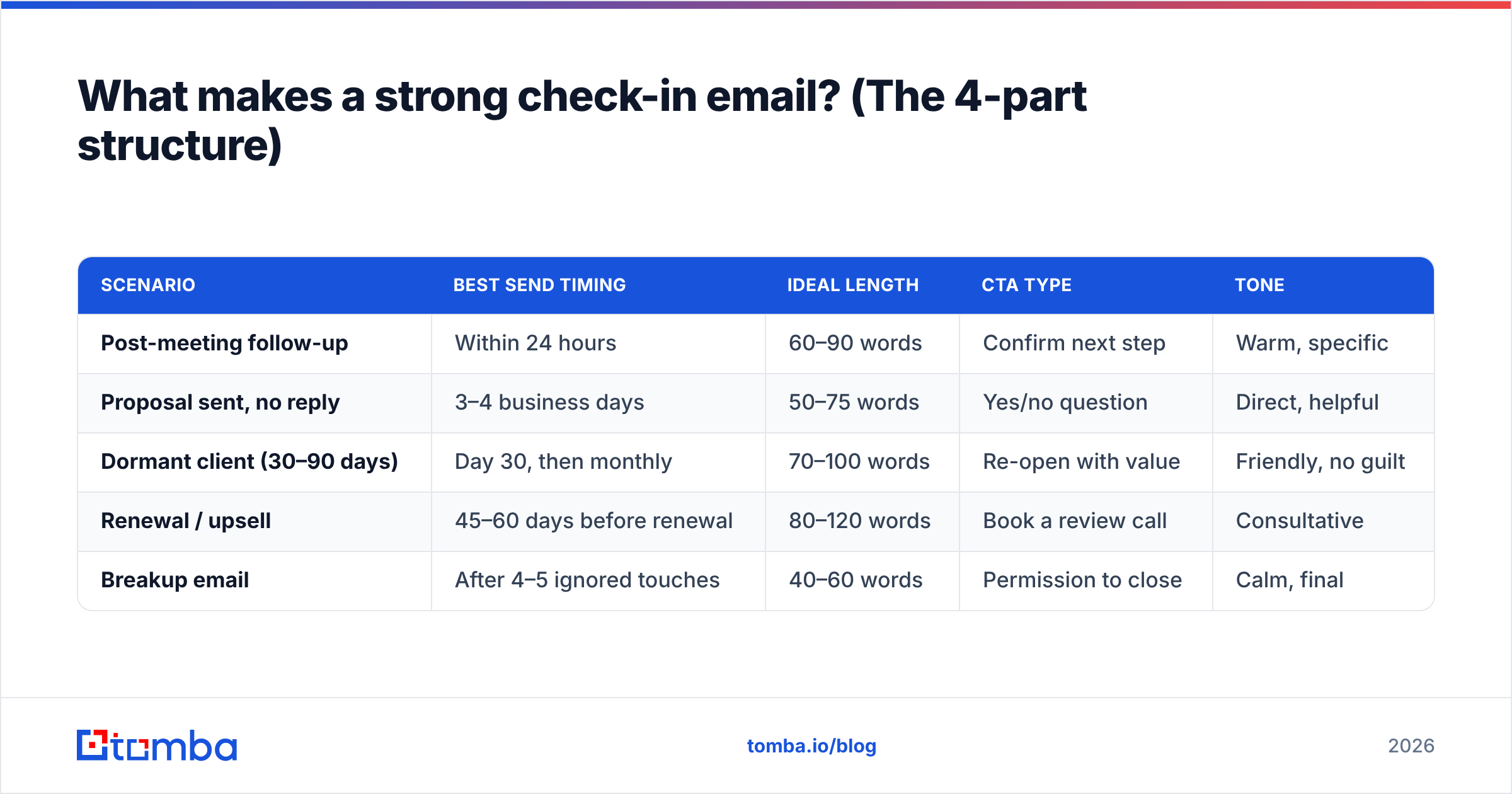
Here is how the structure maps to length and tone across the common situations you'll face:
| Scenario | Best send timing | Ideal length | CTA type | Tone |
|---|---|---|---|---|
| Post-meeting follow-up | Within 24 hours | 60–90 words | Confirm next step | Warm, specific |
| Proposal sent, no reply | 3–4 business days | 50–75 words | Yes/no question | Direct, helpful |
| Dormant client (30–90 days) | Day 30, then monthly | 70–100 words | Re-open with value | Friendly, no guilt |
| Renewal / upsell | 45–60 days before renewal | 80–120 words | Book a review call | Consultative |
| Breakup email | After 4–5 ignored touches | 40–60 words | Permission to close | Calm, final |
Notice the pattern: the colder the relationship, the more value you front-load and the lighter your ask gets. You earn the right to a bigger request by giving first.
Which checking in with clients email template fits my situation?#
Below are 12 templates grouped by scenario. Swap the brackets for real details — generic personalization is worse than none. For deeper subject-line help, run your ideas through a subject line generator before you hit send.
After a meeting or call#
Template 1 — Recap and next step
Subject: Next step on [project]
Hi [Name], great talking through [specific topic] earlier. To keep us moving, I'll [your action] by [date] — can you confirm [their action] on your side? Happy to jump on a quick call if that's easier.
Template 2 — The "anything I missed?" check
Subject: Did I capture this right?
Hi [Name], I summarized what we agreed on below. Did I miss anything before I send the [contract/proposal]? A one-line reply is all I need.
After sending a proposal#
Template 3 — The single-question nudge
Subject: Quick question on the [project] proposal
Hi [Name], following up on the proposal from [day]. One question to help me tailor next steps: are you still aiming for a [timeframe] start? If yes, I'll hold a slot for your team.
Template 4 — Value-add follow-up
Subject: Thought this might help
Hi [Name], while you're reviewing our proposal, I pulled a [case study/benchmark] from a company close to your size. It shows [specific result]. Want me to walk you through how it maps to your situation?
For dormant or quiet clients#
Template 5 — The re-introduction
Subject: Picking this back up
Hi [Name], it's been a few weeks since we last spoke about [topic]. Circumstances change fast — is this still on your radar for this quarter, or should I check back later in the year?
Template 6 — The "new release" hook
Subject: New [feature/option] you asked about
Hi [Name], you mentioned wanting [thing] when we last talked. We just shipped it. Worth a 15-minute look?
For renewals and upsells#
Template 7 — The proactive review
Subject: Your [account] review before renewal
Hi [Name], your renewal lands on [date]. Before then, I'd love to run a quick review of what worked this year and where we can do more. Does [day/time] suit you?
Template 8 — The usage insight
Subject: You're getting [X] from [product] — here's the next gear
Hi [Name], your team's usage of [feature] is up [X]%. Clients at that level usually benefit from [upgrade]. Want the numbers on what that would mean for you?
The breakup email#
Template 9 — The respectful close
Subject: Should I close your file?
Hi [Name], I haven't heard back, which usually means the timing isn't right. I'll stop reaching out unless you tell me otherwise — just reply "later" and I'll check back in [month].
Light-touch nurture#
Template 10 — Industry relevance
Subject: Saw this and thought of [company]
Hi [Name], this [article/report] on [topic] reminded me of the challenge you mentioned. No agenda — just thought it was useful.
Template 11 — The milestone
Subject: Congrats on [news]
Hi [Name], saw [company news]. Congrats. When things settle, I'd love to talk about how [your solution] supports that next phase.
Template 12 — The simple availability check
Subject: Still the right contact?
Hi [Name], quick admin question — are you still the best person to talk to about [topic], or should I loop in someone else?
These are starting points, not scripts. If you want a fuller library with formatting baked in, browse Tomba's cold email templates and adapt them to your voice.
How often should you check in without being annoying?#
The honest answer: cadence depends on deal stage, but most reps under-follow-up, not over. Data compiled across sales teams on G2 consistently shows that several touches are needed before a reply, yet the average rep stops after two.
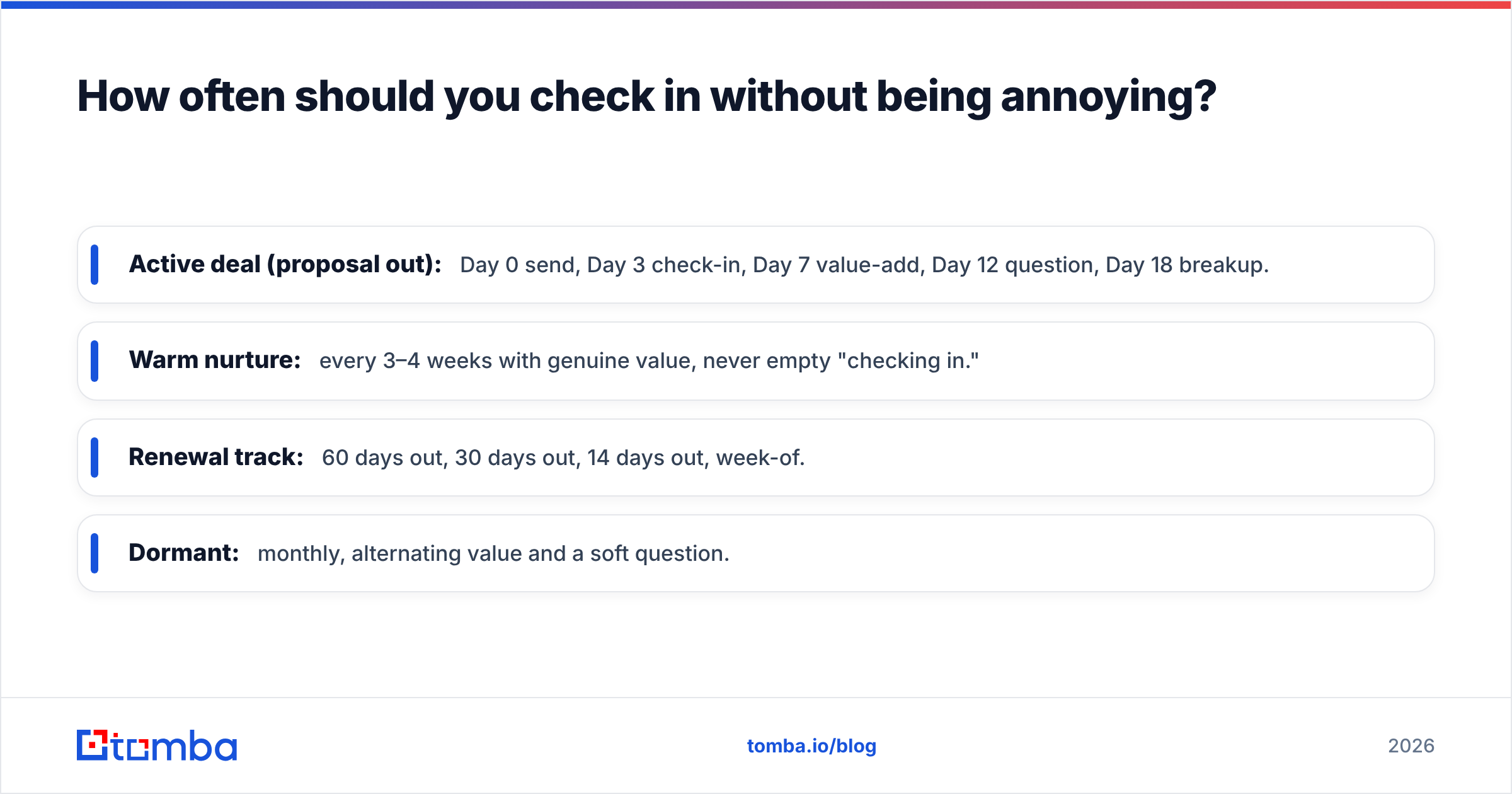
Here's a sane default cadence you can adjust:
- Active deal (proposal out): Day 0 send, Day 3 check-in, Day 7 value-add, Day 12 question, Day 18 breakup.
- Warm nurture: every 3–4 weeks with genuine value, never empty "checking in."
- Renewal track: 60 days out, 30 days out, 14 days out, week-of.
- Dormant: monthly, alternating value and a soft question.
Two rules keep you on the right side of annoying. First, never send the same email twice — each touch must add something. Second, track replies and stop on a no; chasing past a clear rejection burns the relationship. Watching your email response rate per template tells you which ones to keep and which to retire.

Why does your contact data decide whether check-ins work at all?#
You can write the perfect check-in and still get nothing — because the email is going to an address the client left two jobs ago. Follow-up is only as good as the inbox it reaches. This is the half of the process most "email template" articles ignore.
Two failure modes quietly kill check-in campaigns:
- Stale addresses. People change roles constantly. The champion you proposed to in January may be gone by March, and your thread is now talking to a deactivated mailbox.
- Bad sends hurt deliverability. Every bounce signals to mailbox providers that you're not maintaining your list, which drags down sender reputation and pushes even your good emails toward spam.
Before a re-engagement push to a quiet list, two steps protect your effort:
- Re-find the current contact. When a champion goes silent, use an email finder to locate the right person at the account today — including their replacement.
- Verify before you send. Run the list through an email verifier so bounces don't sink your sender score. Clean data is the difference between a check-in that lands and one that never arrives.
This is where a tool stack earns its keep. Salesforce's own State of Sales reporting points to data quality as a top blocker for reps — the template is rarely the problem; the address often is.
How do you measure if your check-in emails are working?#
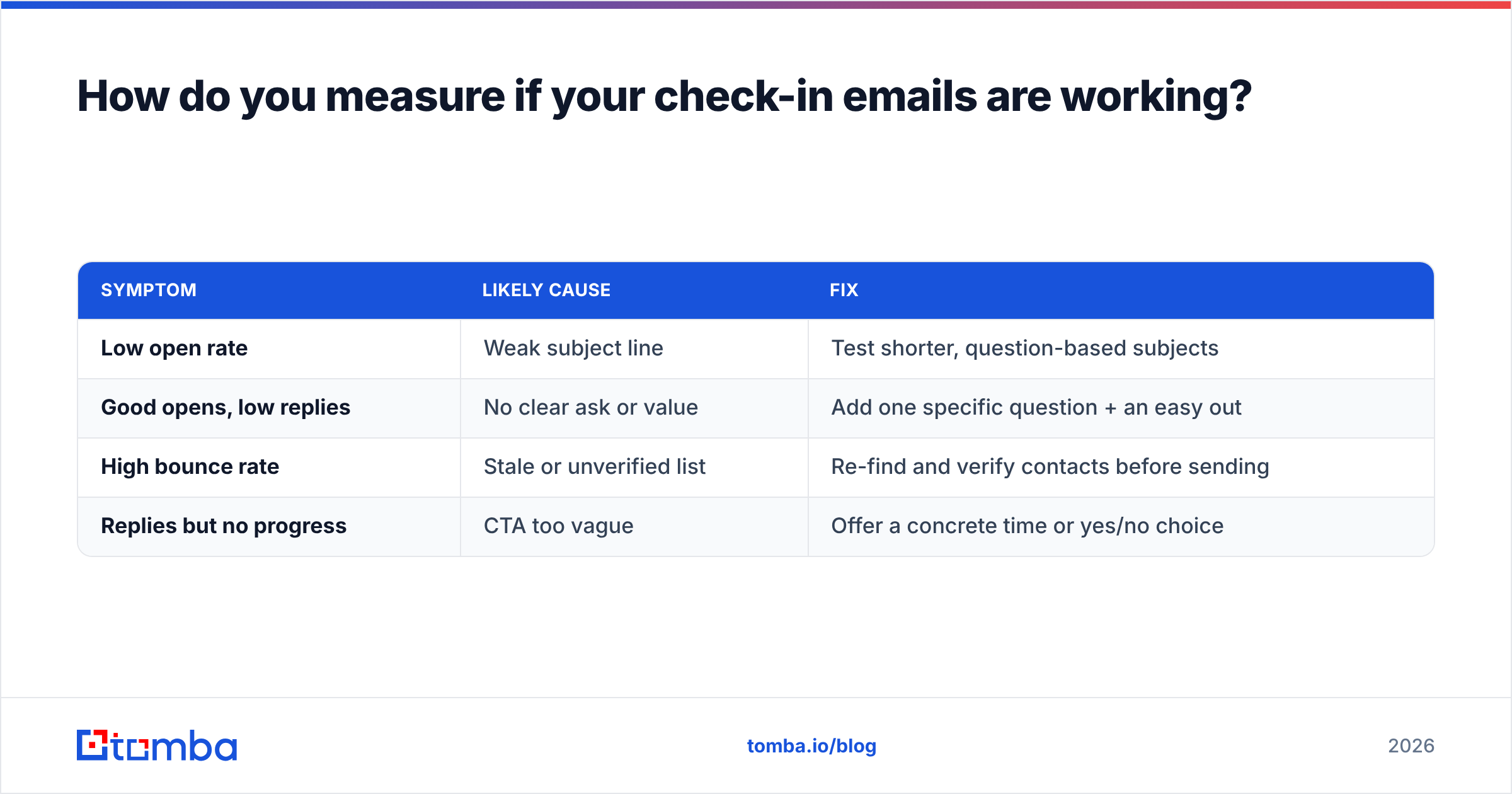
Track three numbers per template, not just "did the deal close." Reply rate tells you if the message resonates. Open rate isolates the subject line. Bounce rate exposes data decay. Read them together:
| Symptom | Likely cause | Fix |
|---|---|---|
| Low open rate | Weak subject line | Test shorter, question-based subjects |
| Good opens, low replies | No clear ask or value | Add one specific question + an easy out |
| High bounce rate | Stale or unverified list | Re-find and verify contacts before sending |
| Replies but no progress | CTA too vague | Offer a concrete time or yes/no choice |
If your bounce rate is creeping up, that is the data layer talking, not your copy. Fix the list first; iterating on wording against a broken list just hides the real problem.
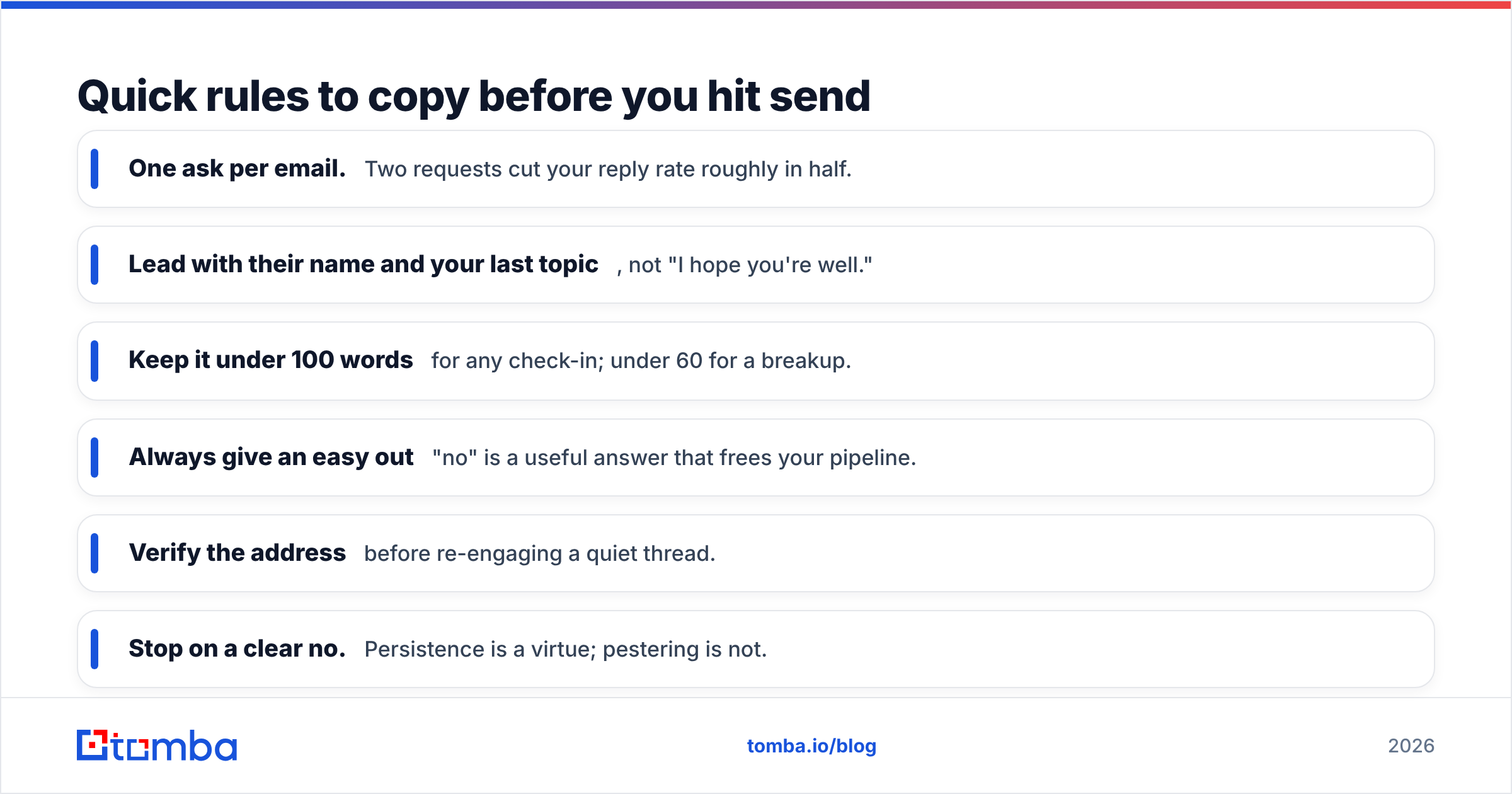
Quick rules to copy before you hit send#
- One ask per email. Two requests cut your reply rate roughly in half.
- Lead with their name and your last topic, not "I hope you're well."
- Keep it under 100 words for any check-in; under 60 for a breakup.
- Always give an easy out — "no" is a useful answer that frees your pipeline.
- Verify the address before re-engaging a quiet thread.
- Stop on a clear no. Persistence is a virtue; pestering is not.
Put your check-in templates to work#
Templates get you the words. What gets you the reply is sending them to a real, current, verified inbox — every time. Start with the Tomba Email Finder to locate the right contact at any account, then verify the address so your carefully written check-in actually lands instead of bouncing. The free tier gives you 25 searches a month to test it on your quietest accounts; paid plans start at $49/mo when you're ready to scale your follow-up. Pair clean data with the 12 templates above, and "just checking in" stops being a dead end and starts booking replies.
// get started
Find, verify and enrich your first contacts today
Start on the free plan with 25 searches a month, then scale when your team is ready.
Free plan · No credit card required · GDPR & CCPA
// about the author