Chorus Pricing, Reviews, Pros and Cons (2026 Guide)
A neutral 2026 breakdown of Chorus.ai pricing, real user reviews, and the honest pros and cons before you commit budget to conversation intelligence.
Chorus (Chorus.ai, now part of ZoomInfo) is one of the best-known conversation intelligence platforms on the market — it records, transcribes, and analyzes your sales calls so reps and managers can coach, forecast, and find deal risk. But "well-known" doesn't automatically mean "right for your team," and the pricing is famously opaque. This guide gives you the unvarnished version.
TL;DR#
- Chorus pricing is quote-only. There is no public price page; most teams land somewhere between $8,000 and $25,000+ per year, billed annually, often bundled with ZoomInfo.
- Reviews are genuinely strong for transcription accuracy, coaching workflows, and CRM sync — Chorus holds high marks on G2 and Capterra.
- The biggest cons are cost, annual lock-in, a per-seat model that punishes large teams, and the fact that it only works after you already have meetings booked.
- It is not a prospecting tool. Chorus analyzes conversations you've earned; it does not find contacts or build pipeline. You still need a separate data layer for that.
- Best fit: mid-market and enterprise sales orgs with 10+ reps, a dedicated enablement function, and budget for annual SaaS.
What is Chorus and what does it actually do?#
Think of Chorus as a flight recorder for your sales calls. After a deal closes or stalls, you can replay exactly what was said, who said it, and where momentum shifted — instead of relying on a rep's memory of the call.
Chorus joins your Zoom, Teams, Google Meet, and dialer calls, then produces:
- Searchable transcripts with speaker separation and keyword tracking
- Call scorecards and coaching comments tied to timestamps
- Deal intelligence — flagging deals that have gone quiet or skipped a buying stage
- Conversation trends across the team (competitor mentions, pricing objections, feature requests)
- CRM auto-logging into Salesforce and HubSpot
Since the ZoomInfo acquisition, Chorus is increasingly sold as part of a broader ZoomInfo go-to-market suite rather than as a standalone purchase, which matters a lot when you reach the pricing conversation.
How much does Chorus cost in 2026?#
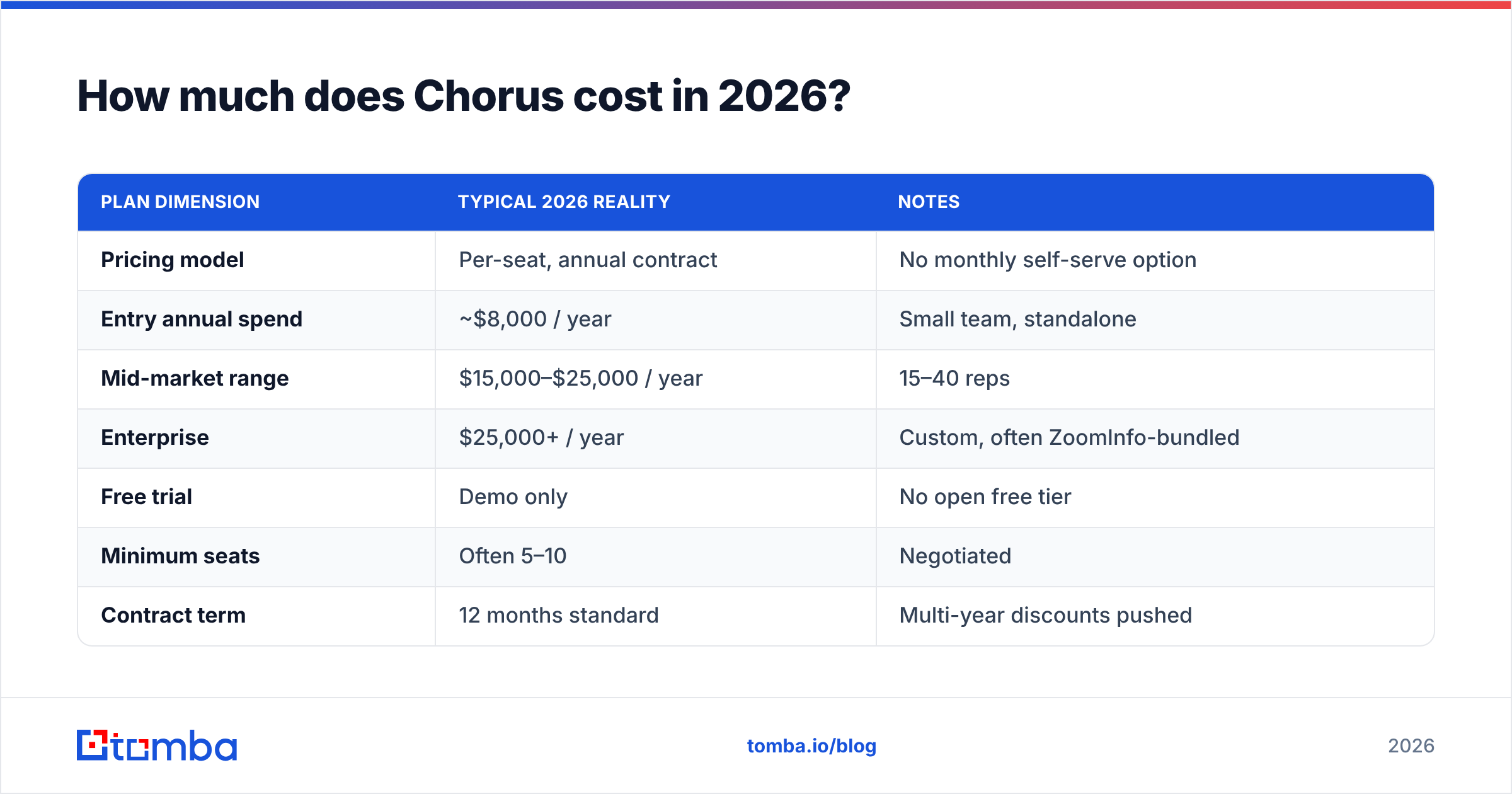
Short answer: Chorus does not publish prices, and you will need to talk to sales. That alone is a con for smaller teams who want to self-serve.
Based on aggregated buyer reports and reseller data, here is the realistic range. Treat these as directional, not quotes — your number depends on seat count, contract length, and whether it's bundled with ZoomInfo.
| Plan dimension | Typical 2026 reality | Notes |
|---|---|---|
| Pricing model | Per-seat, annual contract | No monthly self-serve option |
| Entry annual spend | ~$8,000 / year | Small team, standalone |
| Mid-market range | $15,000–$25,000 / year | 15–40 reps |
| Enterprise | $25,000+ / year | Custom, often ZoomInfo-bundled |
| Free trial | Demo only | No open free tier |
| Minimum seats | Often 5–10 | Negotiated |
| Contract term | 12 months standard | Multi-year discounts pushed |
The headline issue isn't the number — for an enterprise enablement budget, $20K is normal. The issue is predictability: the per-seat model means costs scale linearly as you add reps, and the annual commitment removes flexibility if your team shrinks mid-contract.
What drives the price up#
- Seat count — the single biggest lever. Conversation intelligence is priced per recorded user, so a 50-rep org pays roughly 5x a 10-rep org.
- ZoomInfo bundling — Chorus is frequently quoted alongside ZoomInfo data and engagement tools, which inflates the total even if you only wanted the call recorder.
- Advanced analytics tiers — deal forecasting and market-intelligence features often sit in higher tiers.
- Onboarding and CSM — enterprise contracts may carry implementation fees.
What do Chorus reviews say (pros and cons)?#
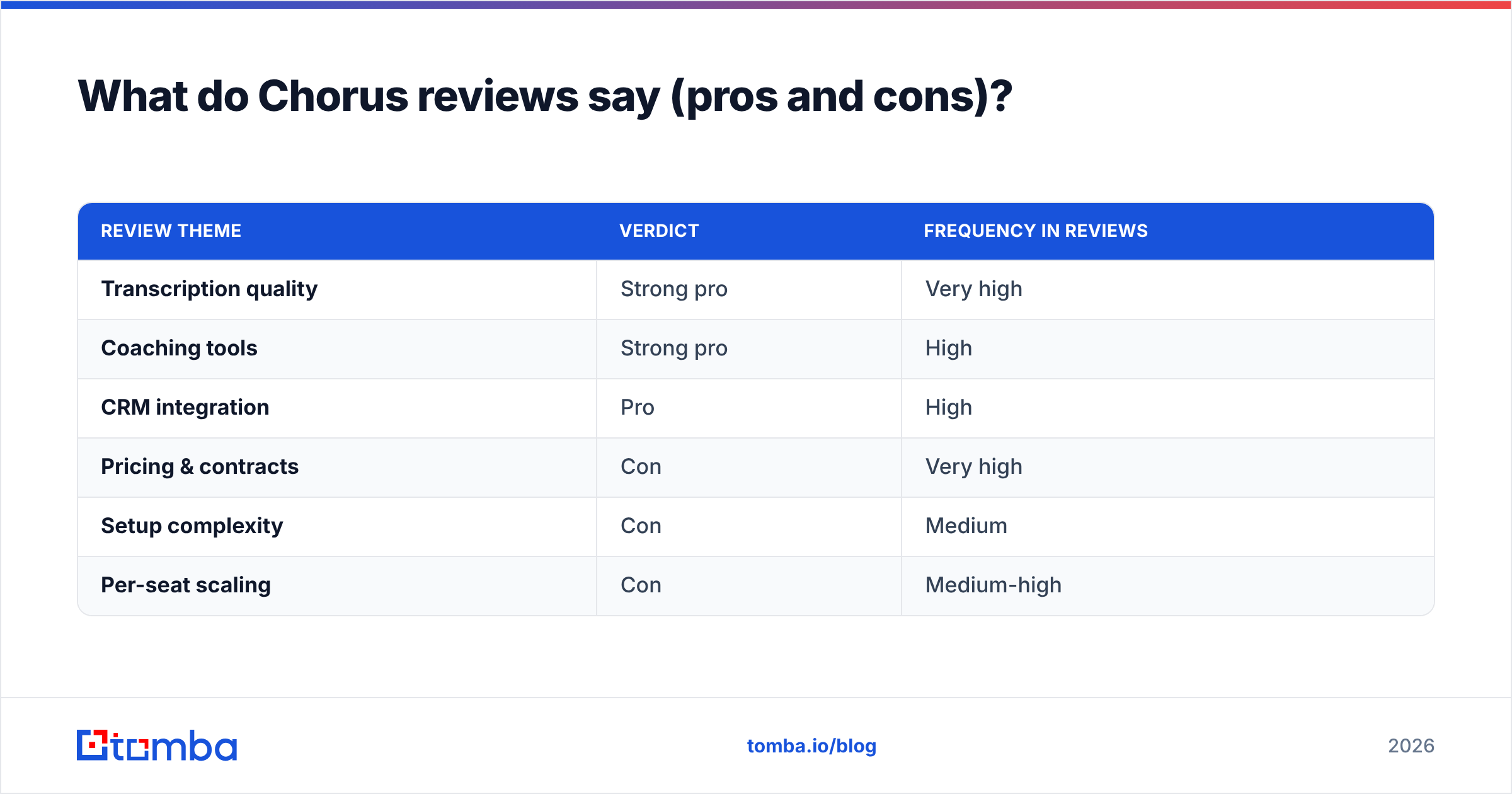
Across G2 and Capterra, Chorus earns consistently high ratings. But the pattern in the written reviews is more useful than the star average. Here is the honest split.
Pros reviewers consistently mention#
- Transcription accuracy is excellent, including with accents and crosstalk. This is the feature people praise most.
- Coaching workflows are mature — managers can build scorecards, leave timestamped comments, and create call libraries of "best" calls for onboarding.
- CRM sync just works. Calls, notes, and next steps land in Salesforce/HubSpot without manual logging.
- Deal visibility — sales leaders love seeing which deals have gone dark without pinging reps.
- Search across all calls turns months of conversations into a queryable knowledge base.
Cons reviewers consistently mention#
- Opaque, high pricing and aggressive annual contracts. The most common complaint.
- Per-seat cost scales painfully for larger teams.
- The ZoomInfo bundle can feel like paying for tools you didn't ask for.
- Setup and admin overhead — getting scorecards and trackers tuned takes real enablement effort.
- Occasional UI sluggishness on long calls and large libraries.
- Lock-in — leaving mid-contract is hard, and exporting historical call data is clunky.
| Review theme | Verdict | Frequency in reviews |
|---|---|---|
| Transcription quality | Strong pro | Very high |
| Coaching tools | Strong pro | High |
| CRM integration | Pro | High |
| Pricing & contracts | Con | Very high |
| Setup complexity | Con | Medium |
| Per-seat scaling | Con | Medium-high |
Is Chorus better than Gong and the alternatives?#
For pure conversation intelligence, Chorus and Gong are the two giants, and they're close. Reviewers generally find Gong slightly ahead on deal analytics and revenue forecasting, while Chorus is competitive on transcription and tends to be easier to acquire if you're already a ZoomInfo customer.
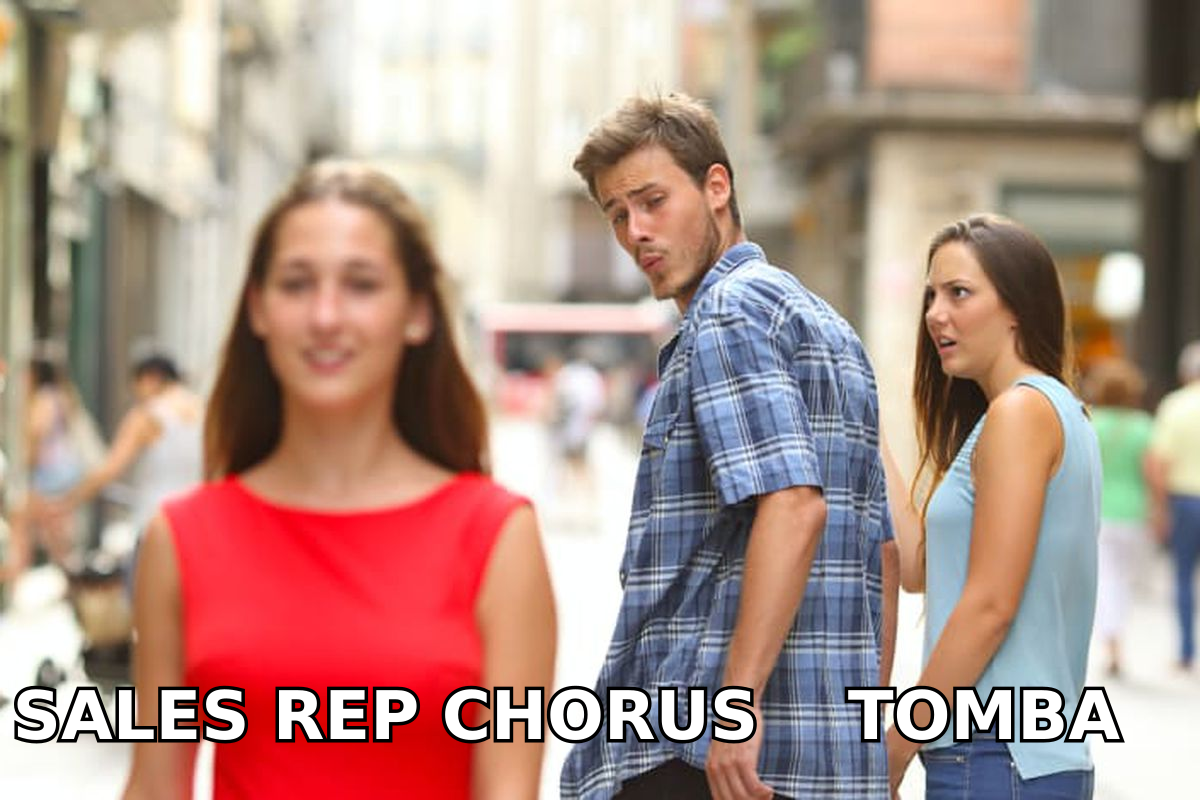
But here's the reframe most buyer guides miss: conversation intelligence is a bottom-of-funnel tool. It only earns its keep once meetings are already on the calendar. If your problem is "we don't have enough qualified conversations to analyze," Chorus is the wrong first purchase.
That distinction matters for budget sequencing:
- Top of funnel — you need contact data, verified emails, and phone numbers to book meetings. That's a data and prospecting problem.
- Middle/bottom of funnel — you need to run and analyze those meetings well. That's where Chorus, Gong, and similar AI sales technology live.
A team spending $20K/year analyzing calls while starving its pipeline is optimizing the wrong stage. Get the inputs right first.
Where does prospecting data fit alongside Chorus?#
You can't analyze a sales call you never booked. Before conversation intelligence pays off, you need a reliable way to reach the right people — and that's a different category entirely.
This is where a data and email layer comes in. Tools like Tomba focus on the front of the funnel: finding and verifying who to contact, so your reps have conversations worth recording in the first place.
A practical, cost-aware stack often looks like this:
- Find the contacts — use an email finder to get verified professional addresses by name and company domain.
- Verify before you send — run addresses through an email verifier to protect sender reputation and keep bounce rates low.
- Enrich and route — push clean records into your CRM with contact enrichment.
- Book meetings → record them — only now does Chorus (or any conversation intelligence tool) start returning value.
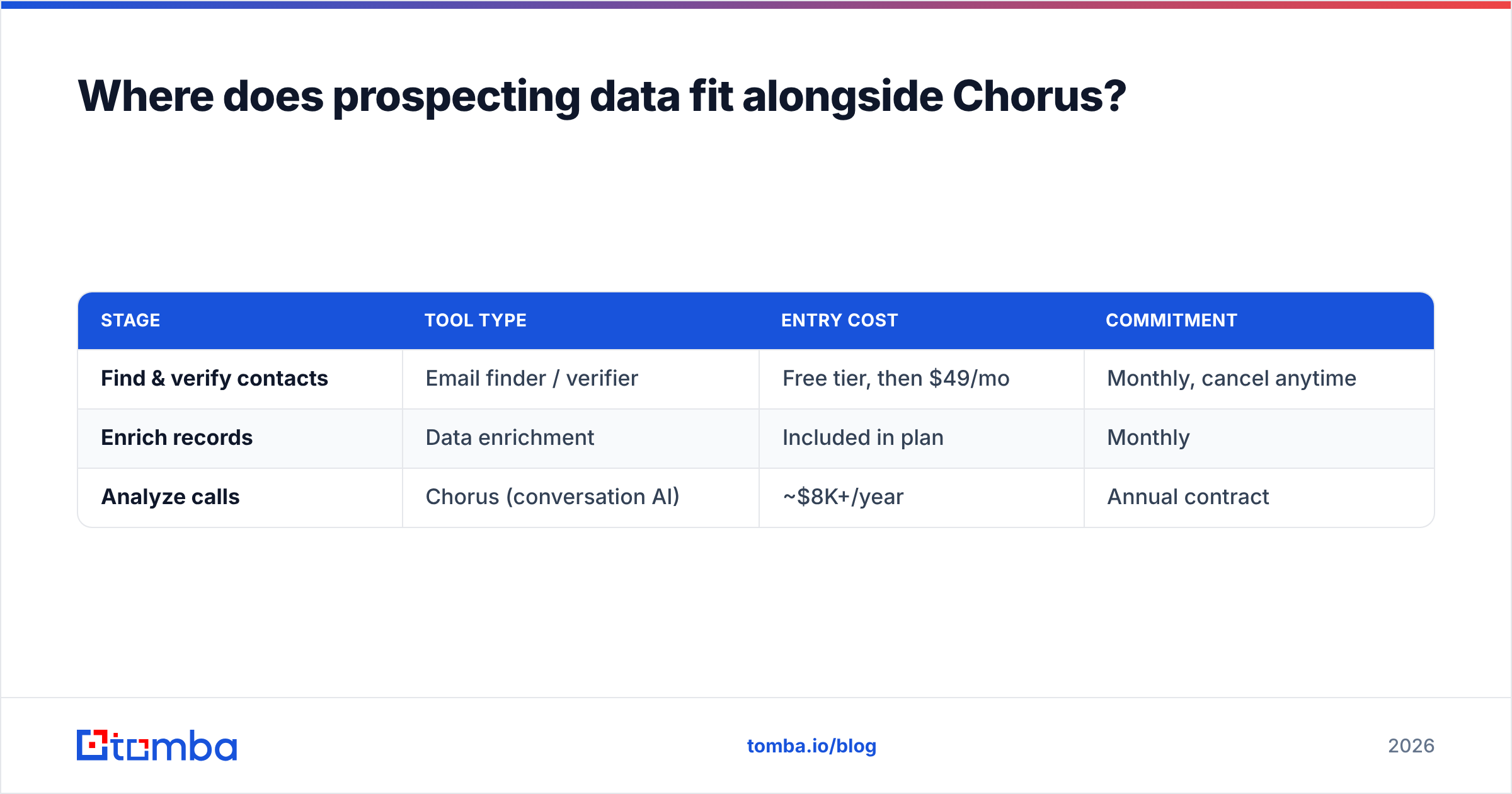
The cost contrast is stark, and it's why many lean teams sequence their spend deliberately:
| Stage | Tool type | Entry cost | Commitment |
|---|---|---|---|
| Find & verify contacts | Email finder / verifier | Free tier, then $49/mo | Monthly, cancel anytime |
| Enrich records | Data enrichment | Included in plan | Monthly |
| Analyze calls | Chorus (conversation AI) | ~$8K+/year | Annual contract |
For reference, Tomba pricing starts with a free tier of 25 searches/month, then Starter at $49/mo, Growth at $99/mo, and Pro at $249/mo — month-to-month, no annual lock-in. That's a fundamentally different commitment profile than enterprise conversation intelligence, because it solves a different problem.
Who should actually buy Chorus?#
Buy Chorus if all of these are true:
- You already book enough meetings to make call analysis worthwhile (think 10+ reps running daily demos).
- You have a dedicated sales enablement or RevOps function to tune trackers and run coaching.
- You're on annual SaaS budgets and value forecasting and deal-risk signals.
- You're already a ZoomInfo customer or open to the bundle.
Reconsider or wait if:
- You're a small team or early-stage startup still building pipeline.
- You want self-serve, month-to-month pricing.
- Your real bottleneck is getting meetings, not analyzing them.
- You can't commit to a 12-month contract.
How do you evaluate Chorus without overpaying?#
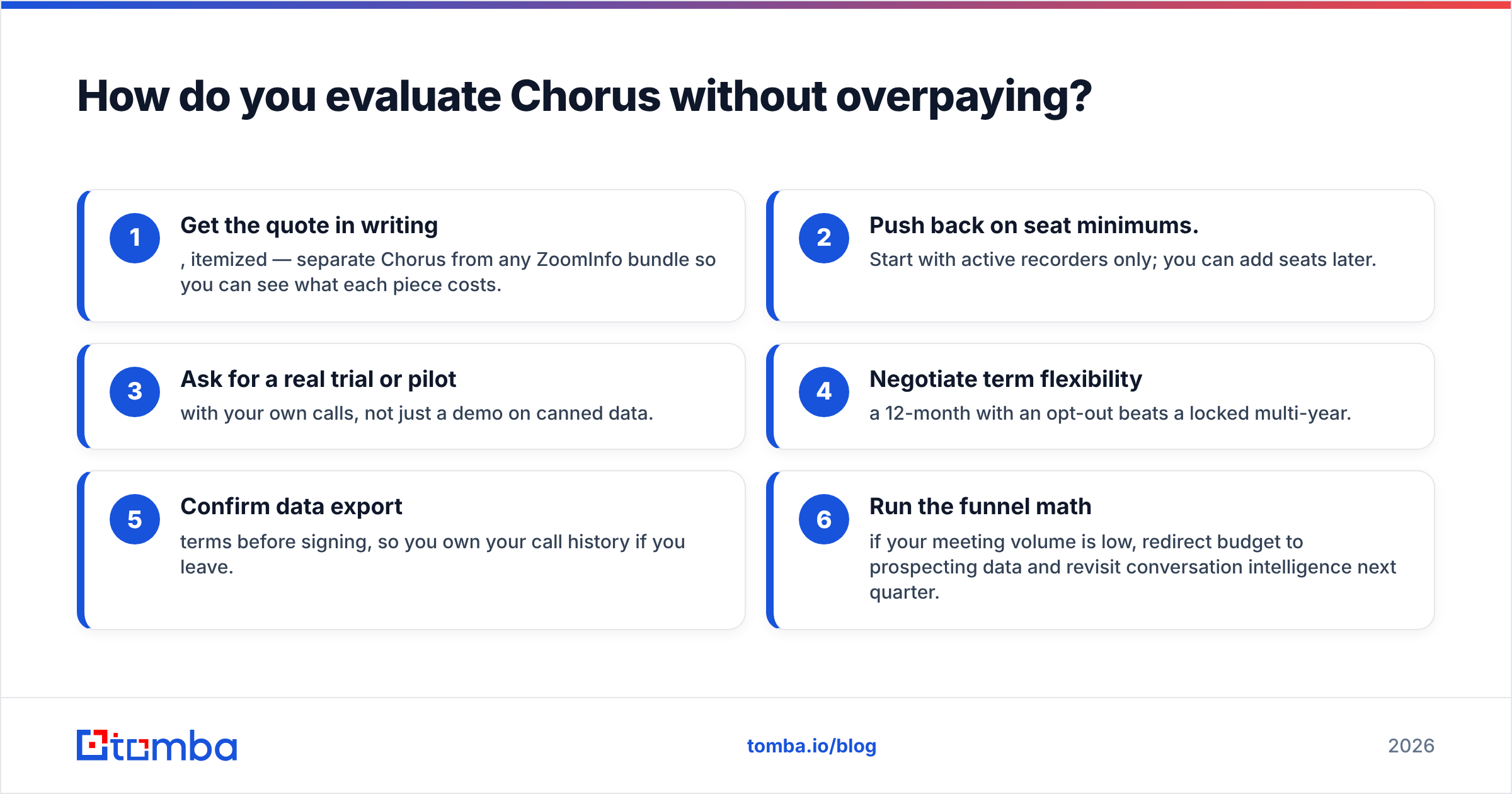
Treat the sales process like any enterprise negotiation:
- Get the quote in writing, itemized — separate Chorus from any ZoomInfo bundle so you can see what each piece costs.
- Push back on seat minimums. Start with active recorders only; you can add seats later.
- Ask for a real trial or pilot with your own calls, not just a demo on canned data.
- Negotiate term flexibility — a 12-month with an opt-out beats a locked multi-year.
- Confirm data export terms before signing, so you own your call history if you leave.
- Run the funnel math — if your meeting volume is low, redirect budget to prospecting data and revisit conversation intelligence next quarter.
The bottom line#
Chorus is a strong, well-reviewed conversation intelligence platform with excellent transcription and coaching — but it's expensive, contract-heavy, and only valuable once your pipeline is already full. The pros are real; so are the cons. For most teams, the smartest move is to make sure the top of the funnel is working before committing five figures a year to analyzing the bottom of it.
If your real gap is reaching the right people, start there. Tomba's email finder gives you verified professional emails by name, company, or domain — with a free tier to test it and plans from $49/mo, no annual lock-in. Fill the pipeline first; then let a tool like Chorus help you close it. Find your first 25 contacts free and build conversations worth recording.
// get started
Find, verify and enrich your first contacts today
Start on the free plan with 25 searches a month, then scale when your team is ready.
Free plan · No credit card required · GDPR & CCPA
// about the author