Claap Pricing, Reviews, Pros and Cons (2026 Guide)
A neutral 2026 breakdown of Claap pricing, real user reviews, and the honest pros and cons — plus who should buy it and which alternatives fit better.
Claap has quietly become one of the more talked-about tools for async video, call recording, and AI meeting notes. But the pricing page is light on detail, the reviews are scattered across G2 and Reddit, and the trade-offs only show up once you've already migrated your team onto it. This guide pulls the whole picture together.
TL;DR — Is Claap worth it in 2026?#
- What it is: Claap is an async video messaging + AI meeting recorder built for sales, product, and remote teams who want to cut live meetings and capture call insights automatically.
- Pricing: A real free tier exists, paid plans start in the ~$8/user/month range, and "Pro" tiers with full AI and CRM sync land around $16–$25/user/month. Always confirm on the official pricing page — Claap revises tiers often.
- Reviews: Users praise the recording quality, AI summaries, and clean UX; complaints cluster around occasional transcription misses, limited deep CRM automation, and per-seat cost at scale.
- Best for: Small-to-mid sales and product teams that live in async video and want call notes without a heavyweight revenue-intelligence contract.
- The gap it doesn't fill: Claap captures the conversation. It doesn't find or verify the contact data that gets you on the call — that's a separate job for a tool like an email finder.
What is Claap and who is it for?#
Think of Claap as a hybrid between Loom and a lightweight Gong. Loom gives you async screen-and-camera videos; Gong gives you AI call analysis for revenue teams. Claap sits in the middle: record async videos and sales calls, get AI-generated summaries and action items, then collaborate with timestamped comments — all without scheduling another live meeting.
Technically, Claap is a SaaS workspace where every recording becomes a searchable, commentable asset. It connects to your calendar and video conferencing, joins calls as a bot, transcribes them, and pushes notes into your stack.
It's aimed at four overlapping buyers:
- Sales teams who want call recording and AI notes without paying for full conversation intelligence.
- Product and UX teams running async user-research reviews and feedback loops.
- Remote-first companies replacing status meetings with short async videos.
- Founders and small GTM teams who need one tool that does recording, notes, and light follow-up.
If you're evaluating it as a sales tool specifically, the question isn't just "is the recording good" — it's whether the notes actually move into your CRM and trigger the next action.
How much does Claap cost? (Claap pricing breakdown)#
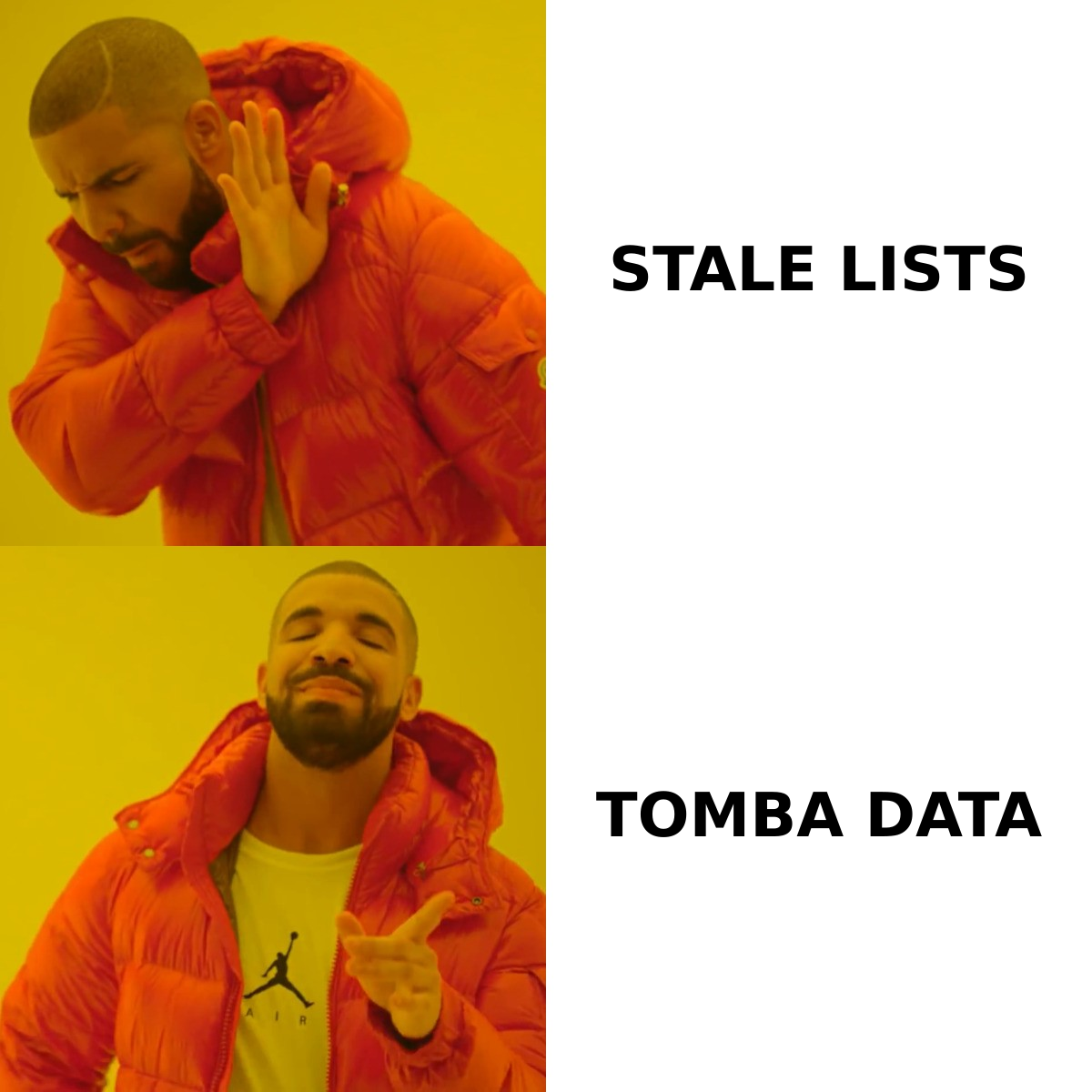
Claap uses a per-seat, tiered model with a genuinely usable free plan. Pricing has shifted more than once, so treat the figures below as the typical 2026 shape rather than a contract — verify current numbers on the official Claap pricing page before you buy.
| Plan | Typical price (per user/mo) | Who it's for | Key limits |
|---|---|---|---|
| Free | $0 | Solo users, trials | Capped recordings, limited storage, basic AI |
| Starter | ~$8 | Small async teams | More storage, longer videos, light integrations |
| Pro | ~$16–$25 | Sales & GTM teams | Full AI notes, CRM sync, call recording bot |
| Business / Enterprise | Custom | Larger orgs | SSO, admin controls, priority support, security review |
A few pricing realities to plan around:
- Annual vs monthly: The headline numbers are almost always the annual-billed rate. Month-to-month runs meaningfully higher.
- Per-seat math: Claap looks cheap at five seats and adds up fast at thirty. A 25-person team on Pro is a four-figure monthly line item.
- Feature gating: The features most sales teams actually want — call recording bot, CRM push, advanced AI — generally sit on Pro and above, not Starter.
- AI usage: Some AI capabilities are metered. Heavy recording volume can nudge you toward a higher tier sooner than headcount alone would.
Compared with full conversation-intelligence platforms that start in the hundreds-per-seat range, Claap is the budget-friendly option. Compared with a plain screen recorder, you're paying a premium for the AI and the sales-oriented features. Where you land depends on how much of that AI layer you'll genuinely use.
What do Claap reviews actually say?#
Aggregate sentiment across G2 and community threads is positive, typically in the 4.5/5 range, with a consistent pattern in what earns praise and what draws criticism.
What reviewers like:
- Recording and playback quality — clean video, fast rendering, easy sharing links.
- AI summaries and action items — saves real time on post-call admin and meeting recaps.
- Async-first UX — timestamped comments and reactions make feedback feel lightweight.
- Onboarding speed — most teams are productive within a day, not a sprint.
What reviewers criticize:
- Transcription accuracy on accents and crosstalk — usable, but not flawless, and it occasionally mislabels speakers.
- Depth of CRM automation — sync exists, but it's lighter than purpose-built revenue tools; complex routing still needs manual work.
- Per-seat cost at scale — the most common churn reason cited is price once the team grows.
- Search and library organization — as your recording library balloons, finding the right clip gets harder.
The honest read: Claap delivers strongly on its core promise (record, summarize, share) and is weaker on the "operationalize the insight across the whole revenue stack" promise. That's a reasonable trade-off at its price point, but it's the line to watch.
What are the pros and cons of Claap?#
Here's the balanced ledger, distilled.
| Pros | Cons |
|---|---|
| Genuine free tier to evaluate risk-free | AI features and CRM sync gated to higher plans |
| Async video + call recording in one tool | Transcription stumbles on accents/crosstalk |
| Fast, clean AI summaries and action items | Per-seat pricing scales expensively |
| Quick onboarding, low learning curve | CRM automation lighter than dedicated tools |
| Strong for product/UX feedback loops | Library search degrades at high volume |
| Cheaper than full conversation-intelligence suites | Doesn't source or verify contact data |
The pattern is clear: Claap is a strong capture-and-collaborate layer and a weak end-to-end revenue-operations layer. If your bottleneck is "we waste time in meetings and lose call context," Claap fixes it. If your bottleneck is "we don't have enough qualified pipeline," Claap isn't the tool — that's a prospecting and data problem.
How does Claap compare to alternatives?#
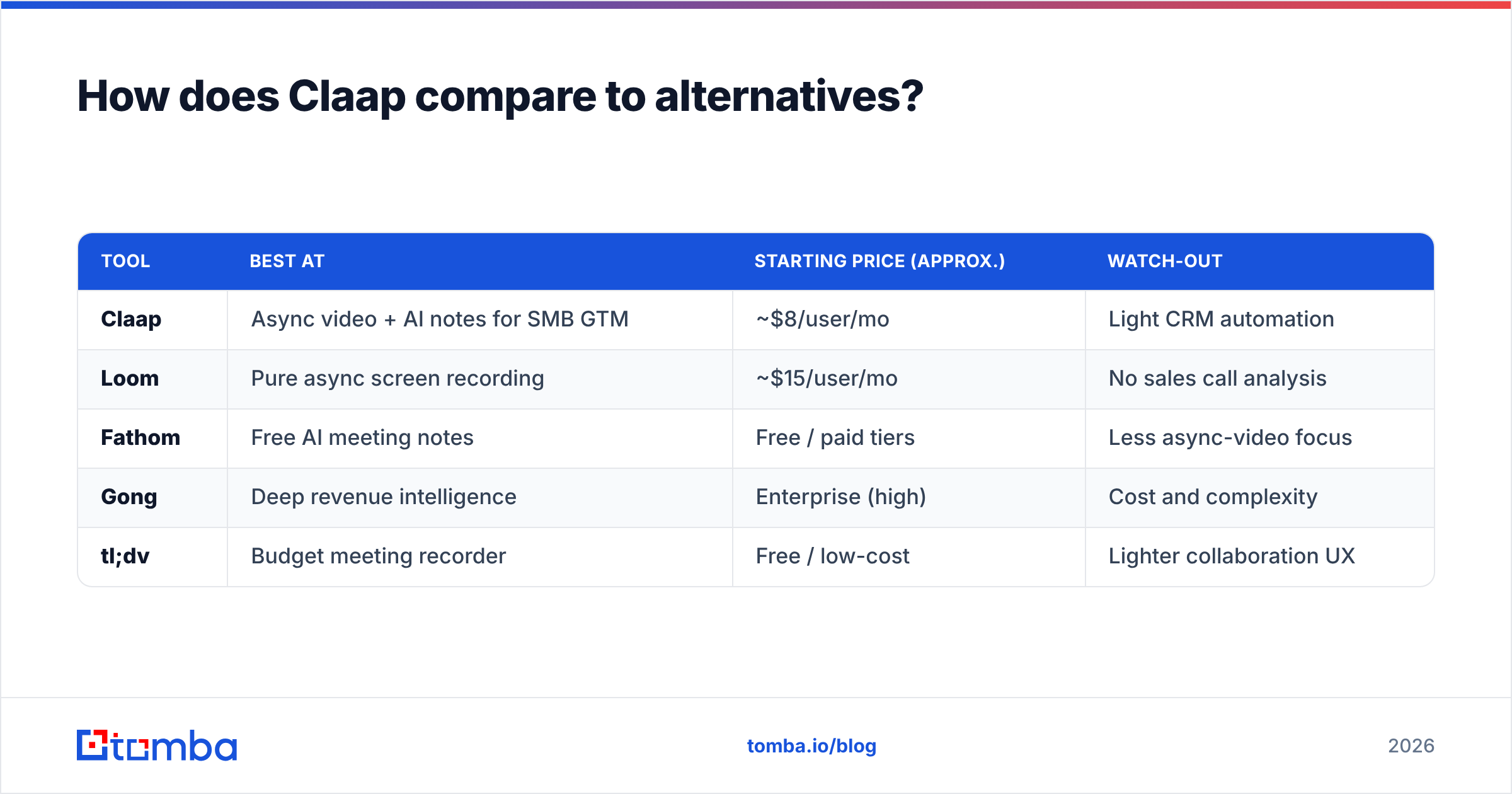
No tool wins on every axis. Here's how Claap stacks up against the names it's most often compared with.
| Tool | Best at | Starting price (approx.) | Watch-out |
|---|---|---|---|
| Claap | Async video + AI notes for SMB GTM | ~$8/user/mo | Light CRM automation |
| Loom | Pure async screen recording | ~$15/user/mo | No sales call analysis |
| Fathom | Free AI meeting notes | Free / paid tiers | Less async-video focus |
| Gong | Deep revenue intelligence | Enterprise (high) | Cost and complexity |
| tl;dv | Budget meeting recorder | Free / low-cost | Lighter collaboration UX |
If you're specifically trying to escape the price and complexity of enterprise conversation intelligence, look at a Gong alternative shortlist — Claap, Fathom, and tl;dv all serve teams that want 80% of the value without the enterprise contract.
The decision usually comes down to three questions:
- Do you need async video, or just meeting notes? Need both → Claap or Loom. Just notes → Fathom or tl;dv.
- How deep is your CRM workflow? Heavy automation and forecasting → Gong-class tools. Light sync → Claap is fine.
- What's your team size? Under ~20 seats, Claap's pricing is friendly. Above that, run the per-seat math hard.

Where does Claap fit in your sales stack?#
Claap is a mid-funnel tool — it shines after a conversation is already happening. That makes it a complement to, not a replacement for, the top-of-funnel layer that creates conversations in the first place.
A realistic 2026 outbound stack looks like this:
- Find the right contacts — pull verified emails and direct dials with an email finder and enrich them with firmographic and role data.
- Reach out — run cold email or LinkedIn sequences to book the meeting.
- Record and analyze the call — this is where Claap earns its keep.
- Follow up and sync — push notes and next steps into your CRM and pipeline.
Claap owns step 3 and assists with step 4. It does nothing for steps 1 and 2 — and those steps are where most teams actually lose pipeline. You can have flawless AI meeting notes and still starve if you don't have accurate contact data feeding the top of the funnel. Tools that handle data enrichment and contact discovery sit upstream of Claap, not inside it.
That's not a knock on Claap. It's a scoping reminder: buy it for what it does — capture and collaborate — and pair it with the data layer it deliberately leaves out.
Is Claap worth it? (Verdict)#
Buy Claap if: you're an SMB or mid-market sales/product team that records a lot of calls and async videos, you want fast AI notes without an enterprise contract, and your team is small enough that per-seat pricing stays comfortable. The free tier means you can validate this in a week with zero risk.
Skip or supplement Claap if: you need deep revenue intelligence and forecasting (go Gong-class), you only need meeting notes and not async video (Fathom/tl;dv are cheaper), or you're scaling past ~20–30 seats where the per-seat cost starts to sting.
And regardless of which recorder you choose: remember that the recorder is downstream of the data. A meeting tool can't book a meeting with a prospect you can't reach.
Find the people worth recording a call with#
Claap helps you make the most of conversations you're already having. The harder problem — getting accurate, verified contact data so those conversations happen at all — is exactly what Tomba is built for. The Tomba Email Finder lets you find professional email addresses by domain, name, or company, with verification baked in, so your reps spend their time on calls instead of chasing bounced emails.
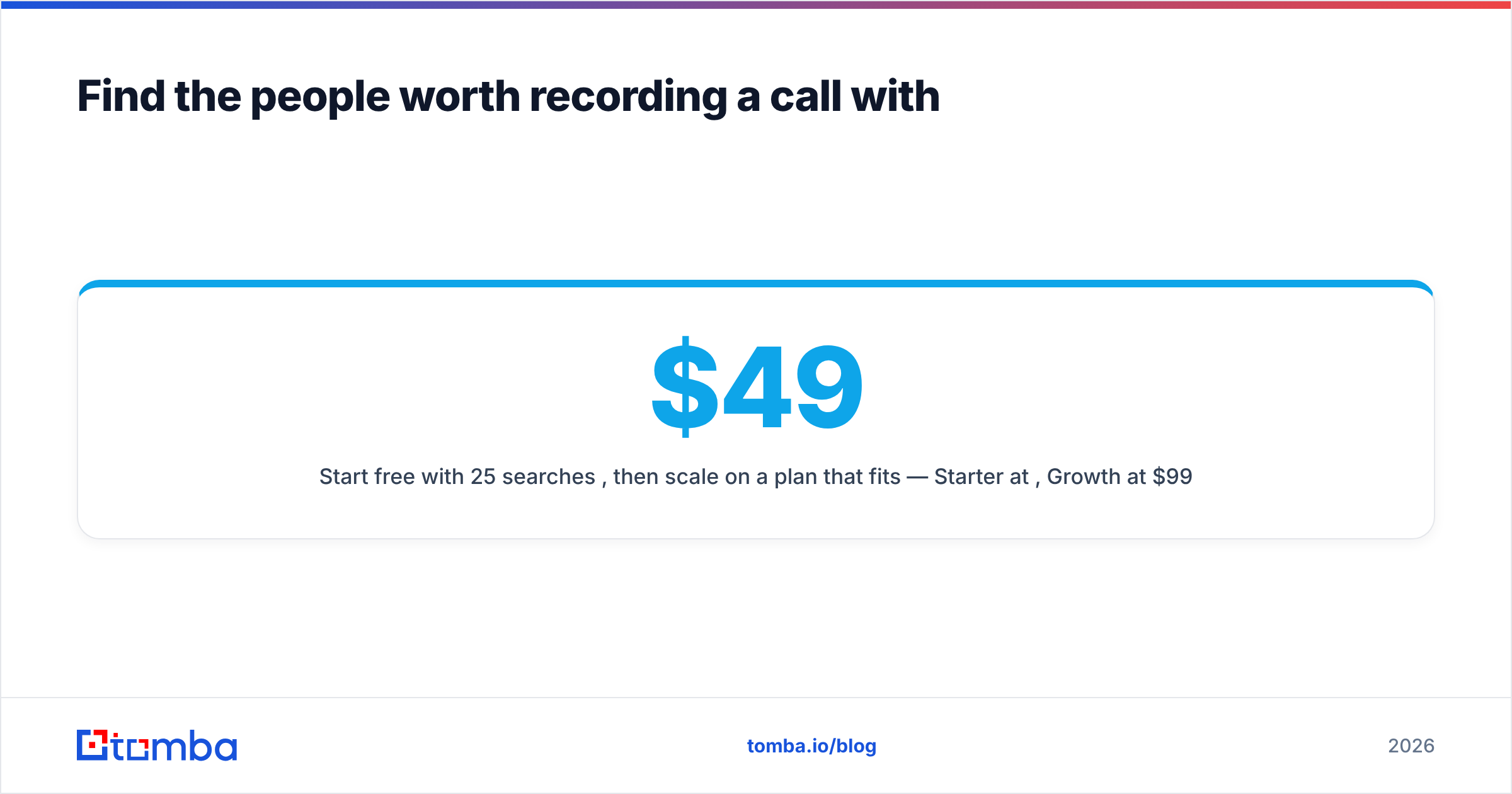
Start free with 25 searches/month, then scale on a plan that fits — Starter at $49/mo, Growth at $99/mo, or Pro at $249/mo. Check the full Tomba pricing breakdown, feed clean contacts into your outbound, and let Claap handle everything after "hello."
// get started
Find, verify and enrich your first contacts today
Start on the free plan with 25 searches a month, then scale when your team is ready.
Free plan · No credit card required · GDPR & CCPA
// about the author