Claritysoft CRM Pricing, Reviews, Pros and Cons (2026)
Is Claritysoft CRM worth it in 2026? A straight breakdown of its pricing tiers, real user reviews, and the pros and cons that decide whether it fits your sales team.
Choosing a CRM is less about the logo and more about whether your reps actually log into it on a Monday morning. Claritysoft has spent years positioning itself as the "easy-to-use" CRM for small and mid-sized businesses that found Salesforce too heavy and HubSpot too sprawling. But ease of use is a feature, not a strategy — so the real question is whether Claritysoft's pricing, capabilities, and trade-offs line up with how your team sells in 2026.
This is a neutral teardown: what it costs, what users actually say, and where it wins or falls short against the alternatives.
TL;DR#
- Claritysoft CRM pricing runs roughly $39–$49/user/month for Professional and $69/user/month for Enterprise (billed annually), with a 14-day free trial and no permanent free tier.
- It scores well on ease of use and support — that is its core differentiator and the thing reviewers consistently praise.
- It is weaker on native automation, deep integrations, and marketing depth than Salesforce, HubSpot, or Zoho.
- Best fit: SMB sales teams (5–100 reps) who want a clean, fast contact-and-pipeline CRM without a consultant.
- A CRM is only as good as the data inside it — pair any CRM with a contact-enrichment layer so reps aren't selling to dead records.
What is Claritysoft CRM?#
Claritysoft is a cloud-based customer relationship management platform aimed squarely at small and mid-sized businesses. Think of it as the CRM equivalent of an automatic car: it deliberately hides the complicated machinery so a non-technical salesperson can get in and drive on day one, instead of spending two weeks reading the manual.
The platform covers the standard CRM building blocks — contact and account management, a visual sales pipeline, activity tracking, email marketing, quotes, and reporting. If you're new to the category, the broader concept is worth a quick read in this CRM glossary entry before you compare vendors, because "CRM" means very different things depending on whether you're a 5-person agency or a 500-rep enterprise.
What Claritysoft is not trying to be is a full revenue platform with embedded sales engagement, conversation intelligence, and a marketplace of thousands of apps. It picks a lane — usable core CRM for SMBs — and stays in it.
How much does Claritysoft CRM cost in 2026?#
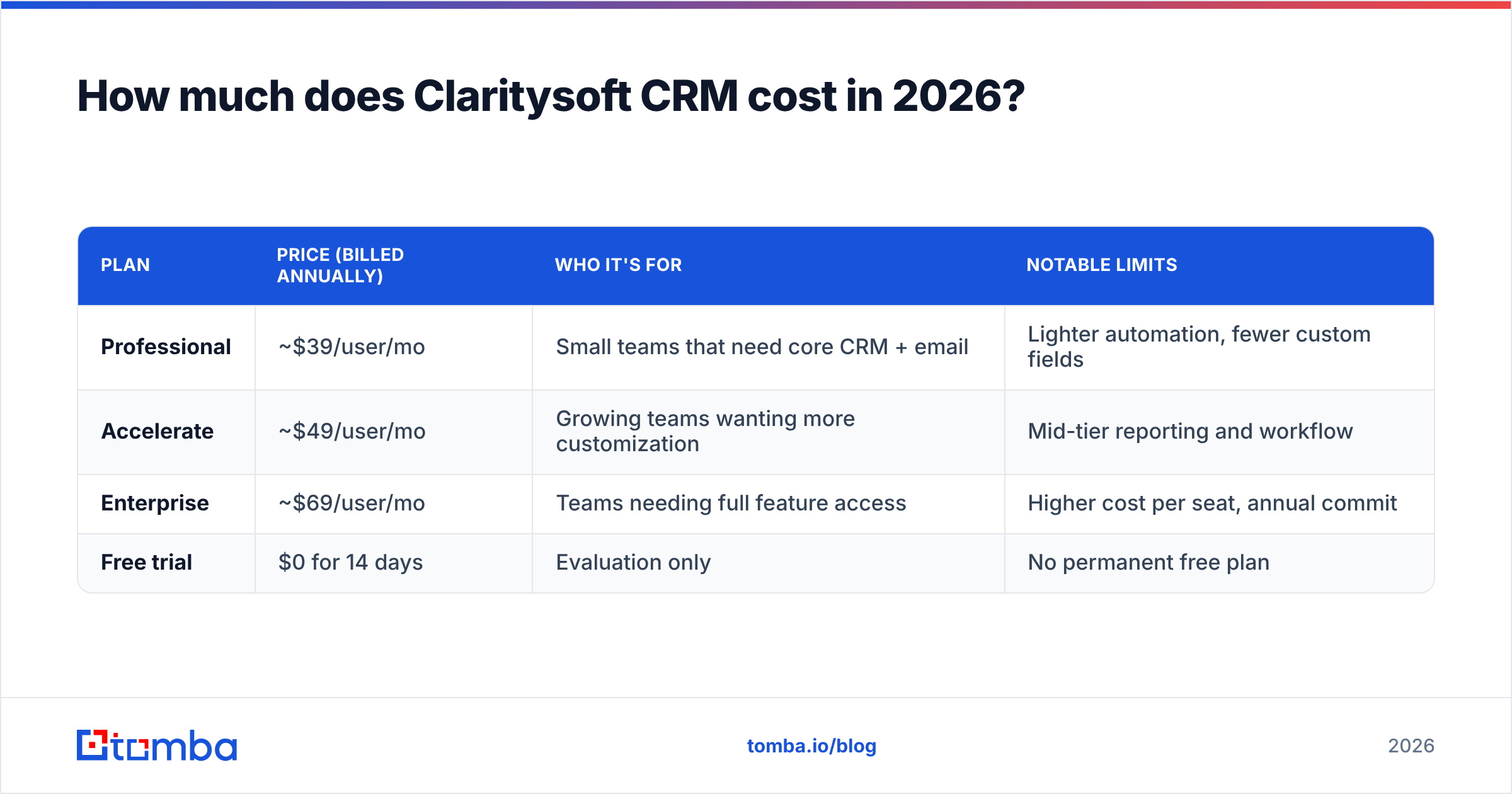
Claritysoft uses a per-user, per-month model with a discount for annual billing. Pricing has historically been published on claritysoft.com, and the structure has stayed stable across recent years. Here is the current shape of the tiers.
| Plan | Price (billed annually) | Who it's for | Notable limits |
|---|---|---|---|
| Professional | ~$39/user/mo | Small teams that need core CRM + email | Lighter automation, fewer custom fields |
| Accelerate | ~$49/user/mo | Growing teams wanting more customization | Mid-tier reporting and workflow |
| Enterprise | ~$69/user/mo | Teams needing full feature access | Higher cost per seat, annual commit |
| Free trial | $0 for 14 days | Evaluation only | No permanent free plan |
A few things worth flagging before you budget:
- Annual billing is effectively the default. The advertised low numbers assume a yearly commitment; month-to-month pricing is higher, so factor in the lock-in.
- No free forever tier. Unlike HubSpot or Zoho, Claritysoft gives you a trial, not a free seat. If "free CRM" is a hard requirement, this isn't it.
- Add-ons stack up. Email marketing volume, additional storage, and some advanced modules can push the real per-seat cost above the headline figure.
- Onboarding is generally included, which matters — for SMBs, the soft cost of implementation often dwarfs the license fee.
For comparison, you can sanity-check competitor list prices on independent directories like G2 and Capterra rather than relying on any single vendor's marketing page.
What do Claritysoft CRM reviews actually say?#
Aggregate review sentiment is consistent: people like using it. Across the major B2B review sites, Claritysoft tends to land in the high-4-star range, and the pattern of feedback is unusually clear.
What reviewers praise:
- Genuinely easy to learn. New reps get productive in hours, not weeks. This is the single most repeated compliment.
- Responsive, US-based support. Smaller-vendor support that actually picks up the phone is a recurring theme.
- Clean interface. Less clutter than enterprise suites; the daily-use screens are uncrowded.
- Fair value for SMBs. Reviewers feel the price matches the capability for a small team.
What reviewers criticize:
- Automation is shallow. Workflow and rules-based automation lag behind HubSpot and Zoho.
- Integrations are limited. The native connector list is short; teams lean on Zapier or manual exports.
- Mobile app is functional, not great. Fine for lookups, frustrating for heavy field use.
- Reporting hits a ceiling. Good enough for pipeline basics, thin for advanced RevOps analytics.
The honest summary: Claritysoft reviews reward it for doing the fundamentals well and penalize it for not reaching further. That's exactly what you'd expect from a product optimized for simplicity.
What are the pros and cons of Claritysoft CRM?#
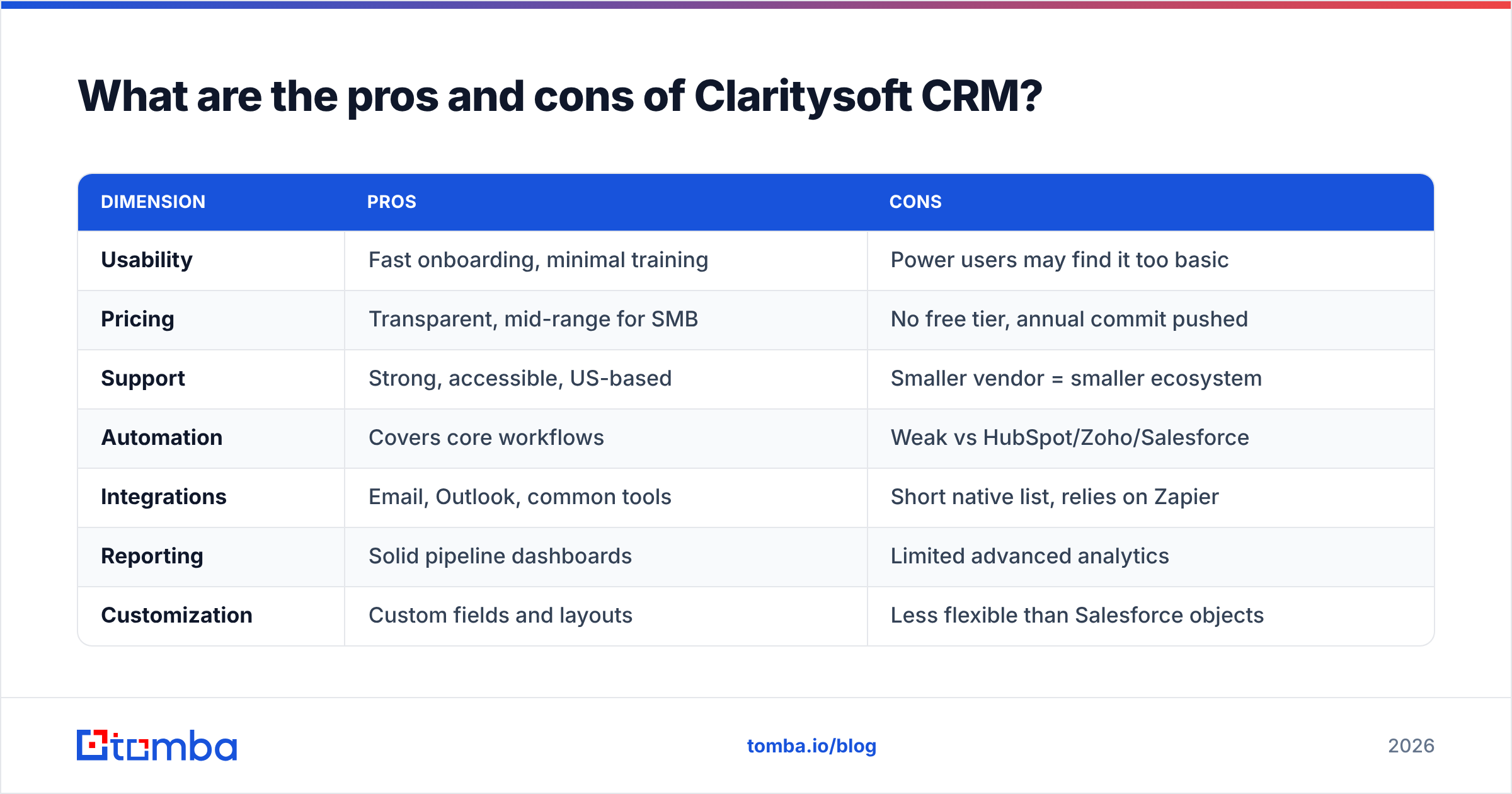
Here's the balanced view, stripped of marketing language.
| Dimension | Pros | Cons |
|---|---|---|
| Usability | Fast onboarding, minimal training | Power users may find it too basic |
| Pricing | Transparent, mid-range for SMB | No free tier, annual commit pushed |
| Support | Strong, accessible, US-based | Smaller vendor = smaller ecosystem |
| Automation | Covers core workflows | Weak vs HubSpot/Zoho/Salesforce |
| Integrations | Email, Outlook, common tools | Short native list, relies on Zapier |
| Reporting | Solid pipeline dashboards | Limited advanced analytics |
| Customization | Custom fields and layouts | Less flexible than Salesforce objects |
The pattern: Claritysoft trades depth for approachability. If your team's biggest CRM problem is "nobody updates it," that trade can be a genuine win — adoption beats features that go unused. If your problem is "we need to orchestrate complex multi-touch campaigns across systems," you'll outgrow it.
How does Claritysoft compare to Salesforce, HubSpot, and Zoho?#
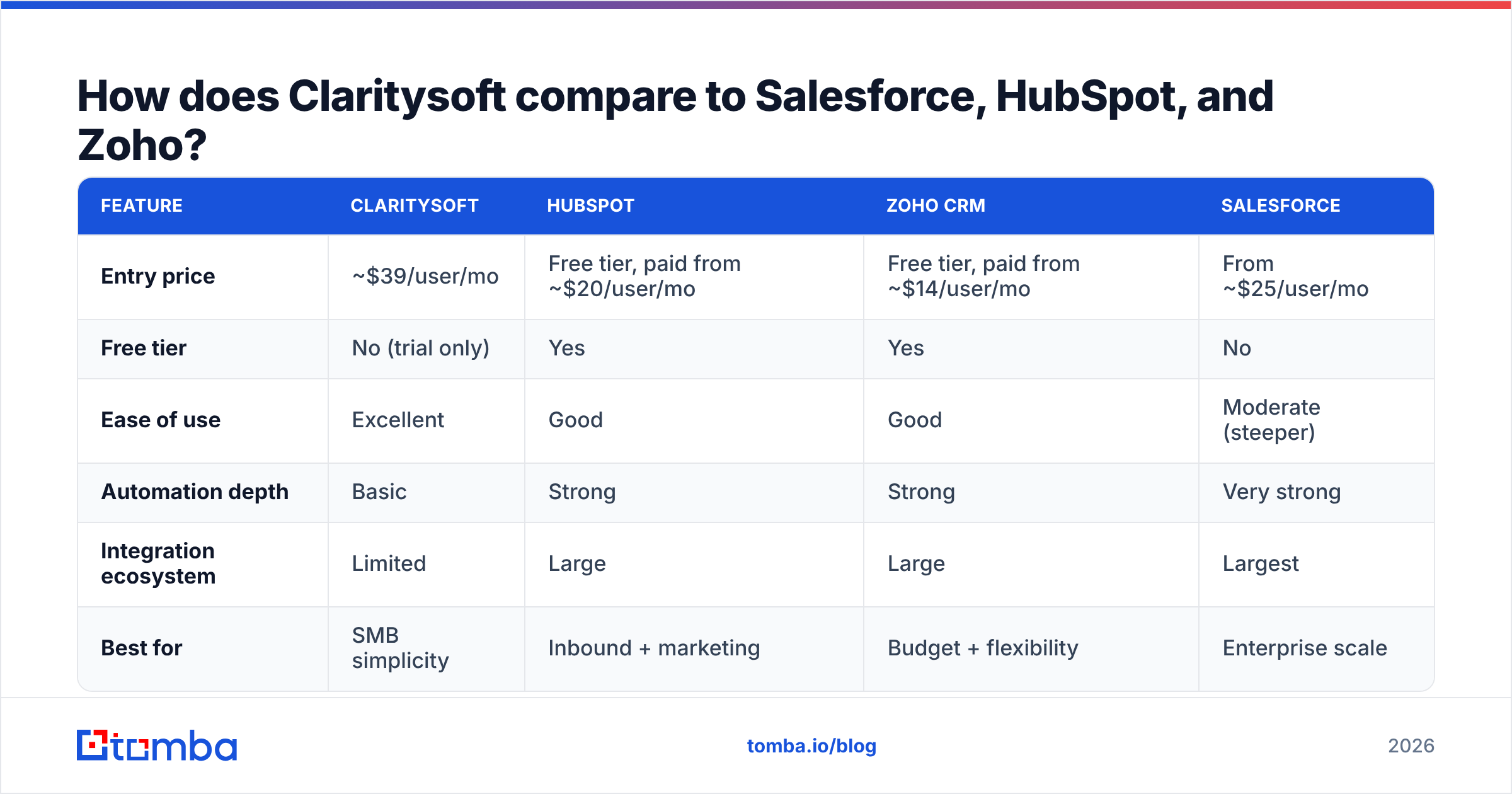
No CRM is "best" in a vacuum; it depends on team size, technical maturity, and budget. Here's how Claritysoft stacks up against the names it most often competes with for SMB deals.
| Feature | Claritysoft | HubSpot | Zoho CRM | Salesforce |
|---|---|---|---|---|
| Entry price | ~$39/user/mo | Free tier, paid from ~$20/user/mo | Free tier, paid from ~$14/user/mo | From ~$25/user/mo |
| Free tier | No (trial only) | Yes | Yes | No |
| Ease of use | Excellent | Good | Good | Moderate (steeper) |
| Automation depth | Basic | Strong | Strong | Very strong |
| Integration ecosystem | Limited | Large | Large | Largest |
| Best for | SMB simplicity | Inbound + marketing | Budget + flexibility | Enterprise scale |
The takeaway: Claritysoft wins on focused simplicity and support for small teams that value getting started fast. It loses to HubSpot and Zoho on ecosystem and free entry points, and to Salesforce on raw scalability and configurability. If you've already decided the big suites are overkill, Claritysoft is a legitimate shortlist candidate. If you anticipate heavy automation or a 50+ app stack, look harder at the alternatives.
Who should actually buy Claritysoft CRM?#
Use this quick fit test before you commit budget.
- Strong fit: A 5–100 person sales team, low technical appetite, frustrated by a clunky or abandoned CRM, that wants something reps will genuinely use.
- Possible fit: A services or B2B company with straightforward pipelines and moderate email marketing needs.
- Poor fit: A RevOps-heavy org needing deep sales automation, multi-system orchestration, advanced attribution, or a sprawling integration stack.
If you land in "poor fit," your time is better spent evaluating HubSpot or Salesforce — the higher cost buys depth you'll actually consume. If you land in "strong fit," Claritysoft's simplicity is a feature, not a compromise.
Why your CRM choice matters less than your CRM data#
Here's the uncomfortable truth that no CRM vendor leads with: the platform is just a container. A beautifully designed pipeline filled with bounced emails, outdated job titles, and missing phone numbers will lose deals regardless of which logo is in the top-left corner. Industry studies routinely peg B2B data decay at 20–30% per year — meaning roughly a quarter of your contacts go stale annually whether you switch CRMs or not.
This is where most Claritysoft (or any CRM) evaluations go wrong. Teams obsess over feature checklists and ignore the input quality. A clean, fast CRM full of dead records is still a CRM full of dead records.
That's the gap a dedicated data layer fills. Before a contact ever lands in Claritysoft, you want it found, verified, and enriched:
- Find the right contact. Use an email finder to locate verified professional addresses by name and domain instead of guessing patterns.
- Verify before you import. Run addresses through an email verifier so your CRM and your sender reputation aren't polluted by hard bounces.
- Enrich what's thin. Apply data enrichment to backfill job titles, company size, and phone numbers on records that came in half-empty.
Do this and your CRM — Claritysoft or otherwise — becomes a system reps trust. Skip it and you've bought a tidier place to store bad data.
How do you get clean data into Claritysoft?#
The workflow is straightforward and doesn't require ripping out your CRM:
- Source contacts from your target accounts using a domain or name search.
- Verify deliverability in bulk before any import.
- Enrich the records with firmographic and contact detail.
- Push to the CRM via CSV import or an automation tool like Zapier, which Claritysoft supports.
- Set a refresh cadence — re-verify quarterly to fight the 20–30% annual decay.
Because Claritysoft's native integration list is on the shorter side, most teams handle enrichment upstream of the CRM rather than inside it. That actually works in your favor: it keeps the data hygiene job in a purpose-built tool instead of bolting it onto a CRM that wasn't designed for it.
Frequently asked questions#
Is Claritysoft CRM free? No. There is a 14-day free trial, but no permanent free tier. If a free-forever plan is essential, HubSpot or Zoho CRM are closer fits.
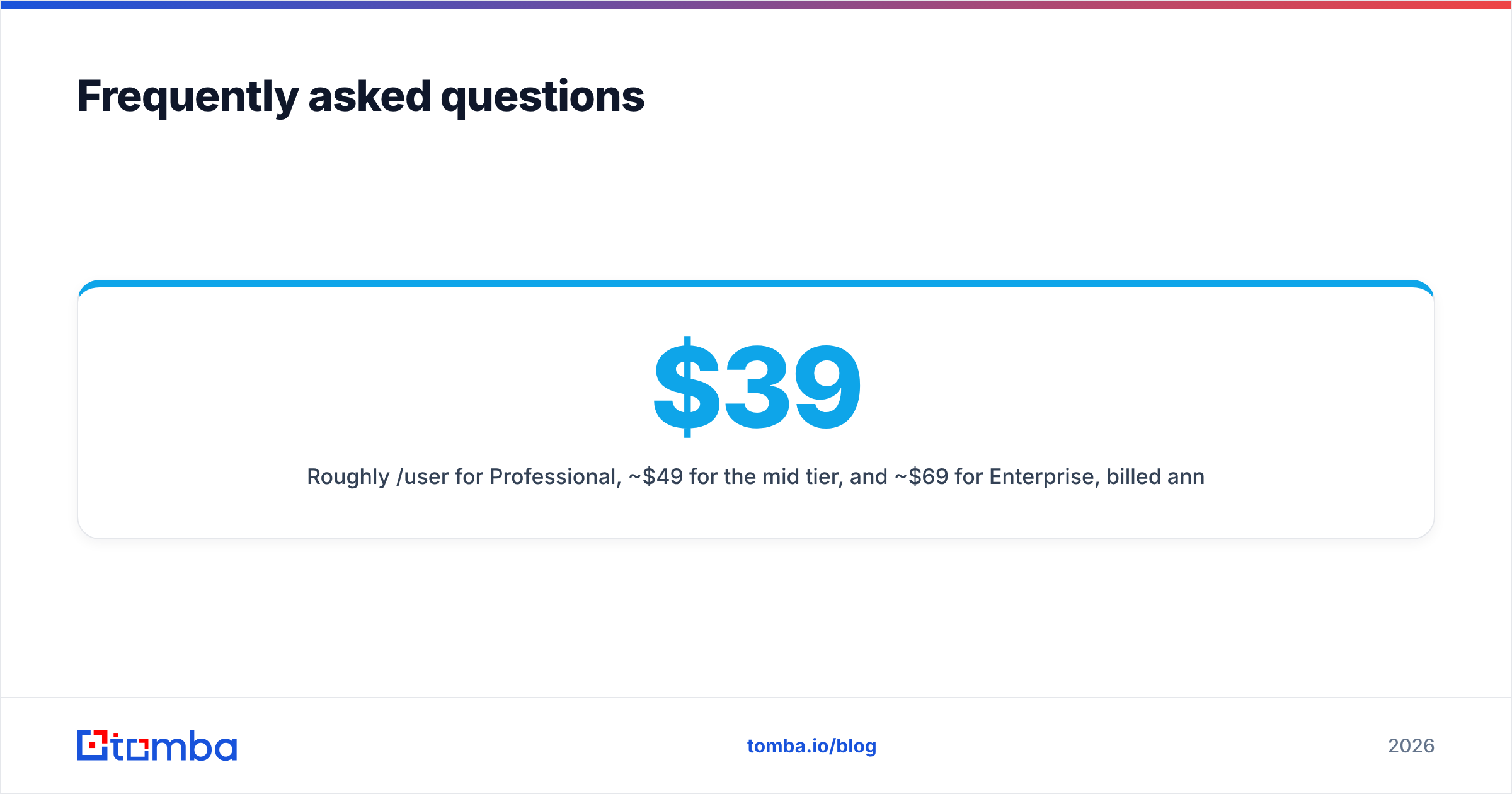
How much does Claritysoft CRM cost per user? Roughly $39/user/month for Professional, ~$49 for the mid tier, and ~$69 for Enterprise, billed annually. Month-to-month rates are higher. Always confirm current numbers on the vendor site, since pricing can change.
Is Claritysoft good for small businesses? Yes — that's its sweet spot. Reviewers consistently rate it highly for ease of use and support, which are exactly the things SMBs need to drive adoption.
What are Claritysoft's biggest weaknesses? Limited native integrations, shallow automation compared to HubSpot/Zoho/Salesforce, and reporting that tops out at pipeline basics.
Does Claritysoft integrate with other tools? It connects to email, Outlook, and common business apps, and supports Zapier for broader connections — but the native connector list is shorter than the major suites.
The verdict#
Claritysoft CRM is a credible, fairly priced choice for small and mid-sized teams whose number-one problem is CRM adoption, not feature depth. Its pricing is transparent, its support is a genuine strength, and reviewers reward it for being easy to live with. The trade-off is real: limited integrations, basic automation, and a reporting ceiling that growth-stage RevOps teams will hit.
But whichever CRM you pick, the deciding factor for pipeline outcomes isn't the software — it's the quality of the contacts inside it. A clean CRM with stale data still loses deals. Start every record right: use the Tomba Email Finder to find and verify accurate, deliverable business emails before they ever touch your CRM, then enrich and refresh on a schedule. Spin up a free Tomba account, run your first list, and import only contacts you can actually reach — so your CRM works as hard as your reps do.
Ready to find emails that actually work?
Join 150,000+ professionals who stopped guessing and started sending. Free credits on signup — no credit card required.
Get the Tomba newsletter
Practical outbound tactics and product updates — once every two weeks.
About the author