Clay AI Prospecting in 2026: A Practical Guide for Teams
Clay turns scattered data sources into automated prospecting workflows. Here's how Clay AI prospecting actually works in 2026, what it costs, and where it fits your stack.
Clay has become the default answer when a sales team says "we need better prospecting data, and we need to automate the boring parts." But the tool is also widely misunderstood. People expect a database; what they get is closer to a programmable spreadsheet wired to 100+ data providers and an AI layer on top.
This guide explains what Clay AI prospecting really is, how the waterfall enrichment model works, what it costs in 2026, where it shines, and where you still need a dedicated email source feeding it.
TL;DR#
- Clay is an orchestration layer, not a database. It pulls from 100+ providers (and your own sources) and runs them in sequence — a "waterfall" — until it finds the data point you asked for.
- The AI part is real but bounded. Claygent (Clay's AI research agent) reads websites and reports, scores fit, and writes first-line personalization at scale. It is not a magic data generator.
- Pricing scales with credits, not seats. Plans run from a free tier up to Explore, Pro, and Enterprise. Credit burn is the number that actually controls your bill.
- Email quality still depends on the underlying providers. Clay routes the request; the accuracy comes from sources like a strong email finder and a separate email verifier pass.
- Best fit: RevOps and growth teams who want to automate multi-step enrichment and personalization, not solo reps who just need 200 verified emails this week.
What is Clay AI prospecting?#
Clay is a spreadsheet-shaped automation tool that enriches lists of companies and people by chaining together data providers and AI agents. Think of it like a kitchen with no ingredients of its own — it's a brilliant set of appliances and a head chef (the AI) that knows how to combine whatever you bring in from the market. The value is in the orchestration, not in a proprietary pantry.
A typical Clay table starts with a list: company domains, LinkedIn URLs, or a search you run inside Clay. From there, each column is an enrichment — find the company headcount, find the decision-maker, find their email, score the account against your ICP, draft an opener. Each row runs those steps automatically.
The "AI prospecting" framing comes from two features working together:
- Claygent — an AI agent that visits a website, reads a 10-K, or scans a job board and returns a structured answer to a question you write in plain English ("Does this company sell to dentists?").
- AI formulas and writing — column-level prompts that classify, summarize, or personalize using the data already in the row.
So when someone says "we run Clay AI prospecting," they usually mean: build a target list, enrich it across multiple sources, qualify it with an AI agent, and hand a personalized, ready-to-send list to their sequencer.
How does Clay's waterfall enrichment actually work?#
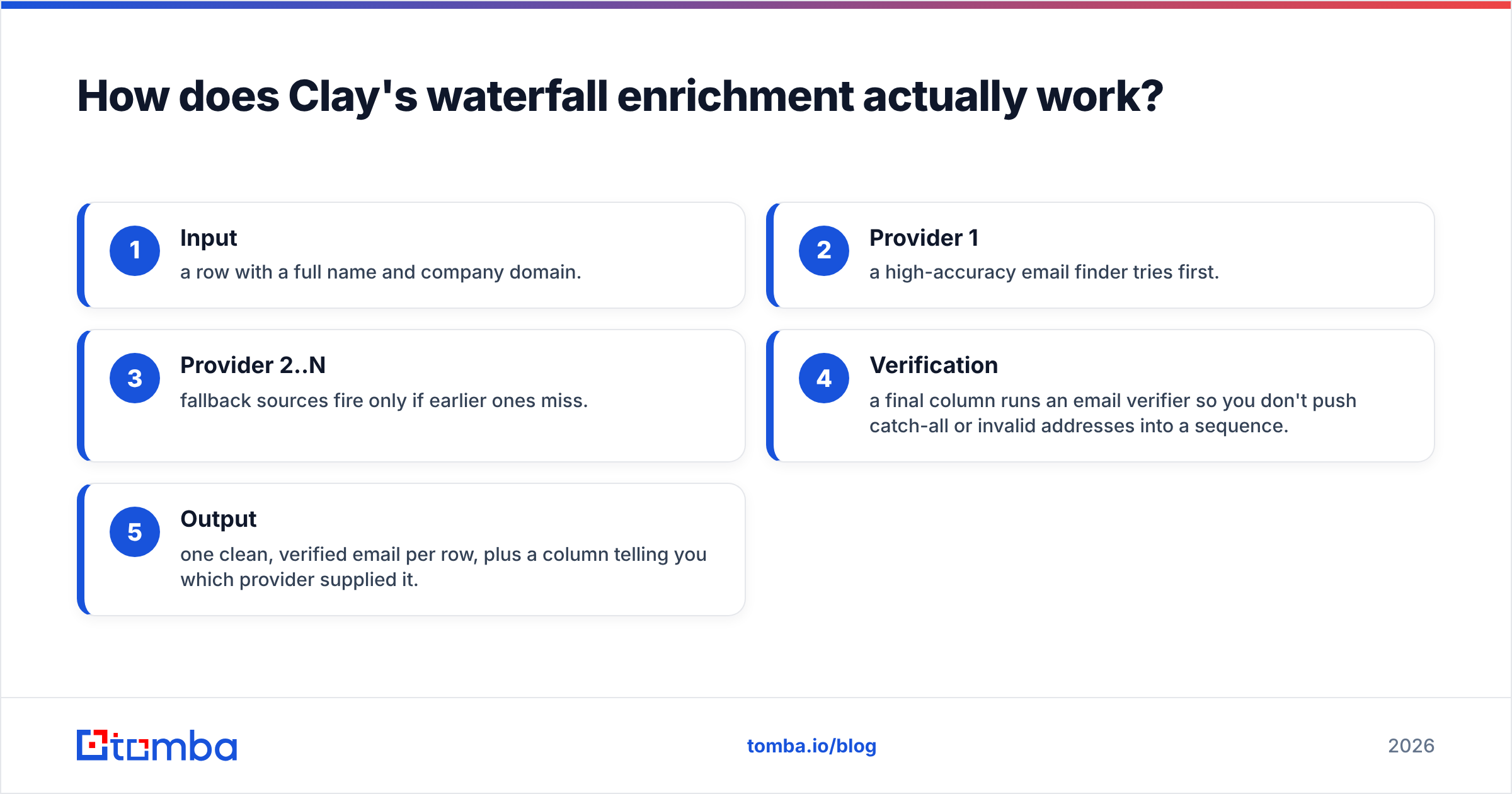
A waterfall runs providers one at a time and stops at the first hit, so you pay for coverage without paying every provider for every row. If provider A returns an email for a contact, providers B and C are never called. If A misses, B tries, then C, and so on.
This is the single most important concept in Clay. It is also where your costs and your data quality are decided.
Here is the practical flow for an email-finding waterfall:
- Input — a row with a full name and company domain.
- Provider 1 — a high-accuracy email finder tries first.
- Provider 2..N — fallback sources fire only if earlier ones miss.
- Verification — a final column runs an email verifier so you don't push catch-all or invalid addresses into a sequence.
- Output — one clean, verified email per row, plus a column telling you which provider supplied it.
The waterfall is provider-agnostic. That means Clay's email quality is only as good as the sources you plug in and the order you rank them. Teams that treat the first provider slot casually end up paying credits for low-confidence guesses; teams that lead with a strong source and verify at the end get clean lists for less.
Rule of thumb: order your waterfall by accuracy first, then by cost. The cheapest provider in slot one looks economical until you count the re-runs and bounced sends.
What can Claygent do that a database can't?#
Claygent answers research questions that no static database stores — the stuff a human SDR would normally click around to find. A database can tell you a company's size; it can't tell you "did they just launch a Shopify store" or "do they mention SOC 2 on their security page." Claygent can, because it actually reads the page.
Common Claygent jobs in prospecting:
- Qualify fit — "Read this site and tell me if they sell physical products."
- Find a trigger — "Does their careers page list an open SDR role?"
- Extract a detail — "What CRM do they appear to use?" (paired with a tech-stack lookup).
- Summarize for personalization — "In one sentence, what does this company do?"
The catch is cost and reliability. Each Claygent run consumes credits and takes real seconds, and like any LLM agent it can return confident-but-wrong answers on ambiguous pages. Smart teams use Claygent for high-leverage qualification on a filtered list, not as a brute-force scan of 50,000 raw rows.
How much does Clay cost in 2026?#
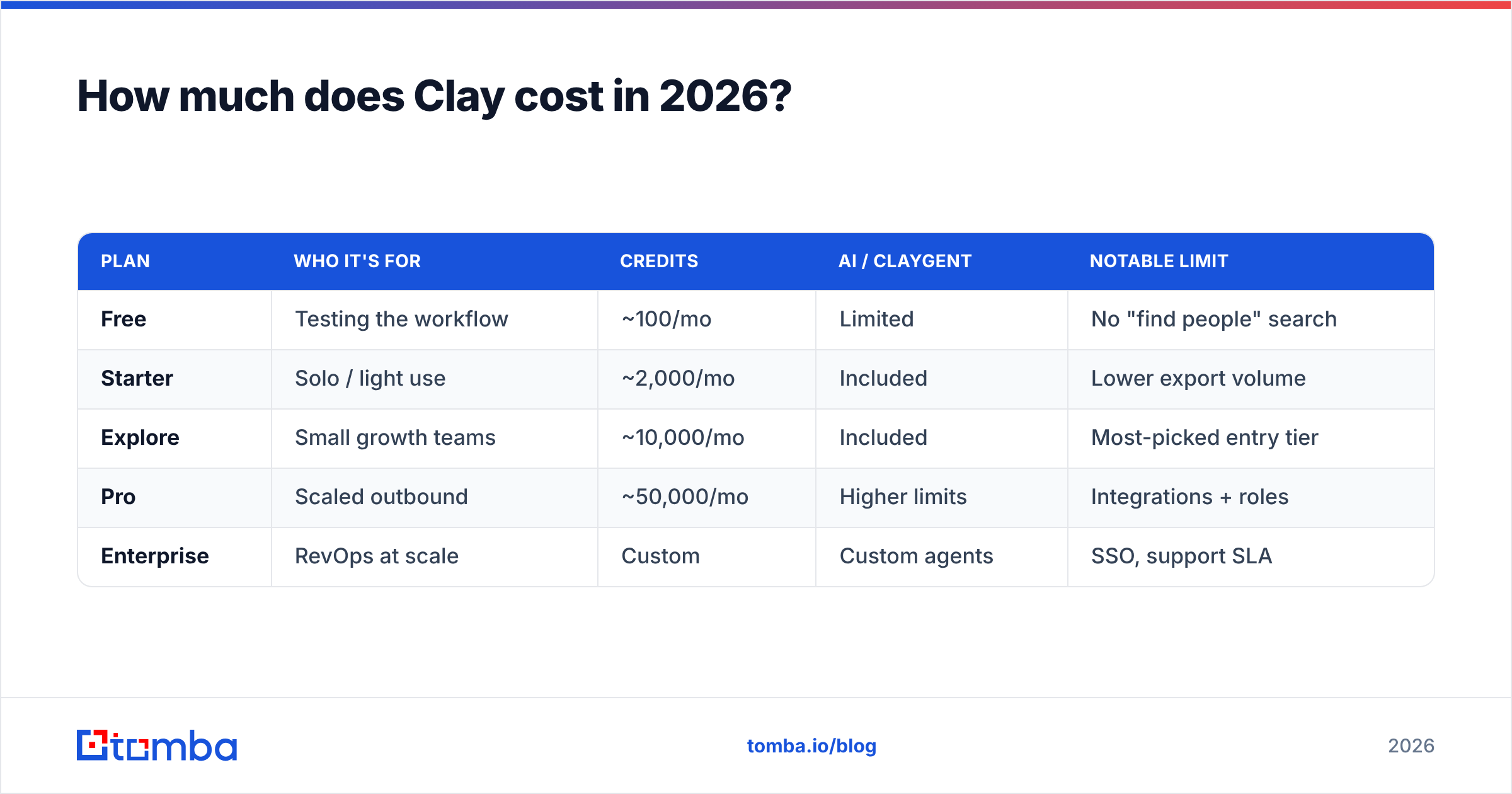
Clay prices on credits, not seats — so two teams on the same plan can pay wildly different effective rates depending on how heavy their waterfalls are. Every enrichment, every Claygent run, every provider call spends credits. The plan you pick sets your monthly credit allotment and which features unlock.
The tiers below reflect Clay's published structure; always confirm current numbers on clay.com before you commit, since credit allotments shift.
| Plan | Who it's for | Credits | AI / Claygent | Notable limit |
|---|---|---|---|---|
| Free | Testing the workflow | ~100/mo | Limited | No "find people" search |
| Starter | Solo / light use | ~2,000/mo | Included | Lower export volume |
| Explore | Small growth teams | ~10,000/mo | Included | Most-picked entry tier |
| Pro | Scaled outbound | ~50,000/mo | Higher limits | Integrations + roles |
| Enterprise | RevOps at scale | Custom | Custom agents | SSO, support SLA |
The number that bites is credit burn. A single row that runs a 3-provider email waterfall, a tech-stack lookup, and one Claygent qualification can spend far more than a row that just appends headcount. Multiply that across 20,000 prospects and the "10,000 credit" plan evaporates fast.
Two ways teams keep the bill sane:
- Pre-filter hard before enriching. Don't run AI on rows that fail a cheap, deterministic filter first.
- Bring your own high-accuracy email source via API so the first waterfall slot hits often and you stop paying fallbacks. A dedicated provider with a flat, predictable pricing model is easier to forecast than per-credit guessing.

Is Clay better than an all-in-one prospecting tool?#
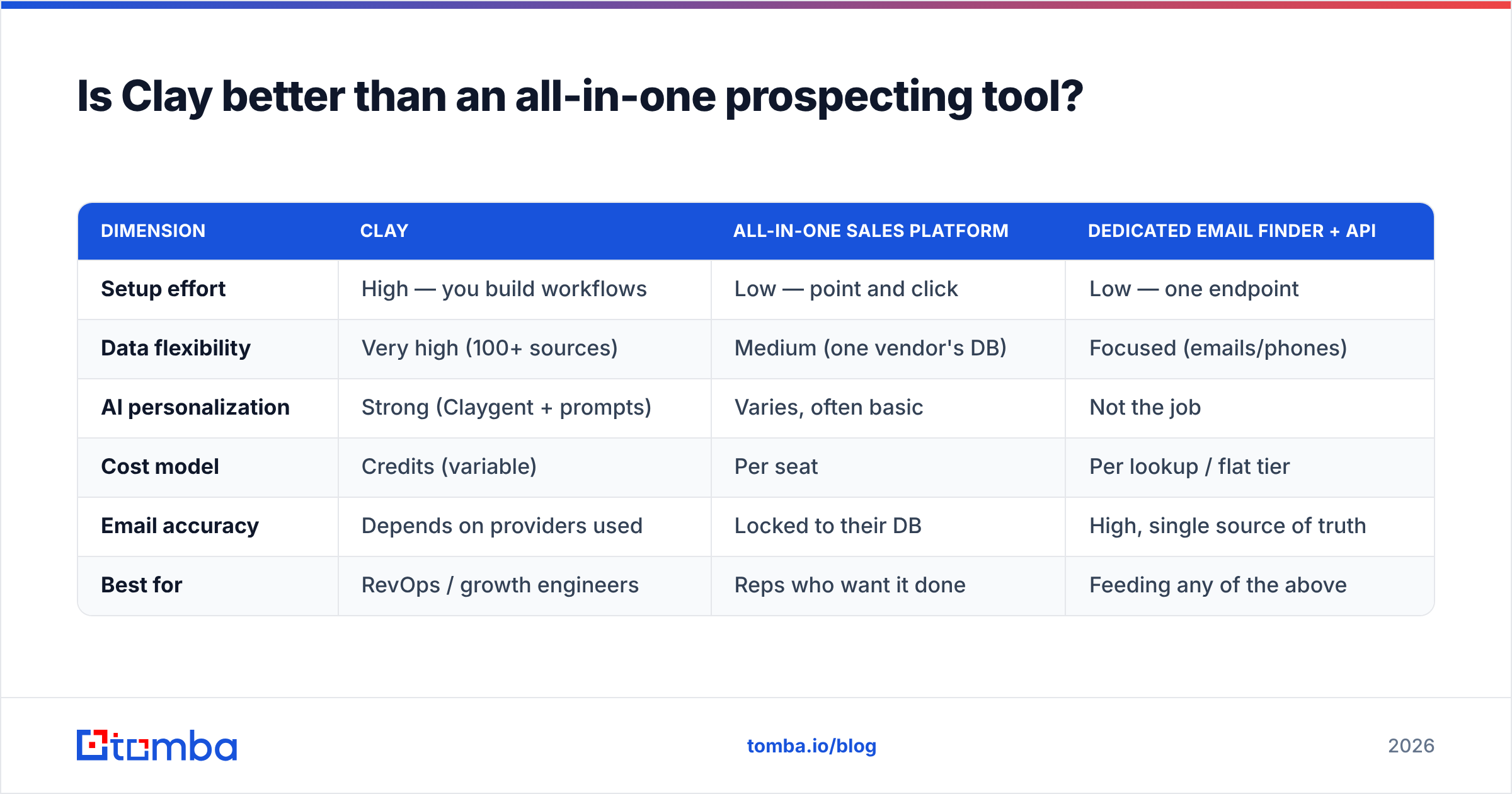
Clay wins on flexibility and loses on simplicity — it's a power tool, not a plug-and-play list builder. Whether that trade is worth it depends entirely on whether you have someone who will actually build and maintain the tables.
Here's an honest side-by-side of the three approaches teams weigh in 2026:
| Dimension | Clay | All-in-one sales platform | Dedicated email finder + API |
|---|---|---|---|
| Setup effort | High — you build workflows | Low — point and click | Low — one endpoint |
| Data flexibility | Very high (100+ sources) | Medium (one vendor's DB) | Focused (emails/phones) |
| AI personalization | Strong (Claygent + prompts) | Varies, often basic | Not the job |
| Cost model | Credits (variable) | Per seat | Per lookup / flat tier |
| Email accuracy | Depends on providers used | Locked to their DB | High, single source of truth |
| Best for | RevOps / growth engineers | Reps who want it done | Feeding any of the above |
The pattern that works best isn't "Clay or a dedicated tool." It's Clay as the orchestrator and a specialist email source underneath it. Clay decides what to find and for whom; the email finder and verifier decide whether the contact data is real. You can wire a source like the Tomba API directly into a Clay HTTP column so your first waterfall slot returns high-confidence emails, then let Clay handle scoring and personalization.
For larger lists, you can also do the heavy contact-finding outside Clay with a bulk email finder, import the clean output, and reserve Clay credits for the AI work that genuinely needs them. That split usually cuts credit spend more than any in-app optimization.
Where does Clay fall short for prospecting?#
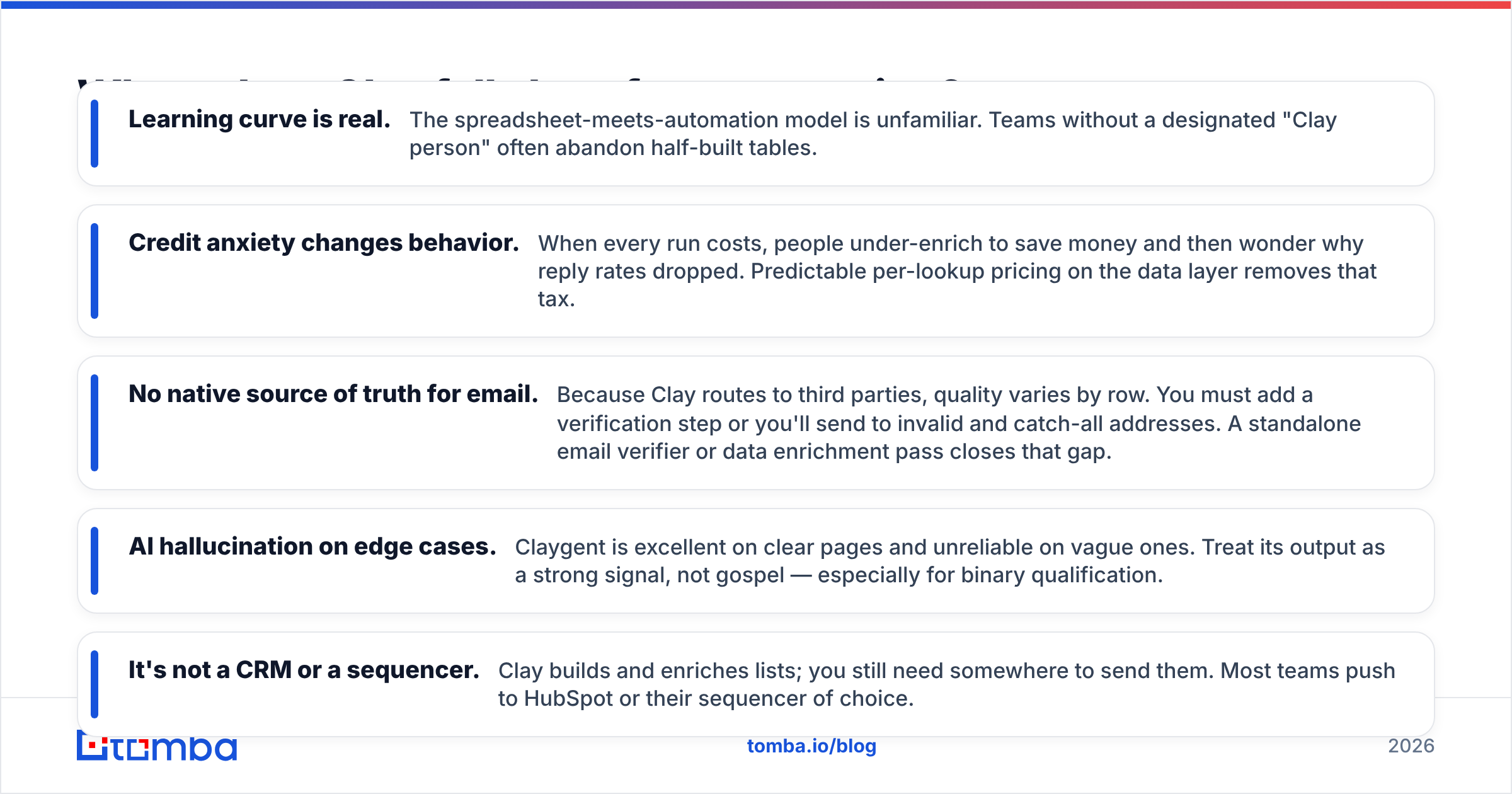
Clay's weaknesses are the flip side of its strengths: it assumes you'll build, maintain, and budget carefully — and it doesn't own its data. Going in clear-eyed saves a lot of wasted credits.
- Learning curve is real. The spreadsheet-meets-automation model is unfamiliar. Teams without a designated "Clay person" often abandon half-built tables.
- Credit anxiety changes behavior. When every run costs, people under-enrich to save money and then wonder why reply rates dropped. Predictable per-lookup pricing on the data layer removes that tax.
- No native source of truth for email. Because Clay routes to third parties, quality varies by row. You must add a verification step or you'll send to invalid and catch-all addresses. A standalone email verifier or data enrichment pass closes that gap.
- AI hallucination on edge cases. Claygent is excellent on clear pages and unreliable on vague ones. Treat its output as a strong signal, not gospel — especially for binary qualification.
- It's not a CRM or a sequencer. Clay builds and enriches lists; you still need somewhere to send them. Most teams push to HubSpot or their sequencer of choice.
None of these are dealbreakers. They're reasons to scope Clay correctly: use it for orchestration and AI research, and pair it with a reliable, flat-rate data source so the foundation under all that automation is solid.
How should you structure a Clay prospecting workflow?#
Build in this order — list, filter, enrich, qualify, personalize, verify, export — and put the cheap deterministic steps before the expensive AI ones. That sequence keeps credit spend proportional to how qualified each row is.
A clean reference workflow:
- Source the list. Import from a search, a CSV, or a domain search that returns every contact at your target accounts.
- Filter cheaply. Drop rows outside your ICP using free or low-cost columns (country, headcount, industry) before spending anything on AI.
- Find the contact. Run your email waterfall, leading with a high-accuracy provider.
- Qualify with Claygent. Only on the rows that survived the filter — ask one sharp yes/no question.
- Personalize. Generate a first line from the data you already gathered.
- Verify. Run every email through verification before export so bounces stay near zero.
- Export. Push the clean, scored, personalized list to your CRM or sequencer.
The discipline is in steps 2 and 6. Filtering early means the expensive steps run on fewer rows. Verifying late means nothing invalid ever leaves Clay. Skip either and your costs and bounce rate both climb.
Who should actually use Clay?#
Use Clay if you have repeatable, multi-step enrichment that you're tired of doing by hand and someone willing to own the build. Skip it if you just need verified contacts fast. A growth engineer running weekly ICP campaigns will get enormous leverage. A single rep who needs 300 emails before Friday will get more value, faster, from a dedicated finder and a verifier — no table-building required.
The honest summary: Clay is a force multiplier for teams that already know what "good prospecting" looks like and want to automate it. It is not a shortcut for figuring out who to target, and it is not a substitute for a trustworthy email source.
The bottom line#
Clay AI prospecting is one of the most powerful ways to automate research and personalization in 2026 — as long as you remember it's an orchestrator, not an oracle. The intelligence is real; the data quality still comes from whatever you feed the waterfall. Lead with an accurate source, qualify with AI on a filtered list, and verify before you export.
If you want that first waterfall slot to hit consistently, start with the Tomba Email Finder. Plug it into Clay via the API, or run your bulk lists through it directly, and let Clay spend its credits on the AI work that actually moves reply rates. Solid data first, automation on top — that's the order that wins. You can compare Tomba plans and start on the free tier to see the accuracy difference before you wire it into a single Clay table.
// get started
Find, verify and enrich your first contacts today
Start on the free plan with 25 searches a month, then scale when your team is ready.
Free plan · No credit card required · GDPR & CCPA
// about the author