Clay Enrichment in 2026: How Waterfall Data Enrichment Works
Clay enrichment uses a waterfall of data providers to fill gaps in your CRM. Here's how it works, what it costs, and where a direct API beats it in 2026.
TL;DR
- Clay enrichment runs a contact or company through a "waterfall" of data providers in sequence, stopping at the first one that returns a verified result — so you pay for coverage, not one vendor's blind spots.
- It is powerful but credit-hungry: complex tables with many enrichment columns burn credits fast, and pricing climbs quickly past the entry tier.
- The waterfall model is only as good as the providers feeding it. For email specifically, a direct, high-accuracy source often beats a generic waterfall on both cost and deliverability.
- If you mostly need verified work emails and phone numbers at scale, a dedicated API like Tomba can replace several waterfall steps for a fraction of the per-record cost.
- This guide breaks down how Clay enrichment actually works, what it really costs in 2026, and when to use it versus a focused enrichment API.
What is Clay enrichment?#
Clay enrichment is the process of taking a thin record — maybe just a name and a company domain — and filling in the missing fields by querying multiple data vendors until you get a match. Clay is a spreadsheet-style automation tool; "enrichment" is the part where each row reaches out to external providers and pulls back emails, phone numbers, job titles, company size, funding, tech stack, and dozens of other attributes.
Think of it like booking a flight through a comparison site instead of one airline. Rather than betting your whole trip on a single carrier's routes and prices, the site checks several and shows you the best available option. Clay does the same with data enrichment: it checks provider A, and if A has no answer, it falls through to B, then C, and so on. That fall-through chain is the famous "waterfall."
Technically, each Clay column is a function call. You map an input (say, Company Domain), pick an enrichment action, and Clay executes it per row, writing the output to a new column. Stack enough columns and a single row can touch a dozen providers before it is "complete."
How does waterfall enrichment work in Clay?#
Waterfall enrichment is the core idea that makes Clay more accurate than any single tool. Instead of trusting one vendor, you order providers by quality and let the data "fall" down the chain until it finds a hit.
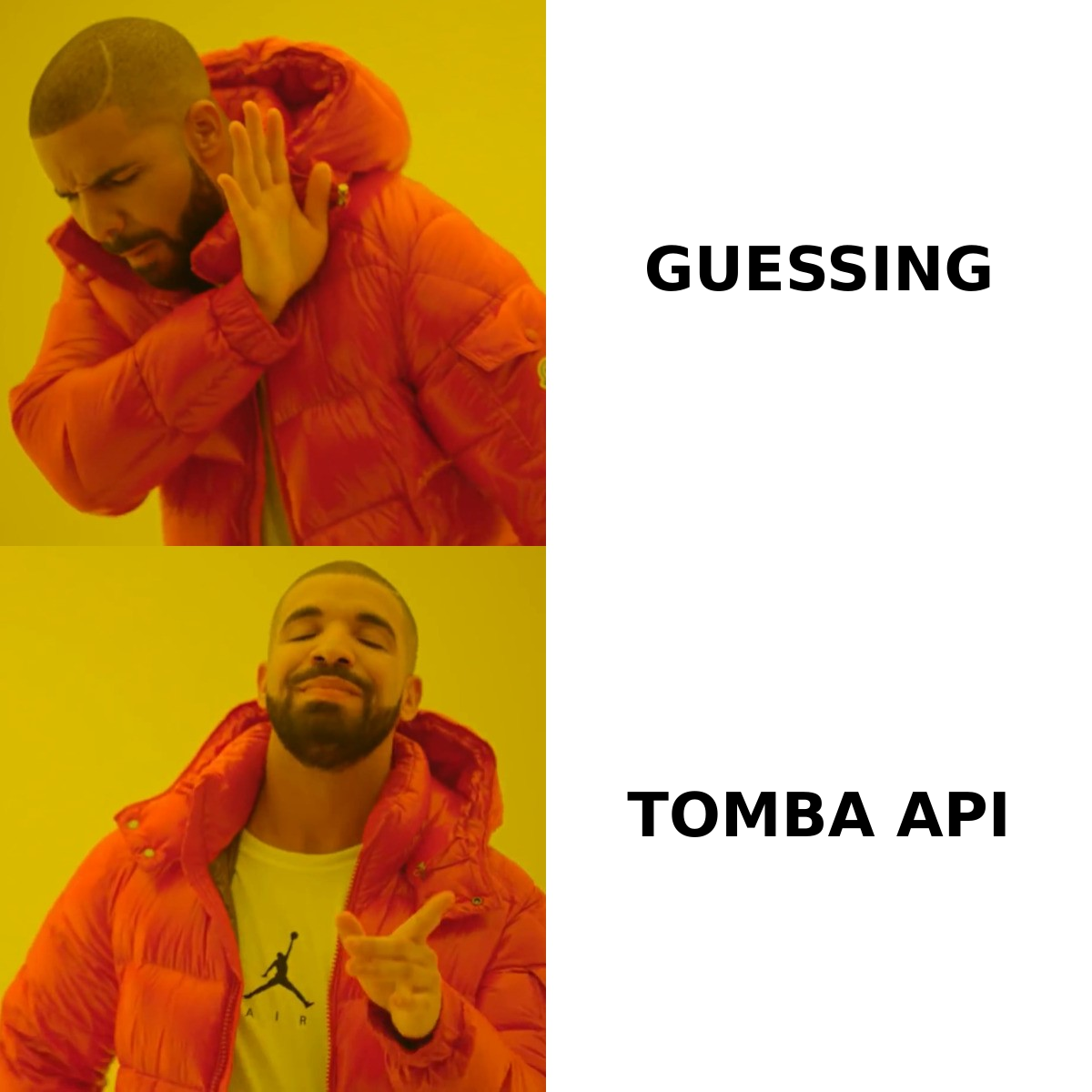
Here is the typical flow for finding a verified work email:
- Start with an identity anchor. You need something stable — usually full name plus company domain, or a LinkedIn URL. This is the key every provider matches against.
- Query provider 1 (highest trust). Clay calls your best email source first. If it returns a verified, deliverable address, the waterfall stops. You only paid for one lookup.
- Fall through on a miss. No result, or a risky/catch-all result? Clay moves to provider 2, then 3. Each step is a separate credit charge only when it runs.
- Verify the winner. A good setup ends with an email verifier step that confirms the chosen address is valid before it ever reaches your sequencer.
- Write back and enrich further. Once the email lands, downstream columns add phone, title, seniority, and company firmographics.
The waterfall's strength is coverage: where one vendor finds 55% of your list, three stacked vendors might find 80%+. The weakness is cost and complexity — every extra step is another integration to maintain and another credit line to watch.
What does Clay enrichment cost in 2026?#
Clay pricing is credit-based, and that is where teams get surprised. You do not buy "1,000 contacts" — you buy credits, and every enrichment action spends them. A row that runs five enrichment columns can cost five or more credits, and waterfall steps multiply that further on misses.
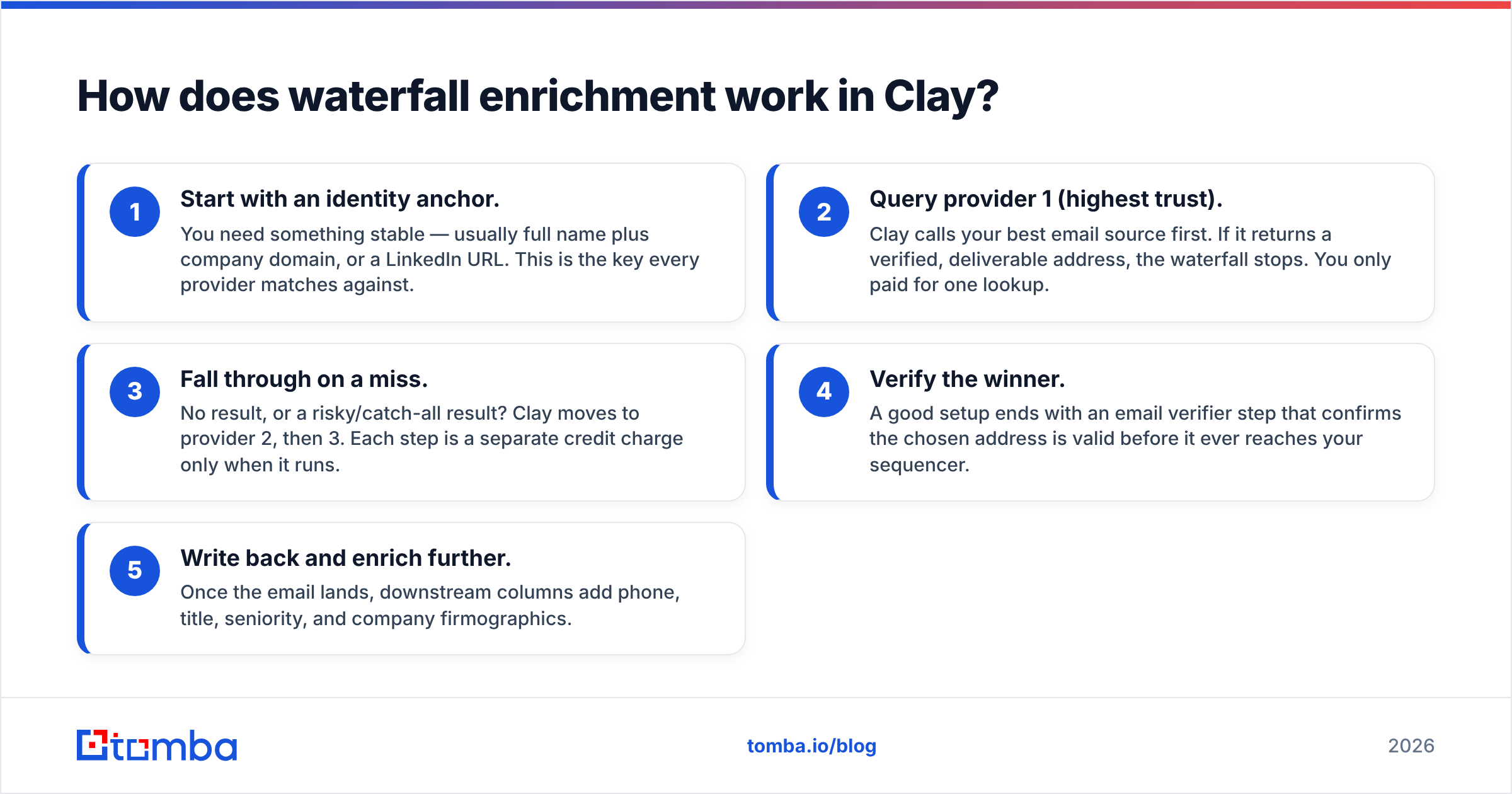
Here is a simplified comparison of how the credit math plays out against a direct enrichment API. Exact provider prices change, so treat the Clay column as illustrative of the model, not a quote.
| Factor | Clay (waterfall) | Direct API (e.g. Tomba) |
|---|---|---|
| Pricing unit | Credits per enrichment action | Searches/verifications per plan |
| Entry plan | Free tier, then paid tiers scaling fast | Free 25 searches/mo; Starter $49/mo |
| Cost per "found" email | Variable — multiplied by waterfall depth | Flat per successful search |
| Best for | Multi-attribute, multi-source enrichment | High-volume verified emails + phones |
| Credit waste on misses | Yes — failed steps can still consume credits | Pay primarily for results |
| Setup effort | High — build and tune each column | Low — one API call or integration |
| Verification included | Add a separate verify column | Built-in verification |
The takeaway: Clay shines when you genuinely need many attributes from many sources in one table. But if 80% of your enrichment is "give me a verified email and a phone number," you are paying waterfall overhead for a job a single email finder can do at a flat, predictable rate. Compare the math against transparent Tomba pricing before you commit a budget to per-credit billing.
Is Clay enrichment better than a direct enrichment API?#
It depends on what you are enriching. Clay is better when your needs are wide; a direct API is better when your needs are deep and high-volume.
Choose Clay when:
- You need 10+ different attributes per record (funding, headcount, tech stack, intent, social, etc.).
- Your data sources change often and you want to swap providers without re-coding.
- You are running creative, one-off list builds where flexibility beats unit cost.
Choose a direct enrichment API when:
- Your main job is verified work emails and B2B phone numbers at volume.
- You want predictable cost per record, not a credit meter that moves with table complexity.
- You are wiring enrichment into a product or pipeline and want one stable endpoint.
This is not really Clay versus Tomba — it is "orchestration layer" versus "data source." Plenty of teams run Clay and plug a high-accuracy email provider into the first slot of their waterfall. The smart move is to put your most accurate, lowest-cost source at the top so the waterfall rarely has to fall through to pricier vendors.
Where does the data in a waterfall actually come from?#
Every enrichment result, in Clay or anywhere else, traces back to a finite set of underlying data sources: public web pages, company sites, professional networks, SMTP responses, and partner databases. A waterfall does not create data — it routes to whoever already has it.
That matters for two reasons. First, accuracy is inherited. If three providers in your waterfall all license the same stale database, stacking them adds cost without adding coverage. Second, deliverability depends on verification quality at the source. An address that passed a real SMTP and catch-all check is worth more than three "guessed" permutations.
This is why the provider you place first in the chain is the most important decision you make. A source with strong first-party verification and transparent data sources reduces how often the waterfall has to fall through — which is exactly what keeps your credit spend down. For domain-wide list building, a focused domain search often returns more usable contacts per dollar than a generic person-enrichment waterfall.
For more on what separates a deliverable address from a risky one, G2's category overviews and vendor docs are useful neutral references — see G2's sales intelligence category and the general framing of data quality on Wikipedia.
How do you build a cost-efficient enrichment waterfall?#
A good waterfall is ordered by accuracy-per-dollar, not by brand name. Here is a practical build pattern you can replicate in Clay or any orchestration tool.
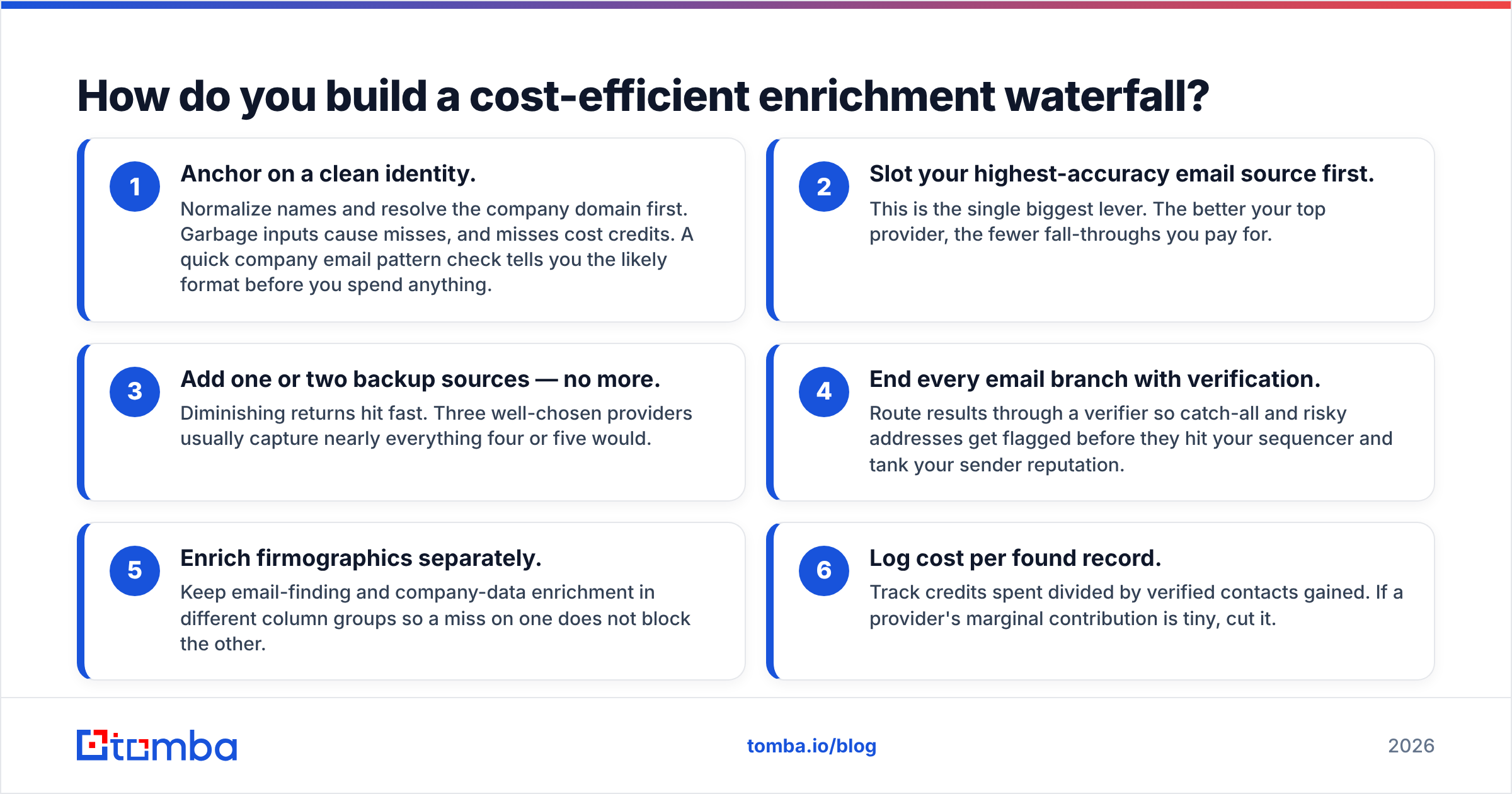
- Anchor on a clean identity. Normalize names and resolve the company domain first. Garbage inputs cause misses, and misses cost credits. A quick company email pattern check tells you the likely format before you spend anything.
- Slot your highest-accuracy email source first. This is the single biggest lever. The better your top provider, the fewer fall-throughs you pay for.
- Add one or two backup sources — no more. Diminishing returns hit fast. Three well-chosen providers usually capture nearly everything four or five would.
- End every email branch with verification. Route results through a verifier so catch-all and risky addresses get flagged before they hit your sequencer and tank your sender reputation.
- Enrich firmographics separately. Keep email-finding and company-data enrichment in different column groups so a miss on one does not block the other.
- Log cost per found record. Track credits spent divided by verified contacts gained. If a provider's marginal contribution is tiny, cut it.
Teams that follow this pattern often find that a single accurate API at the top of the funnel handles the majority of records, with the waterfall reserved for the long tail. That hybrid is cheaper and more maintainable than a five-vendor stack where every provider runs on every row.
What about phone numbers and catch-all domains?#
Two failure points break most enrichment workflows: phone coverage and catch-all domains.
Phone enrichment in a waterfall is genuinely useful because mobile-number coverage varies wildly by provider and region — stacking sources meaningfully lifts hit rates. If dialing is part of your motion, route a dedicated phone finder into the chain rather than relying on whatever your email provider happens to attach.
Catch-all domains are trickier. These are mail servers that accept every address, so a normal verifier cannot tell a real inbox from a fake one. A waterfall that ignores catch-alls will happily write addresses that bounce. The fix is a dedicated catch-all verifier step that applies deeper checks before you trust the result. Skipping this is the most common reason "enriched" lists still bounce at 8–12%.
When should you skip Clay entirely?#
Skip the waterfall when your use case is narrow, repetitive, and high-volume — because then the orchestration overhead is pure cost.
If your weekly job is "take this list of 5,000 companies and return verified work emails plus phones," you do not need a spreadsheet of provider columns. You need one reliable endpoint. A bulk email finder or the Tomba API does that in a single call, with verification built in and a flat, forecastable cost. You lose flexibility you were not using, and you gain a pipeline that does not break when a provider changes its credit pricing mid-quarter.
The honest rule: use Clay when the variety of data is the problem, and use a direct API when the volume of a single data type is the problem. Most go-to-market teams have both situations — so the answer is usually to run a lean waterfall with a strong, affordable source anchoring the top.
Final verdict: orchestrate smart, source smarter#
Clay enrichment is a genuinely good orchestration layer, and waterfall logic is the right mental model for maximizing coverage. But a waterfall is only as cheap and accurate as the provider you put first. Stack five mediocre sources and you get an expensive, fragile table. Anchor with one high-accuracy source and you get coverage at a fraction of the credit burn.
If verified work emails are the core of your enrichment — and for most B2B teams they are — start by making your first waterfall step the best one. Tomba's Email Finder delivers verified, deliverability-checked addresses by name and domain, with built-in verification, a free tier of 25 searches/month, and a clean API that drops straight into Clay, your CRM, or your own pipeline. Put it at the top of your waterfall, watch your fall-through rate drop, and stop paying credits for guesses. Try it free and enrich the part that actually matters first.
// get started
Find, verify and enrich your first contacts today
Start on the free plan with 25 searches a month, then scale when your team is ready.
Free plan · No credit card required · GDPR & CCPA
// about the author