Clay vs Instantly (2026): Data Enrichment vs Cold Email
Clay builds enriched lead lists; Instantly sends them at scale. Here's an honest 2026 breakdown of features, pricing, and which one your outbound stack actually needs.
You are comparing Clay vs Instantly because both keep showing up in outbound conversations — but they solve opposite halves of the same problem. Clay builds and enriches your lead list. Instantly sends cold email to that list at scale. Picking "the better tool" only makes sense once you know which half you are missing.
This guide breaks down what each platform actually does, where they overlap, what they cost in 2026, and how to decide — without pretending one replaces the other.
TL;DR#
- Clay is a spreadsheet-style data enrichment and automation platform. It finds, enriches, and scores leads using 100+ data providers and AI. It is not a cold email sender at its core.
- Instantly is a cold email sending platform built around unlimited inboxes, automated warmup, and deliverability. It is not a serious enrichment engine.
- They are complementary, not interchangeable. Most mature teams use a data layer (Clay or a dedicated finder) and a sending layer (Instantly).
- Cost reality: Clay gets expensive fast as credit usage scales; Instantly stays cheaper but you still need accurate contact data feeding it.
- The cheap fix: pair a focused, high-accuracy email source with Instantly's sending engine, and skip Clay's premium tiers until you genuinely need waterfall enrichment.
What is Clay and what does it actually do?#
Clay is a data orchestration tool that looks like a smart spreadsheet. Each row is a company or person, each column can call an API, run an AI prompt, or pull from one of its many integrated data sources. Its signature feature is waterfall enrichment: if provider A can't find an email, it automatically tries B, then C, until it gets a hit.
That makes Clay powerful for building targeted, enriched lists — think "find every Series B SaaS company in fintech, get the VP of Sales, enrich with company headcount, then write a custom first line." It is a builder's tool, closer to a no-code automation canvas than a CRM.
What Clay does not do well is send and manage thousands of cold emails with warmup and inbox rotation. It can trigger sends through integrations, but deliverability infrastructure is not its job.
Where Clay's model gets uncomfortable is cost. You pay in credits, and waterfall enrichment burns multiple credits per row when it queries several providers. Lists that look cheap in a demo can cost real money at production volume — which is exactly why teams pair it with a predictable-cost source like a dedicated email finder for the bulk of straightforward lookups.
What is Instantly and what does it actually do?#
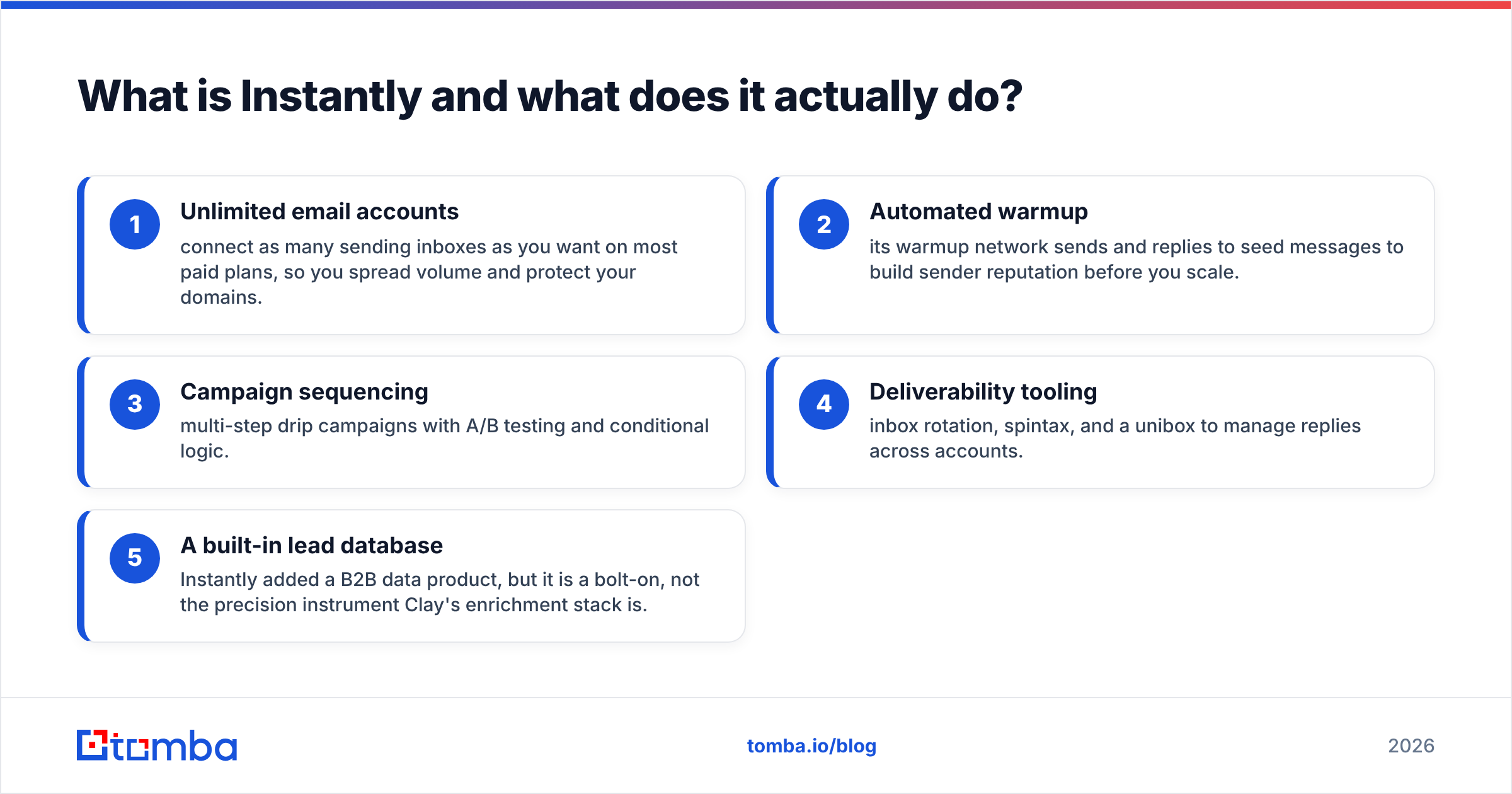
Instantly is a cold email sending platform. Its reason to exist is volume outreach that still lands in the inbox. The core pillars:
- Unlimited email accounts — connect as many sending inboxes as you want on most paid plans, so you spread volume and protect your domains.
- Automated warmup — its warmup network sends and replies to seed messages to build sender reputation before you scale.
- Campaign sequencing — multi-step drip campaigns with A/B testing and conditional logic.
- Deliverability tooling — inbox rotation, spintax, and a unibox to manage replies across accounts.
- A built-in lead database — Instantly added a B2B data product, but it is a bolt-on, not the precision instrument Clay's enrichment stack is.
In short, Instantly is the sending engine. Give it good data and it will get more of your messages seen. Give it bad data and it will faithfully deliver to dead inboxes, tanking your sender reputation and your email deliverability.
Clay vs Instantly: side-by-side comparison#
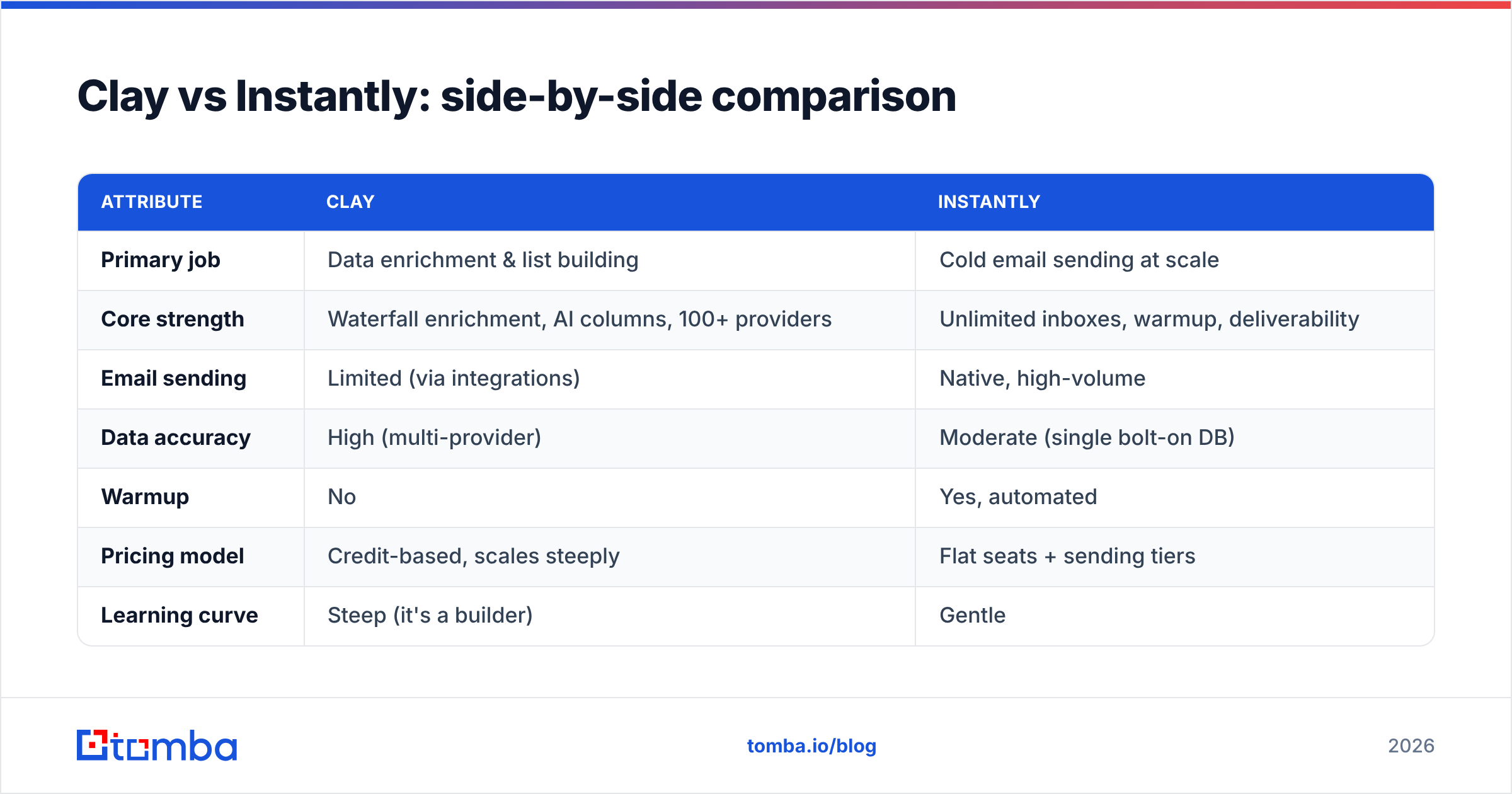
Here is the honest split. Read it as "different jobs," not "winner takes all."
| Attribute | Clay | Instantly |
|---|---|---|
| Primary job | Data enrichment & list building | Cold email sending at scale |
| Core strength | Waterfall enrichment, AI columns, 100+ providers | Unlimited inboxes, warmup, deliverability |
| Email sending | Limited (via integrations) | Native, high-volume |
| Data accuracy | High (multi-provider) | Moderate (single bolt-on DB) |
| Warmup | No | Yes, automated |
| Pricing model | Credit-based, scales steeply | Flat seats + sending tiers |
| Learning curve | Steep (it's a builder) | Gentle |
| Best for | RevOps, list engineering | SDR teams running volume outbound |
| Free option | Limited free plan | 14-day trial |
The takeaway: if your bottleneck is who to contact and what to know about them, that's a Clay-shaped problem. If your bottleneck is getting 5,000 emails delivered without burning domains, that's an Instantly-shaped problem.
Is Clay better than Instantly?#
Neither is "better" — they sit at different stages of the sales automation pipeline. The right question is: where is your outbound actually breaking?
- If your reps complain about list quality, missing data, or stale contacts, Clay (or a dedicated finder + verifier) fixes the input.
- If your reps complain about emails landing in spam, low open rates, or domain bans, Instantly fixes the output.
A common and expensive mistake is buying Clay to "do outbound," then discovering you still need a separate sending tool — and vice versa. Map the tool to the failure mode.
According to G2 category reviews, buyers consistently rate Clay highest for data flexibility and Instantly highest for deliverability and ease of use. That pattern matches their design intent rather than contradicting it.
How do Clay and Instantly handle pricing in 2026?#
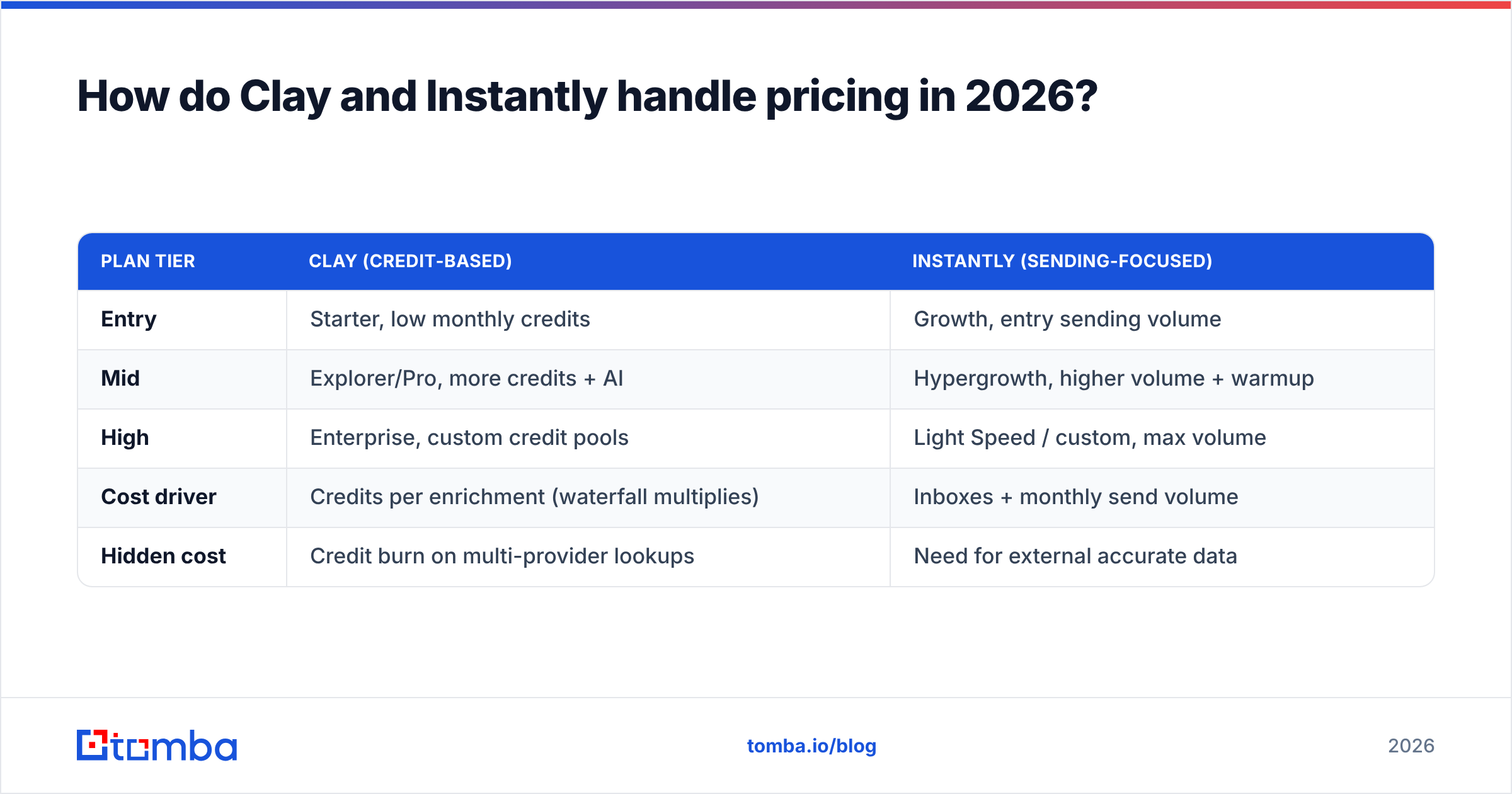
Pricing is where the two diverge most, and where teams overspend.
| Plan tier | Clay (credit-based) | Instantly (sending-focused) |
|---|---|---|
| Entry | Starter, low monthly credits | Growth, entry sending volume |
| Mid | Explorer/Pro, more credits + AI | Hypergrowth, higher volume + warmup |
| High | Enterprise, custom credit pools | Light Speed / custom, max volume |
| Cost driver | Credits per enrichment (waterfall multiplies) | Inboxes + monthly send volume |
| Hidden cost | Credit burn on multi-provider lookups | Need for external accurate data |
Clay's credit model is the variable to watch. Waterfall enrichment is brilliant, but every extra provider it queries spends credits, so a "find the email" task that fails twice before succeeding costs three times as much. Instantly's pricing is more predictable, but it quietly assumes you already have clean, deliverable contact data — which you have to source elsewhere.
That "elsewhere" is the gap. You can feed Instantly directly from a precise, pay-for-what-you-use source instead of paying Clay's premium credits for basic lookups. Compare the math against Tomba pricing — a Free tier with 25 searches, Starter at $49/mo, Growth at $99/mo, and Pro at $249/mo — and the per-lead economics for straightforward email finding often beat routing everything through waterfall credits.
What's the smartest way to combine data and sending?#
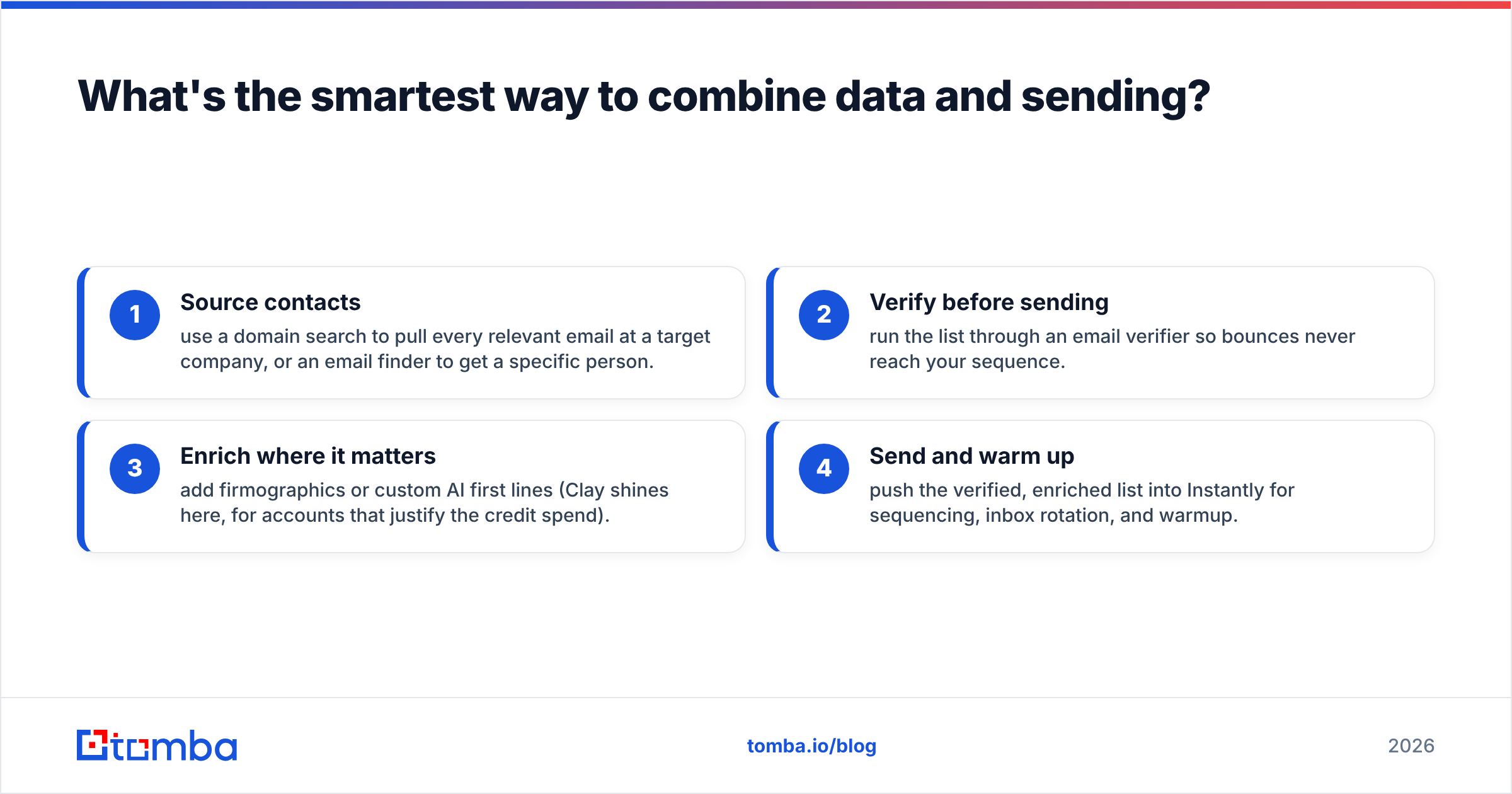
The best-performing outbound stacks treat data and sending as separate, swappable layers. A clean pattern:
- Source contacts — use a domain search to pull every relevant email at a target company, or an email finder to get a specific person.
- Verify before sending — run the list through an email verifier so bounces never reach your sequence.
- Enrich where it matters — add firmographics or custom AI first lines (Clay shines here, for accounts that justify the credit spend).
- Send and warm up — push the verified, enriched list into Instantly for sequencing, inbox rotation, and warmup.
This decoupling is the whole point: you avoid overpaying Clay for volume lookups and you stop Instantly from delivering to dead addresses. Verification is the cheapest insurance in outbound — a 5% bounce rate is enough to get a sending domain throttled, and no warmup feature undoes that damage after the fact.
Where does an email finder fit between Clay and Instantly?#
Right in the middle — and it's the layer most "Clay vs Instantly" comparisons skip.
Clay is a powerful but pricey general-purpose engine; Instantly assumes data already exists. A dedicated finder-and-verifier handles the highest-frequency, lowest-complexity task — get an accurate, deliverable email for this person or this domain — at a predictable cost and high accuracy, then hands off.
Tomba covers that middle layer directly: email finder, email verification, domain search, catch-all checks, and bulk lead generation for list-scale jobs, plus integrations and an email finder API if you want to wire it into a Clay table or a custom workflow. You can run it standalone, feed Instantly, or use it to cut Clay credit consumption on the easy lookups while reserving Clay for genuinely complex waterfall and AI enrichment.
Clay vs Instantly: which should you choose?#
Decide by your dominant constraint:
- Choose Clay if you are a RevOps or growth engineer building bespoke, heavily-enriched account lists and you have the budget for credits and the patience for a steep learning curve.
- Choose Instantly if you are an SDR team that already has decent data and your real problem is sending volume and staying out of spam.
- Choose neither alone if your honest answer is "I just need accurate emails I can actually reach." In that case, start with a focused finder + verifier, send through a deliverability tool like Instantly, and add Clay later only when enrichment complexity demands it.
Most teams discover they were trying to make one tool do two jobs. Split the jobs, match the spend to the value, and your pipeline gets cheaper and cleaner at the same time.
Final verdict#
Clay and Instantly are not rivals — they are neighbors. Clay decides who and what you know; Instantly decides how it lands. The expensive mistake is buying either one expecting it to cover the whole funnel.
Before you commit to a premium Clay plan or scale Instantly volume, fix the cheapest variable first: accurate, verified contact data. Start with the Tomba Email Finder to source and verify deliverable emails by name, company, or domain, then route them into whatever sending and enrichment stack fits your team. Clean input makes every downstream tool — Clay, Instantly, or both — work better and cost less.
// get started
Find, verify and enrich your first contacts today
Start on the free plan with 25 searches a month, then scale when your team is ready.
Free plan · No credit card required · GDPR & CCPA
// about the author