Clearalist vs Contactout: Which Email Tool Wins in 2026?
Clearalist cleans lists, Contactout finds contacts — but which one actually belongs in your prospecting stack? A neutral 2026 breakdown of accuracy, pricing, and fit.
You are comparing two tools that do not actually do the same job — and that mismatch is the whole story. Here is the short version before the deep dive.
TL;DR#
- Clearalist is built around email verification and list cleaning. Contactout is built around finding emails and phone numbers, largely from LinkedIn. They overlap less than the "vs" framing suggests.
- If your problem is "my bounce rate is too high," Clearalist is the closer fit. If your problem is "I have names but no contact details," Contactout is closer.
- Both leave a gap: neither gives you a single workflow that finds, enriches, and verifies in one place at a predictable price.
- Pricing models differ sharply — Contactout leans on credit packs and LinkedIn quotas; Clearalist sells verification volume.
- For most B2B teams that want finding and verification under one roof, a consolidated platform like Tomba is worth pricing out before you commit to either.
What is Clearalist?#
Clearalist is an email verification and list-hygiene tool. Its core job is to take a list you already have and tell you which addresses are safe to send to — flagging hard bounces, role accounts, disposable domains, and catch-all servers. Think of it like a bouncer at the door of your email list: it does not bring guests, it just decides who gets in.
Verification matters because mailbox providers punish senders who hit dead addresses. A list with 8% invalid contacts can quietly wreck your sender reputation, and once that drops, even your good emails land in spam. Tools in this category compete on catch-all detection accuracy, processing speed, and how aggressively they classify "risky" addresses.
What Clearalist does not do well is acquisition. It assumes you already have the addresses. So if your pipeline starts with "here is a company and a job title, go get me the email," verification-first tools leave you stuck at step zero.
What is Contactout?#
Contactout is a contact-finding tool best known for its Chrome extension that pulls personal and work emails — plus phone numbers — while you browse LinkedIn profiles. Its strength is the reverse of Clearalist's: it brings the guests but does lighter checking at the door.
Recruiters and sales teams use Contactout to turn a LinkedIn search into a list of reachable people. It also offers a search portal and an API. The trade-off is that LinkedIn-sourced personal emails are often consumer Gmail or Yahoo addresses, which are harder to use for B2B email deliverability and frequently go stale when people change jobs.
Contactout's verification is built in but secondary. If deliverability is your obsession, you may still want a dedicated email verifier downstream — which is exactly the kind of stacking that drives tool sprawl.

How do Clearalist and Contactout compare head to head?#
Here is the honest side-by-side. Notice that the two tools win on opposite axes — that is the central tension in any "clearalist vs contactout" decision.
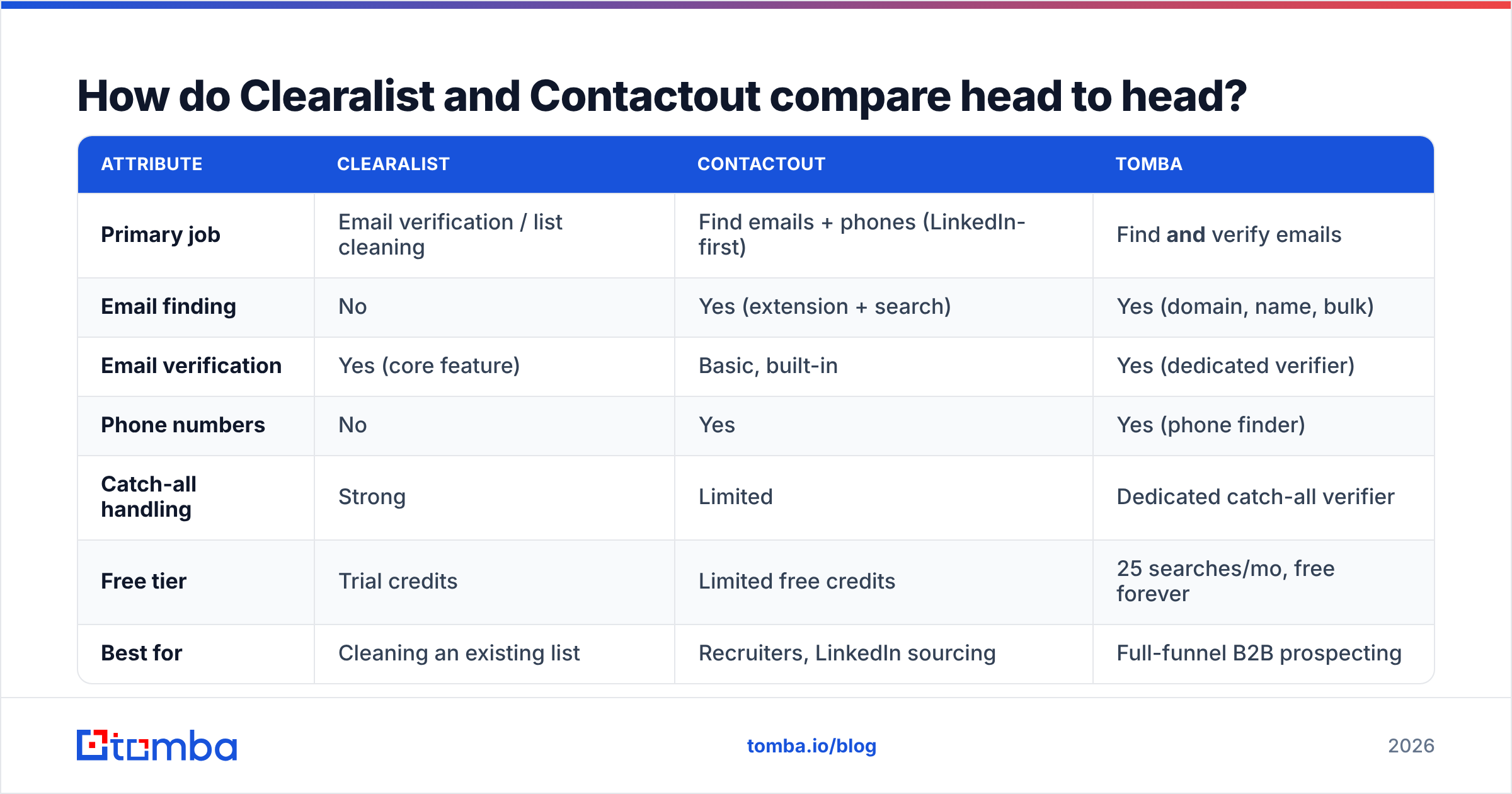
| Attribute | Clearalist | Contactout | Tomba |
|---|---|---|---|
| Primary job | Email verification / list cleaning | Find emails + phones (LinkedIn-first) | Find and verify emails |
| Email finding | No | Yes (extension + search) | Yes (domain, name, bulk) |
| Email verification | Yes (core feature) | Basic, built-in | Yes (dedicated verifier) |
| Phone numbers | No | Yes | Yes (phone finder) |
| Catch-all handling | Strong | Limited | Dedicated catch-all verifier |
| Free tier | Trial credits | Limited free credits | 25 searches/mo, free forever |
| Best for | Cleaning an existing list | Recruiters, LinkedIn sourcing | Full-funnel B2B prospecting |
| API access | Yes | Yes | Yes (REST + CLI + MCP) |
The pattern is clear: pick Clearalist if you have a dirty list, pick Contactout if you have empty cells where contacts should be, and look at a consolidated option if you have both problems — which most growing teams do.
Which one is more accurate?#
Accuracy means two different things here, so compare like for like.
For verification accuracy — correctly labeling an address as valid, invalid, or risky — Clearalist is purpose-built and generally strong, especially on catch-all domains where many tools guess. This is its home turf.
For finding accuracy — returning a correct, current email for a named person — Contactout depends heavily on LinkedIn data, which skews toward personal addresses. Those can be accurate the day you pull them and wrong six months later when the person switches employers. Work-email coverage is thinner than what a domain-pattern engine produces.
A few practical notes on judging any vendor's accuracy claim:
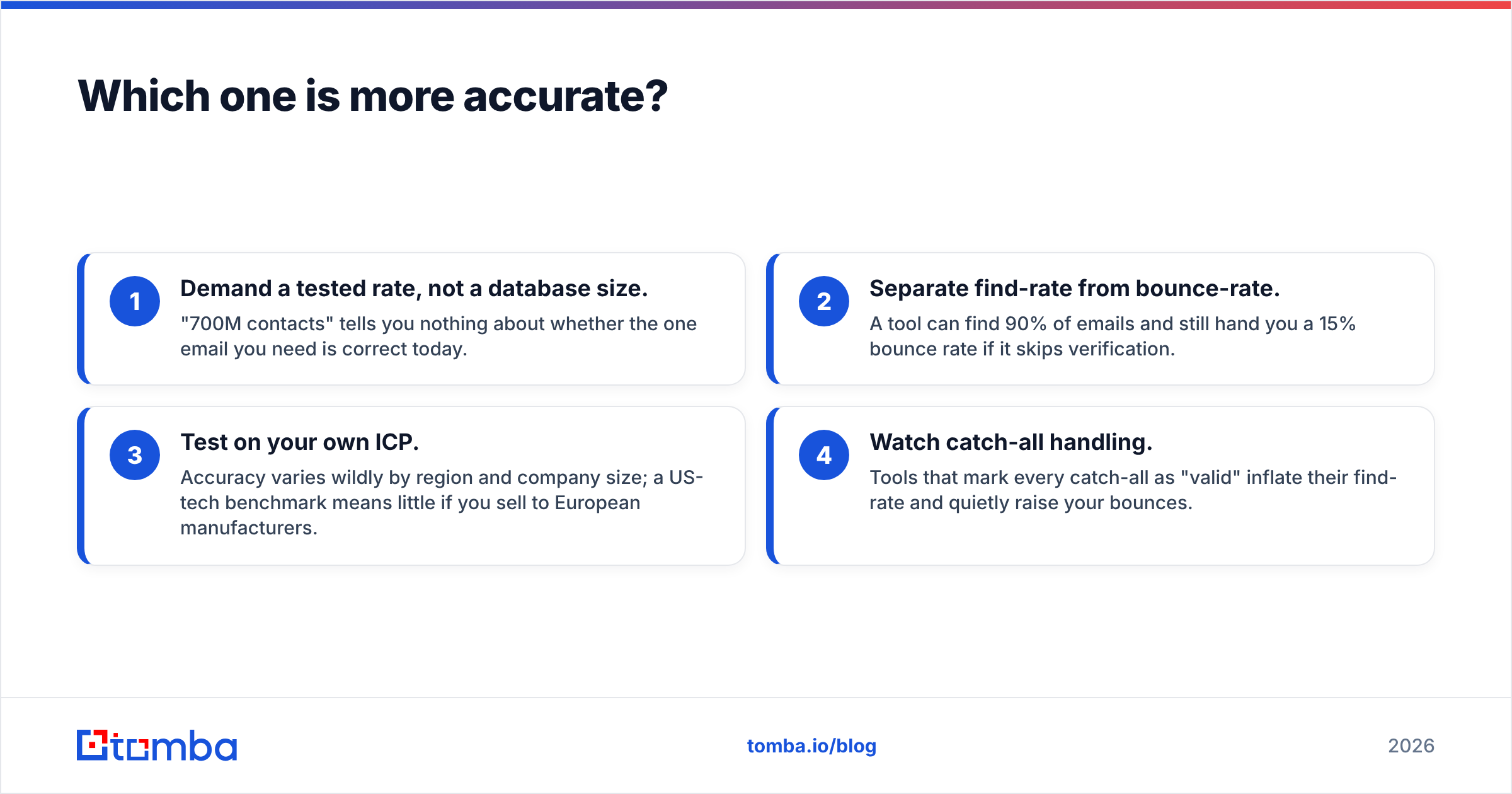
- Demand a tested rate, not a database size. "700M contacts" tells you nothing about whether the one email you need is correct today.
- Separate find-rate from bounce-rate. A tool can find 90% of emails and still hand you a 15% bounce rate if it skips verification.
- Test on your own ICP. Accuracy varies wildly by region and company size; a US-tech benchmark means little if you sell to European manufacturers.
- Watch catch-all handling. Tools that mark every catch-all as "valid" inflate their find-rate and quietly raise your bounces.
If both find-rate and bounce-rate matter to you, a platform that pairs an email finder with a built-in catch-all verifier closes the gap that either single-purpose tool leaves open. You can sanity-check any vendor's numbers against an independent review profile on G2 before you trust the marketing page.
How does pricing compare?#
This is where the two tools diverge most, and where buyers get surprised.
Contactout prices around credits and LinkedIn-extraction quotas, with meaningful jumps between tiers and add-ons for API and team seats. Heavy LinkedIn users can burn through monthly limits quickly. Clearalist prices on verification volume — you pay per email checked, which is cheap if you verify occasionally and expensive if you re-verify large lists monthly.
Because they bill on different units (contacts found vs emails verified), a true apples-to-apples number is hard. The realistic cost of running both — Contactout to find, Clearalist to verify — is what you should compare against a single consolidated subscription.
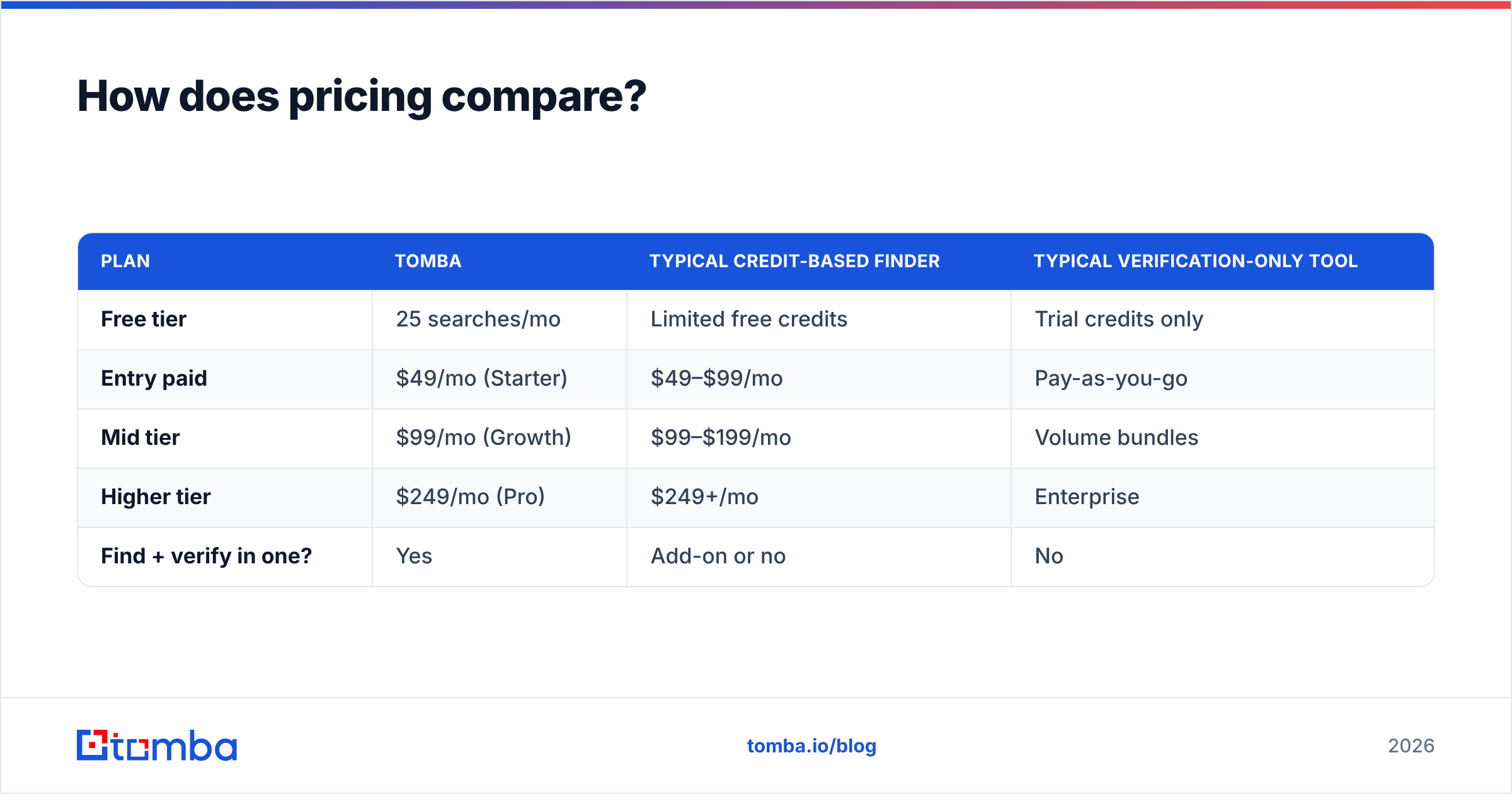
| Plan | Tomba | Typical credit-based finder | Typical verification-only tool |
|---|---|---|---|
| Free tier | 25 searches/mo | Limited free credits | Trial credits only |
| Entry paid | $49/mo (Starter) | $49–$99/mo | Pay-as-you-go |
| Mid tier | $99/mo (Growth) | $99–$199/mo | Volume bundles |
| Higher tier | $249/mo (Pro) | $249+/mo | Enterprise |
| Find + verify in one? | Yes | Add-on or no | No |
Tomba's published pricing starts with a free-forever tier (25 searches/month), then Starter at $49/mo, Growth at $99/mo, and Pro at $249/mo, with Enterprise custom. The point is not that one number beats another — it is that paying once for find-and-verify usually beats stacking two specialized subscriptions plus the glue work to move data between them.

What about workflow and integrations?#
A tool is only as good as how it fits the rest of your stack. Contactout's extension is genuinely convenient for one-off LinkedIn sourcing, but it encourages manual, profile-by-profile work that does not scale to a 5,000-account list. Clearalist slots in late — after you have a list — so it rarely touches your CRM directly.
The friction shows up at the seams. When finding and verifying live in separate tools, someone has to export a CSV, upload it elsewhere, re-import the results, and reconcile duplicates. That handoff is where data goes stale and hours disappear.
A consolidated approach removes the seam. With Tomba you can run a domain search to pull every email pattern at a company, verify in the same pass, and push results straight into HubSpot or Salesforce — or automate the whole thing through the Tomba API. For bulk jobs, the bulk email finder handles thousands of rows without the export-import shuffle.
Which should you choose?#
Match the tool to the bottleneck, not the brand:
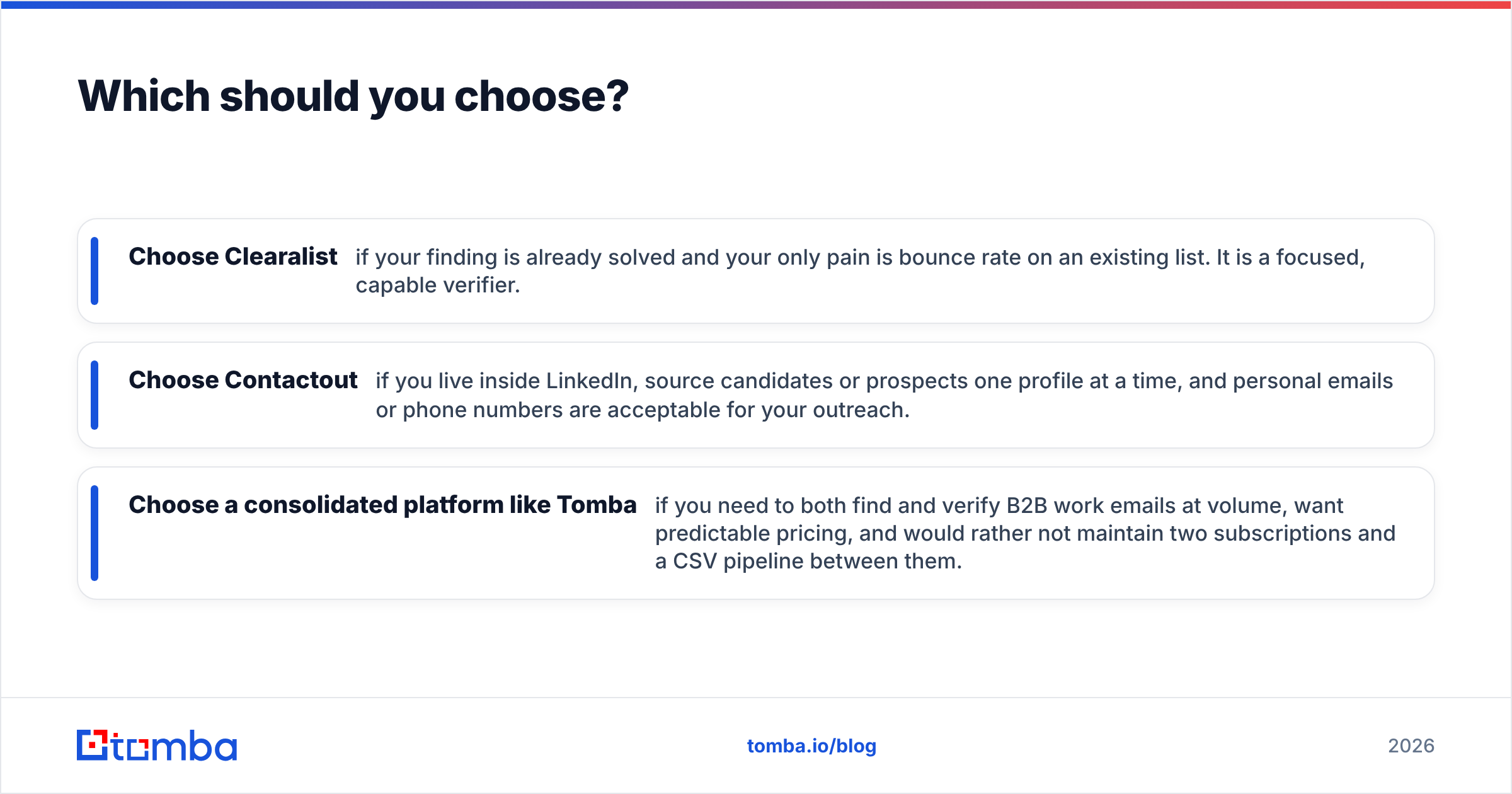
- Choose Clearalist if your finding is already solved and your only pain is bounce rate on an existing list. It is a focused, capable verifier.
- Choose Contactout if you live inside LinkedIn, source candidates or prospects one profile at a time, and personal emails or phone numbers are acceptable for your outreach.
- Choose a consolidated platform like Tomba if you need to both find and verify B2B work emails at volume, want predictable pricing, and would rather not maintain two subscriptions and a CSV pipeline between them.
Most teams underestimate how often they need both jobs done. You rarely have a perfect list that just needs cleaning, and you rarely find contacts that need zero verification. The "vs" question often resolves to "neither, alone."
Frequently asked questions#
Is Clearalist a Contactout competitor? Not really. Clearalist verifies lists; Contactout finds contacts. They are complementary tools that people compare because both touch email data — but they solve different problems.
Can one tool replace both? Yes, if it does finding and verification natively. That is the category a platform like Tomba sits in, alongside a dedicated email verifier and catch-all finder for the edge cases.
Are LinkedIn-sourced emails good for cold outreach? Mixed. Personal Gmail/Yahoo addresses from LinkedIn convert poorly for B2B and decay as people change jobs. Verified work emails generally perform better for deliverability and reply rates.
Do I still need a verifier if my finder is accurate? Usually yes for large lists. Even strong finders return some risky or catch-all addresses, and a quick verification pass protects your sender reputation.
The bottom line#
Clearalist and Contactout are good at opposite halves of the same problem — one cleans, one collects — and that is exactly why pitting them against each other rarely produces a clean winner. If you only have one of those two problems, pick the specialist. If you have both (and most outbound teams do), stop stacking subscriptions.
Start with the Tomba Email Finder: find verified B2B emails by name, company, or domain, validate them in the same workflow, and push clean contacts into your CRM — all on a free tier that lets you test accuracy on your own list before you pay a cent. Run 25 searches this month, compare the bounce rate to what you get today, and let the numbers make the call.
// get started
Find, verify and enrich your first contacts today
Start on the free plan with 25 searches a month, then scale when your team is ready.
Free plan · No credit card required · GDPR & CCPA
// about the author