Clearalist vs Leadsforge: Which B2B Lead Tool Wins in 2026?
A neutral, hands-on breakdown of Clearalist vs Leadsforge in 2026 — accuracy, pricing, data coverage, and where a leaner tool like Tomba beats both.
Clearalist vs Leadsforge: Which B2B Lead Tool Wins in 2026?
Choosing between Clearalist and Leadsforge usually comes down to one question your demo call will never answer honestly: whose emails actually land? Both promise rich B2B contact data, both wrap it in a slick sequencer, and both will quote you a number that looks great until your bounce rate climbs in week three.
This is a vendor-neutral breakdown of how the two stack up in 2026 — on accuracy, pricing, data depth, and workflow — plus an honest note on where a focused tool beats a do-everything suite.
TL;DR#
- Clearalist leans toward all-in-one outreach: data plus sequencing plus a built-in dialer, priced for teams that want one bill.
- Leadsforge leans toward data volume and intent signals, with a heavier enterprise contract and a steeper learning curve.
- Accuracy is the real differentiator — bundled databases tend to age fast, and neither tool publishes a transparent verification step you can audit.
- If you mostly need verified emails on demand, a specialist like Tomba Email Finder covers the find-and-verify job at a fraction of the cost.
- Pick the suite if you want one platform for everything; pick the specialist if deliverability and per-credit economics matter more than feature count.
What are Clearalist and Leadsforge?#
Both are B2B prospecting platforms — software that turns a name, a company, or a LinkedIn URL into a contact you can email or call. The category sits next to CRMs but does a different job: a CRM stores relationships you already have, while a prospecting tool manufactures the relationships you don't.
Think of it like a kitchen. A CRM is your pantry — it organizes what you bought. A prospecting tool is the grocery run. The question that separates good tools from expensive ones is whether the groceries are fresh when they arrive.
Clearalist positions itself as an end-to-end outreach engine: a contact database, an email sequencer, a phone dialer, and basic reporting in one dashboard. The pitch is consolidation — fewer logins, one contract.
Leadsforge positions itself as a data-first platform: a larger raw contact pool, buyer-intent signals layered on top, and enrichment APIs for teams that pipe data into their own stack. The pitch is scale and signal.

Neither pitch tells you what you actually need to know, which is how stale the underlying records are and how aggressively each tool verifies before it hands you an address.
How do Clearalist and Leadsforge compare on features?#
Here's the head-to-head on the attributes that change your day-to-day, not the ones that look good on a billboard.
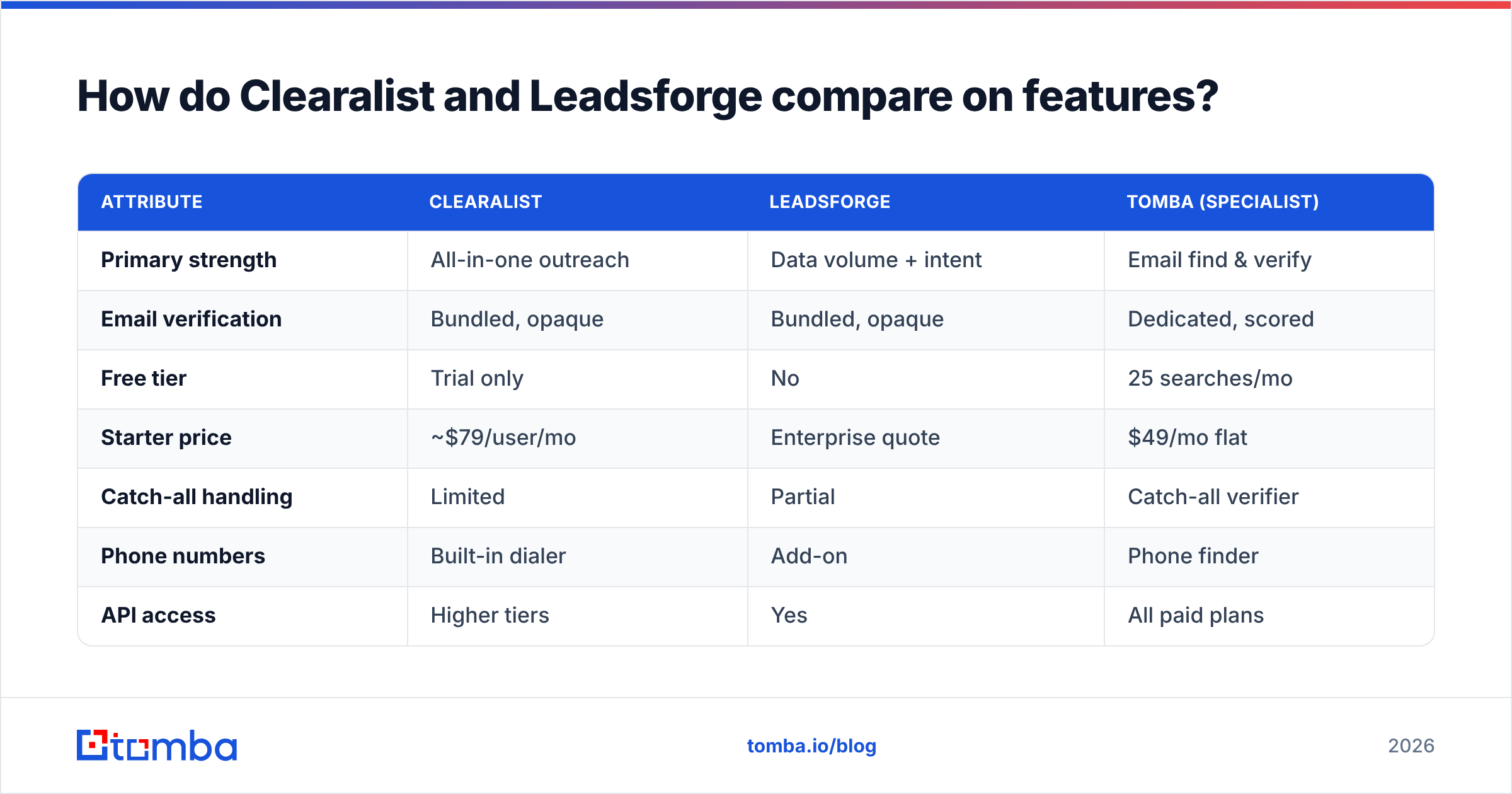
| Attribute | Clearalist | Leadsforge | Tomba (specialist) |
|---|---|---|---|
| Primary strength | All-in-one outreach | Data volume + intent | Email find & verify |
| Email verification | Bundled, opaque | Bundled, opaque | Dedicated, scored |
| Free tier | Trial only | No | 25 searches/mo |
| Starter price | ~$79/user/mo | Enterprise quote | $49/mo flat |
| Catch-all handling | Limited | Partial | Catch-all verifier |
| Phone numbers | Built-in dialer | Add-on | Phone finder |
| API access | Higher tiers | Yes | All paid plans |
| Learning curve | Moderate | Steep | Low |
A few things stand out. Both suites bundle verification but treat it as a black box — you get a "valid" flag with no confidence score and no way to separate a confirmed mailbox from a risky catch-all. That matters because a catch-all domain accepts every address at the SMTP layer, so a naive checker marks junk as deliverable. If you send to it anyway, your sender reputation pays for it.
The second pattern: pricing transparency drops as you move up-market. Clearalist publishes seat pricing; Leadsforge pushes most buyers into a custom quote, which usually means an annual commitment before you've validated the data on your own list.
Which tool has more accurate data?#
The honest answer: neither publishes a number you can trust without testing it yourself. Every vendor in this space quotes 95%+ accuracy. Almost none define the denominator.
Accuracy in B2B data decays on a clock. People change jobs, companies get acquired, and a record that was perfect in January is wrong by summer. The studies that matter aren't the vendor's marketing page — they're independent reviews on platforms like G2 and Capterra, where you can read what bounce rates real teams hit after the trial ended.
What you should actually measure on a free trial:
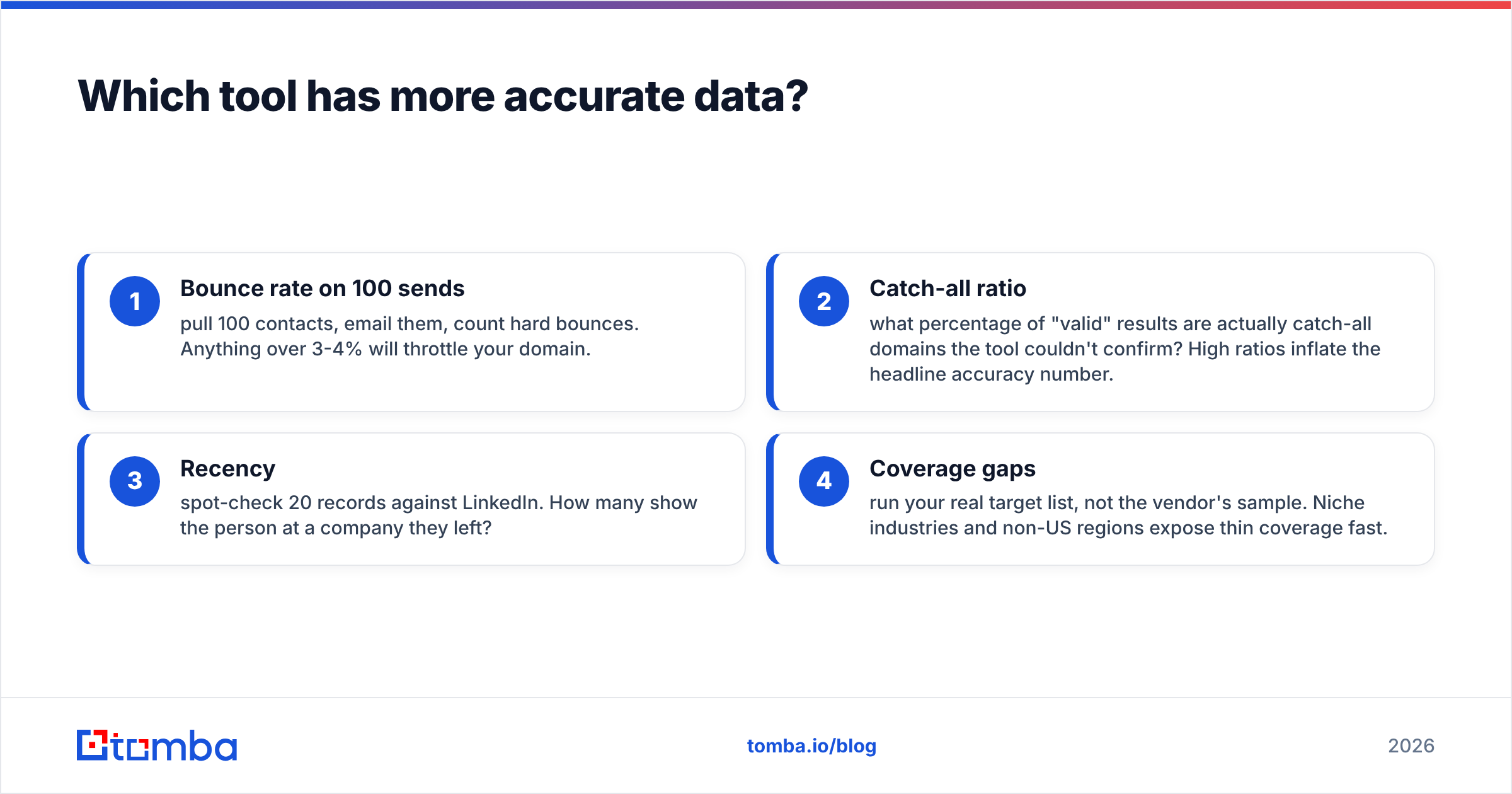
- Bounce rate on 100 sends — pull 100 contacts, email them, count hard bounces. Anything over 3-4% will throttle your domain.
- Catch-all ratio — what percentage of "valid" results are actually catch-all domains the tool couldn't confirm? High ratios inflate the headline accuracy number.
- Recency — spot-check 20 records against LinkedIn. How many show the person at a company they left?
- Coverage gaps — run your real target list, not the vendor's sample. Niche industries and non-US regions expose thin coverage fast.

This is where a specialist earns its place. A dedicated email verifier returns a real status — deliverable, risky, invalid — with the SMTP evidence behind it, instead of a binary flag. Pair that with a catch-all verifier and you stop guessing on exactly the domains that wreck deliverability. You can run Clearalist or Leadsforge for sourcing and still pipe every address through an independent verification pass before it touches your sequencer.
How much do Clearalist and Leadsforge cost?#
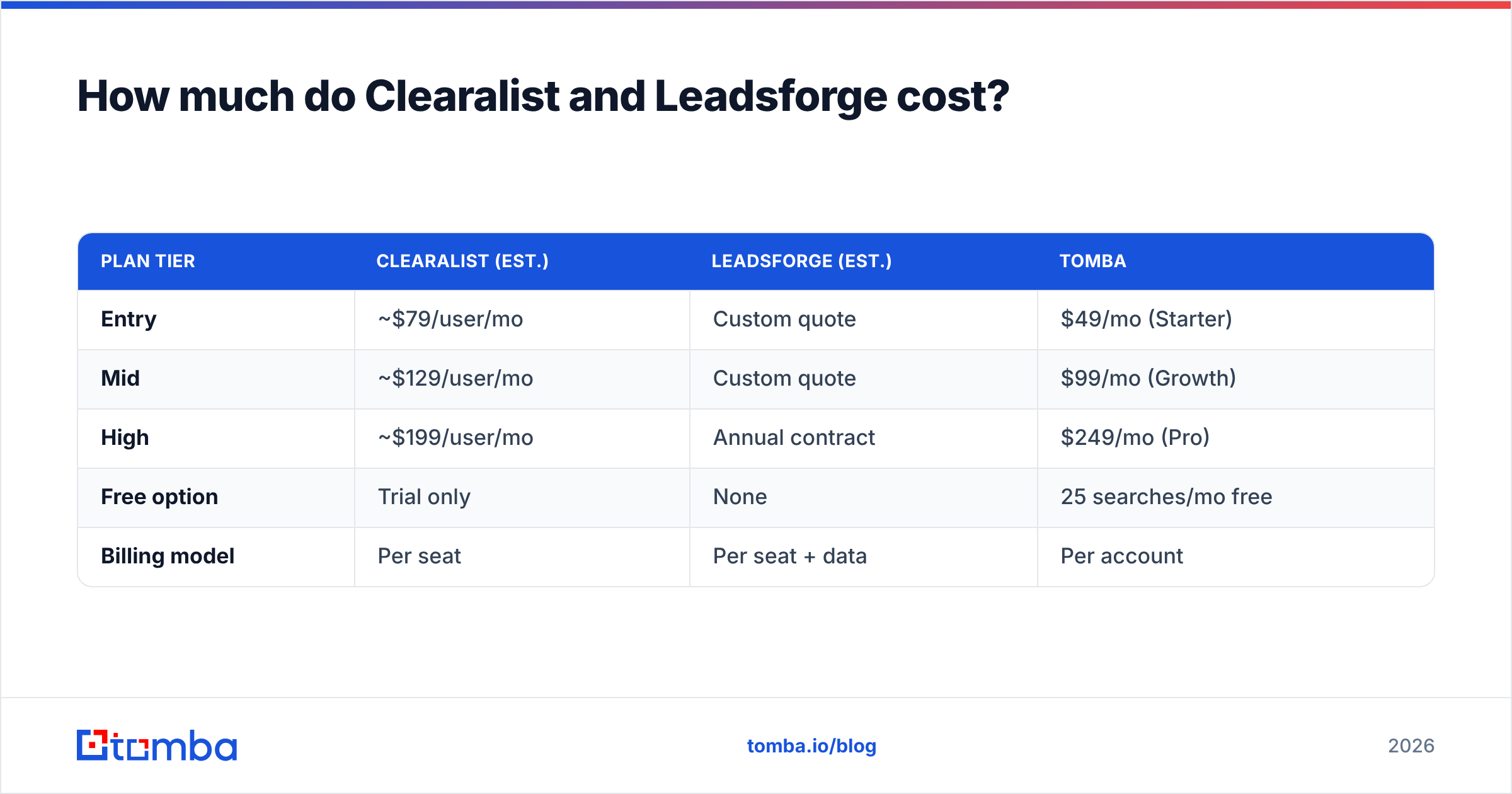
Pricing is where the "all-in-one" story gets expensive. Bundled suites charge per seat, so a five-person team multiplies the monthly rate by five whether or not all five need the dialer.
| Plan tier | Clearalist (est.) | Leadsforge (est.) | Tomba |
|---|---|---|---|
| Entry | ~$79/user/mo | Custom quote | $49/mo (Starter) |
| Mid | ~$129/user/mo | Custom quote | $99/mo (Growth) |
| High | ~$199/user/mo | Annual contract | $249/mo (Pro) |
| Free option | Trial only | None | 25 searches/mo free |
| Billing model | Per seat | Per seat + data | Per account |
Two takeaways. First, suite pricing scales with headcount, while a credit-based specialist scales with usage — if three reps share one sourcing workflow, you pay once. Second, the "custom quote" model favors the vendor; you negotiate without knowing what comparable teams pay.
Tomba's pricing is flat and public: Free (25 searches/mo), Starter at $49/mo, Growth at $99/mo, and Pro at $249/mo, with Enterprise custom. That predictability is the point — you can model cost per verified contact before you commit, which is impossible when the headline number hides a per-seat multiplier.
Is Clearalist better than Leadsforge for outbound teams?#
It depends on what breaks first in your process: your tooling sprawl or your data quality.
Choose Clearalist if your team wants one dashboard for sourcing, sequencing, and calling, and you're willing to accept opaque verification as the trade for convenience. It suits smaller teams that value a single bill over best-in-class accuracy, and the built-in dialer is genuinely useful if cold calling is core to your motion.
Choose Leadsforge if raw volume and intent signals drive your strategy — large addressable markets, enterprise accounts, and a RevOps function that can pipe data through its own enrichment and validation layer. You'll pay more and ramp slower, but the data pool is deeper.
Choose a specialist if your bottleneck is deliverability and unit economics. When the job is "find a verified email for this person at this company," a dedicated email finder with a transparent verification step and per-account pricing usually beats paying suite prices for a database you can't audit. You keep your existing sequencer and CRM and just fix the data going into them.
A practical hybrid many teams land on: use one platform for sequencing and calling, but never trust its bundled verification. Source where you like, then run every address through an independent verifier before send. It costs pennies per contact and protects the domain reputation that all your outreach depends on.
How do they handle integrations and workflow?#
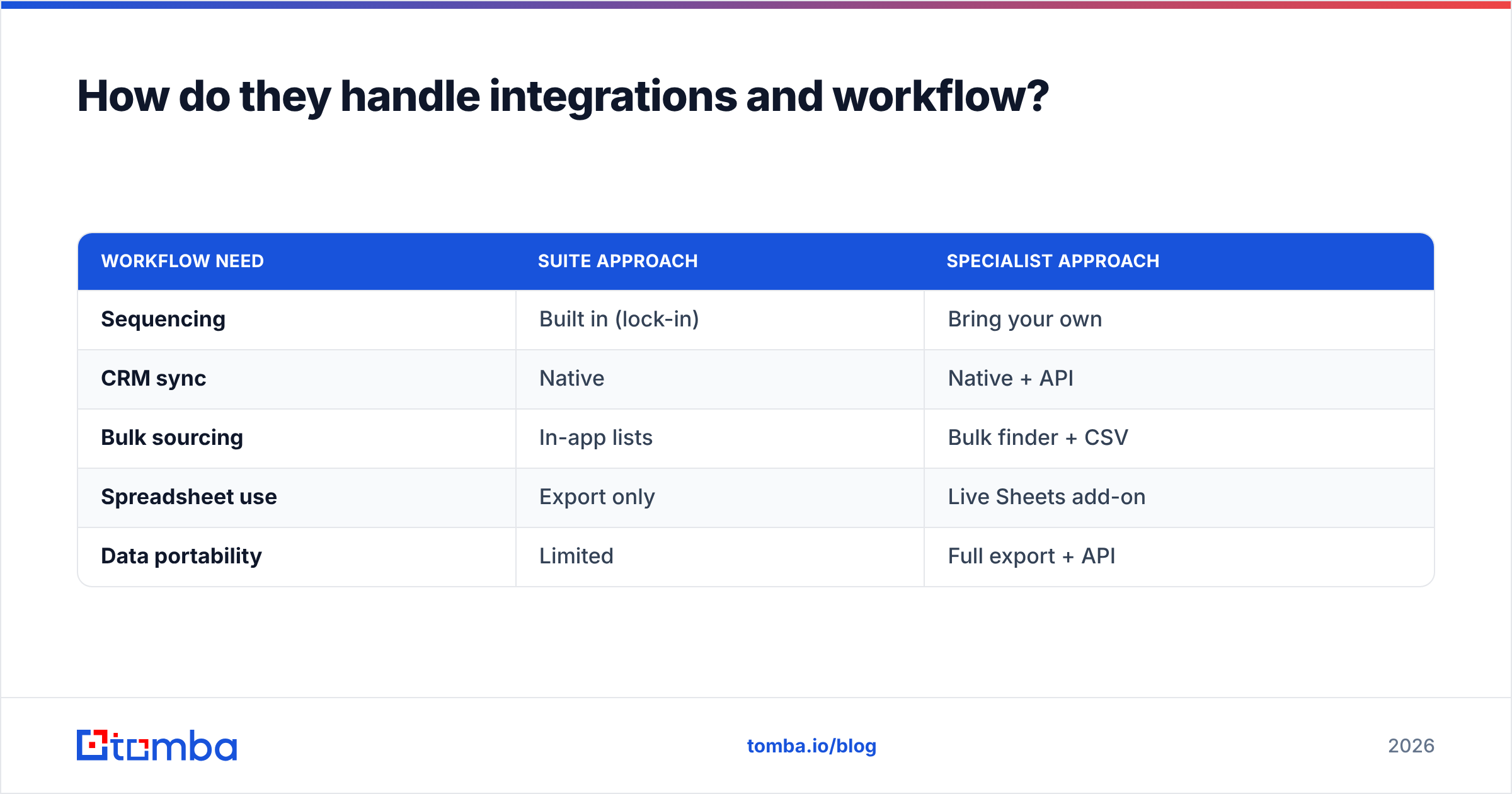
Both suites integrate with the usual CRMs — Salesforce, HubSpot, Pipedrive — and offer native sequencing, which is the main reason teams tolerate their data limitations. The lock-in is real: once your sequences live inside Clearalist or Leadsforge, switching means rebuilding workflows, not just exporting a CSV.
A specialist takes the opposite approach — it stays in your stack instead of replacing it. Tomba connects through a HubSpot integration, a Salesforce integration, Zapier, a Chrome extension, Google Sheets, and a documented email finder API. The mental model is different: the suite wants to be your outbound system; the specialist wants to feed whatever system you already run.
For most teams the second model ages better. Sequencers come and go, but verified contact data is a commodity you'll always need, and decoupling it from your sending tool means you can swap either side without a migration.
| Workflow need | Suite approach | Specialist approach |
|---|---|---|
| Sequencing | Built in (lock-in) | Bring your own |
| CRM sync | Native | Native + API |
| Bulk sourcing | In-app lists | Bulk finder + CSV |
| Spreadsheet use | Export only | Live Sheets add-on |
| Data portability | Limited | Full export + API |
What about the email finder comparison?#
If the email-finding piece is what you actually care about — and for most outbound teams it is — it helps to see how dedicated finders line up on accuracy and coverage rather than feature bundles.

The pattern across independent testing is consistent: tools built specifically to find and verify emails tend to return cleaner results than the email modules bundled inside larger suites, because verification is their whole job, not a checkbox feature. A domain search that returns every known address at a company, scored by confidence, gives you more usable contacts than a suite list padded with unverified catch-alls.
That's not an argument against Clearalist or Leadsforge wholesale — it's an argument for separating the find job from the sequence job, and using the best tool for each.
Frequently asked questions#
Is Clearalist or Leadsforge cheaper? Clearalist publishes lower entry pricing, but both bill per seat, so the real cost depends on team size. Leadsforge typically requires an annual enterprise commitment. A per-account specialist like Tomba ($49/mo Starter) is usually cheaper for teams that share one sourcing workflow.
Which has better data accuracy? Neither publishes an auditable figure. Run a 100-contact bounce test on each free trial against your own target list — that's the only number that matters. Independent verification through a dedicated email verifier catches the risky catch-alls both suites tend to mark as valid.
Can I use a specialist alongside these tools? Yes, and many teams do. Keep your sequencer, but route every sourced address through an independent verifier before sending to protect your email deliverability.
Do they offer free trials? Clearalist offers a time-limited trial; Leadsforge generally requires a sales call. Tomba offers an ongoing free tier of 25 searches per month with no card required.
The bottom line#
Clearalist wins on convenience for small teams that want one dashboard; Leadsforge wins on raw data depth for enterprises with their own validation layer. But both share the same blind spot — verification you can't see into and per-seat pricing that punishes growth.
If your real problem is finding verified contacts without torching your sender reputation or your budget, start with the job, not the suite. The Tomba Email Finder finds professional emails by name, domain, or company and verifies every one with a transparent confidence score — on a flat, predictable plan that starts free. Run it against your toughest target list for an afternoon, compare the bounce rate to whatever your current suite gives you, and let the numbers pick the winner.
// get started
Find, verify and enrich your first contacts today
Start on the free plan with 25 searches a month, then scale when your team is ready.
Free plan · No credit card required · GDPR & CCPA
// about the author